 Problems? See this thread at archive.org.
Im confused, wich problem the laptop have atm only the wifi issue or have another one, and someone have buyed it from amazon and got problems with the laptop...
Regards
-
1. wifi performance
2. cpu/gpu throttling
3. some don't like the display, unclear whether there are defective displays or just people unhappy with the quality vs other displays on the market -
Well folks, I am having the worst luck. I had the palm rest assembly (including touchpad) replaced a couple of days ago. This was the second time the guy came out. First time was the wireless card. Anyway, my computer is doing something new now. If I barely touch it or move it, it will shut off. Like remove the battery kind of shut off. Now it won't come on at all. This happened once a few hours after the tech serviced it last time, but didn't realize what it did, until it happened 5 times today. I'm not hitting a button or the touchpad. So now I'm waiting for the tech to come out a third time to put the original wireless card in, then I have to send it to the Dell Depot for servicing.
For those of you familiar with the inside of this machine, tell me if the unit shipped with screws here. I think the service guy left them out:
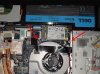
One is for the top of the fan. The second is part of the mother board. I can't tell what else is wrong or what is causing the problem though. I think I'm cursed! -
looks like you got a bad service guy...and it also looks like you have the grounds for a replacement system. But make sure they BUILD you a new one and not ship you one of the Ships Next Day systems. The newly built ones don't have the wifi problem according to Dell -
Those missing screws are the 2 Phillips head screws that go in with the bottom cover
-
Ever since I updated the bios to A09 my fan constantly runs even when no programs are running.
I call Dell support and they wanted to replace the mother board and fan assembly but there were no parts available. So they are sending a replacement computer, 7 to 10 days. Unfortunately it is too late to get my money back so I am stuck with it.
I was so undecided after my last XPS 15 (L502) had so many problems and I said I would never buy another Dell. Unfortunately I didn't listen to myself and have already had issues with my new XPS 15.
I should have bought a Macbook Pro, I would have paid a lot but a least it would have worked.
Jim -
Have you tried flashing A09 again? im asking because I havent had any issues with my fan running a lot with it
-
you may have lucked out, newly built systems should have the wifi fixed according to Dell... I have gotten 5 reps now to tell me that..
-
+1 one that...
Sorry to say, but Macs are not perfect either. However their QA is a bit better than DELL IMHO. -
yeah my mobo is on back order as well, so im getting a replacement xps 15. hope wifi fixed, and touchpad and battery :S
-
Lionel should be checking in tomorrow, he said he has no major updates though.
-
Minor updates are cool just show your face so I know dell hasn't forgotten about us
-
If he hasn't updates how is possible that Dell reps are saying that they have fixed the wifi issue?

Inviato dal mio GT-I9100 con Tapatalk 2 -
Hehe, I just figured that out.
-
the organization is apparently very bad at communicating...Bill himself said this
-
Soooo... Just to update.. I received my three replacement Dell XPS 15 L521X laptop's today. All 3 have no problems with WiFi, no screen grids, no touch pad problems. The only thing that I noticed is that during a gaming test, the CPU was throttling down to 1.2.ghz, CPU was only reaching 85c and GPU was reaching 65c. Games like Guild Wars 2 run perfectly fine as far as I've seen so far for a 3 hour session. I did notice they all came shipped with A09 Bios.
Spec's from all 3:
i7 - 3612QM Processors
8gb 1600Mhz
nVidia GeForce GT 640M 2gb GDDR5
750gb 7200rpm HDD's + 32gb SSD
Intel Centrino Advanced-N 6235 WiFi Adapters -
You buyed the pc from del? Or from amazon or another reseller?
-
Flash the Bios again and it will be OK. I had the same problem, once re-flashed it, everything is fine now.
When the engineer came to replace the motherboard, I told him do not replace it, its fine now. -
Great news !
Do you think that all new units will be OK in all countries ?
Because I send back mine to Dell France 2 weeks ago, in France they wern't aware at all of the problem...
I don't want order back and get an old stock unit with problem, should i wait more longer to be sure ? -
Can you guys download new drivers that Dell posted recently?
-
My three Dell XPS 15 L502X laptops I purchased from dell.com website. 6 / 7 months later I got tired of the problems I had with these laptops, so I sent multiple departments around to Dell regarding the problems and reference links around the net with the same issues I was experiencing from their product. A manager from their escalations team contacted me directly about my issues with the L502X laptops. He was willing at first to give me a 100% refund, but I turned that down and asked if he could come back to me with laptop replacements as an option. Two hours later he got back to me with 3 Dell quotes for 3 brand new Dell 15 L521X laptops (I mentioned the spec's in my previous post), Dell directly built these, and shipped them to me.
So short answer, yes, Dell.com is where my laptops originated from and not from amazon or some other reseller or Dell supplier.
The sad thing is, I have seen people on this forum here that have purchased a Dell L521X laptop, and they are still waiting for their order to even make it to the production line. At first after I emailed back accepting the replacement order from Dell, within 20 minutes all 3 laptops had the status of order received in the order status page. An hour later, they were already set as "work in progress". The estimated delivery date was set for the 4th of Oct. However during the build process with Dell, the status updated to ship from factory and the estimated time for delivery changed to 30th of Sept. However, I received them today which is the 28th of Sept
I also checked the drivers and they are all up to date as are the drivers for this laptop on the Dell site. The only thing I updated was my nVidia drivers to the latest 306 ones. -
Luck you!
Have you tested the wifi at different locations?
My xps was taking 1 hour to throttle for the first time... Then after a reboot It would start after 5 minutes on diablo3.
Sent from my HTC One X using Tapatalk 2 -
Dell France is aware with this issue. I spoke with a Dell rep few days ago and he offered me the USB dongle in ordre to wait for the official fix.
-
Yes, I previously had my laptops at my work location and was picking it up fine. Full bars over 50ft away through one very large wall in the office.
At home here, we normally sit between 5 to 15ft from our router, but I have taken it to our bedrooms over 40ft away through two walls and still had great reception.
Sitting here before I clicked submit, I disconnected my wifi and let it see what's around. I can pick up 5 other AP's from neighbors around me. One is fairy close. I can also pick up the shop's wifi over 70ft away from me through 3 walls of mine and of course the exterior wall from the shop over the car park. -
definitely sounds like it was fixed!
Now we need to see what was changed so we can request it for those who already own one -
Don't go by how many bars you have because with mine I can show 5 bars but the connection is terrible. check it on speedtest.net or something like that
-
i think he'll be fine because those who have the wifi problem also have a problem picking up access points, the fact that he can see so many indicate that he should be fine, though a speedtest wouldn't hurt
-
Why you want the fix?
You had always said that you haven't any issues...
Inviato dal mio GT-I9100 con Tapatalk 2 -
i don't but people still do and it's not fair to them. It also helps me feel better knowing Dell owns up to their problems.
-
Ok thanks for your feedback guys from france, glad the situation changed for you. 2 3 weeks ago the support wasnt aware telling me that there is no known problem, the idiot tech who came to myhouse to change wificard didnt realy confirmed the problem he was lost trying to act like there is no major prob, when i told them about problem with other people in the world and the usb dongle they told me thats all fake forum rumors lol ...
-
I agree with gixer2000. The bars are no indication to this particular WiFi problem. I get full or nearly full signal strength anywhere in my house, but if I leave the room with the router the download speed capability drops dramatically. Like, one room away drops to 0.2 Mbps with full bars.
-
Sorry, let me clarify, besides looking at bars, I did check, sitting within a 15ft range from the router I was getting steady Wireless-N speed's around 250mbps. I switched my router back to a 20mhz range, tested multiple channels within my house, also tested on going back to a typical wireless-G network. Even connected as 'G', does not matter where I go around the house it's constantly 54mbps.
speedtest.net is not really a viable connection testing method since that is internet. So I did some typical wifi tests.. one L521X setup in the dining room (approx 20ft from router, 1 wall), this L521X I am on in the far back room of the house (approx 40ft away), both laptops on a G network had a solid 54mbps to the router.
Since I build custom firmware for routers and help out, such as the classic "Tomato" firmware for routers, I pulled out the following routers and tested:
Linksys E1000
Linksys WRT54G v2 & v6
Netgear WNR2000
Netgear N600
Linksys WAG6xx (can't remember the exact model from the top of my head)
D-Link DIR 300
And finally a.. Belkin N1 Wireless..
Doing a simple 1gb file transfer took no time at all over a G network configuration. Some of the routers above let me stay on the 2.4ghz range but change from 20mhz to a 40mhz wide band where I did other tests using a wireless N network configuration.
End result:
My 3x L521X laptops are perfectly fine
Just the fact I can litrally get a stable solid connection to my friends store, past a small car park is impressive enough to say the least
-
Hello Everyone,
I have been following this thread basically from the start. I would have been in a mess with you guys had i not stumbled upon this forum..so thanks ha. Anyways i have a few questions for you guys.
I've been in the market for a premium laptop and no other build catches my eye better than the l521x that being said time isn't really a factor for me now so i was able to wait and creep these forums and held off buying..waiting for updates because i was teetering with this and the rmbp (too costly/insufficient space)
So to my point, i would consider myself an above average user but far from understanding everything about pc's. so when i started to see these complaints and the fact that there is a division among people who notice/unnoticed these problems i started think where i fell into the category. would you still recommend this machine?
I would be using this mainly because i want to start using blender then move to more advanced programs in future, i am not to say a die hard gamer..i would prefer my fps games on consoles but games such as sc2, diablo3 and emulators are what i would be playing soo am i going to throttle 2 minutes into any game? how bad is the throttling? would an average user even notice? ive never had the pleasure of having an hd screen so grid issues i probably wouldn't even notice and the wifi seems to be factory cut now apparently..
I just need help pulling the trigger on a machine and i like the build on this laptop better than any other windows machine, im an average user who wants to future proof with a powerful machine..any help thoughts? thanks! -
It seems that the wifi is fixed on new orders. Make sure you custimize a build and don't pick the "Ships Next Day" machines to make sure you receive a new build.
Your gaming habits are like mine and you should not experience throttling. I've played D3 for hours and even some older adventure games just fine. -
Good that it works for you, but did you compare it to another computer?
Speed test is a good enough tester for the wifi, after all internet speed is what most people look for. -
Thanks for the quick reply..i just wanted to make sure i'm putting my cash into a good buy, i have always used dell desktops and never had problems with them but i see all over the internet of how people hate dell laptops but i feel like im just sifting through fan boy bs. -
I checked dell webpage and the customization is not for hardware, its just for optionals or software. Is there anyway to know if i get a new system or a old one?, and its the same to buy from amazon or its better to buy it from dell, cause i prefer amazon, they sent his items to P.O.Box and dell dont.
Regards -
If you have been following this thread from the start then I think you have all the infos to do the right choice.
Regarding Game scenario I suggest to read some serious reviews like these:
AnandTech - Dell XPS 15 L521X: A Detailed First Look
Review Dell XPS 15 (L521X) Notebook - Notebookcheck.net Reviews -
In fact there isn't any hardware customization, theoretically if you buy a new one, it must be new, but for a customer I think is practically impossible to know production date.
In addition, there is no certainty that there is a fix, just yesterday an user of this forum has received a new L521X with the WiFi issue. -
Amazon has the old systems with the bad wifi. I know because i got one from them originally
if you go to "customize" on Dells site, then you are going to get a new one even though you can only configure add ons lol. Just don't click on one that says "Ships Next Business Day".. -
that guy picked a "Ships Next Business Day" system. Those are old. New production units are fixed according to Dell.
-
At least we know that the ones that work its cause a new hardware, or a new software/ bios that has not been released on dell website?
-
Not, because some user like krayziehustler has reported no wifi issue in his system from the start and his laptop has more than 2 months of life.
Even before someone (very very few) hasn't reporting wifi issue. -
No official statement by Dell, only Dell reps say that and we know how they are reliable...
-
Bill said the same thing. He said he had a system for an exec and it had the wifi problem. Then they brought in another system and it worked fine in a spot that the other one did not have any signal
Yes but I have had some time these past few days and I have chatted with more than 10 reps and ALL but 1 admitted the issue and said that the fix was already in place. I have copied some of my chats here on this forum.
I found that Sales people are more informed than tech support and XPS support.
I bought another XPS 15 just today to give as a gift and will update once it arrives. -
Ok, but this means that if someone today receives a new system without wifi issue does not imply that there is a fix in production or that this fix exists.
If you go back in this thread Dell reps have always said that wifi issue was fixed even 1 month ago...
Dell reps are totally unreliable, they want only sell a machine and they don't know almost nothing about Dell machines. -
True, i just wanted up to date advice, it just seemed like to me that there is an amount of people that have these problems vs people that don't, i wasn't sure if throttling occured mostly in people that run maxed out settings (i understand the system should of course run at those settings anyways) but with chassis as they are now these are not the only systems affected by heat. like i said i don't intend to always push my machine to the max as opposed to a "power user"
I think i have read every review possible for this machine i just wanted some real people advice. -
i believe they found what the variable was and are applying it to new builds
i have been following this closely and last time i did this excerise a month ago, i got different responses. They would say something like it has been fixed with driver update and what not.
Now without me even getting specific, 9 out of 10 that I tried knew exactly what it was before i mentioned and said "hardware" fix has been implemented at the factory. Bill always said that the fix at the factory would come first.
Again i am speaking from MY experience with Dell reps and what they told me time after time. Lets see as more people start buying and coming here. -
Worked fine when copying over WiFi to my desktop server. Also worked fine when copying to my media pc in my ent unit.
-
FWIW, I think that if you complete the purchase via phone you can talk them into changing some of the hardware build (hdd, memory) which would, I *believe*, force a custom build on the line and not one from stock (they are not going to pop a box open to change an existing system, that just doesn't make sense).
XPS 15 (L521X) Owner's Lounge
Discussion in 'Dell XPS and Studio XPS' started by Muddy, Jun 28, 2012.


![[-Mac-]](images/avatars/[-Mac-])


