 Problems? See this thread at archive.org.
i originally did the upgrade to keep all the dell stuff, but Dell lets you re download cyberlink and you can get the rest on Dell.
Do a clean install and install Windows 8 under UEFI to get better performance...Mines boots in 8 seconds with Samsung 830 and UEFI install
-
-
Clean install onto the SSD, keeping the (probably now redundant) Intel RST partition for now. The original Win 7 install was left on the HDD and I shrank that partition and made myself a new "Data" partition after the Win 7 partition. Now I have dual boot into Win 8 from SSD or Win 7 from the HDD, but at the moment no SSD cache. I really need to consider the optimum setup overall to maximise the benefit of the SSD. At the moment I'm struggling to put it all to good use. I do not need a 128GB system/boot drive.
Holy crap!. I didn't go for UEFI because of all the FUD about BIOS releases, but my boot time with Win 8 from the SSD (how are you measuring?) is nearer 25 seconds, give or take. Maybe I should give A11 a go. -
mind you i have a Samsung 830 SSD not the mSATA that came with it, UEFI boot, everything Intel disabled (no need for cache when using SSD) and 8 seconds from pressing the power button I am at the desktop.
-
This week has appeared new and incomprehensible configurations (all with Win8) for L521X on Dell Spain website.
These are:
1.249€ config
i5-3210M
4GB SDRAM DDR3
500GB 7200rpm + SSD mSATA 32GB
Geforce GT 630M 1GB
Dell Wireless 1901 Bluetooth v4.0
1.349€ config
i5-3210M
8GB SDRAM DDR3
1TB 5400rpm + SSD mSATA 32GB
Geforce GT 640M 2GB
Dell Wireless 1901 Bluetooth v4.0
1.499€ config:
i7-3632QM
4GB SDRAM DD3
1TB 5400rpm + SSD mSATA 32GB
Geforce GT 630M 1GB
Dell Wireless 1901 Bluetooth v4.0
So, we have i7 with 4GB and GT630M, and i5 with 8GB and GT640M?
Where is the powerful config with i7, 8GB SDRAM and Geforce GT 640M 2GB?
I'm very confused.. -
I'm using the msata, which is a Samsung 830 128GB, but in a smaller format. I don't know how much difference in performance there should be. It's a guess, but I feel my machine is spending at least five seconds in a BIOS/POST phase before Windows even begins to launch. No way I can see a cold boot occurring in anywhere near 8 seconds. I feel like I'm still booting from the HDD.
Unfortunately Dell's website has been refusing to serve the driver (and BIOS) updates page all morning, for the last five hours. It's not the experience I was hoping for from a "premium" machine. I have other niggles too - screen quality, shocking keyboard backlight bleed and touchpad contrariness. All in all this is not the experience I paid almost £1200 for. I'm very close to sending the whole thing back. It's taking too much of my time and the support and the shenanigans about drivers and BIOS is a mess. -
Search this thread for the FTP drivers site. That was working this morning.
Sent from my brain using neurons fueled by glucose -
@Romu,
Thank you for the information and I am glad to know that there is a workaround to resolve the issue by using an external antenna.
I will be glad to forward this information to our support team and will get back with the feedback ASAP.
Dell-Niranjan -
Niranjan,
Just to be clear, I hope you haven't understood from my message this is a valid wordaround, did you?
It was just to make some testing in order to isolate the root cause of the crappy Wifi. -
Any other problems besides WiFi?
-
lmao.. Introducing the new new xps 15.. Now with expandable antenna! Never will you be out of range again...

-
Guys, let's not be too hard on the reps here on NBR. First, the NBR rules state we should be polite. Second, look at the other notebook sections. Do you see reps from those manufacturers even posting?
Sent from my XT910 using Tapatalk 2 -
Disable the Realtek sd card reader in device manager to get your 10 seconds back.
-
How did you do a clean install? Boot CD + the cd with the drivers? Or did you get the drivers from someplace else?
I'm trying to figure out how to setup a clean install of windows 7 onto a 830 SSD. I have the driver disc that Dell provided with the computer but I'm not sure if I'm supposed to use that. I remember reading here someone said there's an order to install that drivers in. Also not sure what to do with the 32gb msata after I install the ssd -
WiFi UPDATE
Hi guys,
Recently, Dell replaced the screen on my XPS 15. I did a test on my home network against my iPhone 4 and using my XPS M1330 speeds as control.
This test took place up a floor and about 26ft diagonal from place of router.
Dell XPS M1330: 21ish mbps (older data)
Dell XPS 15: Download 20.73mbps, peaked at 22mbps; upload 3.64 mbps
Apple iPhone 4: Download 10.01 mbps, upload 3.73mbps
My recommendation for those still struggling with WiFi is this: Have your screen replaced, and make sure you have all the drivers/BIOS software updated.
My current system hardware configuration:
Intel Centrino 6230 (Changed by Dell, this had no effect of making WiFi better)
Dell Screen P/N 6985X AU Optronics -
What type of screen problems were you having?
-
Can't see, to register for My dell software. The system tag scanner isn't popping up. Any suggestions? Is it just me or has anyone else been able to register their system to dell downloads?
-
None. Dell replaced the screen only to try and fix the WiFi issue, and it worked!
-
FYI: Windows 8 boots much faster and is faster overall on this laptop and that is what I am using
I got all the drivers off Dell's site first. Then i got the ISO and made a bootable USB, set BIOS to UEFI and the SATA to AHCI and did the install. Then i installed the drivers from dell (but only those that i wanted like the Dell Touchpad drivers)
mine doesn't have a 32gb cache but with an SSD boot driver you don't really benefit from the added overhead of chaching. I would turn off all Intel Rapid stuff and format the 32gb drive as a secondary drive for photos/video. -
How do you do a lightroom stress test?
-
Ok so purolator just droped off my laptop...I sent it on monday 22/10/2012 and they sent out to me on wednesday 24/10/2012 .... um . In any case, i opened up the beat up box to see my old HDD and the Depot letter saying they did an msr check, new hdd and reinstall of os.. so how does that fix the grids and touchpad issues.
I even wrote a nice letter and printed out picture and etc and placed it with the laptop.. seriously wth! I am also getting a meesage from rst upon boot up as well.
This is the letter i wrote them:
Good day to whomever is reading this at the depot, this letter will briefly explain to you in detail what this laptop's current problems are.
To start off, there is the issue of the grids being visible on the display.. And before you say its normal, well let me assure you that the display has been replaced by an onsite tech and this newer one is far more worse than the previous, by 78% . So i ask of you to please take a look at the display and fix it for it gives me headaches and i cannot stand seeing the grid while watching movies.
The grids are most visible when bright and open colors are on the screen, the following images are one of the desktop and one of a youtube video, and yes, that is how i seem the display, full of grids.
Secondly, there is a really big issue with the touchpad and screen conflict, when i close my lid and leave it alone for a few hours or so, i come back to see the touchpad has went berserks and moved things around, deleted things, opened things and caused havoc. The touchpad sensitivity is at its lowest acceptable for my use. There is some kind of conflict going on. below is a picture of paint that i left open , with a red image and blue pen selected, i closed the display and came back to see a whole bunch of programs open and windows telling me it has low memory. you can see from the first image the red image and the blue/grey dots the touchpad/screen made, going all the down to the minimize all button on the right corner and from there you can see from the second image the havoc is caused...This is a serious problem for it has caused the deletion of my files and closing of other documents and etc.
The third issue, is if i am to guess, normal for this "powerful" laptop, it seems that when something is using both the cpu/gpu, the laptop seems to throttle down the cpu and gpu, such things are games, I am not able to play any descent computer games without the laptop being throttled down and the game jittering even though its running on medium specs.
If you could kindly solve these issues, i would be most grateful.
I thank you for your help and time.
Elvis
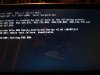
Also: no, no problems have been solved with this new HDD.. just closed my lid and not even 15m later, i have a bunch of ie's open. screen still shows highly visible grids. wifi still really really bad... -
Hi PithyChats,
thanks for sharing all these test results.
As it seems that you know your networking stuff, may I ask you this:
I have the same laptop, bought it recently after Dell salespersons assured me that WiFi issue has been fixed. Anyway, obviously it hasn't.
So, whenever I move away from my router, WiFi/internet performance drops to almost 0mpbs. In the same exact spot where my other laptop/smartphone get a 8mpbs speed.
The crazy thing is that even when I plug a usb WiFi dongle (Realtek) into the XPS, that doesn't work either!! The same dongle in another laptop in the same spot, works flawlessly. But in the XPS I get the same non-existent WiFi performance!! Something that I find quite surprising, as I use the same dongle+drivers as in the other laptop. The dongle works fine with the XPS when I'm next to the router, but not when away.
So, my question is: Have you done any similar test? What were the rersults? Any idea why even a usb WiFi doesn't work?
I'm really baffled by this behaviour.... -
Hey Guys I just took the plunge.
Call me crazy but i got a outlet model. It was so cheap....
I7 -512SSD 16GB Ram For $1350 out the door.
Granted its used/referb.
Thoughts, If I buy brand new and the wifi is bad then i would have to get a referb when they replace it. -
Hey Go into bios and turn off network Boot to get rid of PXE
-
hi
updated bios
changed bios to UEFI
and sata to AHCI
installed windows 8 on the 32gb ssd part of the msata drive but boot time seems to be worse than under windows 7 (around 25 seconds)
have i done something wrong? -
Really?!? Ok, polite is normally best policy, even when they have hung up on you every time you call support, but even if you forget that little piece. I truly don't care about the other companies because I spent premium money to purchase a premium laptop from Dell that the company knew was flawed when they sold it. So I hear your argument, it just doesn't hold water for me based on my experiences and many of the other people who also purchased this machine.
I continue to be polite and Dell continues to string me along and not provide the QUALITY service a premium customer deserves. -
Being rude will not get you anywhere. You should know this by now.
Sent from my MB886 using Tapatalk 2 -
Ha, is that a dell accessory
-
Disable Realtek sd card reader in device manager.
-
while the resoltuion center gets back to me, i will try installing windows 8 on this "new" hdd and just swap it with my prior hdd and return the new one. Just want to try windows 8 again. But im having so much troublw with it, the depot did not instal anything, no software, no widi, no dell, no recovery partition no utility partition nothing! how can i even reinstall my system. and the only name id i am able to get for the HDD is DWW-4XC11C6W390
Um my touchpad click wont do anything. clicking on the left and right clicks work, but not anywhere else on the touchpad, i cannot find an option to turn this on, or this another of the depo's fault? -
I have a bunch of Wifi dongles including cisco and buffalo, not sure of the chipset at this time. (I think the buffalo is Atheros, but I have to check). I have not had a chance, but when I do, I will test a few and report back. Are you sure you disabled the onboard wifi? Having two laptops right next to each other could cause some interference. Also make sure you delete all old drivers.
-
Honestly have not gotten to it yet. Any requests? (IE throttling, screen grid, thermals etc?)
I have a pretty complete test suite at the office, with virtually all major OSes available to me, so I am happy to indulge specific requests as time allows. I do have 3 systems that I can test, so it does give a better sense of what are design versus random problems. -
can anyone help me out with the touchpad "anywhere" clicks not doing anything, is there an option somewhere? ive tried updating the drivers, uninstalling and reinstalling but nothing. only the left and right click seem to be working. could the depot have made another error when putting my laptop back together?
-
Just got mine today. It has the Intel Centrino 6235 WiFi card. The internet slowness did not present itself until i closed the lid and let the laptop charge for a while. Then web pages started to load very slowly. I think I fixed the issue....I set my wireless router to Wireless N 5 Megahertz. Since then the wireless slowness has gone away!
http://s11.postimage.org/nsqoh5ls3/Capture.png -
probably a faulty touchpad? Did you check your tap to click settings? search up mouse in windows start and change the settings for dell touchpad
-
Still loads of Win 8 drivers listed but with the files missing and not available to download. FTP site does not have them either. Of 16 files listed for my service tag only seven have downloaded successfully and nine are missing.

and the list continues past the bottom of the screen.
Also, having installed a UEFI/AHCI copy of Win 8 to my mSATA I now find that the LCD backlight control is non functional. The screen graphic moves up and down but the backlight does not change. Is that likely to be a driver problem, or BIOS, or something else? It had been working fine before going the UEFI route. -
no not it. tried everything
I tried installing my "old" HDD but the system kept telling me no boot device selected and nothing i do software wise fixes the toucpad. soooo frustrated! -
Must be Dell's "fix" for the palm rejection not working anymore... I've actually had to turn off my tap to click because I can't type more than 3-4 words without it clicking off somewhere else.
-
Mine did that when I had to reinstall Win7. Turn the rapid start off, that fixed my problem. You can turn it back on once you have re-installed all of the drivers. -
Is there a way to install windows 8 in the same way windows 7 was on the computer from the factory.
I.e. one drive, intel rapid storage
My current setup seems slower with the os on the msata, and all my other files on the hdd.
When I install the os on the hdd and install IRS windows 8 won't load and just loops -
Hello there.
FWIW Just registered to give my experience with the WiFi problems. I bought the machine before spotting this thread a few weeks ago
The wifi was pretty terrible. had to go through motions with dell support. updated all the drivers, firmwares et al had them remote assist and tweak settings. no difference.
They had an engineer come out, replaced the Intel wireless card, no difference, replaced the screen (i.e antenna) no difference.
They tried to convince me it was drivers again, but after I didn't give in they finally admitted it was a problem with the model. in the end I got them to offer (UK)
a - Full Refund
b - Free WiFi dongle.
I took option a. -
I'm pretty sure that I disabled the onboard WiFi; did this through network centre->manage adapters->disable Intel Centrino...
Though I didn't remove the device from the device manager or remove its drivers; I just disabled it. The strange thing is that the dongle works fine when close to the router, but not when moving away from it!
As for interference, I did test the two laptops separately, not one next to the other. I will try again by totally "removing" the onboard WiFi and report back. -
I just swapped out my 750GB HDD for a new Samsung 830 SSD. All works fine, re-installed Windows and most the drivers, however, the backlight on the keyboard appears to have stopped working. I also noticed that in the Bios, the status for the kboard now reads 'non backlite' - Any ideas? Bios version is A09 incidentlly..
-
What is your routers WiFi settings? Is it set to 2.4 Megahertz? Try switching the wireless settings to N only 5 Megahertz. I did this and it solved my WiFi problems..... worth a try.
-
Weird since the guy that tested 3 xps15s a few days ago said they all worked better on 2.5ghz
-
sorry but i havent followed this thread this days, if i buy the laptop today, should i still get the wifi and screen problem?. or should i still wait ?
-
Wait there's tons of issues
-
Thanks i will keep waiting, while i go to church to hope they fix all this machine problems.
-
I am not sure what he did.....BUT this worked for me. I switched my wireless settings on my router to n only 5 Megahertz and my WiFi issue went away.
-
you are forgetting that pblic wifi is on 2.5.. ie tims,mcdo, etc
-
I thought I'd look more closely into the WiFi issue, not that I am actually complaining about the performance of my machine, but I found the assertion here interesting....
How do I test the speed of my home network? - Network-General-Discussions - General-Networking
that you should only expect to achieve maybe 1/3 of the transfer rate of the advertised network connection speed even in good/ideal conditions. Now I have a Fon 2.0n router, which has a setting to operate in mixed g/n mode, which is how I usually have it set due to the needs of legacy hardware. In this mixed mode my L521X was only connecting at 54Mbps and achieving throughput in the region of 20Mbps from the next room with a dividing wall. That seems quite fair enough.
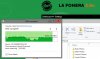
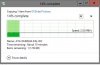
Today I briefly switched the router to n mode only and transferred a DVD ISO image. This time the file was flying along at up to 8MBps, or 64Mbps while situated a few feet from the router and in the same room, which is much more like it. However, as I roamed about the house I did see speed fluctuate, dropping as low as 1MBps (8Mbps) but averaging around 2.5MBps (20Mbps) as I wandered about. So, while I don't discont the possibility of WiFi problems I think people need to pay close attention to their setup and environment. It might be that they are getting exactly the speed they should expect. And if there are 802.11b devices around, or even just the router set to allow b speeds, be extra careful.
Here are my WiFi file transfer speeds achieved firstly with the router set to n only and then with the router set to mixed g/n mode....
XPS 15 (L521X) Owner's Lounge
Discussion in 'Dell XPS and Studio XPS' started by Muddy, Jun 28, 2012.


