 Problems? See this thread at archive.org.
hi,
when i install windows on the hdd (leaving the msata ssd blank) and then following those instruvctions (ie change bios settings), windows wont load.
is there something im doing wrong in the setup or initial installation of windows?
-
You need to install windows with the BIOS set for Intel Rapid Start (or whatever it's called, really RAID underneath) - not AHCI - as that will change fundamental hardware support configuration for windows.
It may be possible to repair your windows install after the fact, by booting with the windows-setup CD/DVD and using the repair option, but I haven't tried it lately (or at all with Win 7) so I can't say for sure. -
Hi All,
I have the Win 7 64 bit 521x with weak wifi (at longer distances) and Bios A04. My slot drive also ejects when plugging in a USB device and when booting up. Screen is fine. No throtteling issues as far as I know (I don't play games).
Is there any advantage to my upgrading the bios to A12?
Thanks in advance for your advice. -
Has anyone contacted support about the GPU-throttling? Moving the throttling from the CPU to the GPU doesn't make things better IMO.
-
CondorII: if you are planning on upgrading to windows 8 you MAY want to move to a12 first as it supports UEFI and Secure Boot, but it is certainly not required.
Sent from my brain using neurons fueled by glucose -
I think it's not the same as U500VZ but I may be wrong.
-
Here is the profile: Dell XPS 15.icm
To install first press the Windows key + x to open the Mobility Center and under Default Display Color change from Splendid Color to Generic Color.
Copy the icm file to your desktop and right click it and select "install profile"
Now right click on your desktop and select "Screen Resolution", click "Advanced Settings" then select the "Color Management" tab and click "Color Management"
Now click "Add" and select the profile "Dell XPS 15.icm" and click "Set as default profile"
You should now have the calibration loaded.
I also increased the saturation slightly to do this right click on "Intel HD graphics" in your system tray and select Graphics Properties>Advanced Mode>Display>Color Enhancement and now change saturation to 5.
Let me know how you get on. -
Thanks a lot ramdrive! I'll post what happen with Ubuntu.
I've just had confirmation that the tech is not onyl going to change my antennas, but most probably the whole screen module. -
No plans on upgrading to Win 8, do you still recommend A12 Bios?
-
If you're happy with how the machine is running then I don't think it's necessarily worth your time, the other major change that would apply would be changing the throttling management to favor pulling down the GPU instead of the CPU ... but if in your use the CPU is not getting pulled down then I doubt it would be meaningful.
I'm on A12, but then I am installing Win8 this weekend, and have a compulsion to tinker anyway. -
Thanks. It’s a bit too reddish for me, with a bit of saturation adjustment it would be fine.
I like white, not mixture of white/red, white/yellow.
All my laptops have Dell 2209WA(Digital)-1-night.icm, and very happy with it.
Dell 2209WA(Digital)-1-night.icm -
I have been withholding posting here in the hope that some of the XPS's issues would be addressed as BIOS releases were issued (I have the SSD 512). That being said, my principal point of concern cannot be fixed with a BIOS, as it has to do with the screen's pixel issues. So here goes:
Are there really some people out there who have screens that do not have the issue highlighted by tdodd (obvious grid pattern)? Cause I wear glasses and even without them, it's pretty damn evident, read unacceptable. Sadly, my Inspiron 9400 that is five years old has better definition than this XPS screen......which I naturally expected to be an upgrade. Sure it's bright but.....
Lately (I've had the laptop for two weeks), I've also noticed if you spend your day staring at letters on the screen, which are all slightly fuzzy due to this pixel issue, you get headaches. On top of that, any screen that has large sections of it in white of grey colour, are horrible and feel like they are buzzing.
Also concerning the screen, most web sites look terrible due its colour interpretations. One of which being Dell's own web site. Even on this here site, the Dell ad's lines are jagged, and I can hardly read the Intel logo. I can pretty much guarantee that if they cannot replace this screen with something better, than my XPS is being returned.
I find all of this even more odd, when I consider that I made the purchase based off my friend's XPSz. What baffles me is why downgrade a screen from the beta model? And finally, if I'm willing to drop the amount of money I just have on a laptop, I would have been more than willing to spend an extra 100 or 200 to have the screen just about perfect. What a disaster.
Oh, and yes, I do have the wifi problem (although it got a little better after the bios A12)
[15 year loyal Dell customer] -
Guys I do not get it , when I read this thread I feel that the laptop is so bad but on the other hand it is chosen as one of the best multimedia laptops in the market now by Notebook Review website !!! I do not know if I should go for it or not !!
-
People have different needs and performance acceptance thresholds. Also I am sure there is variation in performance from machine to machine. Maybe NBR was given a cherry picked example. Maybe their testing is not as exhaustive as thousands of hours of end user experience. I don't see how realistically it could be.
Many have complained of poor WiFi performance and throttling, I had no problems with such things, but then I don't play games. On the other hand I found the screen unacceptable, especially for photo editing, while others seem quite content. There is a whole separate discussion just about the screen, There is seldom smoke without fire.....
http://forum.notebookreview.com/dell-xps-studio-xps/677227-xps-15-l521x-display-thread.html
If you think this is the machine for you then buy one and you might be lucky. For the most part I found it wonderful, but for me the screen issues killed the deal stone dead and I have a full refund coming this week. So be prepared to reject and return it if anything does not meet your expectations and a repair is unlikely to remedy the fault. -
I felt the same as you, lots of positive reviews on the net then I found this thread and nearly cancelled my UK outlet order.
Luckily I did not, and now have a fine machine at a silly price with no problems at all as far as I can tell after 24 hours of ownership!
My advice is to try one you can always return it if you do not like it. -
Lots of truth in this. Let's be honest, most people use their machines for very basic functions that hardly tax their systems to what they are capable of: email, facebook, web browsing. I find this comparable to an old man driving in the slow lane with a Ferrari, 10mph under the speed limit. He has purchased the car more out of looks and feel (leather seats, nice dashboard) than what is under the hood, and ultimately will never fully grasp its power. There could be a KIA engine under the hood and he would never know it.
That being said, the XPS 15 has to be one of the nicest looking laptops I have ever set my eyes upon, it's a simply gorgeous machine putting the Mac Pro to shame, which makes me having to return it all the more difficult. I also don't seem to have the heating issues many people have had, but I have an SSD and, for ultrabooks, I believe this is a necessity. Secondly, the recent BIOS 12 has helped tremendously with my fan not randomly going off like a jet engine. However, I just can't figure out how the screen, if it is a universal problem, is even remotely tolerable. Peoples' faces on websites are clearly blotchy, even to the most inexperienced user. This is what makes me think there have to be two screens. One being the one that was originally in the Z model, and the other being the cheaper replacement they thought they could get away with. And the wifi.....close two doors in the house 20 feet from the router and it is hardly functional.
Being a Dell loyalist, I'm not going anywhere. This company has treated me really well over the years and I have spent tens of thousands with them. Regrettably, I'm now going to have to wait until these primary issues are resolved, as they presently hamper my enjoyment thus value of the machine.
CAVEAT EMPTOR...... -
well the truth sucks...
Cynicism confirmed sadly..
http://www.nytimes.com/2010/06/29/te...ell.html?_r=1&
Dell lawsuit: Pattern of deceit | ZDNet
..... smoke ...... fire ...... -
Looks like it and I've read that it is although the u500 is supposed to have an optional touch screen.
-
If I could do it over, I would steer clear. Mine has been at the depot since 10/19 (20 F***ing days). They keep giving me calls every 3 days to let me know the part they need is still on backorder and "should be available the day after tomorrow." Just got another backorder call today. I called to ask for a refund, but they will only offer an exchange for a refurbished unit, which would take 7-10 days to ship, because I have owned the laptop for too long.
Their support has been very unsatisfactory and the disappearance of Dell staff from this forum speaks volumes. If you decide to buy it, be sure to thoroughly evaluate it and make sure everything works to your expectations. If you find something wrong, return for refund ASAP. Don't give them the chance to fix it like I did. It should have been working from day one, and I feel like an idiot for thinking the issues would have been ironed out post-release. -
Finally. Now we need another one for L521x.
Sent from my HTC One X -
I really like this computer, but what really annoys me is the damn trackpad. Are there any drivers or anything to make clicking less annoying?
-
I installed it and set it as default but it sems not actually loaded. Do I miss any step? -
Autually I tried ifferent profiles on my system, including yours, I do not see any slight changes in display. How can I double check a profile is applied?
-
Hi there.
I'm facing a pretty strange situation. I did the upgrade to the A12 Bios, and immediately jumped from 4 bars to 5 just beside (1.5 m) the router. This morning, while waiting for the Dell tech guy for coming, I did my usual test, 7 m from the router on speedtest and whaou!, I now get a consistent 11 Mb/s download rate when I got only 3/4 with the previous bios.
So, I called Dell to say: "here is my status, I didn't have the time to make some real life testing (watching a HD video over the wifi), but it seems the A12 Bios fixed my wifi".
The Dell answer was pretty fair: "It's strange, because we have no clue the A12 Bios is wifi related, so, if you don't mind, we maintain the tech guy, he will replace the wifi card by the new one (Dell 1901 I guess) and the whole screen module".
I must say I'm a Dell fan for a long time, personaly and professionnally, and here again, they seem to do the job. -
"Peoples' faces on websites are clearly blotchy"
That is easily fixed! -
No it isn't. The grid lines add a texture to images which makes what should be smooth skin look rough and bitty. For photographic work it is a disaster, and that doesn't address the issues of weak colour gamut and poor viewing angles, especially on the vertical.
-
I am not talking about the grid lines!
The blotchy images in the web browser is caused by a sharpening filter that is set to high. -
Just to update everybody my L521x is now going back for a refund.
Having not noticed the grid lines wearing my contact lens I do notice them when wearing normal spectacles, this is totally unacceptable for me.
I have also just tested the gamut of the display and find it only covers 80% of SRGB and 59% of AdobeRGB my RGBLED Studio 16 covers 100% of both.
Back to looking for a new laptop!!!! -
Sorry, yes, that is another issue, created by the "Splendid" (I think it was called) colour settings. Setting it to "Generic" will help with that concern.
-
Hi!
I have received 2 out of 3 ordered XPS 15. The first one was really fine, except strange blueray disc sound on startup, nothing big non-issue to me, but compared to second XPS 15, it was louder, no other issues so far, but I'm not using that personally.
Second one was with loose touchpad, touchpad is not kinda stable, it's loose, that was given back to fix the issue.
3rd is not yet arrived, I'll let you know once it arrives.
Both XPS'es had no issues with screen, we did not test wifi range etc., coz here in office all seems fine. One has windows 7 installed, on first install it didn't find any ethernet or wifi drivers, which was a bit of a surprise Second one and third one will run Ubuntu, there were no issues at all.
One thing, which may show wifi issues, is that wifi network list is way shorter than on my old and trusty ThinkPad T500. I'll get back with wifi after I'll get computers at my hands.
regards
Kirurgs -
So, finally you got it right, in terms of grid lines, yours suffers too. I think ALL have the same grid issue.
A friend came by to do some work on his Aspire 5920 which was made back in 2007.
I compared the two screens, I was amazed to see that in fact are the same, L521x in just brighter. -
Dell called me and offered refund or USB wireless adapter. I chose USB adapter because I got a very good deal which I may never find again. I can live with USB adapter in worst case scenario and hope for the permanent fix (drivers) sooner or later.
-
I respect your decision, but I really think people need to go along the thought path of "with current defects, is this machine okay for me as-is" and do not hope for much less count on any future fix. I just think it's more realistic.
FWIW, I have a dell-supplied USB WiFi dongle that I carry with when out and about, in case I need it.
WiFi is the only issue I've had, er, issue with. For my usage, the screen is fine, and the throttling either doesn't happen or does in a way that is still usable for me. I've since bumped the RAM to 16 Gb and am putting in a larger mSATA SSD this weekend for the fresh OS install - " hot" is what I'd call the machine afterwards. ;^) -
Romu are you on windows 7 or 8?
-
So, Dell came and the result is mitigated. The new screen is the same as the previous one, not worse, not better, but I didn't have any issue, so be it. Finally I don't have any information if the new screen is a redesigned unit, or the same one.
The guy also changed the wifi card for a....Intel 6235 But in France, the L521x has been refreshed with still a 6235.
Does the wifi works better now? With Linux yes, clearly, but as I posted this morning, to me this is thanks to the A12 Bios. In the same conditions, I now get a consistent 12.2 Mb/s download rate 7m from my router when I previously only got 2/4 Mb/s, so this is a huge improvement. I didn't have the time to my real life testing (watchin a HD video over my wifi) yet, but I will.
On Windows, the wifi is better but not as good as with Linux, I suspect the N mode activated on Windows.
Now, I'm happy, but as the tech guy wrote "same performance as before" on his report, I guess Dell will come back to me. I'll try a exchange for a brand new unit.
@Condoril: W7 -
Unfortunately in my country Egypt we do not have this option to return it back, this is why I have to be very careful in my choices especially it is not cheap laptop but rather premium one.
-
Does anyone know if it is bad to use non-matching RAM sticks? I currently have 8gb (4gb x 2) straight from Dell. I'm looking to upgrade my RAM (preferably 16gb) but it seems the primary RAM slot is a pain to get to. The secondary is much easier.
Can I put a single stick in the secondary slot, let's say 8gb, and leave the original 4gb in the primary slot to make it total 12gb?
Thanks. -
The best buy near me had a model of the XPS 14 and I loved it! I could imagine how the XPS 15 would feel as they are very close in size and exactly the same in feel. My question is, should I pick it up or not? Its between this and the Lenovo Y500 and while the specs are better for the price, I have no idea about the build quality.
-
is250: I'm 80% sure you can use mis-matched size of RAM, but you'll disable the dual-channel performance.
Whether that is a noticeable change in performance I could not say.
I have no, and know of no one who has, tried using mismatched-size ram.
dkris2020: read the stuff here on the wifi factors (both xps14 and 15), and have a no-questions-asked return policy in force, and go into it knowingly. I have no knowledge of the lenovo to make a comment on that machine. -
Well I look at it this way, I can go $1699 for the XPS, or get a high-res refurb. MBP for around the same price, just so many options to weight.
-
Y509 only has a 3 hour battery life. Screw that.
-
I would probably stay with the 8GB ram and keep dual channel performance. You can mismatch and you'll see probably a very slight increase but it wouldn't be enough to be worth it.
You can always try allotting some more virtual memory?
If you can, just go for the 16GB upgrade, it's fairly quick once you get the back cover off. It took me like half an hour figuring how to take off the back cover without breaking it to change my HDD to SSD. You can probably do the RAM upgrade in the back in half an hour. Just don't lose any screws taking out the boards -
Perhaps I'm wrong, but I always thought that "dual channel" simply refers to the number of channels servicing the RAM. Since the L521X has dual channel RAM, each slot is going to get it's own channel. A slot cannot use more than one channel, however, a single channel can service two RAM slots. As such, using different memory sizes should not cause any loss in performance. In fact, RAM sticks on different channels can even run at different frequencies and timings (my friend recently did this on his Sandy Bridge desktop).
-
Anyone notice that this site NBR labeled the XPS 15 L521x, as the 3rd (behind MBP and Samsung 9) best multimedia system in their 2012 Holiday buyers guide. WOW! Yes I can see how it has great potential and I truly want to LOVE this machine. But REALLY!!!!! With all of the problems noted in this thread alone?
WHAT AM I MISSING?!?!?!?!? -
Same issues here:
1. Loud blueray disc noise when the system is accessing the drive (which is during startup or sometimes just randomly). Anyone had luck getting it fixed with a replacement?
2. Loose touchpad, will have to contact Dell to get it fixed. -
So I've had my Dell L521X for a couple months now, and it's frankly amazing. I've had no problems with the display or Wifi, or even throttling. But one issue I'm having is with general noise. The hard drive for me seems to be making a great deal of noise, and it is very noticeable in a quiet room. Anybody else have this issue, or have suggestions on how to fix this?
-
SSD? that's all I got, btw no throttling?! do you not play games all that often?
-
I actually don't, maybe around 4-5 hours per week. Every now and then, I'll have frame rate dips, but that's to be expected. Other than that, I have no problems with gaming in general. I usually play games like Borderlands, Total War Shogun, and Deus Ex: Human Revolution
-
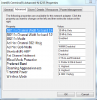
Here are my wifi settings and it seems that i have ok performance.
-
REDog, the wifi issue is only for the 2.4 GHz band, so if your router runs at 5 GHz, your wifi is fine.
XPS 15 (L521X) Owner's Lounge
Discussion in 'Dell XPS and Studio XPS' started by Muddy, Jun 28, 2012.


