 Problems? See this thread at archive.org.
Does anyone have the plum purple lid, I would like to see some pictures before I order mine, I need to decide between the red and the purple. TIA
-
Yes, it does indeed have the connector, and the little icon on the F6 button to turn it on...it almost seems like the connect doesn't want to go all the way inside the connector on the board.
-
Someone posted pics in this thread of their purple 14z. If you do a search it should come up, but if not, you'll have to go through manually.
-
it's pretty far back. within the first 20 pages I'd guess.
-
So how is the battery life on the 6 cell battery? I really dont want to add any more weight to the laptop as the weight of my current 14 inch notebook is one reason I want to upgrade (plus the weak screen on my current notebook).
Is the keyboard flex really noticeable while typing or is it only when you purposefully apply pressure? I love the keyboard on my current Thinkpad.
Has anyone tried a DisplayPort-to-VGA Adapter yet? I really need VGA support for projectors. -
I'm really happy with the 6 cell, but my needs are not very high. I would have been fine with 2.5 hours on Power Saver mode, but I'm actually getting about 3:15 to 3:30 (and once, almost 4 hours, but that was just word processing, email and internet surfing), albeit without any really processor intensive apps running.
I haven't noticed any keyboard flex at all in regular typing - only when I purposefully apply pressure.
No experience with the display port. -
Mine doesn't have any keyboard flex. Typing on this keyboard is fun. Note that there are no numpad keys on the keyboard, numbers are ONLY on the top row.
-
If you look down at the keyboard while typing, you can actually notice the flex. Despite that, this keyboard is one of the best I've used.

-
I tried the search but it wouldn't bring anything up so I did it manually. Thanks
-
ITT: Post your desktop. I just got mine sorted and ready to go. 900p
![[IMG]](images/storyImages/97529206.jpg)
-
To my ears after doing some stress tests with ORTHOS while undervolting yesterday, it seems that there are 3-4 different fan speeds. First there's the idle fan, then there's the low hum, after that it becomes audible but not above ambient noises, and everything past this point becomes annoying and you can hear great amounts of air being vented.
That said, I do get the same problem as you, but I don't know if I'd call it a "problem". Whenever I turn the computer on, the fan goes on for 2s or so and then goes idle and starts the low hum once vista finishes loading up. After that, every several minutes or so, I'll hear the fan start up (similar to the startup fan noise) and quickly go back to humming. Also, your temperatures pretty cool, and with the same multiplier voltages as you, I'm averaging 37C for both cores on AC. I'd just rest easy knowing that the CPU isn't getting fried and ignore the fan. It's really not as loud as you think it is.
Just let you PC idle for 5 minutes or so and pay attention to the fan. It should act up, I only get the occasional fan activity whenever I'm actually doing something that'll stress the CPU a little. -
What's more worrying to me is the fact that my screen and the colored lid on the upper right hand corner isn't tightly sealed together and there's a sliver of a gap over there. If I pinch them together, I can hear a click, but they'll separate again.
I doubt it's a huge deal, but I find it annoying...anybody else have this problem? -
I bought mine from Best Buy and it had this exact problem. The upper right corner bezel was actually cracked where it met the colored lid. The crack was VERY small but it did indeed make a noise consistently when pressed. I exchanged mine for another and no problems as of yet.
on another note...
Still trying to battle with my keyboard backlighting. I tried reinstalling Vista, and the Dell QuickSet utility..the program that is supposed to recognize the Fn keys, and still no luck...anyone have any guesses before I call Dell and ask for an exchange?? -
Are the other f keys working (backlight for screen etc?)
-
Yes, every other Fn key is working
-
maybe there's some software switch you have to throw somewhere before it will let you use it.
-
There's something about the backlit keyboard in the Dell Quickset software you can download from the Dell driver site.
-
Just making sure: you connected both connectors, right? One is the data connector, just like on any other keyboard, and the other should be the power cable to enable the backlight.
-
piyh where did you find that wallpaper?
also how does fallout run?
-
Mannnn finally. After the longest 7 days ever my 14z has finally shipped. On 2 day shipping should put it here on Thursday. I'll post some pics when it arrives cause, really, are there ever enough?
-
You too have 5 gigs of RAM, cool.
-
I got a smoking deal. I posted about it earlier. I had a budget of $1300.00 and I wanted a thin and light for schoolwork/notes and light gaming and my employer has a business contract with Dell. Retail at dell.com after a $123.00 instant savings puts this system at $1560. I bought mine for $1280 with 2 day shipping. Sitting on a phone for a few hours at a time with the same rep, ordering dozens of systems for my company... it paid off in the end. I don't think I could find a system that looks as sharp with these specs for the money anywhere else.
-
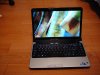
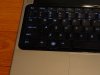
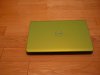
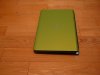

My pics have been a long time coming as well - don't think anyone's done the green yet, so i figured this might still be relevant. Excuse the grainy image quality - did not really have a chance to spruce them up.
I also noticed a distinct lack of interest in the green. I've tried to capture it accurately in these pics - it really does look good. -
Yep, both connectors are attached, though the power cable for the light doesnt seem to 'feel' like its sitted fully...could just be me though.
Still trying to mess around with the Quickset stuff... -
It could just be your laptop itself (though I don't know what or how that could be so), which would explain why Dell is sending me and the other person from here brand new laptops instead of replacement keyboards. Hmm..
-
Anyone run TF2 on their machines? How does it run?
Also, does anyone know of any current dell deals involving the Dell 14z? Should I give up hopes on possible dell back 2 school deals for this laptop since school is already almost starting. -
its a brand new laptop model, I don't think we'll see deals until the next revision of 14z
-
Whoever posted the un-thumbnailed image, could you try to only post thumbnails or small images in the future - it kind of messes up the rest of the thread otherwise - not all of us are viewing this forum on large displays.
-
The green looks nice, darker than what it looks like online.
-
Oh great, that might explain it! Well I'm glad the guy at Dell bothered to inform me of this when I explained what I was trying to do..ugh
Looks like I'll be calling Dell to get some answers, probably end up returning the keyboard then! -
I have been looking on the dell outlet for the past couple of days and there are no 14z outlet pc's.. i guess everyone loves their 14z?
-
that, or they're still waiting for them to come out of production
-
The only one I have seen in the last 3 days is a PINK 14z.. Not my cup of tea
but I'll keep my eyes out
-
well a technician came, replaced the fans and mobo, but the annoying fan "problem" persists. The system is so awesome otherwise that ill just have to get over it
Well it's a little more than that because when i was shopping around for a laptop, fan noise was a major issue and I read about how quiet the 14z was so I can't say I'm not disappointed, but there are worse things in life
-
Well here it is! The final verdict on the backlit keyboard is that there is some sort of extra chip soldered onto the motherboard that enables the back lighting to function.
So, to save other people the trouble I have gone through, you CANNOT just purchase the back lit keyboard after ordering the system without it! Suck!!
Now to get my RMA number from Dell... -
I know, right? I thought it was a bit of a risk going with it simply based on what their photos looked like, but it played out in my favor.
-
I find it hard to believe that there would even be a connector for it on the mobo if that were the case.
-
+1, karan. Especially given that there are two connectors. I would say it is far more likely that it is 1) not connected correctly or 2) the connectors themselves or the ribbons are busted in some fashion. We wouldn't have success stories from people ordering the backlit kb and installing it themselves, and they wouldn't allow you to purchase one individually, if there were a controller soldered onboard.
-
Ive done everything I can think of, more than double checked the connectors both on the keyboard and mobo..and this isnt my first time inside a laptop either.
Sooo I dont know what to think...but for $60 its turning into quite a hassle.
On the good side, Dell sent me a Pre-paid UPS label to ship it back, which was unexpected. I have 5 days to ship it, so I will play around with it some more before I send it out. -
I've been inside a few myself, and if the backlighting is using those ribbon cables for power that could very well be the issue without anything being cosmetically wrong with it. I've ruined those things just by picking them up, and would've never known I broke it save that it stopped working. Such a pain.
-
Agreed, thanks for sharing your pic's. I was seriously tempted by the green, but the previous pic's I saw online all made it look too chartreuse. But, I really like the "true" color in your pic's.
And p.s., still really liking mine. Not crazy about the touch pad and mouse buttons but, with adjustments suggested by Karan, it's perfectly usable; just takes a little getting used to, I guess. Also, probably should've gotten the 900P, but I'm totally fine with the 720P. -
So what would you suggest I do?? Should I ask for an exchange rather than a refund?? Seems to be ending up as a much bigger hassle than its worth.
I always have this kind of luck
-
I'd recommend you call at least 2 or 3 different tech support people to find out what options are available to you. you may find one that's particularly nice and gets a solution out to your satisfaction.
-
Wow, that means the techs were actually right when I called. Wonder when my replacement laptop is going to get here.
-
Well I know they wouldn't just send me one so it's a possibility.
-
I'm in the same boat here, I afraid I'd have to send it in for them to work on or something and I can't go without my brand new lappy
edit: http://www.parts-people.com/index.p...=All&search=lcd lid&pmin=&pmax=&manufacturer=
They don't have the 14z but keep your eye out for it. If dell won't sell you one you might have to wait a few months but until then I can live.
Hours of searching through generic wallpaper sites lol. Fallout runs well at medium settings with minimal tweaking at 1280x720. (p8600) I'm not quite sure how much more it can be pushed but i'm still pretty happy with it considering the non gaming battery life. I wasn't expecting a crysis shredder.
Whoever was asking about TF2 I'm sure it'll run solidly
-
I was able to fool mine with my work ID! That picture is as low-res as it gets!
I uninstalled the software immediately. -
I played with the software on a friends Studio and could not confuse it at all. I think there are settings within the app that let you set how strong the match needs to be. I tried to take a video of his face and played that back, I took a photo and showed it that, but neither worked. He's quite strict about security though, so I imagine he has it set to the strongest possible detection method
-
Hi guys
i was wondering if the dell 14z is strong enough to play:
Left 4 dead
Company of heroes
Cod4
I am stuck between getting dell 14z or building a pc with 22 inch monitor and radeon hd 4870. My current laptop can't even play css, i am not that heavy gamer but i need a system that can play future games -
You could biuld a strong desktop for gaming and buy a cheap netbook for portability ?
The studio 14z will handle Left 4 dead and COD4, I don't know about COH
---> OFFICIAL: Dell STUDIO 14z Owner's Lounge <---
Discussion in 'Dell' started by poison7fl, May 28, 2009.


