 Problems? See this thread at archive.org.
Hi I purchased the 15R as I didnt want the 17" screen also i didnt need the dvd drive so I purchased a 2nd hard drive caddy to fit an additional 2.5 drive:
Dell Inspiron 1545 2nd HDD/SSD Hard Drive Caddy/Bay/Adapter - Optical Bay Drive Caddy
Problem I have is after fitting the caddy it requires a fascia similar in size to the dvd drive otherwise there is a gap underneath the laptop. I dont think the fascia comes off the dvd drive as its mounted with screws
Any suggestions?
-
these caddy's were usually designed to use the front plate from the CD drive you removed.
if there are screws try removing them and carefully removing the front plate, than install on the caddy. -
There are a couple screws but it seems like the front plate doesnt dettach from the cd drive unless am going wrong somewhere
-
There's two clips, you remove the screws and then have to push down on the clips to release it, they're really fiddly though and can break. There's one either side of the facia.
-
Thanks will have a look tonight see how i get on
btw where do you screw the hard drive into the caddy? I cant see any holes to do that? -
Which one did you get? I got a Silverstone one, came with some basic but useful instructions. Mine screwed into the side, but it might be the underside of the hard drive also.
-
I managed to screw in the hard drive into the caddy successfully now am struggling to find the clips to remove the fascia on dvd drive
it looks like this :
http://s11.postimg.org/vs44y3xfn/20130330_114135.jpg
http://s22.postimg.org/duryahtcx/20130330_114152.jpg
half way there, taking the screws off 3 screws on the back of the dvd drive it seems the fascia is part of the drive? -
I've done the same thing with mine and its pretty easy to do
Remove the dvd drive from the laptop (by removing the retaining screw under the HDD/ memory cover)
To take off the existing DVD fascia, just look closely at either end and you'll see at one end a vertical and the end other end a horizontal plastic clip. Just use a small screwdriver to gently lever these back and the cover will come off (no screws).
I found the fascia just clipped straight back on to my replacement HDD caddy -
Hoping for some guidance from anyone that has more understanding on the Hybrid AMD graphics system on the these laptops.
As most of you already know, you can't just install the latest radeon catalyst driver from AMD as the 7730 works in a hybrid mode with the intel HD4000. This is an OEM config and the obvious downside to this is that we are reliant on Dell providing driver updates.
I have been doing some digging for alternative options and found this site Home ← leshcatlabs.net . This looks promising as the guy has developed a independent driver set fot laptops, that is updated soon after AMD release their beta drivers. Does anyone on here have any experience using the leshcatlabs driver on the 15r or 17r se? Any tips on doing a correct/ succesful install? -
some people used 3rd party moded AMD GPU drivers with success.
Since I do not have issues with the OEM driver 001 I have had no reason to investigate the ones you mentioned. -
Same here, OEM drivers have worked fine, I believe in if it aint broke, don't fix it, though I'm sure at some point I will want to update.
If you read far enough back in this thread you will see people talked about, and used those drivers a while back. -
Thanks, must admit ive just played the new Tomb Raider and not had any issue but this game was sponsored by AMD so would not have expected any. My concern i suppose is when we we get a few months down the line or for games that have been optimised for nvidia during development. Il. See how it goes ...
-
I have experience with leshcatlabs. I'll tell you what I know, and I hope you can clarify to me if there is no other way for us to get AMD drivers. How is this system different than any other Enduro-powered laptop?
Despite my not being entirely sure about this, I used leshcat's drivers since day one with this laptop. I read on a forum that was the way to go, and my initial attempts with AMD drivers didn't go well, so I followed the instructions and installed them. Basically everything worked flawlessly for a few months, then today (after reading your post) I went back and thought I'd update the drivers with leshcat's latest release (actually not the latest - the 13.1 whql release instead of later betas).
Now something's not working, and my Catalyst centre is crashing quite often.
Anyway, you just download the package you want, uninstall whatever driver you have now, maybe give it a pass with Driver Fusion, and then install. The tricky step is installing something called DSE, necessary to the process but difficult on this Inspiron 15R SE because it has "Secure Boot" in Windows 8. The only way I could install it is by disabling secure boot in the bios. This has to do with Win8 and its checks for drivers with official signature. -
I have trouble using the HDMI output. HDMI only works when I remove the drivers and reinstall them, but after a reboot the HDMI port simply doesn't work, and I have to repeat the routine. I did a clean W8 install.
Any help would be appreciated. -
Turns out to be a issue with the HDMI cable. Every other HDMI cable I've tried works flawlessly.
-
Hi all
I have an Inspiron 15R SE with Win 7 Home 64bit and mSATA SSD 32Gb used for cache. Now I'd like to update win to win 8 Pro (I have the upgarde DVD) installing it to the mSATA SSD (32Gb are enough?if not I'll get a bigger one )
)
My problem is that I have to reconfigure the system in order to swith the SSD use from cache to boot disk on windows and BIOS and then to install win 8, but I do not have any idea on the right step to do can someone help me providing a link to a guide or writing down the procedure?

-
Forget it, i tried to use the oem 32gb as a win8 or win7 os drive, and it constantly runs out of space, windows just loves to eat free space up!
Change it for a 128 or larger drive and come back
-
hi
I have a 7520 and recently sent it for repairs for a motherboard/processor failure, now the status lights are not working and I just realized it, could it be that the connector was not connected? And I sometimes have a problem with the optical drive as it wouldn't eject at certain times when the button is pressed -
sometimes when my display is turned off after being idle, waking the pc back up does not turn the display on. I have to put the laptop to sleep and wake it up again to get it working, has anyone experienced this and know of any fix?
-
OK thank you! But can you explain me the procedure to change the WIN and BIOS setting to use the SSD as boot disk instead of cache?
-
Yes, happens to me as well, and I've read other similar reports on other forums. No idea on how to fix
-
Hi guys,I ordered a dell inspiron 15R special edition 7520 recently and waiting for the arrival.I plan to upgrade the mSATA SSD 32GB on the daughter board to crucial m4 256GB. anyone here do it before? Is it hard to upgrade it myself?
if it is upgradeable myself,is there anyone can guide me to do this as well?
I heard that mSATA SSD is slower than normal SSD,is it true? for instance,crucial m4 is faster than mSATA crucial m4. -
Thinking about getting this laptop. Currently on XPS L501x with i7, GT435, 1080p screen, backlit keyboard and JBL speakers.
Spec looks pretty solid.
Sent from my HTC One using Tapatalk 2 -
You have to completely dissassemble the laptop to achieve it.
BUT
it's totally worth it
Yes mSata drives are usually slower than sata, but it's like comparing a ferrari to a lamborghini, does it matter which is fastest? it is still going to be a heck of a ride
Gluck! -
Hi guys. I have been recently having problems with my Bluetooth. I don't exactly know when this problem started - when I try to pair with a bluetooth device, the device is never found. I checked in device manager and my bluetooth device has a yellow exclamation mark and the advanced device properties show that there are two unsigned drivers as shown in the picture below:
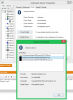
I have tried to uninstall the drivers and reinstall them but the reinstallation process reverts when it is almost complete and gives an unknown error. Has anyone had this problem before? I am running windows 8. In Devices and Printers I also have a Dell Watestone Touchpad with a yellow exclamation mark next to it.
I will appreciate any help in solving this problem. -
Download the latest drivers from Intel.
Sent from my HTC One using Tapatalk 2 -
I'd quite like a backlit keyboard, didn't realise when purchasing that mine didn't have one. Can I buy a backlit keyboard and attach it myself?
-
Does anyone have a good SpeedFan profile to use with this laptop? I made my own but it not perfect.
-
The quick answer, yes, If you can find the specific one for your laptop.
it may take some research, but I think there are several keyboards for the Inspiron 15 inch series laptops that may fit. you will have to confirm the connector used on your laptop is the same.
here is one example I found
New for Dell Inspiron 1540 1550 US Keyboard Backlit as Photo | eBay -
Hey so I ordered my dell 7520 and should be receiving it tomorrow. Specs are 8gb DDR3, 3rd gen i7 3632QM, Radeon HD 7730M, 1TB @ 5400RPM, 32Gb Msata daughterboard, 32G SSDR mSATA Card, Windows 8 Home.
My question to you guys are what should I do upon receiving the laptop to make full use of the mSATA SSD. is there anyway of having the os on the SSD? also any other tips on maximizing performance? Im new to laptops as iv been building desktops all my life. thanks for reading looking forward to the help! -
Hi guys
Are there any build issues with the 2013 15r se laptop?
Sent from my M7 using Tapatalk 2 -
I was the same when I moved to this laptop.
You will be able to fit the OS on the mSATA drive but you won't be able to fit much else on it, it'll run out of space a lot. You can change the option for the mSATA SSD in the BIOS, can't remember where though (because I don't have a mSATA drive)
I'd suggest upgrading it to at least a 64GB so you can fit OS and some programs on it. I have a 250GB standard SSD and I've barely used half of it, and I have most things on there apart from documents, photos, music, etc. -
Is the SE model still worth buying?
The 15R is the updated model here in the UK but the SE is still last years model. Main differences are full HD screen, non low voltage i5 and 7730 gfx instead of 7670 on the new R.
Is it worth waiting for the 2013 SE model?
I can get it for £470 here in the UK from Dell after coupon.
Offer ends tomorrow so please I need answers soon. -
Yeah its fantastic value for money. I got it for the same price as you but with an i7 and 720p screen. Definately avoid the 15R.
But if you can find the Asus N56VM for £499 with the full HD screen and i5 I'd go for that instead, its got Macbook comparable build quality. What will you be using the laptop for? -
Dell increased the price by £70 before the offer is meant to expire at midnight tonight! Cheeky so I made a complaint. Cheapest N56 is £549 which is out of budget. Max I can spend is £500. After coupon new price of the SE will be £546 so no difference.
main use is moderate gaming and video decoding using madvr. -
Ah my bad, last time I checked it was at £499 at Saveonlaptops.
Your best bet for raw performance is the Inspiron 15SE. I was on a similar budget to you as well. Don't worry about the code expiring, Dell releases them every thursday morning. -
Code was not problem, price of laptop is. They had it for £529 until this morning. My quote stated 529 even.
Only after coupon was it affordable when it was 529 now after coupon its still over 500. -
I'm thinking of doing this as well. Has anyone successfully upgraded the wireless card in this laptop?
-
Hi All,
I'm making a clean install of Win7 (enterprise) on my 15R SE with 32 GB msata. After I have changed SATA operation to AHCI in bios, I could install the OS with all drives provided from Dell - except the one for Intel Rapid Start Tech. "System-Utilities_Driver_R0WR7_WN_1.0.0.1031_A02", it simply says that "The computer does not meet the minimum requirements for installing the software". Everything runs fine as I can see it, so I want to use the msata as a cache device to accelerate my system. When I run "Intel Rapid Storage Tech." program, I have no option to enable the "Acceleration". I checked the Intel's site "http://www.intel.com/support/chipsets/sb/CS-032826.htm" and can see that I need to set Sata to "Raid" in bios, but I couldn't find where to set this.
I would very much like to hear if anyone tried this has an idea for what I'm doing wrong and maybe can guide me through the process. Thank you in advance.
Ps. the computer came with Win8 and it worked without any problem.
Kind regards,
Pengzi -
the whole thing doing a clean win7 install IF you have a Msata card....... is to install Intel rapid storage driver during the windows installation and some other stuff. (either you will get issues afterwards.........
see guide here (100% working...tried it myself):
http://forum.notebookreview.com/del...o-windows-installation-intel-rapid-msata.html -
Hi KSMB,
Sorry I should ask you the following question directly here (posted it in the thread you linked to):
"Thank you for sharing the experience regarding clean install of win7 with a msata. If I've already installed win7 without using the usb (your step 4 and part of 5) do i have to reinstall windows again? I can understand that when using usb with extracted RST-program, the main-disk will be partitioned differently (f.x. with an 8 Gb hibernate/sleep partition, which I don't have). My problem is that when launch the Rapid Storage software I don't have acceleration option (only 4 buttons instead of 5). Should I just delete all partitions on the main driver and reinstall win 7 again?"
Thank you for your answer and help!
Kind regards,
Pengzi -
For some reason, after a clean W7 install, I was having trouble installing the driver for my ethernet card. It wasn't on the regular Dell Support Drivers site. The following link, however, with a bunch of other drivers helped:
Drivers for Inspiron 15R SE 7520 -
Is it true that once Windows 8 has been installed on a hard drive that you can't then install any previous Windows OS on it? Someone told me that recently.
-
If you delete the partition the Win 8 OS will be gone, you can then install any OS you want.
Already done It on my 15SE -
Guys,Is it worth to upgrade to Lenovo Y500 dual GT750M SLI from dell inspiron 15R SE full HD?
-
If budget is not a concern and you need and upgrade then why not.
-
budget allowed but I don't know whether which laptop would be a better pick? Is Lenovo Y500 far better than Dell Inspiron 15R SE? I still doubt between these two models
My usage would be programming,web designing,and some light photo/video editing. -
You won't need a GT750M SLI for non gaming. Go for a laptop with a strong CPU like an i7 3632M, plenty of memory, SSD and hard drive combination and a full HD screen. Post your requirements in the 'What Notebook should I buy?' section.
-
Hello everybody. I'm using a dell inspiron 15R SE. I notice some sort of, vibration, a flicker, whenever there's a new page rendering, or better, every time i change screen (like when switching from an application to another). It is especially noticeable on grey tone screen, for example on photoshop cs5 working area. This flicker lasts for about half second, as if it's trying to assest itself.
It's the first time i'm using a fullHD monitor, and i don't know if it's attributable to that. I don't know anybody with such a screen for a comparation.
Someone suggested me that it could be caused by the switchable graphic cards, but i've checked, and i notice the fliker even passing from desktop to start page of win8 (or vice-versa).
Has anybody noticed something like that? -
^ i have the same problem too. My system has full hd display and i notice flicker for a second in gray backgrounds. screen takes a second to settle. you can observe this in music app background and also the screen becomes pixelated in dark backgrounds. When displaying colours the screen is vibrant and awesome but is very disappointing in grey and dark.
take a look at these screenshots. not sure if you can see what i'm seeing in your display. observe how the colour shading is not smooth and pixelated in the windows media player pic in the part where blue and black shades mix. and screenies from cabin in the wood movie, the water shading is so pixelated. Actually the problem is even worse and these pics doesn't show it fully.
http://i.imgur.com/CGmCLOk.png
http://i.imgur.com/0oCMVmO.png
http://i.imgur.com/RBFWKPs.png
Dell Inspiron 15R Special edition (7520)
Discussion in 'Dell' started by lucjuh8, Jun 5, 2012.


