Problems? See this thread at archive.org.
sacredevil thanks
so you have have just one huge partition for OS and all the data programs etc etc?
no D:?
-
Yes, 50gb for OS (C: ) and the rest for Data (D: ) and 2.5gb for MD.
-
I'm going to be getting my Studio 15 tomorrow and I have a few questions.
1. How do I go about getting the AHCI driver? The Dell site lists drivers under many categories and I'm not quite sure which one it's under.
2. Since MD 4.0 is a separate application, I should be able to directly boot from the Vista disk. When would I install the AHCI driver (before or after Vista)?
3. Is there any way to create a recovery partition that is bloatware free or at least maintain the old bloatware filled recovery partition? I would feel much safer having one.
4. Can I organize OS and Data files into the same partition? I've never actually performed a clean install before on any computer but I haven't had separate partitions for OS and Data files so I assume you can...?
Thanks a lot for the guide, Les! -
After plowing through the better part of this epic thread, I've a final couple of questions before taking the dive. My main motivation for fresh installing the Les method is less the bloatware considerations (only have some 35-40processes running after factory delivery of my Inspiron 1720) than to be able to correctly partition the hard drive. I do video editing and would want at least a couple of partitions in addition to the C: volume. Question: If the D: primary is converted to an extended partition will one of the resulting logical drives be able to support XP in a dual boot setup? Or does the second boot drive require it be primary? Secondly, I've just learned that Media Direct is now out in version 4 and that it's 'integrated' into Vista itself. This would presumably mean that a primary partition would be liberated here in itself. If so, is Media Direct 4 a simple upgrade for the asking from Dell, or must I content myself with v3.5. My purchases is only three weeks old. Oh, and finally I don't quite understand the nuance as to whether I need both the Intel Matrix Manager program (the 20mg install)or simply its driver (370k). I must have missed this part of the thread. Thanks one and all for the great follow-through on this topic.
-
Hi limi. Here is the link for the Studio 15 AHCI driver: AHCI
The AHCI driver is installed DURING the vista installation. There will be a screen during the vista setup(after booting from the vista disc) in which you will see the partitions on your machine. This is where you click the "load driver" button.
And yes, you can just have 1 large partition with OS and data files together. -
Thanks for the link.
For some reason, the computer couldn't detect the driver on an SD card or a USB drive...so I'm just trying the clean install without the driver. If the computer BSODs on me, then I'll look into it. -
If I don't have a flash drive or blank CD, is that a major problem? I just got my laptop and wanted to do a clean install. A few weeks ago I was told that I can do the AHCI install on my first boot. Is this true?
It is a Studio 15 laptop. Thanks! -
What exactly does the Intel Storage Matrix Manager do? It's listed as optional so I'm not sure if I should install it.
Also, I'm having trouble getting the fingerprint reader working. I've installed the driver and it is supposed to be functioning but I don't have the fingerprint suite software that was initially on the laptop before the clean install. Does anyone have a link to where I can get the suite? -
The Matrix Manager makes your laptop run 15% faster.
-
K I was just worried because when I was installing it, it said that it could never be uninstalled...if it's that good it should be at least "recommended"

-
Yeah it's the only thing holding me back from doing a clean install right now. I wonder if shop rite sells usb drives...
-
The matrix manager or AHCI makes your computer preform at a 15% interval, which can make it preform at faster rates. The reason that most people cant open it from the USB or CD is that it needs to be extracted then put on the USB. IF you keep it in its zip format, then vista cant find it during the install. Also, if you have your disk labeled "Drivers" from Dell, it also contains the AHCI drivers. When vista is installing, it brings up a screen that asks which partition to ad Vista onto, when there look at the lower right side...and hit the load drivers selection. Before you hit search for the drivers, slip in the Drivers disk, allow Vista to find and Install the AHCI drivers, when done with that...slip Vista disk back into the drive, select which partition to install it to, and hit install Vista.
-
I'm just wondering if you stuck with the Stardock (earlier version) or if you un-installed and then installed the latest Dell Dock for the website. I'm having the same issues; however i can't get the latest version to load no matter what approach i take, but the Stardock versions seems to work.
-
glc37, I installed the Stardock one, and then installed the Dell Dock without installing Stardock. I'm pretty sure it just overwrote it. Either way it works now and they both looked exactly the same.
-
limi44, i'm just wondering what version you show for the Dock app. after installing the newest version on top of the old version? I have not tried this yet, but i'm curious if it updates the version.
thanks, -
hi, im sorry if this was awnsered already.. but i cant be bothered to read 200 pages of posts... but when i boot from the dell media direct 4.0 CD, it brings me to the log in screen...?? whats wrong?
oh, anotehr quick question... im planning to partition my harddrive to have one just for the OS, what is the minimum you guys think i should set it to... is 20GB enough? -
chaugh, i had the same scenario as you, but i found a few posts back that with media direct 4.0, you don't boot from this disk; however go through the Vista install and once complete you install MD 4.0. It does not require a separate partition.
-
thank you glc37!! the problem is... i cannnot find my vista cd key on the bottom of my new studio... will i need it when i reinstall vista?
is it the same as the product ID in system in the control panel? -
Not if you reinstall Vista from the OEM reinstall disk.
-
hi, read the last few pages.. thx for the all the help.. jsut have a few quick questions
-
hi thx for all the help.. jsut have a few quick questions...
1. after the installation.. where can i get my dell dock back.. because the one on dell says its jsut for reinstalling and not for a clean install..
2. i also cant find the fingerprint reader driver on dell.com or on my disc... where do i get it?
3. is tehre any benifit in having a seperate partition for my os? my current c drive is only 20 gb but i keep having to move files over to my D drive, which is 280gb! -
Hey, my Studio was dispatched today so I'm gonna wipe her clean and start over.
The thing is, I got office home/student preloaded and obviously I want to keep it having paid for it. What else outside of what's posted in the guide do I need to do?
Also, what drivers/software might I have trouble with? I'm guessing the fingerprint reader at least? -
I did a clean install and now my sleep/hibernate settings are all messed up. If anyone hasnt messed with their advanced settings could you take a picture of the settings for each power plan and post them? Or if someone knows the big secret to getting it back to normal could you let me in on it?
-
Edit:
Posted in another thread -
do you have to reinstall media direct if you just want to do a fresh install of vista, like i didnt touch the mediadirect partition just the vista and recovery partition
-
what files does media direct support, i have mkv files in folder and when i used media direct to add them. it can't see it. I installed all the codec, i can play the file with my media player classic but i just want to use my remote. does the remote only work with media direct?
currently running vista 64bit -
Sorry if I missed something in these 200 pages but I just received my Studio 17 and wanted to reformat it with a clean install. I followed the instructions carefully but after restarted my PC it would NOT boot from MediaDirect 4 disk (that it came with). I restarted like 10 times (F12, DVD drive) and only once it opened a screen with onlly one line, Windows Vista on it and went back to start Vista again.
What is wrong? Thanks.
-
Sorry about your troubles, I'll shoot an update to Les for him to update this sheet. Media Direct 4.0 works within vista. Start your reformatt with installing Vista, follow everything as usual, but when you are done with that...insert Media Direct and install it within Vista. 3.0 and 3.5 are the older versions that must have a seperate partition. -
thank you. So I booted with Vista disk, deleted all particions (including the recovery), installed the AHCI driver (from Dell disk) and I installed Vista and then Media Direct 4.0 (do I really need it?). I thing the recovery partition is still somehow reserved by Windows b/c I have 10GB less space now. How do I get the storage back?
-
Hi globus007. That 10GB of space is probably currently labeled as unallocated space. It must be merged with the primary partition to gain access to it. To check this, type 'computer management' in the vista start menu search bar. Click the computer management item that comes up. When the new window appears, click 'Disk Management' in the left panel. Now in the bottom middle panel, see what it says for each partition. See if you can find the 10GB here.
-
ty, it says Resource CD, CDFS, Primary partition. how do I merge it?
I'm new to Vista and had my Inspriron 8500 untouched for years. After the reformat, I have a n=few problems I can't figure out how to fix.
I can't make my WebCam to work (it's looking for some drivers). My Device manager doesn't show any missing drivers though.
My toolbar doesn't expand like before. And how do I get that Dell tool bar (Mac-style)? I only installed the drivers so far. I'm afraid to clutter my system with Dell stuff. What am I misssing? -
As per Dell help:
"The following list is an overview of the correct order to install drivers on Dell desktops and portables. After reinstalling Microsoft® Windows®, follow the order listed when reinstalling drivers. It is recommended that you print this list for reference when installing drivers.
Note:
Some devices may not function properly if the drivers are installed out of order.
Notebook System Software (NSS) - A vital utility that provides critical updates and patches for the operating system. If you are reinstalling Windows or updating all drivers, it is important that this software be installed first. Currently, the DSS and NSS are not required for computers with Windows Vista®. This is located under the System and Configuration Utilities Category on the Drivers and Downloads page.
Chipset - Helps Windows control system board components and controllers. This is located under the Chipset Category on the Drivers and Downloads page.
Video Adapter - Enhances video performance. This is located under the Video Adapter Category on the Drivers and Downloads page." -
Its funny...i've havent actually looked at this sense my reformatt. My comp is set with MD partition, C for windos, D for other misc,...but when i pull up this manager it says C and D are ok, but there are to more partitions one says healthy EISA configure, and the other one says Primary partition, but both have 100% free space at 47 MB and 2.01 GB. What are these, and should i del them? Thx
Nevermind, found it out...EISA is the drivers and utilities disk that dell initiated and thats why its so small and unnoticed, the other 2 GB is the hidden partition for MD...man i feel like an *** for having asked that. Ha -
hello there, newbie here.
my XPS gave BSOD several times and wouldn´t run vista, so did the clean install, twice, because forgot some steps. Any ways, it works all perfect but only have 1 partition with 10 less Gb... my real question is:
I want 2 partitions, one for OS and programs and other for data, in what step exactly do I configure this and the spaces I want for each partition?
I've done the intall twice but could find something that tells my about that.
Thanks for your time, I'm learning a lot with you and my first laptop. -
If your running Media Direct 3.0 or 3.5, there is a selection I belive number 2 that allows you to actually pick the distribution of partition size. That was how i did mine, and it worked perfectly. If your running Media Direct 4.0 and it installs directly into vista, you go go into the device maganger and then disk manager and pick the size partition you want to set aside, but I personally woulnt do that b/c moving volume within the OS while its running could make it unstable, ...if MD 4.0 is the case, download a seperate program for partition distribution.
-
you are right, thanks a lot Monk, I think I'll be keeping 1 partition by the moment ... but ..I just realice that this means I killed the RECOVERY partition for good right? ... is that a good or a bad thing?
cheers -
its all relative...I personally dont want a recovery partition on my comp. When i need to reformatt i have imaged a clean install with only programs i wanted, so thats my own recovery partition (i suggest using acronis). Some people want to sell the comp later on and want it to be an exact copy from dell itself, so then they deft want it there. I also wanted my 10 GBs back in memory, I paid for them, why should Dell tell me what goes there. Anyhow, its too late to think about that, the Dell partition is gone, your comp is bloatware free, and performance is much faster...ENJOY!
-
so true. But there still are 10Gb missing in my only partition, I know HD show less space than they have in theory, but 10Gb?
Thanks. -
The sound quality using the line-out doesn't sounds as good as it used to be after the format. I'm using the latest sigmatel audio driver from dell. Is there something I missed?
-
hello there,
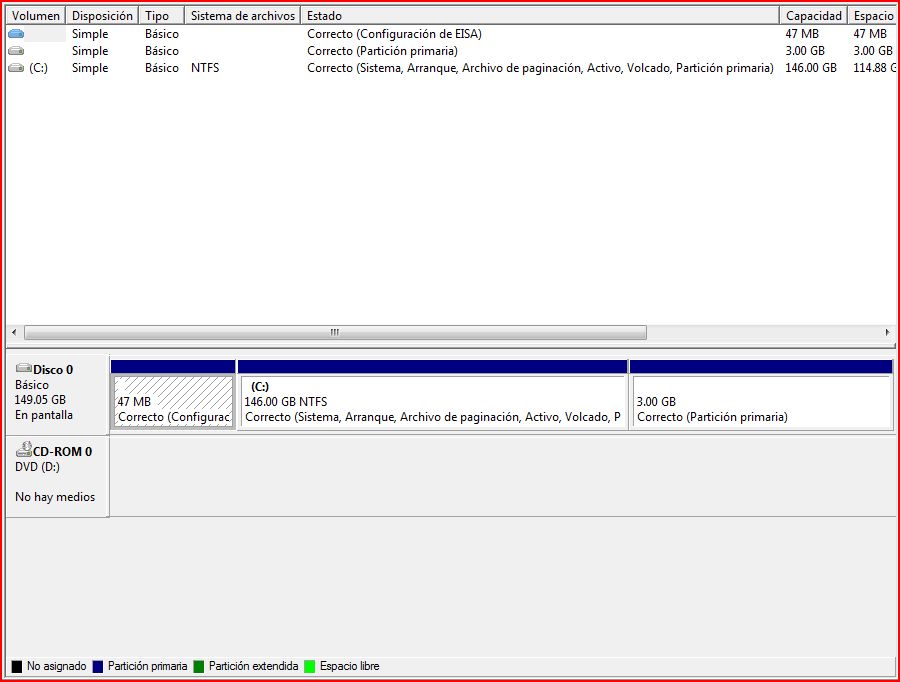
I have three volumnes, one is C (146Gb with sistem, boot, etc etc/NTFS), another with 3Gb(Primary Partition ) and other with 47Gb (EISA Configurtion).
I have a 160Gb samsung and only can use those 146Gb, so, is there any whay to have those at least 10Gb back?
thanks a lot for your time.
Pd. the 3Gb partition gives me the "Eliminate ..or Erase Volumen" (using vista in spanish)
and all of them are "Primary Partition" .. no of then has tha black label of unlocated -
Ok, it seems some of the newer owners of Studio 17 that got shipped Media Direct 4 has a different set of instructions then?
well, i havebeen working all night to try to install Vista Ultimate 64 on a NEW HDD that i had lying around and so far, i've been somewhat boggled.
1) installing vista from CD constantly prompts me for a CD/DVD driver and so i got stuck there
2) installing vista from a USB flash worked... but the confusion over ACHI and SATA modes caused BSOD and no reboot.
3) installed vista from USB flash, when the screen to select PARTITION came up, i installed ACHI drivers and vista 64 installed flawlessly on the HDD...
BUT...
despite trying to install all the 64 bit drivers,..
1) ATI Catalyst 8.8 does not load properly and still lists as generic, res stuck at 1600x1200
2) webcam is not recognized within control panel
3) fingerprint reader driver installed, but i'm missing the program?
4) on board network, iirc Broadcom? cant seem to find drivers anywhere...
i'm a bit lost...
any/all help would be greatly appreciated... -
I uploaded pic so you can see it clearly, thanksAttached Files:
-
-
Got a new, Dell UK XPS M1530 delivered today and wanting to format it free of junk - it hasn't come with a drivers/utilities disk (guessing a mistake, the accompanying Inspiron has one) - is everything available off the Dell website or is some of it CD only?
Can't see an AHCI driver on the downloads site, or is it part of the chipset driver? -
Its called the Intell Matrix Storage Manager on Dell's site
http://support.dell.com/support/dow...1&impid=-1&formatcnt=1&libid=41&fileid=224400
Sad but true, but loosing that much space sometimes happen. I have a 320 GB HD, and I'm only able to use 312GB, its all about how the drive reports the the space and how Vista reads it. Nasty advertising... -
d@mn, it's seems that I will have to live with it, will a new reinstall fix ir? hehe
-
If you have the recovery cd, you can just pop-in the CD, select the reformat option and the installation process will continue automatically.
---------------------
Taylor
SuperBabyGuide -
I just made this thread in the xps forum but thought I would ask here too:
Basically I need another partition and don't want/need Media Direct so I was thinking about deleting the 2.5gb partition MD uses.
I also want to run through the bloatware removal process. Should I do this before I delete Media Direct and the partition or after?
Thanks for your help -
If i was you, I would stick in the Media Direct CD, follow the first step of guide..pick your partitions IE how many you want and their sizes, then stick in the Vista CD. IT will ask you to select a drive to install vista into, but before you do that, you can see all your partitions, find the 2.5 GB media direct partition, and select at the bottom right to delete that partition. What happens is Media Direct has cleared your old Vista, set up new partitions, and allows you to actually remove the MD partitions. Once its removed, select your partition to install vista to, load your AHCI drivers, and follow the rest of the guide. MD is not an essential part of vista...its only personal choice. Also if you dont do the MD first, when you stick in Vista disk it will only allow you to repair vista, thats why its important to do step 1.
-
Hi Pikin. A new reinstall won't free up space beyond the 146GB usable space. According to your disk management screenshot, there is no 10GB recovery partition, as it has already been added to your usable space on C. If the recovery partition was still present, your C volume would have 136 GB max capacity.
On a side note, this great thread that was started on NBR when the first people who ordered and received m1330 were here is now up to 2000 responses.
-
thanks darthsat,
now that I think about it, my disk might have had that space in the first place, bou as I did the clean intall a few days after I got my laptop ... I don't remember very well the size of it.
I think I'll leave my lappy as it is now, it's fast, and already cuztomized with the tweeks.
One more thing for the ones planning to do the clean OS intall, my lappy didn't came with many bloatware, just roxio .. and one or two more stuff, so, may be you want to check what's in you lappy, may be it's ok the way it is, it's just a thought, because in the other hand, you learn a lot .. for the newbies like me ... with this process.
cheers
Dell Vista Laptop Reformat and Bloatware Removal Guide
Discussion in 'Dell' started by Les, Aug 18, 2007.