 Problems? See this thread at archive.org.
Maybe put up settings manually. Because if you have fully tweaked OS, no bloat and still get lower score than expected for the clock speed something isn't perfect in your setup.
See if you MB manufacturer have similar guide for your MB https://www.gigabyte.com/FileUpload/Global/multimedia/2/file/525/946.pdf
-
-
VCCIO - 1.1V
SA - 1.15V
CPU - 1.355V
RAM - 1.35V
LLC 7 VRM Frequency Manually set to 850
AVX Offset 0
Cache x47 -
Can you try stock clock speed for 9900K (MCE DISABLED)? Then post results.
-
Marginally lower Physics Score at 4.7Ghz
EDIT - JUST REALIZED THIS IS 3.6GHZAttached Files:
-
-
Ok 4.7GHz... Shockingly close like less than 1K Points from CPU being at 5GHz and 5.2GHz for Overall Score however the Physics Score didnt change much 23.2K at 5GHz it was at 23.6K
Attached Files:
-
-
P0/R0 stepping for your 9900K ? The Physics scores is overall too low.
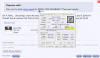
Can you run InSpectre tool and post screenshoot? -
P0 Stepping.
Attached Files:
-
-
Disable both then re-boot and test again. Remember disable your AV software before testing.
Time fly and I'm soon on the way for my usual 1 months Summer Vacation Hope you get it fixed.
Last edited: Jul 20, 2019TheDantee likes this.
Hope you get it fixed.
Last edited: Jul 20, 2019TheDantee likes this. -
Thanks for the Help! Broke 34K still nowhere near where it should be tho
Attached Files:
-
-
That doesn't sound right to me, because going from 4.7Ghz to 5.0Ghz is a 6.3% increase in clockspeed, yet you're only seeing a 1.7% increase in the CPU score. This makes me think that the CPU is being power or temperature limited when at 5.0Ghz, so I'd check to make sure temperatures are ok and that you have the power limit in the motherboard BIOS extended so that you're not bumping up against the power limit. You'll also want to make sure that the maximum allowed Amps (A) setting is high enough for the increased power limit that you've set. When I overclocked my 6700K I had to increase both the Power Limits and also that Amp setting I talked about. You'll probably want to use HWInfo (Sensors) to create graphs to monitor CPU clockspeed, CPU temperatures and CPU Package Power - you could then run various CPU tests and then look back at the graphs to see what your CPU had been doing during that testing to help you troubleshoot the issue. HWInfo (Sensors) also includes "Throttle Reasons" type variables that can be monitored, so you can also take a look at those to see if any kind of "throttle trigger" has been tripped during your testing.Last edited: Jul 20, 2019
-
When running 5GHz I checked Clock Speed remained at 5GHz the entire timeRobbo99999 likes this.
-
Well, that's a good sign, but might be an idea to check some of the other things I mentioned in my post too (e.g. BIOS settings, HWInfo Sensors monitoring during testing).
-
Long and Short Power is already set to max 4095
-
How about all the other stuff I mentioned in my initial post. What about the Amp setting in the BIOS, might be called Current or something? What about monitoring with HWInfo Sensors for any "Throttle Reasons"? Try it all, see what you come up with.
-
IDK if I have AMP Settings I'll get some pics
-
I just checked in my MSI Z170A BIOS and it's called "CPU Current Limit (A)". I set mine to 250. Voltage and Watts work together to create Amps, so I'm guessing that at whatever CPU voltage you're using and whatever Watts power consumption you're expecting of your CPU, you'd have to input those 2 values and make sure they were less than the Amps you set in the BIOS. My CPU is at just under 1.4V, so according to online calculators I'd need to put 350W through my CPU to reach 250A at 1.4V, so I just set the CPU Current Limit(A) in the BIOS to a ridiculously high figure - I mean you're controlling the max power draw allowed through your Power Limit variables in Watts (so it's not dangerous), so I think it's just about making sure you've configured at least enough Amps in your BIOS. I think. (don't know why they've created an AMP variable in the BIOS, seems unnecessary to me, you'd think they could just have Power Limits in Watts, and then the board would allow whatever Amps to reach that target, seems superfluous to me, but hey it doesn't matter.)
I mean it might not be that that's causing your low performance for your overclock, but it's just about making sure you're checking off all the bases, see my initial post to you, which included basically all my thoughts on it.Last edited: Jul 20, 2019 -
Here's some pics in my BIOS nothing for max power
![[IMG]](images/storyImages/035664b94996dd4722d28c8daeef4cf7.jpg)
![[IMG]](images/storyImages/159a6fcad7d48da04d898b96b07ed58d.jpg)
![[IMG]](images/storyImages/fa7dbecaae03670cd46def6a3acd1e27.jpg)
![[IMG]](images/storyImages/1ed7eba29d67a20d7f7c253c3ac46bbc.jpg)
![[IMG]](images/storyImages/3598b93c7198b4f0f95c8ca28292d135.jpg)
![[IMG]](images/storyImages/59a0da8ab4a262900f35b97ef956ebb7.jpg)
![[IMG]](images/storyImages/0d72919cae85a6422fc32093cc473139.jpg)
![[IMG]](images/storyImages/4d8181f66fd2ed66575db456b0fb422a.jpg)
Sent from my OnePlus 7 Pro using TapatalkRobbo99999 likes this. -
I don't profess to know what all those settings do, but the ones I do know of I think you've set correctly, and your Current Limits seem fine - I don't really see anything that might cause a throttle, apart from you have MCE disabled, I would have that enabled, I mean I have the equivalent of that enabled with my CPU - I think it overrides the 'rules' associated with stock Intel CPU operation, in as much it will run all cores at the maximum stipulated frequency under any loading (regardless of the number of cores being at max load) provided the increased CPU power limits that you've set in your BIOS are not exceeded.
Run some demanding CPU benchmarks whilst you have HWInfo (Sensors) open, and graph CPU Frequency, Total CPU Percentage Usage, and CPU Package Power, so you can look back at the graphs after you've done your test runs - so you can see to make sure that CPU frequency is constantly stable, and what the CPU Package Power was throughout those runs. Also look at all the "Throttle Variables" that are shown in HWInfo (Sensors) - there are a lot of them for both the CPU and motherboard - and check that none of the limits have been tripped - they're described as "Yes" or "No" in HWInfo (Sensors). If they all say "No" (for both Min & Max), then that's a good sign, and you have not had any kind of throttling behaviour during your test runs. Once you've ruled out all that, then it's probably not a hardware issue, and instead some kind of a software issue - either the benchmarks you're choosing to run are not pushing the CPU to it's limits and therefore you don't see much of an improvement with an increased overclock, or some other software issue that is preventing full CPU performance.TheDantee likes this. -
all those bios settings go to something?
-
MCE Enabled had definitely done soemthing as I'm thermal throttling the chip now will working on further lowering thermals and get back to this thread.
Sent from my GM1917 using TapatalkRobbo99999 likes this. -
Yeah, you'll have to fine tune your overclock with reduced voltage and/or reduced Mhz, or do something re cooling - and then check you're getting the scores you should for whatever overclock you end up with, check all that HWInfo stuff of course as you're tuning your overclock too, to make sure it's not misbehaving and throttling.Rage Set likes this.
-
Is that physics score with 9900K @ 5Ghz or stock?
Even on my AW Area-51m I get 26k+ at 5Ghz with 9900K:
https://www.3dmark.com/fs/19316903Rage Set likes this. -
https://www.3dmark.com/hall-of-fame-2/port+royal+3dmark+score+performance+preset/version+1.0/1+gpu
https://www.3dmark.com/pr/126955
Good enough for spot #39 in the Hall of Fame Rage Set, jaybee83, Papusan and 1 other person like this.
 -
Cool, that's a good result, #39 would be nothing to be sniffed at, #39 in the world. How's that fair amoungst the NBR overclockers here, did you check if any of our regulars are above that?Talon likes this.
-
Hi, I just installed an EVGA x299 Dark and I have a 7980xe installed. I have the cores in the bios set to 45x18. The bios is saying my cpu voltage is 1.344v. I moved over to the Dark from a Rampage VI Apex and at 45x18 my voltage was only 1.20v. I tried setting it to that on the Dark and it would not boot so I went over to the other bios and set it to 1.25v and it also would not boot. Anyway I reset the bios and it's back to 1.344v. Just seems kind of a high voltage for not very high clocks. Any help would be appreciated.
-
after a quick look i only found @Johnksss above him with regards to NBR overclockers i mean...
Last edited: Jul 29, 2019Talon and Robbo99999 like this.
-
It sounds like one motherboard is more stable than the other one with regards to your CPU overclock. I suppose you'd have to fine tune the amount of voltage that is really required for 45x18 on your new motherboard - and then you'd compare that against your old motherboard, and then you'd draw your conclusions as to just how rubbish the new motherboard is in comparison to the older one. I don't know enough about specific settings to recommend to you, maybe you're overlooking something in the BIOS setup of your new motherboard, and therefore you're not getting the best out of it. Maybe someone with a CPU like yours and a similar motherboard can make sure you're running the fundamentals correctly.
EDIT: It's one thing to set a voltage in the BIOS, but it's worth checking what actual voltage is going to the CPU. "VCore" in HWInfo Sensors. I'd check that you're actually getting the VCore that you expect when you run a CPU load (eg Cinebench15, or something that you know provides a certain voltage on your previous motherboard). Maybe the VCore at load is too low, and the LLC needs to be increased. I'd use some HWInfo Sensors monitoring to work out what's actually happening.Last edited: Jul 28, 2019JoeT44 likes this. -
Yes @Johnksss has me by 10 spots and about 100~ points separating us.Robbo99999 likes this.
-
Very nice bro! I've stopped all of my benchmarking. Setting up a new channel and other things before I get back to it.
-
What version of the vBIOS are you using? I suggest getting the XOC vBIOS for this board. https://xdevs.com/guide/e299ocg/#biost
1.344v is high for 45. Looks like the voltage is set to auto.JoeT44 likes this. -
I am on the latest bios 1.18. Thanks BrotherLast edited by a moderator: Jul 28, 2019
-
Hey, that's a target!
-
The link I gave you, will give you all of the information you'll need about your new board. Welcome to the Dark family It does have a slight steeper learning curve compared to an Asus board but I think it performs better.
Robbo99999, Papusan, Mr. Fox and 1 other person like this.
-
The XOC bios file would not extract correctly. I have another bin file Mr. Fox sent me for that bios and the bios didn't see it on my flash drive to flash it.
-
It has to be formatted as FAT32 or FAT. The BIOS cannot access NTFS. If you used the flash drive previously for installing Windows it might be formatted as NTFS.
-
-
No it's formatted as fat32
-
Not sure why it can't see the file if you unzipped it and it is on a FAT32 USB stick. Try pressing F12 and see if you get an error message trying to save a screen shot to USB or see if you can save a BIOS profile to USB with no error message. If you get an error, try a different USB port or reformat the stick again.
Here are some videos with BIOS settings you can tinker with:
Not XOC BIOS:
With XOC BIOS:
Rage Set, Papusan and Robbo99999 like this. -
Well my whole problem was that I installed W7 in Legacy mode. Now I''m at [email protected] and I got 10134 on CB20 in UEFI mode.
Rage Set and Robbo99999 like this. -
Weird that this would have an effect on CPU stability, but ok then, good that it's solved and your new motherboard is not worse than your old one!
-
Your 1st video showed me my mistake in installing W7 in Legacy mode. Thank you. When I had the rampage in the screen just before the windows 7 logo where it shows the 2 OS and the Macrium Reflect in the boot menu used to be smaller. Now it looks huge like the resolution is too low. Any ideas?Mr. Fox likes this.
-
That is very strange as the OS being installed to MBR versus GPT disks should not have any bearing on the BIOS accessing a USB flash drive. But, I am glad you got it working. That's all that matters.
If you mean like this picture it is normal. It is because the BIOS is operating in a mode compatible for Windows 7 and older OSes. Windows 7 and older OSes requires VGA (legacy video) mode for booting. Windows 8+ can use GOP (UEFI video mode) or VGA. VGA is lower resolution than GOP. Just like the @Prema BIOS boot logo is small with GOP and large (full screen) with VGA... same thing. If you try to boot Windows 7 with GOP mode it will freeze at the screen with the colored blobs swirling around and never go to the desktop. The lower resolution only affects the older OSes during the booting phase of the OS loading. Once you are on the desktop they essentially function the same.
If this is not what you are asking about, please post a picture so we can see.
Last edited: Jul 29, 2019Papusan likes this. -
Brother @Rage Set did.
So did Brother @Raiderman... (had to find a post with his sig to confirm that).
And, speaking of which, it has been quite a spell since I've seen Brothers @Raiderman and @KY_BULLET around these parts. If both of you hombres are still around, you'd best pop in and say hi to us before long. What are you ornery critters up to?Last edited: Jul 29, 2019 -
Keeping these here for my reference
Goal will be to try and beat these both.
Ultimate goal, beat my previous Titan X (Pascal) card in the graphics amp: https://www.3dmark.com/fs/13653218
Rage Set, Robbo99999, Papusan and 1 other person like this. -
You should easily be able to beat it. That physics score is abysmal.ssj92 likes this.
-
Well my goal is to beat your GPU score & my Titan X (Pascal) GPU score with Radeon VII.
https://www.3dmark.com/compare/fs/19316903/fs/13653218/fs/18845935
The Titan X (Pascal) was in a alienware graphics amplifier (pcie 3.0 x4 external enclosure) hooked up to a AW 13 R3 laptop with 7700HQ.
Now I will be installing the Radeon VII in the graphics amplifier hooked up to my Area-51m laptop with 9900K so it will be interesting to see.Robbo99999 likes this. -
Unfortunately the Amplifier pcix4 is killing the performance by some margin (I remember was about 20-30%)
-
Take a look at my 3dmark score I posted above. It is more like 3-5% and that was with a i7-7700HQ.
As long as you are connected to an external display performance hit is minimal.
It's internal display that loses around 15% performance from my testing.jaybee83 and Robbo99999 like this. -
*Official* NBR Desktop Overclocker's Lounge [laptop owners welcome, too]
Discussion in 'Desktop Hardware' started by Mr. Fox, Nov 5, 2017.





![[IMG]](images/storyImages/62-93-FR.jpg)