Problems? See this thread at archive.org.
Oh my. Sorry, bro. That's horrible news. You have my condolences. More likely the mobo. It happened to both me and Brother @Johnksss with ASUS garbage. Luckily, his CPU survived, but the ASUS board killed my CPU in the process. Thankfully, Intel replaced the CPU under warranty. I hope AMD does the same for you if you are as unfortunate as I was. If you check the ASUS forums you'll likely find others experiencing the same. I did at the time. I also lucked out because it was less than 30 days and I RMA'd it for a full refund as a defective part with NewEgg. I didn't have to deal with the idiots at ASUS tech support. The CPU was also from NewEgg, but I had it more than 30 days when the mobo killed it.
-
-
Or at least designate them as being "Sponsored" and by who.
-
Precisely. This is exactly why I'm still holding off on AMD for a gaming rig.. the latency isn't just with the RAM, it's everywhere and it can actually be felt.
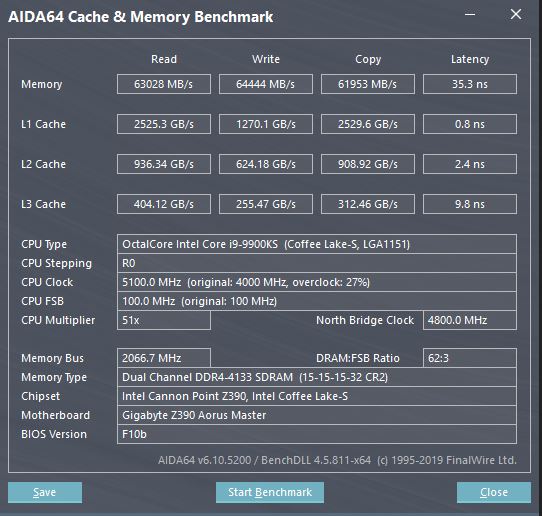
Tuning RAM is pretty rewarding once you get it tuned to its limits. 4133 / CL15 / 35.3ns latency ... AMD would still dream to be able to achieve anything close to Intel figures right now, but come next gen who knows...
Attached Files:
Johnksss, Mr. Fox, Rage Set and 1 other person like this. -
-
Dang sorry to hear..that sucks. The Extreme II Alpha is the second revision board right? I hope mine doesn't crap out lol... same board.
-
It isn't so much that they receive hardware no one can get. It's rather the very few people(Vance is the only one that comes to mind) with a direct technical role in companies can have a much easier time binning with socketed GPU dies if they so chose to. And as far as I know, generally, that's not being done anyways. Also I somehow don't think sitting on an assembly line, swapping hundreds of dies, and testing OC is all that fun anyway.
The specialized OC software like AB Extreme can help but I seem to remember they are somewhat accessible if you are kinda in that circle on hwbot.
Everything else is mostly money.Last edited: Feb 3, 2021 -
Yikes, hopefully it just one point of failure (and the least expensive one at that).Rage Set likes this.
-
Hi
does anyone use coollaboratory liquid here ???
or what is better for longer life " thermal grizzly or coollaboratory"
I have been using thermal grizzly for a long time ,,..but now is quality little weird
,.before it used to work for a year or more and now maybe just a month and is completely dry ??
and coollaboratory editions
pro // extreme / ultra
what is the difference ????
thanks for advice -
During my research, I'm not the only one with this problem. I don't understand what is going on with Asus lately. The first version of this board was RMA'ed through Newegg. I sold off that board and upgraded to the new revision. This one could possibly be dead. I don't have another TRX40 board to test the CPU. So begins the slow process of eliminating components.Johnksss, electrosoft, Mr. Fox and 1 other person like this.
-
Please keep us posted. I hope it is only the mobo. Any plans on what you might replace it with yet?Rage Set likes this.
-
![[IMG]](images/storyImages/2467261.jpg)
![[IMG]](images/storyImages/2467262.jpg)
![[IMG]](images/storyImages/2467257.jpg)
![[IMG]](images/storyImages/2467263.jpg)
CB11.5 = 25.4
CB15 = 2335
CB20 = 5592
CB23 = 14344
This was 5.3GHz no AVX offset, 1.47V (1.43 or so ran some tests, but had to crank up the voltage for some later tests, so...). Turns out each step is around 100mV going from 5.1 to 5.2 and 5.2 to 5.3. I have 5.2GHz now running no offset at 1.37V without an AVX offset, stressed with the 30min CB23 run. Still have to stress it in more ways to prove stable, but that is a good start.
Temps are in the high 80s, almost 90 (or at times 90) at 5.3GHz. So that will not be my daily driver. Might try 5.4 on the single threaded tests that are easier to complete or very fast running benches (wPrime).
wPrime 32 was 2.698s.
![[IMG]](images/storyImages/2467265.jpg)
Cannot wait to try to get Win 7 setup or a benching drive of Win 10 to get better scores. -
I added QD2 fittings so I can pull the GPU from the Banshee bench without having to mess with opening coolant lines. The fittings are aligned so that I can reconnect them without the GPU as well to run the loop through the CPU only.
Very nice. Congrats, bro.
Let me know if you want me to upload a W7 ISO that I finally got to work on Z490. It was a real pain in the butt. Wasn't nearly as easy to get it to work as Z390 was. -
Nice on the quick disconnects! I use QD3s between the machines in the server rack, then the EK QDs for the GPU in the Z490 build. I was going to go all EK QDs, but the order didn't process and the EK QDs sold out. Performance PCs, because the not processing was on their side, gave me a discount since the sale ended and the parts were out of stock, so the QD3s cost me the same as the EK would have.
And I probably will ask you in about a week (too tempting to play with when I have to do that work project). I take it the same issues of USB compatibility and NVMe are going on with the Win 7 ISO, or something more involved? -
Yes, primarily the USB 3.X compatibility. I also found the reason the installations were failing was after the first reboot from Windows 7 Setup needing to use the Advanced Boot Menu and disable Driver Signature Enforcement the first time to accommodate the USB 3.1 drivers that have been modded for Windows 7, otherwise you get trapped in a cyclical BSOD.
I use the larger QD3 fittings on the big desktop that I use for benching. The QD2 fittings are made the same, just smaller and a better fit for the smaller bench.Johnksss, Papusan, Rage Set and 1 other person like this. -
Well today was a bit of a nice day I suppose?
I got for fr99 the following:
2x Dell P2715Qt 4K IPS monitors
1x4TB HDD / 3x 1TB HDD
60ish GB DDR3 (4GB DIMMS)
8 port KVM
20ish USB C to DisplayPort adapters
Some Black switch mechanical keyboard
1Gb/s Intel NIC
I need a bigger desk...
What companies decommission to us sometime is pretty absurdJohnksss, Mr. Fox, Rage Set and 1 other person like this. -
-
Was his name Sherlock, and did he have a brown stain on the seat of his pants?
Dang. Yeah, that sounds like a nice day to me. Congrats. That's quite a motherload of free goodies, bro. -
I'm completely done with Asus. Crossed out on everything. Two different boards, two different revisions. Same result, hardware failure. To be quite frank, I did not really overclock the CPU on this mobo. I learned my lesson after the first board went out. Hopefully my CPU is okay. If there was a 250 dollar TRX40 board out there, I would get it to test out the CPU. Unfortunately for me, all of the TRX40 mobos are 450+
I'm going back to X299 now. Perhaps a 10980XE is in the cards. -
It is really sad the way ASUS has taken such a terrible turn for the worst. I want nothing to do with them at this point for similar reasons. I have the Prime Z490M-Plus because it is the cheapest money can buy, not because it is a good product. And, it's not. I just hope it doesn't fail and take the 10850K with it if/when it goes.
I wonder if Brother @Johnksss has a way of testing the CPU for you, of if he knows anyone that does.
NewEgg has a good mobo return policy as long as you return it within 30 days. If you have a local MicroCenter they do as well.Last edited: Feb 3, 2021iunlock, Johnksss, Papusan and 1 other person like this. -
Microcenter has 10980XE retail boxed chips for $899 currently. At one point they were selling for $799 which is insane considering the beast that chip still is.iunlock, Johnksss, saturnotaku and 3 others like this.
-
I saw. $899 is a great price for that chip. MC is about 60 mins from me in New York. Anyone else in CT want to take a drive with me to MC? Hahaha.iunlock, Johnksss, Papusan and 1 other person like this.
-
Yeah, haven't been liking asus premium for awhile while it seemed other elements were going down. Elmor also left awhile ago (was one clue where things were going).
And for TX40, the increase in board prices really just harmed the platform without the 16 core chips available to get people on platform. AMD is bringing back 16- core chips for Zen 3 TR, but the TX40 platform now likely only lasting a year... it just feels like AMD didn't think it through.
But look at how even mainstream boards have increased. Now, with tariffs increasing some costs, including GPUs and MBs, by 25%, along with the Fed printing so much money that the dollar is devalued which means that will eventually increase costs of goods on top of the tariffs, prices are never going to be sane again.
I blame all political parties here, but won't go into who is responsible for what and the ignorance of shutting down the economy or low interest rates or tax cuts before economic problems arise, etc. (Yes, that points to both Obama and Trump, I'm an equal opportunity hater , and I've got choice words for Biden as well already).
But I am surprised that because Intel gave no competition and AMD prices their platform so high, Intel has a price point with the 18 core that still is a good option (I just don't like the X299 VRM).
That is why i decided to give GB a try. Don't like the limited options in bios, although you get some back through software if you use it. But, I also saw how many people had problems with asus z490 boards and didn't want to bother. So far doing fine. Still getting used to the platform. -
Are there any decent air cooling options for an X299 CPU?
-
https://www.3dmark.com/pr/847305
Decent OC, no XOC vBios. 4 sticks of 3200 memory with auto timings. 4.8 on the 9900K. Going to swap the RAM for my 4800 set and work on the CPU OC.
LOL, pointed to the wrong URL. The first link was not mine. It was one I was comparing my score to.Last edited: Feb 3, 2021Johnksss, electrosoft, Papusan and 2 others like this. -
I am sure you can get away with it if you run the CPU stock, but I am not sure what air cooler is best suited for it since I do not use air cooling.Johnksss likes this.
-
Bro Fox. Does this behaviour smells as from the newer/newest OS from Redmond?
Anyone knows what's wrong with Fire Strike Combined scores ? Why are they fluctuates so much? hwbot -
Yes, exactly. In fact, 12161 would be an abnormally high combined score for a 10900K on anything newer than 1809, and anything newer than 1809 will have significant variance between runs. Anything above 10K would suggest a very high overclock, the wild fluctuation whether stock or overclocked. At 5.5GHz, swinging between 9.5K and 12K is normal for newer versions of Windoze OS X.
-
You would need to con a bunch of users to submit scores for that number to go up.
Really? And just how do you propose to get past the falcon security? Since that is what has been holding us up since the 2080's hit the floor. And we have really good programmers as well. Flashing another vbios from another card is doable, but change one byte on that card and it either boots to black screen or error code 34. Would be really interested in hearing how you got past that on 2080's and higher gpus.
Got it to run at 4400, but it was like ddr2 performance. That dram calculator does help alot, but only up to 3866 in my case.
Damn, sorry to hear that. As I was telling @Mr. Fox the other day, another asus board just bit the dust. I just really want my money back at this point.
That's what I thought at first, but it took out my CPU and my ram. Patriot replaced all 4 sticks at no cost and Intel sent me a check for 765.00 for my 10900K since they didn't have any to replace it with.
There is a section for that, but they still are included in the world rankings pool.
Nice latency, but everything else is pretty low. Are you able to run that at 46 or 47 multiplier?
Now that one I don't have. A TRX40 board.
Same here, pretty much done with their high end line for now. Running MSI Ace Series as They were out of the Godlike and Out of the Gigabyte as well. EVGA doesn't make a x570 board so couldn't go that route.Last edited: Feb 4, 2021Papusan, ajc9988, Rage Set and 1 other person like this. -
You need Benchmate for Cinebench R23 from Maxon. I wonder how long it takes before Benchmate is needed for Futuremark UL 3Dmark Suite. First 3DMark03/05/06 then 3DMark Suite

This reminds me about First We Take Manhattan, then we take.... Berlin
-
Mind you that was just a snap of many during the tuning stage. For the given board and CPU, this is the limit and I think there are only maybe three people with this board that can achieve a stable tune as shown with the tight timings. It's running at 53x with the frequency and timings at the moment.
Those are 4600 G.Skill RoyalZ sticks. It posts on the Dark board np at 4600, but ideally that's not the best. Running higher doesn't mean better. It's all about the timing and having a balance that brings real world results for the given application. Gaming, work load etc...
When looking at Aida64, you don't tune based off of just looking at the Read and Write. The real world indicator is more focused at paying attention to the Copy speed data then obviously the timings. A lot of this is RAM willing, but also limited to the board...
This is also a 9900KS not a 10900K. Are you able to get your latency lower, along with your timings? With most of the Z490 boards daisy chained, I'm hoping to at the very least match the tune that can be achieved on the Z390 board. I have a few confirmations with those that have the Z490 Master being able to run simliar settings so that's good.
Try to get your latency down some more, board and RAM willing... Last edited: Feb 4, 2021
 -
I don't blame ya... Asus hasn't even been on the short list this season, with the exception of maybe the Extreme, but not paying that much for a board lol when you can get an EVGA Dark for much less and IMO built much better overall for less money.
I've been just contemplating on whether to turn the X299 Dark w/ the Delidded 7980XE into a main rig... with seeing all this talk about the 18 core beast it's really swaying me to go that route lol...we shall see.. .but what to do with the Z490 Master w/ the Delidded 10900K? I guess I could just sell it... Hmmm
I've been pretty impressed with Gigabyte after the Z370 boards, starting from the Z390. My current main rig is the GB Z390 Master and for the price point it's among the top for sure...very strong board.
For the Z490 I also opted for the GB Z490 Master again as it was the most appealing board to me at the price point without spending $1000 for a wasteful E-ATX like the Asus Extreme, which would be way overkill to play games on haha...
I've mentioned this before in the past, but the whole Gigabyte bios thing IMO was way over blown ... there's nothing wrong with it lol. It works...it's feature rich and just as easy to navigate than Asus bios... What really made me LOL was the fact that after a few youtubers released some videos talking down on the GB bios, then all of a sudden people who didn't even own the board started not liking it just because he said, she said... It was silly..
There's nothing wrong with the GB bios for the class that it's in. I actually like it a lot. My Z390 is running an earlier firmware w/ the the proper microcodes and it runs flawless. There's a firmware for the Z490 Master confirmed to be working pretty well for my RAM tune so I'm pretty content with that. There are some pretty awesome people willing to customize the firmwares for GB so at least there is that, but that's mostly a RAM feature issue, not overall functionality.
For anything beyond normal computer use like gaming, work tasks etc... that's what the EVGA Dark's are for.
-
Ummm, that's why I asked if you could go lower. It's a 9900KS and not a 10900K which is higher in latency.
And as shown here, it surely does go lower as this user shows. That's why I asked.
I would love to catch this guy, but my memory overclocking is nowhere near up to par.
electrosoft, ajc9988 and Rage Set like this. -
My problem is that it doesn't have some of the per core overclocking and certain aspects of control of the CPU seen on other motherboards. You know the Easy Tuner returns that feature, and that it is a program that seems nice, although trying voltage for Vcore in bios results in lower Temps than doing so in that software. I don't know if they are relying on Die sense for one and socket sense for another or what.
Now, something GB gives that others do not in all cases is the frequency values for switching for power delivery.
It worked well with my sfp+ 4 port 10Gbps cards I bought from server pull surplus, allowing for flashing the card firmware from within the bios menu.
I'm not saying the bios is not feature rich. I'm saying it lacks certain features i want. Meanwhile, I purchased it because the hardware itself seemed robust. You can change bios and add features, but you cannot change the hardware after the hardware is sold.
For ram, it booted my old 4133 sticks, but it wasn't stable without additional voltage and tweaked timings. But it did support tightening these stocks to 16-19-19 with 1.43V.
I'm critiquing the product, not saying it is bad. Criticism is what helps advance to get us more features. Preventing criticism helps to stall forward movement.
But that is all I meant, which is what I said previously. I'm getting used to the platform. You get some features back that are lacking in bios through using their provided software on the OS. And that I need more time to fully explore the board. That isn't calling it crap and I have no idea who you are referring to. This is purely my opinion on what I've seen so far. I purchased at one step under you with the Aorus ultra. My Temps on the VRM look great at this point. Two of the three m.2 slots can be used without reducing sata ports (if using NVMe drives, using sata m.2 would drop one sata port on one of those two m.2 slots being populated, with the other not listing support; see the manual). I like the look and feel. But I'm not regurgitating others, I'm stating MY experience with MY board and hardware.
Edit: also, I would need more time in the software on the OS to fully see what it allows and although it lists all cores, I did not see if it allows setting your selection of the cores for which is higher or if it solely goes in the core order of 0-7, along with not looking to see if you could turn off cores in the software.Last edited: Feb 4, 2021 -
Man, this updated version of Catzilla seems a lot better. I saw a peak of 835W on the GPU screen, frequently over 650W, and just over 1100W from the wall on both 1440p and 4K. Maximum NVVDD peaked at 1.500V, LOL.
I initially had trouble installing and then launching it on Windows 10 20H2 and LTSC. It would cause Windows 10 to hard lock during it's hardware scanning when you first launch the app. Then I found that it installed and launched without a hitch in Windows 7, but I noticed my 4TB data drive and the ASMedia SATA controller it is attached to vanished from Windows and in Device Manager during the hardware scanning. It did not come back until reboot, then launching Catzilla a second time caused it again. So, I went into the BIOS and disabled the ASMedia SATA controller and connected that drive to a native Intel SATA port and now it works fine in Windows 7 and both versions of Windows 10. Strange.
It really sucks how HWBOT calculates points (or doesn't give any) now. It's almost more hassle than it is worth uploading results when they don't count much. No global or hardware points for either one of these top box scores. That really blows and sucks.
https://hwbot.org/submission/4675096_mr._fox_catzilla___1440p_geforce_rtx_3090_42532_marks/
https://hwbot.org/submission/4675106_mr._fox_catzilla___4k_geforce_rtx_3090_21563_marks/
Last edited: Feb 4, 2021electrosoft, ajc9988, Rage Set and 2 others like this. -
Korean Quasar Zone website with review of 3090 k|ngp|n
Many nice pict from the internals Etc here is one
![[IMG]](images/storyImages/826e90aa6a7665b311249f34711903a6.jpg)
-
Phase 1 (of like 5): Initial KPE mount with the Enthoo 2 that arrived today.
It is a little smaller than the Meshify 2 XL length wise so the tubing get a hair bit of slack. One major complaint is the lack depth in the rear for cable management. It is very shallow and the fan guard frame in the front was a pain to remove.
The tubes are too short for a split fan/rad mount in the front and too short for a side mount. It's either front tubes down or tubes up rad shifted down or top mount which won't fit atm with the NH-D15.
I was going to disassemble my DG-77 and take the EVGA CLC 280 from it for a Q&D AIO, but the wife informed me she wants me to move all her components over to it as she loves the look so I'll be moving her system to it. Fitting, as she took ownership of my KP shirt from my KP 1080ti a few years back.
The way the KPE heats up the NH-D15 is pretty toasty to watch. I'll be popping in an EVGA CLC 360 Sunday for an intake side mount so intake fresh front KPE, intake fresh side CLC 360. I could also go KPE 360 up top, CLC 360 side or front too.
With the rad mounted front, tubes down vs sitting on top before temporarily, the pump noise has been cut in half with no intermittent gurgles. I have to get right up on it now to hear it meaningfully.
-
Ummm you posted a RAM bench of an EVGA Z390. A much superior board. Not a fair comparison.
I posted a RAM bench of my daily gaming rig that's a ~$200 Gigabyte Z390 Master board.
4133 /15-15-15-32 / ~35 Latency is where it's the happiest on this Gigabyte Z390 Master board. That's actually pretty good given the class of this board.
I spent way more time on it than I should have tuning it lol, but that's where I ended up settling.
Yea I hear ya about RAM tuning... you'll either go grey or pluck out all your hairs, which ever comes first if you get lost in it. I must say though, extremely rewarding...
However, for gaming... this is all way overboard. It was for fun and for sheer curiosity.
Looking forward to seeing where you end up. You can catch that guy...*that one meme here... You can dooo iiiittt.Johnksss likes this. -
Wow, you just don't want to accept an L.
Edit:
I was able to get 4333 to run, but with crappy performance on the 5950X. I backed it down to 3866 at the moment. CPU score went up (Timespy) and system seems far more snappier. I need to try it with 4 sticks of memory as the viper is what, single rank and it seems to run better with dual. Or something like that. Not sure.Last edited: Feb 5, 2021electrosoft, Mr. Fox, Papusan and 1 other person like this. -
Oh for sure. I completely get where you're coming from and you've made some great points. There are many pages that GB could take out of Asus's book and they did with some things, but mainly people were complaining about the UI and organization, but GB did fix a bunch of things taking the criticism constructively, which was nice to see. I was just pointing out the over reaction of others (not you) that was heavily influenced by some YT reviewers complaining about the GB bios, nit picking it to pieces when in reality it wasn't a big deal at all. It really just displayed laziness and IMO it screamed click bait just to complain about something.
One thing that attracted me to GB during the Z370 days for example is how they were the under dog, overshadowed by the likes of Asus, MSI etc... My Z370's did run pretty warm lol, but I didn't mind as they were priced well and performed pretty well too comparatively. The GB Z390 line really came out with a big bang and it was nice to see them flex against the typical picks.
As for your RAM try using a modded firmware for Ultra board as it should yield you better results. Feel free to DM me if you need some help.
ajc9988 likes this. -
Huh? That's so irrelevant and has nothing to do with anything lol. Not everything is a competition.
You posted an EVGA Z390 Dark RAM test LOL... how do you find that a fair comparison? Of course that's going to perform better.
That's like trying to compare a 3990X Threadripper to a lower class CPU and expecting a better outcome in MT benches. Not going to happen. It's not a matter of a competition ROFL... It's reality.
The EVGA Z390 Dark is pretty amazing for RAM tuning...iirc I was able to get the Latency in low 32's with some nice timings. Of course it wasn't stable at CL14/15's, but it held for some tasks...
Anyway, curious to see if you can catch that guy... post it up if you do.
Edit: @Johnksss all casual, nothing serious lol... joking and humor doesn't translate well over text.Last edited: Feb 5, 2021 -
AMD is tricky isn't it? Very picky too.. On the TRX40 board it did well right around 3800's with tweaking the IF to balance it out. Some benches did better at 3733...
How does your 5950X game? Notice any latency? I definitely noticed latency with the 3970X, even with the bios tweaked disabling half the cores etc... there's this weird stutter/pause that is pretty annoying.
Oh also, if you notice like on some games (CB2077) for example, the core utilization balance is all over the place with AMD CPU's vs Intel... Just something interesting to observe...
I'm really curious how you like the 5950X for general gaming etc... Almost pulled the trigger with going AMD before getting the 10900K/Z490..Johnksss likes this. -
No worries brother! What i was getting at was could you go lower is all. Nothing nefarious. Reason # two being this is where you tend to thrive at. memory overclocking and timings and all. I personally need to really brush up on that area of overclocking, but have been very lazy with it. So benches want better latency while others want better read/write/copy settings. So it becomes an overall situation in the end. Of course gaming clocks are going to be different and way more stable than benching clocks. That's why I never ask people if they can game at those clocks unless i'm just kidding around.
Also, you have to play the hand your dealt, My hand consist of Patriot Viper 4400 CL19 on quite a few different boards, but messing with this AMD stuff I now see where I was going wrong with the intel stuff. I'll need to boot that system up and see if it translates in the a gain or wishful thinking.
Also, you posted a 9900K system with high end ram against my lowly Patriot ram and 10900K instead of using your direct compare with your 10900K setup, how is that fair? See, I can play that card as well.
As to the second picture that guy totally smoked me with his setup and others have done better with worse. Pretty sure I could hunt down those folks as well, but not really neccessary.
Yes, it really is!! Still trying to learn how the voltages translate in to real performance and not just a bunch of wasted watts.
That's where I'm at right now, but going higher I lose half the uncore speed and performance seems to drop by like 10 to 15 percent on average. I have been using Timespy cpu test to see if it's possible to catch other AMD users at 20K+ CPU scores. My best is 18.7K Still a ways to go on hat front.
As to gaming, it's pretty damn smooth. I was kind of surprised. I played Blackops, CP2077 and GTA5.
I didn't check that, but will next time I fire up those games(I run those games in 16/32). I did have to readjust my aiming though, which was weird. Kind of felt like G-Sync was on and running at like 240Hz, which is crazy. Monitor is only 144Hz.
I see that sort of stutter when I dont have the ram running optimized. Or trying to use the presets and WOW, double performance hit. That Dram Calculator made a serious world of difference! Gaine like 5k on score from using it. -
A short run before the bed
Dang, its day now, LOOL
https://hwbot.org/submission/467526...geforce_gtx_1070_18sec_700ms?recalculate=true
![[IMG]](images/storyImages/2468450.jpg)
Al those should be possible to take
Edit. 12th
https://hwbot.org/submission/4675280_papusan_gpupi___1b_geforce_gtx_1070_18sec_658ms
![[IMG]](images/storyImages/2468470.jpg)
Bro Fox. This will only be a wet dream! GPUIPI for me and Catzilla for yooo 3770K ain’t for 3D benches, HaHa
Last edited: Feb 5, 2021Rage Set, electrosoft, Mr. Fox and 2 others like this. -
All good all good as always! Those Patriot sticks are such a great deal. I got a few of the 4000 sticks during BF, but haven't done anything with them yet. Lowest cost Samsung B-Die money can buy for sure. There are a few ways to approach finding the limits of a given bin with RAM. The interesting thing is that some RAM may post and run ok with lower voltages, but perform worse with more, vice versa. Matching the timings just right with the proper values in the bios is the tedious part as you know. The AMD RAM calculator gives a decent ball park to work from and saves a ton of time...that thing is awesome.
Did you ever game on your 7980XE? I'm curious how it compares to the 5950X etc... but yea check out the core utilization next time you fire up CB2077. Pretty interesting...
I wish I had more time right now to dive into everything. The 3090KP is still sitting in the box. I barely had time to delid the 10900K and test the Z490 on the test bench. Slowly but surely...
-
That was one of the main reason I bought them. A great deal on price. They have netted me some nice numbers, but I do see i'm not using them to their full potential.
I have seen this also. As mentioned earlier. More does not always mean better. So true.
Yep! I was pretty much lost without it. And not having ran AMD in like over 10 years has a guy pretty rusty!
Yes I did game with the 7980XE. I may have some pictures of that. Will have to look around and see. I will also check on the core utilization later today.
My KPE sat in the box for a few days as well, but I quickly found time to test it before it's 15 day return windows. Just in case
Join the club, but being busy is better than not considering all the folks out of jobs around here. I been having a little time in between work to finally get back to some testing. I'm still on the fence about AMD, but we shall see how that pans out over the next few weeks. Chip is a solid, but they all seem to tap out around 4850..... before you have to go extreme cold. From what I have seen so far.
So I just played some CP2077 and the utilization is every other thread with thread 1 and 13 seeing the highest core speed. This was gaming at 4.8 ghz. The other 16 threads were like 0 to 5 percent at best. Mostly zero percent though.Last edited: Feb 5, 2021Rage Set, electrosoft, iunlock and 1 other person like this. -
Those 7980XE gaming pics would be great if you can find them. One of the reasons why I was considering turning the 7980XE into a main gaming rig is to put it to use and not worry about the next best thing coming out in the near future lol. AMD is chasing core counts, while Intel is picking themselves up off the ground at the moment, while still holding the crown for frequency. It won't be long until Intel comes back around, but I think for guys like us it's best to hold off to see what AMD launches next to see if it's worth switching over.
As great as the 5950X is it's hard to justify getting that since I have the Delidded 7980XE collecting dust with two more cores that can actually hit 5.0GHz+. Paired with the X299 Dark, it should remain very relevant for a while. The cons to the 7980XE is that it gulps fuel like no other, but hey... we don't talk about gas prices around here lol.. it's quite the opposite as we welcome more power draw.
On the other hand the 10900K is a Monster of a CPU and the added two cores is a nice addition to the already great 9900K's. It's crazy because, while the tech media is pushing core counts, the reality is that for a gaming rig 8-10 cores is all you really need. Maybe 12 in some titles and more in a very small list of titles/sims etc... For those that game at higher resolution 1440p and 4K, higher frequency is where it's at and this is why the 10900K remains King as AMD still can't come close to the 53x all core on the 10900K for high res gaming.
It just feels odd ditching the 9900KS that's running flawlessly. First World problems I guess and for that very blessed.
Interesting about the core utilization on the AMD yea? I'm curious now between the 7980XE @ 4.8GHz vs the 5950X @ 4.8GHz in game FPS... hmmmm
And you're right with these times right now it's very fortunate to be busy rather than on the opposite side of the fence. Very grateful for sure.. I wish the best for those who have been bit by this plandemic. *cough* pandemic.
Maybe when I get the KP installed into the 3970X rig and if you still have the 5950X we can have a discord session or something to tune some RAM... I'll install the patriot kit.
Last edited: Feb 5, 2021Johnksss, Rage Set, electrosoft and 1 other person like this. -
It's a weird place to be right now. I had a 5800x on order along with a 5600x for a sff buildout for my brother (which is now a microATX buildout in progress) and canceled the 5800x. For gaming at 4k and my workflow I had already discounted the 5900x and the 5800x is too much like the 9900k/ks in regards to my needs....so for myself back into the look and see pile I go. As posted before, I even returned my 10900k + Z490 Strix as it wasn't compelling enough to keep.
I'd be curious to see your final results for gaming 7980XE vs 5950X @ 4.8ghz.
And the current climate has been financially a blessing in that closing out the year's books we are way ahead of last year both business and personally. Equal or greater income plus removing many outlets of luxury spending we would normally do (vacations, much more eating out, window shopping, etc...). -
You're absolutely right. Very strange time to be in right now in the Tech world. With 4K gaming being a real thing, that's the bar that will remain for a while as 8K is far away at a distance. We can't even get 4K above 100 fps right now lol, fully maxed out. Therefore, with 4K being the new standard (because it's possible now ..ie.. playable) the current hardware right now with the exception of the 3090 still is far behind chasing the 4K horses tail. The higher end CPU's are more than adequate right now and will likely continue to remain ahead of the 3 way race between, Screen Resolution, GPU and CPU.
However, for 1080p and 1440p gamers the reality changes drastically in favor of the current hardware being on par to push those resolutions, which applies to most people.
The new gen of laptops coming out with the non gimped 30 series are quite impressive and it's something that could easily accommodate someone going with microATX type of builds etc.. Being in a situation like yours where you realize the reality and acknowledge the fact that a lot of the current hardware is way more than enough for your needs is very much on point. I openly admit that as well.. the CPU's and GPU's that I have are way overboard, with the exception of when I play certain titles, rather flying sims at 4K that need every bit of power that it can get.
There are a lot of factors to consider of course, but for most gamers they could get by just fine with a proper gaming laptop. Desktops are fun, I get it, but with these new 8 Core laptops with more than adequate GPU's, it's really hard to not have on the short list if going with smaller builds.
I'm really looking forward to the next gen GPU's already as we're still below the threshold for most 4K gaming even with the best hardware available right now. I think the leap will be huge for the 40 series due to the jump (improvement) in nm processes and tech in general. DLSS has really opened the reality for good quality (image) gaming for those who couldn't experience it before so it's pretty exciting. Ray Tracing on the other hand is that extra layer of icing on the cake right now, not a necessity, but it's nice to see that finally maturing as well. (Note: Another valid reason why I skipped AMD GPU's all together this go around due to them not supporting RT. As a maxed out settings @ 4K type of gamer, not having RT would make no sense at the price point.)
Congrats on a good 2020 that's really awesome. The whole situation did cut out a lot of the luxuries that we're used to for sure. What I mean by that are even simple things like eating out etc.. normal stuff. On the bright side it does leave the wallet a lot happier, but man do I miss normality. Watching Netflix and seeing "normal," really makes you miss it. "Remember when we could go out and get a burger?" #GeeThanks2020-21 LOL.Johnksss, electrosoft and Rage Set like this. -
Only one lack to be there I expected to be yesterday 10th
https://hwbot.org/submission/4676015_papusan_gpupi___1b_geforce_gtx_1070_18sec_643ms
![[IMG]](images/storyImages/2468952.jpg)
Edit.
Nr 9 and reached the target. Top 10 of 1070 2227.5 boost seems near the limit with the Gpu max out at 44C. Too hot. Water cooling would help. The rest on the ranking is well above 2250MHz. Maybe an another driver would help me to boost the scores.
https://hwbot.org/submission/4676086_papusan_gpupi___1b_geforce_gtx_1070_18sec_502ms
![[IMG]](images/storyImages/2468991.jpg) Last edited: Feb 6, 2021Rage Set, Mr. Fox, Johnksss and 1 other person like this.
Last edited: Feb 6, 2021Rage Set, Mr. Fox, Johnksss and 1 other person like this. -
I had debated getting another 7980XE or 10980XE setup, but was like....weighing the odds between the two (X299 Dark has the correct 4 slot spacing for NVlink - but I already have a work around for that so that is no longer an issue). Did a lot of looking around and found that for multicore performance AMD had more wins in the win column than Intel. (Not talking about their Xeon line.) Plus it had PCIE 4.0 / NVME 4.0. So that was my thinking in picking it up. Now, this setup is only for multicore benchmarks as I have the 10900K(Top bootable speed 6.2 ghz - 5.8 ghz stable on some benchmarks) for single core benchmarks. I have yet to put the SS on the 5950X either, so that may gain another 1 to 3 hundred Mhz in clock speed. Still need to master water overclocking first. Also to note, the 5950X already beat most of my 7980XE multi threaded benchmarks so for me personally I would have been going backward if I went back to it.
(As to gas, im 91+ octane all day every day no matter what the price is.)
List of cpus:
I have a 9900K(P870TM1), but no board. I have a 7700K in my server. I have a 6700K in my Qnap Diskstation. I have the 940XM in my Car computer laptop. I have the 4930K as a kick around backup system. I have the 10900K and now the 5950X.
Between the 5950X and 10900K it pretty much now covers all benchmarks for me as I did not buy any of this stuff strictly for gaming. Benching and computer repair when they are not benching. I wish intel would have came out with a 11900K 10 core instead of the 8. That would have been perfect for this BS MXIIE Asus board as it says it's PCIE 4.0 "ready". Does PCIE 4.0 make a difference? It does for storage(pretty sure the 4k iops is a toss up as well), but as in helping the gpu seems to be a toss up.
Sure, we can do that as I think I'm going to keep it, but may get a different board though. I wanted the Gigabyte Extreme or Master, but my Microcenter did not have them in stock...iunlock, electrosoft, ajc9988 and 2 others like this.
*Official* NBR Desktop Overclocker's Lounge [laptop owners welcome, too]
Discussion in 'Desktop Hardware' started by Mr. Fox, Nov 5, 2017.