 Problems? See this thread at archive.org.
Even with a wimpy baby-girl 47x16 and 3200 RAM overclock, the performance is truly excellent. And, the temps are really low at 47x16.
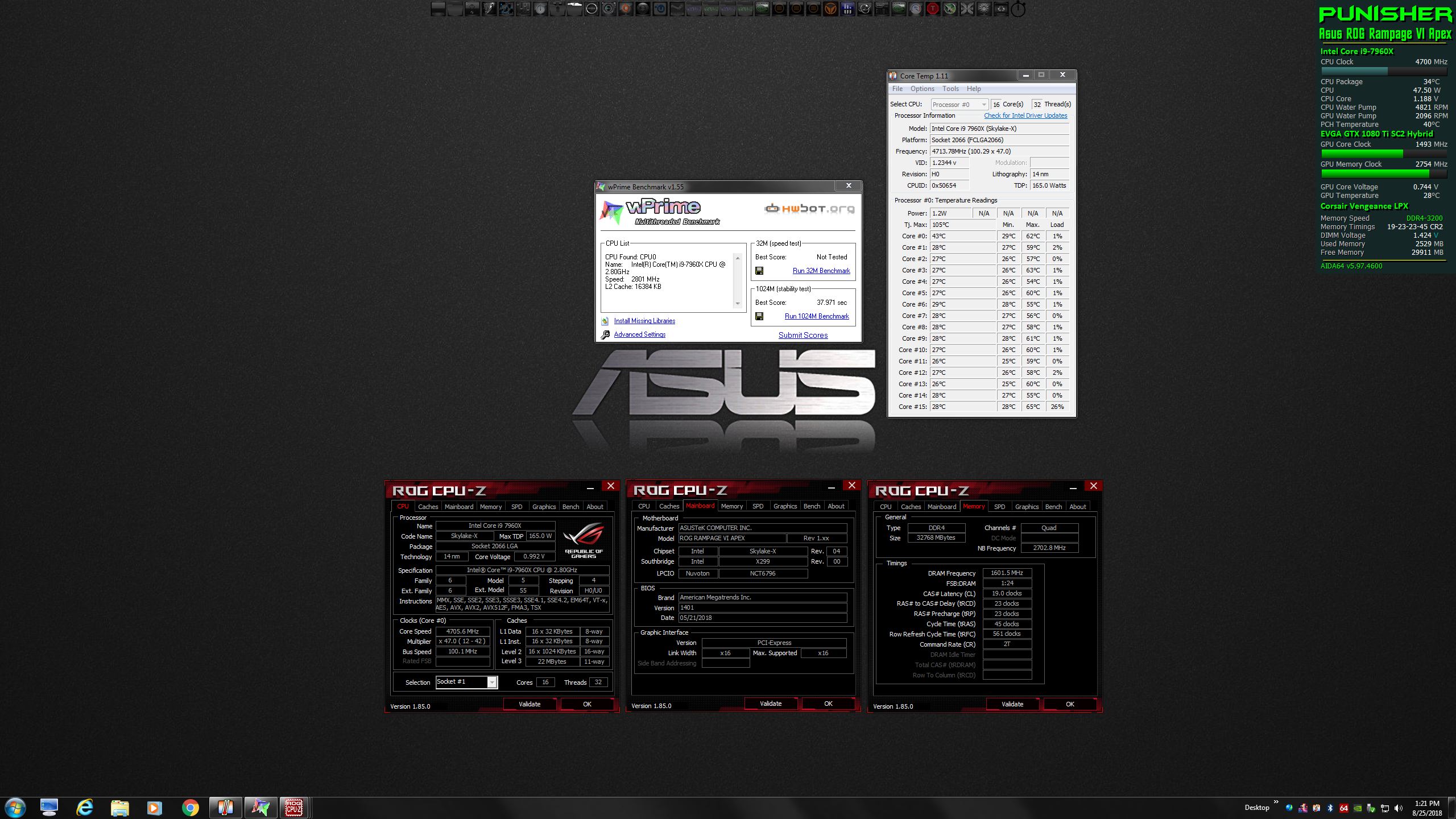
-
-
Hummmm, on the Apex it looks a bit slow? And voltage seems a bit high 1.48V?
![[IMG]](images/storyImages/J6iAUfo.png)
As to TB. I Never really gave it any thought to running it on a desktop board, since most of the high end boards give you access to the timings. Not to mention already tried and true profiles loaded on most of these boards.
You need DIP5 V1.05.14
And more than likely you will also need the ITBM driver as well. V1.1.0.1005.(NVM It is still crashing with this version)
Edit:
1401 nor 1301 are really not that good. They tend to crash a lot when messing with memory and then love to sit in the 00 or BD error codesLast edited: Aug 25, 2018 -
I cannot find an AI Suite that runs for some reason. Isn't DIP5 V1.05.14 part of AI Suite? I have the ITBM driver installed. I will try lowering the voltage. I had to increase it for the Maximus X Hero board for 4200 and I just coded it to the XMP profiles. I may have to temporarily boot it up on the desk with the iGPU and reprogram the default SPD for this board to use it correctly. I started tinkering with it after the new ME goofed everything up and got all but the 4 stick problem above 3800 by using my own values instead of Cosair's.
-
Definitely going to have to do something with the cooling before I can do any fancy benching beyond this. Might break out the AC unit before I am able to buy a water chiller. Both of these had a little bit of thermal throttling.
http://hwbot.org/submission/3924579_mr._fox_cinebench___r11.5_core_i9_7960x_45.7_points/
![[IMG]](images/storyImages/KU9ytRM.jpg)
http://hwbot.org/submission/3924577_mr._fox_cinebench___r15_core_i9_7960x_4338_cb/
![[IMG]](images/storyImages/rSq9hLB.jpg)
-
OK, one issue solved. It's that crappy onboard Intel NIC POS causing slow desktop access and RAM slowdowns. I uninstalled the drivers with Revo and disabled it in the BIOS and immediately get access to my desktop (without the 1 minute lag crap) and look at the RAM speeds. LOL. Now I wonder if that was what was buggering up the memory write and copy speeds on the ASROCK Taichi. It had the same crappy NIC.
Way better read, write, copy and latency now.
@Robbo99999Vistar Shook, KY_BULLET and Papusan like this. -
Really? I thought it was because you're running 1004 with better timings and higher cache? I could be wrong though...
My nic is enabled and so is my 10G nic card.![[IMG]](images/storyImages/BS7x1TD.png)
Aisuite3 3.00.13
Dips 1.05.14Mr. Fox likes this. -
Here's another. I have 1004 on BIOS #1 and that seems a lot better than the crappy new one on BIOS #2. But, AI Suite won't run on either BIOS version.
![[IMG]](images/storyImages/image_id_2056836.jpeg)
-
I still don't think the Nic card has anything to do with it though.
I'll upload it in a few.
https://drive.google.com/file/d/1C1-eS0tvVweX1r0xMtOgoCKxWDHdZnCL/view?usp=sharing
![[IMG]](images/storyImages/qCGC7fo.png) Last edited: Aug 26, 2018Mr. Fox likes this.
Last edited: Aug 26, 2018Mr. Fox likes this. -
Yeah, seems weird that NIC card would affect RAM efficiencies, which is what JohnKSS has been questioning you about above.
-
Thanks, Brother John. Same issue. I guess I better do a clean OS install of W7 and W10. I removed all drivers and ASUS applications with Revo and ran RegOrganizer cleanup before taking the other system apart, but maybe there are files from the Z370 installation that are goofing things up on X299. Since I have to do that, maybe I will tinker with CPU RAID with that DIMM.2 slot and see how that works. Do you find that works better than the normal PCIe slot on the PCH side?
-
Just delete the Turbo driver and let AI reinstall it's version of the driver.It will have a triangle more than likely, but AI will openMr. Fox likes this.
-
Yup, AI Suite works fine if I remove ITBM and leave it as an Unknown Device with no drivers. As soon as I install the driver to fix that in Device Manager, AI Suite crashes, will not launch, and I start having random Explorer.exe crashes and BSOD IRQL_NOT_LESS_THAN crap. I guess we will have to choose one or the other, so I will have to live without AI Suite until ASUS fixes it... if they fix it. Will have to control fans in BIOS only.
AI Suite does not seem to install it's own version of the driver. After reboot it still shows as an "Unknown Device" in Device Manager
That is how I did it and it works fine until I reinstall the driver for Turbo Boost Max, then after I reboot, everything gets all jacked up and I start having BSOD issues, AI Suite won't launch, etc. Until I remove AI Suite, then everything goes back to normal. .Last edited: Aug 26, 2018KY_BULLET likes this. -
-
Once AI installs it's version, you leave it alone. It will stay with a triangle. Some where along the line it got messed up and you can't seem to have both. Not like it really matters though. In your case you would rather have the AI Suite.
As to raid. That is an interesting situation in it''s own rite. I have a VROC key and boy did that not work out right. Like 90 percent of the time. PCH raid seems to work pretty much all the time, but if you install the wrong version of the raid driver....Problems. CPU raid can't be done unless you have a VROC key. You can raid 1 cpu drive to 1 PCH drive or 2 PCH drives if I remember correctly. And you need to set that portion correctly in the bios for it to even detect it. You can not boot a cpu raid either.Papusan, Vistar Shook and Mr. Fox like this. -
Okay, I didn't really understand this, other than you having to be careful while using it. I would rather have AI over Turbo boost 100 percent of the time since you automatically disable it in the bios. Just disable itbm and that's it. It has to be the AI version though. Fan control will work perfectly fine.Mr. Fox, Papusan and Vistar Shook like this.
-
Yeah, I will just leave it as "Unknown Device" in Device Manager. That really bugs me, but I will get over it eventually. Not sure why only HEDT CPUs have that identified as extra hardware in Device Manager, and wish they didn't have it.Johnksss likes this.
-
Mine does not say "unknown Hardware" It says Intel Turbo Boost Max Technology, not sure why yours says unknown hardware still....
-
If you do a clean install and never have the driver installed, or if you completely remove all of the driver files and registry keys related to it then it is an "Unknown Device" to Windows 7. It gets its name from the driver.Johnksss likes this.
-
Yes, I understand that part. Just didn't understand why you left it unknown.
-
-
I figure it I am going to disable it or remove the driver in Device Manager, then there is no point in bothering to install the offending driver in the first place.
-
That driver kind of auto installs when you run AI, but I guess if you decided not to use it. Then that makes sense.
-
No, that does not happen for me. I just did a clean install last night. After installing everything else, including AI Suite, it is the same driverless "Unknown Device" in Device Manager it was before I installed AI Suite. But, AI Suite works fine. I haven't done W10 yet. Maybe that will be different. I will find out next weekend. (Will be gone on a business trip this week.)Last edited: Aug 27, 2018
-
Ah, got it.
-
SAMSUNG MZ1LV960HCJH-000MU Enterprise SSD (960GB) x2... These are M.2 22110 form factor. 4K speeds and Sequential write speeds is where they really shine, but the write speeds totally smoke the 960 Pro. Just look at the Anvil write score compared to 960 Pro.
![[IMG]](images/storyImages/a1mT7XH.png)
![[IMG]](images/storyImages/xSzKAZR.png)
Samsung SSD 960 PRO (512GB) x2
![[IMG]](images/storyImages/JitsIEQ.png)
![[IMG]](images/storyImages/uvCLFsp.png)
![[IMG]](images/storyImages/KLSK4LI.jpg)
I have them mounted on the ASUS DIMM.2 adapters on the CPU side and the 960 Pros mounted on the DIMM.2 adapters on the PCH side.
![[IMG]](images/storyImages/ZvpldXl.jpg)
![[IMG]](images/storyImages/Uf2ICqs.jpg)
![[IMG]](images/storyImages/uCBaml0.jpg)
@Phoenix @Papusan @ole!!! @Johnksss
The 960 Pro can only beat it with write cache enabled and buffer flushing disabled... which is, apparently, not an applicable feature to enterprise SSD because data integrity is more important than the risk. I run with that disabled with my 960 Pros anyhow, since my overclocking escapes tear up the OS more easily with those features enabled. Plus, there is no discernible difference in performance, just higher benchmark scores.
Last edited: Sep 3, 2018 -
Well, now my Cyberpower UPS capacity is being exceeded. When I run these benches the power draw goes above 1kW and starts beeping at me, LOL. My PSU is also 1kW.
So, now that I have scraped up the money for the water chiller, I guess a bigger UPS and a bigger PSU are both going to be needed... and I only have one GPU so far.
https://www.3dmark.com/3dm11/12914214 | http://hwbot.org/submission/3933148_
![[IMG]](images/storyImages/d9fVK58.jpg)
https://www.3dmark.com/fs/16316866 | http://hwbot.org/submission/3933241_
![[IMG]](images/storyImages/ibMmYjk.jpg)
https://www.3dmark.com/fs/16316966 | http://hwbot.org/submission/3933256_
![[IMG]](images/storyImages/qZvc0RL.jpg) Last edited: Sep 8, 2018Johnksss, custom90gt, jclausius and 2 others like this.
Last edited: Sep 8, 2018Johnksss, custom90gt, jclausius and 2 others like this. -
-
This seems like the right place to ask a question I've had trouble researching. I'm looking to put together an Intel Z370-based desktop, probably with a Core i7-8700K or 8086K. Most of you in here are running Intel chips and doing overclocking. Intel lists the CPUs I mentioned as supporting DDR4-2666. I don't plan to do any record-breaking CPU overclocking. Is there a point to getting DDR4-3000, for example, or DDR4-3200? Is there a "sweet spot"?
Charles -
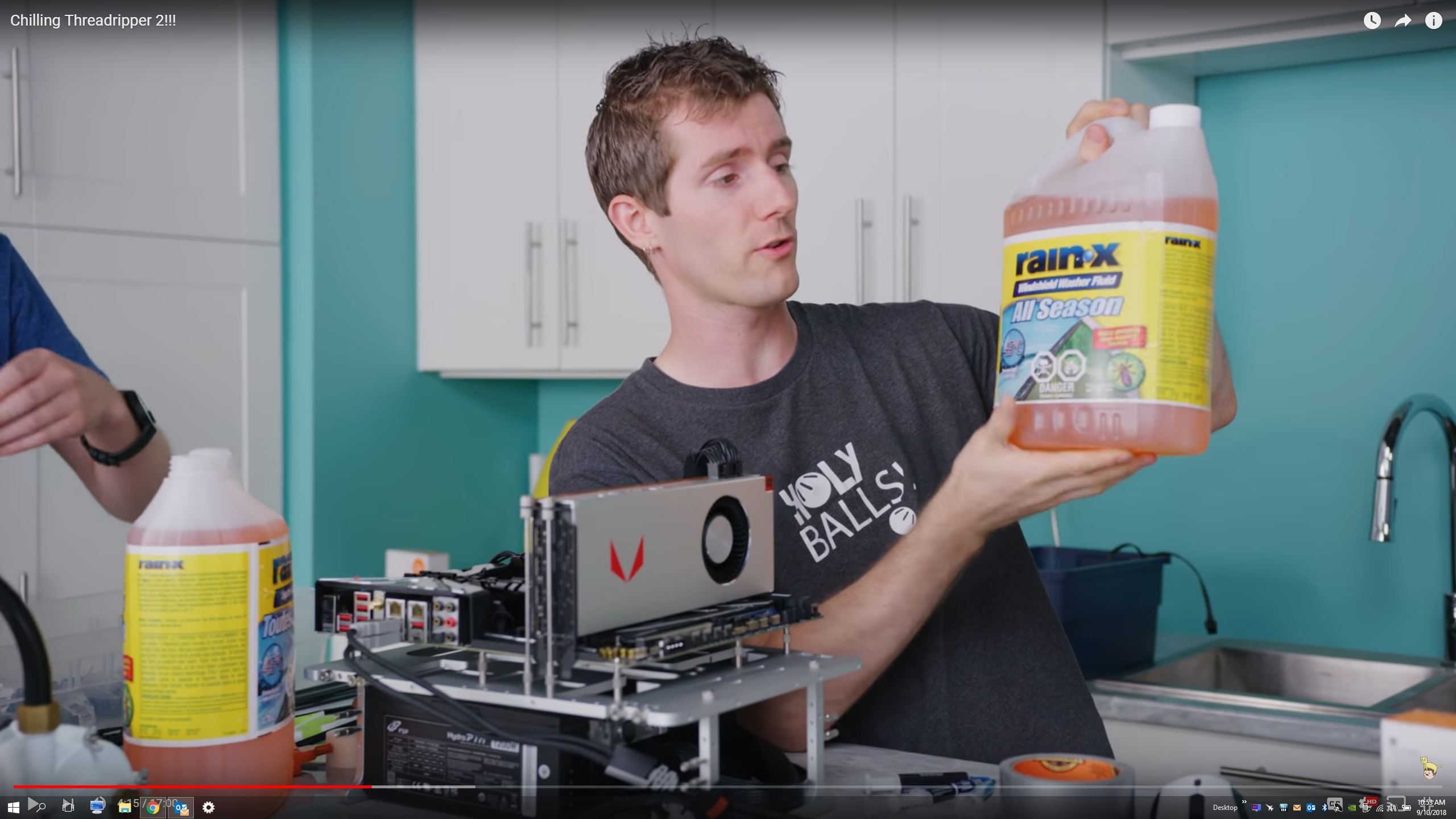
LTT posted something similar a week or two back:
I think it's a brilliant idea to use an external water chiller. But, how would you manage the condensation that forms on the cooler blocks? Build drains? Clearly, water and electronics don't mix. -
Hi Charles. If you're not benching and chasing numbers, then there is really no point in paying extra for faster RAM beyond between 2400 to 2800. The extra premium you pay for 3000 and higher is only really measurable in benchmarks. If you are going to be gaming, you would see a minor bump in performance (maybe a few FPS) going from 2133 to 2400 or 2800 or 3000.
I saw NewEgg has 1080 Ti on sale for $600 now.
I look forward to seeing some pics of your build, bro.
Well, I live in a super dry desert and condensation is almost unheard of. If you calculate the dew point and keep it a few degrees higher than that it should not be too hard. But, it is something to pay attention to.
The other thing is, you don't necessarily have to run it full blast for moderate (5.0-5.3GHz) overclocking. For stuff like wPrime and Cinebench you need it really cold, but it does not need to be as cold for stuff like 3DMark because it doesn't load the CPU nearly as much.
Thanks for the link to Linus' video. I had not seen that one yet. I will watch it now. Curious how well a 1/10th HP chiller will do in his tests. I bought a 1/2 HP (5 times stronger, LOL).
Edit: Wow, that 1/10th HP chiller did a fine job with TR2. My 1/2 HP chiller probably won't even have to break a sweat to keep the 7960X and 1080 Ti super cold.Last edited: Sep 8, 2018 -
Thanks. Back in the day I used to buy specific MHz memory so I could get a good FSB: DRAM ratio, nowadays we don't have that problem. So DDR4-2666 is what I will spec.
CharlesALLurGroceries, Johnksss, KY_BULLET and 1 other person like this. -
From what I have seen 2800MHz was the "sweet spot" for Kaby lake. Probably the same for Coffee. At least for gaming. Take also a look on this link... Intel i7-8700K Coffee Lake Memory Benchmark AnalysisLast edited: Sep 8, 2018Johnksss, Charles P. Jefferies, KY_BULLET and 2 others like this.
-
Bottom line. No. You would not notice anything different if you ran 2666 vs 3000. You would only notice if you came on the forums and mention it and about 30 people would say there is a noticeable difference.Papusan, Mr. Fox and Charles P. Jefferies like this.
-
Cool in more ways than one! Are you gonna water chill your GPU as well as CPU?
When I looked into it when I built my desktop back in Nov '16 I decided to go with 3200Mhz RAM. From what I saw 3200Mhz was the sweet spot. Some games are very sensitive to RAM speeds, the F1 games in particular, and Timespy CPU benchmark responds significantly to RAM config too. I'd try and get a Dual Channel & Dual Rank setup going of 3200Mhz RAM. A RAM stick can be single rank or dual rank, dual rank performs quite a bit better in those games that are RAM dependant, it was quite significant. Dual Channel is obviously when you use two matching RAM sticks, but Rank is just describing the 'layout' on each individual RAM stick. I believe Dual Rank is becoming less common nowadays, but you might be able to find some such sticks. Dual Rank is not anymore expensive - I mean often the best overclocking RAM sticks that use Samsung B-die memory modules are Single Rank, and they're expensive! In terms of gaming performance the Dual Rank aspect is more important than extreme overclocked RAM running Single Rank. This is all the stuff I remember after looking into it. I recommend 16GB of RAM in total if you're gaming.
EDIT: If you're gaming below 100fps then these recommendations are not particularly important. One caveat to that though is if the game places large loads on CPUs - like Battlefield 1 and particularly Battlefield V (beta), then I would think these RAM recommendations would still hold true below 100fps due to the sheer large loads on the CPU even at lower frames per second.Last edited: Sep 9, 2018Charles P. Jefferies, KY_BULLET and aaronne like this. -
I don't know yet. I'm thinking about it. But, I don't really need to because it never gets warm enough for the clocks to start dropping. I cannot remember the last time my 1080 Ti went above 50°C, even when overclocked to 2200MHz on core with 1.200V applied.KY_BULLET likes this.
-
In that case there's no point in doing it, unless you're gonna pump even more voltage through your GPUs. For one, I don't know whether that's even possible to put more voltage than 1.2V and secondly I don't know if it's wise to pump more than 1.2V through it?!
-
If there is I don't know how to. But, yeah... probably no point in making the GPU any cooler. Nothing to be gained by it since it is already too cool to down-clock like a "normal" Pascal.KY_BULLET and Robbo99999 like this.
-
OK, I rearranged the office this weekend to get it ready for the water chiller. I moved my business stuff from the left side of the desk to the right, and put the open bench on a microwave cart, then I can just wheel it around for any parts adjustments. Chiller will go under the desk on the left side, just to the right of the bench.
![[IMG]](images/storyImages/Office.jpg)
And, I picked up one of these little buggers from Amazon.
...for this... http://www.dpcalc.org/
So, on a day like today, (more sultry than normal,) dewpoint is only 6°C here in the Arizona blast furnace.
Last edited: Sep 9, 2018 -
What do you want the RH meter & dew point calculator for? Do you want to use it to work out on a daily basis what temperature to set the chilled water to - so you can make sure you always set it above the dew point of your room environment - to avoid condensation on your PC?
-
Yes, sort of. I am not going to run the chiller full blast 24/7, but when I do then I will check that just to simplify matters. I am going to have the radiator on the return line, so I could just leave it turned off except when I am benching, and that will be two radiators instead of one. It will also have QDC fittings on all coolant lines, so I can disconnect the chiller if I ever have a reason to, and not have to re-route any hoses to use my current set-up as presently configured.
The CPU is so easy to access on the open bench, I can put down some kneaded eraser and shop towels in just a few minutes if I decide to crank up the chiller full blast and ignore the dew point.
Edit: I am also adding this as an auxillary pump so my XPSC D5 Photon does not have to work as hard. https://www.amazon.com/gp/product/B01CGAD986
Last edited: Sep 9, 2018Johnksss, Robbo99999, Papusan and 1 other person like this. -
I would think you would get excellent results by leaving it slightly above dew point rather than running it full blast below the dew point - afterall you're going down from slightly above room temperature cooling water (guessing at least 25 degC) down to say 8 degC for the cooling water - that's a 17 degC drop in coolant water temperature which would provide a corresponding drop in CPU temperatures. By running it below dew point you might be winning only another 6 degC if you want to make sure that the water is not below 0 degC (freezing, unless you plan to use some kind of anti-freeze in there too - I don't know much about this kind of PC cooling and the established practices).
If you plan to keep the water chiller radiator in the loop when you're not running the water chiller unit, won't that increase the flow resistance? I'm assuming that if the chiller is turned on then it has it's own pump that drives the flow, but switching it off would result in increased flow resistance & therefore decreased flow rate when the chiller is switched off? EDIT: or is that what your pictured auxillary pump is for - to win back the flow rate when the chiller is turned off? -
The only time one would need to push the temps lower is to achieve a higher than normal overclock, same reasons for using LN2 or DICE pots. I am already using an anti-freeze, microbial and corrosion preventative additive with the distilled water.
I thought it was interesting that Linus was using Rain-X windshield waster fluid with the TR2 chiller video. I may try that. https://www.rainx.com/product/windshield-washer-fluid/rain-x-all-season-windshield-washer-fluid/
The chiller does not have a pump. I also assumed they would, but none of them do from what I can see. @Johnksss has to use a pump with his also. I ordered the wrong pump and had to re-order a different model that supports in-line placement. The one I first ordered is only submersible.
https://www.amazon.com/gp/product/B01E9IO748
Attached Files:
Last edited: Sep 10, 2018 -
-
Right, I understand. Do you have flow rate meters in your loop (is that even a thing?)? I'm guessing having flow rate meters would help people get the most efficient setup in terms of tuning pump speeds and layout. You'd also be able to see if adding your second radiator (water chiller) & auxillary pump affects the flow rate, which is more pertinent when your chiller is switched off, because you don't really want lower flow rates than before as you may end up with higher temperatures than you had before (albeit the 2nd radiator of the water chiller may help counteract that effect when the chiller is off). EDIT: another way of working it out in a more 'black box' approach would just be to measure CPU temperatures under like-for-like loads, so praps flow rate measurement is unnecessary detail.Mr. Fox likes this.
-
I do not have a flow rate meter (yet) but the motherboard even has built-in support for that, with a header to plug one in and integrate that into BIOS sensors and monitoring features. And, that is also supported by HWiNFO64. I think I would just leave the auxiliary pump running all of the time. The flow rate will be the same at all times with the chiller running or not based on whatever pump(s) are used in the loop.
Performance-PCs recommend adding the chiller to the existing loop so it can be used as an ordinary system when the chiller is turned off. There is also some evidence that including a radiator prevents the water from being chilled as much as without a radiator. If it is on the return side (after the CPU has been cooled) it should be good. Even if having the radiator in the loop prevents the water from getting as cold as without a radiator, it should still be A LOT colder than just using ambient temps. And, since I will have QDC fittings on everything, I can always change that on the fly if I need the temps to dip lower for higher CPU clock speeds.
I am sure I will do a lot of experimenting and learning once I get the chiller.Last edited: Sep 10, 2018KY_BULLET and Robbo99999 like this. -
Here is the header for it...
Last edited: Sep 10, 2018KY_BULLET, jclausius and Robbo99999 like this. -
Return it. You don't need it. Just use the two pumps you already have.. And since you are not going negative, you can keep the glass Res. That is why you seen I had the other one on when I came over. For when I was running colder than 0 degrees.
As to running it inline. Just turn off the radiator fans and watch for condensation, because that will drop right into your case and power supply. Provided it actually gets that cold.Last edited: Sep 10, 2018 -
My CPU and GPU are on separate loops, so while I do have 2 pumps the CPU only has one. According to the specs on the 1/2 HP chiller, it should have a pump with higher capacity (GPH) than what it looks like the D5 can do by itself, So that is why I ordered the auxiliary pump. But, maybe that would be enough by itself. I may try it with just the D5 pump and see how it does.
-
*Official* NBR Desktop Overclocker's Lounge [laptop owners welcome, too]
Discussion in 'Desktop Hardware' started by Mr. Fox, Nov 5, 2017.


![[IMG]](images/storyImages/nuVImiS.png)
![[IMG]](images/storyImages/hww0yUG.png)
![[IMG]](images/storyImages/y2MORMV.png)
![[IMG]](images/storyImages/NQab0oo.png)
![[IMG]](images/storyImages/GB7U2Wp.png)
![[IMG]](images/storyImages/iQnrTTK.png)
![[IMG]](images/storyImages/OWFec4J.jpg)


![[IMG]](images/storyImages/1KgcB5c.jpg)
![[IMG]](images/storyImages/fB8wGxd.jpg)
![[IMG]](images/storyImages/rwZ2iar.jpg)