Problems? See this thread at archive.org.
yes i dont have express card but i use mpcie...
This is not good? - PE4H-PM3N ver2.4 Package Contents
intel hd graphics is iGPU and nvidia 330m is dGPU.
you think will work?
-
Newegg has a "Limited time Shell Shocker" on the Antec High Current Gamer Series HCG-620 620W for $40 AR
Newegg.com - Antec High Current Gamer Series HCG-620 620W ATX12V v2.3 / EPS12V v2.91 SLI Ready CrossFire Ready 80 PLUS BRONZE Certified Active PFC Power Supply -
mine shipped bios 1.20, and since it uses the newer embedded controller, downgrading to 1.11 is not possible. Anyone know if it is possible to run egpu on the x220 without 1.11 bios?
-
If you run your X220 with 3GB of RAM or less it will work. Suggest review Re: Request to fix TOLUD in newer BIOS files - Page 5 - Lenovo Community to understand the issue and were it's at atm.
-
thanks for the link, very informative. Hopefully they get to it soon. Unfortunately I would have to buy new, smaller SODIMMS to get to 4gb>
-
Yes, you'll need to use mPCIe port. This means will need to remove wireless card to allow eGPU implementation. If your notebook have Intel HD Graphics iGPU you can do x1.Opt setup.
Yes you can downgrade to BIOS 1.11. Embedded controller firmware is part of the system BIOS. So when you downgrade to BIOS 1.11, embedded controller firmware will downgraded too. atticus182 have successful downgrade the BIOS. -
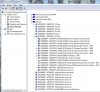
I'm taking a look at PSI resources allocation in my system (Asus X50SL, also known as F5SL, based on SiS chipset): which one of the underlined PCI BUS represents TOLUD?

-
You have 256MB free @C0000000, so have room to accomodate a eGPU. There is already a successful SIS968-based P8400-2.26+GTS450@x1 ASUS X59SL DIY eGPU implementation done by Jeykhob.
-
Hello, everyone.
I have an odd issue after successfully got running an egpu on windows xp.
I was testing windows 7 to make use of the new features it can offer, but i wasn´t able to get egpu running till now.
I performed compaction, and setup 1.x chainloaded to w7 successfully, after I installed last nvidia drivers, no errors shown, all resources allocated,gtx 560 recognized, but OS doesn´t switch to gtx 560 and external monitor.
Does exist any known incompatibility with 7900 gs + gtx560 and w7?
Thanks in advance for the help. -
Any idea if the ASUS X55SV laptop can function with eGPU? It has an ExpressCard slot.
-
Hi CoolZone,
Please install Setup 1.x. Then boot into Setup 1.x & take a screenshot of the main screen. The hotkey to take a screenshot in Setup 1.x is shown at the bottom of the screen. Instruction on how to access the screenshot also explained in Setup 1.x page. Post the screenshot here.
Your notebook have Intel 965PM Express Chipset & Geforce 9500M GS. To get the best performance from eGPU on this notebook is by doing x2 or x2E setup. This depend on the PCIe ports configuration on your notebook. For x2 setup, you'll need PCIe ports 1&2 or 3&4 or 5&6. You can see an example of x2 setup in my eGPU Experience post (link in my sig). -
Please post detail information per Main FAQ#1 instruction.
Please follow the instruction in Common FAQ#10 to get Nvidia eGPU working with an internal Nvidia dGPU. -
Hello Kizwan, way back you asked me to check ATI Radeon HD 6750 2gb on PC. I checked it and it was not working (is it due to eGPU stuff?). Graphic card is in warranty period and I asked for new card at XFX customer care center. I'm still awaiting response and it is going to be long wait before I get replacement or repair of graphic card.
That is why I ordered today Asus ATI Radeon HD 6750 1gb especially for eGPU, which I'm expecting to receive within 3-4 days. Tomorrow I'm going to buy new PSU especially for eGPU. Support for Cosair is not available in city I'm living instead I'm planning to buy VIP 500w PSU. Please have look at it and advice if it is ok or not.
Thanks.
-
Hi pappu6600,
I can't find the VIP 500W PSU specification. Please consider CORSAIR CX430W Watts SMPS Power Supply CX430 W 430W | eBay . Radeon HD 6750 only required one 6-pin PCIe power connector & power requirement only 86W. -
its a physically different controller. per lenovo and the post you just linked, you can not downgrade to 1.11 with the newer embedded controller. only solution for those of us with newer x220s is to wait for a new bios
-
there are some great info here regarding thunderbolt
AnandTech - The Apple Thunderbolt Display Review -
Okay, ordered Corsair CX430W from given link.
Thanks.
-
some (authentic) pictures of Netstor's (new) Expresscard gen 2 -> PCie Adapter:
Link
At the bottom I found an (more or less) interesting comment for Thunderbolt users:
It seems that there is an alterantive to Magma's Thunderbolt product
-
Thanks Kizwan,
I installed drivers manually, reboot and voila!! Everything running smoothly, except for some lines that appear on my laptop screen, I suppose due to I'm using a desktop driver for my 7900gs, and It appears that i don't need to use setup 1.x since there isn´t any conflict in W7.
Now I can switch between ext and int. screen inside OS, what is much better than in Xp, where I couldn't do it.
Thanks again to you and everyone here for sharing your knowledge, all of you are making a huge contribution to this community and our pockets!! -
Just out of curiosity, what exactly does win7 allow about display switching that Xp doesn't?
-
This guy think that he can hack the 1.21 BIOS of the Lenovo X220 to put the TOLUD back to 3.0Gb :
http://forum.notebookreview.com/lenovo-ibm/609712-x220-bios-1-21-update-released-4.html#post7935983 -
Yes, it is possible to mod the BIOS to change TOLUD. However the mod is a bit complex & I haven't been able to grasp it myself yet. If that guy able to mod it, that is good news. So, to make it come true, will need a volunteer to test the modified BIOS. The volunteer must know how to recovered a bricked BIOS if it doesn't go well. Proceed with caution.
-
Well, you'll be surprised how easy this mod actually is. All we are lenovo begging for is already there since the very first BIOS version, it's just a TOLUD switch that is hardcoded to 3.5 GB since >1.11. In fact, it's no more than changing 3 bytes in the flash. I am convinced that this will be a breakthrough for all lenovo's that have eGPU capability issues due to TOLUD. As long we have no faster TB / LP solutions available to the eGPU community, these SB lenovos will mark the top end of the performance table for a long time, given that we will see x1.2Opt implementations soon.
Once I have checked my hack with a BIOS dump provided by the community (I do not own a X220/T420 yet) I will openly publish my full work so all the other BIOS hackers around these forums may - for your safety - confirm that it's safe. I would never ever publish a flawed BIOS hack that potentially bricks other users' laptops. -
If it is that simple then why lenovo tortures us???
Anyway. I got a question. I recently got a second 5850 and was trying to use two of them on cf running @x1. However my board supports cf @ x16 x4 mode, when I try to run @x1 x1, crossfirex tab on ccc isn't there. I am checking that on my desktop before trying on my laptop just to be sure it's working. I am going to test again but if anyone knows of a solution or a patch I am asking him to provide. I am gonna have Internet again after a few days so just answer and I will get to you later.
Thanks in advance. -
Just a quick question:
Right now I have the nvidia hdmi audio devices disabled in the control panel; is this enough to free up the extra bandwidth or do I need to uninstall them completely to ensure they aren't taking any bandwidth?
Also, I updated my experiences post with some more info. -
You just need to disabled them.
-
Wow! Which version of OSX are you using?
-
Hows this going? Still running fine.
PS: How do you manage without a WiFi card? -
Thanks for all of your help! After studying on this thread for many days, I finally managed to get my egpu work.
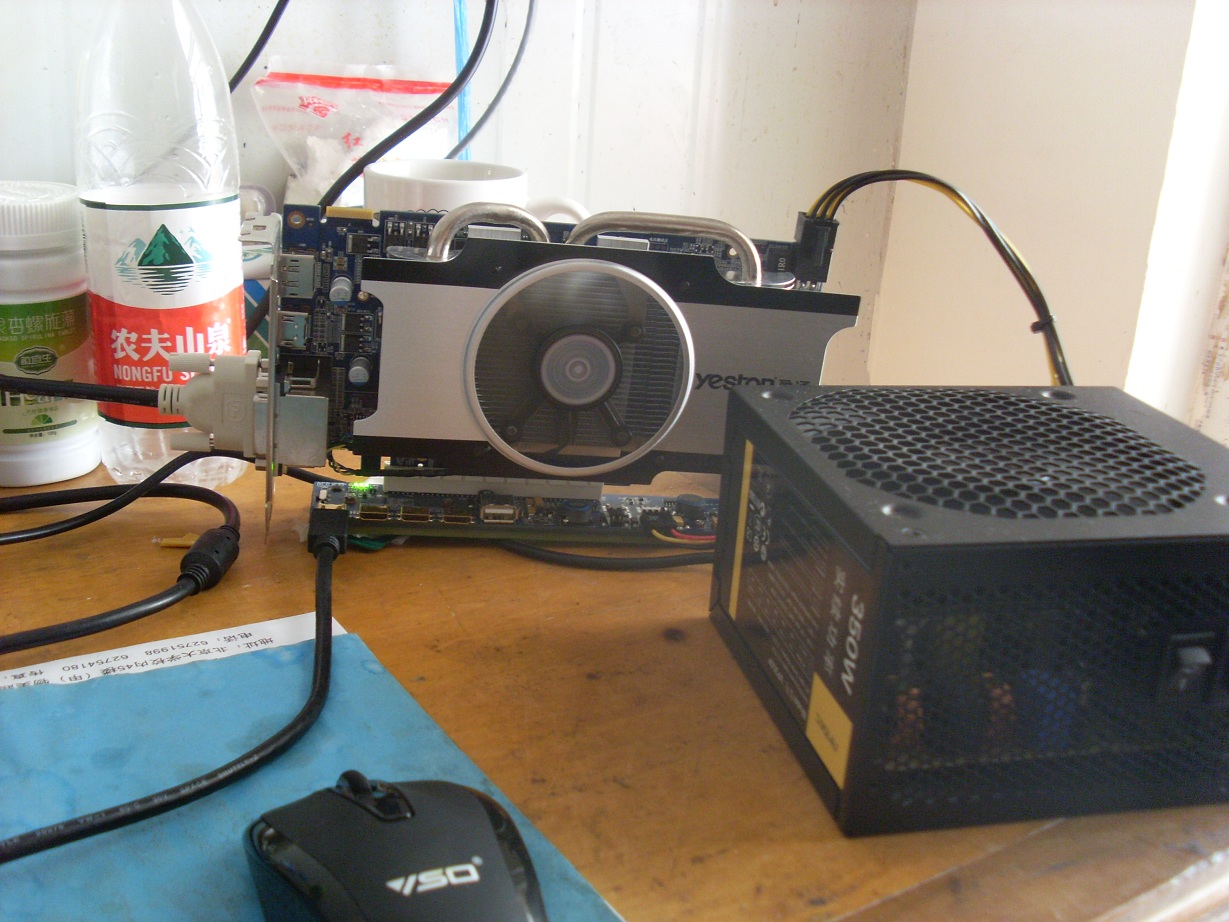
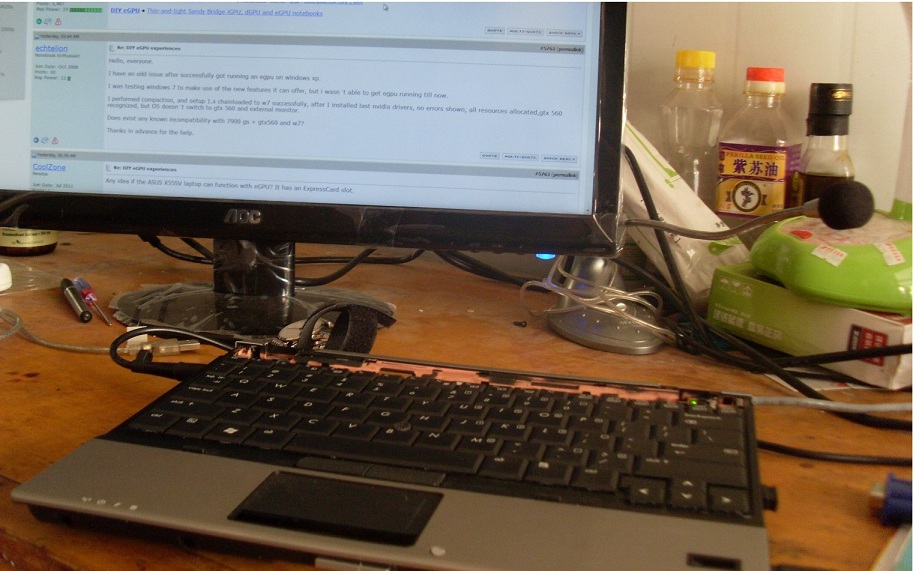
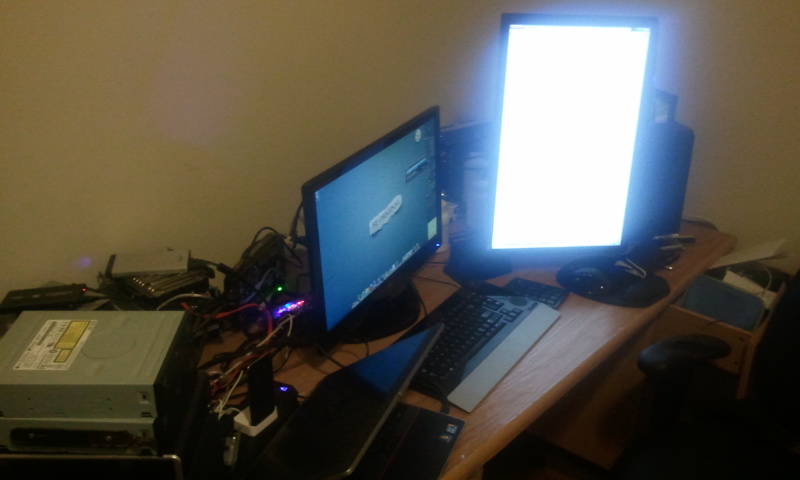
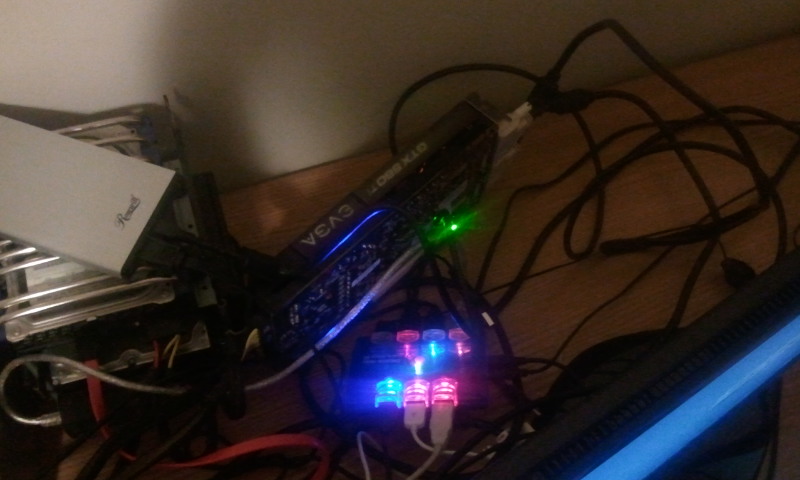
I bought my secondhand HP 2530P motherboard, its cooling system, a pair of c&d shell, a keyboard, a mini sata to sata adapter and an AC adapter, this totally costs about $100. It is really cheap and works very well. But as I had to connect my external LCD with a VGA line, there is always wave effect on my screen. Then I resorted to this egpu thread, and fortunately solved my problem. The following pictures show my setup.
My cpu is [email protected], I don't do the dual IDA or TME-unlock mod, as I'm afraid that would cause damage to the motherboard if I made any mistake. The eGPU is a HD 6850 with 1G DDR5 memory, it is connected with PE4H and EC2C to the host. System memory is 2G+4G ddr2 800.
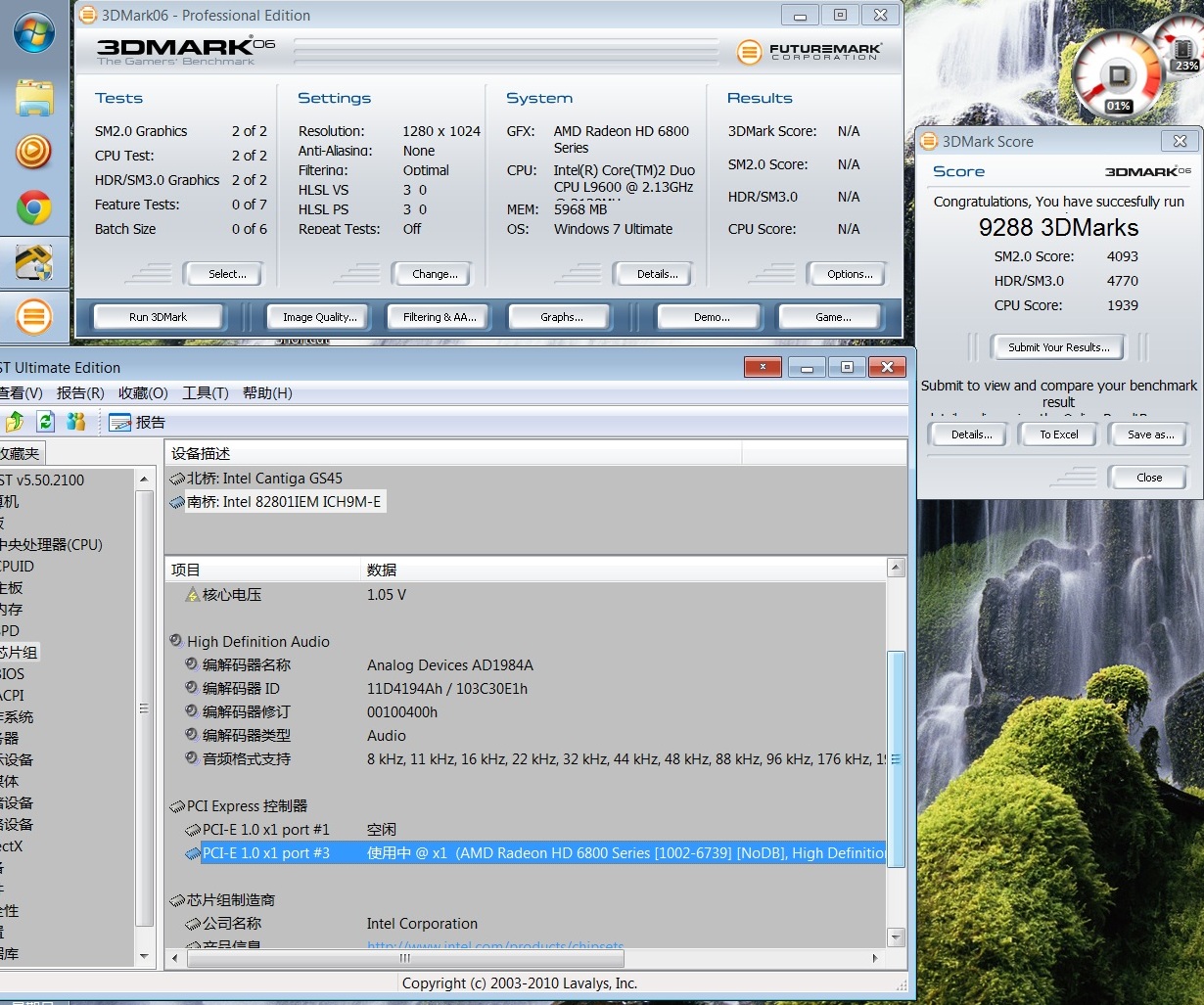
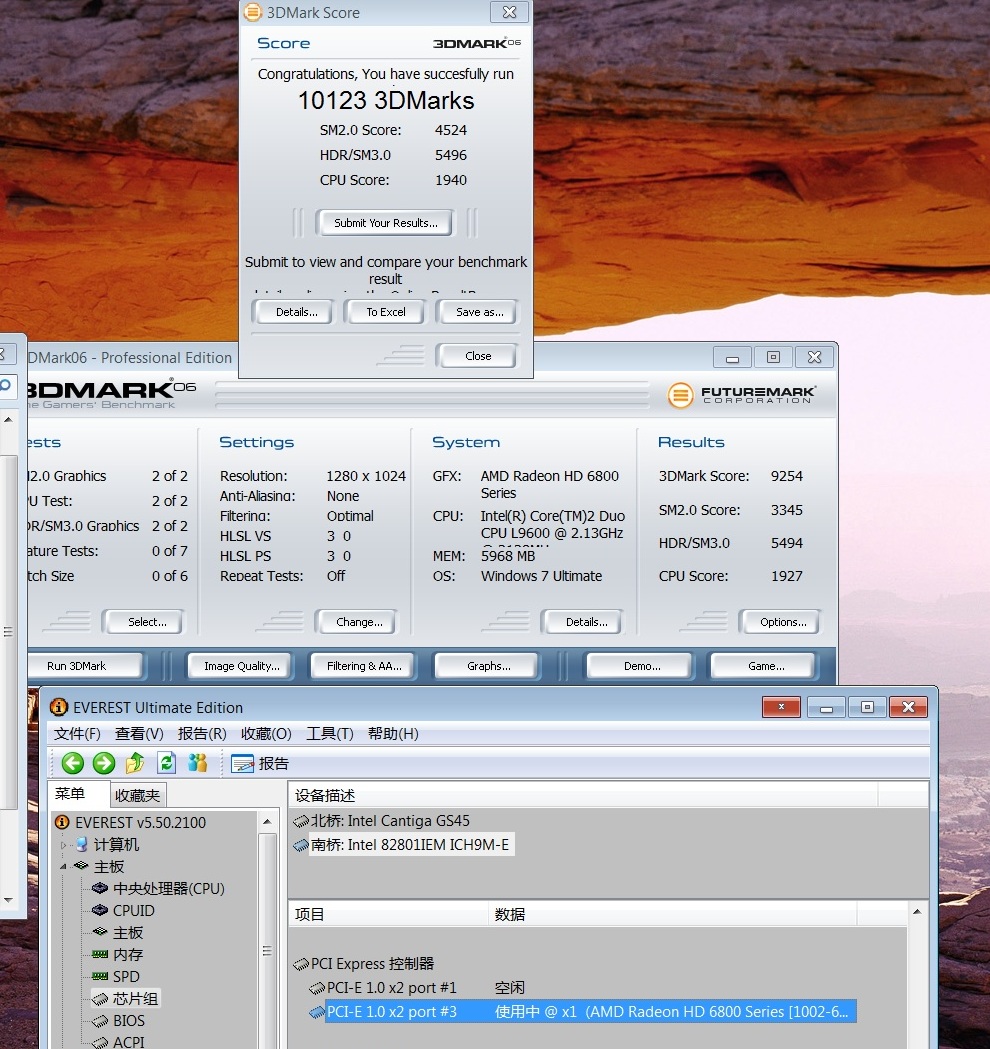
I had setup 1.x -10e8 installed, and only pci compaction 36bits works for me. I had also tried X1E mode, not sure whether enabled [email protected] successfully, as there was not much difference when I ran 3d mark after that. The two picture below show the 3D mark06 score.
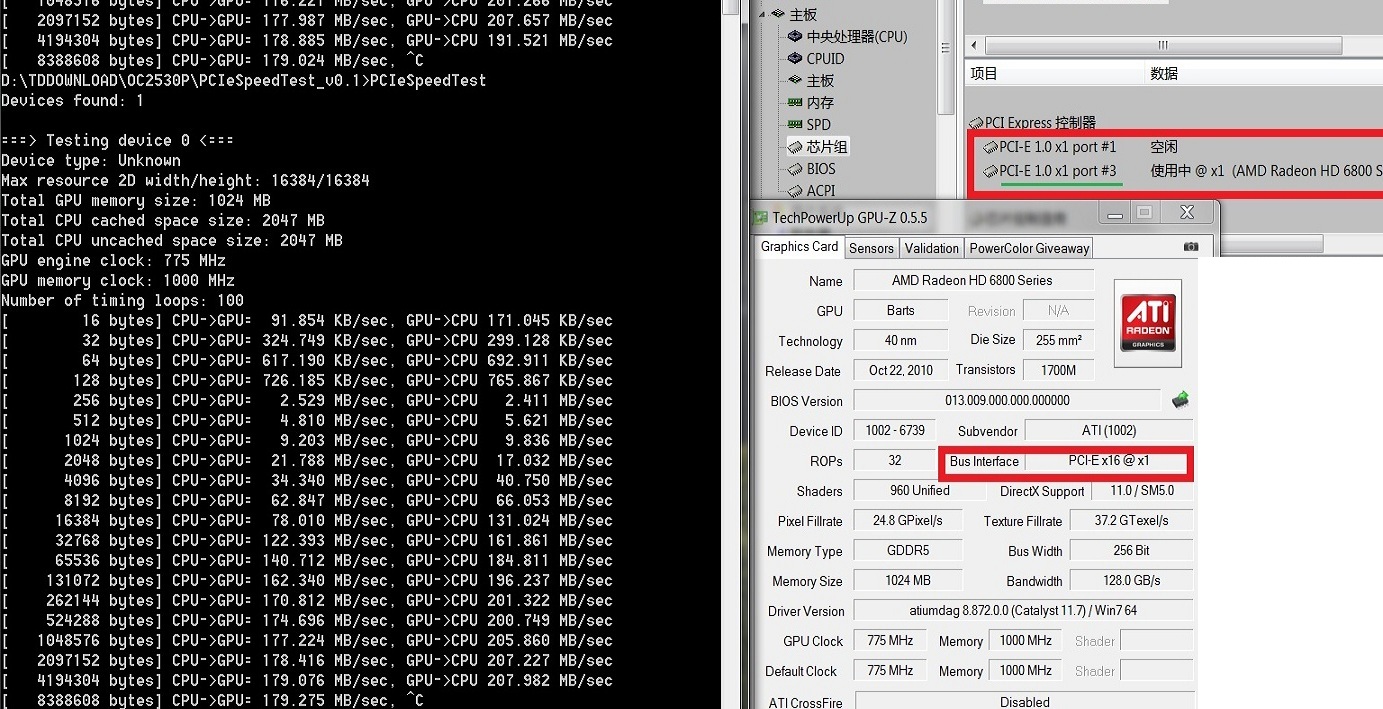
pcie x1
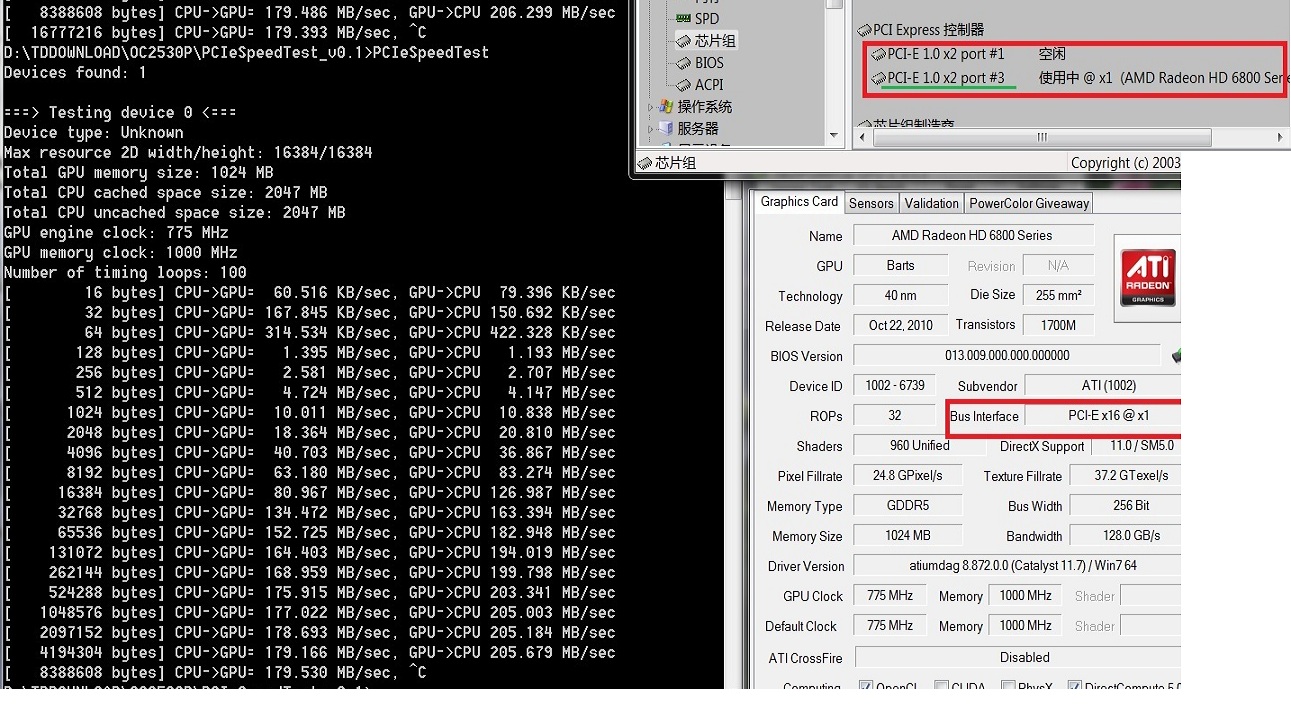
pcie x2
Attached Files:
-
-
$100 well spent
dual-IDA on a L9600 2530P runs at 2.40Ghz and it's very easy to engage. It just requires that you flash the confirmed working 2530P modded bios then use Throttlestop to start dual-IDA. If you wanted to go beyond 2.4Ghz then you'd need to do the TME-unlock PLL pinmod as explained.
HD6850: x1 versus x1E
There's a 15.2% increase in your 3dmark06 SM 3.0 scores b/w x1 and x1E.
x1 - 4770
x1E - 5496
That correlates directly to 3D gaming FPS . Eg: my testing found like games like NFS Shift show a large difference in smoothness. RE5 benchmark should also show at least a 10% improved score and a noticably smoother operation.
To get this x1E mode sorted out, can you run the ATI PCie Speed Test for x1 and x1E mode. It it's a duplexing issue then we'd expect the x1E mode to give double the bandwidth.
Oh... and since you have a 4500MHD iGPU you do always have the option of getting a NVidia card such as a GTX460 whose x1.Opt performance will exceed that achieved with your HD6850. -
Interesting. I wish I can help you. I have seen/heard people tried on PCIe x16 + x1 & it works with some sort of tweak. (I wish I know what that tweak is.) I'll let you know if I found anything on it.
-
Hi nando4,
Thanks for your advise. I just did the PCIe bandwidth test. The result was disappointing as you can see in the pictures below. Do you think it implies that the x1E mode is not enabled? I noticed that, even if everest indicates PCI-1 1.0X2 port3, the GPUZ still tells that bus interface is PCIe x16@x1.
I am sure whether I made any mistake when I did setup 1.x. I just entered pcie ports, enable x1e for port 3. Then generated the pci.bat with 36bits compaction. At last used the startup.bat which contains only pci.bat and grub4dos to chainload win7.Attached Files:
-
-
Just reporting that the mini HDMI coupler did not work. I got 2, one on a part replacement, and neither could even do the 2.5gt/s rate. I took one apart to see its design, and it uses very short wires all bunched together without shielding. If someone could find another coupler that uses a PCB instead of wires I think this would work.
Now I'm tempted to buy a PE3. The only thing stopping me is if the redriver IC works. Nando any idea on when we will know if it works or not? -
Hi,
I meant that in Xp, even with my dgpu activated, Nvidia control panel didn't recognized both dgpu and egpu, so I wasn't able of switching between them, when XP was already running, Xp switched to eMonitor before booting fully.
In W7, both cards, with their monitor attached, were recognized, so now, I can switch between any of them on the fly, even when OS is running.
Regards. -
Nothing really new, but its on Lenovo's site - maybe they're adapting Thunderbolt as well in 2012
-
Suggest wait . . .
-
Cool. As painful as it is I guess I'll wait. Thanks for the update. -
<strike>Is there any chance this cable Covid HDMI Ribbon Cable - LUX-HD-300RB might support PCIe 2.0 5gt/s?</strike> I don't think so.
-
deleted.....
-
Does something need to be done before I can use the Nvidia 285.38 drivers (for BF3) with my setup, like a new modded .inf file?
-
Assuming you mean 285.38, you should be able to install them as is. The only downside of desktop drivers is no internal LCD support.
-
So should I install the Verde drivers or the desktop ones? If I install the desktop ones will I retain the optimus enhancements? I don't care about the internal display as I will be using my external monitor (and the monitor on my Y460 is quite honestly one of the worst monitors I have ever seen...), but I do care about the performance increase from optimus.
Also yes I meant 285.38; that was either a typo or I am developing dyslexia... -
You can only install the desktop driver. Verde does not have your card in its .inf.
-
I'm having trouble with a black screen upon powering my notebook. I followed the instructions for #1 under the troubleshooting section but it still seems to hang at a black screen upon resuming from sleep. here's a video of the process
http://www.youtube.com/watch?v=Ffbr_jL2468 -
Yes, but does optimus work the same way with the desktop driver?
-
Hey, guys.
I managed to succeed in setting up an eGPU setup with 560TI with Dell Latitude e6520. I know Khenglish setup is similar, but I just wanted to post my result. First, let me thank Nando, Khenglish, and Kizwan for helping me set it up.
My set up is the following.
Dell e6520
i7-2620m
8GB
Intel 3000HD
+
PE4H-EC2C
EVGA OC GTX560 TI
Antec TruePower 550w
Dealextreme HDMI cable (This took like 3 weeks to arrive. Until then I had to use the really short HDMI cable that came with the PE4H, which was a big pain since I literally had to put the GPU between the laptop and my monitor).
![[IMG]](images/storyImages/70949d1317092831-diy-egpu-experiences-img_20110926_212949.jpg)
![[IMG]](images/storyImages/70950d1317092831-diy-egpu-experiences-img_20110926_212959.jpg)
Although I was worried a bit in the beginning, my PSU, whose 12v amp is only 19amp, runs the GPU and my 6 other hard drives fine.
Let me walk you through how I did this.
1. In Windows 7 64 bit, I hotplugged the GPU and installed 275.33 verde with Nando's nvam.inf.
2. Installed Setup 1.x to manually set the Expresscard speed from 2.0 to 1.0.
3. Rebooted the comp with the expresscard in and HDMI cable out.
4. When I was in Setup 1.x screen, I connected the HDMI cable and pressed F5 to refresh. If it doesn't detect, I tried taking the expresscard out and inserting it again with the cable in.
5. After detecting the GPU, I went to PCIE PORT, G1, and changed the NVIDIA port to 1x speed.
6. saved it.
7. chainloaded to win7
8. Booting takes longer than before (like 10-15s) but it works well.
As you can see in the last 3 pictures in the attachments, I got major speed upgrade. MY WEI's graphic performance used to be 6.4 but now it's 7.8. 3dMark06 is 18000 and 3dMarkVantage is 12000. I believe these results are along the line of systems with similar spec, but if it's not please let me know.
![[IMG]](images/storyImages/70951d1317092831-diy-egpu-experiences-__131486404648113.png)
![[IMG]](images/storyImages/70952d1317092831-diy-egpu-experiences-__131486411282199.png)
![[IMG]](images/storyImages/70953d1317092831-diy-egpu-experiences-__131486414648503.png)
I'm very satisfied with the result, and I would like to thank again to Nando, Khenglish, Kizwan, and others who helped me to set this up.
I have two questions.
1. Do I have to go into the Setup 1.x every time I boot to set the Expresscard speed to 1x? Or is there a way to save the setting permanently?
2. When my monitors go into standby mode after inactivity and I turn them back on, the laptop's LCD is on and one of my external LCD is on, but not the other external LCD. I have to press windows + p to choose projector only to turn both external LCDs on. Is this normal or is there a solution to this?
Thank you guys!Attached Files:
-
-
Yes. You just can't use the internal LCD.
rubenhan, I can't think of a workaround to not have to use a startup.bat. The best workaround would be to get the 5.0gt/s rate working, but obviously that's a bit difficult. Pray for redriver. -
Please follow lazyboy's method.
-
About the desktop drivers: I am running that now, and there is one annoying thing; I cannot unplug the eGPU while on standby, whereas with the mobile drivers I could. If I unplug when it's in standby, I get BSOD on startup.
-
Thanks for the heads up; I guess I will wait until tomorrow and see what my performance is like in the beta and then see if I need the drivers before modded verde ones are available. My biggest concern is whether the game will be playable at all with the x1 optimus link, and I don't think newer drivers are going to necessarily change that.
DIY eGPU experiences
Discussion in 'e-GPU (External Graphics) Discussion' started by master blaster, Sep 18, 2009.