 Problems? See this thread at archive.org.
@anilpalepu, please read this: http://forum.notebookreview.com/6949956-post2283.html The short version is: "TOLUD defined available PCI space & usable system memory". Graphic card required 256MB PCI space. If TOLUD is equal or higher than 3.5GB, there won't be enough PCI space for eGPU. The only solution is to reduced the amount of RAM to 3GB. For be able to use 4GB++ RAM & eGPU, TOLUD must equal or less than 3.25GB.
-
Oh ok ok...got it.. It was much clear after reading the post in the link...
Thanks a lot !!! -
Forgive me if I missed this, I've been digging through the thread but can't seem to find the answer. Has anyone done an eGPU (and/or is it possible) with a Sony VAIO Z2 and the Light Peak connector?
-
Sony itself. But noone else.
-
-
-
I already asked for the notebook specification & also a question regarding whether your notebook do have ExpressCard slot or not.
-
Z13 is compatible. We have already entries in the performance table, see first post. You can chose PE4L or PE4H. PE4L cheaper, shorter slot so card does not stand. PE4H full PCIe slot length, better stand, 19V laptop PSU power converter for low-end cards, up to x4 setup available. If you don't need the better stand, go for the PE4L. A x2 setup with the Z does not make sense since the performance won't be better than x1.Opt and you need to open up the laptop for gaming. Both work with the EC2C ExpressCard kit and offer good performance (15-16k 3DMarks06) with the BIOS hack (that enables Optimus in static stamina mode). No Setup1.x needed, you can hot-plug the eGPU right to the running laptop. Booting with eGPU plugged in doesn't work tho, you have to disconnect the eGPU until the POST screen appears (you get a BSOD otherwise).
Use NVidia cards in the 460/560 series for optimum performance. All other answers can be found by clicking the implementation links in the performance table. Z11-13 are all the same hardware-wise. -
Thanks for the info pyr0
Reckon I will go for the PE4L
So far, this is what I have found:
PE4L V1.5 + EC2C + SWEX + 30cm HDMI ExpressCard to 1X PCI-E Slot Adapter | eBay
Should be fine, right?
I'm going to wait and see what else Nautis does with the Z1 drivers, before experimenting around with the bios and drivers. Though I guess to get best performance from egpu, I should do it, otherwise its not really worth it. -
I have everything hooked up, but there is a problem.
I have two 4-pin molex to single 6-pin adapters to power the GPU. Since each 6-pin is taking up two 4-pins, all of my 4-pins are used up.
http://www.playtool.com/pages/psuconnectors/connectors.html
The one about 80% of the way down the page - the 6 pin PCI express power cable - I have two of these powering a GTX 465 - I want to unplug 1 of the 4 4-pins.
Can I unplug just one of the 4-pin parts of the 6-pin adapter. There would still be a 4-pin to 6-pin connection, just not a double 4-pin to 6-pin connection. Will the 12V run through the single 4-pin to the 6-pin or do you have to have both or the 4-pins to the 6-pin.
The reason I am asking is because I need another 4-pin to power my PE4L. I do not want to go out and buy a Sata to 4-pin. I know I have plenty of power I was just wondering if the power would go through one 4-pin to the 6-pin if both 4-pins were not hooked up. -
I've never seen anyone doing this. Probably it is possible: look at this.
I suggest that you purchase a molex splitter and you're done!
However, wait for some more expert geek! -
I am a newer try to install my Vidock 4+ to my vaio z 1190x
I don't understand much about suggestion on first page.
Please brief me a instruction for viao z again.
because I try to follow this instruction but I can't install optimus driver
Dear Jeff,
A friend with a Sony Notebook has put together this instructions on how to configure a Sony Notebook to work with ViDock. This is what we give out in technical support if a customer asks how to get his Sony to work. Please have a look:
a) Maybe thee is something new in there for you to learn
b) Is there something you suggest to update or improve? These instructions have been written about half year ago:
We have constructed a manual for the Sony Vaio Z series. The reason the Sony Vaio is not able to work correctly out of the box is because it already has built in hybrid graphics. This limits the ViDock from working correctly. The following steps will get your laptop and ViDock working properly.
1. Before you start, please make sure you have administrative privileges on the laptop. Also you may create a full system backup with an application like Acronis True Image Home and such.
2. Omitted step due to your setup.
3. Uninstall the existing NVidia drivers from the Control Panel -> Add/Remove Programs (both NVidia and Intel drivers will be removed). This step is not necessary, but recommended.
4. Download and install the latest Intel HD drivers from here: http://downloadcenter.intel.com/Sear...01&FamilyId=39, restart the laptop. Make sure the laptop boots in its native resolution (1920x1080 or 1600x900), it means the Intel driver has been installed correctly.
5. Download the NVidia Optimus drivers: http://download.laptopvideo2go.com/n...12_win7x64.exe and extract the package to a temporary folder. You may install standard NVidia drivers, but it does not make much sense because the native hybrid video drivers are significantly faster than non-Optimus ones.
6. Download the Nautis’ INF files: http://www.nautisiandesigns.com/driv...64bit_INFs.zip and extract the 64bit NVUOPTI.INF file to the same temporary folder where driver is (no subfolders!). This will enable Optimus feature in the 259.12 Toshiba’s drivers for VAIO.
7. Download the latest PhysX driver from here: NVIDIA DRIVERS 9.10.0513
8. Download the latest “DIY Vidock Setup 1.x”: http://forum.notebookreview.com/gami...iences-63.html (scroll down the page little bit to find the link). I don’t post the final links to the applications here because the applications and drivers can be updated and changed in the future.
9. Download and install the ImDisk virtual disk software: Tools and utilities for Windows.
10. Launch the DIY Vidock Setup executable; it will extract the package content to c:\DIYVDOCK folder. Now make sure you have BCDEDIT application available from your default application path. If not – you will need to copy it from c:\Windows\winsxs\amd64_microsoft-windows-b..iondata-cmdlinetool_31bf3856ad364e35_6.1.7600.16385_none_e41fee6cbedca6f2\bcdedit.exe to c:\windows\system32. Run the setup-disk-image.bat file from the folder; it will create a DIY Vidock record in the Windows boot configuration.
11. Plug the Vidock into the working laptop. Windows will detect the external video card, but it will not be able to install the correct driver, so it will just show a generic “VGA Display Adapter” device. Please note: the VAIO Z laptop won’t start if the Vidock plugged in. But Villagetronic guys have created a workaround – they have added jumpers that allow delaying the video card initialization*.
12. Run the setup.exe file from the NVidia drivers’ folder; make sure it shows "Display driver” in the list of applications to install. If it doesn’t – most likely you have forgotten to put the nviopti.inf file in the driver’s folder, or have extracted it with a subfolder.
13. If you get an error during setup – you still can install the driver from the Device Manager. Open the Windows Device Manager, then go to Display Adapters, and right click on the Standard VGA Display Adapter; select Update Driver Software -> Browse my computer for driver software -> Let me pick from a list… -> Have Disk… and select nvupti.inf file from the drivers folder.
14. Now install the PhysX driver, unplug the Vidock, and restart the laptop.
15. Select DIY Vidock Setup 1.x from the boot menu, select the menu based setup (second item), select “!Edit startup.bat”, add the following string in the All profiles section (before call pci.bat):
call iport dedicated off
and save the startup.bat file. The line we’ve just added turns the integrated NVidia GT 330M video card off to make Optimus configuration possible.
16. Select Using startup.bat, then Chainload w7|orig from the main menu. Next time you will not have to do all these procedures. Just Select DIY Vidock Setup -> Automated startup via startup.bat (auto select on timeout) -> Windows 7 (auto select on timeout).
17. Now you have 2 choices, depending on the video card type you’re going to use with the Vidock. Some video cards can be plugged in to the laptop a normal way, some with a small trick. I’ve tried GTS 450, GTX 285 and couple of GTX 460. The easiest way works with GTX 285 and GTS 450 – just plug the video card and start enjoying it. Unfortunately, this does not work with GTX 460. The laptop and my external monitor both show the blank screen in case if I plug the GTX 460 into the working laptop. So, as soon as the OS has been loaded, put the laptop into the sleep mode, plug in the video card, and wake up the laptop – it will activate the external video card and you should not see the blank screen. Please note if you hibernate your laptop and turn it on again, the internal NVidia video card will be powered on (even if it’s disabled in the Device Manager), and the Optimus feature will be deactivated.
18. To make sure the Optimus mode is enabled in your configuration – open the NVidia control panel, go to “View” menu item and see if the “Add “Run with graphic processor” to Context Menu” item is visible and enabled.
19. Now you may disable the laptop’s display and play COD, NFS, etc... The Optimus configuration also allows you to use the Vidock without an external display (just like a video accelerator), but in this case the NVidia drivers will show a watermark when the 3d engine is working.
thank you. -
I know this is probably some where in the FAQs, but I have tried sleep mode, hibernate and just booting - any time I boot with the eGPU on I get BSOD - also when I sleep or hibernate and then power it on I get BSOD.
I can not download AIDA64 because my trial is up and Everest isn't helping much. I hear the noise that windows in recognizing something when I turn on the eGPU.
I do not have an external monitor, but have not downloaded any Nvidia drivers since I assumed Win would recognize it and do it automatically.
I have a GTX 465 on a Toshiba laptop - PE4L through expresscard -
jedip what graphics card are you using with your vidock 4+?
For Nvidia cards you no longer need to use modified mobile drivers for optimus. You can now use unmodded desktop drivers right off of Nvidia's website.
The main thing you have to do is disable the internal dedicated graphics with nando's setup program. This is necessary if your system does not have a low enough TOLUD to run all 3 graphics cards at the same time, and/or to enable optimus for the external graphics card.
elicash80, what are you getting as an error on the BSOD? If you have installed a driver at some point for the 465, uninstall it in "programs and features" in the control panel. You can do this without the card running. -
I am not getting any error. Also I have not installed anything. When I turn on the eGPU with windows already booted nothing happens except the sound that windows recognizes something. When I sleep mode or hibernate, there is just a black screen when I try to resume the computer. If I boot with the eGPU on, I only get a black screen.
I don't see any error codes, but when I get a BSOD I have to turn off the PC, turn off the eGPU and reboot without the eGPU on.
Do I need to install a Nvidia driver or Optimus or Nando's tweak first? -
I use Gtx460ti.
Follow this( quiet useless) instructions.
1. I can't install optimus driver 256.12 or 285.xx The message is can't find hardware to install.
2. Now I can install eGpu on start up (thanks to people posts in this thead)
I try to add line "iport dedicated off"
I try to read comment in eGPU console I think I should add line " iport dGPU off"
but now it not sucess.
Please suggest.
Note I wanna run internal LCD with eGPU too.
Thank you. -
Set the graphics card's port to gen1 in nando's setup program. It may be trying to run gen2 if you have a 6 series chipset. This is known to cause a black screen on startup.
-
I am not very familiar with how to disable hybrid graphics since I do not have a hybrid graphics system.
This driver modified by nautis is the latest that I am aware of that supports a laptop's internal LCD. To get the latest beta driver working you'd have to modify its .inf yourself. -
Okay, so I installed the driver for the GTX 465 - It recognizes it in the device manager and the install went fine, but it has a yellow triangle by the GPU in device manager and says an error has occurred with this device.
I am assuming it is because the Intel HD iGPU is still enabled. When I disable the Intel graphics, the computer reverts back to windows graphics.
I was thinking if I disabled Intel GPU and then put the computer to sleep and then came back the GTX would automatically kick in because I know the computer is recognizing it.
The problem is that with the iGPU disabled I can not manually set the computer to sleep or hibernate. My only options are to shut down or restart. If I disable the iGPU and then reboot with the eGPU on I get a BSOD. -
<sup> 1</sup> *Connector* - referring to the wires on the 4-pin molex(s) to 6-pin PCIe adapter OR the connector itself (e.g. 4-pin peripheral connector, 6-pin PCIe connector, etc).
<sup> 2</sup> *Wire* - referring to the cable coming from the PSU.
If the adapter have double 4-pin molexs to 6-pin PCIe connector, you'll need to plugin both 4-pin molex. If you only connected one 4-pin molex, that means you only connected one 12V connector to PCIe plug on the GPU which is not enough. It is recommended, if possible, the two 4-pin molexs are connected to different cables coming from the PSU. Because if connected to the same cable, you're actually feeding the pcie plug with a single 12V wire. It possibly drawing too much current on a single 12V wire. However, if the PSU have all 4-pin connector on the same cable, you don't have much choice though. Anyway, whatever situation, you'll need to plugin both 4-pin molex.
The single 4-pin molex to 6-pin PCIe adapter have two 12V connectors. When connected using this adapter, it is similar condition to the double 4-pin molexs when both connected to the same cable coming from the PSU. It can work but it will drawing all of the power from single 12V wire.
If you want to plug more device, I think you should get another PSU which have the two 6-pin PCIe power connector that you needed.
I don't remember whether you have post your PSU specification or not. The symptom you're experiencing is caused by the GTX465 unable to draw or didn't receive enough power for it to work. The solution to "black screen" problem is explained in Common FAQ#5 & it also very much the same issue for Common FAQ#4.
<strike>If you're using PE4H v2.4 set a jumper at J4. If PE4H <2.4 will need to do the Panzer's fuse bypass.</strike> (EDIT: My bad. You have PE4L.) Again, please post the PSU specification.
Please post the exact error code. Without the error code, it's hard to determine what is the problem.
Don't disabled Intel HD Graphics iGPU.
It will be much easier if when posting follow the Main FAQ#1 instruction.Last edited by a moderator: Jan 29, 2015 -
Hi there, I was wondering if the egpu would work with an AMD cpu setup: all the feedback I can see is from users with Intel setups.
My idea was to get an HP Probook or Lenovo Thinkpad with one of the new AMD a APU and an Expresscard slot. THis way I could still have some decent graphic power when the laptop is not docked.
Is this possible?
I am in fact looking for a small laptop (14 inches or less) with an expresscard slot (I do not want to open it to plug the eGPU) and with still some decent 3d capacities when on its own. (and cheap too ! ) So far I did not find such a laptop in all the laptops compiled in the very nice list by Nando -
Appologies in advance if I'm in the wrong section. I've been reading through the forum all evening and still uncertain on stuff.
Thinking about jumping on the eGPU train with my Fujitsu t5010.
Expresscard is out of the question since my laptop shipped with a pcmia slot, doing some laptop disecting I found I have 2 m pci-e slots, 1 with my wifi card in it and 1 more above it, both half size cards. I'd post a picture but its the same layout as this one except my upper slot is half size. I moved my wifi card up to the upper slot (Port 5), and my laptop recognizes it drivers and all, but I'm not getting any wireless activity through it (switched back to the lower port (Port 2) and it worked fine).
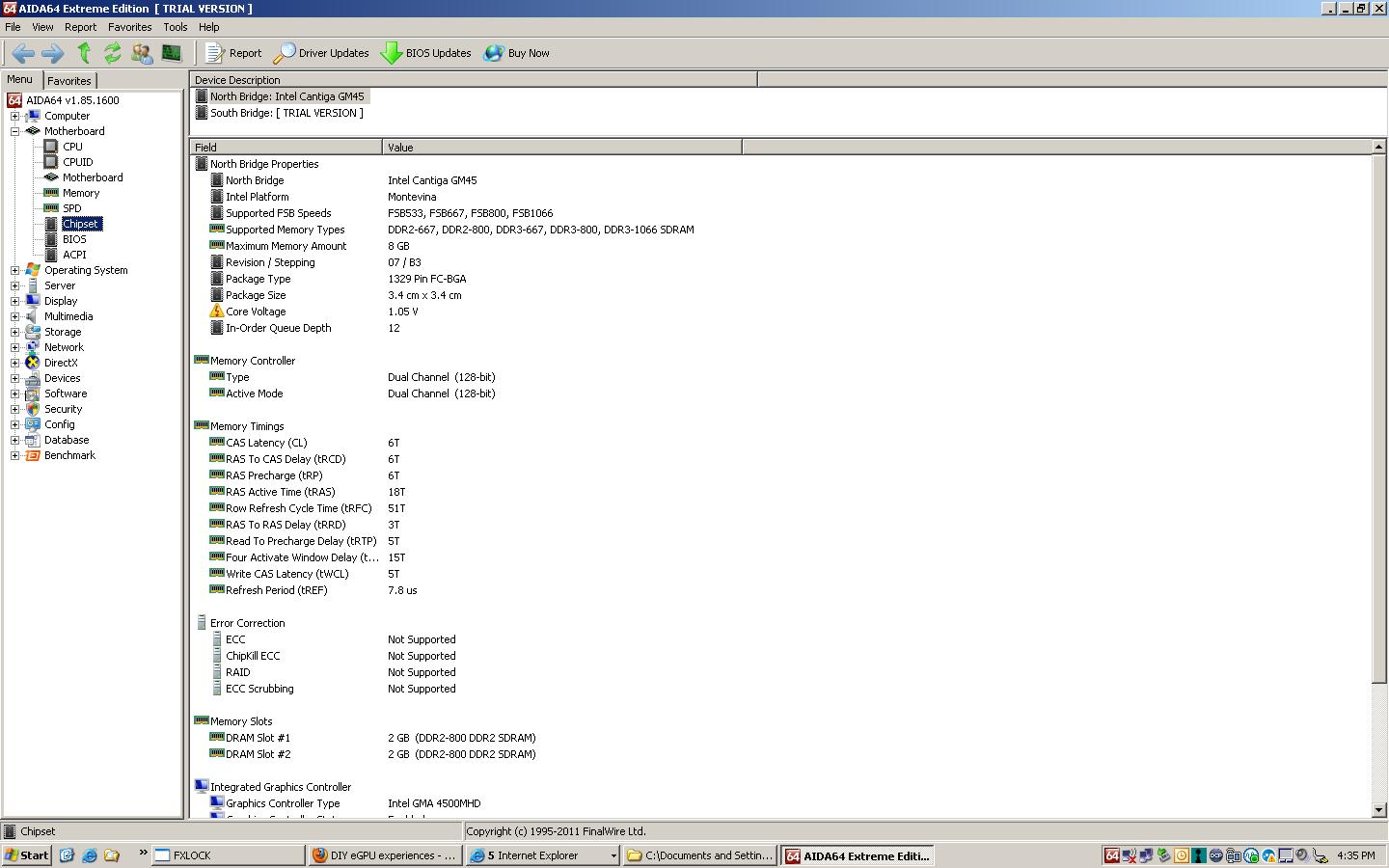
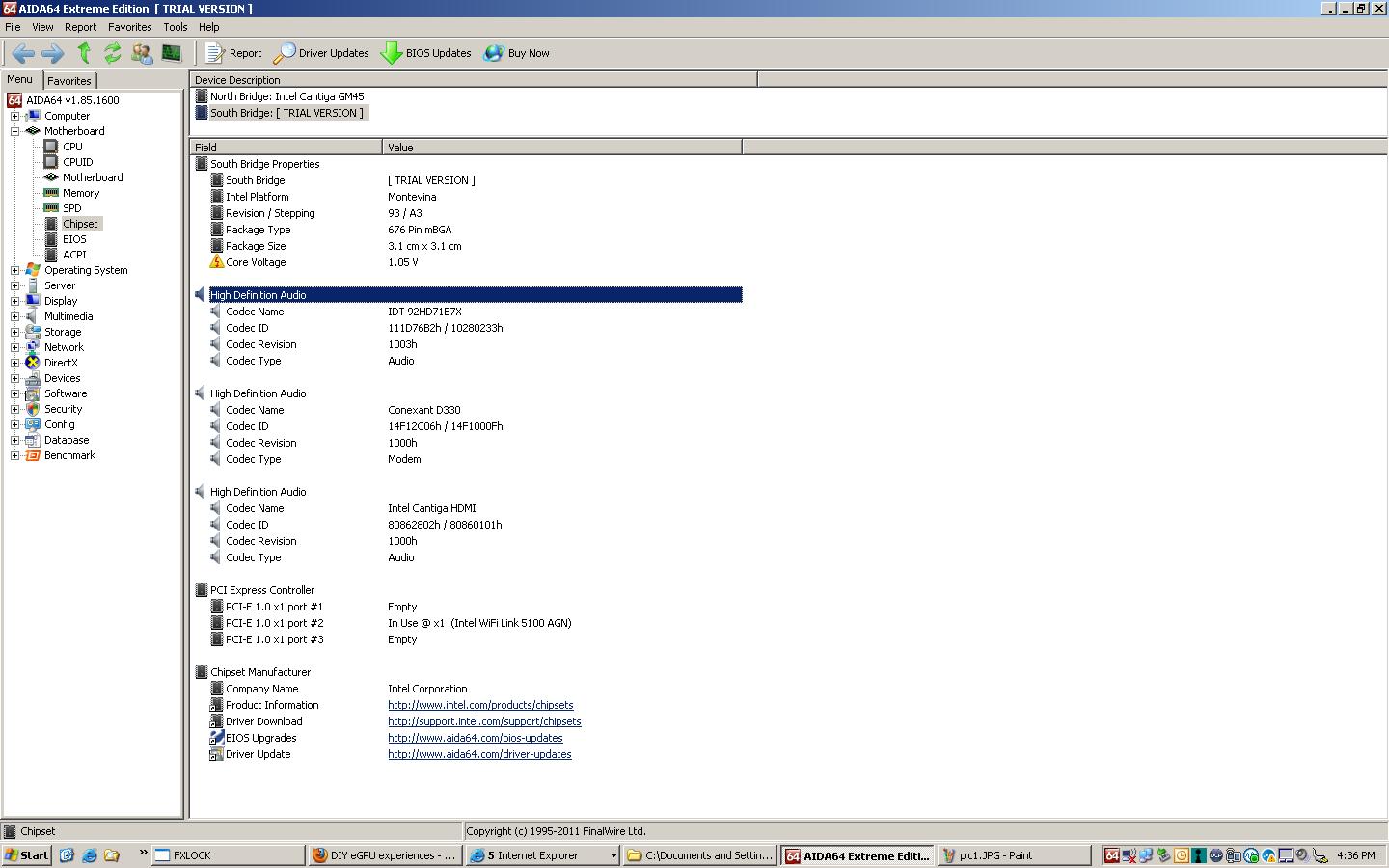
Here is a screencap of my southbridge. NOTE: i took the screenshot while i had the wifi card in the upper slot.
- If the upper slot is meant to be a 3g card slot, does this limit me to using port 2 without the wifi card?
- Is there any way through AIDA64 to find out more about the port usage?
- If all could go as planned, i was going to use a PE4L-PM3N through port #2 and some form of a 460 with a external monitor. My on-board GPU is GMA 4500MHD, could I gain any benefits over 1x with my situation?
-
What is the specification of the other laptops?
There are already several AMD CPU+eGPU implementation listed in the first post. You can go take a look.
If your notebook have GMA 4500MHD iGPU, you can do x1.Opt setup with Nvidia desktop graphic card. x1.Opt is x1 link with Optimus setup. x1.Opt can deliver better performance than x2 link with the same GPU. Only need to use one of the mPCIe port for eGPU. -
one is a dell e6400
once i get home ill get the others one is a asus vx7 -
Sounds good, following tangent is on topic even though not about the eGPU directly.
I cant seem to figure out if my 2nd mPCIe slot is WWAN and unusable. I've been toying around with my wifi card in my second mPCIe port (port 5) as to why i could detect/ install drivers for but not connect to networks with. If anyone on here is familiar with the "rfkill" command of linux, i got these results:
soft block no
hard block yes
hard block generally relates to the hardware switch that i flip for the card to turn on so I'm assuming thats a driver mod issue. Just wanted a sanity check so I know if I don't have to sacrifice my built in wireless for the GPU
tl;dr: is there anyway to tell if a mPCIe is WWAN only through software means? I couldn't find any schematic on the Fujitsu T5010 nor are my eyes good enough to trace the mobo. -
Dell E6400 is a good candidate for eGPU implementation. It have Intel GMA 4500MHD iGPU which means you can do x1.Opt setup with Nvidia desktop graphic card.
![[IMG]](images/storyImages/71267d1317796662-diy-egpu-experiences-pic1.jpg)
x1.Opt setup is x1 link with Optimus which can give better performance than x2 link setup with the same GPU. Next, we need to check TOLUD. To check TOLUD, open Device Manager, go to View \ "Resources by connection", then expand Memory tree & look for first PCI bus with 8 digit number beside it. (OR you can just take a screenshot & post it here.)Last edited by a moderator: Feb 6, 2015 -
If you put wifi card at the 2nd mPCIe port & windows/AIDA64/Device Manager able to detect your wifi card, that means you can use it for eGPU.
-
Anyone have experience with EGPU and VaioZ ,please help.
I use Vidock with 560Ti +Vidock.
And instructions from Vidock are useless.
Thank you. -
Villagetronic support is here and on facebook
You purchased a commercial product and are entitled to support from Villagetronic. If they can't get you a working solution then I'd suggest you request a refund. The refund would allow you to purchase the cheaper DIY eGPU hardware from HIT (gaining legitimate access to the DIY eGPU Setup 1.x software) for which this thread is dedicated to.
NOTE: The Sony Z11-Z13 instructions from Villagetronic (VT) referencing the DIY eGPU/ViDock Setup 1.x software are in violation of the license terms of that software. That software is NOT for Villagetronic customers to use unless you purchase a $25 license. If VT can't provide their own software then that is another good reason to seek a refund.
FYI: VT declined to sponsor the creation of the DIY eGPU/ViDock Setup 1.x software, specifically compact, in May 2010 so it's infuriating to see they wish to freely use that software, charge excessive prices for their hardware and give their users poor support. I question the business practices used by VT. -
Word.
@jedip, have a look on the many eGPU implementations with the VAIO Z on the first page. You find all the instructions you need there. -
I'm very disappoint with VT supporting. I asked them for instruction of setting up Vidock since last Thursday via ticket. There are not any respond up to now.
Pyr0, I will try to find out again.
Thanks for your help. -
I highly recommend you return the VT product. It is virtually worthless. Two external AC adapters and advertised features that don't work.
Mine came with a bad AC adapter (the big one) and I had to wait 2-3 weeks for a replacement only to find out the 2.0 compatibility that they advertise didn't work. -
I was able to install the driver from Nvidia for my GTX 465, but got error 43 on the GTX itself until I disabled it and then enabled it.
I figured I was going to use optimus, so I uninstalled the GTX 465 driver and then downloaded the Verde 275.33 driver, but it is not recognizing the GPU.
What order do I need to do this? GTX 465 driver, then the 275.33 then the nvam.inf, then the 1x setup to correct the error 43? If there is some other order please let me know.
Also I am getting error code 10 (in addition to error code 43 on the GPU) on the Virtual Wifi Miniport Adapter 1 & 2. This is when the GTX 465 driver is installed. On the Verde driver I can't get past installation. -
Hi, i have several problems installing an egpu for my dell xps 1530m.
As a first try I want to install my old NVIDIA GeForce 6610 XL.
What did i do:
1. Plugin-in the egpu setup over pcie (express card) - i am pretty sure i plugged everything together as it should be
2. start the notebook
3. power on the egpu after bios is finished
As i entered windows (7 x64) the system started to install drivers for the NVIDIA GeForce 6610 XL, but after some time windows crashes with blue screen.
After the reboot in the device manager there is my NVIDIA GeForce 6610 XL, but it has an exclamation mark before its name. Something seems to be wrong...probably it is related to the blue screen :GEEK:
The graphics card is powerd by an 200W psu.
Is it probably only because the graphics card is very outfashioned or is it my fault?
Please help me making this work so i can buy a 460 GTX without knowing if all this here really works for me
Greetings -
Problem: 1) GTX 465 has error 43 in Dev. Man.
2) Virtual Wifi Adapters 1 & 2 have error 10
3) Can not install Verde drivers because they do not recognize the GPU (GTX 465 driver installs fine)
4) If I boot or standby with eGPU on I get BSOD at start or awake respectively
5) I need to know which order to do this, I have all of these things downloaded - GTX 465 Driver, 275.33 Verde driver, Nvam.inf, and 1.x setup
6) My PE4L only seems to work if the second slider, SW1, is set to the second position, 2.5 - Masterjumong2012 has almost the exact same NB and and same problem with the slider, he set his sliders to 15.10 secs, but if I do I get the above problems.
OS:Win 7
PSU: Coolmax V-400, 12V1@14A, 12V2@15A
PC: Toshiba A665-6086
PE4L, expresscard and 5 series chipset with Intel HD graphics
***Sorry tried to edit and wound up with a double post, the one two above needs to be deleted please*** -
Set the PCI Reset Delay slider to 0seconds on the PE4L and resort instead to manual hotplugging after boot for the time being. Then boot Setup 1.x, hotplug your EC2C, hit F5, ensure the video card is detected, perform 32-bit PCI compaction on the iGPU+eGPU, chainload mbr. This process can then be automated via the startup.bat, which would look like the following, so only need to select the "automated startup via startup.bat" menuitem to get the card detected, allocated and have you booted in Win7.
Then in Win7 install the 285.27 Retrofit (Verde) modded driver.Code:call vidwait 60 10de:06c4 call vidinit 10de:06c4 call pci call grub4dos mbr
WARNING: Your PSU is insufficiently specced to power a GTX465 at full load. It has 12V@14A (168W), it requires a least 200W. Even a lower-power GTX460 would be problematic with it. I suggest getting Corsair CX430 with a 12V/28A (336W) rail which will be more than enough to drive the GTX465. -
The PE4L absolutely will not recognize or do anything if the SW1 switch is not set to the far side (2.5). Either in Windows or the DIY 1.x setup. It picked it up fine after I took the delay off 0. I compacted it, chain loaded it and even rewrote the code exactly as you have it, but it did the same thing upon reboot, I believe because of the delay.
Anyone know how Masterjumong got around this?
At first the code looked like this before I rewrote it.
Code:call vidwait 60 10de:06c4 call vidinit -d 10de:06c4 call pci call grub4dos mbr
-
Hi Everyone,
This is my first post to the forum so if this is in the wrong spot please feel free to move it.
I am very interested in building an eGPU setup for use with an Asus eee 1015PEM netbook. I do not intend to game with this system. I want to be able to do some CG/GLSL/HLSL coding on this machine, preferably up to the highest shader model currently available. The Atom / 3150 in this machine only supports OGL 1.4 and shader model 2 under DX (with pixel shaders in software). Not very useful
This netbook has no Express slot. It does have two mPCIE slots. One of these already has a 1/2 size combo N wifi / bluetooth card in it. The other has no connector installed.
The netbook has 3150 graphics / 2 core Atom (Pine Trail / Pine View?). I think from what I've read that this chipset will work with NVidia Optimus to allow the eGPU output to go back to the netbook's LCD. Am I correct?
If someone knows of a post where a similar setup has been successful I would really appreciate the link. I'd also be very interested in any suggestions regarding the graphics card. I'd like to lean towards power saving rather than processing power, best shader model support and low heat. I'd like CUDA too. I'm guessing for this that the card will have to be NVidia?
Many thanks and apologies for the long first post.
Mark -
As nando already pointed out, the PSU can't deliver sufficient power needed to drive GTX465. GTX465 need at least 200W for it to work. Your PSU only have 12V1@14A=168W. You'll need to replaced the PSU first before you can successfully getting eGPU working.
-
It has two 12V rails. +12V1@14A & +12V2@15A - doesn't this add up to 348W?
The GTX has 2 6-pins and each 6-pin is connected to two Molex. -
Are there any DIY plans to use the the Lightpeak or PMD of the new Vaio Z2 to run a better graphics card?
-
Hi,
Please post the error code. Without the error code, we don't know what is the problem is. Please post the PSU specification. At the moment I'm unable to find NVIDIA GeForce 6610 XL (6600 XL??) thermal design power. Obviously, if you're going to use GTX460, you'll need to change the PSU. GTX460 required 160W & this means PSU must have enough +12V power (at least +12V@15A=180W).
BTW, it is recommended to post detail information per Main FAQ#1 instruction. -
That is not correct. The rail is divided to two rails. Only first rail will be use, +12V1. +12V2 is for the 4-pin connector (also known as "ATX12V" or "P4" cable) and +12V1 is for everything else. So, clearly the +12V1@14A unable to supply enough power to drive 200W GTX465.
-
Have my parts all ordered, working on a portability concept in the mean time while i wait for them to come in.
My Fujitsu t5010 has a modem connection port as well as its LAN. The modem connection port (rj-11? its late i'll look tomorrow) seems like an easy removal for me, and a mini hdmi cable (might need to be dremeled) should fit through that hole in the case.
I was thinking of dropping the PM3N in a mPCIe slot permanently and wiring a mini hdmi male to mini hdmi female at the edge of the laptop case so that I could just plug a mini hdmi male to male from the PE4L. Doing so would give me the "portability" like with the express card (simple disconnect).
searching online i couldnt find a mini hdmi male to mini hdmi female, nor a mini hdmi coupler. Does such a thing exist/ would it work? I'll sketch out a simple schematic sometime tomorrow and post it. -
hi it's error code 12. i found this out later, sorry :-/
i allready tried to fix this using the Setup 1.x
but now i do not rellay know how to get furher. i ran the eGPU-Setup-mount.bat to get the bootable drive "v"
when i reboot the system (egpu plugged in) i choose the egpu setup instead of windows boot, but then there is a message saying something like "not all devices have erpg" and the setup chainloads to windows.
i had to stop trying then because my wife got mad :-/
greetings -
Hi Martype,
In Setup 1.x page, there is an instruction on how to install Setup 1.x properly. Then you'll need to do 32-bit PCI compaction. Just choose "PCI compaction" & choose "Run compact". There are probably multiple choice, e.g. ALL, dGPU, eGPU & dGPU+eGPU. Try ALL first. Just follow the on-screen instruction. -
If it is netbook ION 2, Optimus might work with Intel GMA 3150 & Nvidia desktop graphic card. (Source: NVIDIA ION 2 - Notebookcheck.net Tech)
Are you looking for these: HD-901 Solderless DIY HDMI Connector Kit for Custom Installation products, buy HD-901 Solderless DIY HDMI Connector Kit for Custom Installation products from alibaba.com & hdmi PCB and Cable connectors
You might need this too: Covid HDMI Ribbon Cable - LUX-HD-300RB -
I use W520(equipment Quadro 2000M) to connect A DIY Vidock
it been error code 12 when iGPU+dGPU+eGPU
And i tired to use Setup 1.x solve it. but failed
If i disable iGPU and use dGPU+eGPU
the code 12 solve
but another question appear
BSOD when i switch to Monitor which in eGPU
I need somebody help me
-
Which BIOS version?
DIY eGPU experiences
Discussion in 'e-GPU (External Graphics) Discussion' started by master blaster, Sep 18, 2009.




![[IMG]](http://forum.notebookreview.com/attachments/gaming-software-graphics-cards/71267d1317796662-diy-egpu-experiences-pic1.jpg)


