Problems? See this thread at archive.org.
Hello I just registered me here to ask if it would be possible to use this methode with an soundcard?
-
Hi Clonkig,
Yes, it is possible. For example, see here. -
Thanks! Now I will definitely trying that.
-
Is HIT coming out with a new adapter?? If so what is it and will it help me get more speed out of the eGPU???
-
Thank you for that information. I just ordered this PSU which should 100% eliminate PSU as the problem, question, when you say disable the internal monitor, can you elaborate? Because I need to use internal LCD to run Setup 1.x and to get into windows (it will freeze if I have it connected to external monitor right away)
EDIT: Also, is there a reason things seem so inconsistent, like today I setup the eGPU again and now it won't run on the internal LCD, the mouse just jumps around like crazy after I try to launch a game, and the game never launches, I pull out the expresscard and get a BSOD.
EDIT 2: And now internal LCD seems to be working fine...not sure what is going on
EDIT 3: Tried putting comp to sleep, plugging in to external monitor, awake from sleep, and got the sluggish issue, then black screen after trying to launch a game. -
Sorry, my mistake. I just confirmed it myself, 3dMark06 should be able to run even when internal LCD is on. The problem lies on the PSU insufficient power. Anyway, when I mean disabled internal LCD, what I mean was turn off internal LCD in Control Panel; set to "Show desktop only on 2" (external monitor).
This probably just a glitch OR graphic card suddenly trying to consume a lot of power which PSU can't deliver. If this happen again, downclock the graphic card a bit until your new PSU arrived.
"Black screen" you experienced show graphic card unable to get enough power. There are two things you can to do to fixed this:-
- PSU with enough current on the +12V; for GTX560Ti at least +12V@24A. You already ordered one.
- GTX560Ti OC consume a lot of power. Likely the PE4H's fuse is kicking in upon detecting a very high load and shuts down the power to your eGPU. If you use PE4H v2.4, you can set the jumper (on the PE4H). If you use PE4H v2.0 or older, you can do Panzer's fuse bypass. Ignore this if you use PE4L.
-
Hello, I'm new here and I have a few questions to ask:
I saw on the first page that someone has tried the Dell Inspiron 1545 with a GT 430. I was wondering if I could maybe put in a GTS 450 but I'm not too sure. According the the multicolour chart on the first post also that it reccomends anything higher than a GTS 450 for pcie x1.0 Opt but I am not sure what the Opt is? can someone help me out with that?
Does having a mobile graphics card improve performance (i.e I have an ati mobility radeon hd 4330)? If so would you reccommend that I get an Ati graphics card instead of the nvidia?
Oh almost forgot that I am planning on upgrading the cpu of my Inspiron 1545 from the pentium t4300 to a core 2 duo t9400 so hopefully that may also give my laptop a boost when I purchase this egpu set -
Hi Lachie3112,
Welcome to NBR forum & specifically, eGPU Experience thread! x1.Opt where Opt means Optimus. Optimus provide PCIe data compression which boost performance over PCIe x1 link. x1.Opt only possible if the notebook have either Intel GMA 4500MHD (Intel 4 Series chipset) or Intel HD Graphics (1st gen. Intel Core) or Intel HD 3000 (2nd gen. Intel Core = Sandy Bridge) iGPU. x1.Opt require combination either of these iGPU & Nvidia Fermi desktop graphic card.
Your Dell Inspiron 1545 don't have iGPU but instead it have dGPU (ati mobility radeon hd 4330). So, to get the best performance is either x1E tweak or x2 link setup. For x2 link, it will require two PCIe ports (2 x mPCIe ports or ExpressCard+mPCIe) with combination either of these ports; [PCIe port#1 & #2 ] OR [PCIe port#3 & #4 ] OR [PCIe port#5 & #6 ]. -
Thanks! that helped me understand alot.
Ok so does that mean that I could install any gpu via egpu and it would work? Because I am thinking of getting either a Radeon HD 6770 or Nvidia GTS 450 and I would like to know if anyone has tested anything more powerful than a GT 430 on the Inspiron 1545 and what results they had.
Thanks -
Inspiron 1545 with 4500MHD would do OK with a NVidia Fermi due to Optimus pci-e compression engaging. Your HD4330 model however wouldn't engage pci-e compression. That's a NVidia driver limitation. The good news is the expresscard slot is on port5 so you could have a x1E tweaked ATiAMD card which would perform OK. Can see x1E results/comparisons on the first post for an idea.
Consider the third option of selling the Inspiron to fund a better Optimus-capable SB notebook. They start from as little as $400. ee thin-and-light link in my sig if interested.
OR - perhaps ask another 4500MHD-equipped 1545 owner if they'd be prepared to do a systemboard swap with you? -
I think you misunderstand. Your notebook doesn't have Intel GMA 4500MHD iGPU. So, your notebook unable to support x1.Opt setup. The only way to get the best performance:-
Performance comparison: x1 < x1E < x2 ~= x1.Opt
For x1E tweak, you can use only ATI and older Nvidia desktop graphic card. While for x2, you can use any ATI & Nvidia desktop graphic card.
For x1E tweak, you can use the ExpressCard slot. x2 might be a bit complicated.
![[IMG]](images/storyImages/inspiron15s560930aut650.png)
According to this, the only way to do x2 is by using [PCIe port#1 & #2 ] (2 x mPCIe ports) IF PCIe port#1 is physically available. This means, you won't be able to use wireless card when using eGPU.Last edited by a moderator: Feb 6, 2015 -
Hi!
Sorry, I still have the same issue as well. I changed the PSU as you suggested, tried to force port to G1, reinstall the whole OS and drivers and still no success. I only can use my GTX 560ti OC if I downclock it to 850 Mhz. Do you have any other suggestion what I should do? I only have PE4L, so I cannot set any jumper.
Before it worked even with 960Mhz...
Thanks in advance!
David -
Ok let me get this straight....
Because I have a dGPU that means I cannot use x1 Opt but with a tweak I can use x1 E.
That means that I can only use ATI and older Nvidia cards right?
Does that exclude the newer ATI 6xxx range? i.e 6770
If no would it be theoretically plausible to use that + a powerful enough PSU?
Sorry for the many questions but I am not sure about this as I only learnt about this today. Also for anyone who says for me to buy a new laptop please refrain because I am only looking to upgrade and that is all. I already have 2 laptops and don't wish to purchase anymore.
Thanks again for the help! -
Actually I suggested Corsair CX500 ( post #6068).
I don't have any clue what is wrong with yours though. PSU Corsair CX430 shouldn't be an issue. It can deliver more than enough current to drive GTX560Ti OC. Furthermore, it worked before. Why it doesn't work now?! According to your last post, this only happen with Heaven, am I right? What happen when it failed to work; "Black screen" or BSOD or screen flickering? Please run Furmark & tell me what happen.
If it's any consolation, I get BSOD when trying to play 4K video using hardware acceleration. -
It's not because you have dGPU, it's because your notebook doesn't have iGPU (Intel GMA 4500MHD). Currently, only x2 and x1.Opt can deliver enjoyable performance. Since your notebook can't do x1.Opt, what left is x1E. You can use any ATI desktop graphic card OR older Nvidia desktop graphic card. Since you can only use x1E with older Nvidia desktop graphic card, I think better you get ATI instead. Any ATI 5XXX or 6XXX will do. Please look at post #350 to see comparison between x1 & x1E. It should give you an idea what kind of performance you'll get.
If you don't mind, please check whether your notebook have two mPCIe ports or not. And determine their PCIe port #. Right now, we know one of the mPCIe port where wireless is connected to is PCIe port#2. So, if there is another mPCIe port, please find out what is their PCIe port #.
BTW, suggestion to sold current notebook & get new one, is merely a suggestion. -
Well, as we both said, it worked even with overclocked, so I know PSU is not an issue, so Corsair 430 is just fine.
Well, I posted before (#6384) a few pictures what happened during Heaven, it just dropped my back to internal LCD with an error message. I run the benchmark test of MSI Kombustor and no error. I will try to play BF3 as I remember I had problems with it before... -
well according to everest, I have 4 PCI-E 1.0 x1 ports nunbered #1,#2,#3,#5
PCI-E 1.0 x1 port #3 In Use @ x1 (Marvell Yukon 88E8040 PCI-E Fast Ethernet Controller)
and
PCI-E 1.0 x1 port #2 In Use @ x1 (Broadcom BCM4310 USB Controller)
which leaves 2 free I think.
However after using everest I discovered that on the North Bridge it has an Intel GMA 4500MHD under integrated graphics but it says its disabled?
My normal graphics shows up under PCI-E 1.0 x16 slot as the Ati mobility radeon hd 4330 video adaptor. -
Please run Furmark too.
That doesn't mean the empty PCIe ports are physically available. The connector might not mounted on the motherboard. PCIe port#2 is wireless card & can be detachable. You can open memory-wifi compartment to physically examine the available mPCIe port(s). Intel GMA 4500MHD is disabled & unusable. It is not electrically connected to display. -
![[IMG]](images/storyImages/72098d1319876627-diy-egpu-experiences-error.jpg)
Regarding the "D3D11AppWindow::swap_window(): device removed" error, you're not alone. Someone else also got the same error on their desktop with same error & also with Heaven but different graphic card.
Other people with the same error:-
MSI Twin Frozr II 560 Ti Temps -- High?! - Page 2 - Overclock.net - Overclocking.net
What's wrong - Overclockers UK Forums
EVGA GTX 570 Classified crashing - Page 3 - Overclock.net - Overclocking.net
[Official] GTX 580 Overclocking Club - Page 11 - Overclock.net - Overclocking.net
[Official] GTX 580 Overclocking Club - Page 8 - Overclock.net - Overclocking.net
Few people got the same error with Heaven. Your OCed GTX560Ti might not stable or faulty. If you have desktop - with different PSU, please test your GTX560Ti OC on it. If you can replicate the problem, that means you have faulty graphic card.
EDIT: Left everything to default but upped the voltage a little bit. See if that make the problem disappear.Last edited by a moderator: Feb 6, 2015 -
I really hope it is not the card...
Actually I tested Furmark and it was quite stable. It went up to 73 celcius, but it was stable for like 8 minutes, then I got bored and quited, and run benchmark (attached). No problem at all.
With Heaven, still the same issue.Attached Files:
Last edited by a moderator: Feb 6, 2015 -
-
Did you try increased the voltage a little bit?
-
Not yet, but I will a little bit later...
Unfortunately I cannot check it in a desktop anywhere, but I really hope it is not faulty. -
hmm. I believe i'm doing something wrong, but i can't figure out just what.
I've got a Lenovo x220, flashed to the most recent BIOS.
I've got an ASUS GTX560
I've got the PE4H-EC2C v2.4a.
I've got a RAIDMAX 530SS PSU (530w, 20a on +12v 1 and 17a on +12v 2).
Everything appears to be cabled correctly. The PSU spins up, the GPU spins up, i plug in the Express card, and there are three green LEDS on the PE4H (02, 03, and 04. 01 stays unlit). However, no dice on the GPU being detected. The express card is a real to keep in the slot!
Any thoughts? (I bet it's the RAM problem). -
Thank you for your interest kizwan, I checked the ports on my 6930G and I do not see anywhere port # 2, but I have the Acer 5720G and if I understand the port 1 and 2 gives x2 link or x1E, I'm confused.

Will there be a difference if I take NV9600M GT or ATI 2300HD to my dGPU. -
GPU is not detected at all. It have nothing to do with RAM. I recommend checking the connection, checking the GPU is not faulty & try another PSU.
Aspire 6930G
![[IMG]](images/storyImages/72303d1320433401-diy-egpu-experiences-south-bridge-6930g.png)
Does Creative SB X-Fi is connected to ExpressCard slot? If yes, this means ExpressCard slot is PCIe port#1. I believe you can do x1E tweak since the ExpressCard is at odd numbered PCIe port.
Aspire 5720G
![[IMG]](images/storyImages/72304d1320433809-diy-egpu-experiences-south-bridge-acer-5720g.jpg)
Does Creative SB X-Fi is connected to ExpressCard slot? If yes, this means ExpressCard slot is PCIe port#1. If PCIe port#2 (mPCIe port) is physically available, you can do x2 link. If there is another empty mPCIe port available, connect wireless card to that port to know what is the PCIe port #. If it is PCIe port#2, you'll need PE4H, EC2C (expresscard) & PM3N (mPCIe card).
Performance comparison: x1E < x2
It doesn't matter whatever dGPU you have. dGPU doesn't contribute to eGPU performance at all.Last edited by a moderator: Feb 6, 2015 -
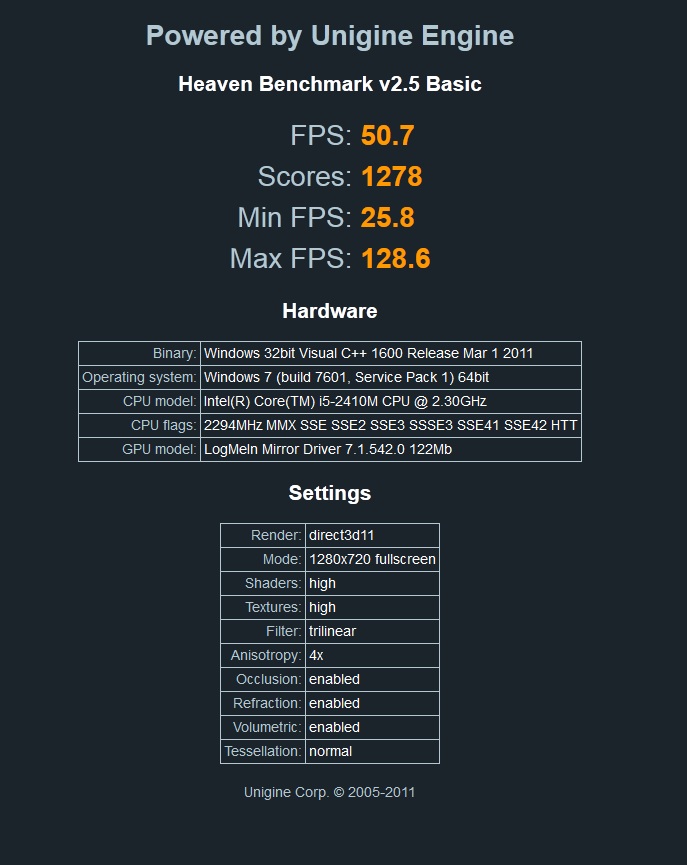
Ok, I increased the voltage by 50 mV and it works now. 900 Mhz, no error. Thanks! Although I don't know what occured it.
BTW, I got 1278 score with Heaven, best ever. I hope it remains stable...
Thanks again!Attached Files:
-
-
Well, i recabled everything and now it is just being super sluggish on the desktop. hmm. Could be a faulty cable or ExpressCard?
edit: Windows Resource Monitor shows CPU, HDD, and RAM all spiking to near 100% intermittently. Mouse is skipping around the screen. Everything goes back to normal when i remove the ExpressCard. But hey, at least it's SOME response to plugging the eGPU up.
second edit: a USB stick plugged into the PE4H gets recognized. So it's not the PE4H, the EC2C or the cable.
edit again: The input lag only happens when i have two 6-pin power connectors in the GPU.
Final Edit: ty GPU from my desktop works fine in the egpu setup, new video card works fine in the desktop. Conclusion: not enough juice in the new psu, guess it's time to swap 'em.
More edits: wow, now i'm really stumped. I can't get the beefier PSU to power the new card on the PE4H. Worked fine in my desktop! What's really going on here?
The other card i have is a 9800GT. When i plug it into the PE4H it spins up real hard, and when i attach the cable to the ExpressCard, it quiets down and is detected by Windows immediately. Conversely, when i plug the GTX560 in, it spins up real quiet and then when i plug the cable up to the ExpressCard, the fan goes into overdrive. I'm using the 3rd +12v rail on this PSU for the GPU, which is rated at 25a. This should be more than enough to push the GTX560 at full load. Why does this card + PSU work in my desktop, but not with the PE4H? Is it because my mobo has the extra 8 pin connector so that PCIe slot is getting more juice?
I'm pulling my hair out trying to troubleshoot this lol -
May I know the specification of the other PSU? How do you know it use the 3rd +12V rail? The 4-pin/8-pin connector on the motherboard is only for CPU. The motherboard have an advantage because PCIe ports get extra power from ATX 24 pin main power cable. So, if GPU request more power, PSU can deliver through the ATX 24 pin main power cable. AFAIK, RAIDMAX is not good product. That's why I suggest try other PSU. Your test with 9800GT show the PE4H, mHDMI cable, expresscard are OK. Try borrow a single rail & 80Plus rated PSU with +12V max current at least 18A. It should work.
-
Antec BasiqPower550w. On the rear of the PSU, where the modular attachments are, it is labeled which 12v rail is in use. i.e.: 4 modular sockets for "HDD" are labeled as 12v1. A single socket is labeled "PCIe/HDD" is specified as 12v3. My guess is that the 24pin power, the additional 8pin, and a third, unlabeled 6pin are on 12v1.
So, to recap:
Antec550+ mobo + 9800GT = Functional
Antec550 + 9800GT + PE4H = functional
Antec550 + GTX560 + mobo = functional
Antec550 + GTX560 + PE4H = NONfunctional.
The PSU has enough juice to push the card in the mobo, but not in the PE4H. I guess this might be because there's just not enough power on that 12v rail, even at 25a. -
That weird. Try setting the jumper on the PE4H.
-
Okay guys, I'm new to the eGPU project, so I'd like some help with this. Here is my list:
PE4H-PM3N or PE4L-PM3N (whichever is better bang for buck)
Any Standard Power Source you can link me to
Nvidia GeForce GTX 460 1GB GDDR5 Sparkle SXX4601024D5UNM GeForce GTX 460 OverClocked Video Card - 1024MB GDDR5, PCI-Express 2.0, Dual DVI, Mini HDMI, SLI, DirectX 11, Fermi w/Limited Lifetime Warranty at TigerDirect.com
OR Nvidia GeForce GTX 550Ti 1GB GDDR5 EVGA 01G-P3-1557-KR GeForce GTX 550 Ti SuperClocked Video Card - 1GB, GDDR5, PCI-Express 2.0 (x16), Mini-HDMI, Dual DVI, DirectX 11 SLI Ready, Includes Free 3DMARK 11 w/Registration at TigerDirect.com
Im going to be playing on my internal LCD on my HP Pavilion dv6-3210us entertainment laptop. I will be playing games that require a lot more power than the HD 4250 IGP (obviously), such as The Elder Scrolls IV: Oblivion, The Elder Scrolls V: Skyrim, Assassin's Creed II, Fallout New Vegas, and Crysis. So if you could just give me some feedback, I'd really appreciate it. -
The 12v bypass jumper on the PE4H had no effect.
I was looking back at the other people's experiences with the x220 in the matrix on the first page, and it turns out i have almost the same setup as Atticus128. I really have no idea why it's not working at this point. -
Hi Linkster,
HP Pavilion dv6-3210us doesn't have basic requirement to support x1.Opt setup. It only have ATI Mobility Radeon HD 4250 dGPU. Basically you can play games on internal LCD but only in windowed mode & the performance won't be great. You still need to use external monitor. I don't know whether x2 is possible or not on AMD platform. You can do x1 link but games will stutters when too many effects.
GTX460 power requirement is 160W.
GTX550Ti power requirement is 116W.
Recommended to get single rail, 80Plus rated PSU with max current on the +12V rail at least 11A for GTX550Ti or 15A for GTX460. -
If possible, borrow another PSU. Preferably single rail PSU. See if that able to make it detected.
-
Im not begging for like OMGBBQ high graphics, I just want it PLAYABLE, you know? So I assume you are recommending the 550Ti? If I was allowed, I'd go ahead and plop a Radeon in my grandparents' desktop, but I can't, so I am limited to the eGPU. So, could you, if it isnt much trouble, just list what you think I should throw together? I know I need a PE4L or H-PM3N adapter, so which do you recommend for this setup? And when you say, " HP Pavilion dv6-3210us doesn't have basic requirement to support x1.Opt setup," do you mean it is impossible for me to use the internal lcd with nvidia optimus drivers?
-
Wow, it's really hard to find a PSU with a single 12v rail in a brick and mortar store around here. guess i'll have to order a new one from newegg!
-
I posted earlier about some laptops I am able to get and their viability to use an eGPU solutions. I was wondering which of the laptops here would get me the best performance:
-HP g7-1260us 17.3" Laptop (i3-2330M Processor (2.2GHz))
-HP Pavilion dv6-6110us 15.6" Laptop(AMD Quad-Core A6-3400M Accelerated Processor (2.3GHz))
-Dell Inspiron 17R-1707 17.3" Laptop(i3-2310M processor (2.1GHz))
-ASUS K53E-RBR4 15.6" Laptop(i3-2330M Processor (2.2GHz))
These laptops fall into the range that I can afford and the places where I could buy them...out of these, which one would offer me the best performance with an eGPU? Thank you guys very much for any input. -
I think I already make myself clear in my previous post.
"HP Pavilion dv6-3210us doesn't have basic requirement to support x1.Opt setup."
Information on the x1.Opt available at first post. Opt=Optimus setup only possible if notebook have either Intel GMA 4500MHD or Intel HD Graphics or Intel HD 3000 iGPU. Optimus provide PCIe data compression which boost performance over PCIe x1 link. With this setup, you can use internal LCD & still can get good performance. If using external monitor, the performance will be even better. However, I checked & found HP Pavilion dv6-3210us doesn't have any of the mentioned iGPU. So, x1.Opt is not possible on this notebook.
"Basically you can play games on internal LCD but only in windowed mode & the performance won't be great. You still need to use external monitor."
You still can use eGPU with internal LCD but games will only running on windowed mode. When you trying to change to fullscreen, it will move back to external screen. This show external monitor still needed. Performance won't be good when playing on windowed mode & on internal LCD.
"I don't know whether x2 is possible or not on AMD platform. You can do x1 link but games will stutters when too many effects."
When x1.Opt is not possible, the only way to get similar performance the Optimus provide is by doing x2 link. This will require using two PCIe ports. However, I don't know whether x2 link is possible or not on AMD platform. x1 link is possible but you'll experience stuttering & lagging during gaming when too many effects. It is playable but stutters & lag will kill all the fun. Several example of eGPU x1 link on AMD notebook: & & & &
"Recommended to get single rail, 80Plus rated PSU with max current on the +12V rail at least 11A for GTX550Ti or 15A for GTX460."
Basically don't buy cheap PSU. Buy good PSU from good brand & make sure the +12V max current is enough to cover the graphic card power requirement.
Between GTX460 & GTX550Ti, I'll let you decide which one you want. Regarding the kit you need, PE4L-EC2C if your notebook have ExpressCard slot OR PE4L-PM3N if it doesn't have ExpressCard slot. -
I have a PE4H 1.0a & GTX 560 (not Ti) OC model from Asus and am now using the new power supply, haven't been able to get it to do anything yet though. Will edit.
EDIT: Current issues, I am trying to run Metro 2033 on internal LCD (external was giving me BSOD issues) and the benchmark program either doesn't run or I get a BSOD complaining about *will update what if it happens again*
EDIT: 3dmark06 is currently running on internal LCD, will see if it is able to make it through the whole test. Made it through on internal LCD, lets see if external will work.
EDIT: External would not work...after running 3dmark06 on the internal screen, I tried to disable the internal screen using the fn + f8 function because in the control panel there was nothing about my internal display for some odd reason. I then tried to run 3dmark06, after trying to start the benchmark, I got a black screen. I restarted, launched and ran setup 1.x, then windows 7 (with external monitor still connected), for some reason it did not launch windows using the external monitor as the primary, so I put my laptop to sleep, then woke it, external monitor was found, and internal never turned on, tried to launch 3dmark again, when I tried to run it I got a bunch of red and black squares as well as other weird graphical glitches... Ideas?
EDIT: got another BSOD when using internal screen and 3dmark, was able to see the screen to write down "nvlddmkm.sys" as something that caused the problem.
EDIT: 3dmark ran on internal okay, but I still can't get the metro 2033 benchmark to work. -
do we think this will be adequate?
Newegg.com - Antec NEO ECO 520C 520W Continuous Power ATX12V v2.3 / EPS12V 80 PLUS Certified Active PFC Power Supply
Antec 520w. Single +12v rail pushing 40a, and 80+ certified.
Also, thanks for answering a million questions
-
Yeah, that one look alright.
-
The "black screen" you experiencing is associated with PE4H's fuse kicking in upon detecting very high load & it will cutoff power from PSU to eGPU (see Common FAQ#5). You might need to do Panzer's fuse bypass.
I don't know why I think you have GTX560Ti OC. I did googled "GTX 560 DirectCU II OC" before & it straight show GTX560Ti OC result. Sorry about that. I might have made you wasting your money buying new PSU. GTX560 OC can consume up to 190W on peak 3D. It shouldn't cause PE4H fuse kicking in. Probably GTX560 OC draw more power than 190W. -
Hmm well my black screen seems a bit odd in that sometimes I get weird artifacts and whatnot. So what do you think it could be, I don't really want to keep buying new parts :/. Also I have a PE4H 1.0a, are the two fuses labeled "47 20V" ?
I'm wondering if it could have something to do with my expresscard slot, it seems very easy to the E2C adapter to pop out -
Panzer's fuse bypass show where the fuses located.
All ExpressCard slot like that. ExpressCard adapter can easily pop out. -
He has a different version than mine, so mine doesn't look the same. Well I installed Asus Smartdoctor and was able to underclock (and the fans made some noise for the first time, but it didn't last long.) Running 3dmark06 on the internal screen right now.
EDIT: 3dmark ran, but the mouse is jumpy and I still cannot get metro 2033 to run. Sigh, nearing the point of giving up.
EDIT 2: Here is an interesting one.... Put the GFX card in my desktop and got a pretty low score, I can't imagine it is because my motherboard is only 16x 1.0 and not 16x 2.0.
Processor
Intel Core 2 Quad Processor Q6600
Processor clock1520 MHz
Physical / logical processors1 / 4
# of cores4
Graphics Card
Graphics Card
NVIDIA GeForce GTX 560
VendorAsustek Computer, Inc.
# of cards1
SLI / CrossFire Off
Memory1024 MB
Core clock0 MHz
Memory clock0 MHz
Driver name
Driver version8.17.12.8538
Driver statusNot FM Approved
General
Operating system32-bit Windows 7 (6.1.7600)
Motherboardhttp://www.abit.com.tw/ IP35-E (Intel P35+ICH9/R)
Memory4096 MB
Module 1
1024 MB Corsair DDR2 @ 400 MHz
Module 2
1024 MB Corsair DDR2 @ 400 MHz
Module 3
1024 MB Corsair DDR2 @ 400 MHz
Module 4
1024 MB Corsair DDR2 @ 400 MHz
Detailed scores
3DMark Score12202 3DMarks
SM2.0 Score4370
HDR/SM3.0 Score6268
CPU Score3327
GT1 - Return To Proxycon36.31 FPS
GT2 - Firefly Forest36.52 FPS
CPU1 - Red Valley1.09 FPS
CPU2 - Red Valley1.62 FPS
HDR1 - Canyon Flight79.06 FPS
HDR2 - Deep Freeze46.3 FPS
Settings
Default settings used Yes
Width1280
Height1024
Anti-AliasingNone
Texture FilteringOptimal
VS Profile3_0
PS Profile3_0
EDIT again: Ran Metro 2033 benchmark a few times (on my desktop) with these settings:
Options: Resolution: 1920 x 1080; DirectX: DirectX 11; Quality: Very High; Antialiasing: MSAA 4X; Texture filtering: AF 16X; Advanced PhysX: Enabled; Tesselation: Enabled; DOF: Enabled
Avg Framerate across 10 tests was about 13.15 fps, how does that sound? -
Hi All,
I'm contemplating purchasing an eGPU setup with the hopes of playing Battlefield 3 on my laptop. Specs below...
Dell Latitude E6510
Intel Dual Core i5 560M
8GB Memory (DDR3-1333)
Intel QM57 Chipset
Two free PCI-E 2.0 x1 ports
SSD on the way sometime this month
Based on the little bit that I've been reading I believe I should be able to get x1 w/ Optimus support so long as I get a Fermi based graphics card. My concern is that I've read that some people are not able to get greater the solution working if they have greater than 4GB of memory. Will that be my case here as well?
Thanks,
Ryan -
Your scores are very low, especially the Metro 2033 benchmark. You should be getting around 17k in 3dm06 and about 40fps in metro 2033.
-
may I ask how the modification would look if the wires would be "up and down"?
-
It depends on your TOLUD. You can check your TOLUD by opening the device manager, then clicking "view", then "resources by connection", then clicking "memory".
-
Hmm then perhaps it is my GFX card causing the issues, although I don't know how the scores would be that low, the clocks all seemed correct, any idea what it could be?
DIY eGPU experiences
Discussion in 'e-GPU (External Graphics) Discussion' started by master blaster, Sep 18, 2009.


![[IMG]](http://img517.imageshack.us/img517/3717/inspiron15s560930aut650.png)

![[IMG]](http://forum.notebookreview.com/attachments/gaming-software-graphics-cards/72098d1319876627-diy-egpu-experiences-error.jpg)


![[IMG]](http://forum.notebookreview.com/attachments/gaming-software-graphics-cards/72303d1320433401-diy-egpu-experiences-south-bridge-6930g.png)
![[IMG]](http://forum.notebookreview.com/attachments/gaming-software-graphics-cards/72304d1320433809-diy-egpu-experiences-south-bridge-acer-5720g.jpg)