 Problems? See this thread at archive.org.
The PE4L and PE4H v 2.4 are PCIe gen 1. I think that's why on v2.0 you get BSOD. You have to set the compatibility mode to gen 1
-
I just wanted to get this out there again. Again, any input would be greatly appreciated!
-
Awesome! The first fully documented x4 implementation. Hint: you can avoid having to set x4 mode and do all the other stuff by placing the sequence of commands required in your startup.bat file.
Also, you can disable EIST in your BIOS and use Throttlestop to get your P8600-2.4 running at 2.53Ghz. Looking forward to seeing your NVidia GTX4xx/5xx results when you get it going.
That's correct. A Series-6 chipset whose expresscard/mPCIe port is set to gen2 speed but is running a current PE4L/PE4H *must* be set to gen1 speed in the bios or via Setup 1.x or else a BSOD will occur when the driver tries to communicate with the eGPU.
Use the DNA-drivers to provide a unified driver for your HD4250M and HD5770. That should eradicate the error 10. -
I downloaded a couple of versions and installed them but now the 5770 doesn't show up at all after a 32-bitA compaction. If I plug it in after everything boots, then I get an error 12.
-
Here's my enclosure for my DIY Vidock:
Benchmarks will be posted as soon as I get a new monitor. -
Ok today i had a quick chat with a salesman @ Bplus:
Now comes the doubt; I still have the XPS15 L501X but on Dec 25th i'll have to give it cause it's already "formally" sold and i wouldn't have a replacement (even for light gaming). My GF has the same PC so should be capable to handle the PCI gen 1 adapter only in mPCIe due the lack of the EC slot. I surely have one empty mPCIe slot on the XPS15 (plus the one busy for the Wifi card). How do i know if that slot is bound to the USB bus or the PCIe one? I would like to buy now the gen 1 and use it and, once the gen 2 is released, i'll give the gen 1 to my GF to let her play some games But I don't know how to check how the mPCIe port is connected to avoid a waste of money. Any help appreciated!
Thanks -
Hello All,
I'm considering building my first eGPU setup. I've been reading and searching this thread for information on building an SLI package. I haven't found anything yet and wondered if it was because it is not technologically possible or not cost effective vs the performance gain .... diminishing returns.
If it is possible, I have in mind to build it with two MSI GTX 560-448 Ti's. If anyone could point me in the right direction or tell me I'm going down the wrong path that would be great. I would like to stay out of hot water with my budget manager (wife).
I currently have a Sager NP9261 that just isn't keeping up anymore graphically and this would be a great way to get a little more life out of her. I couldn't even get through the second test with 3Dmark Vantage. She has the following specs:
Win 7 Ultimate x64 | Q6700 @2.66 GHz | 8GB PC5300 | 2 nVidia 8700M GTs 512 MB in SLI | 3 Western Digital Black 500GB HDDs (Raid 0 and a data drive). -
Hello All,
I'm considering building my first eGPU setup. I've been reading and searching this thread for information on building an SLI package. I haven't found anything yet and wondered if it was because it is not technologically possible or not cost effective vs the performance gain .... diminishing returns.
If it is possible, I have in mind to build it with two MSI GTX 560-448 Ti's. If anyone could point me in the right direction or tell me I'm going down the wrong path that would be great. I would like to stay out of hot water with my budget manager (wife).
I currently have a Sager NP9261 that just isn't keeping up anymore graphically and this would be a great way to get a little more life out of her. I couldn't even get through the second test with 3Dmark Vantage. It was a great system 4 years ago, but only marginal now.
She has the following specs:
Win 7 Ultimate x64 | Q6700 @2.66 GHz | 8GB PC5300 | 2 nVidia 8700M GTs 512 MB in SLI | 3 Western Digital Black 500GB HDDs (Raid 0 and a data drive).
Oh, and if I yank out the TV tuner I never use I can do at least x2 with the extra mPCIe slot. -
Hey guys, I have been lurking this thread for a couple months now, but now that I finally made my first good attempt at doing an eGPU implementation, i wanted to post my findings and experience and see if you guys can help me.
I am starting with a 2008 era Dell Latitude D830 Core 2 Duo with a T9300 2.3ghz with 4.00 gb of ram and 256mb NVidia Quadro NVS 140m. Also running a 120gb SSD in the HDD bay and a 500gb mechanical HDD in the media bay so no DVD player. Running Windows 7 64-bit.
I started out by trying to use my old Radeon 4870HD which required a lot of power and I could not get it to work with the P4EL that I got from Harmonic Inversion. http://www.harmonicinversion.com. After trying for a week and being unable to make my 4870 spin, i gave up, figuring the card was probably dead.
For a replacement card i chose to go with an MSI R6570 due to low power consumption, and also wanting to use ATI to avoid any driver conflicts with my onboard NVidia drivers and using an Nvidia eGPU (i am curious if this was an unwise choice, please give me some feedback on that)
For power I got an Antec Earthwatts 500W because it was pretty cheap.
Also I did not like the stability of the P4EL so I ordered a P4EH from Harmonic Inversion and I like it a lot better.
So after checking my TOLUD and finding it to be set at 3.5gb i was very dismayed but I decided to try anyways. With the laptop off I put the express card in and booted up successfully the first time on an external LCD but the card was not recognized and there were IO conflicts
After taking out 2gb of my ram, I booted again with the card in the machine and it went fine. I installed the ReadyDriver Plus according to the recommendations on the DoNotArgue.com site so that my laptop automatically F8's and selects 'Disable Driver Signature Enforcement' every time it boots. Then I installed the AMD DNA drivers from DoNotArgue.com
It worked great, I was able to play my games with remarkable improvement in quality even though I'm sure this is a 1x implementation. I did not have to do any compaction or chain loading or any of the complicated stuff I have read about on this thread that feels beyond my grasp.
A couple things I noticed now...if I boot up with the card in the slot I don't have an internal LCD and can only run off external monitors connected to the eGPU.
However, I can use the method of booting with no eGPU, then putting the laptop to sleep, inserting the expresscard and then waking up. When I do it that way I have the dGPU and the eGPU and I can use both internal LCD and external monitor. I was very happy when this worked, but my elation was short lived when I tried to run my game that way it was slow like before when it ran on the dGPU.
I guess I have a lot more testing to do -
Greetings everyone,
So I was reading the new update about the thunderbolt eGPU (because I have to use a mac at school grrr) and it says according to the Bplus section that it will be available around Nov/E (the PE5H v1.0 that is).
Well its december and we have yet to see it. Is it out or am I mistaken with the date? -
I will be in a dire need to get rid of my desktop since I will be moving around a lot but I still want to game.
What I have right now is: gtx 570 1280mb, ocz 500w psu. So what exactly do I need to get this show on the road? I got a gpu, I got a PSU. I want to run it via the expresscard so I guess it's PE4H ver2.4 with EC2C for me then? I want to run it in x2 link mode for maximum performance (that's max without TB?) So a SB laptop will be required then? Will the results be better with or without optimus?
Power the PE4H ver2.4 with EC2C with a floppy power connector, got that on my PSU. The mini hdmi is included in the PE4H ver2.4 with EC2C?
I also got a 2 monitors, 1 lg 120hz and 1 dell IPS, will I be able to use both normaly with DVI? -
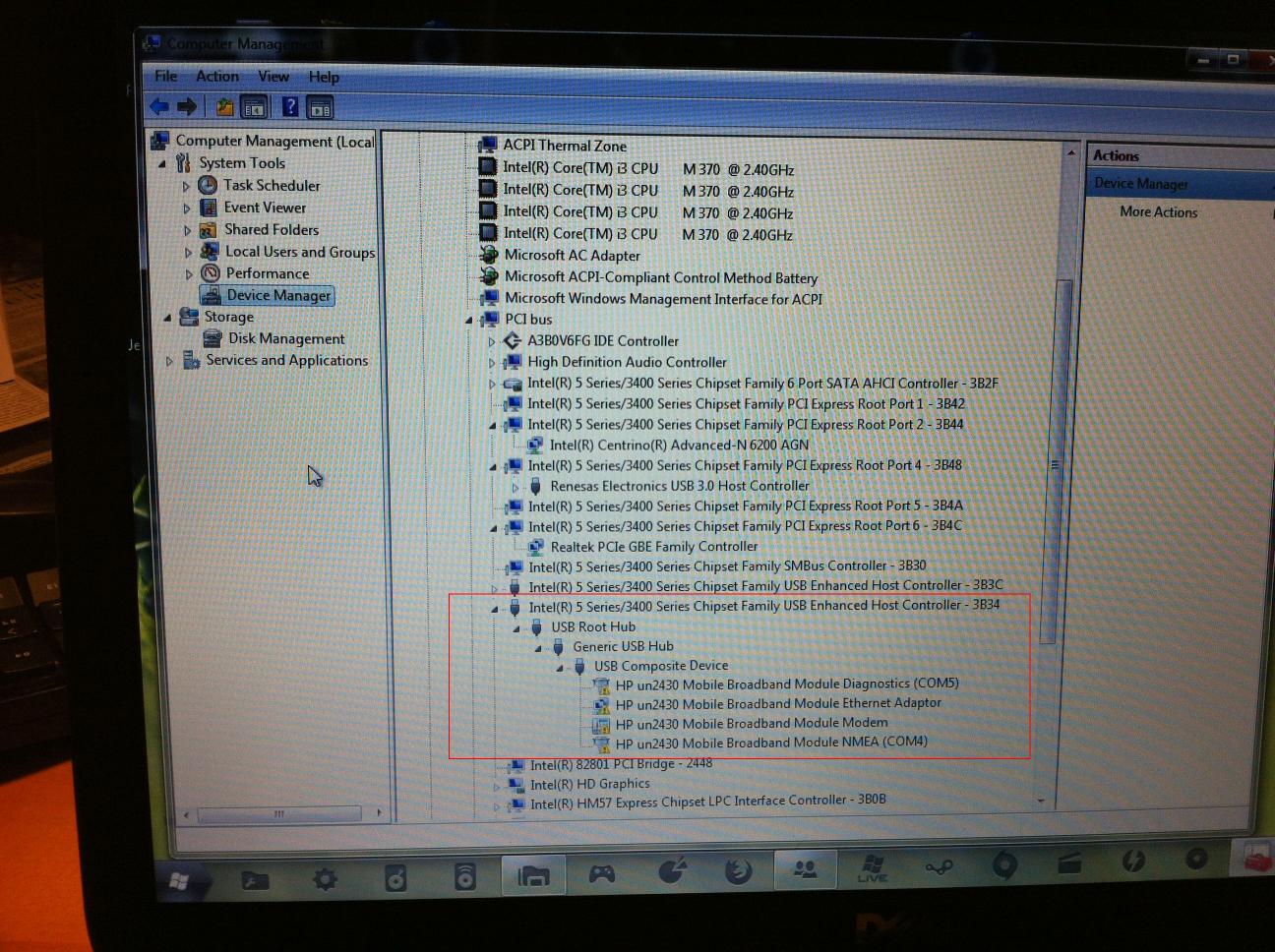
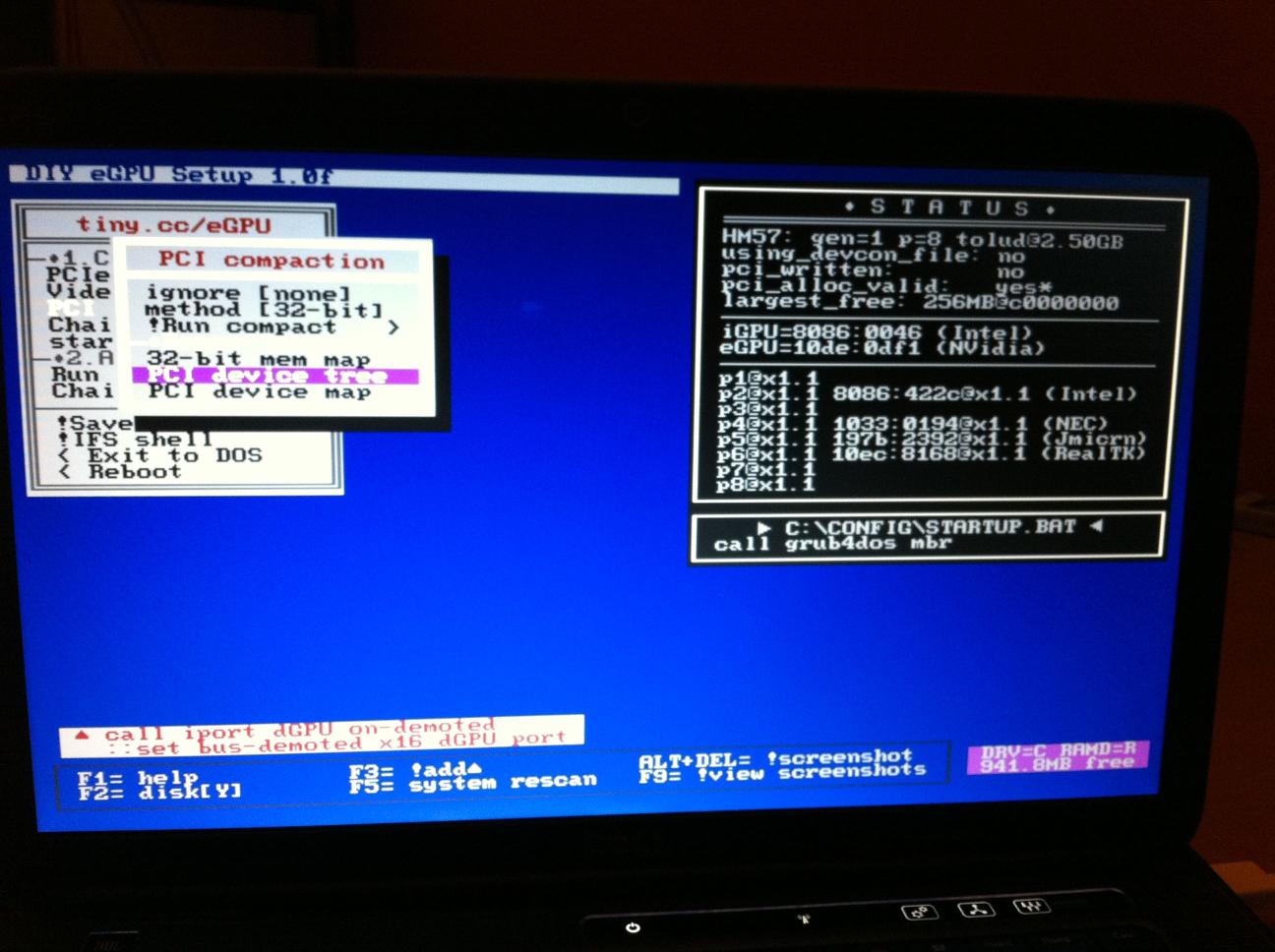
Ok i made a quick test: I took the HP un2430 WWAN card I have in my HP 2560P and installed it in the WWAN slot on the XPS15 L501X.
Attached below (first 2 images) the result. Do i have to guess the WWAN card is on the PCI to USB bus then? (and so the port is UNUSABLE for DIY dock?)
Later I installed back the card on my HP and in eGPU Setup 1.x is still invisible, but on device manager is under a different group (attached too below), that clearly says PCI to USB Host Controller (but in this PC i have the EC slot so it's only a double check for the XPS15 L501).
So how can i check on what bus is on the XPS 15?
Attached Files:
-
-
WWAN card = USB
wifi card = pci-e
If you want to test if the WWAN port is usable for DIY eGPU purposes then connect a wifi card to it and see if it appears in the port listing in Setup 1.x. From previous comments in this thread, Dell appears to wire both the USB and pci-e pins to their WWAN/wifi slots.
See Getting Started section on first page. Note: x2 link width cannot be done with a SB notebook. In addition, it requires accessible [port1+2], [port3+4], [port5+6] or [port7+8]. I'd advise purchasing a SB notebook with an iGPU and wait for the pci-e 2.0 kit to arrive. It will give the equivalent of x4 1.0 in bandwidth. -
Thanks. Checking in 5 mins and back
Ok, sounds like the WWAN slot is on PCIe bus also on the L501x. Thanks ^_^
Ok: Next step: i REALLY don't get what TOLUD is, or better, I've read that's something related to the max memory the system reserve, so lower it is better it is for an eGPU setup, but actually i can't measure how much good is to have 2.5Gb; what does it mean exactly?Attached Files:
-
-
Okey, I'm a tad confused really but essentialy, get a SB laptop, make sure there are port 1+2, 3+4, 5+6 or 7+8 avaible and wait for pci-e 2.0 kit to arrive. Any timeline when its due to be released? And by iGpu, do you mean internal other than the HD3000 f e 540m?
-
iGPU = HD 3000
dGPU = GT540m
eGPU = "your external card" -
Look like when windows starting, it set eGPU as primary video card. Did you installed any modified/3rd party ACPI/DSDT table(s) before? Did you try reset BIOS settings to defaults? Did you try fresh windows installation? (By "fresh" means not using recovery/restore disk/partition.) Does Intel HD Graphics iGPU show up in Device Manager if your notebook boot with LCD connected to eGPU?
P/S: Please answer all questions. Thank you.
I never thought it is PSU issue since it work OK when on x1.
Congratulations for successful eGPU x4 implementation.
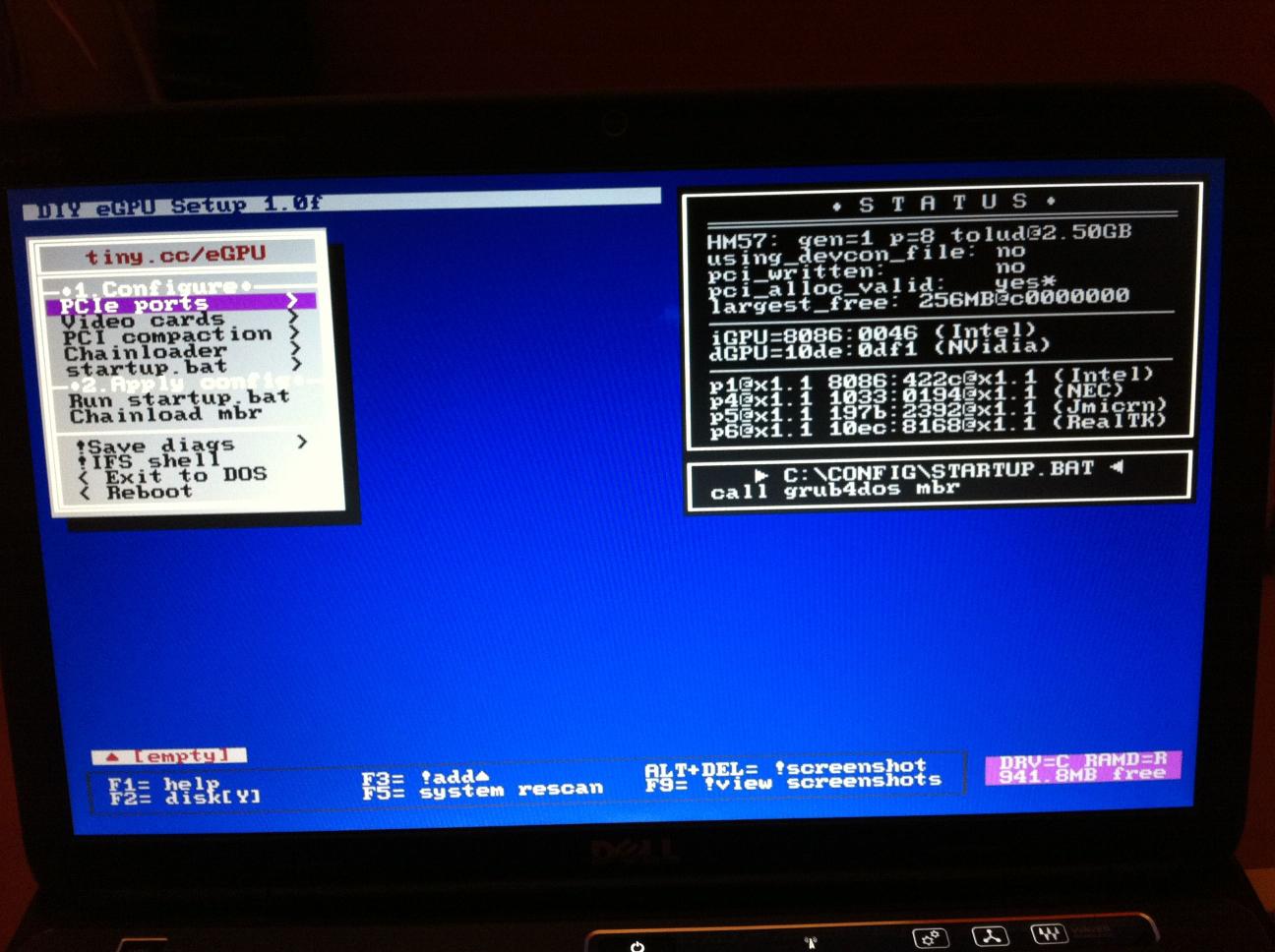
Do you mean, eGPU was detected in Setup 1.x but disappear after doing 32-bitA compaction? Please post screenshot of Setup 1.x main screen (instruction is available at Setup 1.x page).
timohour have tried CrossFire & SLI setup but so far unsuccessful. To get best performance from eGPU, prefer doing x2 setup (of course with single graphic card). To be able to do x2 setup, your notebook must have two accessible & usable PCIe slots, either two mPCIe ports or ExpressCard+mPCIe. The PCIe port number must in this combination:-
- PCIe port#1 & port#2
OR
- PCIe port#3 & port#4
OR
- PCIe port#5 & port#6
You can use AIDA64 to know/check the PCIe port number.
First you said it worked great but then it running slow. With ATI, you will not get hardware acceleration on internal LCD. You can play games on internal LCD but in windowed mode only. Performance won't be great though. You still need to use external monitor. With x1 setup, you'll experiencing stuttering & lagging while playing games. To get best performance, better do x2 setup IF PCIe ports are in either of these combinations (you'll need to use two PCIe ports, either two mPCIe ports or ExpressCard+mPCIe):-
- PCIe port#1 & port#2
OR
- PCIe port#3 & port#4
OR
- PCIe port#5 & port#6.
Your notebook doesn't have the required iGPU (Intel GMA 4500MHD) to be able to get hardware acceleration on internal LCD if you decided to use Nvidia Fermi desktop graphic card.
You can use PE4L (or here) too because you only need one PCIe port. It much cheaper than PE4H but PE4H have sturdier base though. x2 setup is not possible on SB notebooks due to hardware/BIOS limitation. So, to get best performance from eGPU, you can do x1.Opt setup (with Nvidia Fermi desktop graphic card) which is slightly better than x2 setup & you can use internal LCD (with eGPU hardware acceleration). Opt=Optimus make this possible & it also provide PCIe data compression which boost performance over PCIe x1 link. For now the available eGPU kit only supported PCIe Gen1 (2.5Gb/s at each direction, 5Gb/s concurrent) speed. When PCIe 2.0/Gen2 kit (5Gb/s at each direction, 10Gb/s concurrent) available, you'll get much better performance, equivalent x4 PCIe 1.0/Gen1 speed. The SB notebook (with ExpressCard slot) you need to get must have Intel HD 3000 iGPU to take advantage the Optimus setup. You also can get SB notebook with Nvidia Optimus. SB notebook with Nvidia Optimus definitely don't have TOLUD issue because you can disabled/turn off the internal Nvidia graphic card (dGPU) & the free PCI space can be use by eGPU.
- You need to connect the floppy power connector from PSU to PE4L/PE4H.
- If graphic card have two PCIe power ports, you need to connect PCIe power connectors to both ports.
- miniHDMI cable is included in the package. If you buy from HIT, you might need to select miniHDMI cable when ordering.
- You can use two external monitors with eGPU.
-
hi i have dgpu 330m and intel gma graphics which is disabled by sony.. how do i enable it to do 1x Opt? i have an egpu gtx 460.. my computer model is sony CW thanks!
-
Most probably you can't. The disabled Intel HD Graphics iGPU most likely not electrically connected to output.
-
No one seems to answer this question.
-
Sorry, let me clarify. My eGPU has never been detected since I started using the setup with anything more than 2GB of RAM. When I previously was using only 2GB's, my laptop would boot normally, but bypass the integrated graphics completely and only run off the eGPU (i.e. the laptop display had no power but my external LCD's would show the boot screen and ultimately the Windows desktop - everything ran fine albeit on 2GB of RAM).
The very first time I did a 32-bitA compaction (after installing 8GB of RAM and despite Setup 1.x not detecting my eGPU), Windows did detect the eGPU as a "VGA compatible device" but with an error 10. After installing the DNA drivers, I haven't been able to get Windows to detect it at all.
Hope that clarified things a bit! Eitherway, my screenshots are attached.
Thanks!Attached Files:
-
-
Any update on the Thunderbolt can be found in "News" section, at first post.
-
You are using an AMD chipset, so Setup 1.x's STATUS window will not accurately reflect what's going on since it's been tested/designed on Intel chipsets.
To check if the eGPU is on the pci-e bus, use the PCI Compaction->Reporting Tools.PCI Tree and do a visual inspection to see what it reports. I'd advise using the command line to perform PCI compaction. Do a 'help compact' for instructions. -
Ok: Next step: I REALLY don't get what TOLUD is, or better, I've read that's something related to the max memory the system reserve, so if i understood well, lower the value, better it is for an eGPU setup, but actually i can't measure "how good" is to have a 2.5Gb TOLUD; what does it mean exactly? (In common language)
One more thing: I checked for the PM3N adapter and I saw there are 2 versions. Does the 1.2 differs from 1.1 only for the CLKRUN delay circuit? Are there any contraindications choosing the v 1.2 instead the 1.1? -
That cleared things up a lot, thanks! I'll wait for the 2.0 to be released before I start looking into a laptop then.
-
Nando: What is the Redriver hwtools is talking about? And should we expect cabling to be different to support pcie2.0 speeds? And lastly behind the expected month you write Dec/M Dec/B what does those extra letters mean?
-
I think I can only answer to the last question
B = Begin
M = Mid
E = End
By the way the limited device sounds to be only the EC2C or mPCIe card (plus the cable), not the PE4L/PE4H itself, cause they used a PE4L 1.5 (actual revision i think) to achieve a PCIe 2.0 speed. -
Do you know what script I would need to change and where to update the startup.bat for those changes? I haven't messed with that before.
Also I tried to find a guide or something to help with with the P8600 for throttlestop and can't figure out what to change to change it to the higher Ghz. Also in the guide it says to have EIST enabled but you said to have it disabled? also in bios it only says Intel Speedstep. So this is the same as EIST? -
<s>Guys i need help, I got vidock4+, got 560ti, got optimus working..
but cant get streoscopic 3d option in driver, neither in latest beta, nor latest stable..
is it even possible to have on eGPU 3d vision working? got acer hn274h monitor</s>
[Mod Edit]ViDock4+ discussion is at http://www.facebook.com/VillageViDock[/Mod edit] -
I could have 3DVision working with my setup, but not with the modified verde driver, but the original driver for 560ti...
-
Redriver is an IC used to get pci-e 2.0 transmission going on lower grade cabling. However, it appears that by directly attaching the cable (no connectors) they were able to get pci-e 2.0 going without it. Can read the ReDriver datasheet if interested.
This ReDriver-less design was tested as a result of serialk11lr's/ JediMasterZon modded PE3A that could establish a pci-e 2.0 link here. That modified device had no cable nor used any connectors other than the EC2C<->expresscard port.
So yeah, the word I have is the new design will either be an EC2C+cable all as one product with a single connnector to attach it to a PE4L/PE4H, or it will be a EC2C+cable+PE4L/PE4H with no connectors. Villagetronic's ViDock has the latter design.
Eliminating the ReDriver IC would mean lower manufacturing which translates in lower cost for the DIY eGPU community. Besides, I have a sample with the ReDriver IC and still it wouldn't establish a pci-e 2.0 link:
![[IMG]](images/storyImages/pe4l20.jpg)
Above: engineering sample PE4L 2.0 with ReDriver IC, which with an accompanying flat cable and EC2C-with-ReDriver-IC. It still wouldn't establish a pci-e 2.0 link. It was therefore suggested to go a connectorless design given serialk11lr's modded PE3A could establish a pci-e 2.0 linkLast edited by a moderator: May 5, 2015 -
So cable bandwitdh is whats limiting us? Then I guess a thunderbolt cable between the expresscard and hwtool hardware might become something we should look at soon?
-
Nope. BPlus' latest flat cables are fine. It appears the mHDMI connectors on the EC2C/PE4L/PE4H are the culprits preventing pci-e 2.0 links from being established. Hence the move to a connectorless design with the flat cable wired straight onto the EC2C (and perhaps even the PE4L/PE4H).
-
i imagine the pcie endpoints (chipset and graphics) are failing link training, and therefore downbinning the link to a lower gen speed. going to smaller hdmi cables may help signal integrity issues.
-
Do you think we could still have the modularity of the dock through a custom connector or it's a plain physical limit of every connector (inductance?) so having it soldered directly is the only way? (I'm interested to have both the Express Card and the mPCIe) to make some tests on friends notebooks and promote the purchase of the kit
-
Well I hope they sort it out, then I can buy one in the start of the new year and a new gpu when I some money after christmas spree ^^
-
Hi, guys. Be gentle on me. I did read most of this things and understand what I need. I just want to confirm with someone who is experienced on this. I have Asus G51VX - RX05 and have upgraded cpu to E8435. NOw today I think i discovered that what might be and express card slot. I jsut want to confirm with some people here that this laptop indeed have that slot as I can provide pics and ss of everest.
Thank you for all help. -
I tested a 15cm flat cable with PE4H 2.4 (no ReDriver) and PE4L 2.0 eval (with ReDriver). It still failed pci-e 2.0 link establishment. Based on those results and BPlus' testing we conclude the mHDMI connectors are introducing inductance/noise/reflections that are preventing pci-e 2.0 link establishment.
That's the way BPlus are heading after having ReDriver + full modular design fail pci-e 2.0 testing. I hope that BPlus can manage to leave the connector on the PE4L/PE4H end so it could still be time-shared between mPCIe and expresscard systems. Consider too that by having a cable soldered directly to a EC2C/PM3N it would eliminate the issue of "too big mHDMI cable plastic boot" that prevented PM3N installation in cramped slots unless the boot was shaved to fit. -
Yeah that's a rough matter of price, if it drops enough, surely the best choice will be to get two kits, one for each type.
Btw from my point of view, the main worry of this one way solution is only the position of the mHDMI solder spot on the board, considering the dimensions of generic a PCIe card (no more than 4cm of width, but up to 31cm lenght), i would put the port on the short side like PE4L (even considering that SB notebooks cannot handle more than 1x for now and they're the only ones to take the advantage of a v2.0 solution).
That could help to make enclosures easier to be realized and could grant the possibility to keep the GPU horizontally without having arrange the cable avoiding tight corners to plug it in the notebook. -
<s>answeriong my own question: got it fully working... lol dunno how exactly but it is, steps:
modded latest verde beta, istalled everything - not working
clean install latest stable fermi - not working
restart - working even with optimus...
59 fps, starcraft 2, exterme details, 3d vision, quite nice
pic: http://denali.sigp.info/tmp/sc2.jpg
thinkpad t500, x1.opt, intel 160gb ssd, 2nd hdd 500gb in ultrabay, t9900, 8gb patriot sig ram and acer hn274h</s>
[Mod Edit]ViDock4+ discussion is at http://www.facebook.com/VillageViDock[/Mod edit] -
Good news with connector-less solution PE4L ~though it took over 2 months to develop Redriver and now abandoned ~Cant wait to get one~
-
Hi guys,
I want you to help me with this one:
I got the eGPU all working perfectly, but whenever I put the laptop into sleep mode and wake it up, the laptop goes BSOD after seconds. How can I fix this problem?
Also, Plug and Play results in the same problem. -
Hi All,
I've been enjoying my PE4L for a while but I recently purchased a new desktop so I no longer have a use for it. Is anyone in need of one? Please email me at [email protected]
This eGPU business allowed me the joy of gaming while I was saving up for my desktop! It might be a pain to get set up but it is well worth it! -
Set the PCI Reset Delay to 0 seconds (far left). If it's set to 6.9 or 15sec position, then resume from standby results in a BSOD. If you were using that feature to bypass the bios then you'll need boot with the eGPU powered off, hit F8 during Win7 startup, poweron eGPU, attach EC2C (or plug mHDMI cable in EC2C).
-
Alternative method to the one I posted earlier. Boot with the PCI Reset Delay set to 7/15s, then switch to 0s position after boot if want resume-from-standby to occur without BSOD.
-
Hey all!
I ran into another problem: I've got a Dell Latitude E6410 notebook and PE4L with HD 4830 working fine, but...the card cannot accelerate flash videos...at least, there is no flash acceleration. The flash video goes green and every browser I tried freezes. HTML5 videos working fine, by the way. Is this a typical problem or it is a simple bug in the AMD driver? I'd like to use my ATI card with working flash acceleration.
I'm looking forward for your answer. -
Anyone know why Skyrim wont work on my eGPU but will on my iGPU? It's kinda starting to annoy me. It tries to load up then says stopped working before it even opens all the way after a second or two.
-
I wonder if they ever looked at using infiniband cables, there are some well proven designs of cable and connectors at high speed transfers over short-medium distances (unlike hdmi which tacked on many specs later) and fairly cheap in bulk if you ignore the marked up aftermarket/branded crap. And its a healthy used/parts market too
-
I think it's an optimus settings and not a eGPU fault, i had to manually set the *.exe in the dGPU whitelist, so i think you have to do the same...
DIY eGPU experiences
Discussion in 'e-GPU (External Graphics) Discussion' started by master blaster, Sep 18, 2009.




![[IMG]](http://imageshack.us/photo/my-images/9/pe4l20.jpg/)


