 Problems? See this thread at archive.org.
Regarding to my problem, I have tried the graphic card on another desktop system, though with different PSU, and it works perfectly, but when powering the gpu with the vidock, it doesn't get detected. Any reason why this happens? Read my post from this link to know my problem:
http://forum.notebookreview.com/gam...851-diy-egpu-experiences-755.html#post8223541
-
Any help would be appreciated here. I am one step from going crazy.
-
is the modded nvam.inf the same for all drivers? nvidia has the 290.53 beta and the drivers page for optimus only goes up to 285.62. 290.53 seems to have improvements for BF3 and Skyrim
-
How does the vidock work with notebooks that already have discrete a GPU?
Say I have a notebook with a i5 processor and an AMD GPU. On the other side I have a vidock with a Nvidia GPU.
Does this f... everthing up?
-
Your problem sounds like a hardware issue with either the mHDMI cable or the PE4H. I Would try another mHDMI cable if you can. If you don't have a mHDMI cable but do have an HDMI cable with adapters, you can use that.
-
Nope. However for optimus you'll have to disable the AMD gpu.
-
Ok, given I want to use optimus for the internal notebook monitor, and I have both the AMD and Nvidia drivers installed, its just to disable the AMD gpu in device manager?
-
i am not sure if it is a hardware problem or if i am doing something wrong because the red light turns on the adapter turns green whn i plug the expresscard in the slot. will try but if anyone can think of anything else i would appreciate it. Anyone else facing the non gpu detection problem. Btw i tried the setup 1.x aswell and i still get a non detection there.
-
No you can't just disable in the device manager. It has to be lower level than that. You have to use nando's setup program.
Also I would only advise using internal LCD with a PCI-E 2.0 setup. On PCI-E 1.1 it performs worse in games than what benchmarks indicate. -
I believe that LED operation is normal with your version of the PE4H. If both LEDs are green, it means that everything is connected. I still think you have a hardware problem. Can you try the graphics card in a desktop system?
-
so i have a dell e6420. i5-2540m and hd 3000 graphics. qm67 chipset, series 6 i think?
how do i check if my TOLUD is good enough, and what would be the optimal set up to get the best performance with eGPU ? should i wait for the new PE4L 2.0 or would performance be about the same? -
Hey, I'm in as same as your position. need a solution here
-
You have been referred to http://forum.notebookreview.com/gam...diy-egpu-troubleshooting-faq.html#common_faq9 as a response to your PM. You'll see the link requests you replace your mHDMI cable as a fix to your problem.
-
Well, I had everything running, ran a few benchmarks.. now all I'm having is trouble lol
I set everything up, started windows, and plugged in the gtx460, windows recognized it and installed its drivers. I downloaded the mobile drivers and modded inf file, installed and restarted. Used nvidia control panel to set the gtx460 as prefered card. Everything was running fine on my internal screen (dell Inspiron 1545, intel 4500hd graphics). I plugged the 460 into my tv, and had the laptop set to projector mode and everything seemed good. I had a freeze caused by my SSD (been having them for a while, just was able to convince crucial to RMA), so I had to force power down. Restarted.
Tried to sleep the laptop to unhook the expresscard and the laptop wouldn't sleep. The screen would dim, but the laptop and were still running and the power light never started blinking like it normally would. I couldn't get the screen to come back on, so I unplugged the expresscard and forced power down of the laptop. I started back up and windows said I had a BSOD, checked for a solution but couldn't find one. I slept the laptop and plugged in the expresscard, resumed and it had disabled my wifi (and wouldn't allow me to reenable it) and wouldn't allow my mouse to be connected by the USB Bluetooth adapter. Also wouldnt allow me to output video to my tv. Eventually had another BSOD..
Left at idle with expresscard plugged in and had another BSOD
BCCode 7e
BCP1 C0000005
BCP2 94C6C6BB
BCP3 8E9235F4
BCP4 8E9231D0
BCCode 9f
BCP1 00000004
BCP2 00000258
BCP3 85B29A70
BCP4 82D7CB24
BCCode 7e
BCP1 C0000005
BCP2 94EE6B5D
BCP3 8EA49744
BCP4 8EA49320
Not sure what info is relevant..
(Insprion 1545, T9400 (@2.66ghz), 4gb ram installed but using Win 7 32-bit for the moment)
PNY GTX460 1Gb 256-bit DDR5
Rosewill Hive 550W Modular PSU (80 Plus Bronze Certified, +12V@38A)
Edit: Checked out troubleshooting page.. Might need Setup1.x for wifi issue. It's strange that it was working perfectly fine then stopped though..
Edit 2: working fine again. Powered down, unplugged gpu and powered it off, started windows, turn on gpu, slept windows, plugged in gpu, resumed and everything worked. Had to then unplug and plug back from the mini adapter at the back of the gpu for the tv to recognize it.
Edit 3: Seems I only have a problem when I try to sleep to either plug in or remove the gpu. If I boot up with it plugged in, I'm fine. Boot up without it, sleep, plug in, resume, no wifi eventual BSOD. Boot up with it, laptop wont sleep, eventual BSOD. -
The e6420 has a low enough TOLUD to use an eGPU and doesn't even need compaction. bplus's next attempt at the PE4L 2.0 will be tested within a week. I advise that you wait to see if it is successful before purchasing a PE4L. Benchmarks don't really do justice to the performance boost that PCI-E 2.0 provides. PCI-E 1.1 even with optimus will go back and forth between silky smooth and stuttering on certain games.
-
Just wanted everyone to know that BPlus does still have PE3A's. I ordered mine Monday and It got here today, Wednesday, to the middle of the United States from Taiwan. Impressive. Going to test with an HP 6460b and a friend's GTX560ti in the next few days to see if I can get a 2.0 link established. Looks like the PE4L's are about ready to ship though. Gotta love my timing.
-
I'm wondering is it possible to make a egpu for a 2010 imac?
-
Inspiron 1545 (T9400 [OC to 2.66Ghz], X4500HD, 3.5gb ram, 128gb M4 SSD) PE4L 1.x Opt. w/PNY GTX 460 (stock: 675/1800) Benchmarks:
Vantage
Internal: 6436
External: 7663
3DMark 06
Internal: 10207
External: 11967
3DMark 11
Internal: P2280
External: P2451
PCMark 7
Internal: 2824
External: 3011
p.s. I watched a video and couldn't get it to output audio to the tv. No option for it in my audio settings either. Ideas?
p.s.s. anyone else not having their scores show in Chrome? I have to copy/paste to ie to get the page to show
(will add scores with factory overclock settings from similar pny card later) -
Thnx for the help. Found a solution to my problem. Turns out one of the cables on the psu was not working properly and when i replaced it my gpu was detected. Got the error 12 and managed to overcome it with the setup 1.x. One thing that i did not quite get. Do i have to do the whole process with the pci combustion every time i turn off or restart my pc, or am i doing anything wrong. My steps are:
choose the option with the menu on the setup1.x
Choose pci combustion-32bitA-run combuation duriong which i press enter 3 times to complete.
Then click on the chainloader and load to windows.
Am i doing anything wrong here or that is the way it should be?
To clarify things: i do get past the error 12 and the egpu seems to be working, but do i have to do the process every time i turn on my laptop?
Thank you -
Anyone tried a 7970 yet?
I wonder how does its performance scale with bandwidth... -
Hey everyone,
I successfully managed to get an eGPU set up on a Latitude XT2 using the ExpresssCard slot! Yay!
The benchmark results are nothing spectacular (although Windows rates the graphics score at 7.0 - compared to the internal graphics score of 4.2), likely due to the XT2's wimpy 1.4GHz Core 2 Duo processor, although the entire setup only cost $6.43 (details below). Also, the XT2's TOLUD was set at 3.5GB, but a DSDT hack allowed to GMA4500MHD to be remapped into large memory.
![[IMG]](images/storyImages/entiresetup.th.jpg)
Hardware Setup Details
XT2 Details![[IMG]](images/storyImages/ecadaptor.th.jpg)
Essentially a (really) DIY PE4H, but reduced down to the bare minimums. Mainly, the ATX power supply was used to supply +3.3v instead of using a custom switching regulator like the PE4H.
Otherwise, it's just a bunch of soldered connectors. Sensitive signals (like PCIe clock, transmit, and receive) was routed through SATA cable (which has similar impedance characteristics to PCIe lines) and seems to meet bandwidth requirements.
Power connections were broken out into pins and wired into the ATX power supply. While you're technically supposed to connect ALL the power/ground pins, the video card connects those internally. So although it's not exactly standards compliant, it saves solder work.
All connections were manually soldered with an iron - 4 hours of fine-pitch soldering "bliss".
PROTIP: If you attempt this project, you may end up using a lot of flux, which may seep into the contacts. Thoroughly deflux (think ridiculous amounts of alcohol / your favorite industrial solvent) before use, and you may save yourself a lot of "head, meet wall" time.
Finally, all wiring was secured in place using gratuitous amounts of thermoplastic adhesive dispensed from the potting apparatus (aka hot glue gun).
Parts List
ExpressCard Housing Top ($1.01): https://www.mouser.com/Search/Produ...irtualkey64910000virtualkey649-10030573-200LF
ExpressCard Housing Bottom ($1.27): https://www.mouser.com/Search/Produ...tualkey64910000virtualkey649-10030574-0010RLF
Expresscard Connector ($2.54): https://www.mouser.com/Search/Produ...virtualkey64910000virtualkey649-130570-2112LF
PCIe x16 slot ($1.61): https://www.mouser.com/Search/Produ...irtualkey64910000virtualkey649-18783-10113TLF
... along with a butchered SATA cable, spare wire, solder, flux, and plenty of hot glue which I just had lying around ...
Questions:The XT2 has 3 available PCIe ports:
p 1 is WWAN (full length mini-PCIe card)
p 2 is WLAN (half-length mini-PCIe card, WiFi card by default)
p 4 is ExpressCard
From what I've read in this thread, it may be possible to chain p1 and p2 (both mini-PCIE slots) into a x2 link for a graphics card, although I really can't test this without having some circuit boards done.
The machine has a TOLUD of 3.5 GB, so it is impossible to hook up external graphics plus 4+ GB RAM without hacks. The D_LCK bit is also set, so short of BIOS modding, it is not possible to change the TOLUD. The DSDT hack (see http://forum.notebookreview.com/8052097-post6515.html ), however, works - the relevant PNPA03 section in the stock XT2 DSDT is similar to the screenshots, and injecting the relevant portions of code enables large memory. While it compiles with errors (is this a bad sign?), it does load fine.
Running an external GPU with <4GB memory is possible without any hacking.
If you're running Windows and looking for a DSDT extractor, I used DSDTSE. The iasl.exe file bundled with the DSDTSE package may need to be replaced with the iasl.exe from ACPICA to get it to run.
While it works, I still do have some questions. If anyone could answer them, I'd be very grateful!
- Can a DSDT hack brick (damage hardware) on a computer? It seems that the new DSDT table is loaded in Windows instead of hardware, so a OS reinstall should revert the stock version, right?
- Could this setup work with PCIe 2.0 (5 Gbit/s), assuming the SATA cable properly carries the signal? Alternatively put, are the PCIe 2.0 pin-to-pin connections exactly the same? (I can't test this myself since my chipset is ICH9)
- How does SATA cable compare to HDMI cable in terms of signal integrity? It seems HDMI is rated for 340 MHz per "lane", while SATA is rated for 6 Gbit/s. However, HDMI does offer more wires, so you can pack all the required signals over one HDMI cable.
- I'm also looking for a small power supply. It seems most video cards will not draw more than 300W (is this true?) - so will something like this FLEX ATX 350W power supply ( Newegg.com - FSP Group FSP350-60EVF 20+4Pin 350W Single FLEX ATX 80PLUS Power Supply - Server Power Supplies ) work? Is FSP a good brand? Several other FLEX ATX PSUs have reviews which involved smoke, fire, explosions, and failure, which are generally not good things.
A Circuit Board Solution?
The cost of this project turned out to be a small fraction of that of a PE4H kit - although granted, this setup is a lot more sketchy. However, the base concept is similar, and there are services which will do a custom 2-layer circuit board starting from $10 (depending on size). This seems like a possible solution to a even more low-cost, true DIY (or rather, "solder-it-yourself") eGPU kit. Anyone interested in working on a open source, low cost, simple, board layout ?
The only concerns for such a device are:
- Cheap FR-4 boards likely are not impedance controlled, so you can't do serious microstrip transmission lines for the PCIe link. This may result in signal integrity issues (and please correct me if I'm wrong). Does anyone know how important this would be? I'm just talking about a line spanning the length of an ExpressCard (~75mm) or mini-PCIe card (~51mm), which would them go to a SATA or HDMI connector.
- How important are gold fingers for the miniPCIe card? ENIG (gold-plated) PCBs are more expensive, although I've also heard that it's bad to mix gold contacts and tin contacts. -
So the problem turned out o be the cable from the psu. but is it the power cable, or the wires from inside the PSU? Please clarify for me.
-
Does anyone have an ETA or know roughly when PE4H 3.0 will come out?
And also what are the likely improvements going to be? -
I hate when people said "overkill", I really do. Anyway, I recommend Sandy Bridge notebook. Make sure that notebook have Intel HD Graphics/3000 iGPU. Some notebook come with dGPU only where the Intel HD Graphics/3000 iGPU is disabled in factory. No way you can enable them after that. You don't have to worry if the notebook you're getting is advertised as Optimus powered notebook because for sure Intel HD Graphics/3000 iGPU is enabled.
Definitely you need to get another PSU. GTX560 Ti alone have power requirement of 260W if OC-ed & on peak 3D. The PSU must have at least max current of 24A on +12V (12V * 24A = 288W, calculated with 10% margin).
Can you take a video? Possibly hardware faulty might explain why driver unable to successfully communicate with eGPU. You might need to replace the mHDMI cable.
Different version have different nvam.inf. I mean the content are different.
Optimus setup only possible if your notebook have active Intel HD Graphics iGPU.
Did you try set the default output device to HDMI audio?
Yes, you need to do this in every cold boot because the settings you did in Setup 1.x is not permanent.
It's normal. You can fixed them to satisfy iasl.exe compiler if you want to.
Very unlikely to cause any damage. Reinstall OS will revert the DSDT to original copy, loaded from BIOS.
Depend on the graphic card power requirement. Since graphic card will draw power from +12V, you need to make sure the max current on +12V is sufficient to power a graphic card of your choice. FSP is good PSU. Make sure the serial number start with FSP too. There are many brand that unable to deliver stable max power that they claimed their PSU can do. So, beware. To name a few; Corsair, Seasonic & FSP are trusted brand.
BTW, ducky64, nice DIY setup you have there. -
If you have SB notebook, it can double the eGPU performance as shown here.
-
What is an SB notebook?
-
SB = Sandy Bridge = 2nd generation Intel Core processor
-
Oh ok, but apart from that are there any improvements for other things, like bandwidth or x1E because I'm about to buy and wondering if I should wait for v3 as I already have CX430 v2 psu and Gigabyte Radeon HD 4890 and monitor so just waiting to order the passive adaptor. Would you recommend I wait for pe4h v3 with that setup or just buy v2.4?
-
Again, if you have SB notebook, it can double the eGPU performance. If you don't have SB notebook, there is no improvement at all.
Let me explain. SB notebook have PCIe rev 2.0 5Gb/s bandwidth/speed but with current kit from BPlus, eGPU only work in 2.5Gb/s. So, the idea of new kit, PE4H v3 or whatever they called it, is to support 5Gb/s bandwidth. -
With that usb3 card and the riser card, isnt it possible to get something longer than 15cm? Would like somethning like 30-50cm but I know its hard if you want to keep bandwidth high
-
Thanks for the reply kizwan. I'm just wondering though, did I miss out anything else, like an important step? Because it sounds too easy to me.
Also, a couple more things:
1. Should I wait for PE4H 3.0?
2. Will the stock NVIDIA drivers be enough or will I need to mod the driver as per the link? http://forum.notebookreview.com/gam...851-diy-egpu-experiences-123.html#post6542661 -
1. You can wait PE4L v2.0. Look like PE4L v2.0 will be available first & after that PE4H v3.0. PE4H v3.0 might come with enclosure.
2. You can use the modified nvam.inf file from that post with Nvidia Verde driver.
I don't think you miss out anything. Using eGPU on x220 should be easy. -
Hi posting asking of those with x220's.
I've got the newest bios (1.26) and found that my system refuses to change the TOLUD when I install 8gb of ram inside. 4gb+ causes an error 12 message.
Does anyone know why my laptop doesnt change the TOLUD when I cold boot with the gpu plugged in and turned on? It seems to work for everyone else.
Setup1.X compaction doesn't work either.
The setup works fine at 2gb installed, with x1.1.
Setup:
Laptop: Lenovo x220
CPU: i5-2520
RAM: 8gb
GPU: GTX 560TI
PSU: Corsair CX-430W
PE4H+EC2C -
The power cable. Just make sure that your gpu gets sufficient power. In my case the cooling system was working but that was the only thing that works. When i found out that there wasnt enough power going to the card and fixed it it worked.
-
If I'm not wrong, then I would say that the problem that I am in now comes from expresscard adapter.
-
Hi,
I've been reading a lot on egpu's and thunderbolt. From reading I can't tell if all the necessary parts are available to create a thunderbolt egpu solution. Has anyone successfully created one? I know some companies are developing solutions like magma, msi, and vidock, but I'm curious if it can be done now. Thanks!
Patrick -
Following some very good advice from Nando4 I have moved from an aging desktop machine to the following with great results:
Fujitsu T901
i7 2620
8GB RAM
128GB Crucial M4 SSD
500G HDD in optical bay
Intel HD3000 graphics
Win7 Pro 64bit
I decided against the integrated nvidia graphics to avoid any error 12 issues as I knew i would be relying heavily on my eGPU most of the time.
eGPU
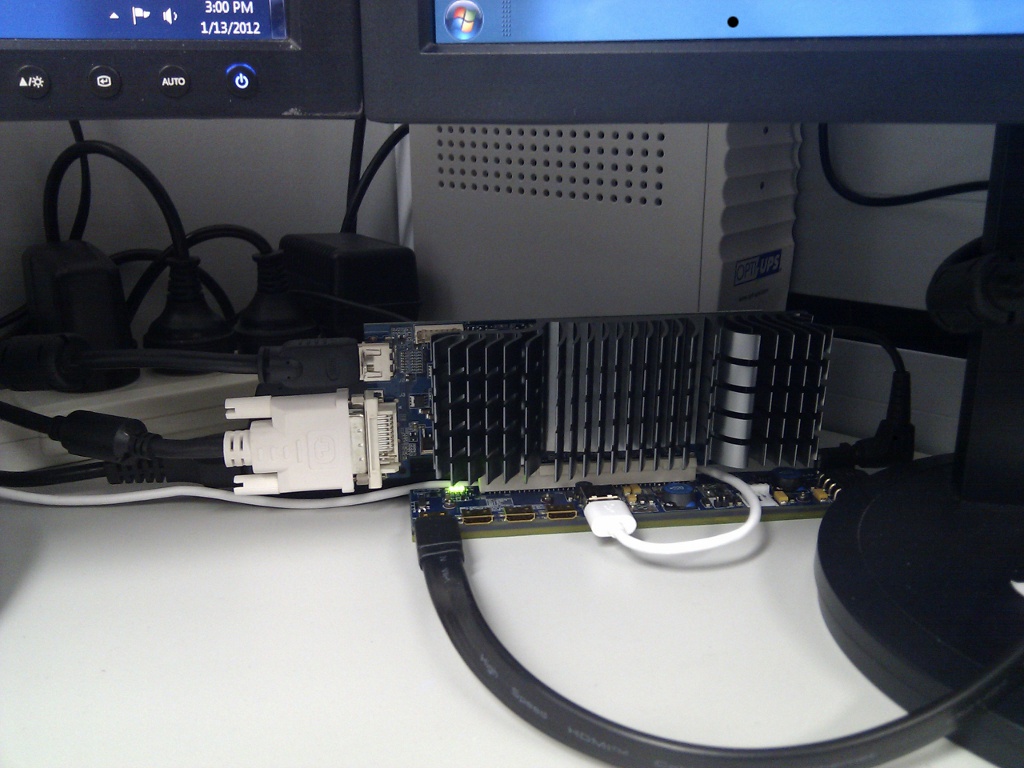
PE4H-EC2C V2.4a
60cm PCIEM/M cable
Asus ENGT520 Silent video card
Old asus laptop supply (19V 90W)
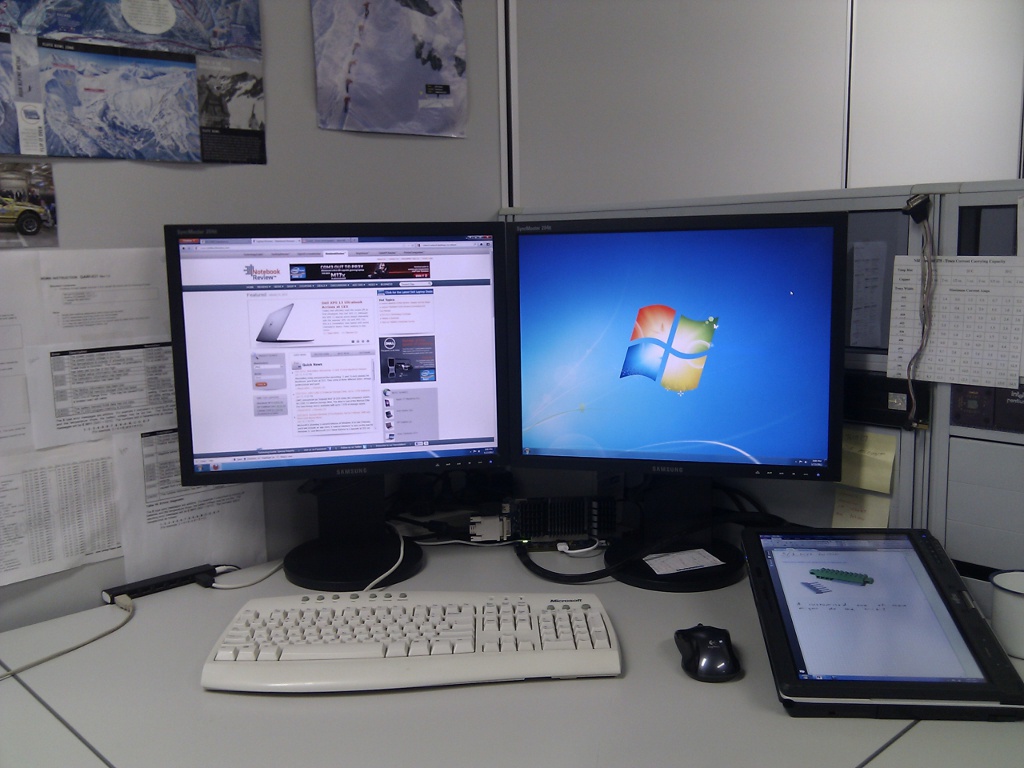
Dual Samsung 204B 4:3 monitors @ 1600x1200 (I love these displays)
275.33 nvidia drivers with nando4's modified inf file
Setup was straight forward. I just followed the instructions for the driver install and everything basically just worked.
My time is split between embedded system development and management so this setup is perfect for my needs. I can do development work on my external screens using a desktop keyboard and mouse whilst also using OneNote on my tablet with the pen.
I have a 7 port hub connected to the PE4H so it basically is my docking station. When I come in to the office each morning I just connect the PCIE and power cables to my tablet and all my peripherals are good to go.
I highly recommend Actual Multiple Monitors for this sort of setup as it solves a lot of the issues associated with extended desktops including adding a taskbar to all screens and ensuring programs open on the monitor you want them to.
I still need to sort out the following issues and would appreciate any advice:
- If I boot the machine with the eGPU connected the external monitors do not automatically come up. I need to manually "extend my desktop onto these monitors" each time
- If I start the machine and then hot plug the eGPU, my wireless card seems to disappear for a few minutes and then come back up. I don't seem to need to manually extend the desktop if I do this however.
Many thanks to Nando4 and others for making this setup possible. I am very happy with it.Attached Files:
- If I boot the machine with the eGPU connected the external monitors do not automatically come up. I need to manually "extend my desktop onto these monitors" each time
-
If anyone is interested I am selling my PE4H plus EC2C (expresscard adapter) on ebay here:
eBay - New & used electronics, cars, apparel, collectibles, sporting goods & more at low prices
It worked pretty well with my gtx 560Ti in single player games, but not as well in some of the multiplayer games I played and I have decided to stick with my desktop for serious gaming. -
Hi there
Just like Mjolner above, I am also selling my Vidock unit, but this is the PE4L, I used it about for 4 months since May using my GTX 460. Then I built my desktop in Sept, with my GTX 460.
It works just great, the link is here if anybody is interested. Please contact me if you have questions.
http://www.ebay.ca/itm/ws/eBayISAPI.dll?ViewItem&item=200700077390&ssPageName=ADME:L:LCA:CA:1123 -
How are the experiences with different hdmi cables?
Are there cables available that improve the speed?
Andreas -
Please take GTX570 to test perfomance! I have 560 non TI and reget that buy this card, non GTX 570.
-
That's my enclosure for eGPU, made from plexi, based on sprtnbsblplya enclosure
![[IMG]](images/storyImages/klejenie3.th.jpg)
![[IMG]](images/storyImages/klejenie2.th.jpg)
![[IMG]](images/storyImages/klejenie1.th.jpg)
![[IMG]](images/storyImages/skladanie.th.jpg)
![[IMG]](images/storyImages/gotowe1r.th.jpg)
![[IMG]](images/storyImages/gotowe2e.th.jpg)
![[IMG]](images/storyImages/gotowe3.th.jpg)
-
I have a question. I have a nice eGPU setup that I show you here :
http://forum.notebookreview.com/gam...851-diy-egpu-experiences-439.html#post7694162
I play games like battlefield 3, Skyrim and other big games, but there is something annoying that happens everytime.
When I start my notebook with eGPU on, all is ok. But, when I start a game with high graphics, blue screen..everytime. I have to start the game in screen mode with low graphics, and after 1-2 minutes 1-2 minutes of playing, I return to full screen with high detail to not freeze and BSOD.
Why?! it is a little bit annoying to do this all the time..
Thanks -
That weird problem. Did you already try set the fuse bypass jumper?
-
Yep I tried the fuse jumper open and close... nothing changed. Before the BSOD comes, the external screen comes black and it says that the nvidia driver is not detected.
-
Re: PE4H 3.0
Hi
I have a Sony z13
As its not a Sandy Bridge-based laptop, I take it there is no point in me waiting for the 3.0v of PE4H as there it would be no performance improvement over the previous versions of PE4H?
thanks -
Sounds like your PSU or eGPU's silicon needs to warm up before it can deliver full load. Try pulling back the clocks and voltage of your GTX560Ti to see if that helps things. We've had one other user with a factory OCed GTX560Ti that had to do the same to get stable operation.
Sony Z13 uses a Series-5 chipset with max speed of 2.5GT/s (Gen1) which the current PE4H 2.4 or PE4L 1.5 works at. There is no value in getting a PEL 2.0 or PE4H 3.0 for your system. -
Hey nando,
I'm still having a problem with the pe4h, can you give me some advices to fix it? -
In your PM/posts you indicated that the video card works OK in a desktop system, the mHDMI cable has been replaced and the problem still remains if you use another notebook. Steps that are outlined in the http://forum.notebookreview.com/gam...diy-egpu-troubleshooting-faq.html#post7816969 .
If setting the fuse bypass doesn't help then I'd suggest seeking a replacement of your PE4H from whoever you bought it from. -
Unfortunately, I bought it from a person named redtrontech from ebay who has wholesale of PE4Hs, I am now negotiating with him, he said that I should go to notebookforum blog, do you know that website?
DIY eGPU experiences
Discussion in 'e-GPU (External Graphics) Discussion' started by master blaster, Sep 18, 2009.


![[IMG]](http://imageshack.us/photo/my-images/846/entiresetup.jpg/)
![[IMG]](http://imageshack.us/photo/my-images/51/ecadaptor.jpg/)




![[IMG]](http://imageshack.us/photo/my-images/818/klejenie3.jpg/)
![[IMG]](http://imageshack.us/photo/my-images/407/klejenie2.jpg/)
![[IMG]](http://imageshack.us/photo/my-images/33/klejenie1.jpg/)
![[IMG]](http://imageshack.us/photo/my-images/807/skladanie.jpg/)
![[IMG]](http://imageshack.us/photo/my-images/402/gotowe1r.jpg/)
![[IMG]](http://imageshack.us/photo/my-images/641/gotowe2e.jpg/)
![[IMG]](http://imageshack.us/photo/my-images/100/gotowe3.jpg/)

