 Problems? See this thread at archive.org.
Okay, will do. I wan't the best performance, so thats that I'll go for.
-
-
Created the section with insights for:
- Tech Spec of solution and standard benchmarks
- Game Video Benchmarks -
If I boot with internal LCD OFF (BIOS and so on appears on it but the loginscreen don't) & there external monitor is primary AND I was able to login without a BSOD, then I'll be able to turn on the internal LCD and play games on it as well as extending one montor with the internal and play on the primary.
If I don't connect the external monitor I am not able to open the nvidia control panel for a while and I'll get a bluescreen if I play 3D games, but If I wait until I'm able to open the control panel, I can play 3D games.
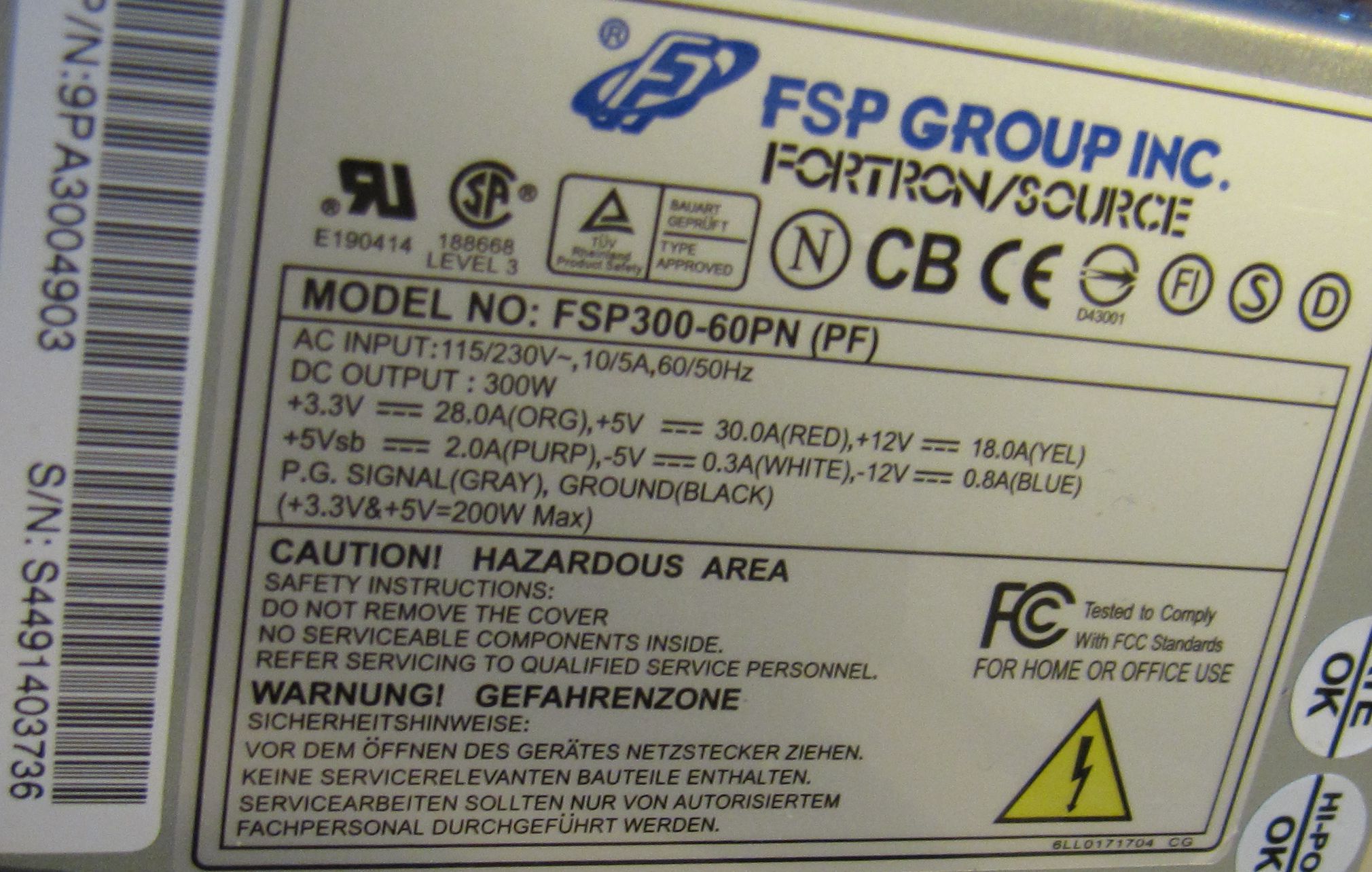
I attached a picture of the label of the PSU. Yes 12V. Btw. I used both GPU powersockets with diffenent wiring looms.Attached Files:
-
-
I will wait for the first tests and I think I will also go for a PE4L 2.1...
-
Hi,
1) is it possible to add my sound card to laptop by using this methods .I have a MMC/SD/MS-CARD SLOT
2)Does it require external power supply ? -
I don't think so. Those slots are only designed for low bandwidth (throughput) flash memory. The best SD Card right now can only achieve 95 MB/Sec.
Sent from my iPod Touch 4G using Tapatalk -
1. Yes, you can but like graphic card, you need to use either mPCIe port or ExpressCard slot. You can't use MMC/card reader.
2. You can use AC adapter for sound card I think but definitely no need desktop PSU. -
So I have connected the egpu to my expresscard slot after booting and my device manager reports that there is a problem. Any fix for this?
Edit- so I installed the latest DESKTOP nvidia drivers for the gtx460 and now I am getting this error message:
Windows has stopped this device because it has reported problems. (Code 43)
Edit- nvm I think I have everything working.Attached Files:
-
-
sound card implementation: http://forum.notebookreview.com/gam...e-out-how-make-diy-vidock-33.html#post5204991
-
Since it seems Nando scared off my buyer I had to relist my PE4H if anyone is still interested:
eBay - New & used electronics, cars, apparel, collectibles, sporting goods & more at low prices -
1)Looks like I don't have mPCIe port or ExpressCard slot in my laptop . Stucked now . Is there any good asus laptop with Expresscard slot ?
2)my sound card is M audio audiophile 2496 >if I am connecting this one does it require external power ? .In desktop it draws power from pci slot .there is no extra slot for power . -
All notebooks I've seen have a mPCIe slot for the wifi.
Asus have just released a 1.55kg/3.4lbs 12.5" B23E with an expresscard slot. See ASUSTeK Computer Inc. - Commercial Notebooks- ASUS B23E. It's ~$900 in i7-2620M form in the US.
The PE4L/PE4H needs external power supplied either via the DC jack or floppy molex to supply up to 12V/75W to the slot, the same as a desktop pci-e slot supplies. A expresscard/mPCIe slot doesn't even have a 12V rail. It's got a maximum of 3.3V/1.3A (4.3A) so cannot come near powering a desktop pci-e card. -
i have inspiron 1545 can it support the above graphics card(external)?
-
i have dell inspiron 1545 with expresscard slot. how can i get this one working??
-
Hi,
If you look at first post, you'll find two Dell Inspiron 1545 with successful eGPU implementation.
http://forum.notebookreview.com/8231156-post7619.html
http://forum.notebookreview.com/7547774-post3914.html
http://forum.notebookreview.com/7551109-post3929.html
Dell Inspiron 1545 have Intel GMA 4500MHD iGPU. You can utilized Optimus performance using Nvidia Fermi desktop graphic card. You will be able to get acceleration on internal LCD. The kit you can use is PE4L-EC2C ver1.5 Package. -
PE4L 2.1 BPlus page is up. Engineering sample is going to be available Feb 20 2012 for $70+shipping.
-
I waiting PE4L 2.1 test)) Maybe i change my P4EH 2.4, but if perfomance increase more than 30%.
-
Quad Core 2.4Ghz? That difference 460\560 versus 580 onP4EL 1.5 version?
-
I`m interested in your setup but I'm not sure if I'm able to reproduce it. Can you provide detailed information on the soldering process?
And second question, has anyone been able to do a working egpu setup with a Lenovo Thinkpad L520? -
Hello,
i have the question...
I have dell xps 1330
:: Procesor
Intel Core 2 Duo T7300 2 GHz 4 MB pamięci podręcznej L2, FSB 800 MHz
:: Chipset
Intel Crestline PM965
:: Memory
3GB
:: GPU
NVIDIA GeForce 8400M GS - 128 MB GDDR3,
monitor
13,3 Zoll 16:10, 1280x800 pikseli,
:: Hard disk
320GB
::
ExpressCard, 2x USB 2.0, HDMI, FireWire, S-Video, VGA
My question is:
Make any sens connect to this notebook egpu. I want use to this PE4H ver2.4 with EC2C. My friends from poland told me it is stupid becouse the graphic will not work like on normal PC. -
Hello,
To get better performance from eGPU on your notebook, I recommend doing x2 link setup. x2 link setup will require connecting eGPU to two PCIe ports either two mPCIe ports OR ExpressCard+mPCIe. x2 link setup only possible with either of these combinations:-
- PCIe port#1 & port#2
OR
- PCIe port#3 & port#4
OR
- PCIe port#5 & port#6
You can use AIDA64 to know the PCIe port numbers.
These are several successful eGPU implementation on M1330:-
http://forum.notebookreview.com/5122549-post159.html
http://forum.notebookreview.com/6941485-post2261.html
http://forum.notebookreview.com/7062871-post2604.html
http://forum.notebookreview.com/6550196-post1246.html
http://forum.notebookreview.com/6738629-post1740.html -
thank you very much for the advice.

-
is there any xps / inspiron models with Express card slot ?
-
Nope. That's why I got a latitude.
-
Well remember the CPU runs at 2.9ghz+ due to turbo. Because it's an extreme edition ES I have 10 more watts to play with than everyone else, so on average I get higher turbo. Also remember that the 580 has a pretty big overclock (and it will be even higher in about a week).
I was a bit surprised at how well the card scaled too. Compared to my 1ghz 460 benches and the 1ghz 580 benches I gained almost exactly 52% (512/336). Even in tests heavily limited by PCI-E (dmc4s4) there were still major gains, which is what surprised me the most.
Oh and in a few days a PCI-E 2.0 adapter is arriving
-
I think that with kepler release we'll have even more fun
-
Hi,
I've just checked for TOLUD into my device manager before trying an eGPU.
Here is what I see :
[0000000009FA00000 - 00000000FEAFFFFF] PCI bus
It looks like my TOLUD is only of 2554Mb ? Can anyone confirm?
My dream of my eGPU Mod idea for my VPC-Z21 is suddenly but vanishing slowly...
edit :
Z21 TOLUD is 2,56 Gb < 3.25 Gb
So there's no TOLUD issue ?
Ehmm I'll be trying my eGPU mod as soon as possible then
-
Yup, TOLUD is 2.5GB. Won't even need compaction.
-
Thank you.
I've just noticed that there's no Large Memory is that a problem ?
I'm not sure I understood, so to get a working eGPU we need either a TOLUD of 3,25 or less or if TOLUD is more than 3,25 we need Large Memory PCI BUS entry which root bridge extends into 36-bit space ? right ? -
Yes that's correct. Only need large memory if TOLUD is 3.5GB or higher. You're fine and everything should be plug and play.
-
Thank you very much!
-
I'm trying to use an AMD HD 5870 with my Aspire 5940G laptop, which has a AMD Mobility Radeon HD 4650 built in.
On a fresh Windows 7 install, my card is recognized and Windows automatically installs drivers. However, I then run into the same problem as this guy: http://forum.notebookreview.com/gam...851-diy-egpu-experiences-142.html#post6607546
If I understand it correctly, the problem is that Windows uses different drivers for the two cards. And indeed, this seems to be the case:
![[IMG]](images/storyImages/F9EAK.png)
Right now, I've removed the driver for my 4650 and I'm trying to install the same one I have for the 5870. Wish me luck ^^
edit: Hm, that didn't work. I clicked "Uninstall" in the device manager to remove the driver, then started the latest catalyst setup to install it again. Everything went fine, but after the install, Windows itself installed a driver and when I went into the device manager to take a look, everything was like at the beginning :-/ -
Try Driver Sweeper, its by Phyxion. It'll get rid of the whole driver.
Phyxion.net - Driver Sweeper -
Nando, looking at the product page, it appears they will be making the longer lengths
PE4L-EC060A Lenght 60cm
PE4L-EC030A Lenght 30cm (OEM)
PE4L-EC100A Lenght 100cm (OEM)
PE4L-EC150A Lenght 150cm (OEM)
PE4L-EC200A Lenght 200cm (OEM)
is this true? I hope it is! -
I know only what Masaharu from BPlus commented in his recent update about cable lengths:
-
Hm, I did that. Now I get "error 12" while still having different driver versions. Guess I'll have to reinstall Windows again.
-
Windows doesn't report the right driver versions in the device manager. One driver is in fact running both cards despite what it says. I ran into this inconsistency on my old laptop with a 9600m gt and a gtx 460. To test it I first installed a driver with a bug on one card (the bug was poor dx7 performance. I tested with 3dm01), then installed a driver without that bug on the other. I then ran 3dm01 on the card that windows said had the bugged driver installed, and there was no bug, meaning that the more recently installed unbugged driver was running both cards.
Error 12 means not enough resources. This is not a windows problem. You need to verify that your TOLUD is 3.25GB or lower, and if so run compaction. If it isn't 3.25 or lower you can't use the 5870. -
The problem you're experiencing is not because of the drivers. It actually because lack of resources for the 5870 to run. I have used different drivers before for HD4570 & 5870 (both show different version in Device Manager). Both of them run OK.Last edited by a moderator: Feb 6, 2015
-
I have a question:
say I buy the eGPU kit and buy the express card link and the mini pcie card. I currently have a free express card slot and also a free mini pcie slot and need to know if it would be possible to use both and get twice the bandwidth with an external gpu. If so, what about 2 mini pcie cards and one express card slot? (if I pulled my wireless card and used it's mini pcie slot also)
I have seen posts about this, but I would like someone to tell me: "I have one set up this way and it works!"
PLEASE get back to me on this soon!
Thanks guys....
also, has anyone done this with an acer aspire 6920g? how did it work? -
On Intel chipsets:-
- PCIe root ports 1-4 can be independently configured as four x1s, two x2s, [one x2 and 2 x1s], or one x4 port widths. PCIe root ports 5–6 can be configured as two x1s, or one x2s.
- PCIe root ports 1-4 and ports 5–8 can be independently configured as four x1s, two x2s, [one x2 and 2 x1s], or one x4 port widths.
x2 link setup only possible with either of these combinations:-
- PCIe port#1 & port#2
OR
- PCIe port#3 & port#4
OR
- PCIe port#5 & port#6
OR
- PCIe port#7 & port#8
x4 only possible with either of these combinations:-
- PCIe ports #1 + #2 + #3 + #4
OR
- PCIe ports #5 + #6 + #7 + #8
Referring to first post, it turn out Aspire 6920G can't support x2 link setup. -
If you have problem using D.N.A. drivers then I suggest try this method. For this method you'll need a copy of ATiAMD official mobility & desktop drivers.
First thing you need to do before proceeding is by uninstalling ALL ATiAMD drivers & software. Use Driver Sweeper if you have to.
- Install Mobility drivers for your ATI Mobility graphic card in Device Manager:-
![[IMG]](images/storyImages/Mobilitydriversinstallation.jpg)
- Install Desktop drivers using Setup package:-
![[IMG]](images/storyImages/eGPUdriversinstallation.jpg)
This way, you will not have problem with unsigned drivers error, OR "No AMD hardware found" error after reboot. The original INF files will taken care all of this. You also do not need to worry for the drivers overwriting each other because the drivers files (.dll) are identical for both Mobility & Desktop drivers (if same version).
![[IMG]](images/storyImages/MobilityvsDesktopdrivers.jpg)
![[IMG]](images/storyImages/MobilityvsDesktopdrivers02.jpg)
You can see in the first picture, the only difference between Mobility & Desktop drivers are the INF & CAT files.
After you have installed the Desktop drivers, Catalyst Control Center should detect both dGPU & eGPU.
![[IMG]](images/storyImages/CatalystControlCenterHardwareInfo.jpg)
Please try this & let me know whether this works for you or not.Last edited by a moderator: Feb 6, 2015 -
So, there is no way to go expresscard + mini PCIe? If not, which connection is faster, and more reliable for a x1 setup? Ease of use is not an issue for me. If my mini PCIe slot is the better choice then I can take a dremel to the case and extend the port out and not have to pop the cover every time I want to connect my hardware.
Just to be clear though... You said that the aspire 6920g WILL NOT support a x2 setup even with expresscard + mini PCIe?
Thanks for the help so far
-
The port layout for a 6920g was here partially established as:
port1=LAN
port2=expresscard
port3=?
port4=Wifi
port5=?
port6=?
What is still unanswered is what is the port # of the second mPCIe slot? To find out requires swapping the wifi into it and seeing how it appears in Aida64 or Setup 1.x. If it appears as port3 then yes, you can do a [port3+4] x2 link using 2xPM3N products.
Still, you have 2 notebooks so could consider offloading them both in favor of a refurb 17"/15" Dell M6600/M4600 either of which has a high performance ~HD6970M/HD6770M equivalent onboard dGPU and can have an x1.2Opt eGPU attached via it's expresscard slot if want to benchmark higher still. -
Both ExpressCard & mPCIe are connected to [PCIe + USB ] lane. So, you can use ExpressCard + mPCIe if the PCIe port numbers follow the rules I explained in my previous post.
For example, if ExpressCard is PCIe port#1 & one of the mPCIe port is PCIe port#2, then you can setup x2 link using ExpressCard + mPCIe.
Like Nando said, the Aspire 6920G PCIe ports arrangement are partially identified. So, there are 50-50 chance x2 is not supported.
EDIT: Look like ExpressCard + mPCIe is not possible because PCIe port#1 is occupied by ethernet/LAN adapter. LAN adapter is integrated & not removable. So, if PCIe port#3 is mPCIe port (physically available/accessible) then you can do x2 by using two mPCIe ports (PCIe port#3 & port#4) using two PM3N adapter. -
well, I have some time now, so I will stick a wifi card in that extra slot and see what it comes up as.
It seems that a x2 setup will only work on 2 ports that 'in line' like 1 + 2, or
4 + 5 but not on 2 odd numbered ports or 2 even numbered ports. Am I correct in that assumption? If so then what is port number 2 in this picture? Is that the express card, or something else?
I appreciate your suggestion but, selling my laptops is really not an option at the moment. What I really want to do at the moment is outfit my acer to be able to sit on my desk with 2 monitors to do some gaming (lan parties, and just an 'always on' system) but still be able to pack up and go with the internal nvidia 9500m when the situation calls for it.
My other laptop is powerful enough to churn through just about anything, and I am out of the house quite a bit. -
Remember, x2 link setup only possible with either of these combinations:-
- PCIe port#1 & port#2
OR
- PCIe port#3 & port#4
OR
- PCIe port#5 & port#6
OR
- PCIe port#7 & port#8
1 + 2 yes but 4 + 5 can not.
Yes, port#2 is ExpressCard because the screenshot was taken when eGPU is connected to ExpressCard slot. -
So an engineering sample will be available ~ Feb 20. Any idea how this engineering sample with differ from the final product?
-
In the 1-16-2012 update, Masaharu from BPlus tells us:
-
turns out that both port 3 and 4 are my mini PCIe ports so I guess that would work with an x2 setup using 2 of the PM3N devices that you mentioned earlier.
One thing I was wondering is if the port numbers are assigned by hardware or software? Is there be any way to change it, maybe just spoof it to work with port numbers 2 and 3? I haven't looked into the setup 1.x tool yet, and am not exactly sure what it does. Is there a way it could effect a temporary change to the port numbers?
If nothing else, could a bios mod re-assign the port numbers?
I really don't want to pull out my wireless card every time I want to dock with my system
Sorry if I seem to be asking the same question every post... just trying to figure out if this is a good low cost way to squeeze some more gaming life out of my system.
-
No way to spoof it or re-assign it. It's determined by what pins the mPCIe spot connects to on your ICH8M I/O chip. So the ports were designated by the notebook designer who had port1-6 to play with. That designer would never had imagined anybody trying to run a x2 DIY eGPU using a combo of mPCIe+mPCIe or mPCIe+EC so it's luck of the draw as to which systems can do x2. There are Dell XPS 164x systems that can do a x4 1.0 link using port1+2+3+4.
If the prospect of connecting two cables to get x2 1.0 link performance is not appealing then consider offloading the 6920G for the *cheapest* expresscard equipped Sandy Bridge notebook and attach a new $70+shipping PE4L 2.1 kit to it to achieve x1.2Opt (~x4 1.0 in bandwidth). It will outperform anything your 6920G can do. Attach a GTX560Ti and it you'd be giving the Sager NP-8170's GTX485M a run for it's money **. You'd even be able to game using the notebook's internal LCD due to NVidia Optimus being active.
** of course the GTX485M would be faster for high bandwidth dependent games due to it's x16 pci-e link
DIY eGPU experiences
Discussion in 'e-GPU (External Graphics) Discussion' started by master blaster, Sep 18, 2009.






![[IMG]](http://i1236.photobucket.com/albums/ff457/Kizwan_Chronos/Mobilitydriversinstallation.jpg)
![[IMG]](http://i1236.photobucket.com/albums/ff457/Kizwan_Chronos/eGPUdriversinstallation.jpg)
![[IMG]](http://i1236.photobucket.com/albums/ff457/Kizwan_Chronos/MobilityvsDesktopdrivers.jpg)
![[IMG]](http://i1236.photobucket.com/albums/ff457/Kizwan_Chronos/MobilityvsDesktopdrivers02.jpg)
![[IMG]](http://i1236.photobucket.com/albums/ff457/Kizwan_Chronos/CatalystControlCenterHardwareInfo.jpg)

