Problems? See this thread at archive.org.
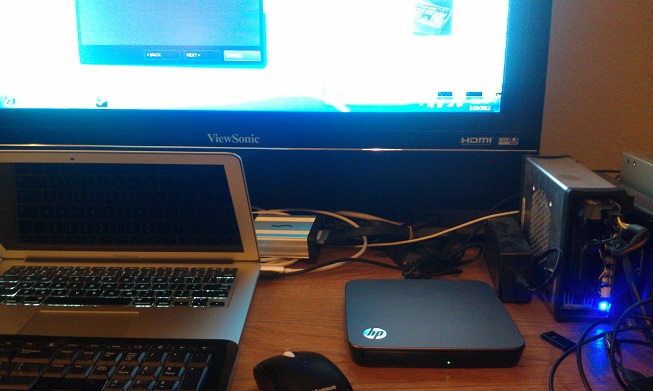
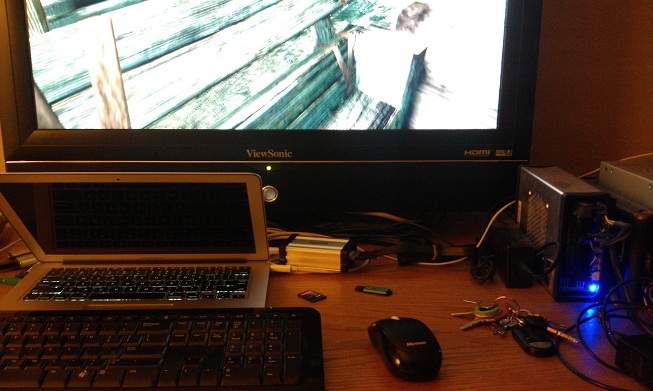
some more pics of the macbook air and sonnet thunderbolt adapter w/ nvidia 560 gtx gpu. first pic is just of the desktop, 2nd is of running skyrim. settings are at high.
-
Attached Files:
-
-
Hi,
You mean PE4L v2.1 right? Anyway, better choose single-rail PSU, 80Plus rated & reputable brand (e.g. Corsair, Seasonic, FSP). Also make sure max current on +12V is at least 20A. 20A is high enough to support any graphic card with power requirement less than 240W.
GTX460 or GTX560Ti can handle BF3 just fine I think. There is a youtube video in this post you might want to watch:-
http://forum.notebookreview.com/7694162-post4386.html
That is using PE4H v2.4 which is older version than PE4L v2.1. With PE4L v2.1, FPS should be smoother & almost double. -
Double FPS on external monitor? Really?? I'm far from that. So far these are my results from last night (all external):
![[IMG]](images/storyImages/73654080.jpg)
V:\DIAG\ folder?? Should I have a DIAG folder on my root somewhere? -
PE4L 2.1 doubles fps on internal screen only, it's more like +20% on external screen.
-
Thanks kizwan,
yes I meant PE4L v2.1. Does it make any sense to buy faster cards like GTX570 or 580 (e.g. do they make more use of the extra bandwidth of v2.1)? It worries me that the guy in your link only gets like 30 fps at Metro 2033 with a GTX560TI! -
Yeah, that's how I remember too.
But it is strange that I checked Skyrim (with like 100 mods on it) and lags the same way as with 1.1, but for instance Witcher 2 goes like charm with highest possible details...
I will make more tests probably tonight and see the exact fps difference. -
Yes, double FPS on internal screen. External screen also get better FPS but not double.
I think you have older Setup 1.x from your older eGPU setup. You need to mount the Setup 1.x image & look in DIAG folder.
That is running at PCIe x1 1.0 (5Gb/s concurrent) bandwidth. Your PE4L v2.1 support PCIe x1 2.0 (10Gb/s concurrent) bandwidth. You might interested with nando's PCIe x1 2.0 with Optimus (x1.2Opt) test/review/benchmark.
Some games require a lot of bandwidth which means performance difference between, for example GTX460 & GTX570 might not too big. While on some games that don't require a lot of bandwidth, you might see improvement with GTX570/580. Remember, avoid dual-GPU graphic card. -
It depends on games you play. Even the same games, with different settings (not graphics ones) can run in 2 completely different ways.
These tests were made on PE4L 1.5 cause i currently have my 560TI in RMA, but once it comes back i will update the videos with the 2.1 kit. (it's kinda lame. I have the 2.1 kit from 5 days and my GPU broke the day after i received it )
)
P.E.
Battlefield 3 in SP gives about 30fps @720p maxed out while in MP (64p map) it stays on 13-18fps.
NFS Shift 2 stays on 35 fps with 4-car race during daytime, it drops to 10fps on 16-car race during nighttime.
The culprit is related to the amout of infos the system has to share between the CPU and the GPU (coordinates, pixel effects etc). Many objects = less performance due the limited bandwidth.
Performance can vary between 0 and +100% as far as i saw.
The only two games i had the chance to test with v2.1 before the break of the GPU, were Batman Arkham City and Anno 2070, both on internal screens @720p.
The first one didn't got ANY ADVANTAGES at all cause it was still bound at 40 fps average on v1.5, Anno moved its minimum fps score from 13 to 26fps that's exactly a +100% in performance (aka 2x). It is fully situational.
http://forum.notebookreview.com/8267588-post1.html there is a dedicated thread for all the video performance ^_^ -
Still not working with my macbook pro. Could it be because I have 8gb of RAM? Im guessing you only have 4 because its a macbook air. Still showing error 12 with the 560
edit: And I saw in your pictures that in device manager, there was a tree for Memory. Mine doesn't seem to have it... And I don't see any of the audio files. When I scan for new hardware with the card plugged in, I just see the card itself. -
why are they releasing expresscard version only when most of us SB notebook people have only mpcie
-
The Laptop Quadro 1000M has no problem updating to Verde 295.73...
but 295.73 desktop just refuses to install for my GTX 560 TI.
I've tried the hacked inf from laptopvideo2go and it still doesn't work.
The installer will function as normal but at the end it will report that installer failed and I see display drivers and 3d vision drivers are not installed. -
Well, I don't know the reason, but I just simply dowloaded the desktop driver and installed it without any problem, whlie I was using my GTX560ti. I'm not sure if it works with internal LCD too though, as it is not modded, but I only use eGPU with my external LCD. Did you try clean install? I didn't...
-
I tried clean install, driver sweeper, same result.
-
Modded nvam.inf file for 32-bit & 64-bit Verde 295.73 is now available at: http://forum.notebookreview.com/8089740-post6787.html
-
Should I try getting the 560 to work with my macbook by taking out one of the 4gb sticks of ram? That would leave me with 4gb, so same as your setup. And I also have Windows set up on an ssd, helps a ton with all the rebooting
-
So, here are my benchmark result:
NVIDIA GeForce GTX 560 Ti video card benchmark result - Intel Core i5-2410M Processor,FUJITSU FJNBB10 score: 16393 3DMarks
NVIDIA GeForce GTX 560 Ti video card benchmark result - Intel Core i5-2410M Processor,FUJITSU FJNBB10 score: P13167 3DMarks
NVIDIA GeForce GTX 560 Ti video card benchmark result - Intel Core i5-2410M Processor,FUJITSU FJNBB10 score: P3991 3DMarks
![[IMG]](images/storyImages/nvtelenwg.jpg)
UPDATE!! I had a new 3DMark11 Score of 4360, which seems quite better...
GPU-Z showed it works at x1 2.0, so I guess it works properly, although it doesn't show a big difference. It was quite strange once, because when I moved the cursor over "Bus Interface" it changed back to x1 1.1, no idea why.
I tried quickly Skyrim (modded as hell), but it was lagging as much as before, but perhaps it is CPU bottlenecked. On the other hand, The Witcher 2 was as smooth as never before with much higher details. Now I use the highest possible settings, and no issue. I will checked them with fraps if I'll have time.
UPDATE:
SWTOR (1080p, maxed out even by the client_setting.ini) - ~40 FPS
Skyrim (1080p, maxed out + 100 mods) - ~ 40 FPS (sometimes drops to 5 FPS, but I guess due to one of the mod)
The Witcher 2 (1080p, maxed out + ubersampling) - ~ 15-20 FPS W/O ubersampling - ~35 FPS
Alan Wake (1080p, maxed out) - ~35-40 FPS (sometimes lags a bit) -
is there a new downloadlink? for 2 houres the file was on mediafireLast edited by a moderator: May 12, 2015 -
you can try that. one thing you can do is, based off of my MMIO map, figure out which devices you need to disable to make room for your nvidia egpu. you and i have the same gpu, and you can break the MMIO region for the 560 into 3 distinct memory ranges. figure out what the minimum contiguous memory range that is necessary for one of these and figure out if you have areas in your MMIO range you can free up.
-
Can you tell me the number of your bios? My T410 can not detect the graphic card.
-
Ok thanks. I checked your MMIO map, but I don't seem to have a "Memory Tree" in device manager. Any idea how I could solve that problem?
-
under device manager, view->resources by type. you should see DMA, IO, IRQ, and Memory branches. expand the memory one.
-
Ah awesome
. So I can pretty much disable the ones that I wont use? Like Gigabit ethernet, sd host controller, high definition audio controller..
-
Borealiss, I cant thank you enough.
Just tried out skyrim on ultra settings at 13xx by 7xx and runs with small amounts of lag, but 1000x better than running on low with small amounts of lag with my intel hd only. You have been a huge help to all macbook pro owners and it is now comfirmed to work with both diy egpu and Vidock products.
Now, have you installed optimus drivers? I am guessing that all you have to do is download them from the site. Or are there modded drivers?
EDIT:
In AIDA under display->gpu->my card (560)->bus type it says pci-e 2.0 x16 @ x1. I'm guessing that means I'm at 2.0 x1 link? -
can anyone reupload the file please?
-
On 3dmark06 with optimus enabled, I achieved 14639. My card is a 560 1gb
-
Thats a bit low. I get 16500~ on a similar system.
-
epicblob,
glad to hear it. were you able to do it with all 8 gigs of ram? please post up a picture of your MMIO map.
the sonnet adapter should be running at a 1x v1.0. it shouldn't be 2.0 speeds. did you get any lag in skyrim? on wide open spaces i would get microstutters, i didn't get that on my envy 15.
what drivers did you use? optimus? -
In the future when there are laptops with multiple thunderbolt ports would it be possible to have an egpu hook up to multiple ports to have doubled, tripled, quadrupled bathdwith?
-
depends on the video card and drivers i think. some have only been able to chain multiple pcie lanes together if they are on the same root complex, i think. i don't know how different pcie lanes would show up from different thunderbolt controllers as they are probably seen as different bridges.
-
Yes it was with full 8gb of ram. I just disabled a bunch of random stuff lol. I will do some more looking into finding the pcie speed. And yeah I am also getting micro stutters. But in all honestly, I went from playing on low settings/ low rez with micro stutters to playing on ultra full 1080 with micro stutters; I can't complain. And I still don't know about optimus drivers. I need to find the link speed to actually see if optimus was enabled.
-
I got 295.73 WHQL desktop drivers working now.
I guess the trick is, if you already installed the Verde drivers for your laptop GPU, because Verde only comes in international flavors, you should also choose the international version of the desktop driver as well.
At least I have no problems installing the international version, but I couldn't get the English only version to install correctly. This is the first time I had an issue with the English/international version though. -
the same card on a 1x link on my envy 15 1050-nr i7 doesn't stutter under the same scenario. i guess that shows you scores aren't everything. my envy 15 gets about 7000 in 3dmark06, but runs skyrim, mass effect 2 & 3demo great. my guess is that there is a bandwidth limitation on the sonnet adapter, and we're not getting true 1x speeds, but i don't have a way of testing it. i know some people in other forums have noticed less than theoretical throughput.
to free up some more pcie bandwidth, disable your audio devices associated with your egpu. they should show up as "nvidia high something audio" in device manager. i think these are for HDMI audio. -
Sorry about that. Please try again: http://forum.notebookreview.com/6542661-post1222.html
-
Ok so I wanted to re-test it, so I followed the steps to set it back up. Enable igpu, reboot, unplug plug, all that. But I still get the error 12 message on my egpu. Any ideas why? Should I try freeing up some more memory?
-
not sure. did your MMIO range change?
-
Here is my detailed write-up. I will update this post with pics later.
System
Lenovo Z570
CPU
i7-2630QM 2.0
RAM
8.0
eGPU
[email protected]
3Dmk6|3Dmk11
17922|3751
Ports
HM65 mPCIe
OS
Win7/64
Cost
$354
I'm using an old HP 300W PSU (16A x 12V) to power my eGPU. Setup 1.x compaction was unnecessary. I received error 12 only when not not using the chainloader. Note that initially none of the latest Nvidia drivers download packages would install. I first had to install the old drivers included on the disc that came with the GPU.
I have disabled the HD audio for the card and have kept USB usage to a minimum to achieve best performance. Even at x1 PCIe 1.1 I am able to play GTA IV, Left 4 Dead 2, Dirt 3, Skyrim, Battlefield 3 and Mass Effect 3 (demo) at very playable framerates and high detail. Most newer games have minimal or no stuttering and average 30 FPS @ 1920x1080 resolution. I can presume that the next revision of the PE4H (3.0) with PCIe 2.0 will produce great results.
*UPDATE*
The only games that I had some bad stuttering issues with were GTA 4 and Fallout NV. I spent the day modifying game files and have corrected the issue for both. The key to GTA was downgrading to an older patch. I used the NV Stutter Remover from Nexus to fix NV. I was also able to run Dead Rising 2 on high without any problems. Low bandwidth or not I've been able to run all games on high or ultra detail with the GTX560! -
Are these results ok for 1.2 Opt setup? Seems a little bit low...
By the way, in setup 1.x when I force G2 on port 4, it shows "[email protected] ...:[email protected] (NVidia)". Is that how it should be? -
Results look about right. You'll only get 100% improvement in scenarios where the game/app is completely bandwidth limited. You'd see greater % improvement with internal LCD mode which gets closer to meeting that condition.
Yes, [email protected] ...:[email protected] is correct. Per the Status Window help in Setup 1.x:
Speaking of which, can anybody provide HTML hosting for the Setup 1.1x help files? They currently 160KB in size. Preferrably without any nag/ads/popups. Means users could browse the help text with a simply click.Code:Intel pci-e ports shows port width, device, negotiated link width, gen. p<port>@x<width>.<gen> device@<neg-width>.<gen> NOTE: an inactive pci-e 2.0 link will show as x1.1. The link being downgraded as a powersaving feature of the eGPU/pci-e bus. Use GPU-Z in Windows to confirm if a pci-e 2.0 link is established. -
thank you
-
hi primoxtian,
I have exactly the same specifications in my laptop but it's Acer Aspire 5755G. My laptop have Windows 7 64bit OS, i7-2630QM 2,0ghz CPU, 8GB RAM, dGPU GT540M 2GB, iGPU Intel hd3000, HM65 chipset.
eGPU setup is Zotac GeForce GTX 560 OC 1GB model, PE4H 2.4 + PM3N and some cheap 350W 12V/16A x2 ATX PSU.
We got the eGPU detected just switching the dGPU off in BIOS and then did 32bit compaction + !Save dump and g1 port2 to eGPU in Setup 1.x. We have also 285.62 NVidia Verde drivers with modded inf file installed succesfully. But then we encountered the real problem: every time we tried to do benchmarking or play games like BF3, laptop start lagg and eventually even crashboot. eGPU is detected fine in device manager and Optimus + NVidia control panel is working. We don't have external screen.
So do you have any advices for me and my friend. We have tried quite everything but we are now thinking that is the PSU really the problem here.
Can you tell us exactly what did you do to get eGPU working? Drivers and so on. And what kind of PSU you have?
PS. also others can tip us if have some ideas!
Thanks in advance -
GTX560 OC (non-Ti) power requirement is 190W. So, PSU must have at least 17A of max current on +12V or +12V1 if multiple-rails PSU. Your PSU only have 16A on +12V (12V * 16A = 192W) which is too close, & which also explain why eGPU crashed whenever you tried to run any games or benchmarks. If you can't change PSU for now, underclock your graphic card a little bit. (Not a typo, it's actually "underclock".)
-
In Zotac website is a specification pdf where reads that Zotac GeForce GTX 560OC 1GB has power requirements of 153W or something like that. So i'm little bit confused now. I have this
PSU now. We haven't tried to underclock yet.
-
GTX560 OC can easily draw more power than that. 153W is TDP which is not the max power consumption of the card. I use this as my reference:-
Graphics Cards Thermal Design Power (TDP) Database - 3D Tech News and Pixel Hacking - Geeks3D.com
Try underclock, you should be able to run any games or benchmark without any problem. -
Good to know! I was just assuming that the PSU should be enough. But now I think that maybe should buy new PSU like Corsair CX500W model. kizwan, what are the clocks (normal for GTX 560) I should try before buying new PSU.
-
Please refer to this: GeForce GTX 560 - Specifications - GeForce
For core clock try down to 810. -
How do I check the pcie link speed on Windows 7? I did not install any Nvidia drivers yet I'm getting numbers that are telling me that I'm running with optimus drivers. Any ideas?
-
GPU-Z exists for a reason...
-
What about a memory clock? There are 4008mhz memory clocks in Zotac GTX 560 and Zotac GTX 560 OC. But only 2002mhz-> in NVidia's GTX 560.
-
Hi all, i am a happy user of the E-PCI to EC2C adapter, i have both PE4H and PE4L, i've only used the PE4L, i am also selling my unused/unboxed PE4H link - ebay. (bought it by mistake like a dumb ).
I would like to report the following:
-With my lenovo g530, Duo Core 2.16 GHZ CPU, Mobile intel 4 Graphics card, 3 GB ram > I managed to get Nvidia Optimus to work on my Internal LCD with my Geforce 440 Graphic card.
-My video game perrformance was very smooth, with my imbeded video card my games were low 2-3 FPS, with the EGPU i jump to as high to 30-40 FPS on any game in low/med detail.
-My games do not run fast on max detail (new games), i never tried it either.
**Also please add this 'trick' if possible to your list of solutions, if your laptop "fails to recognize" your EGPU (pe4h with graphic card attached and with express card connected) do the following:
-Unplug Expresscard from express slot in laptop but keep both ends of HDMI cable connected to laptop, power down your EGPU while Express card disconnected from express slot (but HDMI ends connected), you must be in NORMAL windows mode for this to work, not sleep mode.
-Power on EGPU, with expresscard not connected to laptop, connect it after powering on EGPU, and your PC will recognize it.
-This works a lot when you get the message during 1.x set up "egpu not connected", i don't know what you call this trick, hot set up? cold? warm? i don't know, i just know it works.
-doing this makes having to boot with EGPU connected to windows and possibly risk a crash - futile, you can just connect it while in normal windows and it will engage optimus, optimus lets you stream your EGPU to your internal laptop monitor.
Overall, it works GREAT!!! thank you nando64 and kizwan and every one else that keeps this thread running. I now need to sell my PE4H, i can't afford to have both, its condition is un-boxed and unused link - ebay Thank you all for the great support you gave this forum, i am more than pleased to be actually ABLE to play ANY new game at low/med detail, i am person that doesn't care about graphical quality, its all about the gameplay.
Also if for whatever reason you'd like to buy for lower price than suggested, please contact me first. -
Haha well I feel dumb. Thanks though
DIY eGPU experiences
Discussion in 'e-GPU (External Graphics) Discussion' started by master blaster, Sep 18, 2009.