Problems? See this thread at archive.org.
Hey hizzaah, I'm not worried about the actual working condition of the PE4L. The green light comes on and everything, and the jumper is closed on JP4, open on JP3. I had to adjust the jumper myself because the default jumper setting caused smoke! (to answer antiknown: the jumper setting is used to regulate 5V/3.3V from whatever power source you are using) I shut down the PSU quickly, and though the green light still comes on something might have been fried.
Since I've ordered the PE4H I'll also get another mini-hdmi cable and E2C2 to see if those are at fault, and I can check if my gpu or psu are at fault (though this is unlikely). I ordered a 1m mini-hdmi cable from dealextreme before I bought your PE4L, so I'll be able to know if it was the original mini hdmi cable very soon. If I find out the PE4L is not the issue I'll decide between keeping the PE4L or PE4H.
-
-
Hi Folks,
good news:
after a long email conversation the tech support from bplus came to the conclusion that the expresscard joint of the dongle has some problems and they will send me a new one.
So if you still have problems, contact the support! -
Oh, lol. Had me worried for a minute! Hope you get things figured out once your parts get in..
Good luck! -
Do you think the new one will work then?
Seeing so much problems in the forums here, I'm not really convinced of that - but please keep us informed!
-
Anyone ????
-
Hi,
I order mine on ebay (redtrontech), who have I to contact if i got a problem ? -
I try the USB port in PE4L and he works very well.
I contact by email the tech support from bplus. -
so bplus send me another one which the joint was improved, but the samples will be ready around March 22nd.
-
@Joss
thanks for the good new. I wrote my email a few hours ago and so i am very confident that i am getting a new PE4L as soon as possible
And what are you supposed to do with your broken PE4L? -
Confirmed, bplus will send a new one around March 22nd. Their product page now shows pre-order ready March 22nd as well.
-
I don't know, they didn't say if i need to send back.
-
Hi all,
I send a message to redtrontech on ebay to know if they already send my item or if they've stop sending pe4l 2.1a rev.
I will tell you as soon as i'll have (good ?) news. -
Receieved mine today. 2.1a, same problem as everyone else above.
Thought I was doing something wrong, but after checking the thread today, i'm assuming its a problem with the cables, etc.
USB sticks work, but no video cards!
Going to check cable with ohm meter just in case. -
I tested the cable and joints, all seem fine.
I even got the schmatic and a expresscard schematic and they all seem ok, I don't know a lot about how the TCC RX TX CLK stuff works, but I thought maybe the wires were put in wrong, etc, but it all looks fine :\ -
I am having issues with the ViDock 4+ running the EVGA Geforce GTX 560TI on my
Sony VPC-EB36GM
Intel Core i5-460M
4GB DDR3 RAM
Intel HD Graphics
The Device Manager does not see the card. A sound chimes when plugged and unplugged from the PCI-E slot. AIDA64 shows the slot empty when plugged in. My apologies if posted on wrong thread. I tried looking for a ViDock specific thread. Thank You for your reply's! -
You'll find support at Villagetronic's support page and facebook page.
-
this is what i found out and and sended bplus:
here is the schematic of the pcb side: http://www.hwtools.net/PDF/PE4L_21a_schematic20120118.pdf
Right now I am writing on my bachelor thesis and have no time to test this out. Can anyone else try? -
You should contact Villagetronic support.
-
I just got a response from redtrontech (I also got mine from ebay).
"We will port the re-work guide on the Notebookreview forum for it, pls check it later." -
I also have noticed the pinout was not in order, I don't know enough of about how it works, but i'm thinking its as simple as an assembly error, maybe the schematic was wrong, and the builder just build it like the schematic said and never tested?
I also noticed that the USB connection (which works) negative is a pink cable, and the pci-e negative is white. -
I also would like to add, the RX should be connected to the TX, and vise versa.
If you read a few pages up, a person was having trouble with the 2.1a not connecting, but it was causing studdering, mine does absolutely nothing. -
redtrontech answer me on ebay:
I don't know what it mean ?! Will they send another piece or should we make some correction by our-self ? I'm not electronic master I'm afraid with it !
So, wait and see ... -
On bplus facebook's page :
Thank you for being beta testers
-
enclosure in the making, other components should arrive soon
![[IMG]](images/storyImages/_DSF0252.jpg)
PE4H, GTX460, 400W powersupply for my Lenovo T410 with Intel HD, maybe I need some help later on :q -
Tested my PE4L 2.1 today same problem as everyone else tried two cards. USB port works fine though
-
Is it recommendable to buy an ultrabook and also purchase a eGPU solution to use with a HD4770? I'd like to use the laptop's display and as far as I've read in this thread, there's a great performance boost when using an external monitor...
-
Hi burt, nice enclosure
where does parts come from ?
-
The main part is from a shop called "conrad" which is located in Austria and Germany: Halbschalen-Gehäuse GSS10 Gehäuse Stahl: 1,5 mm/Frontplatte Aluminium: 2 x 1 mm (B x H x T) 250 x 150 x 200 mm Schwarz im Conrad Online Shop
The mesh is from an architect shop near my university in Vienna, Austria. I guess you can buy something like this online aswell. It's a 0.5mm thick aluminium plate which is very easy to work with.
I am going to cut some pieces out of the case for the GPU and PSU, more pics will follow in a week or so. -
OK thanks ! I saw this enclosure 1 month ago on conrad.fr, but the mesh is a good idea !
-
Does anyone have information regarding performance difference between NVIDIA desktop and mobile drivers? I'm running a GT 430/desktop and was wondering if I should try mobile drivers. Also, the preferred graphics processor option says 'Auto-Select", is this the only proof that optimus is working?
-
There is no performance difference between mobile and desktop drivers. The only difference is that people have more difficulty getting the internal LCD mode to work with desktop drivers. Yes, the "preferred graphics processor" option is the only sign that optimus is working besides the performance increase. If you want to use the internal LCD mode, set it to "High performance Nvidia"
-
Hello all,
wow, what a interesting thread. Had no idea this was even possible. I've read the first page thoroughly but cannot do more than just dip into the thousands of subsequent posts.
So could anyone tell me if this would also be possible on the HP Pavilion DV6?
There is no express card port but I could connect using the mini PCIe slot that the WiFi is connected to. Are there any examples of this working with this laptop and could you for-see any potential issues I might face before I take the plunge and buy the gear.
Thanks a lot for any help that can be provided and keep up the good work. Great thread!! -
To Brownie-uk7:
I have an HP Pavilion Dv7 Quad, which is probably quite similar to your machine. While I have not done an eGPU setup yet, these are the results of my research:
1. Sandy Bridge machines can do PCIe 2.0 x1 connections through their mPCIe slots or their Expresscard slots. My Wi-Fi card is next to the optical drive bay. Hopefully the new mPCIe adapters will keep the cable connection within the half height form factor, so I can just bend the cable down and cut a hole in the bottom of my laptop for it. I'd imagine that the design of the Dv6 is similar.
2. My laptop has a TOLUD of 2.5 GB; it should easily allocate RAM for a graphics card. Hopefully, yours is similar- there's many helpful people here who can help you find out.
3. If you get a recent nVidia card, you can do an Optimus connection. PCIe 2.0 x1 Opt. is enough bandwidth for the card to run at >80% native performance.
4. You may need modded drivers to do an Optimus setup. If you don't have an nVidia discrete GPU in your laptop, those drivers can coexist with the desktop drivers for the eGPU. If you do have an nVidia discrete GPU, you may need modded drivers to run both dGPU and eGPU.
5. Apparently HP is notorious for whitelisting mPCIe slots. I have talked with tech support on this, and their answers have been ambiguous; I don't know if the slot is whitelisted or not. If mine is, the slot in your laptop probably is as well. Setup 1.x can solve this though, and it's only a small donation for the good of the whole eGPU community.
As for the mobility of the laptop, now that the adapter is soldered together, it will have to go with the laptop. I will use a powered PCIe extender to connect my adapter to my graphics card, as I'd rather wear out the connector of a ~$75 adapter or a ~$10 extender rather than on a ~$600 graphics card. When I want to move my machine, I'll unplug the extender and use Velcro to stick the adapter to the lid of my laptop. Perhaps I'll have to build an enclosure for it, as it appears that the adapters are quite fragile. You will probably be able to use a similar setup for your laptop. Battlefield 3 at 2560x1600 with all settings on Ultra- with a laptop!
Good luck with your eGPU,
Squawk -
Hello, i have a SF311 Samsung Laptop With these specs.
i3 2310m
4 Gigs Ram DDR 1330
Windows 7 64 bits
Intel HD
My Problem is that I dont know if my laptop is Compatible with the DIY vidock, Or in other words, do i have an Expresscard Slot?.
This are the types of Cards my laptop Can Read
Secure Digital (SD) / Multimedia (MMC) / Secure Digital (SDHC)
total noob Here Please help me. -
No expresscard slot on your notebook.
You should connect on PCIe slot, but maybe the wifi one. -
Everyone rejoice!
Thunderbolt To Become Standard for PC in 2013, Optical at That | techPowerUp
This means (with PCIe 3.0) POTENTIAL AWESOME PERFORMANCE for future eGPU configurations. -
Yes ! I hope that optical thunderbolt will not be argument to gets prices higher than they must be !
-
Interesting stuff.
Does anyone knows if this is possible on a Sony VGN-SR25G ?
The current LCD is spoilt and im currently using it on an external lcd monitor (15") instead.
It does have a ExpressCard/34 x 1.
Sony VGN-SR25G
((( http://www.sony-asia.com/product/vgn-sr25g)))
Is this sufficient for the setup?
1) PE4L v 1.5 + EC2C +Swex or PE4L v2.1a ??
2) 500w PSU ?
3) HD 5770 from desktop
Current Specs: Intel® Core2 Duo Processor P8400
Ram: 4GB
OS: MS Vista 32 Bit
Appreciate if anyone can advise.
Thank You
TOLUDAttached Files:
-
-
Hi
Thank you (kizwan, nando4) for help in setting up
eGPU run mode port1 x1 and port1 x2, but I can not make port1+ port2
It may be wrong?
Put in port2 WiFi card, run 'setup 1.x' more 'PCIe Ports - Anti-whitelist. Save port (port2) '
Appears on the screen
<[iportcap] Saving port2 to file.
[pcicap] Saving 00:1c.1@e00e1000 PCI config as R:\config\pcieport.p2 (4KB).
[*pt MEM readtofile 1 0xe00e1000 0x1000 R:\config\pcieport.p2*]
Copy R:\config\pcieport.p2(ramdisk)-> C:\config\pcieport.p2(drv)
To check if the mPCIe port whitelisting is overcome, proceed to:
Poweroff your system.
Remove your whitelist-compatible wifi card
Boot back into setup 1.x where the port may be inactive and/or disabled.
If the port is disabled then use iport on (port) (DOS) or PCIe ports enable (menus) to enable it first
Run iport restore (DOS) or PCIe Ports Anti-whitelist. Restore port (menus)
If the whitelisting has been overcome then your mPCIe port will become active and iport scan (DOS) or a F5-rescan (menus) will show any attached devices>.
Do the steps above (my port is disabled), but when click 'Restore port2' screen appears with the message:
<[iportcap] Restoring port2 from file.
[pcicap] Loading 00:1c.1@e00e1000 PCI config from R:\config\pcieport.p2.
[*pt MEM writefromfile 1 0xe00e1000 R:\config\pcieport.p2*]
WARNING: No device found on port2. Please ensure one is attached.
If it was and you still cant see you device then proceed to save the root port iport save root or root (0:0.0 1 MB) in the menus, and do a restore of that instead. That will usually overcome whitelisting>.
At the same time eGPU connected:
(Input 1 to PE4H <-> PM3N port2)
(Input 1 to PE4H <-> EC port1) + (Input 2 PE4H <-> PM3N port2)
No result -
This sounds like port2 is registering the wifi card. Good. You DO NOT need to unwhitelist port2 to do a port1+2 implementation. Just switch port1 to x2 link width, ensure lane2 is connected to the 'port2', then hotplug lane1 into port1, hit F5 and your eGPU should appear running in x2 mode.
-
Please refer to Pre-Purchase FAQ >> " 2. How can I check if my notebook is compatible with an eGPU?". If you don't understand, please point which part you don't understand. I will try to explain it to you.
I see you have Windows Vista. You will need to upgrade to Windows 7. Vista doesn't support two graphic cards with different vendor at a time. Base on the information I found, ATiAMD & Nvidia have included in their driver switchable graphics support for Vista but they only work with Intel GMA graphic card (iGPU). If your notebook have discrete GPU (dGPU) instead (ATiAMD/Nvidia), you will need to upgrade the OS to Windows 7.
I checked your notebook specification, I found it have Intel GMA 4500MHD iGPU, right? You will be able to do x1. Opt setup with Nvidia Fermi desktop graphic card. Opt=Optimus provide PCIe data compression which boost performance over PCIe x1 link. For Optimus to work, you need to upgrade the OS to Windows 7. The kit you need is either PE4H v2.4 + EC2C or PE4L v1.5 + EC2C package. Don't buy the latest PE4L because your notebook can't utilized it anyway.
You can use external monitor. In fact you will get better performance on external monitor. -
First of all, it is DIY eGPU. ViDock has no relation to this project.
-
First of all, it is DIY eGPU. ViDock has no relation to this project.
You should know whether your notebook have ExpressCard or not. Is this you notebook? If yes, it doesn't have ExpressCard slot. Please read Pre-Purchase FAQ >> (read these)
1. " 1. How does a DIY eGPU differ from a Villagetronic ViDock3/4?"
2. " 2. How can I check if my notebook is compatible with an eGPU?"
3. " 3. I don't have an ExpressCard slot. Can I still do use a eGPU?"
If you're noob, it is time to learn. Point which part you don't understand & I'll try to explain it to you. -
Thanks for the replies to far.
I installed Everest to check my setup and it seems that on my HP DV6 I have an mini PCIe which the WiFi is using. But from what I see then the Bus Type for this connections is PCI Express 1.0 x1. From what I understnad then this is the slower one.
Can someone tell me what kind of performance loss I would see from a top graphics card using the Bus Type? I think I read this somewhere in the thread already but can't seem to find it again.
My laptop is pretty new and the 6770m card does a pretty good job anyway so if the performance leap is not so great then I would look at building a PC.
Thanks for any info here and keep up the thread. V cool ideas here -
I posted a while back, and it's taken me a while, but here are my final results with eGPU (at least with this current setup).
Specs:
14" Lenovo T400
Intel T9400 (ICH9M) w/ Switchable Graphics: Intel 4500MHD & ATI HD3470
NVIDIA GTX 460 768 MB (Zotac Synergy Edition)
Windows 7 / 64 Bit
8 GB DDR3 10600 RAM
80 GB SSD
eGPU setup:
PE4H
Generic ancient 250W power supply
Thinkpad Dock
2x 1920x1080 LED Monitors connection from the 460
3dMark06 Scores:
![[IMG]](images/storyImages/uLJG7.png)
Installation steps:
1. Disabled the switchable graphics in the bios. Make the computer boot Integrated and turn detection for switchable graphics OFF. Otherwise even the correct Optimus driver fails to recognize the correct 4500M.
2. Installed Verde 275.33 + nando's nvam.inf (64-bit) driver (see Optimus guide here). At first, the installer would throw the error: "The graphics driver could not find compatible hardware." Updating the existing integrated display driver with the device manager did not work. The fix was to install the GM45 specific driver for Win7/64 bit. I uninstalled the existing ATI driver and manually navigated to the unzipped directory to install the new driver. The pure Intel driver was then recognized by the installer.
3. Upon restart, disabled all the NVIDIA sound drivers for maximum bandwidth.
No issues reported with hibernation, sleeping, or pci-compaction with the 275+ Verde driver. No Error 12 or Error 43 either. It works perfectly in the past week or so since I've completed the setup. SC2 and Dota 2 both run on ultra with no noticeable lag.
FYI, my computer is very similar to another member's. See his post here.
Please add this data to the reference table. I also hope this post will be informative for anyone dealing with the tricky switchable graphics issue with this generation of Thinkpads. Special thanks to nauto et all for the excellent guides and continued support in this thread. -
Hi Kizwan,
Thanks alot for your reply.
Upgrading it to windows 7 would be challenging though as the Sony website
does not say its windows 7 compatible but im going to give it a try anyway.
((( http://www.sony-asia.com/support/faq/446617)))
It says on Device manager that it is a Mobile Intel(R) 4 Series Express Chipset Family . You could be right though.
Can you explain what does the x1. and x2. setup means?
So in other it would more advisable to use a gfx with Opt technology than my current HD5770, correct ?
What are the difference between both kit besides bandwidth?
(PE4H v2.4 + EC2C or PE4L v1.5 + EC2C package)
Will both work on my setup ?
Thanks Again -
PCIe port on notebook is called mini-PCIe port (mPCIe). ExpressCard also connected to PCIe lane. A mPCIe/ExpressCard port only support PCIe x1 link. So, x2 setup means to ganged up two mPCIe ports or mPCIe+ExpressCard to form PCIe x2 link. This means there will be two physical connections to eGPU. This where PE4H come to play.
Yes, x1.Opt setup is advisable than x1 link setup with HD5770. The Optimus performance is equivalent to the x2 performance. In some games it even better. You'll also get acceleration on internal LCD but since yours faulty, you can use external monitor. The performance on external monitor is better than internal LCD.
PE4H have four PCIe x1 ports while PE4L have only one PCIe x1 port. Optimus only need one PCIe x1 port. So, you can use PE4L. PE4H can support x1/x2/x4 setup. PE4L is cheaper than PE4H. PE4L is smaller than PE4H. Either PE4H or PE4L, they should work on your notebook.
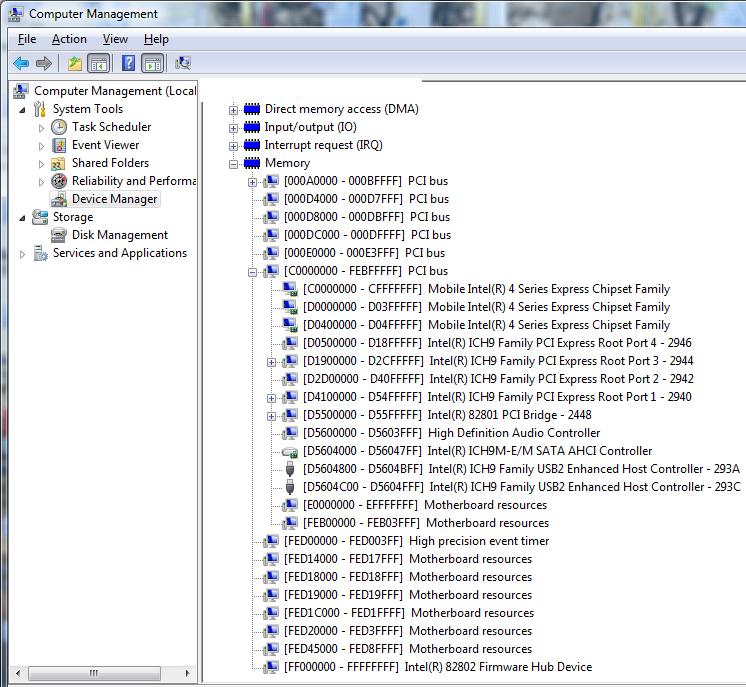
![[IMG]](images/storyImages/76574d1332056419-diy-egpu-experiences-tolud.jpg)
TOLUD is 0xC0000000 (3GB). This means you can use 4GB or more RAM with eGPU. Only if TOLUD is more than 3.25GB, you will not be able to use 4GB or more RAM & eGPU at the same time because of insufficient PCIe space to accommodate eGPU.Last edited by a moderator: Feb 6, 2015 -
Hi,
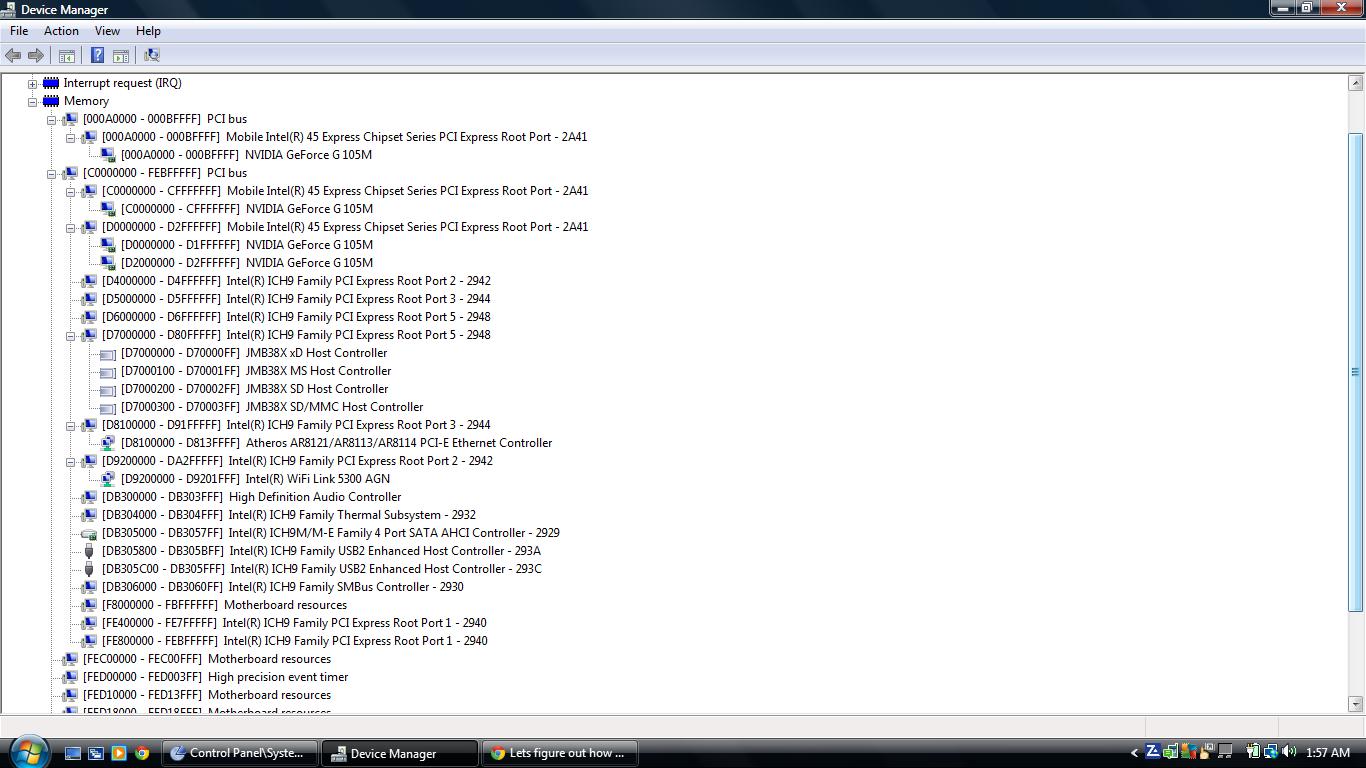
I have an Acer Aspire 4937G with Intel Core 2 Duo P8700, 4GB RAM and NVIDIA GeForce G105M. It has an expresscard slot.
I took the attached screenshot in device manager with Vista loaded.
Qn1. Am I right to say that my TOLUD is 3GB (C0000000)? The first entry with PCI bus is 000A0000 but there isn't anything with an "A" on the pre-purchace FAQ.
I'm using Vista at the moment but my dad has a netbook with Windows 7 whose hdd I plan to borrow whenever I game i.e. when I'm using the eGPU. Otherwise I plan to use the hdd with Vista and the G105M gpu.
Qn2. Will this work and does the TOLUD change with the change in OS?
I'm planning on getting the PE4H-EC2C ver2.4 Package Contents, a 600W PSU (ENP600AWT) and Sapphire HD6850 1GB DDR5.
Qn3. After assembly, do I just need to switch on the laptop and let windows update to download the drivers i.e. does it work automatically or do I have to do something else?
Qn4. What is error 12 in simpler terms and will I run into it?
Thanks!
Attached Files:
-
-
hi, I decided to resell ViDock4+ because of his disadvantages. I've already got GTX560Ti DirectCut TOP from Asus, power supply Tagan TG380 (+12V * 22V = 264W - I'm aware it can be a too little in stress and I'm searchong for something stronger). I have to make a choice between PE4H and PE4L and despite I know that PE4L should work properly with E6320 (through ECPC) I can't imagine how to install a GPU on this panel??? on photos it looks like a lot smaller than socket in PE4H. could anyone explain me what is wrong in my deduction?
-
Hi,
so i just recently purchased a PE4H from harmonic inversion technology and I have chosen USPS shipping. There is no estimate for the shipping time, and I dont have a tracking number. I have sent a few emails to HIT ([email protected]) but have never received any response. Has anyone who purchased from HIT used USPS shipping? If so, about how long did it take? Contacting HIT is incredibly difficult. I have tried using the "contact us" link on their website, and I have also tried emailing them at [email protected] and [email protected] multiple times, never once receiving a response. I have not yet called them however. Should I just call?
Also, since setup 1.x is supposed to come with my purchase, where would I get the download? Do I contact nando every time or is it on the HIT website when I log in?
Thanks
DIY eGPU experiences
Discussion in 'e-GPU (External Graphics) Discussion' started by master blaster, Sep 18, 2009.




![[IMG]](http://forum.notebookreview.com/attachments/gaming-software-graphics-cards/76574d1332056419-diy-egpu-experiences-tolud.jpg)