Problems? See this thread at archive.org.
Yes you must use the ports on the graphics card itself.
-
yes, you have to use the ports on your video card. the ones your laptop will just mirror/extend your internal LCD mode.
-
Oh and with the 680 now out and considering how good it is (12335 3dm11 GPU score at 1.4ghz on air here). I decided it's time to let my card show its true colors to make sure that none of you get a 680 and beat my scores easily. It's an EVGA classified, which is capable of 1.8V to the GPU core. The only requirement is flashing it to an unofficial BIOS and keeping it cool. Sadly for overclocking, winter is nearly over here so no more benching at less than 10C load, but I think I'll be able to keep it under 30C (water cooling). I won't go quite as high as 1.8V, but you can bet I'll go high enough for at least 1.2ghz

-
It was a epic fail trying to get my PE4H 2.4 + EC2C to work on my HP Compaq 2210b and Sony Viao VGN-SZ412N for the past 8 hours. I really could do with some help.
Laptop1:
Sony Viao VGN-SZ412N
Intel Core 2 Duo T5600 1.8GHz
3GB memory
Intel ICH7 Chipset
Hybrid Nvidia 7400 Go + Intel 945 (Nvidia 7400 Go fried long ago, no longer switchable, constantly on Intel IGP now)
Windows 7 64
Setup 1.x 110b5
Laptop2:
Compaq 2210b
Intel Core 2 Duo T8300 2.4GHz
3GB memory
Intel ICH8 Chipset
Intel 965
Windows Vista 32
Setup 1.x 110b5
eGPU:
Nvidia Geforce 8800GT 512MB DVI ports only
PE4H 2.4 + EC2C
350W ATX PSU
External monitor (VGA to DVI adapter)
----
All devices are connected correctly. Everything including Expresscard, mini HDMI cables and Graphics card are all functioning.
Symptom for laptop 1:
1) Black screen (with 1 long and 2 short beep) when booting up with eGPU powered on. *Fixed by changing the PCI Reset Delay slider to 7s*
2) Booted into Windows with eGPU powered on (PCI Reset Delay slider 7s). Device Manager refreshes but nothing gets detected.
3) Booted into Windows with eGPU powered off (PCI Reset Delay slider 0s). Sleep. Power up eGPU. Resume. Device Manager refreshes but nothing gets detected.
4) Booted into Setup 1.x. (card detected). PCI compaction -> 32 bit -> iGPU + eGPU. No need to turn off dGPU as it is set to off by default.BSD occurs upon loading Windows.
5) Tried other PCI compaction options. Either froze on booting Windows or BSD.
Symptons for laptop 2 (PCI Reset Delay slider 0s):
1) eGPU powered on before booting Windows. Card detected and installed as Standard Display Adapter with Error 10 and after installing latest Nvidia driver it changed to Error 12. After setting Setup 1.x -> PCI compaction -> 32 bit -> iGPU + eGPU. The error is then changed to 43 (Incompatible display adapter). Tried to follow FAQ Error 43:
a) cannot install Verde 270.61 (hardware incompatible)
b) mini hdmi cable is fine.
c) didn't get "load a pci dump". Does it mean simply select pci->load dump?
d) Installed 258.96 with modded inf and the error remains
e) (26th July 2011 solution) 275.33 only has 64 bit modded nvam.inf.
Any help is very much appreciated.
Cheers,
M. -
This is Joss27's screenshot of GPU-Z showing PCIe 1.1 x16 @ x1 1.1:-
and following my suggestion, Joss27 able to get the eGPU to work on PCIe 2.0 link:-
Basically, Joss27 disconnected the eGPU using the "Safely Remove Hardware" (icon in the notification area, near clock) & reconnect eGPU after that. This successfully getting the eGPU to work on PCIe 2.0 link. This method should work for you as long as you wait for "... device can now safely removed from the computer" dialog balloon before disconnecting eGPU (the EC2C card from ExpressCard slot).
If the Joss27's method doesn't work for you, you can try the same method (use "Safely Remove Hardware") but instead disconnecting EC2C card from ExpressCard slot, turn OFF eGPU & after several seconds later turn it back ON again.
Please follow this procedure to check the PCIe link capabilities:-
Last edited by a moderator: Feb 6, 2015 -
Strange the card is detected in Setup 1.x but not in windows. Did you try chainload to windows without doing any compaction?
For laptop 2, please try Windows 7. No need to format your Vista, just dual-boot with windows 7.
The drivers version in eGPU Troubleshooting FAQ is the latest version at the time of writing the FAQ. Now, they are old version. They should be read as "275.33 or newer", even though they are not written like that. You should use the latest version available at modded drivers page. -
Yes it is indeed strange. I have tried chainloading to windows without the PCI compaction. It is still the same. Note that if I don't do the PCI compaction and there is no beeping sound after reboot even if the eGPU is powered on. Although it is just black screen on both displays I can tell the laptop is booting and loading into windows...
Any suggestions on how to get my graphics card detected in Windows?
I can see that the modded infs contain fermi desktop graphics card but mine is not one of them. Hence the "cannot find compatible hardware" error. Would installing windows 7 still help? -
Hi,
Just waiting for mine PE4H setup with PCI-express card connector.
Yesteday I found out that it may be better to connect it over PM3N card.
Can someone please take a look at the picture and let me know, what would be better? I can see that both are x2, but it looks that PCI-ex card is working over some USB 2.0 ports that would sugest it is much slower.
Zdj?cia - Pokazywarka.pl
Thank you for your help. I really wanted to find answer in this thread but after reading 300 pages I am more and more confused. -
I was finally able to get the Latitude e6320 into gen2 mode. The only way I can get it to work is to:
1. connect the express card after boot
2. use "safely remove hardware"
3. physically eject the express card
4. re-insert express card after several seconds
Unfortunately benchmarks do not show much improvement.
@1.1x1 3DMark06 - 6168
@2.0x1 3DMark06 - crashes every time
@1.1x1 3DMark11 - 3094 (graphics score: 2990)
@2.0x1 3DMark11 - 3184 (graphics score: 3071)
@1.1x1 Heaven (1366x768) - 1267
@2.0x1 Heaven (1366x768) - 1440
3DMark11 only shows a %2.7 improvement. Heaven was better at %13.6 improvement, but I only ran that test once in each mode so it might be less accurate. Any ideas why there is so little improvement?
The machine specs are i5-2520m, 8gb, gtx 465. I am using the latest stock nvidia desktop driver (296.10). Do I have to enable optimus manually? Is there some way to check if optimus is on/working?
Thanks! -
Don`t you have to use the modified NVIDIA Optimus drivers?
http://forum.notebookreview.com/6542661-post1222.html -
maybe you should try reinstall drivers for (295.73) with nvam.inf?
-
Optimus is not working. Your 3dm06 score would be 3x higher if it was. You probably booted with the 465 connected and on. Don't do that because this causes Dells to disable the HD3000, which must be running for optimus to work. If you didn't boot with the card then you should try reinstalling your driver. Make sure you have a driver installed for the HD3000 too.
Odd that 3dm11 gpu score was higher on 1.1 than 2.0. I saw nearly a 20% improvement from 1.1 to 2.0.
It doesn't matter which driver you use anymore (except for maybe the 300s since no one knows anything about them). Just some people have problems with internal LCD mode with unmodded desktop drivers. Optimus will work automatically. The only sign that its working besides the performance increase is the graphics accelerator dropdown in the 3d options panel of the nvidia drivers.
Has anyone tried the 300 series driver? You'll have to mod the .inf file. I had problems getting internal LCD mode working, so I'm a bit afraid of messing with drivers in case it breaks internal LCD mode again.
Oh and about 1.3V+ with my 580... no performance improvement past 1.4V. Only gained 40mhz from 1.3V to 1.4V. I think I can get 1.1ghz stable though on a relatively cold night. -
From the post about drivers:
I assumed this meant that you no longer need the modified drivers, but I will try them tonight. -
People rejoice! I finally received the new card! It's only an EVGA 560 SC (i ocked it to 900/2100) but will be upgraded to a 660Ti in April! For now, check this:
BF3 - 64 Players, all HIGH preset (not ultra) @ 1366*768 INTERNAL SCREEN PE4L V2.1
![[IMG]](images/storyImages/bf320120323205727145.th.png)
![[IMG]](images/storyImages/photo230312201556.th.jpg)
-
I do connect the 465 after Windows is fully booted, and after that I still have to do "safely remove hardware" trick to get it to flip to gen2.
The HD3000 is also running properly when I do it that way.
In regards to those 3dm11 numbers the overall score is correct, but I must have accidentally flipped the graphics scores when I copy/pasted. But the difference is still less than 3%.
Optimus definitely doesn't seem to be working as you pointed out. I just tried the 295.73 modded driver with the same results. I can't event run 3dm11 on the laptop screen (says it does not support dx11) - if optimus was working wouldn't it use the external card even on the laptop display?
![[IMG]](images/storyImages/egpu.png)
-
WOW !
Amazing fps SimoxTav !!
Which resolution ! High or normal ? 32 bits color ? -
High - 32 bit color 1366*768
This afternoon i'll have the camera back and i'll record a video ^^ -
I don`t get my internal screen working with the egpu. I installed a modded driver and activated the "High-performance Nvidia processor" option. But Internal screen is always working with the intel HD. I tried the Intel HD driver from Intel and the one from Lenovo. I have to hotplug the egpu because a) Booting with it results in a Black screen, b) stopping boot, plug-in egpu, resume boot results in a BSOD.
Notebook is a Lenovo L520 with i5-2410M and gpu is a GTS 450.
How can i check if optimus is active for the performance boost while using the external screen? -
The internal LCD mode only worked for me if the eGPU was hotplugged in prior to booting Win7, either by using F8 to halt the boot process and hotplug or via Setup 1.x to configure the card prior to booting.
You'll know if Optimus' pci-e compression is active if your 3dmark06 result is > 6k. With a GTS450 it will well and truly be above 10k with a i5-2410m. -
ok so no internal LCD for me, because setup 1.x seems to result in a BSOD too (didn`t try it myself, but another L520 user wasn`t successful with it). I got something around 14k points (pe4l 2.1a).
-
3mark06 of 14k means pci-e compression is active.
You could try disabling the GTS450 in Device Manager, then reboot but halt bootup, hotplug the GTS450. If Win7 boots without a BSOD then can enable it to see if internal LCD mode works. It's odd that hotplugging the GTS450 prior to boot causes a BSOD.
If you want to acquire Setup 1.x, I can assist by removing all auxilery lines apart from the ones that configure the eGPU and underlying bridge. That is the safest option to try to get a successful bootup. -
Good idea with disabling and starting but unfortunately only partly successful. I don`t have a BSOD with that method but skill no working internal screen.
Thanks for your offer with Setup 1.x, i take that into consideration. I still don`t know if i want to spend money without knowing if it will work. I tell you as soon as possible. -
I'm new to all this so please be patient with me.
Would it be alright for me to assume that the only requirement for a DIY eGPU to work is an Express Card slot?
My laptop is an ancient one. Is it workable?
Compaq Presario V3000
3.0 GB ram
Intel(R) Core(TM) Duo T2450 @2.00Ghz
Display: Mobile Intel 945 Express Chipset -
I've tried yesterday evening to run a PM3N-PEAH 2.4a setup on my vaio Z21.
The card was detected, then windows installed it. I restarted and then installed the 295.73 drivers with the kizwan's inf.
After a new reboot, I've looked into the device manager, the graphic card was recognized and it didn't show any error.
But I couldn't open nvidia control center, it look like optimus was not enabled, but I also couldn't use my graphic card with an external display, it wouldn't find.
I didn't use setup 1.10b5 but I never needed it with my previous Z, would it help ?
What did I do wrong?
[edit] Maybe it is because I plugged it while windows 7 was booting, while it needs to be prior to boot
It did for me too, and also sometimes it did very very weirdo's stuff, sometimes plugging it when W7 is loading makes sttutering everywhere, while W7 is loading, while the lappy is plaing a sound, opening a prog. (card isn't detected) and if I remove it it goes back to normal.
-
The PE4H 2.4 is a pci-e 1.x device. The Z21's mPCIe slot is running gen2 (pci-e 2.0) speed. It must be set to gen1 speed for it to work. Otherwise it will try to negotiate a link and just fail.
Some systems have a bios setting to set gen1 link speed but that is usually for the expresscard slot. So the simply fix is to use Setup 1.x to switch the port speed. If you don't want to donate for the software then you could concievably disable the eGPU in device manager, use baredit/setpci in Windows to switch the port to gen1 speed, then re-enable the GPU. Downside of that is you won't get the internal LCD mode to work since that requires the eGPU to be detected on bootup. -
^
Thank you Nando, I'll try the setup 1.10b5 I think, by the way it says "Number pieces in packaging:1, Number pieces in box:1" does it mean it isn't downloadable ? -
What happens there is that once you donate for Setup 1.x, HIT send you a download link. HIT's page structured is geared towards delivering a physical product so isn't so accurate here.
Am curious how you go. The Z2 is in need of more gpu power and you may be the first to demonstrate it. Shame there isn't a gen2-capable PE4L 2.1 PM3N product yet. That's the one you want which would alleviate requiring Setup 1.x to downgrade the link as well. -
This is my NVidia 680 GTX benchmark, compared to 580 GTX, the performance is quite good, yet the price of both cards is pretty much the same in the UK. It is definitely worth an upgrade in my opinion. I'm running the latest 301.10 driver for the 680 GTX.
3DMark06 saw very little benefit since it's mostly CPU-dependent. Yet, both 3DMarkVantage & 3DMark11 saw good improvement.
There's no huge fps gains in Game-specific tests, could be because of my limited bandwidth.
It's worth noting that the 580 GTX is already a good card, so going from 580 to 680 wouldn't see so much different.
eGPU: 580 GTX vs. 680 GTX
580 GTX
680 GTX
Gain
3DMark 06
17697
17735
0.2%
3DMark 11
P4833
P5778
19.6%
3DMark Vantage
P20275
P22936
13.1%
Heaven
1569
1750
11.5%
RE 5
117.7
125.3
6.5%
DMC 4
202.5
198.7
-1.9%
Last edited by a moderator: May 8, 2015 -
Very nice, in April/May I'll move myself too to a GTX 680 or a 660ti (GK106). Would be nice to know if the kepler architecture grants further benefits with limited bandwidth compared to fermi in real gaming environment.Last edited by a moderator: May 8, 2015
-
Yeah, maybe, so far I've just tried while the laptop was opened, and it is not convenient at all because the Z2 is a pain, you can't open the lid without back plate but you can't remove the back plate when the lid is open, so powering it up is a bit of a challenge.
Unfortunately, I gave up trying my Z2x convenient eGPU setup I can't find a short enough mini hdmi and there's no space for a longer than the exact needed size. I do not know how to shorten a wire too. in fact I'd need a 7 cm long mini-hdmi male to female... I contacted Aaron and after several e-mails he he proposed me a customized PM3N with soldered HDMI on it but with a male connecter and a female would be much better. The mini-HDMI coupler won't enter the laptop (instead of the VGA) as I though first
So I have a new idea..
I am trying to find a new back plate, on which I will cut a hole with my dremel. But I don't want it to be always opened, so I've already made an hexagonal cap (with the dremel) to match the Z2's design.
It is made it from a shiny steel "sheet" (which is 0.5mm thick and very tough).
And I am still thinking about what would be the best solution for attaching the hexagonal cap to the laptop. For now the most convenient but not the best, would be to stuck velcro lines arround the hole and on the hexagonal cap that I have prepared.
Fortunately the Z2 has quite long bumpers on its back plate and the velcro + the hexagonal steel shell should not be longer.
** Well I hope it is understandable because I'm not good at explaining things.
As for the PE4H-PM3N PCI-e x1 1.0 test, I'll do it as soon as possible and I'll keep you updatedLast edited by a moderator: May 8, 2015 -
Hi everybody!
First post, all my hardware arrived, and i realised that i need the Setup 1.X, so i went ahead and purchased it, but where do i download it now?
Help appreciated
EDIT: Got the email, nevermind
-
I forgot to check that from your earlier post. I do not have the preferred graphics driver option. I have not seen it with the desktop driver or notebook driver. Does anyone have any suggestions?
-
it's strange. haveyou tried to check results with external display?
-
I have been using an external display almost exclusively.
-
hm, curious. i've been waiting for PE4L 2.1a from new stock and your reports doesn't drive me in good mood...
-
Ok, i'm giving up for today, in hopes that some of you might be able to help me out.
I got one of the PE4L 2.1a from the "bad batch" from redtron, and i've had my issues trying to get it to recognize. I've done the soldering part carefully, noted on page 90X, yet it didnt work. i tried all the different configs on the boards, still no catch.
The laptop i'm trying to do this on is the Dell E6510 with the Intel 450m and a NVS 3100m dGPU, and AFAIK and out of research, people with almost identical setups have gotten it to work.
All help is appreciated!
-
Hello,
I've just received a bad-batch PE4L 2.1a from redtron yesterday. I managed to solder the right wires together, using pictures posted earlier in this thread. I did have some issues getting the metal cover back on, but using some tape solved most of that. After that, my grapics card was recognised.
I plan on hooking my Lenovo w520 (i7 2630QM, 8GB ram, HD3000, 1000m dGPU) up to a Nvidia 560ish card in the near future, but at the moment I'm using an old 9600gt + old power supply for testing purposes. I disabled the dGPU in bios. The problem is that I get the infamous code 12 error. If I understood everyting correctly this can be solved by extending the pci space. I'm trying to solve this by altering my dsdt file using instructions here, but when recompiling the dsl file i get the following error.
this error is thesame with or without the added Qword code.Code:w520.dsl 1: ACPI ATRB, 32, Error 4096 - ^ parse error, expecting `error' or `PARSEOP_DEFINITIONBLOCK'
I reviewed the file quickly using my limited C++ experience, but was unable to find anything that obviously has the wrong syntax. I also googled on the errorcode but was unable to find anything that resolves it.
edit: I also tried using this tool which contains a newer version of iasl, but as expected the error is exactly thesame
Does anyone know fix this error? I would be gratefull.
I uploaded my .dst file here.
My TOLUD is 3,1GB with optimus enabled and 3,7GB when using only iGPU btw (?) -
Does anyone know if Error 12 could be a random error? Because I checked the TOLUD for my mbp and its 2.5gb.
I have been trying to get it to work again, but have yet to figure out a sure way. -
Hey guys,
there is no way i can go through 900+ pages (and i already tried to learn through the google machine) but I have some easy questions.
1) it seems like everyone is using intel cpus, does the egpu system not work with amd chipsets or amd cpus?
2) Do you think my system will be able to support egpu?
In the device manager, I viewed the Resources by Connection and the first 8 bit entry was "[00000000C0000000-00000000DFFFFFFF] AMD PCI Express (3GIO) Filter Driver". This seems to indicate that I should be able to support it. The second entry (which I guess doesnt matter?) reads "[00000000F0000000-00000000FFFFFFFF] AMD PCI Express (3GIO) Filter Driver".
Now, my computer is the Lenovo Edge 14 P520 ( Lenovo ThinkPad Edge 0199-23U Laptop Computer - AMD Turion II Dual-Core P520 2.30GHz, 4GB DDR3, 320GB HDD, DVDRW, 14 Display, HDMI, Windows 7 Home Premium 64-bit, Black at TigerDirect.com) and I do have an expressport slot on my laptop (i dont use it).
I looked at AIDA64 for the PCI Express Controller and it gives me the following:
Integrated Graphics Controller
Graphics Controller Type ATI Mobility Radeon HD 4200
Graphics Controller Status Enabled
Graphics Frame Buffer Size 256 MB
PCI Express Controller
PCI-E 2.0 x1 port #247 In Use @ x16
PCI-E 2.0 x1 port #2 In Use @ x1 (Realtek RTL8168D/8111D PCI-E Gigabit Ethernet Adapter)
PCI-E 2.0 x1 port #3 In Use @ x1 (Realtek RTL8191SE Wireless LAN 802.11n PCI-E Network Adapter)
I expected to find a PCI port that was free (linked to the expresscard) and on top of that, port #247 seems really really wierd.
Any insight into this?
3) For a system like mine, would the PE4H and PE4L make any difference? I figure that since I can run only 1x, they both should give me the same performance and that I only need the PE4H if I need x2 or beyond.
Thanks everyone for your replies. This seems like a really cool DIY project and I just wanted to see if I can do a 1x or maybe even a 2x solution. Please note that I only have an integrated videocard and its a 2 year old computer so the expresscard is probably only 2.5 Gbits/s. -
Before doing anything with Setup 1.x and/or DSDT overrides, ensure you have the latest bios flashed onto the system AND you boot with the eGPU powered on with the reset delay set to 0sec (not 7/15secs). At least the latest T420/X220 bios it will detect the eGPU and adjust TOLUD accordingly so I assume the W520 is the same. REF: Request to fix TOLUD in newer BIOS files - Lenovo Community .
If you still don't have enough pci-e space then you have two avenues to pursue:
(i) the 36-bit root bridge DSDT override to allow 36-bit pci-e space to be used. The linked DELL-36b-root-bridge.rar binary includes a iasl 4.x compiler. Your DSDT table may need the newer 5.x version instead.
(ii) Use Setup 1.x to disable the FX1000M dGPU, freeing up 32-bit pci-e space to host the eGPU. -
The reason intel systems are almost exclusively used are because of optimus and intel CPUs simply offering better performance. There is no reason why an eGPU would not work on an AMD system.
I see that your ports are listed as PCI-E 2.0 compliant, meaning that if you can run the higher 5.0 gt/s rate that you can get decent performance. Just because the ports are 2.0 complaint does not mean they support the 5.0gt/s rate though. This was the case with the intel 5 series chipset. Unfortunately AMD does not provide nearly as much public documentation as intel, so I cannot determine if your chipset does in fact support the 5.0 rate.
So basically to get good performance you'll need to get a PE4L 2.1a and hope you can run the 5.0 rate. If your system does not support the 5.0 rate, then you will likely not be satisfied with your eGPU performance. -
I finally solved my problem and it was the drivers 295.73 , back to the 285.62 with the old nvam solved everything , now i can unplug my Egpu without any crash .
So i dunno why my notebook doesn't like these ones , anyway i wanted to post my feedback in case someone else got this issue , Thanks to Nando and Kizwan for trying to help ) -
At the beginning of the file, there are two lines of these:-
Removed them.Code:ACPI Warning: NsLookup: Type mismatch on BFWB (RegionField), searching for (Buffer) (20091214/nsaccess-731) ACPI Warning: NsLookup: Type mismatch on BFWB (RegionField), searching for (Buffer) (20091214/nsaccess-731)
You forgot to close the QWordMemory code with " )".
Other fixed you need to do are:-Code://ADDED FOR 36BIT space eGPU QWordMemory (ResourceProducer, PosDecode, MinFixed, MaxFixed, Cacheable, ReadWrite, 0x0000000000000000, // Granularity 0x000000C20000000, // Range Minimum, set it to 48.5GB 0x000000E0FFFFFFF, // Range Maximum, set it to 60.25GB 0x0000000000000000, // Translation Offset 0x00000001F0000000, // Length calculated by Range Max - Range Min. ,, , AddressRangeMemory, TypeStatic[B][COLOR="Red"])[/COLOR][/B]
- Correct the reserved name. iasl.exe compiler doesn't allow "Name" with underscore character (_) in the name. So, find this:-
and changed it to:-Code:Name ([B][COLOR="Blue"]_IRC[/COLOR][/B], 0x00)
This usually followed by finding all occurrence of "_IRC" in the file & change them to "IRC" too. Fortunately, in your DSDT there is no other occurrence of "_IRC" in the file.Code:Name ([B][COLOR="Blue"]IRC[/COLOR][/B], 0x00)
- Find all occurrence of:-
and changed them to:-Code:Name (_PLD, [B][COLOR="Blue"]Buffer[/COLOR][/B] (0x10)
Code:Name (_PLD, [B][COLOR="Blue"]Package[/COLOR][/B] (0x10)
Before you try this DSDT override, you should try boot with eGPU connected first. " boot with eGPU connected first" means from OFF state, connect eGPU to notebook, power ON eGPU, power ON notebook & see whether it can boot straight into windows or not.
ATI/AMD graphic card required 256MB of contiguous 32-bit PCI space. The keyword here is " contiguous". Nvidia Fermi graphic card required 128MB+64MB+32MB BAR. This means it needs 128MB of contiguous PCI space + 64MB of contiguous PCI space + 32MB of contiguous PCI space. Older Nvidia graphic card, like GTX280 required 256MB+32MB+16MB BAR.
If you get Error Code 12 even with low TOLUD, it only means there is no sufficient contiguous PCI space for eGPU. This is where PCI compaction come to play by shifting other devices to create enough space for eGPU. You also can moved Intel HD to 36-bit space (will need DSDT override) & this will freeing 256MB of contiguous 32-bit PCI space for eGPU. - Correct the reserved name. iasl.exe compiler doesn't allow "Name" with underscore character (_) in the name. So, find this:-
-
@Nando, Kenglish
Thanks for your responses. It turns out all it took was a bios update. Thought I'd exhausted all my options, but totally forgot about updating bios... I looked through the bios changelog files, and 2 version up from my previous bios contained the following change:
(New) Improved memory resource allocation process to reserve more memory space for optional hardware devices.
That probably did the trick.
I can confirm the pci-e 2.0 link is working. When I get a newer graphics card I will run some benchmarks and post them here. Again, thanks guys! -
i have a 15" macbook pro from 2007 and ive just recently gotten my egpu setup. its working pretty well right now with 2gb of ram and a gtx 550 ti, but I would like to get it working with 4gb ram. so i have setup 1.10b5 installed, however when i enter it, it tells me that my egpu is in an unconfigured state and cannot access it. so i tried to do a pci dump in windows 7 using RW-Everything as instructed, however when i try to load that dump and check the status in setup 1.10, i get the same problem.
do i need to keep trying to get my card in a configured state to do pci compaction on it? if so, can i get some help in getting it configured in setup 1.10?
thanks -
When you do a PCI compaction, the NVidia card will have a vidinit done as part of it. This being the same as using Video Cards->Initialize. This is a faster and neater solution that replaces using Video cards->PCI space.!Save dump. Besides, NVidia drivers newer than 270.61 appear not to require the eGPU in a configured state.
-
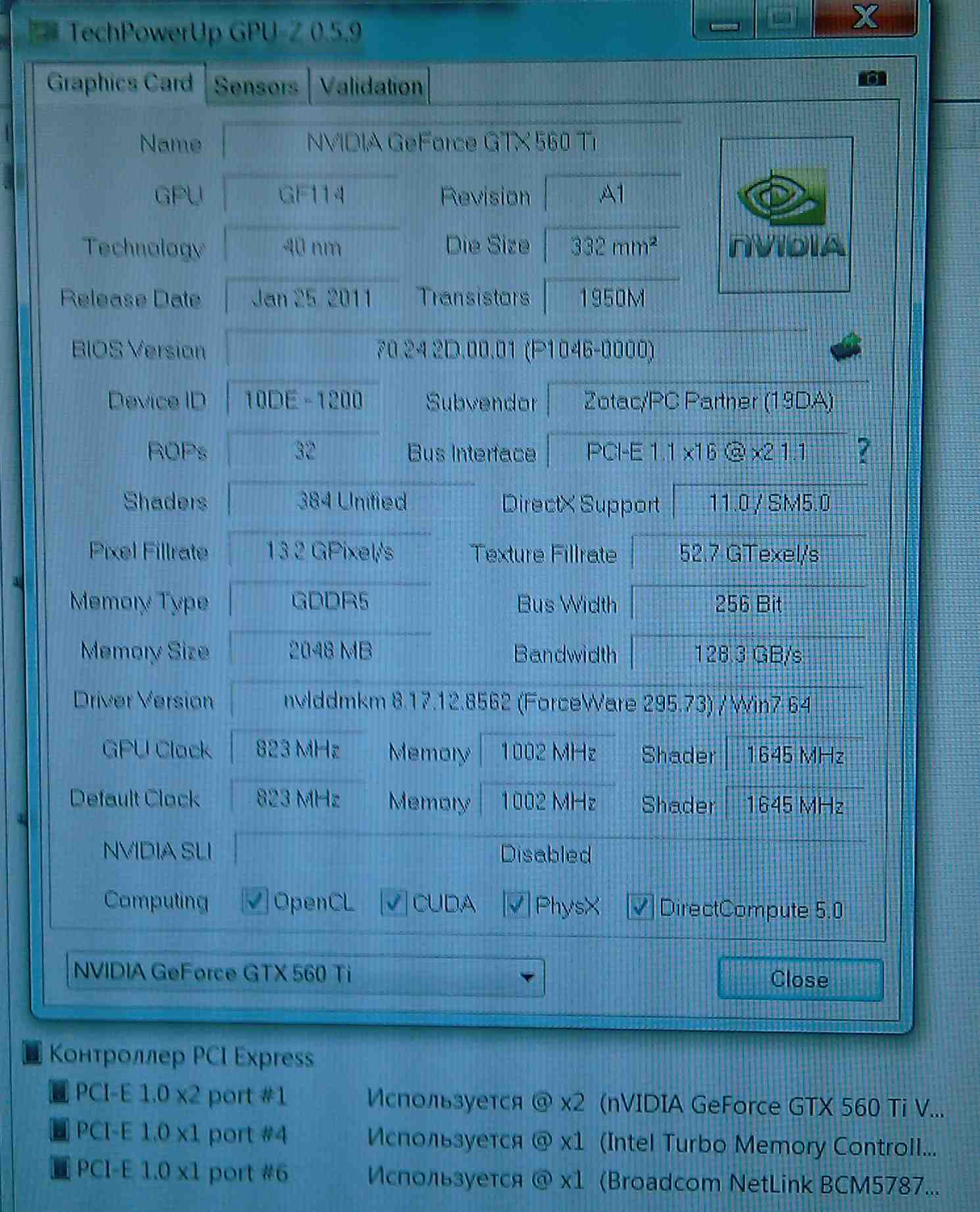
Everything turned out (look at 'GPU-Z'&'AIDA64')
Here are the results of tests (with default settings)
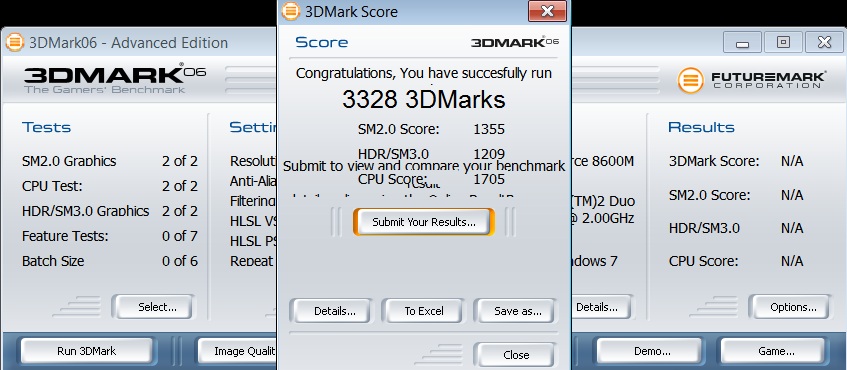
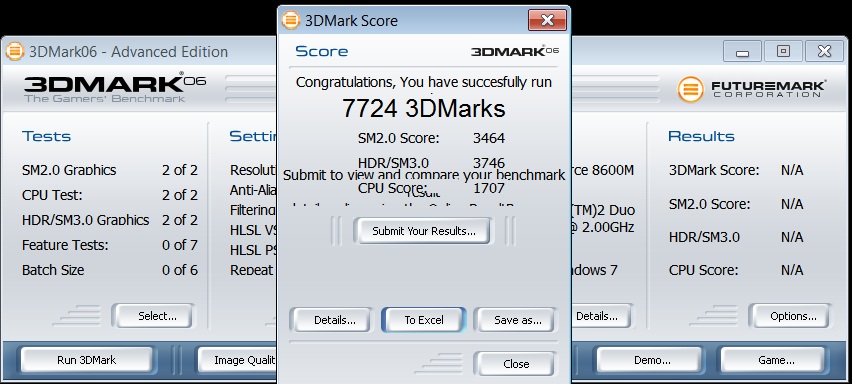
3Dmark06
iGPU eLCD 1280x1024, score 3328
eGPU eLCD 1280x1024, score 7724
3Dmark Vantage
iGPU eLCD 1280x1024, score 1179
eGPU eLCD 1280x1024, score 9942
I think it's best that you can squeeze out of the system
I am pleased with the results, the figures speak for themselvesAttached Files:
-
-
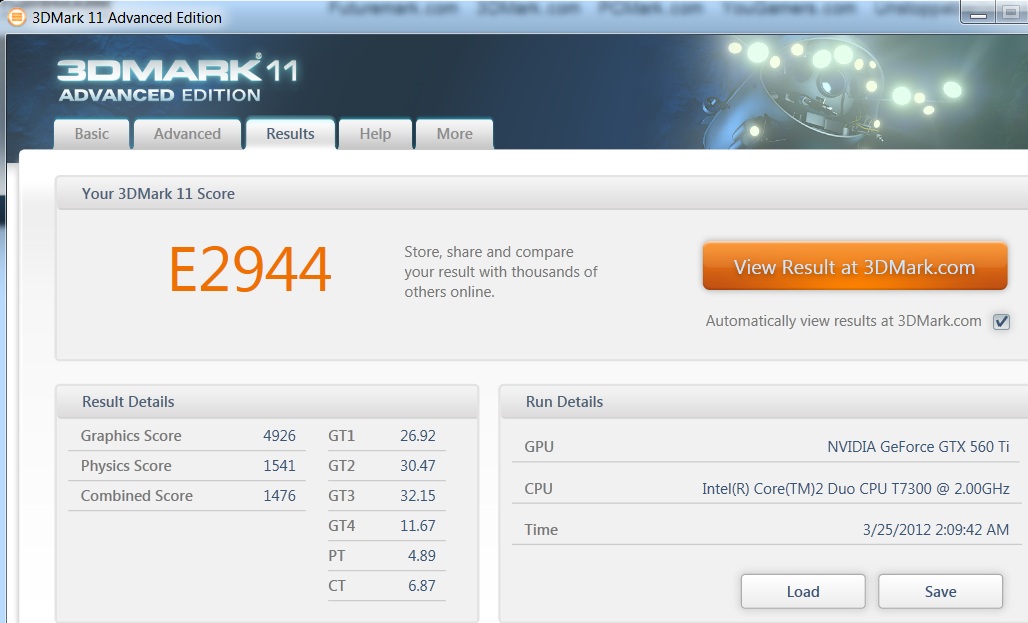
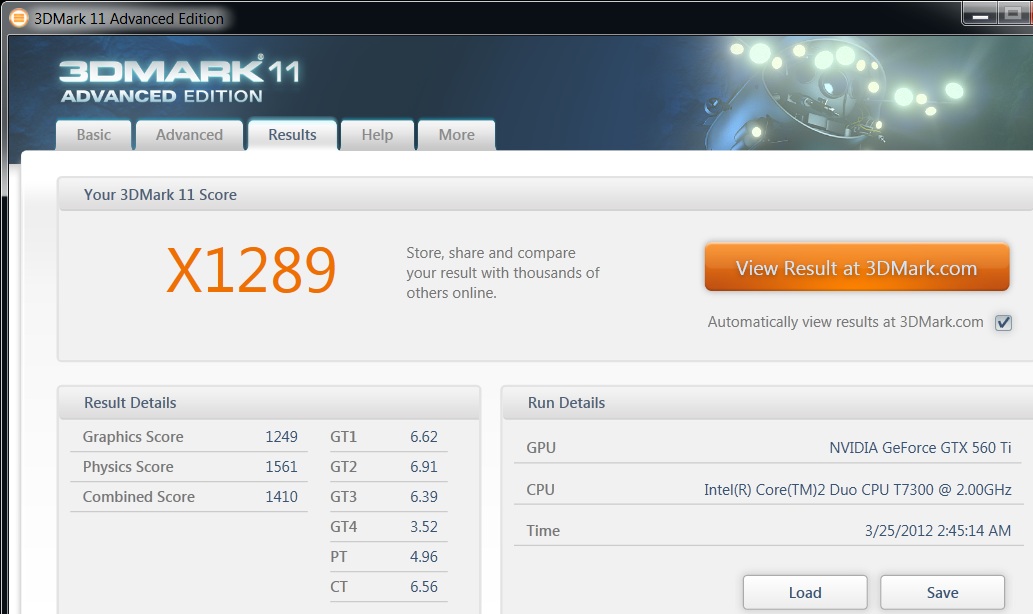
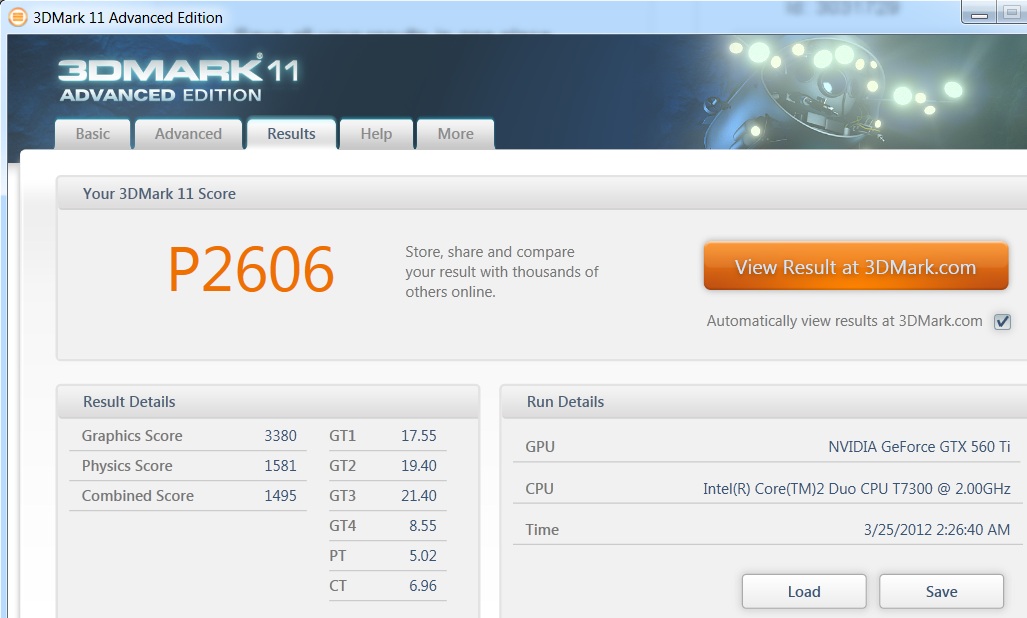
In 3Dmark11 results are worse, but there is a thing of the CPU.
And in the settings 'perfomance' visually better (no jerking) than in 'entry', but points less
3Dmark11
eGPU eLCD, setting entry, score 2944
eGPU eLCD, setting perfomance, score 2606
eGPU eLCD, setting extreme, score 1289
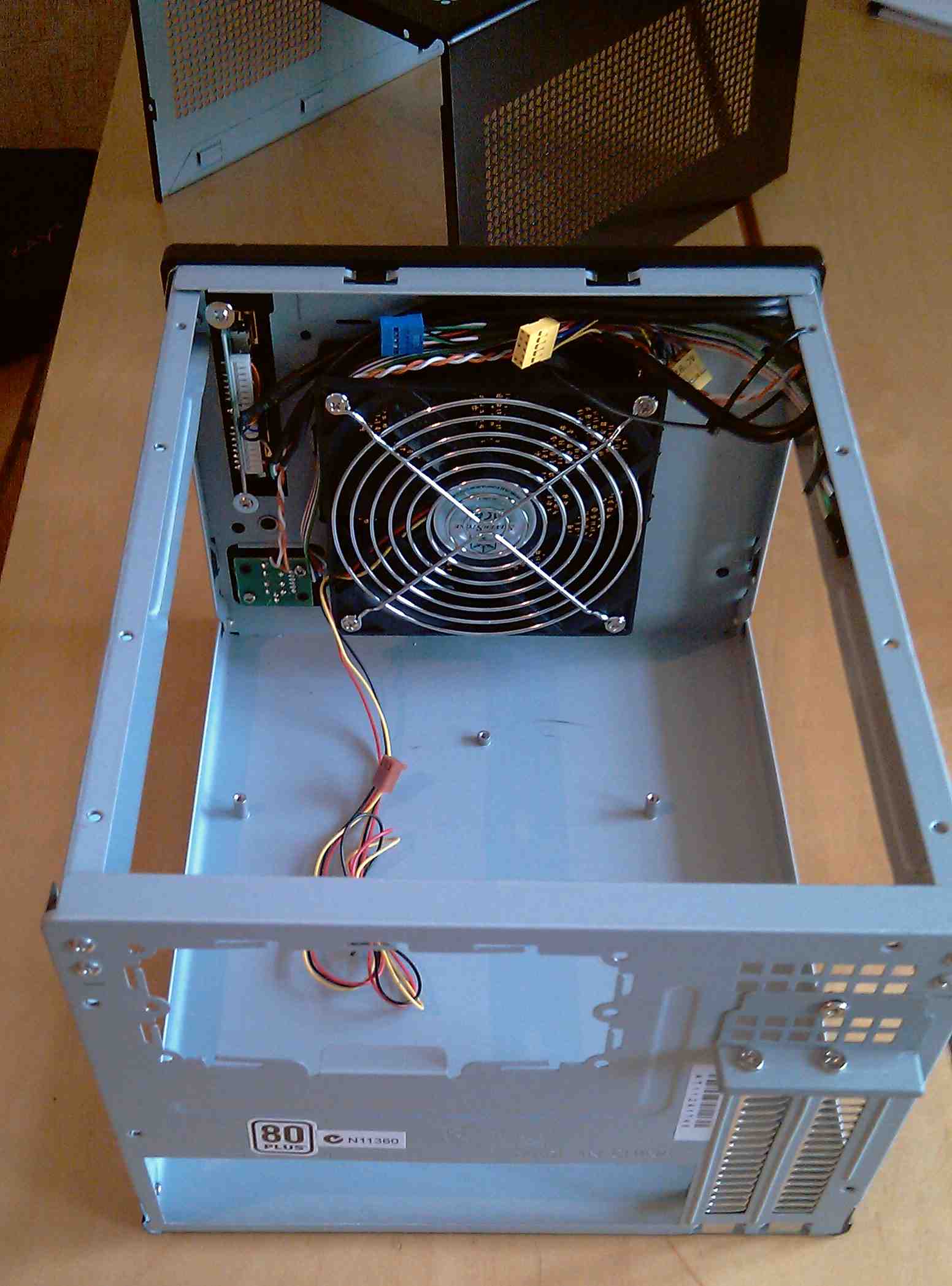
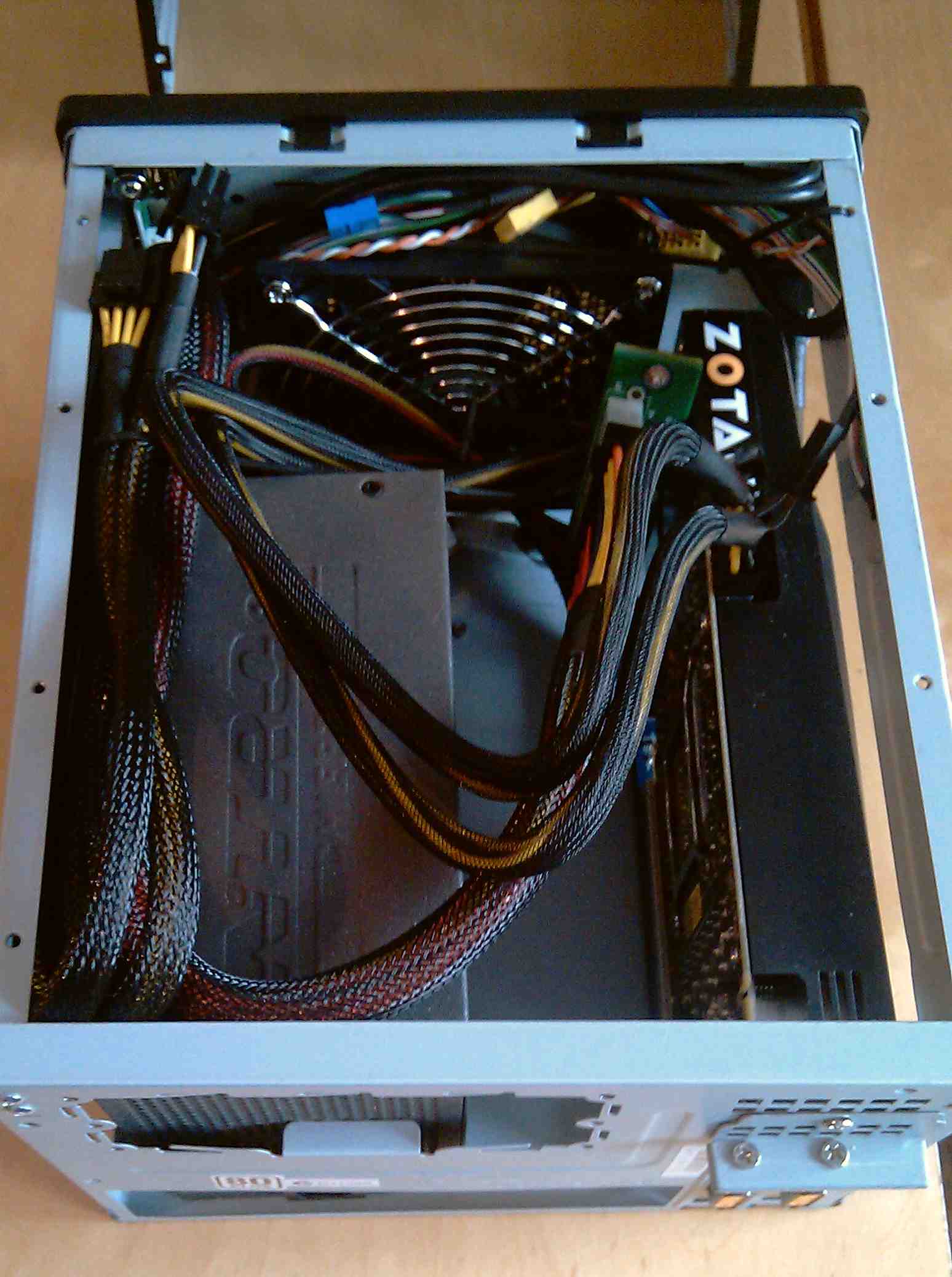
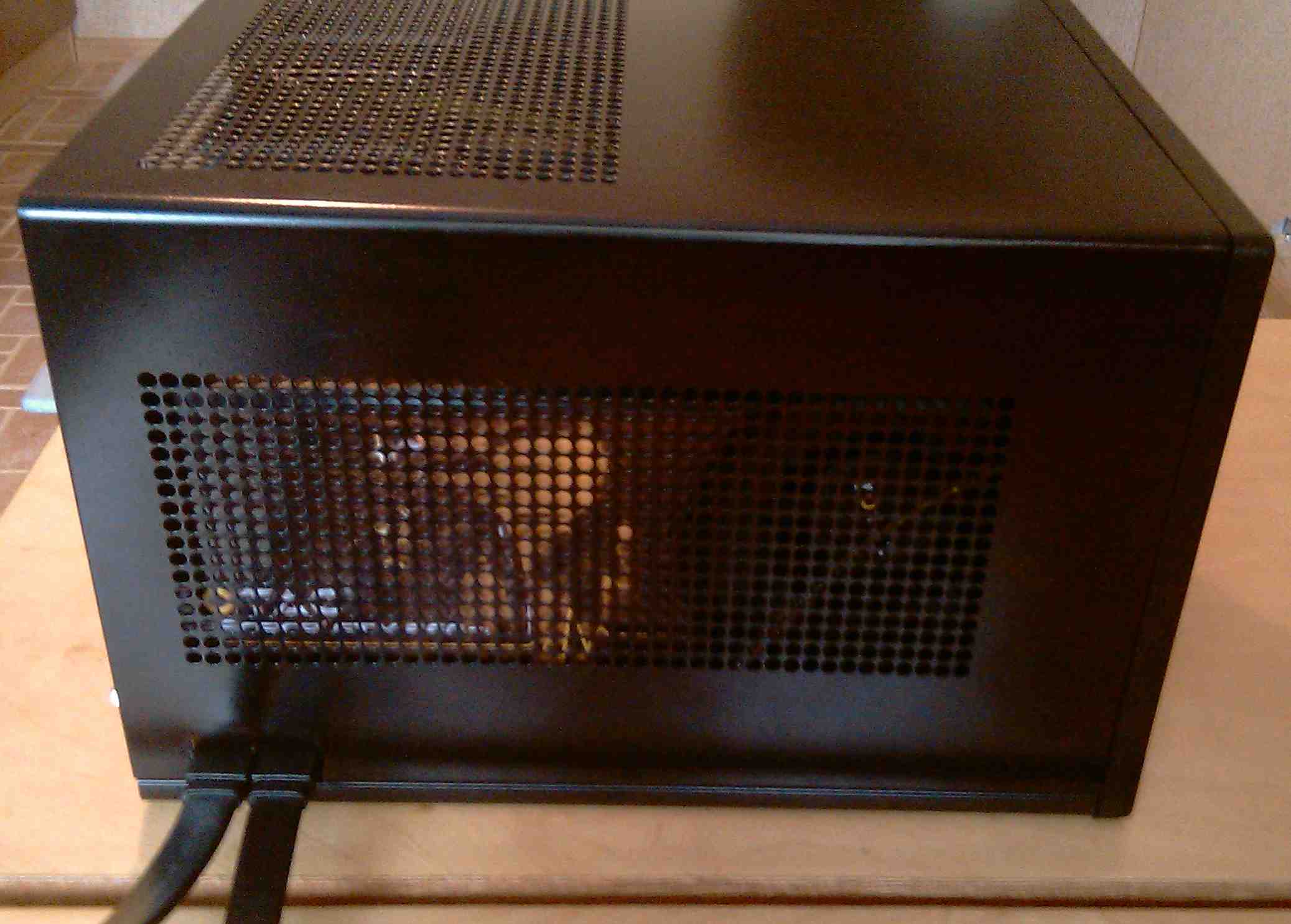
in the end, all mounted in a casing SilverStone SUGO <SST-SG05B>Attached Files:
-
-
It looks really good, I may be doing something similar.. the least wires there are, the best it is, and it is also better when you have a curious and stubborn mink at home!
DIY eGPU experiences
Discussion in 'e-GPU (External Graphics) Discussion' started by master blaster, Sep 18, 2009.


![[IMG]](http://imageshack.us/photo/my-images/687/bf320120323205727145.png/)
![[IMG]](http://imageshack.us/photo/my-images/215/photo230312201556.jpg/)