Problems? See this thread at archive.org.
![[IMG]](images/storyImages/image90)
Newegg.com - lenovo IdeaPad Y550P(324156U) NoteBook Intel Core i7 720QM(1.60GHz) 15.6" 4GB Memory DDR3 1066 500GB HDD 5400rpm DVD±R/RW NVIDIA GeForce GT 240M
http://1.bp.blogspot.com/-bpnTmay9l9Y/ToduGqiIf1I/AAAAAAAAAos/n2A_CLJ2-OQ/s1600/LA-5371P.png
Hey all, I got some input a long long time ago that since my gfx card is already decent, unless I can benefit from x2 or x2e i really shouldn't bother with this. However, I cannot really fully understand the "6. (Performance) Can my system do a PE4H x2 or x4 link as shown in PCIe Scaling Analysis?" section of the FAQ, so I was wondering if I could just get some input by uploading all of my laptop info.
In particular, I'd like to point out that I do have a physical express card slot, and my pcie ports are 2.0. I don't know if the first one is a "ghost" one or anything though. I honestly don't really understand the whole mix match port thing at all.
-
-
Srsly, what did you mean by this? shouldn't current gen mbp's which have TB ports work?! =S
-
If you see this in Device Manager, DSDT override is applied successfully.
![[IMG]](images/storyImages/77039d1333538905-diy-egpu-experiences-lm.png)
Next step setting up eGPU. Try this:-
- Connect eGPU to notebook but eGPU is OFF
- Turn ON notebook
- Halt windows loading by pressing F8
OR
*If you have Setup 1.x, enter Setup 1.x* - Turn ON eGPU
- Continue boot into windows
OR
*If you use Setup 1.x, press F5. Make sure eGPU is detected (listed) in Setup 1.x main screen. Then Chainload & boot into windows.* - You should be able to use eGPU now because Windows 7 will allocate eGPU in 36-bit space.
This is an example of what it look like when eGPU is allocated in 36-bit space. eGPU still listed under "Memory" tree but if you count the digits in the memory address, you'll see the memory range use by eGPU is in "Large Memory" range which means eGPU is now allocated in 36-bit space:-
![[IMG]](images/storyImages/eGPUallocatedin36-bitspace.jpg)
Good luck!Last edited by a moderator: Feb 6, 2015 -
Hi I am a frustrated owner of HP HDX 18 laptop. My laptop will frequently crash during games, and after some research the cause seems to stem from poor design with the GPU and CPU practically on top of eachother while sharing the same heatsink and fan. This DIY eGPU seems like a possible solution to my headaches if i were to disable my internal GPU and get an external GPU up and running. I do have questions whether or not my laptop can support this type of mod.
System specs:
OS Name Microsoft® Windows Vista™ Home Premium
System Manufacturer Hewlett-Packard
System Model HP HDX18 Notebook PC
System Type x64-based PC
Processor Intel(R) Core(TM)2 Quad CPU Q9000 @ 2.00GHz, 2001 Mhz, 4 Core(s), 4 Logical Processor(s)
BIOS Version/Date Hewlett-Packard F.34, 12/8/2010
Installed Physical Memory (RAM) 4.00 GB
Total Physical Memory 3.97 GB
Available Physical Memory 1.93 GB
Total Virtual Memory 8.10 GB
Available Virtual Memory 5.92 GB
I have an available Expresscard slot.
If this mod is possible, what graphics card should i go for as well as what power supply would i need to support the graphics card. Also because there is no integrated graphics card would i need to have an external monitor for this to work? I am not the most technical savy person when it comes to complicated mods like this so i appreciate any help.
Any help is greatly appreciated as i am about ready to give up on this POS laptop. -
HDX18 schematic tells us the port layout is:So x2 is not possible, neither is x1.Opt since you have no 4500MHD iGPU. Your system could run a x1 DIY eGPU but you probably wouldn't be satisfied with the performance. I'd suggest offload your system for another better DIY eGPU candidate.
-
Thank you for your reply. I'm not quite sure what you mean by offload, are you saying i should just cut my losses and try get rid of this laptop?
-
Yes - HDX18 is a poor DIY eGPU candidate box. Not enough bandwidth to make it worthwhile. Games would stutter too much. Your box has a Q9200 so would fetch some decent $$ as a s/h unit.
Then consider a budget x1.2Opt capable Sandy Bridge notebook with an expresscard slot like a Lenovo E420/E520, Dell Vostro 3450/3550 or HP Probook 4330s/4430s/4530s. Can also scout ebay/Outlets for the premium versions, the 14/15' with a 900P/1080P LCD option: Dell E6220/E6320/E6420/E6520, HP 2560P/8460P/8560P and Lenovo X220/T420/T520. -
Thanks again for the reply. how much can can i expect to get for this laptop considering its in good condition aside from the poor HP design causing the computer to crash whenever games are played? Is ebay the place i should be looking to sell?
-
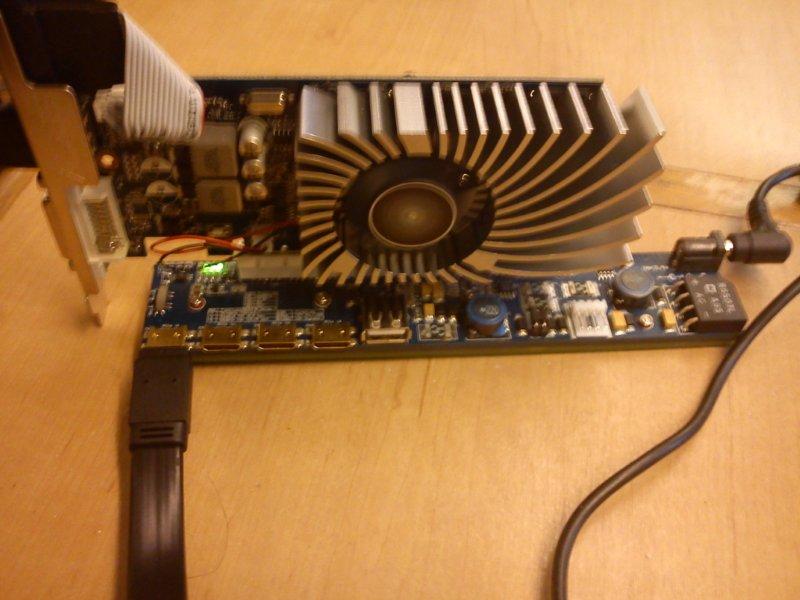
And there we go: the thermosheat on the EC2C is still missing but the cable is fully functional (i made a small mold filled with hot glue near the EC2C to have the space to put the fingers during the insertion and extraction process from the slot without twisting the cable directly). So I can confirm that 1.5m long cable works great with v2.0 PCIe (and it's awesome to use the 12" note in bed without heat and extra weight leaving the box down on the floor
 ).
).
![[IMG]](images/storyImages/photo060412082914.th.jpg)
-
Which cable is that? Simply flat HDMI cable? I read, that there is some HDMI Type B version, which has 29 pins, and 7 shielded Data lines ("Data+","Data-","shield") in comparison with 19 pins and 4 shielded lines HDMI Type A.
So...as far i understood, the PE4L is simply a direct corresponding connection of expresscard (notebooks internal express bus, or whatever) and the PCI-e GPU. Plus power from the 12V jack, or USB, power converter 5V>3,3V, timers for delayed start of the connection and some leds to indicate the presense of power (connection).
So the problem of only 1.0 and 1.1 PICe connection was the distorsion from cable and connecter. Solved with flat HDMI cable and the best possible cable connection -- direct soldering.
I wonder if, for example, the eSata (external, shielded) cable, and the connectors would allow a v2.0 PCIe connection.... -
I used THIS one.
Compared to the old one I noticed that it has one less metal sleeve around each group of cables but the same number of triplets (and it's a cable WITH ethernet) so it should be the 29 pins version (standard HDMI plug). Speaking about the soldering correspondence, if i remember well they are not exactly linear, but it's not so hard following the old template. -
so if i have an express card slot free, and an accessible mpcie slot is taken up by a removable wlan mpcie card, could i take that wlan mpcie card out and replace it with a MP3N to get x2? I could connect to a pe4h with both my express card and the mp3n in the slot the wlan mpcie used to be.
Also if I did this, would I still be able to retain internet connectivity if I bought a USB wireless adapter? -
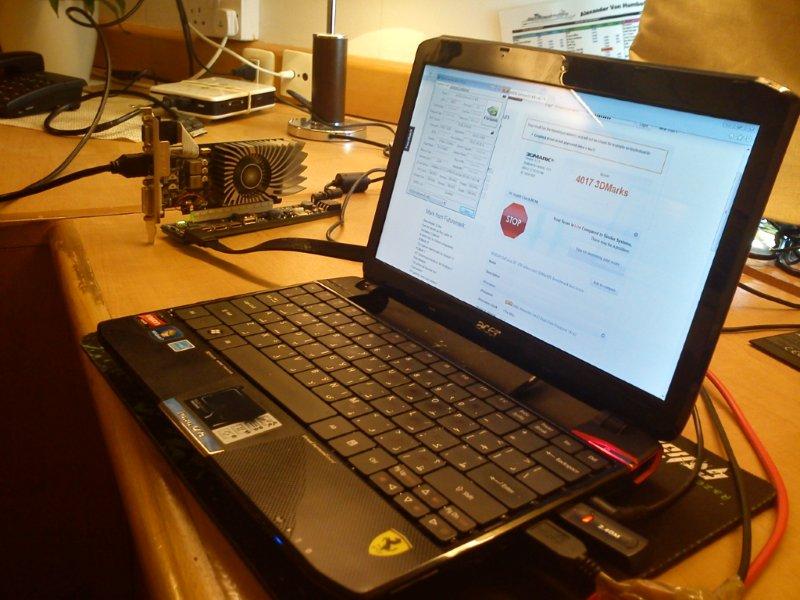
Hello guys:Very nice thread.i read it since some time now and as i have all i need in the end decided to give my contribute.I succesfully connected a GT430 to my ferrari one with TK42 cpu
(no optimus possible so far).I connected it to the wi fi mini pcm on the bottom.No problem at all.Only thingh is that i need to start with wifi connected than stand by connect the GT430 and it goes.Performance are stil far from what i get with the graphic booster but for all those with same laptop that do not have a booster it is worth to try specially if you get a gtx instead of my gt430.In this conf.i get few points over 4000 in 3D mark 2006.
Attached Files:
-
-
Ok, got a fully loaded X220 (I7-2640M, 8 GB @1600, 256 GB Samsung SSD), received a PE4L 2.1b yesterday, and today I borrowed an Asus GTX 560 Ti (factory OCed @900 Mhz).
After a lot of messing around with all those cables, everything went pretty smoothly (can't believe how plug and play this is ). First benches :
3DMark06 :
- HD3000 : 4690
- 560 Ti 1.2opt (external) : 19461
- 560 Ti 1.2opt (internal) : 16169
RE5 :
- HD3000 : 36.7 fps
- 560 Ti 1.2opt (external) : 157 fps
- 560 Ti 1.2opt (internal) : 95.5 fps
Thanks to all those who made this possible. Cheers !
Edit : more benchmarks
3DMark Vantage (GPU score) :
- 560 Ti 1.2opt (external) : 16693
- 560 Ti 1.2opt (internal) : 15761
DMC scene 4 :
- 560 Ti 1.2opt (external) : 157.36 fps
- 560 Ti 1.2opt (internal) : 96.45 fps
3DMark 11 (GPU score):
- 560 Ti 1.2opt (external) : 4211
- 560 Ti 1.2opt (internal) : 4228
Heaven :
- 560 Ti 1.2opt (external) : 1324
- 560 Ti 1.2opt (internal) : 1182 -
I don't really understand I'm pretty unsucessful with my Z2 so far for an eGPU setup...
I think I hve a PM3N v1.2 (there's a switcher 15/7s delay and CLKRUN)
I first tried with my dad's GTX 560 Ti, only once without the setup 1.x the card was easily detected and installed but wouldn't work and sometimes, (when I plugged it to the laptop rather at the end of W7 loading) would make it struggling with a lot of short freezes....
Then I've tried with my GTX 480 and the setup 1.x to restrain PCIe 2.0 port speed to gen1.
But I couldn't even managed to get my 480 detected....
Also while before the GTX 560 Ti would make the laptop crashed if I forget to power on the GPU after bios loading.
But now with the GTX 480 and setup 1.x whatever I have tried nothing happened, it just like if nothing was working. I couldn't even make my laptop crashes or freezes lol...
I've tried with two different hdmi wire and I think both should work properly.
Also, setup 1.x was not even able to recognize the gpu :s (I hope my 480 isn't dead lol... I will check that tomorrow when I visit my parents.)
Same thing for windows whatever I tried (I also tried to put back gen2 speed but made no changes...)
Here are some pictures of my setup 1.x maybe you can deduce something I'm not so gifted and didn't understand everything of it...
![[IMG]](images/storyImages/120407025018659676.jpg)
![[IMG]](images/storyImages/120407024957201102.jpg)
![[IMG]](images/storyImages/120407024930254355.jpg)
![[IMG]](images/storyImages/120407024910884318.jpg)
-
Likely a whitelisting and/or port inactive issue
Gen1/Gen2 link speed doesn't matter at this state as the eGPU isn't under load. What matters is the eGPU isn't appearing on the pci-e bus.
This may be a whitelisting issue. Boot Setup 1.x with wifi card in the mPCIe slot, confirm it shows up in the status window. From here it appears the wifi slot is port1. Then poweron the eGPU and *carefully* hotplug it into the wifi mPCIe slot. Hit F5 to update the status window. Confirm you now see the eGPU. If so then repeat but boot without wifi and see if the eGPU is detected. If not, then work through Setup 1.x's PCIe ports->Anti-whitelist methods to get the wifi/eGPU mPCIe port activated.
I would very much like to see a Sony Z2 with a working eGPU. SimoxTav has only several posts ago shown it's possible to solder a new cable onto a PE4L 2.1. So if BPLUS are dragging their feet in providing a pci-e 2.0 capable PE4L-PM3N 2.1 you could consider making your own by soldering a flat cable directly onto the PM3N 1.2 pins. -
Thank you,
I'll try it as soon as possible, I still don't understand though why before setup 1.x the GTX 560 Ti was automatically recognized.. -
I thought when you ordered from Harmonic Inversion, Setup 1x was included? I'm not seeing it in the package or in an email, I never got a code or anything. If it doesn't come with it, I'm extremely disappointed because the only reason I ordered the 1.5a was because it comes with it.
Do I have to email someone or something? -
Hey, does it make any difference whether I use a 1x cable like you linked or a riser card? And would this work with a 9500GT?
-
ok, i have tried the 1st portion without setup 1.x.
Turned on Notebook with egpu off. Hit F8 before entering windows.
Power on Egpu and continue windows normally.
Here are the result from device mgr.(refer to attachments)
Initially i had the drivers installed for the gfx but i still see the same thing.
Seems like in large memory the egpu isnt appearing there.
Attached Files:
Last edited by a moderator: Feb 6, 2015 -
When you see exclamation mark at the device in Device Manager, you should see what is the exact error code.
-
Its showing the usual, error code 12.
-
Anyone seen if W520 is also just plug and play like the X220?
-
Does the fact that DSDT override works with 3 gb but not 8 gb (BSOD) in any way help me to get past error 12 with more than 3 gb?
-
Perform a 36-bit compaction on the eGPU as described in the DSDT override page. If you still get an error12 then do a !Save Diags->Windows fails, upload the resultant archive to mediafire.com and link here for analysis.
We've just seen accounts of a NV4200M equipped Dell E6420/E6520 require the dGPU to be disabled for the iGPU+eGPU to work in harmony in a x1.Opt configuration (pci-e compression and internal LCD mode). So unless you have a facility to disable the dGPU in the bios you'll need Setup 1.1x to disable it. A iGPU-only T520/E6520/8560P would however be plug-and-play.
The DSDT override is based on trial-and-error with two successful applications of it so far. I'd suggest try altering the range (lines 3,4 and 6 below) starting with the suggestion below to see if it boots Win7 without a BSOD with 8GB installed.
Code:QWordMemory (ResourceProducer, PosDecode, MinFixed, MaxFixed, Cacheable, ReadWrite, 0x0000000000000000, // Granularity [B][COLOR="Red"] 0x0000000220000000, // Range Minimum, set it to 8.25GB[/COLOR][/B] [COLOR="Red"][B] 0x000000031FFFFFFF, // Range Maximum, set it to 12.25GB[/B][/COLOR] 0x0000000000000000, // Translation Offset [COLOR="Red"][B] 0x0000000100000000, // Length calculated by Range Max - Range Min.[/B][/COLOR] ,, , AddressRangeMemory, TypeStatic)
-
Would an Asus g1s work? i don't know if it has a mpcie port or not..
-
I can disable my Quadro in Bios, but its just a bit troublesome having to that everytime I connect the eGPU, but if thats the best solution so be it
Still tempted just to wait for thunderbolt devices and then just upgrade laptop -
Hi
My monitors connected to eGPU is not detected.
After PCI compaction with Setup 1.x, eGPU seems fine with no errors, but any external monitor does not work.
What should I do?
HP Pavilion dv5t-1000 with anti-whitelist modded BIOS
8GB DDR2
Vista x64
dGPU:GeForce 9600M GT
eGPU:GeForce GTS 450@x1
Driver 295.73 with modded nvam.inf
Thanks in advance. -
@Nando4 : I added the DX10 and DX11 benchmarks to my previous post
On the technical front, this setup has really been hassle-free : no need to use the Setup software nor modded Nvidia drivers. I powered the X220 with the eGPU connected (and on). Installed the latest nvidia drivers, rebooted and that's all.
The only (very small) issue is that I use grub to dual boot linux and windows, and grub doesn't show on the screen that's connected to the external card. This is solved by this :
http://www.amazon.fr/HQ-AVSWITCH-10-Commutateur-DVI-I-Ports/dp/B000GTLFS6/ref=sr_1_1?ie=UTF8&qid=1333802399&sr=8-1
This allows me to use the same external screen for the eGPU and the docked X220, and I can have the grub boot menu by selecting the dock video output, and then switching to the eGPU output when I need full graphics performances. -
Hey nando i got an external monitor like you suggested but everytime i try it, i get BSOD 5 mins into playing a game, how do i fix this?
-
Can someone help me with this please?
-
Thanks Nando.
I have tried DSDT override but it still appears the same error. (code 12)
Pardon me but how do i do a save diags?
Im looking at !Save diagnostics but have no clue where to start. -
Did anyone overclock the eGPU? Is it possible, or is the full, x16 connection, as in desktop, needed?
-
The connection is only needed for bandwidth. Over-clocking the GPU doesn't affect and is not affected by bandwidth at all.
I'd imagine you can do it with any GPU tool or RivaTuner or whatever people use nowadays for over-clocking. Plenty of people have over-clocked. Which graphics card do you have? -
Thanks for the quick answer!
I`m going to buy some GTX 460, better Gigabyte or MSI Cyclone, so far i read about all the types and manufacturers. -
Hello!
Got last week PE4L 2.1a+, the setup works fine sofar, but have some consern with diode lights. On previous setup (PE4H 2.4) all diods lighted up green, but on PE4L 2.1a+ diodes R1 is green, R2 does not light up, R3 is orange and R4 is also not lit up. Is it normal?? -
Hi guys. Haven't been here for a while as my Samsung Series 4 has a TOLUD problem...
...but now I'm back and I would like to ask for some help. As there is a new way of managing the TOLUD problem (DSDT override) which seems to be a nice way to try to make my Samsung 400B2B work I would like to try it. However when I try to compile the .dsl file into a .aml some errors and warnings occur which aren't connected with those which were mentioned here:
http://forum.notebookreview.com/gam...851-diy-egpu-experiences-920.html#post8400953 . That is why I would like to ask you for help. Can you tell me how should I rewrite the syntax to make it work? Here are my dsl files - the first one is the raw one (without any changes) and the second one is with some minor syntax changes (those that you mentioned in the post I linked and with QWordMemory part added)
http://db.tt/W0hHIsa6 - file without any changes
http://db.tt/TQ3XfMVY - file with some minor changes
And isn't it a problem that I even don't have the Large Memory branch in the Device Manager? Won't it influence the DSDT procedure in any way? Here is a link to the picture from my Device Manager (again - sorry for the language): http://db.tt/XiVqUsFj
And one more thing (just for sure) - is the DSDT override procedure risky in any way? I ask because I use my laptop also for work (from time to time) and I would be really "unhappy" if the DSDT procedure broke it... -
In the "minor changes" file, at line 2454, change this:-
to this:-Code:Method (_CRS, 0, NotSerialized) { [B][COLOR="Red"]Return (0x00)[/COLOR][/B] }
There is a small risk you can make the OS unbootable but you can always boot with "F8 >> Known good configuration". I regularly used DSDT override before, not related to eGPU, so far no problem.Code:Method (_CRS, 0, NotSerialized) { [B][COLOR="Red"]Return (Buffer (One) {0x00})[/COLOR][/B] } -
Ok. I tried it but nothing changed, so I opened the aml file and tried to compile it (what shows errors in the DSDTEditor which I use) and there's an error in the 17th line. Here is the aml file:
http://db.tt/DMaFk401
Edit: strange situation - as I execute the aml file such an error occurs:
http://db.tt/vRiPCOG5
Can you look at it and tell me what's wrong? -
Hi Nando or Kizwan,
How do i save diags?
Do you mean saving all info from dxdiag?
Thanks -
You get it when the PE4L ships, which could be up to a week. They send you a link to download Setup 1.x. Just make sure your Order Status is at least Confirmed, and you can be sure it will ship eventually.
-
You already successfully compiled the "minor changes" file to .AML file. Next step is to load the .AML file to registry using ASL.EXE tool:-
Look like iasl.exe compiler bug where when you decompiled the .AML file, it created two instance of "TNOT":-Code:asl.exe /loadtable "400b2b 0.1.aml"
You just need to removed the second "TNOT". However, this is redundant. You already compiled the "minor changes" file to .AML file. Why do you want to decompile the .AML file & compile it again?Code:DefinitionBlock ("Samsung 400b2b 0.2_.aml", "DSDT", 1, "SECCSD", "LH43STAR", 0x00000000) { [B][COLOR="Red"]External (TNOT[/COLOR][/B], MethodObj) // 0 Arguments External (HNOT, MethodObj) // 1 Arguments External (SNXD) External (HWID, IntObj) External (IDAB, MethodObj) // 0 Arguments External (PDC7) External (PDC6) External (PDC5) External (PDC4) External (PDC3) External (PDC2) External (PDC1) External (PDC0) External (CFGD) [B][COLOR="Red"]External (\TNOT)[/COLOR][/B]
- Boot into Setup 1.x
- Connect eGPU
- Press F5. Make sure eGPU is detected
- Do 36-bit PCI compaction on eGPU
- Run "!Save Diags" >> "Windows fails"
- Chainload
- In windows, run "V:\DEVCON\mkpcidmp.bat"
- Zipped the V:\DIAG folder, upload it to somewhere (e.g. mediafire) & post the link here.
-
hey there, have a laptop- m6600 with quadro 5010m. Wanting to know if building a egpu setup to just add cuda performance for gpu rendering will work? (iray with 3ds max) Will the cuda cores from external gpu be combined with my inbuilt laptop gpu cuda cores? I understand that you don't get the full performance of the external gpu however, if it does work and combine, will I be loosing any performance from the external gpu if all I am using is cuda cores?
Thanks,
Chris. -
Hi Kizwan,
The setup 1.x could probabbly solve the code 12 error but unfortunately im still the midst of obtaining the coupon code to purchase it.
Besides the DSDT override method are there any other methods that i could still try. From the FAQ i have tried almost all excepts those which requires setup 1.x
Thanks -
Well yesterday I got an PM from some secret santa on how to set x2 on sandy bridge systems. It requires flashing an area called the "flash descriptor", which is located on the same chip as the system BIOS. Sadly, it appears that laptop manufacturers lock this region so that it cannot be rewritten after the laptop is shipped from the factory, so it seems that x2 and x4 are no go unless your manufacturer decided to ignore Intel's recommendation and not lock the flash descriptor. My flash descriptor wasn't even readable.
-
How do you determine flash descriptor is not readable? I want to try read flash descriptor on Intel 5 series notebook. FYI, Intel 5 series chipset also use flash descriptor to set x2/x4 link.
-
Okay so I tried three methods of compaccion and none of them worked.
I keep getting Error 12. -
I loaded it (using a modified .bat file of yours: http://db.tt/EVLuvfqS) but still an error occurs (it's in this file: http://db.tt/vRiPCOG5). And also nothing changes in the Device Manager when I switch to "Resources by connection". Did I do something wrong?
-
egpu setup isnt free anymore? :/ great
-
It is a very complete and powerfull program. Developpers need help to continue this hard work.
You can get a 10USD coupon free. Just PM hitrc (nbr user) to get it.
DIY eGPU experiences
Discussion in 'e-GPU (External Graphics) Discussion' started by master blaster, Sep 18, 2009.


![[IMG]](http://img341.imageshack.us/img341/627/photo060412082914.jpg)