 Problems? See this thread at archive.org.
Anyone? Any advice?
Appreciate.
-
-
The only Setup 1.x facility than you would need for your system is the ability to halt OS bootup and detect the eGPU. You can do the same by hitting F8 to get the Win7 bootmenu, hotplug the eGPU and listen for a slightly muted fan noise indicating it's been detected and is now on the pci-e bus.
Setup 1.x would be useful for you to figure out out what steps you need to get the eGPU detected. Just hit F5 in Setup 1.x to get the Status Window to updated the detected GPUs in the system.
Your diags show that a 32-bitA compaction will work with "ALL" devices so pls try that.
HIT are selling their PE4L 1.5 for US$56, reduced from US$71
A pretty good deal. While a PE4L 2.1 is pci-e 2.0 compliant, a PE4L 1.5 has a detachable mHDMI cable which is more convenient for users with pci-e 1.1 expresscard/mPCIe slots (Series-5 or older chipsets). -
OMG, $979...i think, it will be worth and interesting, to make a DIY Thunderbolt eGPU

As far as i understood, in this test, peak is the average power usage in 3D applications, and max is the rare maximum, that sometimes is achieved during operation.
But in other articles and test this values are called different. No common standard, how to call them. -
Can resoldering an old PE4H, a mHDMI cable and an EC2C overcome that?
I'm planning to purchase a new Ivy Bridge notebook and to do above.
BTW, is there a Thunderbolt to mHDMI x4 adapter? -
I am unsure of the proper steps to successfully execute it after compacting and i still see "no solution found. Set another method than try another pci compaction"
I could be doing something wrong. -
-
firstly, do You have appropriate drivers for your chipset?
did you tried correct drivers for GPU drivers? 64/86 bit? -
I would assume I have the right drivers, I never changed them from what came with the laptop or what windows has auto updated them to. I have no problems with anything else that chipset driver issues would surely cause, and AIDA64 didn't have any problems with my motherboard. And the Nvidia drivers I download said they were for 64 bit windows 7. I can't figure out why I can't manually install them then. Of course, this all only matters as long as I can actually get the GPU to be detected in the first place. At least I know this isn't a hopelessly lost cause. I'm getting closer. I'll make it eventually....maybe
-
I've seen that the lenovo advanced docking station for certain older laptops has a PCIe card. I've got an x220t but the newest dock doesn't have this functionality.
Does anyone know if this functionality has only been left out of the dock and there is still an accessible PCIe connection at the base of the laptop though the docking port? Has anyone got any experience of creating a DIY PCIe riser to the docking port of any laptop which has PCIe passthrough there? -
Hey guys! I'm hoping that you can help me out with my setup. I'm debating going to a DIY VIDock because I like to keep my system minimal. I'm kinda confused with a few points though.
I have an ATI 6870 that I can take from my desktop system.
My laptop is a Sony VPCEB4GFX on Win7 x64.
I don't know how to tell what kind of PCI-Express speeds I can hope to get with this, as the PCI-E seems to be the bottleneck for VIDocks. Is my laptop a good candidate for this? And would an ATI 6870 work, or even be overkill?
I like the actual VIDock because it's a nice integrated little unit. I'm not really liking the idea of lugging around an ATX power supply if I go the DIY route. Are there solutions for a nice compact DIY unit that can handle the power requirements of a Radeon 6870?
I want to play games at 1920x1200 / 1920x1080 -
Hi guys,
Just got my PE4L2.1b, established x1 2.0 link (at least GPU-Z said so) Problem is... Performance just got worse:
3dmark11
with PE4L1.5 : 4052
with PE4L2.1b: 3814
Just reinstalled driver 295.73, downloaded the driver, but there is no "nvam.inf" to replace...Got it work though...
lenovo T420 with PSU and evga GTX560Ti...
Any ideas or anybody having the same problem here? Please help... -
Please refer this page modded drivers.
Follow procedure and replace nvam.inf -
Does anyone knows a work-around for PCI compaction?
I did the 32-bitA compaction on all PCI Devices and it just hangs though there were no error like" "no solution found. Set another method than try another pci compaction".
The only thing i could do was to hard reset the system.
Thanks -
Ok. For all people that get confused about x2, here is the image of what it looks like and why you need PE4H.
TOO BIG IMAGE Sorry for blurry image, but this one had best lighting and angle to see the cables. Now they are all hidden.
This is x2 1.0. As you guessed, yes it needs 2 wires and 2 physical ports. The Flat Cable is lane1 on port3(express card), and the round cable is lane2 on port4(mpci-e coming out underneath the laptop). Port combinations allowed are 1+2 or 3+4. Not allowed 1+3 or 2+3. BUT, only PCI v1.0 can do x2. You CAN NOT do it with PCI v2.0 (say thanks to Intel).
BTW. I ran across a post on this forum that talk about distortions and cable bending. It is ok to bend this cable 180 degrees. I had to do it for lane2 as the location of it is just unfortunate.
P.S I will be posting my Benchmarks soon Nando. I just want to post all info onto 1 post and to gather all the data takes a lot of time and fiddling around. -
When you do a 32bit ALL compaction, it will do pretty much the same thing as the diags shows a success on (see far below).
We see the 4500MHD iGPU and HD5770 are allocated to d000, c000 ranges. e000 is not available so the smaller bars are moved to the fexx range including USB/SATA controllers:
The system should not freeze when doing compaction as it only does the pci write after the compaction has finished. If there is a problem then proceed as follows.
1. do a clean cold boot and post your diags. I'd like to know the bios allocation for the devices.
2. perform a manual compaction at the DOS prompt:
3. try the resultant pci.batCode:cd %DRV%:\config compact pciend 100000000 makebatch pci.bat import devcon.txt
4. If no success, then post your \diag contents and the \config\pci.bat file result from the above.Code:call pci.bat call grub4dos mbr
Code:Running **compact pciend 100000000 makebatch nul verbose import \config\devcon.txt** ****************************************************************** Copyright 2010 Harmonic Inversion Technology All rights reserved ****************************************************************** Compact build date: Mar 7 2012 Detected Intel GM45, TOLUD=c0000000 importing extra prohibited ranges ignoring excessive devcon range: [e0000000, f0000000) arguments: R:\CORE/compact.exe pciend 100000000 makebatch nul verbose import \config\devcon.txt BIOS EBDA base: 9d000 ACPI RSDP not in EBDA found RSD PTR @ 1f7024 rsdt @ b5f12f10 local APIC @ fee00000 I/O APIC @ fec00000 PCIX extended config space @ [e0000000 f0000000) HPET @ fed00000 physical address overflow - b5f00000 b5edd690 ----------------ACPI fixed memory ranges------------------- [fee00000 fee01000) [fec00000 fec01000) [e0000000 f0000000) [fed00000 fed00400) [fed14000 fed18000) [fed19000 fed1a000) [fed18000 fed19000) [fed13000 fed14000) [ff000000 100000000) [fed00000 fed00400) [00000000 00004000) [00000000 00004000) [00000000 00001000) [00000000 00001000) [00000000 00000000) [fed20000 fed40000) [feb00000 feb04000) [fed45000 fed90000) [fed40000 fed45000) ----------------ACPI fixed IO ranges---------------------- [0cf8 0cf9) [0000 0001) [0081 0082) [0093 0094) [00c0 00c1) [0020 0021) [0024 0025) [0028 0029) [002c 002d) [0030 0031) [0034 0035) [0038 0039) [003c 003d) [00a0 00a1) [00a4 00a5) [00a8 00a9) [00ac 00ad) [00b0 00b1) [00b4 00b5) [00b8 00b9) [00bc 00bd) [04d0 04d1) [00f0 00f1) [004e 004f) [0061 0062) [0063 0064) [0065 0066) [0067 0068) [0070 0071) [0080 0081) [0092 0093) [00b2 00b3) [0680 0681) [1000 1001) [0800 0801) [0400 0401) [0500 0501) [164e 164f) [0070 0071) [0040 0041) [0050 0051) [0060 0061) [0064 0065) [0060 0061) [0064 0065) [002e 002f) [4700 4701) [0062 0063) [0066 0067) PCI range: [c0000000 100000000) prohibited PCI range: [ff000000 - 140000000) prohibited PCI range: [e0000000 - f0000000) prohibited PCI range: [fed1c000 - fed90000) prohibited PCI range: [fed13000 - fed1a000) prohibited PCI range: [feb00000 - feb04000) prohibited PCI range: [fed00000 - fed00400) prohibited PCI range: [fee00000 - fee01000) prohibited PCI range: [fec00000 - fec01000) prohibited PCI range: [00000000 - 00004000) 5 bridges PCI memory ranges to allocate: 0: 2: 0, BAR=2 size=0x10000000 prefetch=1 64b=1 2: 0: 0, BAR=0 size=0x10000000 prefetch=1 64b=1 0: 2: 0, BAR=0 size=0x00400000 prefetch=0 64b=0 0: 2: 1, BAR=0 size=0x00100000 prefetch=0 64b=0 0:1a: 7, BAR=0 size=0x00000400 prefetch=0 64b=0 0:1b: 0, BAR=0 size=0x00004000 prefetch=0 64b=0 0:1d: 7, BAR=0 size=0x00000400 prefetch=0 64b=0 0:1f: 2, BAR=5 size=0x00000800 prefetch=0 64b=0 0:1f: 3, BAR=0 size=0x00000100 prefetch=0 64b=0 2: 0: 0, BAR=2 size=0x00020000 prefetch=0 64b=0 2: 0: 1, BAR=0 size=0x00004000 prefetch=0 64b=0 1: 0: 0, BAR=0 size=0x00004000 prefetch=0 64b=0 4: 0: 0, BAR=0 size=0x00002000 prefetch=0 64b=0 6: 3: 0, BAR=0 size=0x00000800 prefetch=0 64b=0 6: 3: 1, BAR=0 size=0x00000100 prefetch=0 64b=0 6: 3: 2, BAR=0 size=0x00000100 prefetch=0 64b=0 IO ranges to allocate (only eGPU range will be allocated): 0: 2: 0, BAR=4 size=8 0:1a: 0, BAR=4 size=20 0:1a: 1, BAR=4 size=20 0:1a: 2, BAR=4 size=20 0:1d: 0, BAR=4 size=20 0:1d: 1, BAR=4 size=20 0:1d: 2, BAR=4 size=20 0:1f: 2, BAR=0 size=8 0:1f: 2, BAR=1 size=4 0:1f: 2, BAR=2 size=8 0:1f: 2, BAR=3 size=4 0:1f: 2, BAR=4 size=20 0:1f: 3, BAR=4 size=20 1: 0: 0, BAR=2 size=100 Bridges: (farthest to closest) 0:1c 0 parent_bridge= none bus_behind=1 64b_capable=1 0:1c 1 parent_bridge= none bus_behind=2 64b_capable=1 0:1c 2 parent_bridge= none bus_behind=4 64b_capable=1 0:1c 3 parent_bridge= none bus_behind=5 64b_capable=1 0:1e 0 parent_bridge= none bus_behind=6 64b_capable=1 1 solutions in t = 0.000000 15 vertices visited [COLOR=RED]setting device 0: 2: 0, BAR=2 size=0x10000000 prefetch=1 64b=1 to 0xd0000000 setting device 2: 0: 0, BAR=0 size=0x10000000 prefetch=1 64b=1 to 0xc0000000 setting device 0: 2: 0, BAR=0 size=0x00400000 prefetch=0 64b=0 to 0xfe400000 setting device 0: 2: 1, BAR=0 size=0x00100000 prefetch=0 64b=0 to 0xfea00000 setting device 0:1a: 7, BAR=0 size=0x00000400 prefetch=0 64b=0 to 0xfe9ffc00 setting device 0:1b: 0, BAR=0 size=0x00004000 prefetch=0 64b=0 to 0xfe9f8000 setting device 0:1d: 7, BAR=0 size=0x00000400 prefetch=0 64b=0 to 0xfe9ff800 setting device 0:1f: 2, BAR=5 size=0x00000800 prefetch=0 64b=0 to 0xfe9ff000 setting device 0:1f: 3, BAR=0 size=0x00000100 prefetch=0 64b=0 to 0xfe9fef00 setting device 2: 0: 0, BAR=2 size=0x00020000 prefetch=0 64b=0 to 0xfefe0000 setting device 2: 0: 1, BAR=0 size=0x00004000 prefetch=0 64b=0 to 0xfefdc000 setting device 1: 0: 0, BAR=0 size=0x00004000 prefetch=0 64b=0 to 0xfe3fc000 setting device 4: 0: 0, BAR=0 size=0x00002000 prefetch=0 64b=0 to 0xfe2fe000 setting device 6: 3: 0, BAR=0 size=0x00000800 prefetch=0 64b=0 to 0xfe1ff800 setting device 6: 3: 1, BAR=0 size=0x00000100 prefetch=0 64b=0 to 0xfe1ff700 setting device 6: 3: 2, BAR=0 size=0x00000100 prefetch=0 64b=0 to 0xfe1ff600[/COLOR] setting bridge 1 range to [fe300000, fe400000) setting empty bridge for bus 1 prefetch range to [0xfff00000, 0x00000000) setting bridge 2 range to [fef00000, ff000000) setting bridge 2 prefetch range to [c0000000, d0000000) setting bridge 4 range to [fe200000, fe300000) setting empty bridge for bus 4 prefetch range to [0xfff00000, 0x00000000) setting empty bridge for bus 5 range to [0xfff00000, 0x00000000) setting empty bridge for bus 5 prefetch range to [0xfff00000, 0x00000000) setting bridge 6 range to [fe100000, fe200000) setting empty bridge for bus 6 prefetch range to [0xfff00000, 0x00000000) Largest empty PCI range < 4GiB @ f0000000, size=128.00 MiB Exit code: 0Perfect. A consolidated post of all the details of your DIY eGPU implementation makes linking off the first page easy. -
I followed the procedure and installed verde R295 with modified nvam.inf. Am I right?
Results still worse than pcie1.1...
3911
Any ideas? -
Ok i tried the R301 desktop forcing the "Frame rate Limiter" to 30FPS via nVidia Inspector, but the results were frequent BSODs and instability in games. The Adaptive Vsync seems to work in some games and not in others. Using both together (considering the 30FPS limit forced in) don't give any advantages. If someone with a GTX680 can show if the "Frame Rate Target" option is visible through nvidia inspector, would be nice to discover if it is in fact a "new" option or a new way to call the "framerate limit" feature.
-
I tried to set "Frame Rate Target" at 20 and 30 fps respectively with EVGA PrecisionX Tool, and a Heaven test showed it did force the frame rate to be precisely those. I observed that the GPU was clocked at higher mhz in intensive scenes to maintain the framerate, and down-clocked in less-intensive ones to reduce the fps.
-
Hello Guys i need your help here.A friend of mine with an Acer5920 cpu core2duo T5750 2.0Gz, 3 Gb ram, integrated graphic intel (X3150 i belive) running windows vista 32 bit see my above set up and ask me to try if it would work on his laptop before to buy all the stuff. so i connected the gt430 with pe4h to the laptop via express slot ec2.The card was recognized with no proble in device manager but when i attempt install nividia driver at certain point i have a warning message that one of the graphic card has been disable because of incompatibilty?
Can someone help? Thank you -
maybe a fresh install based on windows 7 could be better.
Does your friend has a iGPU+dGPU ? -
This is my NVidia 680 GTX 1.2Opt benchmark. Compared to my previous 680 GTX 1.1Opt, the performance was well improved. Heaven test was seen to gain up to 35%, while 3DMark 11 seen 22% improvement.
All tests were performed at GPU stock clock. No overclocking were attempted. I observed the maximum temperature was never above 59 degrees Celsius during all the tests, with fan speed below 50% all the time.
eGPU 680 GTX: 1.2Opt vs. 1.1Opt
1.2Opt
1.1Opt
Gain
3DMark 06
18078
17735
2%
3DMark 11
8585
7012
22.4%
3DMark Vantage
25847
21519
20.1%
Heaven
2347
1750
34.1%
RE 5 (dx10)
144.0
125.3
15%
DMC 4
197.4
126.9
55.6%
* Updates on real game performance problems with previous 1.1Opt:
- Dead Rising 2: Off the record Previously, I encountered massive fps drop in certain areas such as Fortune City Hotel. At some points, it became unplayable. With 1.2Opt, the game runs smoothly in those areas with hundred of zombies on screen at the same time.
- Dungeon Siege III The game suffered from random stutters with my GTX680 1.1Opt, especially when spinning the camera around the characters while moving. I cannot find those random hiccups any more with 1.2Opt.Last edited by a moderator: May 8, 2015 -
Yeha i know trying to convice in change vista to 7 but so far...anyway no he has only the intel integrated card'
-
Yeah i've read that with EVGA Precision tool seems to work correctly, via nVidia Inspector it crashed every single time
-
Hi,
i have a question....if i download the optimus verde driver, do i have to chose my internal graphics card (Intel HD3000), my dedicated card (gt525m) or the card that i will use with my DIY (GTS450)?
thank you for helping me! -
Nice result. But it's around 80% of desktop performance.
I have 560 940\2400 and 3700 marks( I need to double performance to use my new 27" 2560*1440 monitor.
arsenal243 Please make some test in FullHD for Heaven and Mark 2011(extreme preset).Last edited by a moderator: May 8, 2015 -
Looks like I am going to live with the x1 link only with the T410. (Thanks for the clarification nando)
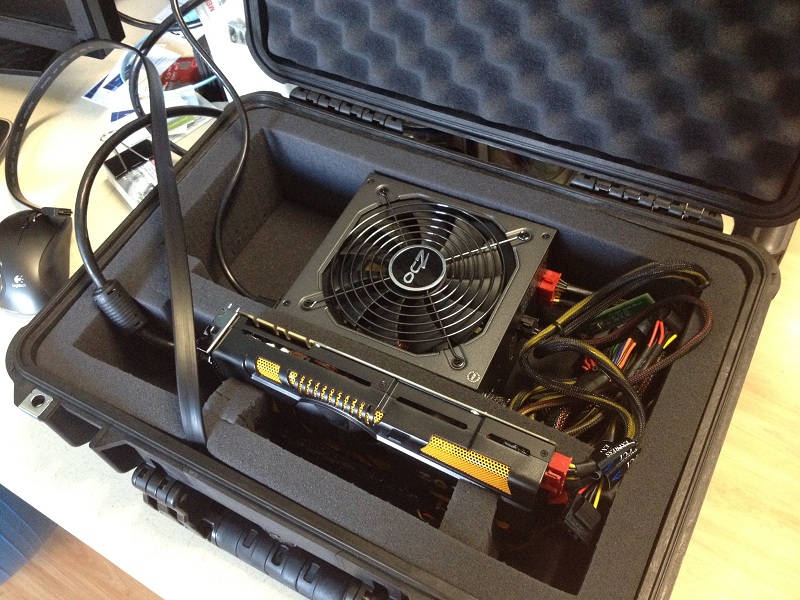
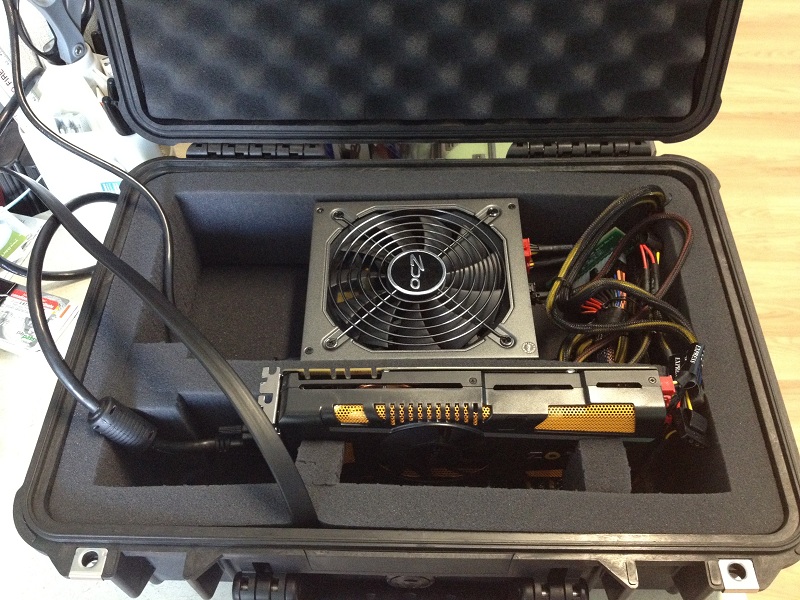
I figure i'll share some pics with you guys.
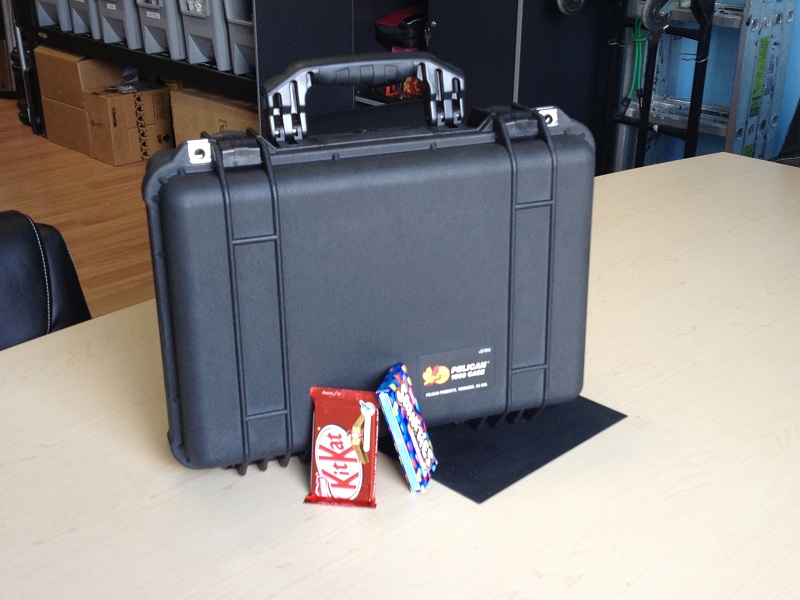
I run everything with the lid open, and when i am done playing my games - i close it and store it somewhere. Its probably not practical for most people, but the only time I play games is when I get together with the friends.Attached Files:
-
-
Looks very nice! Not so compact, but if you have enough room and going by car, not feet or bus or bicycle, than it`s convenient and seems very save.
Does the card cool enough? Because this foam looks heat insulating or possible to degrade from constant +50 +70 Celsius. -
I have tried the manual PCI compaction and right after i executed
call pci.bat it hangs at "press any key to continue"
Below are the diag contents and pci.bat file.
Diag&pci.zip -
OK, here is the situation. In BIOS, if I set pci-e power to generation 1, the results is the same whether using PE4L1.5 or 2.1b, 4059 for GPU score. When I set it to AUTOMATIC...benchmark results became worse and Dirt2 benchmark became nightmare(min10,average 20)
SW2 set to x2 x4 x8 x16 mode, SW1 set to no delay.
I tried modded verde 295.73 driver, result is slightly better yet worse than PE4L1.5. Is pci-e compression not working? Do I have to update BIOS to 1.37(currently 1.35)?
I have seen guys like jemino using 295.73 desktop driver yet getting good performance with X220...While Fausts was experiencing the same problem.
Updating BIOS is really my final shot... -
sry, but how do these compare to the thunderbolt we already have in our macs? what's the main difference?
-
Ow you murdered me in 3dm11. With overclocking I see you beating my 1110mhz scores in everything but 3dm06.Last edited by a moderator: May 8, 2015
-
The 2 greyed out ones are the old versions, so its a bit smaller, and uses less power
-
Hi I am still confused a lot..
would anyone just recommend me what to buy and to use?
I have dell xps1645 and i have
PCI Express Controller
PCI-E 2.0 x1 port #1 Empty
PCI-E 2.0 x1 port #2 In Use @ x1 (Intel(R) Centrino(R) Advanced-N 6200 AGN [8086-422C] [NoDB])
PCI-E 2.0 x1 port #4 Empty
PCI-E 2.0 x1 port #5 In Use @ x1 (Ricoh PCI-E Memory Stick Host Controller, Ricoh PCI-E SD Bus Host Adapter)
PCI-E 2.0 x1 port #6 In Use @ x1 (Broadcom NetLink BCM5784M PCI-E Gigabit Ethernet Controller)
like this..
From how i understand, to use x2, i have to take off the wifi card and use that slot to get x2. but i don't want to do that.. so i just want to use PCIe slot that i can just plug the card in and out without openning the motherboard.
According to the everast, It looks like my laptop has PCI 2.0 so it will be faster than 1.0 PCIe right?
so.. in older to get the highest speed or efficiency, shoul i get PEL4H or PEL4L?
also with either PEL4H/L, what graphics would generate the best result?
I am thinking of buying gtx560 ti or 570.
Thank you ! -
Hey guys, I just decided to plug in a flash drive to the USB slot on the PE4L 2.1 to see if it would connect immediately to my computer through the PCI-e port, and it does. So this means that it's soley the boot order that effects whether or not my GPU is detected, correct? I can put the flash drive in and out and it will connect and disconnect like any usb port would. So the reason GPU's are so finicky is because the OS sees the intel hd3000 first and then disregards the 560ti while booting? I guess I just want to know the order of operations windows takes while booting in regards to GPU's so i can at least partially guide myself into an answer with this whole boot sequence conundrum.
-
Updated BIOS to 1.37 which is the most recent one. And update driver to 296.10...Result in 4012 in 3DMark11 which is about the same as pci-e1.1 4052
I am really out of solutions right now~Any suggestions help! Thanks!
UPDATE: I modified nvam.inf to install verde 296.10 driver and result in 3902 in 3dmark11
Feel like paid $90 and hours and get something worse than before...aw that hurts -
You have TOLUD=3.0GB. E000 (256MB) is reserved leaving C000, D000 and F000 ranges. The F000 range has some devices reserved so cannot accomodate a ATiAMD card requiring a 256MB BAR without PCI compaction first. Howver, a NVidia Fermi card uses 128MB+64MB+32MB BARs so could fit without any PCI compaction. A Fermi card would also give you better performance as you are x1.Opt capable due to the 4500MHD iGPU being the primary bootup video device.
Likely your SATA or USB controllers are causing the hang when you run pci.bat. I had a similar problem with another user and we found switching from AHCI SATA to IDE (compatibility) allowed the relocation without problem.Code:ACPI\PNP0C02\1 Name: Motherboard resources Device has the following resources reserved: [COLOR="Red"] MEM : fed1c000-fed1ffff MEM : fed14000-fed17fff MEM : fed18000-fed18fff MEM : fed19000-fed19fff MEM : e0000000-efffffff MEM : fed20000-fed3ffff MEM : feb00000-feb03fff MEM : fed45000-fed8ffff[/COLOR] ACPI\PNP0A08\0 Name: PCI bus Device is currently using the following resources: MEM : 000a0000-000bffff MEM : 000d4000-000d7fff MEM : 000d8000-000dbfff MEM : 000dc000-000dffff MEM : 000e0000-000e3fff [COLOR="Red"]MEM : c0000000-febfffff[/COLOR] IO : 0000-0cf7 IO : 0d00-ffff
Below I have placed comments indicating what device is being shuffled based on your last 32bitA compacted \config\pci.bat file. Suggest boot Setup 1.x -> DOS prompt, 'cd %DRV%:\config', then 'edit pci.bat'. Place comments "::" at the front of all the "@echo" lines so those are ignored (except for the enable controllers section at the end - do not touch those), then uncomment the lines one at a time, run pci.bat 'call pci.bat' which does the relocation, until it freezes so can identify the problem device.
The alternative solution is to do a DSDT override so can move the eGPU into a 36-bit range and not have to muck around with trying to fit everything into the 32-bit space.
Code:REM r:/core/compact.exe pciend F8000000 import devcon.txt makebatch R:\config\pci.bat REM created Thu Apr 12 23:02:04 2012 echo Performing PCI write (compact@Thu Apr 12 23:02:04 2012) :: 4500MHD iGPU @echo -s 0:2.0 COMMAND=5 BASE_ADDRESS_2=c000000c BASE_ADDRESS_3=0 > setpci.arg @echo -s 0:2.0 COMMAND=5 BASE_ADDRESS_0=f7c00004 BASE_ADDRESS_1=0 >> setpci.arg @echo -s 0:2.1 COMMAND=5 BASE_ADDRESS_0=f7b00004 BASE_ADDRESS_1=0 >> setpci.arg :: USB controller @echo -s 0:1a.7 COMMAND=4 BASE_ADDRESS_0=f7affc00 >> setpci.arg :: Soundcard @echo -s 0:1b.0 COMMAND=4 BASE_ADDRESS_0=f7af8004 BASE_ADDRESS_1=0 >> setpci.arg :: USB controller @echo -s 0:1d.7 COMMAND=4 BASE_ADDRESS_0=f7aff800 >> setpci.arg :: SATA controller @echo -s 0:1f.2 COMMAND=5 BASE_ADDRESS_5=f7aff000 >> setpci.arg :: SMBUS controller @echo -s 0:1f.3 COMMAND=1 BASE_ADDRESS_0=f7afef04 BASE_ADDRESS_1=0 >> setpci.arg :: HD5770 eGPU @echo -s 2:0.0 COMMAND=0 BASE_ADDRESS_2=f79e0004 BASE_ADDRESS_3=0 >> setpci.arg @echo -s 2:0.1 COMMAND=0 BASE_ADDRESS_0=f79dc004 BASE_ADDRESS_1=0 >> setpci.arg :: Ethernet @echo -s 1:0.0 COMMAND=5 BASE_ADDRESS_0=f78fc004 BASE_ADDRESS_1=0 >> setpci.arg ::Wifi @echo -s 4:0.0 COMMAND=4 BASE_ADDRESS_0=f77fe004 BASE_ADDRESS_1=0 >> setpci.arg :: Firewire/SD/Memory stick controller @echo -s 6:3.0 COMMAND=4 BASE_ADDRESS_0=f76ff800 >> setpci.arg @echo -s 6:3.1 COMMAND=4 BASE_ADDRESS_0=f76ff700 >> setpci.arg @echo -s 6:3.2 COMMAND=4 BASE_ADDRESS_0=f76ff600 >> setpci.arg :: pci-e port1 hosting Ethernet controller @echo -s 0:1c.0 MEMORY_BASE=f780 MEMORY_LIMIT=f780 PREF_MEMORY_BASE=fff1 PREF_BASE_UPPER32=0 PREF_MEMORY_LIMIT=1 PREF_LIMIT_UPPER32=0 >> setpci.arg :: pci-e port2 hosting HD5770 eGPU @echo -s 0:1c.1 MEMORY_BASE=f790 MEMORY_LIMIT=f790 PREF_MEMORY_BASE=d001 PREF_BASE_UPPER32=0 PREF_MEMORY_LIMIT=dff1 PREF_LIMIT_UPPER32=0 >> setpci.arg :: pci-e port3 hosting wifi @echo -s 0:1c.2 MEMORY_BASE=f770 MEMORY_LIMIT=f770 PREF_MEMORY_BASE=fff1 PREF_BASE_UPPER32=0 PREF_MEMORY_LIMIT=1 PREF_LIMIT_UPPER32=0 >> setpci.arg :: pci-e port4 hosting nothing @echo -s 0:1c.3 MEMORY_BASE=fff0 MEMORY_LIMIT=0 PREF_MEMORY_BASE=fff1 PREF_BASE_UPPER32=0 PREF_MEMORY_LIMIT=1 PREF_LIMIT_UPPER32=0 >> setpci.arg :: pci bus hosting firewire/SD/memory controller @echo -s 0:1e.0 MEMORY_BASE=f760 MEMORY_LIMIT=f760 PREF_MEMORY_BASE=fff1 PREF_BASE_UPPER32=0 PREF_MEMORY_LIMIT=1 PREF_LIMIT_UPPER32=0 >> setpci.arg :: HD5770 eGPU (move to freed d000 range) @echo -s 2:0.0 COMMAND=0 BASE_ADDRESS_0=d000000c BASE_ADDRESS_1=0 >> setpci.arg :: Enable controllers after they had been relocated @echo -s 0:2.0 COMMAND=7 >> setpci.arg @echo -s 2:0.0 COMMAND=0 >> setpci.arg @echo -s 0:2.0 COMMAND=7 >> setpci.arg @echo -s 0:2.1 COMMAND=7 >> setpci.arg @echo -s 0:1a.7 COMMAND=6 >> setpci.arg @echo -s 0:1b.0 COMMAND=6 >> setpci.arg @echo -s 0:1d.7 COMMAND=6 >> setpci.arg @echo -s 0:1f.2 COMMAND=7 >> setpci.arg @echo -s 0:1f.3 COMMAND=1 >> setpci.arg @echo -s 2:0.0 COMMAND=0 >> setpci.arg @echo -s 2:0.1 COMMAND=0 >> setpci.arg @echo -s 1:0.0 COMMAND=7 >> setpci.arg @echo -s 4:0.0 COMMAND=6 >> setpci.arg @echo -s 6:3.0 COMMAND=6 >> setpci.arg @echo -s 6:3.1 COMMAND=6 >> setpci.arg @echo -s 6:3.2 COMMAND=6 >> setpci.arg setpci @setpci.arg set pci_written=yes
Hotplug your eGPU after bootup so the Intel HD3000 iGPU is the primary bootup video device. Then x1.Opt will engage and you'll see 3dmark06 > 10k. -
Alright, I finally got it figured out connection wise. What I have to do for my system is have the EC plugged in, with the GPU off. Power on the computer, wait until I hear the disk drive click, which happens about halfway through the BIOS screen, wait about a half second, and hit the SWEX switch. This time interval does not match the delay interval options available on the adapter via the delay switch. If I time it right, i will get a connection everytime. The odd thing is, windows then auto-installs drivers - and gives my 560ti old GTX460SE drivers, which then need a restart to fully install. OF course, I'd have to time the power on/off during the restart, which would be very hard, but I can't because the computer seems to hang on the restart. Screen goes black, but computer remains on, and won't turn off. Is windows just giving my card the closest drivers it can find automatically? I'm getting code 10 in device manager, which means i need a restart. AIDA64 also says I have a 460SE, though it labeled it a 560ti before...
If I uninstall the automatically installed drivers windows throws at me, and scan device manager for new hardware, it then tries to give me the same driver for the GPU, but also tries to find drivers for "SM Bus". It finds drivers for GPU (same incorrect 460SE drivers), but fails to find anything for SM bus, and spits out code 28 (no drivers). Hahaha...good god. What is this? -
Hi Nando,
Thanks for analyzing the data.
This Ati cards seems really problematic just to get it to work on 4GB
I do have a gtx 560ti 1GB on hand so will it just allocate the correct amount of space
without having to do PCi compaction ? -
The HD5770 is a configuration hassle to get going on your system and if it was running with 4GB of RAM it would be significantly slower than your GTX560Ti. Not worth the effort imho.
Your system's F000 range can accomodate a GTX560Ti. So (1) Hit F8 during Win7 bootup to halt the process, power on the eGPU, hotplug the EC2C and then resume Win7 load. It should automatically allocate the GTX560Ti to the F000 range with no error12. If not then (2) do a 32bit (not 32bitA) Selective compaction on the eGPU only in Setup 1.1x and 'chainload mbr' to load Windows. -
Thanks for your reply!
I do not have dGPU but when I do hotplug it detects GTX560ti with error12. Sleep/resume will not work either. So I can only boot with eGPU powered on and plugged in.
How can pci-e1.1 performs better than pci-e2.0? Is it possible that pci-e compression is not activated under pci-e 2.0?
Have not seen other T420 users reporting PE4L 2.1b performance~Any guess? -
Magma - Thunderbolt to PCIe Expansion | ExpressBox 3T
![[IMG]](images/storyImages/EB3T_Cards%28med%29.jpg)
~ExpressBox 3T provides an 'outside-the-box' solution for using PCIe® cards with Thunderbolt-equipped computers. High-performance work flows are possible by connecting a Thunderbolt equipped computer to a Magma ExpressBox 3T containing PCIe cards such as video capture, media transcoding, audio processing, and fast data storage. And because Thunderbolt is also based on DisplayPort technology, you can daisy chain a high-resolution display with your Magma ExpressBox 3T.
10Gbps Thunderbolt connection
Three PCIe 2.0 expansion slots (Two x8 and One x4)
220-250W power supply with auxiliary power connectors -
Hi everyone.
Have a quick question regarding GPU upgrade. Which of the following cards would be the best:
GTX570
GTX560Ti 448 cores
GTX 560Ti
Somehow on board there are mostly 560Ti implementation and was wondering if there is something not working with 570 and 560 448 core one. Will be using it with PE4L 2.1a+
Thanx for your reply. -
It's very very expensive ! hope we can make a diy solution !
-
Also,
Graphics Card Support
Windows: Testing of graphics cards under Windows has been limited, therefore we have little to report regarding external graphics. Be the first to know... Join Magma Expresso.
imo the best option to hope for is MSI GUS II -
Yes, but i think that prices will be too expensive regarding video card used inside.
I think that a good DIY egpu @ x1 2.0 has again good days ... -
Hi,
I have y460 (i7 640m, 8GB RAM, ati5650m) and just trying to make my setup work. It is MSI GTX 560 TI 2GB OC with PE4H v 2.4 PCi-e Card, ATX 400W, external monitor full HD.
I have tried read all posts by Mjolner, I am going his path all the time but without result.
1. Connect eGPU and install modified drivers.
http://forum.notebookreview.com/6542661-post1222.html 295.73
2. Install Setup 1.x
Boot to Setup 1.x
3. Turn off dGPU
4. 32 bit companion on igpu egpu
5. Chainload to windows
RESULTS:
1. Low res windows boot
2. Normal windows boot. When I click on Nvidia settings get the messagage that currently this display does not use Nvidia.
I do not know what else can I do to make it run.
I even tried to setup win7 from scratch.
Any advice? I will try to attach dump from Setup 1.x later today. -
Upon planing the DIY eGPU hardware, i forgot about software.
Will the eGPU Gigabyte GTX460 1Gb work with my E6520 i5-2520M 4Gb Ram, when I have the W7-32bit installed, not the 64 bit?
Will I certainly get the 12 error?
(as its said in Techradar's How to make an external laptop graphics adaptor article) -
I've been looking around at cheaper alternatives to the PE4H, and came across this riser which is both cheaper and has 2 PCIe slots. Obviously the bandwith will be shared between the two but is there any chance it would work? Is there anything special about the PE4H which this riser card doesn't have other than the option to do a x2 link?
its about the 8th product on the following page:
Ably-Tech: the Riser Card Specialist
DIY eGPU experiences
Discussion in 'e-GPU (External Graphics) Discussion' started by master blaster, Sep 18, 2009.



![[IMG]](images/storyImages/cactus_ridge.png.jpeg)


