Problems? See this thread at archive.org.
do you know if or where i can find an angled miniHDMI cable / adapter?
-
great thread!
my w700 have both express card 34 & 54, maybe can dual plug with pe4h? or even dual plug the bandwidth still=single? -
Dual expresscard slots huh? wonder if it could indeed dual plug from a PE4H. If it can run two expresscard devices simultaneously, then I don't see why it wouldn't work.
Pick one up and give it shot
-
Seems like you don`t have any Express Card slot . Not 34, neither 54...
So, to connect a eGPU to your laptop you wold have to open it and connect a mPCIe card inside. Perhaps instead of the WLAN. Even than you will most likely face other problems.
I doubt that you will do that, if you were not able to understand the massive, detailed and clear information in the first post about all possibilities to have a eGPU . -
If I can get a 480 GTX for a good price would that be a good choice for my x220 i5 and PE4L 2.1b?
-
how do you get to PCIe ports->anti-whitelist.!Save where is that when i boot to setup 1.x
-
Probably already been answered but I didnt see it...
I've been looking at the MSI GUS II that was spotted at CES and hope that it's not vaporware. What is the most powerful card that operates at 150w? -
So, I'm a little confused as to what I can use as a power adapter. If I go with a 7750 for cost/power consumption reasons (~55W), would it at all be possible to use this ac adapter: IBM Lenovo ThinkPad 20 Volt 3.25A 3.25Amp 65 Watt Laptop power supply AC Adapter | eBay
-
Radeon HD 6870 1GB
ranges from 132W to 189W you have to choose the right versions below 150w.
but I'm sure the limitation has nothing to do with the device itself and that by using an external psu connected to the graphic card you can use any card in the world. -
If the slot is PCI 3.0, should handle alone up to 150W that's why IMHO. Anyway I agree, an external PSU to handle the extra juice and you're done!
-
I hope there will be coming (cheap) TB solutions soon. Without external PSU it would be possible to make it very portable.
-
Hello, I have just received my PE-4L v2.1b. Pretty fast delivery, got it only 4 days after ordering.
I am having a problem with it though. The EC adapter does not seem to be able to stay inside the laptops EC slot; it keeps popping out. Does anyone have some suggestions for this? -
Can you make a photo of the EC? could be related to your notebook clip too, seeing the EC adapter will give us some clues.
-
Here is the picture:
http://img820.imageshack.us/img820/4953/20120417121.jpg
Also, I am using an X220 if it affects anything.
Edit: Apologies, it was my own incompetence. I wasn't pushing it in hard enough. -
Lol better than expected
-
Hi I am still confused a lot..
would anyone just recommend me what to buy and to use?
I have dell xps1645 and i have
i7 720qm, 4gb, ATI mobility 4670, 125gb SSDs.
PCI Express Controller
PCI-E 2.0 x1 port #1 Empty
PCI-E 2.0 x1 port #2 In Use @ x1 (Intel(R) Centrino(R) Advanced-N 6200 AGN [8086-422C] [NoDB])
PCI-E 2.0 x1 port #4 Empty
PCI-E 2.0 x1 port #5 In Use @ x1 (Ricoh PCI-E Memory Stick Host Controller, Ricoh PCI-E SD Bus Host Adapter)
PCI-E 2.0 x1 port #6 In Use @ x1 (Broadcom NetLink BCM5784M PCI-E Gigabit Ethernet Controller)
like this..
From how i understood, to use x2, i have to take off the wifi card and use that slot to get x2, which i don't want to do. so i just want to use PCIe slot that i can just plug the card in and out without openning the motherboard cover.
According to the everast, It looks like my laptop has PCI 2.0 so it will be faster than 1.0 PCIe right?
so.. in older to get the highest speed or efficiency, shoul i get PEL4H or PEL4L?
also with either PEL4H/L, what graphics would generate the best result?
I am thinking of buying gtx560 ti or 570.
Thank you ! -
hi........ i'm new to this site and these kind of stuffs...... so please someone help me to get a best egpu to me.... i got a HP Compaq Presario CQ61-105EE Notebook PC. it's specs are...
2.16 GHz Intel Pentium processor T3400 Microprocessor
Memory 4096 MB (2 x 2048 MB)
Video Graphics Intel Graphics Media Accelerator 4500MHD
Windows 7 (32-bit)
Product Specifications - HP Customer Care (United States - English)
i dont know nothng about the hardware thing like pci ports,express ports etc...
so someone plzzzzzzzzzz help me to get the best egpu 4 my laptop.......... -
Can you read? I already answered you:
Seems like you don`t have any Express Card slot . Not 34, neither 54...
So, to connect a eGPU to your laptop you wold have to open it and connect a mPCIe card inside. Perhaps instead of the WLAN. Even than you will most likely face other problems.
I doubt that you will do that, if you were not able to understand the massive, detailed and clear information in the first post about all possibilities to have a eGPU . -
I guess, just as a general question, is there a way to take a power adapter of a certain OD/ID to the OD/ID of the jack that the PE4H uses?
EDIT: If I'm using a 5.5/7.9mm Lenovo 65W adapter to power the GPU, would #1791 on this page: http://www.cordsplus.com/pages/powerplug_adapters.html (You can Ctrl+F 7.9) work? -
First of all, let me say kudos to all of you! This thread is very interesting and informative. The work being done is absolutely fantastic!
Now, I would also like to profite from some extra GPU power. I recently found out that my expensive laptop is unable to play Skyrim at medium level! :-(
Any who, I would appreciate if someone would tell me what my options are. I would like to maximise my performance for gaming.
Lenovo W510
Qm57
i7 Q820
12gb of ram
Fx800m
Questions:
Would I be able to do x2 or x4?
Which components should I buy?
What would be my maximum performance output?
I truly appreciate all the help!! Cheers!
Attached is my everest statsAttached Files:
-
-
If your wifi slot is accessible then your system could do a x1.Opt NVidia implementation using a PE4L-PM3N or PE4H-PM3N (eg: GTX460-336 cores). Do note that HP whitelist the slot so you'd either have to boot with wifi then hotswap it to use the eGPU or use the Setup 1.x's software undo-whitelisting feature.
For simplicity's and performance sake, I'd suggest upgrade your system to one in the thin-and-light link in my sig and enjoy superior x1.2Opt performance using a PE4L 2.1b. Dell 3550, Lenovo E520 or HP Probook 4530s likely available for a reasonable price in India.
Lenovo W510 is x2 capable using [port3+4] but wifi is affected
The W510 schematic shows
So you could do a x2 1.0 [port3+4] implementation. Issue there is running port3 in x2 mode makes port1 run in x2 mode, so the wifi would get knocked out. Unless there is another mPCIe slot that is port1 you'd need a USB wifi stick to run the x2 1.0 eGPU + wifi concurrently. In addition, port3 is likely whitelisted requiring additional workarounds - Setup 1.x software could be used to do that.Code:port2=wifi port3=UWB/mPCIe slot port4=expresscard port5=media card port6=LAN port7=USB 3.0 port8=firewire
Though I'd suggest you consider offloading your system for a T520/W520 or others in the thin-and-light link in my sig that are x1.2Opt capable. You'd get double the bandwidth from a simpler and cheaper single expresscard slot solution, without needing Setup 1.x software when using a NVidia Fermi/Keplar card. -
Hello. I`am new here.
I just bought PE4H-EC2C and want to use it with my HP Dv6-2155dx, 8 gb RAM, Intel HD video card. eGPU is going to be nVidia GT 9600.
I connect all staff together,but get error 12.
I tried to use 36-bit root bridge DSDT override steps,
http://forum.notebookreview.com/8377566-post8941.html
but stuck on #4. I got 116 errors and have no idea how to fix them.
dv6.dsl.txt
Asking for help. Thank you -
Hi,
finally I got my eGpu runnig nice. I just needed a fresh Windows 7 and now everything looks great.
I get at 3D mark 06 : 16121
System:
Vostro 3450
I5 2140
4 GB RAM
GTX 560 (non Ti) @ PE4L 2.1b
Later I will post my Resident Evil Score but in the moment my Internet Connection is quite slow and so I need some tome to download the benchmak.Attached Files:
-
-
I have a rather silly question:
How do I connect the external monitor? Do I connect it to the eGPU or to the laptops' display output port? Do I have to change some BIOS setting for boot display?
Also, I have tested my PE4L 2.1b with my X220 and a Leadtek PX9600GT. The GPU is detected, and the overall CPU temperature is not as high as without the eGPU, but there is no noticeable increase in performance. Is it because the GPU is simply too old? -
First of all, thanks for the supper quick reply Nando4. Your involvement in this project over these past two years (or more!) is rather impressive!
Unfortunately offloading is not an option. I would prefer to put that money in buidling a new desktop. Just looking to get a little more use out of my laptop before going down that road.
I have a few more newb questions:
1)When looking at my everest stats I notice my PCIe ports are identified as "PCIe 2.0 x1". Wouldn't that mean I would get x2 2.0 by combining port 3 and 4?
2)How difficult is it to use Setup 1.x software. I really don't have to much experience with changing bios...
3)And just to confirm component wise:
a)PE4H ver2.4
b)EC2C
c)Do I also need PM3N for x2? -
Can you guys explain me how to fix these errors???? should i delete some data from file or change????
-
Hello, i just run a benchmark with 3dmark06 and i get 17334 score.
I don't know if it's a good score regarding my conf and it was displaying on my internal screen.
link here
Complete post tomorrow. -
So meanwhile i did the Resident evil benchmark. I scored 128 fps but I can not give you a screenshot because the taken one was black
But so far everything is great And as next step I want an eCPU because with a Dual Core Battlfield 3 is playable but its not perfect.
@Fabi3n
I think it is ok because I scored a little bad less with external LCD but only an I5 and 3D mark 06 likes CPU performance alot -
this could be interesting, my old laptop has poor 3D performance,
luckily it has a fast cpu+express slot. a egpu could increase fps dramaticly.
(its still not a game notbook, i dont play shooters, just casual games like tropico4, rayman origins etc)
now i need to decrease the reslolution to keep it playable
pro's
nvidia's 8300 are cheap for use as a eGPU's
more performance then IGP.
if u dont need the egpu u could leave it at home
cons: for arround 200€ in could buy a (2nd hand) ACER 5920, witch has a GT8300
that means i could sell my old laptop to minimize the costs.
carry extra weight for the power supply and gpu -
Hi Nando,
Any idea on the above ?
Though bsod isnt as frequent but i still get it once in awhile.
Thanks -
they are rather ok. You may also post your GPU-Z printscreen.
-
Hello everybody, here is a complete report of my experience with eGPU.
First of all, please PM me to correct my faults because I'm not Shakespeare and my English is bad (if I knew, i would listen my teacher at school few years ago ).
So you can see my setup in my signature but i make a short describe here :
Dell latitude e6520 with Intel Core i7 2760M, 4Go RAM ddr3 an iGPU + dGPU nvs4200 based on Windows 7® ultimate 64bits
The dGPU was my biggest problem because i would like an "out of the box" installation, but DIY Setup1.x can deactivate it.
Here is the procedure :
- Notebook off, power on the eGPU and plug the EC in slot.
- Power on the notebook and launch setup1.x to deactive the dGPU and chainload windows
- Wait for your system boot up and install nvidia verde drivers + modded nvam.inf
- Restart the computer (go to diy setup and use startup.bat or deactivate dGPU manualy) with the eGPU powered and plugged.
- Enjoy your x1.2opt installation !
I ran a benchmark with 3dmark06 and obtain 17334 score
Here are a lot of pics.
GPUZ and AIDA64
![[IMG]](images/storyImages/aida-gpuz.png)
Battlefield 3
As you can see, at 1920*1080 fps is low (20) and hard to play like this. At 768p we obtain a good FPS 30 to 40 and it's playable without any problem with details on "high".
I think that 4Go ram more, will be good to play in full HD resolution.
I will test lot of bench and test later with an external display.
Here are pics of my test installation. I'm waiting for a good enclosure project.
-
Congrats At last, it works
-
Yes thanks !
I will make another post with many notebook model.
I tried today with a toshiba tecra r850 and it works great ! OOTB ! -
Awesome! I'm glad you finally made it
-
Thanks
i'll try with toshiba s11 and lenovo l510 in few weeks -
Hi all
I've finally managed to run my eGPU setup successfully with my sony Z2
I followed Nando's advices & hints and my eGPU was finally detected! Thank you!
I've made just one benchmark so far, I'll do more later when I've reinstalled my system (it crashed a lot when I tried to make the eGPU setup working and it is buggy now :/)
Sony vaio VPC-Z21 : core i7 2620M, 8gb DDR3
eGPU setup : PE4H 2.4a + PM3N 1.2 + 100cm mini HDMI wire + GTX 560 Ti 1gb (384)
Unfortunately I can only test a x1.1opt setup
So here are the result on 3DMark 06
Default setting with an external monitor attached :
18246 3DMarks
SM 2.0 : 8050
HDR/SM 3.0 : 9256
CPU : 3868
[edit]
I've run the bench again with the hwtools 30cm wire and I got better results :
18714 3DMarks
SM 2.0 : 8103
HDR/SM 3.0 : 9828
CPU : 3867 -
good job !
-
srry for doublepost. see post below...
-
Very cool!!!
Can you give us a photo of the setup? Is it easy to plug-in? is the cable placed on the underside of the laptop?
And do you have still the ability to run wifi(N)? -
Merci
Yep the cable is place underside the laptop and it's easy to plug it.
With this setup, you'll loose WWAN, wifi N and bluetooth unfortunately.
I care only for bluetooth I hope I can find a wifi card with bluetooth combo that can work on the wwan usb-mpcie port.
I'll post a picture soon
-
Has anyone done some Battlefield 3 benchmarking with fraps?
I really want to get into an eGPU setup and get rid of my big expensive desktop, but only if I can play BF3 at 1920x1200 at decent frame rates
Even to the point of getting a GTX680, with a quick laptop to go with it
Really wish there was a thunderbolt solution right now, as I would be all over it!
cheers -
I'm sure, a GTX 680 X1.2opt or even a GTX 580 x1.2opt attached to an external display would run BF3 flawlessly.
-
My 680 GTX is also getting bored but it should be out soon, one of the other forum participants got info that msi was only deciding either to launch with a gnu included or not... (i hope they don't...) If i was you i'd wait!
Just my 2 cents...
-
Hi I posted this in the dell studio forum but not having much joy. Apologies on the double post anyway.
I have a dell studio 1747 and I'm attempting to follow the dsdt overide procedures
http://forum.notebookreview.com/8377566-post8941.html
Unfortunately I'm experiencing difficulting compiling my dsl file even without making any changes.
I run the command
iasl -g
and it produces a number of files
dsdt_CALPELLA.dsl
DSDT_CALPELLA.dat
FACP_CRESTLNE.dat
RSDT_QA09.dat
Then without even making any changes to the dsl file I run
iasl dsdt_CALPELLA.dsl
there are over 200 errors reported after which the compiler stopped as the error limit was exceeded
All of the initial errors were Object does not exist..
e.g. Store (0x03, CSTS)
Object does not exist CSTS
I'm no expert on iasl/dsl but I guessed these names CSTS, CLID, PARM etc were globals the code was using to repersent memory addresses. There were a whole pile of global declarations at the stop of the file so I added in some of the missing ones pointing at address zero.
This cleared some of the object does not exist errors but these errors were replaced with different errors
e.g. Store (0x5A00, ^^^^AMW0.INF6
Object not found or not accessible from scope ^^^^AMW0.INF6
I've really no clue whats going on here. Why would the file not compile when I haven't even made any changes
Any Help is appreciated.
Kind Regards -
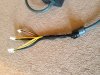
Just finished my 203w Xbox 360 psu for my egpu when I decide if I want to splurge on a nvidia 680, or wait for the 660/670 coming soon,
Anyways here are some pics
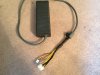
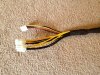
-
Problem description
1. What's the problem?
eGPU not being detected.
2. Have you consulted the Troubleshooting FAQ to resolve the issue?
Yes, I've also searched through many post trying to replicate their results to no avail.
3. Have you consulted the Pre-Purchase FAQ --> "2. How can I check if my notebook is compatible with an eGPU?"
I am a bit confused about the DSDT part. Is that necessary for me?
Platform Description
1. OS
Windows 7 64 bit
2. System
T420 i5 2540M NVS4200M, with Smart Reader and Finger Print Reader.
3. RAM
4 GB
4. eGPU used
PE4L 2.1 with EVGA GTX560 TI
5. PSU specification (especially the +12V max current)
Newegg.com - CORSAIR Builder Series CX500 V2 500W ATX12V v2.3 80 PLUS Certified Active PFC Power Supply
No pcitool in diag, for some reason it would hang if I Y pcitool.
Questions:
How can I confirm if I have a PE4L 2.1a or b?
What does SW1 and SW2 do?
What do the LEDs mean?Attached Files:
-
-
Going to do exactly the same
-
I am not sure that somebody can help you here (im waiting for respond for a while) with your dsdt problem. Try to find in internet already fix file, i found such a file for my laptop. then added DrQ******* fields. But still cannot override it with command prompt like here
http://forum.notebookreview.com/8377566-post8941.html
it says that it was successful but no changes.
DIY eGPU experiences
Discussion in 'e-GPU (External Graphics) Discussion' started by master blaster, Sep 18, 2009.


![[IMG]](images/storyImages/Thunderbolt_Roadmap.png.jpeg)