Problems? See this thread at archive.org.
TOLUD is only relevant when working in 32-bit PCI space. Applying the DSDT override overcomes space limitations allowing the eGPU to be hosted out of 36/64-bit, much larger pci-e space.
I've extended step 7 in the DSDT override page that discusses how to re-allocate your eGPU after performing the DSDT override. Please refer to that.
The interconnect is the same with the commercial or DIY eGPU PE4H. Error 10 can however occur if the mHDMI cable is damaged. I'd suggest swap that out with a US$6-shipped replacement from DX and try again.
As for the iGPU, dGPU and eGPU all co-existing on a W520... I believe they will *however* I recall from PM troubleshooting with you for your Setup 1.x donation that the eGPU would not engage x1.2Opt pci-e compression. Instead it was running at straight x1 2.0 where it is about 2.5 times slower in 3dmark06.
The W520 supposedly has a bios option to disable the dGPU. Doing so would ensure the Keplar/Fermi card would run at the highest x1.2Opt performance.
-
-
I checked the first page, does "standby" in Win 7 refer to sleep mode?
Nando can you please help? -
Yes, standby = sleep mode.
For your situation power on the eGPU, then hotplug the EC2C into the expresscard slot. It should result the system making a 'found new hardware' beep. If not, flip the switches on the PE4L itself: SW1 to 1-2 positon (0 seconds) and SW2 to 2-3 (x16) and try again. If still no go:
- test your eGPU with an ATX PSU, rather than DC adapter if you are using one of those.
- ensure your bios has the expresscard slot enabled. Lenovo has an option to disable it. -
Thanks for the suggestion, actually I always wanted to get a longer mHDMI cable, I might as well do that too.
Well, I didn't figure the 3DMARK06 test to be a serious indicator of performance. Since I kept the dGPU on, I have set it to perform PhysX duty.
Currently I don't think there is a custom inf for the GTX 670 with the latest beta. -
I believe your notebook have dynamic TOLUD. Notebook with dynamic TOLUD have two sets of DSDT. To confirm this:-
- From OFF state, boot notebook without eGPU connected & take screenshot of Device Manager >> View >> Resources by connection >> expand the Memory tree.
- From OFF state, boot notebook with eGPU connected & take screenshot of Device Manager >> View >> Resources by connection >> expand the Memory tree.
When I say "expand the Memory tree", only expand the Memory tree, no need to expand the sub-tree under Memory, like this. Post the screenshots here. -
Thanks Nando will give a go as said!! Big thanks again
-
3dmark06 is one of the best benchmarks to confirm Optimus pci-e compression engages. You'll see a result of ~5k for x1 1.0, ~10k for x1 2.0. When pci-e compression engages, that will increase by 2-3 times, depending on the CPU and eGPU being used.
Now we know the latest NVidia desktop drivers include pci-e and NVidia Optimus funtionality by default. So it should not be necessary at all to mod them to get x1.2Opt performance on your system. Only variables for the W520 would then be:
* dGPU on/off: how does it affect 3dmark06 results?
Yes, Physx provided by the dGPU is a good use for it. One way in which I endeavoured to get the eGPU+dGPU to coexist with the eGPU being given Optimus driver priority was the use of the dGPU on-demoted option in Setup 1.x. Not sure if it works as I don't have a NVidia dGPU equipped system other than Kizwan reported his Asus didn't like that setting. Suggest you try it and advise how it goes.
SimoxTav will be providing GTX670 bench results soon. You are more than welcome to submit your [email protected] Lenovo W520 results too. I am curious how much better it than say a GTX560Ti. -
Many Thanks Nando I really appreciate it. I'll give it a whirl later today.
-
@kizwan. I will get you those screenshots when I have a chance to help figure out getting the dsdt to work on my win server 2008r2 install. thanks for your help
good news / bad news
good news.. out of drunken desperation to eliminate other variables I caved and threw in a different ssd, and installed a fresh install of win 7, rather than 2008r2.
Low and behold the egpu is recognized nicely, works with my 16gb of ram, and am getting opt1.2 ...
bad news, this isnt on my more useful 2008r2 install, and I am now doubting that it will ever work on there (dsdt hopefully maybe).
I dont know why the difference, but there is.. a little dissapointing, If I can't get this to work, I will have to decide between using 2008r2 with hyper-v, remotefx, and other useful admin things... or using win 7 with the perfect egpu support on this machine.
well onto benches.. these are just quick first tests.. It is very late at night, but I was too excited not to do a couple and post the results
3dmark06, overall end score = 23551
3dmark11, overall end score = 7892 , gpu portion of score 8174
Heaven, end score 2355
I'm curious how much better they can be after overclocking this gtx680, despite the bottleneck of have only a opt1.2 connection.
I'm happy I got this to work, although dissapointed I couldnt do it yet with my 2008r2 install. -
I have a 2010 HP Pavilion dv7-4177nr and do not have a PCI slot...is there any other way to interface an external desktop gpu? I like others I would love to upgrade my gpu to play modern games and this thing is only two yrs old!! but without another way to hook it up I don't see how I can take advantage of interfacing a PCIe with this unit. All I have for external connections is 4 usbs 1 HDMI 1 vga 1 e-sata and 1 rj-45 and 1 card reader for sd type micro discs. And the mini pci on board is for wireless usage. Just my luck to have an expensive fairly new un-upgradeable gpu clunker....grrrr
-
I still don't get it. If I want a 1.2 Optimus Connection, then all I need is the newest (Stock) Drivers and a 500 Series Card???
-
AMD chipset + CPU = poor eGPU candidate. Suggest sell up and get a better eGPU candidate systems form the thin-and-light link in my sig. eg: a 17" Dell Vostro 3750 offers a GT525M dGPU and a iGPU + expresscard slot for eGPU purposes.
The following ingredients are required for a x1.2Opt link:
1. A Series-6 system (Sandy Bridge) or Series-7 (Ivy Bridge) notebook with an expresscard slot^.
2. A pci-e 2.0 compliant PE4L-EC060A 2.1b
3. A NVidia Fermi or Keplar class video card. A s/h GTX460-1GB OC edition with 336 cores being great bang-per-buck.
4. A power supply to drive your video card. A 203W XBOX360 a good to mod for for < 198W video cards and providing portability. Or any ATX PSU with sufficient power on the 12V rail if don't need portability.
5. Latest NVidia desktop video drivers. They provide the ability to drive the internal LCD upon detecting a Intel 4500MHD, HD, HD3000 or HD4000 iGPU. When the iGPU and x1 link is found, pci-e compression engages gaining anywhere from 20-333% better performance over a x1 2.0 link without compression.
^ a PE4L-PM3N 2.1 will be released in coming weeks so could use a less convenient mPCIe slot instead of the expresscard slot. Useful for systems like a Sony Z2 which don't have an expresscard slotLast edited by a moderator: May 7, 2015 -
Wait a minute: So If I have the old PE4H v2.4, I am only getting 2,5Gbps of Bandwidth, right? I've got an X220i and a GTX550Ti + latest Desktop Drivers.
In that case, it would be a good thing. Or am I already getting the full 5Gbps, which would be bad in my case? Or do I need the PE4L for that? -
Thank you, Nando!
Thank you, nVidia!
Thank you, Lenovo!
Thank you, Intel!
Thank you, M$!
Thank you, Google!
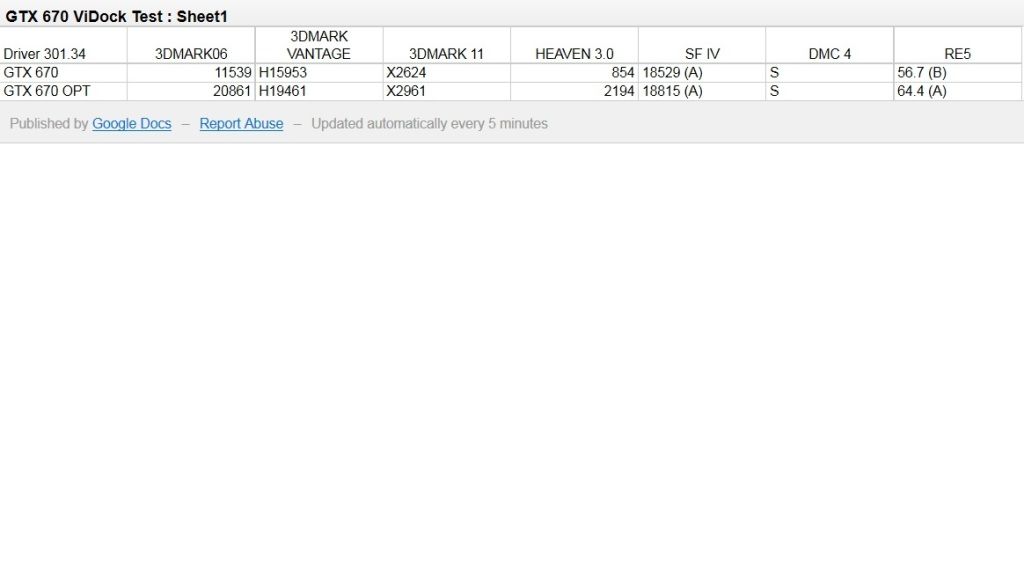
Here is the results of my GTX 670.
https://docs.google.com/spreadsheet/pub?key=0AuuGP9YVjlQ9dGk3VTcwUGprbVYySHVYTTVONHJRbHc&output=html
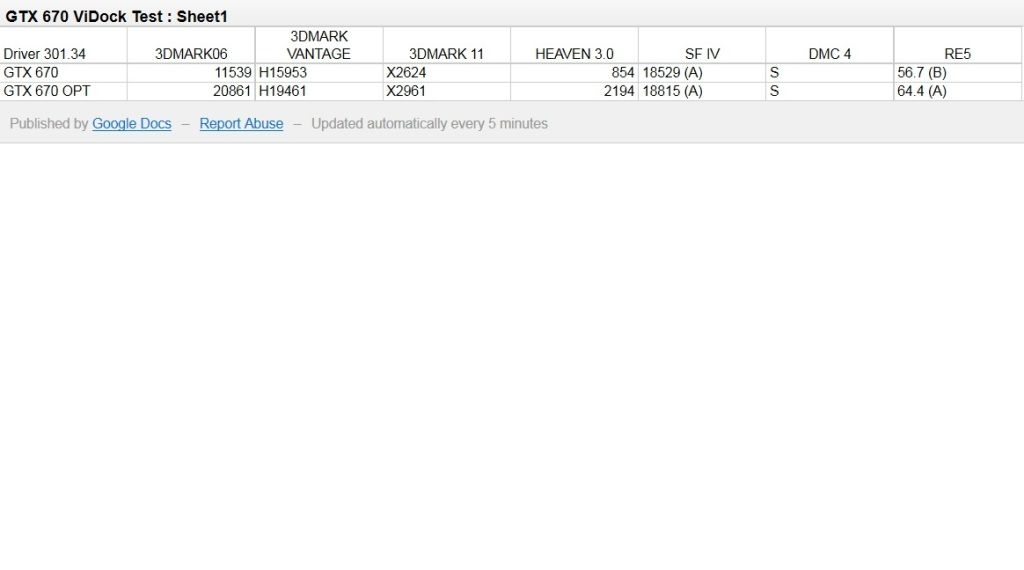
All I can say there is indeed major difference of whether Optimus is engaged or not. Before Optimus was engaged, GTX 670 was good. After it is engaged, it is phenomenal. See the link for yourself.
Test Platform:
Lenovo ThinkPad W520 (i7 2820QM, 8GB DDR3 1333)
Windows 7 Ultimate x64
Driver: 301.34
I will be giving my beloved GTX 560 Ti, which has served me well for over a year now, to my friend this weekend.
So I will try to reinstall it tomorrow and run through the same bundle of tests for comparison purposes if I can manage the time. Fingers crossed. -
@carage
How did you engage Optimus? -
I just set the primary display to integrated graphics inside the BIOS and left on OS detection for Optimus. This disables the onboard Quadro 1000M then Optimus turned on itself inside Windows.
-
So basically, you don't have to do anything at all. How do I know if it works or not? I don't have any Graphics Card in my X220i to turn on.
-
Hi Nando, it is still a no go.
My setting is T420s PE4L 2.1b MSI GTx560Ti + Corsair cx430 PSU + external monitor
Checked Bios. Power-express card (Auto or Generation 1 both tried)
I/o express card is enabled ( sure its working, as I have a express card slot SD card reader)
Display- Digital on Lenovo
The problem is the device can not be detacted at all no matter what combination of SW 1 & 2 positions are.
The facts are: video card spins all the time.
Sw1: 1-2 position - only power light one (green)
Sw1: 2-3 position - both power and detect lights on. Power green, detect yellow.
So I can't see the flag light on at all, but not sure if that is expected to be on.
I even tried with connecting power cable to video card and PE4L both and seperately.
Without the eGPU, power pe4l I have detect and power on. Again one yellow one green
Can you please tell me am I miss anything or the PE4L is faulty?
I did as you said: sleep mode, power Pe4l, hot plug, resume but no tone no device found.
Thank you all for looking at this matter. Appreciate any insights and advice! -
so where do we stand on being able to connect a desktop gpu to a notebook with no pci card slot?
-
I assume it comes with an integrated Intel graphics core on the CPU of your X220i?
-
not great.. you can maybe be able to use an available mpcie located on the mobo itself (if there even is an available), but might run into whitlisting isssues, and the annoyance of running with chassis open. Also that hp laptop you have is amd cpu + ati gpu.. not a good combo for egpu .. I bet you will run into issues attempting any kind of egpu with this machine.
all this is on the front page. .... I would suggest sell the machine for one that is more compatible. sorry:
___________________
.. now about my gtx680, I didnt seem to factor in overclocking when using it with my 203w xbox psu. (the tdp of the gtx680 is 195w) .. with overclocking, I can move that tdp up to 132% of that 195w, which does exceed the capabilities of my xbox 360 psu, and crashes.
running at stock speeds is great, but I unfortunately didnt factor overclocking into it. The scores on my previous post will be it for now
No matter.. I have a spare Shuttle PC60 psu (300w, with 2 12v 14amp lines on it). After taking apart that psu, it seems that 12v1 line is dedicated to all molex connections (sata, molex, and one 6pin) .. and the 12v2 is for the motherboard + p4 connection) I plan to mod the 12v2 p4 connection into another 6pin connection (since obviously it wont be needed for its cpu powering duties anymore)
once it get more power to that gpu, and open it up to 132% of tdp.. I can hopefully up the clocks, and see how much better those scores can be.
(as you can see.. I am probably gonna abandon using win 2008r2 with a possible DSDT solution, and just use win7 since its working flawless with my 16gb ram and all, and I can see myself using this machine now for more egpu related things than its previous server task related duties) -
So to make this external graphic card run on my Laptop, I need must need an extra LCD monitor? Since I wanna minimize my money spend, will it works if I just get a setup external graphic card and plug it on my laptop?
-
for max performance, yes external attached to the egpu. but if you are using nvidia egpu with optimus enabled, you can use your integrated lcd, but with a small performance penalty due to the extra bandwidth it requires.
-
By hotplugging I meant to power on the notebook to Windows, power on the eGPU then plug the EC2C into the expresscard slot. No sleep/resume involved in that process. Can do a device manager rescan for extra good measure in case you don't hear the 'found new hardware' beep. If it's not found then try to alternate the SW2 switch b/w x1/x16 mode on the PE4L and try again. If still not found then suggest try the gear on another expresscard equipped notebook to confirm if the PE4L and/or video card is faulty.
See Pre-purchase FAQ -> 4. Can I make this work using just my notebook's LCD display?
Congratulations on the very good results here with the GTX670. Yes, the pci-e compression makes a very large difference so want to enable it particulary for gaming.
If you can do all the benchmarks per the Implementations blurb(RE5-var-dx9-1280x800, 3dmark06/vant/11, DMCV4-DX10-1280x800, Heaven), then I can add you to the DX9/DX10/DX11 sections on the first page.
[email protected] versus [email protected] comparison would be very welcome.
Not exactly sure if the bios switch you are using allows the dGPU to be used easily when not using the eGPU. If need to go back into the bios to enable it then you may find booting via Setup 1.x to enable the eGPU to be more convenient. There you'd use Video cards->dGPU[off] to disable the FX1000M so eGPU would function in a x1.2Opt configuration and could try (2) use Video cards->dGPU-on-demoted to perhaps allow the iGPU, dGPU and eGPU to all function concurrently with the eGPU given priority over the dGPU for Optimus functionality. -
When I was dealing with the 7950, I tried the dGPU on demoted setting...
My W520 didn't like that...Windows got stuck while loading... -
I did not get this fact clearly on the last pages or in the first post. Which adapter would be better performancewise (Working with sandy bridge + expresscard)? PE4L or PE4H?
-
PE4L 2.1b for opt1.2 speeds
-
Hi Nando4, hi guys,
first semi-successful experience with eGPU with a system you can see in detail in my sign. In addiction my external PSU is a Thermaltake Toughpower Grand 775W (80+Gold). I used PE4H and M4600 easily managed the new hardware.
My procedure is to switch the eGPU system on with EC2C inserted and boot to windows. The two GPUs (Quadro 2000M and gtx570OC) are correctly recognized and using GPU-Z it is confirmed that the bus for gtx570 is PCIe 2.0 x16@PCIe x1 as you can see in attached image.![[IMG]](images/storyImages/GPU-Z%20dopo%20eGPU%20con%20gtx570oc.gif)
Internal screen is not working. It is not possible to duplicate or switch to it.
Now, my questions are:
1) I use optimized Quadro notebook drivers for both video cards (295.73 from 296.70 package) with some problems in recognising the eGPU (a message like this appears: the video driver stopped working and restarted...). I downloaded optimized video desktop drivers for gtx570 (296.10) but, where and when I've to install them?
2) Here my performance benchmarks as suggested in page 1 of this thread:
.
It seems it works at half the capacity of the GPU and I know it depends on the bus that is x1. But how to optimize it in my case? I was unable to solve this problem. Could you guide me step by step?
So please, excuse me for the annoying questions, but I'm too curious to improve my machine (not yet listed among laptops as tested for performance).
Thank you in advance,
Doc -
Hi Doc, would like to add a M4600 to the list of successful implementations as an alternative to a Lenovo W520.
Two issues with the M4600:
1. You need to enable Optimus in the M4600 bios. What that does is sets the iGPU as the primary video and the FX2000M as the secondary. Need the iGPU so the NVidia driver enables x1.Opt pci-e compression on the eGPU.
2. your PE4H 2.4 can only run with pci-e 1.x link speed but will try to negotiate a pci-e 2.x link. That will cause the NVidia driver to hang/BSOD the system. The fix is either to get a PE4L 2.1b that can run the faster pci-e 2.0 link or force the expresscard slot to run at Gen1/pci-e 1.x in the bios or use Setup 1.x if the bios has no facility to do that.
So I'd suggest proceed to configure Setup 1.x's v:\config\startup.bat to contain the following info. This will do all the operations required for a [email protected] (PE4H 2.x). Then just need to reboot and select Setup 1.x -> Automated startup via startup.bat to boot to a working GTX570 eGPU. It will even prompt you to hotplug the eGPU.
Code::: Enable disk caching to speedup the process call speedup lbacache :: Check if GTX570 is attached. Prompt user to attach if not found. call vidwait 60 10de:1086 :: Disable the FX2000M so the iGPU+eGPU can run in a x1.Opt configuration call iport dGPU off :: Force the expresscard link to Gen1 speed when using a PE4H 2.x :: Reset (renegotiate) the link after setting it to Gen1 speed call iport g1 [your expresscard port #] call iport reset [your expresscard port#] :: Chainload to Win7 call grub4dos mbr
-
Thank you very much for your professional answer.
Now I understand a little bit more of eGPU.
I surfed in Nvidia forum to understand the "Optimus philosophy" but it remains unclear.
Also because all the examples I've seen does not match with my configuration. Quadro drivers and Nvidia control panel in my possess seem to be a little different from those presented in the forum.
I understood that PE4L is better than PE4H (even if the second one looks more beautiful than first... ) and i'll consider the upgrade (I'm in touch with SimoxTav who helped me in this eGPU adventure...
and I hope he will continue).
First, I'll try the less expensive solution of the usage of setup 1.x.
So please be patient with my questions, being a newbie.
Thank you again. -
Good news everyone
Most importantly - today I was able to use the eGPU stuff for few hours and now I'm able to confirm that Samsung 400B2B is capable of using eGPU! Yeay! But before giving you all the details I would like to thank Bjorm for allowing me to check my laptop on his eGPU stuff - thanks man!
So - a little bit more about the notebook itself. Here you can check all the details about it: 400B2B 12.5" | NP400B2B-A01UK | Business Notebook - SAMSUNG UK - OVERVIEW. However I am using a Polish version (400B2B-H01PL - from what I think the only difference is the processor) with 03PE BIOS and 8GB of RAM. From my point of view after using it for half a year I can say that:
- it has a lot of power (i5+HD3000) and nice stuff inside (3g modem, hdmi, usb 3.0, expresscard)
- it's 12,5 inch so it's good for transport (also matt lcd)
- it has great battery (6-8 hours during normal usage)
- and three small downsides: poor quality of the screen, poor speakers and hinges that could've hold the screen a little bit stronger
However after I bought it I realized that is has the TOLUD=3,5GB (link: DIY eGPU experiences - Page 718, so I thought that it won't be capable of eGPU. Few months later Nando wrote about the DSDT override which I performed successfully (with a lot of help from Nando and Kizwan to debug the modified .dsl file - more details further) so that the the only thing that was left to do was to plug in the eGPU and check if it works. And doing so was just like plug-and-play - I just plugged in the eGPU, installed the nvidia drivers, optimized the settings of Nvidia Optimus and... that's it.
DSDT override
Using the "DSDTEditor_Linux_Windows" (link: http://olarila.com/dsdt/DSDTEditor_Linux_Windows.zip) I got the original .dsl file (link: http://db.tt/W0hHIsa6), modified it including comments (thanks guys!!!) from Nando and Kizwan (the dsl file after all of the modifications looks like that: http://db.tt/G0V25XzQ), compiled it and loaded successfully into the registry (here is the final .aml file with modifications: http://db.tt/DMaFk401). There were only minor errors so no extraordinary changes were done.
Benchmarks
At the moment I have only one screenshot with my notebook connected to Bjorm's GeForce 560 Ti. As you can see I am able to use the 1.1Opt instead of 1.2Opt (although I downloaded the newest drivers) - I don't know what's the couse, but after I buy all the stuff myself I will investigate why is that. Here is the screenshot: http://db.tt/2hAVMx05
Photos
Bjorm made some some photos using his phone (that is why probably it's him who should be sorry for the quality). Here they are:
![[IMG]](images/storyImages/imag0325o.jpg)
![[IMG]](images/storyImages/imag0324h.jpg)
Other info
We also checked how it worked with Witcher 2 and Call of Duty: Modern Warfare 2. At the beginning the was some shuttering but the solution was checking the settings of Nvidia Optimus for these games specifically and plugging the notebook into the AC. After all of that the Witcher 2 looked like a movie
Summary:
- hard stuff: performing DSDT override, investigating the 1.1Opt
- easy stuff: plug-and-play usage
That's everything that I know at the moment. After I buy the eGPU and all the stuff myself I will try to do check why it doesn't work on 1.2Opt and will provide you with more screenshots, photos and all the information you might need.
Cheers! -
This is great info and exactly what I needed to know for my x220 + GTX 460. I got the PE4H and had it running well but at PCE 1.1 by just setting to Gen 1 in the bios. I just got it last week so I am exchanging it for the PE4L so I can get 2.0 speed. Also want to put in a good word for Harmonic Inversion who were very accomodating about the exchange.
Thanks again Nando
-
I know it's been mentioned a while back that HIT was going to carry the 2.1b of the PE4L kit soon, but their website still states the older 1.5 so I was wondering if anyone had an update on this? I was holding off, but now it looks like I'll need to go the eGPU route for Diablo 3 on my Lenovo W520...
-
Diablo 3 even runs on my Intel HD 3000. Your Quadro 2000m should be enough to handle D3
-
Hello everyone.
HWtools have made a silent upgrade on the PE3A v3.1 adapter. The new adapter (v3.2) other than the new price tag has a floppy power connector on it. This way if you want to add an eGPU you don't need to mod your adapter or a riser as shown here.
Although it makes eGPU pairing a lot easier (no soldering skills required) the new pricetag ($50+$18s/h+$5 riser total $73) makes it not a recommended solution since it will be only $19 dollars cheaper than PE4L 2.1 which provides a 60cm connection cable (rather than 15-20cm of the riser).
One more time BPlus dissapoints us. If they could keep the price as low as $35 it would be the perfect starter kit.
For those interested you an purchase a PE3A along with a riser cable like this and you most probably will be able to use your GPU externally. Confirmation from successful impl is needed . I am using PE3A v3.1 so I can't confirm (too bad BPlus won't give free samples for testing like other companies do). Since the cheapest and even withou a riser it seems the best solution for TB users who can't wait and want to buy Sonnet to express card pro for x 1.2 impl. -
Well it runs it fine, but when the graphics get intense during the large battles the FPS drops into low teens/single digits and hurts. Will double check my DirectX drivers and maybe switch back to Lenovo's video drivers to see if it makes a difference... but my original question still stands!
-
Hello... I want to install a eGPU to my laptop HP ProBook 4530s (I7 2670qm, 8gb ram, iGPU Intel HD 3000, dGPU ATI 7470m) but im not sure of which kit will be better for me, if the PE4H ver2.4 with EC2C or the PE4L V2.1b+ EC2C. I want to know if anyone can help me decide. thanks!!!!!
-
PE4L 2.1b + EC2C
-
Thanks men, you know which is the difference between PE4L 2.1b+ and 2.1a???
-
Just installed eGPU on my X220
X220
i7 2620M
8GB ram
GTX 560 Ti
Using Verde 295.73 drivers
Most recent Bios
PE4L 2.1b @ 1.2 opt
3DMark06: 18727-18890 (depends on run)
RE5 DX9: 154.8 FPS (no AA/etc... not sure what needed to be turned on; default, variable)
Plays Diablo 3 at 1080P pretty well (everything maxed), was getting some stuttering but I believe that was due to a ethernet driver. There are some slowdowns/low FPS areas though. I'll report back after I try it out with the current setup.
Installation was very simple. No longer need to hotplug. Turn GPU on, plug into expresscard slot, power computer on. Install drivers, restart, done. Hotplugging caused GPU to switch to max fan and did not recognize. -
To get my internal LCD runs with eGPU. Does the GPU has to be Nvidia's Fermi type of graphic cards?
Since I purchase a EVGA GeForce GTS 450 1GB 01G-P3-1452-TR PCI Express 2.0 Video Graphics Card, I am thinking if I have to refund it and get a Fermi one like: EVGA nVidia GeForce Fermi GTS450 GTS 450 1GB PCI-E Video Card 01G-P3-1351-KR
The another question is that, what kind of AC adapter I need to purchase (It said a 12V/120W AC adapter works fine) but what kind of barrel size that can plug into a PE4H-PM3N?
Im a computer noob """ -
The 450 GTS you have is already a Fermi.
-
2.1a was broken, soldering was necessary. -
So been playing around with 3dmark, and my modded shuttle 300w psu, and some preliminary overclocks on the gtx680
new scores
3Dmark11 external screen - 8135 overall l,
8517 gpu portion
3Dmark11 internal screen - 7421 overall, 7933 gpu portion
3Dmark06 external screen - 23717 overall
3Dmark06 internal screen - 20514 overall
The results are surpising to me, not near as bad of a performance hit using the interal LCD as I had imagined.
Everything is very smooth so far (now that I've switched OS's).. although I have yet to actually game on it.. that will be soon enough I suspect.
Thanks again everyone for the help and support.. this forum is awesome!Attached Files:
-
-
Can a 12V/120W AC adapter (2.5x5.5) works on PE4H?
-
hi guys - quick question, I'm considering a Lenovo X230T and buying a eGPU solution. I assume ViDock are the way to go from reading as many pages of this thread as I could but if you could answer me the following I would appreciate it:
1) I'm a little confused about the criteria for running it on the internal screen. I do a lot of consulting so I'll be staying in hotels without an external screen - what do I need to ensure it runs on internal? I have seen references to Fermi being required? If someone could explain to me what I need and the reasons behind it that would be fantabulous.
2) I've been a bit hung up on the Expresscard solution VS the thunderbolt solution. Clearly the Thunderbolt has the faster bandwidth but assuming the latest NVidia card (for example a 680GTX) are we able to run it on internal screen and will it bottleneck on expresscard?
3) The express card slot on most laptops goes right under the left wrist pad where you put your wrist when gaming - does the card get hot? For me there is nothing worse than gaming on a red hot palm rest (I don't like external keyboards sucks to be me...)
Cheers guys -
I spoke to them Friday and they said they expected them in early next week. -
I spoke to them as well and got the same response; however, the site says May 25th, so who knows.
Hopefully my order will finally get to me in the coming week. I'll be sure to post here on how it goes. -
Hmm..
I forgot to save my purchased eGPU setup 1.X... and now I cannot re download it. It keeps telling me Download ID invalid.
Is it normal ?
Edit : stupid HIT download policy...
DIY eGPU experiences
Discussion in 'e-GPU (External Graphics) Discussion' started by master blaster, Sep 18, 2009.