Problems? See this thread at archive.org.
Looking to sell my PE4L (PCIe Adapter ver2.1). It's on eBay for cheap. Thanks for the experiment, but its not working out for me with all the micro-stuttering. I'm looking to get into competitive gaming, which is impossible with the micro-stutters.
-
I've linked your intro and my reply to BPlus as something they could perhaps integrate your technology with their hardware. Though you could come up with your own wireless PE4L 2.1b equivalent hardware since it's simple enough.
As for the software configuration side (error 12, anti-whitelisting, etc) happy to discuss Setup 1.x offline if you wish. Just get your post count to over 5 so PM will work. -
You say that my current GPU isn't x1.Opt capable but I am not sure why that matters if I am going to be disabling it in the Setup 1.x. Honestly Most of the time I keep my laptop at my desk anyway so I wouldn't even need to use the internal GPU at all. So even if I got an optimization compatible card like the GTX 560ti I wouldn't be able to run a x2.opt setup? Please explain. Also I want to make sure I understand correctly. To do the x2 setup I would have to get a PM3N and hijack the WLAN slot? Or is this possible though just the express card slot.
Sorry if my questions seem simplistic but I am new to this and am trying to understand.
Thanks for your help. -
Optimus compression technology only available if your notebook have Intel GMA 4500MHD or Intel HD Graphics or Intel HD 3000 iGPU. Combination with any of these iGPU & Nvidia Fermi graphic card, you can do x1.Opt setup (Opt = Optimus compression). However, your notebook only have NVIDIA NVS 160m dGPU, so you can't do x1.Opt setup (this is what nando means by "isn't x1.Opt capable"). Your eGPU will only running at PCIe x1 link with whatever graphic card you choose. With only x1 link, you will experience lagging & stuttering when playing games.
If your notebook support x2 link setup, you will be able to get batter performance. So, need to confirm whether your notebook does support x2 link or not. Please refer to Pre-Purchase FAQ >> "6. (Performance) Can my system do a PE4H x2 or x4 link as shown in PCIe Scaling Analysis?". -
You should carefully read the first post:
"If the system has a dGPU then ensure it's switchable with the Intel 4500MHD/HD/HD3000/HD4000 providing primary video if you want to do a higher performance Optimus x1.Opt setup with allows accelerated graphics to the internal LCD as well as an external LCD."
Soooo, if your laptop has ONLY the dedicated NVIDIA NVS 160m GPU, and no 4500MHD/HD/HD3000/HD4000, switchable with it, than you won`t have Optimus. And this is the case, because the Intel Core 2 Duo don`t have a built in graphic adapter. -
So I am starting to see that for my system the eGPU is impractical without Optimus. At the very least I would have to do a x2 setup which would require me to alter my E6400 to gain access to another port. Maybe I'll just hold out until I convince work to buy me a desktop
 . Thanks for the replies everyone.
-
Hello. I have been reading a bit about eGPU's but I'm not very computer-savvy so I really don't know what to say to ask for help (in reference to system specs). I have an MSI GX620 laptop with Vista (is this even possible with Vista?). I was also wondering if an external monitor is necessary. Thanks for any help!
-
Hi. Which performance I can get with a PCI Express 1.0 1x link? The port is empty on my 8735G. Is there a better performance in games too like BF3 if the CPU is the bottleneck. My T9600 is the most time at 100%.
-
One question - if I have the Corsair CX 430 power supply (12V x 28A = 336W on the first rail) then all the cards like GTX 470, GTX 570 and GTX 580 ( GeForce GTX 570 Power Consumption and Thermals | bit-tech.net) are beyond it's power capabilities? Although I think I know the answer ("Yes, you $%^!") I just want to be sure
Edit:
I just came upon this website ( http://www.geeks3d.com/20090618/graphics-cards-thermal-design-power-tdp-database/ where I found the answer. Thank you very much
-
My friend is willing to sell me a GTX 460 for a pretty good price. My question is, how important is it to get the 256-bit version over the 192-bit one for the eGPU?
-
![[IMG]](images/storyImages/logoix.png) ATI vs Nvidia
ATI vs Nvidia
Virtu vs Optimus
Well a week before I got a very good deal on a GTX460 and this was what made to swap boats. I have been using a HD5850 Extreme for a while and since internal screen mode with Virtu was a pain (*) I decided to go with Nvidia. This little writeup is aimed to compare two GPUs that when compared on a Desktop they perform similar and can be both purchased used nowadays for less than $100 with performance comparable with other cards that would cost over $200.ATI or NVidia?
ATI Sapphire Radeon HD5850 ExtremeThe cards
![[IMG]](images/storyImages/r3dsap5850xtreme01.jpg)
Specifications:
- Graphics processor: AMD Radeon HD 5850, Cypress
- Pipeline: 1,440 stream processors (@ 725MHz)
- Memory: 1GB GDDR5, @ 4GHz effective
- Bandwidth: 128GB/sec, 256-bit interface
- Compatibility: DirectX 11, OpenGL 4.1
- Outputs/Inputs: DVI, HDMI, DisplayPort,
- Size: 215mm long, dual-slot
- OC: @820/1050
NVidia Palit GTX460 Sonic OC
![[IMG]](images/storyImages/1703781111004154959pali.jpg)
Specifications:
- Graphics processor: NVidia GTX 460, GF104
- Pipeline: 336 cuda cores (@700MHz),
- Memory: 1GB GDDR5, @ 3.6GHz effective
- Bandwidth: 128GB/sec, 256-bit interface
- Compatibility: DirectX 11, OpenGL 4.1
- Outputs/Inputs: 2xDVI, HDMI, VGA,
- Size: 200mm long, dual-slot
- OC: @820/920
Both cards have similar clocks with the HD5850 clocking very little higher.
Here you can find a small comparison of those cards tested @ x16 2.0 on a desktop motherboard: 3DMark06, 3DMark Vantage and 3DMark11. Don't be impressed that my results @ x1 2.0 are better than @x16.
Once again my testing rig will be my HP Probook 4530s.Testing rig.
- CPU: i7-2630QM 2.0GHz-2.9GHz (4C/8T)
- MEM: 8GB 1333MHz (2x4GB)
- iGPU: Intel HD3000
- SCREEN: LED 1920x1080 matte finish display
- HDD: 320GB 7200rpm
Following table show the results on both Internal & External Screen for both HD5850 and GTX460, setting it at generation 1 or 2 speed from the bios. For Internal Screen tests VIrtu Driver was used for the HD5850 (along with Catalyst 11.4) while for the GTX460 Optimus Internal Screen mode was used along with 295.53 Beta. (296.10 WHQL which were the only available by the time this writeup started didn't offer Optimus Internal screen mode). Intel HD3000 results will be added just for reference.Benchmarking implementations @ x1 1.0 & x1 2.0
ScreenRAMGPUDirect X 9Direct X 10Direct X 11Ports3D06RE53DVGDMC43D11HEAVExternal 8GBHD5850/GTX460
x1 2.0EC H65HD5850/GTX460
x1 1.0Internal HD5850/GTX460
x1 2.0EC H65HD5850/GTX460
x1 1.0EC H65HD3000413930.11318
.= All GTX460 x1 2.0 benchmarks were rerun @ default clocks for reference
Laptop specs : i7-2630QM | Intel HD3000 | 8GB 1333MHz | 15' 1080p
GPU specs : Sapphire HD5850 Exteme 1GB GDDR5 | Palit GTX 460 1GB GDDR5
eGPU : PE3A- R x1 2.0
The results speak for themselves... Except for some 3DMark Vantage tests (@x1 2.0) GTX460 rules with sometimes twice as much FPS as the HD5850. The reason for that could be that or more likely it is the so called Optimus Compression. The compression saws its true power especially with Internal Screen Gaming. Also almost every Fermi card now is compatible with OS X Lion, so unless you are working with 4 external screens simultaneously you won't need a AMD card but you should rather grab a used GTX460, GTX560 or GTX560ti, or wait for the new 6XX Keplar series.Conclusion
I won't recommend though the Palit GTX460 Sonic OC edition since it is a bad overclocker and very noisy, especially under load.Last edited by a moderator: May 8, 2015 -
Does definetely not work with a Dell Latitude 6500.
After "iasl -g" I could not find any DwordMemory in the .dsl file.
Works out-of-the-box with 2G Ram.
My workaoround is to buy a 20,-- 1G sim and reduce my 4G Ram to 3G.Last edited by a moderator: May 7, 2015 -
![[IMG]](images/storyImages/576618_10150924581484429_805309428_9462058_1901950514_n.jpg)
There we go! GTX 670 + Accelero Mono Plus "Caged" in the enclosure! Time for videos and benchs. -
That..... Is inspiring. Lol.
-
SimoxTav compliments,
very clean and impressive your work on the enclosure and its contents.
A question:
I always hear talk Tolud 3.5, while my setup 1.x returns a Tolud of 3.25. I face some problem? Considering my eGPU optimization problems? -
Thanks
About the TOLUD:
Not at all, before the DSDT override implemented by Nando and HIT in the latest 1.x Setup, the TOLUD of 3.5 could give issues on systems equipped with more than 4Gigs of ram due the problem in addressing the PCI space in the 32bit addresses. Now with the possibility to address the eGPU in the 36bit space, the problem is completely solved. However, to answer you question, having a TOLUD lower than 3.5 wasn't and still isn't a issue, so no performance degradation in your solution
I still hope to find a solution for your 8bit video signal in order to enable the HD3000 inside your M4600, but the only suitable way seems to completely change the mainboard and the screen with it. Maybe with a maintenance call under warranty, (considering that talking about quality the TN screen is a step backward from your current config) you could ask to downgrade your solution to become complaint for the Optimus option
Ciao
Simone -
Hi Friendly Forum Folks!
I've run into some problems i'm hoping someone could help me with.
my eGPU: (Images below)
MSI 560 Ti Twin Frozr, GDDR5 1GB
PE4L 2.1b from hwtools with Molex cable, EC adaptor and switch
550W PSU
My current Fujitsu Lifebook SH761 specs:
- Sandy Bridge i5-2520M processor
- 8GB DDR3 RAM
- GT520M 1GB (800Mhz Engine Clock, 740Mhz Memory)
- EC 1.0, @ x1 1.0 PCIe
1. For some reason i can't get my laptop to detect the eGPU. I've tried powering it on then inserting it, restarting the laptop and inserting a powered on card while it's booting etc... nothing seems to work.
2. When i turn on the power to the eGPU the fans spin normally. However, i'm not sure if the settings on the PE4L are right, ie the SW1 and SW2 switches etc.
Could anyone share their thoughts on this? any advice would be very much appreciated!! Images of the rig are below:
![[IMG]](images/storyImages/539908_10150797834476222_507596221_9902783_605148452_n.jpg)
![[IMG]](images/storyImages/149399_10150797819906222_507596221_9902774_1964925308_n.jpg)
![[IMG]](images/storyImages/292514_10150797819661222_840670558_n.jpg)
![[IMG]](images/storyImages/560017_10150797819266222_507596221_9902772_2047714169_n.jpg)
-
I noted now, a mistake on the PE4L: it says "dealy" instead of "delay", lol
-
Great work!
Would be definitely interesting to complete the comparison by switching off optimus compression! -
This can't be done with my laptop since it have Intel HD3000 only which can't be disabled. If I use drivers older than 275.xx then the results won't be comparable with drivers 295.xx
-
hey guys,
problem,
I have a PE4H and a PE4L v2.1b, along with a 560ti
From my understanding the PE4L should be way better than the PE4H. Yest This is not the case. I get around 30fps with the PE4H yet 12 with the PE4L HELP!
Also, not very computer savvy so solutions need to be explained without crazy abbreviations and assumption of computer knowledge. -
From your previous post we find that you are connecting to a DV6T quad. Last version that had an expresscard slot was back in the Core2Duo days, meaning it's got a pci-e 1.x slot. So while a PE4L 2.1b has the advantage over a PE4H 2.x of being pci-e 2.0 link capable, you will not realize that speed on your system. In addition, I believe the DV6T had no integrated graphics so no pci-e compression would engage, (x1.Opt). Please confirm. So as long as your PE4L 2.1b isn't faulty it should perform at the exact same link speed as your PE4H 2.4.
If you are after the best performance then I'd suggest upgrade to a newer Sandy/Ivy Bridge system like a HP 4530s/8560P, Lenovo E520/T520/T530/W520/W530 or Dell 3350/E6520, along with a Intel HD3000/HD4000 iGPU to get a x1 2.0 + pci-e compression (x1.2Opt) performance. That's the highest performance we can extract from expresscard-based systems. See also the thin-and-light link in my sig for other x1.2Opt capable systems.
Flip the switches on SW1 and SW2 to 1-2 (PCIe=x1, Delay=0ms), power on your system, halt Win7 load with F8, power on the eGPU, then plug in the EC2C into the expresscard slot. The video card's fan will be slightly muted when on the pci-e bus. If you have no success, then set SW2 to 2-3 (PCIe=x16). If still no success, then test the individual components on another notebook or desktop system. -
Hello,
I've been reading over the thread the past few days and have a couple of questions.
My system is a Dell XPS M1330 T7300 2.0ghz 2GB ram 80GB SSD Nvidia 8400M GS.
1. Has anyone been able to do an x2 link (1 + 2) using the PE4H with this system? From what I've gathered, there are 4 PCIE ports - (1 mPCIe WWAN, 2 mPCIe WLAN, 4 EC, 6 LAN card). All the other M1330 users in the benchmark table have only done x1 links with the EC.
2. Is the Sapphire Radeon 6850 a good card for my system? I currently get a 3dmark06 score of 1499 with the built-in Nvidia card. I plan on mainly playing diablo 3 and starcraft 2, nothing too taxing like BF or Crysis.
3. Are "micro lags" a big issue when using the x1 link?
Thanks. -
here's my new 3dmark11 score p8223, 8626 on gpu (had to beat arsenal243, lol)
and a 3dmark vantage to add to the front page .. p26948
that is all.. thanks
edit: more benches
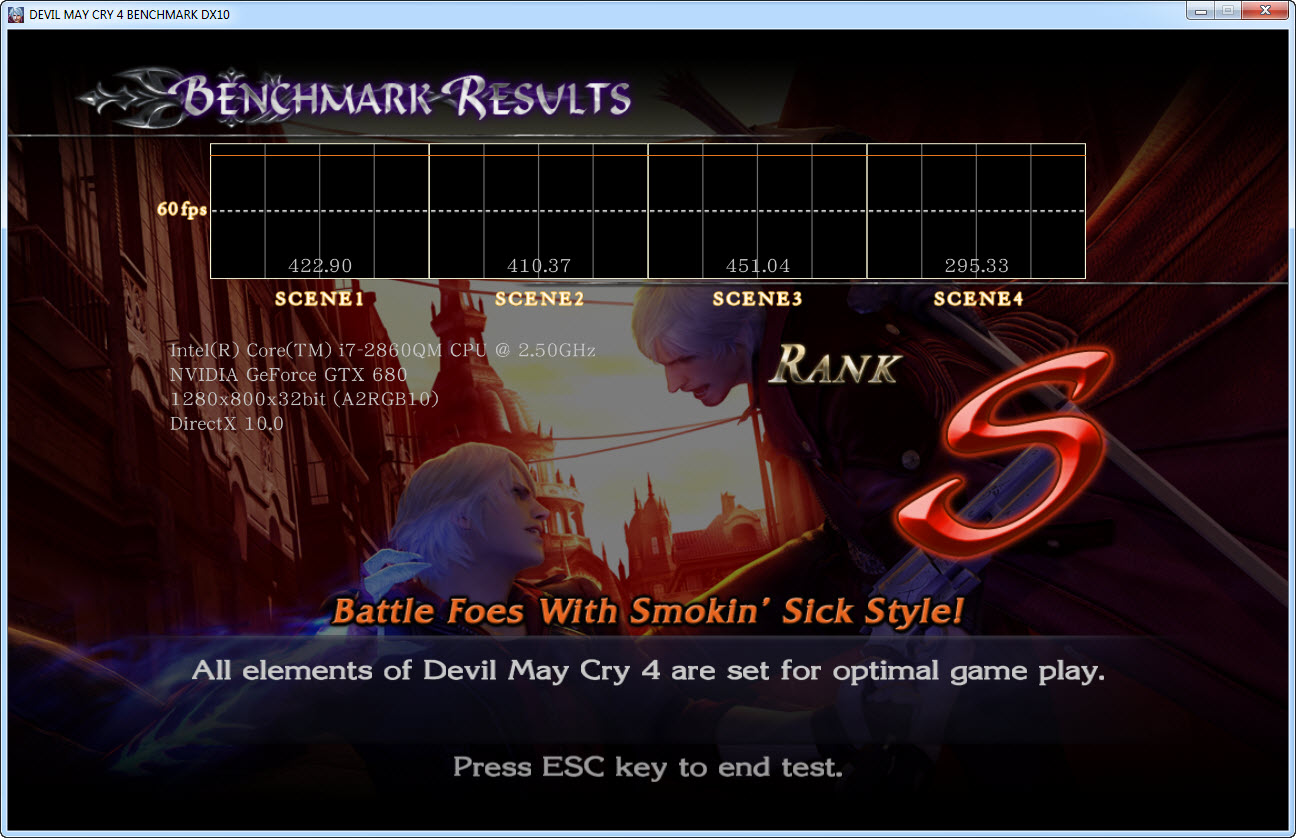
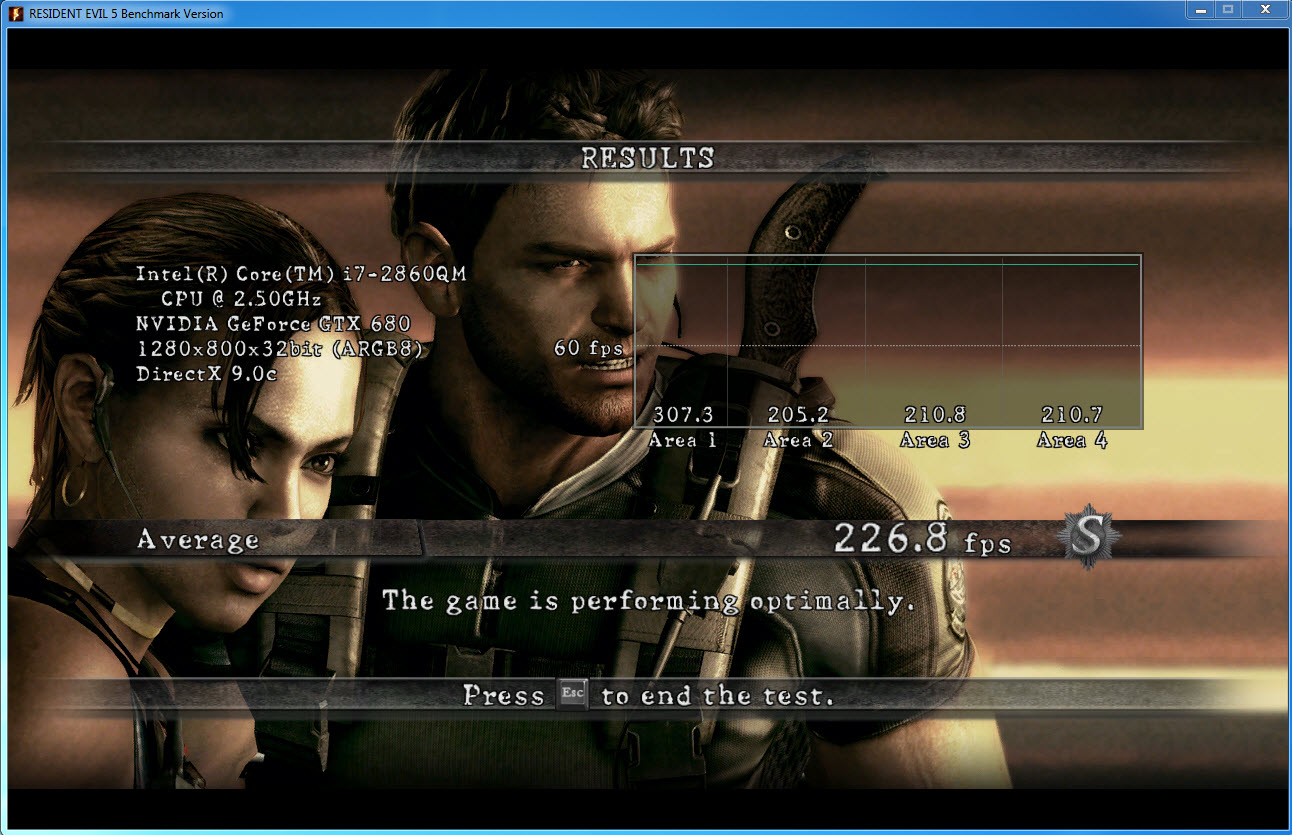
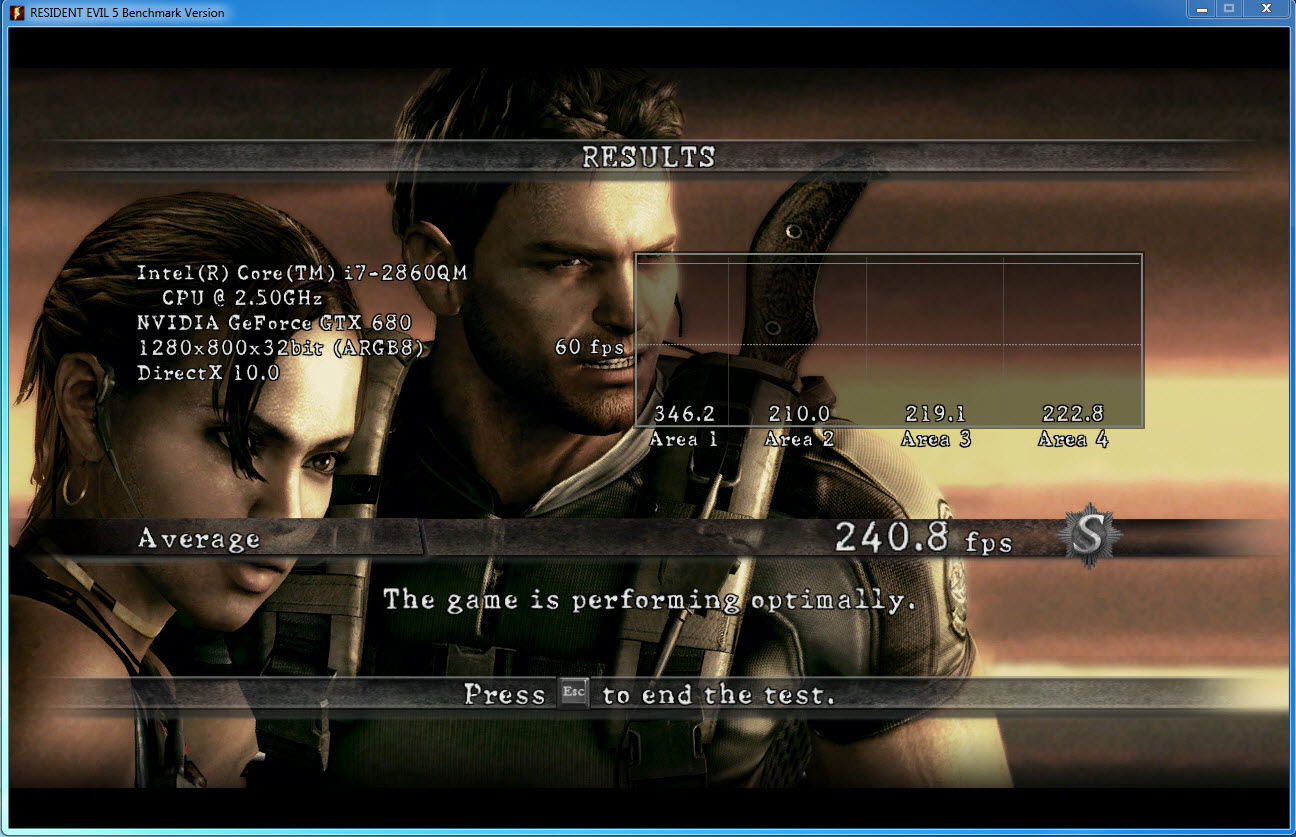
RE5var dx10 - 240.8fps avg dx9 - 226.8fps avg
DMC4 scene4 - 295.33fps
Heaven (update) - 2441
also the i7 2860qm is a 2.5ghz cpu, that can turbo to 3.6 .. the front page has it as a 2.4, which is not correct.
also neat, found my ref asus gtx680 is ok overclocker on gpu (only +88mhz), but mem is excellent at (+525mhz) on the offset when using msi afterburner
Attached Files:
-
-
You are now taking top honors on the leaderboard, a position long held by Khenglish.
Any chance you can run the RE5 DX9 1280x800 and DMCV4 DX10 1280x800 benchmarks as well with eGPU HDMI audio disabled? I'm wondering if those 3dmark scores translate into epic gaming FPS results. -
I haven't posted in a while and I've come up with an interesting finding. If you're getting microstuttering, which sometimes happens with optimus, you can get rid of it by setting an FPS cap. In diablo 3 with the fps cap off, around 1/3 of the time I had microstuttering, which at times was horrendous. My computer would go back and forth between 180fps and 18 fps. I set the fps cap to my refresh rate (vsync alone did not work) and the microstutter was gone. Note that there is still some microstutter, but lots of people complain about it, so it seems to be something to do with the game engine.
Diablo 3 is the only game I got microstuttering in with opt x1.2. On 1.1 I also got microstuttering in SWTOR, and other games may also microstutter. You can globally enable the FPS cap using EVGA precision on any Nvidia card as long as you have a 300 series driver installed.
Also in regards to Ivy Bridge in systems designed for Sandy Bridge. I managed to talk to someone at anandtech, who had contacts at Intel. He said that Sandy Bridge systems (QM67, HM65, etc) do support Ivy Bridge, and the laptop manufacturer just has to release a flash update. The ME firmware must be updated in addition to the BIOS. I have been checking for a BIOS update for my system several times a week, but I have not seen one yet
-
has anyone experience with thinkpads and using amfeltec's mini-pcie splitter to connect 2 video cards to the laptop?
I bougth the amfeltec splitter and my T410s would not boot up upon installing it. no bios logo, just lit black screen.
Alternatively, I am contemplating not using a splitter card, but instead a dual GPU card like amd 6990. I am afraid I will run into same problem, since the splitter is not on the gpu board. any experience very much welcomed here.
Thanks
T -
Im not an expert on the subject but according to the front page, sli gpu cards are not supported (or at least I havent heard of it working)
(also nando, edited my previous post with more benchmarks) -
eGPU on the VPC-Z2
Pictures of the setup
=> VPC-Z2 convenient eGPU setup
The setup is currently running at x1.1Opt, until hwtools release a mPCIe PE4L 2.1, fortunately it will likely be soon available.
GPU I've tested :
GTX 560 Ti
Driver version 296.10
3DMark06
![[IMG]](images/storyImages/120419035002866311.png)
GTX 480
Driver version 296.10
3DMark06
![[IMG]](images/storyImages/120526114419896799.png)
Detailled benchmark results
3DMark Vantage
![[IMG]](images/storyImages/120526114821676503.png)
Detailled benchmark result
3DMark 11
![[IMG]](images/storyImages/120526021917852403.png)
Detailled benchmark results
Unigine Heaven (v3) : good fps, but lot of lags so I didn'tt try to bench it.
RES 5 DX9 variable, default settings.

DMC4 DX10 default settings.

I've tried Skyrim, on a 1920x1080 ultra quality (no AA) + HD textures + Skyrim 2k teture mod (4096x4096) + uGridsToLoad 7
I'd say the average fps is 45 outside in the forest.
I've tried Anno 2070 Ultra quality AA 4X everything runs pretty smootly.Last edited by a moderator: May 8, 2015 -
Afternoon all,
ok - I've just spent about 3 hours going through the page1 "Getting Started" guide and everything it entails. Outstanding work btw, I feel like I know a lot more about what is going on that I expected to But.... I have a few questions, hopefully Nando or someone will be able to throw a few answers my way:
Background System:
I plan to purchase a Lenovo X230T when it becomes available early June, I have seen that the X220T is rated compatible with eGPU so I'm working on the assumption that the X230T will also be.
In terms of the eGPU I am leaning towards the ViDock 4 Plus (purely for asthetics as I need to move it around a fair amount) along with a Nvidia 670GTX for the latest Kepler compatibility. I don't mind the extra money - I just want the best possible chance of it working properly.
Questions:
1) Can you confirm that I have read correctly the 295.xx drivers and above includes the ability to run the eGPU to the internal screen (assuming supported igpu) without the use of any additional hacks/mods/drivers?
2) I'm seeing lots of references to the Fermi Nvidia 4xx cards as being the best for eGPU usage, but I'm not sure if that was just the current generation when the information was written or if that is still the case? My plan is to purchase a Kepler Nvidia 670GTX card on the basis that it is the latest generation so *hopefully* will be the most compatible. I don't mind the extra money - I just want the best possible chance of it working properly.
3) The ExpressCard slot that the ViDock connects with sits right under the palm rest of the X230T... can anyone give me an idea of if the card gets hot? If I was to play on the laptop keyboard is my wrist going to be uncomfortable?
4) I note that the Lenovo X220T does not experience the Code 12 4GB+ RAM issue according to the page 1 list (assuming 1.23+ BIOS version). If possible could someone just confirm this is definitely the case. Cheers
most importantly...
5) I'm a tad confused regarding what is x1.Opt, x1.1Opt, x1.2Opt, etc - is this for the ExpressCard slot or the mPCIe slot that the WWAN/WiFi card goes into - and how does it relate to the PE4L (v1? v2.1?? I'm not sure of the differences) type hardware versions? I'm looking at a ViDock 4 Plus as I need to move it around a fair amount - I understand they use the PE4L, but what versions do they use and is it in a standard format that you could take out and put a later PE4L chipset in?
I'm reading from the front page listing that "arsenal243" has a Lenovo X220T running at x1.2Opt. If he is reading this (or someone else knows) could they explain to me what this is and what I would need to do to achieve it?
6) Continuing on from that last question, I am confused on the PCIe 1.0 and the PCIe 2.0. According to the Page 1 listing the Intel Series 6 and Series 7 chipsets both have PCIe 2.0 (5GT/s) and the PCIe 2.0 corresponds to x1.2Opt for additional bandwidth - again - is this related to the ExpressCard slot speed? How can I check?
Thanks guys, I know that's a wall of text - I'm a technical user but just can't seem to work this out without a bit of help and if I'm about to drop £3k on kit I'd like to be sure
Cheers -
@moogleassassin
Im not gonna comment on the vidock, here there is more focus on the DIY solution.
To answer some questions.. The updated drivers includes optimus capability out of the gate. The better nvidia card, the better.. The gtx670 is awesome. The expresscard slot does not get hot at all. x1.2opt is what we want right now, It basically requires a series 6/7 intel chipset, with intergrated graphics, and a expresscard x1 adaptor device (like the pe4l) that is 2.0 compliant + a newer nvidia card.
Personally I think you should get a gtx670 + PE4L 2.1b + mod a xbox360 203w psu to have the 2x 6pin molex + floppy connector. (i modded one, its fairly easy, portable, look good.) -
tbh I'm open to the idea of not going down the ViDock route, the only reason I was looking at that was because it:
a) comes in a case
b) includes the PSU
c) and most importantly.... I'm lazy
for argument sake do you mean this xbox PSU? - Amazon.com: AC Power Supply for Microsoft XBOX 360: Video Games
Even if I buy the 2.1, get an xbox 360 PSU.... I still need an enclosure for the graphics card. It needs to be as small as possible as I'm a consultant and every so often I'll need to carry it around with me to hotels and such.
I've looked on the 1st page at the list of enclosures, but they all seem either vapourware or fugly
EDIT - At this point I would be happy to pay the $$ for the ViDock just for the half decent looking enclosure and integrated power supply (actually... can anyone confirm it is integrated?). I suppose the important question at this point is whether the ViDock use 2.1b? I guess that is a question for the Village people
-
I see your point, and without some work, your are not gonna get that professional look you'd want from a DIY solution without some work. A commercial version like the v dock might be better for you, just for the aesthetics (just remember not to ask here for support on that hardware specifically, it will likely be ignored)
-
Well I can understand that, after all its not specifically a DIY solution but it is an eGPU solution that still requires a reasonable amount of knowledge to sort out.
Assuming I go ahead with it, I'll contribute my experiences and maybe it will help someone else in my position. If people want to ignore it then that's fine as well
back on topic - is anyone able to answer my above questions (post 10333) about the 1.0, 1.2Opt and the meanings? I'm still a little unclear.
Cheers -
Yes it is related.
PCIe 2.0 means normally, that you have ExpressCard v2.0 also.
So, if you see for some laptop in the table in the first post x1.2Opt, these laptops have ExpressCard v2.0
Check? In the specifications of the laptop...
I think, the X230 will have ExpressCard v2.0, if it still will have ExpressCard slot. I read some people talking about future PCIe 3.0 in some laptops... -
we have been running wireless GPUs for a while, used to work nicely in XP, broke completely on Vista and back again on Win7, but now, with newer machines we can't get over code 12...I tried to get system memory down to 2G, but still got code 12, we also see that with specific GPU, the notebook won't even boot from cold
we do have an additional complexity since in our case the GPU is behind a PCIe switch
what I had in mind is to get your help to set it up and show a prototype of thin client running high end game, all wire-free...I think this would be nice addition to this great thread
so, to use PM, I need posts>5? -
Yes, you need to have at least 5 post to be able to use PM system. You already have 3 posts, 2 more. Next reply, please post the list of GPU you have tried. And for another post, post your new computer specification. There you go, 5 posts. Then you just need to wait script/crontab running at the midnight (to allow you to use PM). After that you can PM nando.
-
Hey
First i've to say, your are one of the best forum i ever read.
With your help i build my one e-gpu solution and I'm testing it in this moment.
Now a little question, how can i see that optimus is enabled?
Is optimus automaticly enbaled if i use nvidia drivers? -
Hi Monwin,
I think one of the easiest ways to test to see Optimus is enabled is to:
1) Open the Nvidia Control Panel
2) Select "3D Settings"->"Manage 3D Settings"
3) Look at the "preferred graphics processor" drop down and see if both the integrated and discrete graphics are listed and selectable for specific applications.
Cheers -
I've got a question:
Let's say I don't want to connect my eGPU via ExpressCard. Can I use a different Adapter instead, like a mini HDMI to Displayport or mini HDMI to HDMI? -
What are you going to connect your eGPU to?
At the moment there are 3 possibilities:
-- ExpressCard:
-either the ExpressCard 1.0, than you use the PE4L v1.5 or PE4H, than you connect the HDMI cable to the ExpressCard-EC2C
-or ExpressCard 2.0, than the HDMI cable is soldiered to the EC2C
-- mPCIe: you connect the HDMI cable to the PM3N, that is sticked in one of the mPCIe slots in the insides of your laptop
Some people modify their laptops (soldering and usually cutting of the laptop required), so the HDMI port replaces some native port of the laptop, or some cover is removed to connect the cable inside of the laptop
-- you have a Thunderbolt port and connect some eGPU device though that port. -
I would like to know whether you can connect an eGPU via Displayport or HDMI, instead of the possibilities you named. After all, that's how the ExpressCard Version is connected to the GPU. Just that the mini HDMI Cable is conncted to the Laptop via the ExpressCard Adapter.
-
No, you can`t.
There are some devices that use USB3.0, but they are not suitable for eGPU yet.
tamirt7138 wrote recently about some wireless PCIe connection, as you can read some posts earlier, but we don`t have a clue about that yet.
The eGPU is not connected to the HDMI port, the HDMI cable is used to connect the eGPU and the expresscard (the PCIe interface). The Displayport or HDMI ports are connected to the graphic card of the laptop, not the PCIe interface.
The HDMI cable is used only because it suits the purpose well. You could take many USB cables, or any other cable, that can carry the signal from the expresscard to the eGPU properly. There are even no HDMI connectors in the PE4L v2.1 because they are causing to much distortion of the signal. So the HDMI cable is simply a good cable and doesn`t has anything to do with actually HDMI interface.
The goal of the eGPU is to connect the desktop graphic card to the PCIe interface of the laptop. It is possible, as i wrote, through expresscard, mPCIe card or thunderbolt port.
GER:
Der HDMI Kabel wurde nur genommen, weil er bequem ist für diese Anwendung. Nicht weil man eGPU durch HDMI Ausgang anschließen kann. -
Thanks, understood it now.
My native Language is actually english, but here in Germany you hardly ever get to talk english, which is why I might sound a bit "rusty".
-
Hello,
I've discovered this forum recently. I find it very interesting and I'd like to give this eGPU solution a chance
But I got one problem. Before I buy the PCIe-expressCard Adapter I want to be absolutely sure that my laptop "supports" eGPU.
So the question is:
Do I really need to pay $25 for this test?!
First nando4's article in the beginning of the thread says:
But somewhere else I read that Setup 1.x costs $25.
Since I haven't found any 8540p's results yet I'm a bit confused.
So is there some cheaper way to check my notebook? Or I just somehow overlooked the download link?
Thank you very much.
PS: HP EliteBook 8540p with dGPU NVS 5100M (1GB), 8GB RAM installed and TOLUD seems to be 3 GB. -
I have experienced this especially with Diablo 3 and have found the same FPS cap to help. I will test the FPS cap on the only other game I ever play on my laptop: an emulated ps2 game. However, it does not have anywhere near the amount of microstuttering as in D3, so that game might not yield any useful information.
-
I have had the same problem with Diablo III, but in my case I disabled the shadows and the problem was almost gone. I will try the FPS cap to look what happens.
In my case I have a Lenovo T420 + Geforce GTX 550 TI + x1.2 Opt. -
Your English is completely OK, i simply saw Germany as your location. My mother language is Russian, but i know English good and German very good So i wrote a note in German
Setup 1.x is not a program to check the possibility of using eGPU. It`s made to overcome problems that rise during the connecting and setup of the eGPU.
But the idea with the check is interesting
You can get a $10 discount, if you will have 6+ replies on this forum. Then you will be able to send private messages and can PM user HITRC to get the
$10-off coupon for DIY eGPU Setup 1.x -
Dudes,
I paid 25$ for the eGPU setup. So how will it be delivered to me? -
Is this possible with the Acer Aspire 5741G? Has anyone tried it with this model?
It doesn't have an expresscard slot but I'm not too sure about the mPCIe / whatever else can be used
DIY eGPU experiences
Discussion in 'e-GPU (External Graphics) Discussion' started by master blaster, Sep 18, 2009.