 Problems? See this thread at archive.org.
The first post shows GTX460/GTX470 NVidia Optimus implemenations are the highest performing ones.
Try another mini HDMI cable as a faulty one will cause this problem. Power up using an ATX PSU to ensure plenty of power, try just sleep/resume in windows. Load the standard NVidia desktop driver to drive it and only once confirmed working move to the Optimus driver. Could try your hardware on another notebook. That's pretty much the extend of troubleshooting that's possible.
Refer to the first post on how to map out mPCIe and expresscard slots so can then see if can do a port1+port2 or port3+port4 x2 setup. It's not possible to switch the location of your wifi to port2 unless port2 is a physical mPCIe slot capable of accomodating it. It possible to use an ethernet port as part of a x2 implementation.
A DIY ViDock implementation will provide CUDA processing abilities so will support Adobe Premiere Pro mercury engine. Please ensure you identify which NVidia cards are supported by that software.
-
-
you need an external monitor to enable CUDA
i tried my GTX 460 768MB on an internal LCD setup with Intel X3100 using the Ultramon/chung gun
and another computer with Core i3 Intel HD that supports Nvidia Optimus running on internal LCD
on both internal LCD Setup, CUDA is not present or atleast i cant use
when i got an external monitor. the CUDA suddenly appeared and i can now use the GPGU(CUDA) of my GTX 460 through external monitor
(for computers that dont support NVIDIA Optimus!) also i discovered that the Tweakforce modded driver for Nvidia ( Xtreme-G 266.58) is better than the official drivers because it gives better image quality and some optimizations for little to no performance hit compared to official drivers -
-
@masterjumong2012 - there's a dual-IDA bios for your 5620Z here which will get you some more performance.
If you want to have your system included on the first post please post at least 3dmark06 and RE5 benchmark results + system details. Would be great if you could do the same for your sister's i3 Toshiba A665 with Optimus. We have no i3 implementations so far.
You cannot use the ethernet port as part of a x2 implementation. You'll need to combine mPCIe (wifi/wwan) with another mPCIe or expresscard slot. x2 require these slots to be combined as either port1+port2, port3+port4 or port5+port6. Please refer to (Performance) Can my system do a PE4H x2 or x4 link as shown in PCI-E Scaling Analysis? on the first post for the details on how to map out your ports. -
Anyone know? To make it more basic...with a decent card like a 460 Fermi could I run the STALKER series on Medium - High settings with my laptop? Thanks!
-
Update
I have a Optimus_watermark-off workaround to remove the NVidia Optimus "confidential" watermark on our DIY ViDock non-certified solutions when using the internal LCD mode and windowed apps. -
Hi, I just purchased a PE4H kit, and plan to use it to add on a GTX 460 ( Newegg.com - MSI N460GTX CYCLONE 1GD5/OC GeForce GTX 460 (Fermi) 1GB 256-bit GDDR5 PCI Express 2.0 x16 HDCP Ready SLI Support Video Card) to my Lenovo T410.
I'd like to have an enclosure for the system, and am trying to decide between buying a separate power supply and building/finding an enclosure ( Newegg.com - Thermaltake TR2 W0070RUC 430W ATX12V V2.2 Intel Core i7 Compliant Dual 80mm Fans Full Cable Sleevings Power Supply) or purchasing a Mini ITX case w/ as power supply ( Newegg.com - Suggested Products.
Which one would work better for my system?
Any suggestions would be appreciated.
Thanks -
Awesome. I was planning on doing an internal optimus setup and this is icing on the cake. Can't wait till all my components arrive!
-
Im sure I know the answer to this already, but does INTEL IGP X3100 work with optimus? i know the x3150 does, but its only a slightly modded x3100.
BTW - my M1330 XPS setup with GTX460 x1 is still going strong! I run starcraft 2, WOW, Forsaken World, Rift, Total war Shogun 2, Dragon age 2 (the last few are betas and demos) all at mid-high graphics ( usually maxed with tweaks here and there - like removing shadows)
I love it! -
i installed that bios but unfortuenately my processor is Pentium Dual Core T4400 and it doesnt have the features of a Core 2 to make this thing to work
btw i can get a Core 2 Duo T6600 or Core 2 Duo T8100 for real cheap but i don't know which one is better
i upgraded my hard drive from 250gb to 320gb and i lost all my files.
i will reinstall everything and i will post my results as soon as possible
hi snipah:smile:
if you are not picky i suggest you get this one instead
Newegg.com - Recertified: PNY RVCGGTX470XXB GeForce GTX 470 (Fermi) 1280MB 320-bit GDDR5 PCI Express 2.0 x16 HDCP Ready SLI Support Video Card
Newegg.com - Antec NEO ECO 520C 520W Continuous Power ATX12V v2.3 / EPS12V 80 PLUS Certified Active PFC Power Supply
Buy.com - Cables To Go 6ft Universal Power Cord
that video card is much faster than the GTX 460 1GB and it has much much better tessellation performance and it has a much much faster double precision floating point which is very important for CUDA applications
the power supply is also much more powerful and much more efficient(80 PLus) and it comes with already sleeved cables. unfortuenately that power supply doesn't come with power cable so i included the cheapest power cord i can find or if you have a power cable lying around, you can use that instead of buying a new power cable
my computer has X3100 and so far there is no possible way to make optimus to work with it
oh and by the way, have you guys heard the thunderbolt port?
according to them it is a dual channel 10GB/s port and it uses PCI-Express protocol!!!
Apple and Intel unveil Thunderbolt I/O technology -- Engadget -
T8100-2.10 will be able to run 2.3Ghz with that modded bios + Throttlestop, has superLFM mode so can undervolt with Throttlestop for better battery life and has 3MB of cache. T6600-2.2 doesn't have IDA nor superLFM mode and has 2MB of cache. Both are 45nm penryns so run cool. If they are the same price then the T8100 is certainly the better buy for it's better features and dual-IDA higher performance.
Optimus' higher bandwidth link AND internal LCD mode only activate when it detects a 4500MHD/HD or x3150. I wish it wasn't so. NVidia could, if they wanted to, put just the higher bandwidth compression code into the desktop driver to give the x1.Opt equivalent performance if it detected a x1 or x2 link. Problem then would be you'd have 2-3 year old systems like a x2-capable HDX9000 woutperforming current gaming notebooks gpu performance.
Since no one has figured out how to bypass those checks in the driver the the only way to get that now is to upgrade your notebook to one with the required primary Intel gfx.
A noticable difference with Optimus active is the loading time of games/apps. There will be a status/% bar during which textures are being loaded to the vram, eg: 3dmarkvantage or RE5-dx9. This bar moves along a lot faster with a Optimus setup.
Double or more bandwith by Thunderbolt, pci-e 2.0/expresscard 2.0 or USB 3.0 will certainly improve DIY ViDock performance. Though only pci-e 2.0/expresscard 2.0 could use the existing PE4L/PE4H hardware with a high-spec mini HDMI cable. The others would need redesigned hwtools hardware.
I sidegraded from a GTX470 to a GTX460 due to it's lower running temps, quieter operation, smaller footprint, lower power requirements yet similar DIY ViDock performance. A GTX560 provides all of these + the faster CUDA performance.
Example: US$230.AR Sparkle GTX560 -
Hey guys, I'm ready to venture into this and just want to make sure I'm on the right path. This is what Everest/AIDA is showing me, I assume I can't do x2 so I am going to settle for PE4L v1.5. Also I'd like to have triple out display, so I'm going to choose something with ATI, which is the bang for the buck? Thanks for double checking this for me.
(The only thing I have plugged in that I can identify is the Creative X-Fi which is in the express port slot when the snapshot was taken.)
![[IMG]](images/storyImages/aiday.jpg)
Uploaded with <a target='_blank'Last edited by a moderator: May 6, 2015 -
Any good idears how I can test wether its my CPU or GPU thats limiting me when I play SCII ? If I forexample my Marine Arena it will lag so so much and I dont want to buy a GTX460/GTX470 just to find out it aint helping anything (It might be my I7 LM620 that is limiting me)
-
Awesome, I'll check that out. Quiet, cool, efficient+good CUDA performance sounds good to me. Thanks!
-
SCII is a DX9 title, so your i7-620LM+8800GTS with 3dmark06=3741 would increase to over 13k with a GTX460 @x1.Opt, as Initial D has demonstrated. 3dmark06 being a great indicator of dx9 performance.
See also http://forum.notebookreview.com/alienware-m11x/524257-how-supercharge-m11x-core-i5-i7-um-cpus.html for info on how to control the turbo boost for higher performance. This will get you more CPU performance. However do monitor system temperatures. -
Well there are port replicators (usually usb 2.0 and are limited by that bandwidth), and there are docking solutions. The docks I've seen have dedicated pins for each connection (DVI, SATA, USB, CRT, LAN), so total bandwidth in this case is moot. The manufacturer builds in whatever connectivity they choose. New connectivity like Thunderbolt and USB 3.0 could shrink existing connectors and make for easy DIY setups.
Upon further inspection of the connector I only see one usable TX and one RX pair, meaning any kind of hack for my laptop would still be PCI-E 1X. But for someone who:
-Doesn't have an expresscard slot
-does have a dock with PCI-E pins
-and doesn't want to use a PM3N or needed a different adjacent PCI-E port for x2 setup could certainly put together a DIY ViDock docking solution
Those are a lot of 'ifs', but if you like hacks it would be a fun one
-
The thing is I tried it on my HD5770 as well (Sold it as I thought it didnt make a huge difference) but it also kinda lagged there and that got 11500 points. But I will look into the supercharge thingy
Just not sure what values are safe to use on my LM620 cpu (Its on 18W TPD, TDC is 14A)
But running Boinc (Some quantum research stressing 100%) its already around 90c-95c so dont want to stress it more, unless I can turn up the fan power, its very silent so it should be able to spin faster, but I could see it ran 2400-2600Mhz doing that so not much turbo left anyway -
Is there any difference between gma 4500m (gl40 chipset) and gma 4500mhd in case of optimus support ?
-
acer47ok's Sony vgn-ns110e also has a GL40 chipset with a 4500M. That system has had a successful GTX460SE @x1.Opt implementation as shown.
-
Can anybody tell me if a DIY ViDock will work on a Asus 5735z laptop.
-
The Acer 5735Z guide/specs shows it has an expresscard slot AND 4500MHD graphics. Means you could do a Optimus setup for best performance with an internal LCD function by using a NVidia Fermi card. eg: GTS450 or GTX460 (recommended). There's a US$110AR GTX460-768MB.
-
Ok, pretty much at my wits end. I went out and bought a third video card today, an HD5770 to replace my NVidia card as it seems more people have been having trouble with NVidia cards.
On connecting after sleep my system tries to switch displays for a while then suddenly restarts.
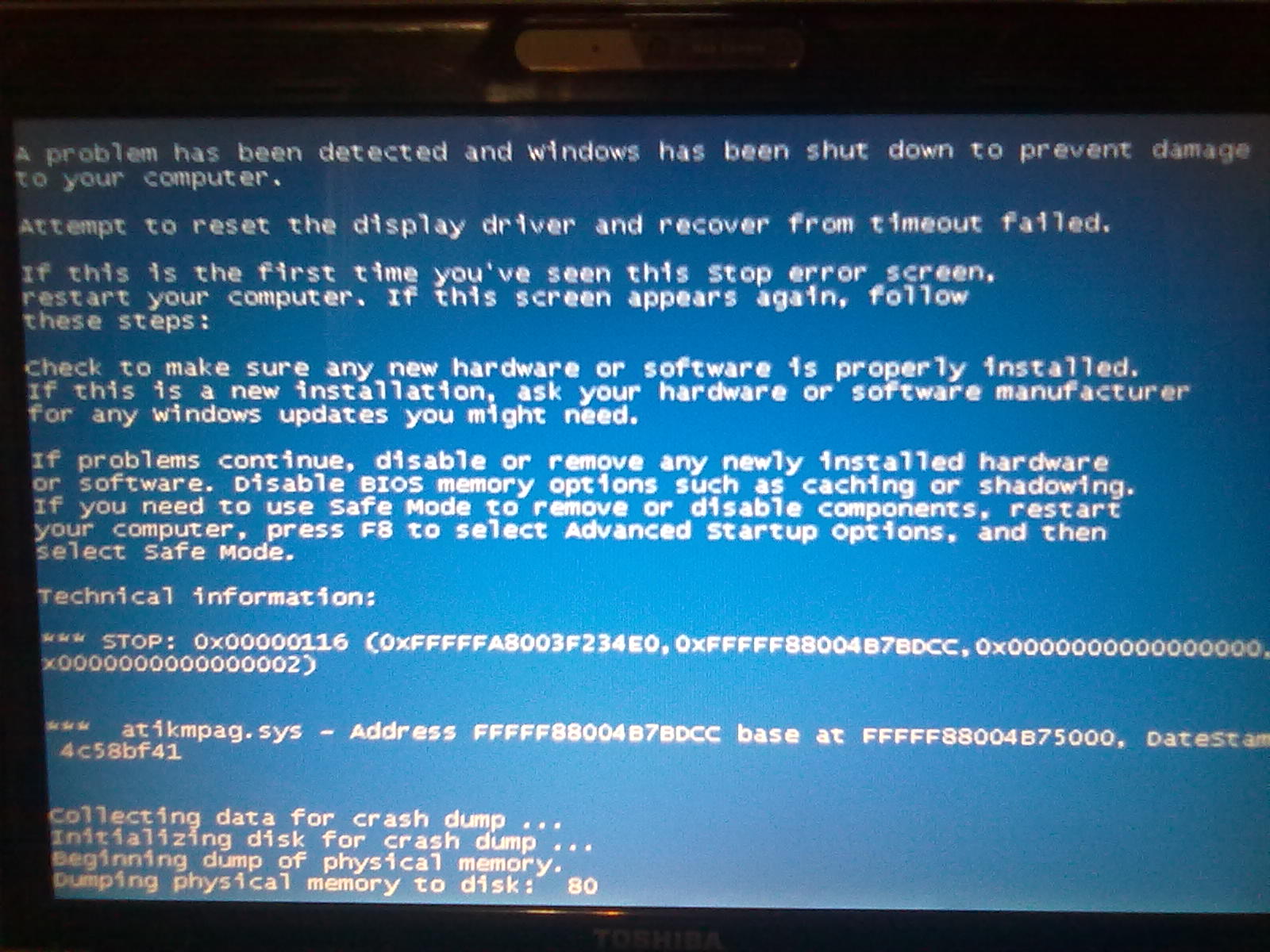
On connecting prior to restart, dos recognizes my displays but prior to starting windows I get a blue screen.
(Below all done with intel card disabled in device manager)
Using bridged setup I get code 12.
36-bit on both or 36-bit dedicated 32-bit imp I get 8-bit colour, device manager doesn't show an error but display settings only sees my laptop screen.
32-bit everything or 36-bit dedicated, ignore imp shows 32-bit colour but otherwise the same as previous.
There was another user here that was also having trouble with a toshiba satellite, any chance these laptops are incompatible? Any chance that my P34H is faulty? Any other direction I should take before I just give up and return what I can?
Thanks. -
Win7 must have the primary video card enabled in Device Manager so do not disable it. If you have an error 12 then boot Setup 1.x, performing the following PCI compaction:
32-bit on HD5770, then chainload
36-bit on HD5770, then chainload.
32-bit on ALL, then chainload.
If you still see error 12 with the above, then "Save Diagnostics" on Setup 1.x, archive the \diag directory, upload and link here.
A faulty mini HDMI cable could be the cause of your problem. It would still allow the video card to be seen on the PCI BUS but it would BSOD when trying to use it due to the heftier data transmission. -
Alright, I'm not getting code 12 on these, device manager seems to think my card is working but when I try to turn on the screen using display settings I get a blue screen. I have tried another hdmi cable with my last card (came with the card) with no changes but if the diagnostics don't point anything out I'll see if I can pick up another tomorrow as a last resort.
Attached Files:
-
-
I'm referring to the mini HDMI cable that connects your PE4L/PE4H and EC2C. If that is faulty then you'll have the symptoms as described. It's quite frustrating as it will allow the card to be detected but fail to allow it's use.
Your diags show you have plenty of space to accomodate your HD5770 so should see no error 12. -
No worries, I understood which cable you meant. I only see code 12 in one case, chainloading from bridged setup, on all other setups I'm getting a blue screen.
-
bad news guys
after i reinstall my OS and updated my BIOS to 1.35 dual IDA, no matter what i do, i am greeted by Code 43 error
i tried
-reinstalling my os without updates and with updated(SP1)
-reverted to Official 1.29 and 1.35 BIOS
-save dump using RW-Everything 1.4.7 and 1.4.9
-32bit compaction, 36bit compaction
-ignore onboard video card
-do the devcon.txt
-use 258.96, optimus 266.35, official 266.58, driver cd
-boot with vidock unplug and power off then sleep, power on, plug and resume
-remove the PCI BUS on devcon.txt
-unplug, replug, reseat the video card, hdmi cable and power connectors
-hotplug the videocard while on vidocksetup and in windows
-swap the end of the hdmi cable
i did everything i previously did before i had success and now the Code 43 error wont go away
i tested my vidock on a Toshiba A665 Core i3 to check if everything is working and so far it is working perfectly.
i am not sure if i saw this before but i suspect this has something to do why i am receiving Code 43 error
![[IMG]](images/storyImages/picture2na.jpg)
right now i am running 1.35 dual ida BIOS and i enabled some stuff on the BIOS to see if it will make any difference but so far it is not making any
i also did a save diagnose on DIYSetup just incase someone can decypher it
devcon.txt
10DE0E22.BIN
save diagnostic "before compaction"
save diagnostic "after compaction" -
Edit your startup.bat in Setup 1.x to contain the following so when you select "Automated startup via startup.bat" all the right steps are done in the correct order. ie:If you get an error 43 when you chainload, then power off your DIY ViDock, do a Device Manager rescan so that the GTX460 will go away, sleep system, poweron DIY ViDock, resume and do a Device Manager scan.Code:
:: PCI ID of GTX460 is 10de:0e22. Countdown 60secs for user to attach a GTX460.
:: Power on DIY ViDock then plug in mini HDMI in EC2C when prompted
call waitvid 60 10de:0e22

:: Ensure have done a video cards->PCI Dump->Save (Win) to 'configure' the
:: GTX460 so it doesn't hang Win7 startup or cause error 43.
call pcicap load -d 10de:0e22

:: Ensure have done a 32-bit PCI compaction on the GTX460. This is saved
:: to pci.bat. This ensures no error 12 occurs.
call pci

:: Chainload into Win7
call grub4dos w7
Failing that, use Driver Sweeper to remove all traces of previous NVidia video drivers and install the standard desktop driver. Your system has x3100 graphics so can't get the Optimus driver benefits anyway. -
Nando, what do you think about this PSU for my project (PE4H kit and a GTX 580)?
Thank you
-
Ok, I just picked up a new mini HDMI cable and there has been no change. All of my further tests though seem to always produce a blue screen, I've only seen code 12 once. Device manager seems to think that my device is working properly but when I try to turn on one of my displays using display settings, I get the attached blue screen.
I'm starting to wonder if my PE4H is not working correctly. I'm also very curious as to what the switch on the end does (goes from 1 - 3). I'm guessing that's for setting up 2x and so on.Attached Files:
-
-
Just did a system restore and installed the newest driver, no change.
-
is this your laptop? Toshiba Satellite U500 Ultraportable Laptop My Digital Life
if it is then you might need a 3rd party driver(microsoft) for ati 4570M and ati driver for ati 5770 -
That's the base model, mine's slightly different but nearly the same. Where might I find one of these drivers?
-
http://forum.notebookreview.com/gam...851-diy-vidock-experiences-9.html#post5590209
you mess with the inf as above, then
you either install the microsoft driver for 4570m from a list in device manager or download it from microsoft
also you can uninstall the onboard card's driver, disable it in device manager, it'll be standard vga. and then install a win xp driver for 5770. you'll be limited to dx9 only -
Ok, I have an Intel integrated video card, not the ATI as listed in the link, or at least that's what device manager is telling me. I've tried installing the Optimus ATI driver but windows 7 won't let me because it was designed for XP.
I've also tried Nando's steps but windows automatically install the card as with the same HD5770 driver I previously installed even after running driver sweeper. -
I've tried to reinstall my DIY ViDock again with my 450 GTS.
The problem I was having was a texture stretching problem. Would paged pool memory errors from Starcraft 2 hint at why this has been happening? If so, how can I fix paged pool for ALL programs and not just Starcraft 2?
Thank yall!
Edit: So after, I dunno, 4 months we get the 266 updates. I installed it and for some reason, no artifacting, no stretching, ran perfectly fine on my laptop. PE4L-EC2C, Nvidia GTS 450 EVGA, Toshiba Satellite A505
![[IMG]](images/storyImages/84501803.th.png)
I'm not gonna jump to conclusions, I'm going to thoroughly test my items accordingly to make sure all errors have been eliminated. -
nevermind then, I thought you had an ati onboard
-
Update: error 43 also caused by PCI Reset Delay switch in non-zero position
Setting a PE4L 1.5+ or PE4H 2.4+ PCI Reset Delay slider on the 7 or 15 second position will also cause the error 43 if doing a poweron DIY ViDock, then resume-from-sleep method to attach. Win7 must have the NVidia card visible as soon as resume. If it's delayed then a NVidia card will be 'unconfigured' causing the error 43.
Please move the slider to 0sec (no delay) to avoid this with NVidia setups. ATI setups appear to not have this problem. At least the HD5750 I tested didn't. -
Hi Nando4,
When i saw this thread- i was excited enough- and ordered my PE4H kit...
as well as a GTX460-2GB.
I own a Dell Precision M4500, Win7 (64Bit), and 4Gb ram, Nvidia Quadro FX880M (1GB) graphics card...
I use a software- 'Octane Render' that runs on Cuda (3.0 as well as 3.2) with multi-GPU support (well on cuda 3.0 for the time being..).
I shall use the P4EH kit and plug it inside a barebones mini cabinet with 350W+ powersupply...
I have seen from previous posts that 'octane render' can run- no doubt with this arrangement ( http://forum.notebookreview.com/gaming-software-graphics-cards/418851-diy-vidock-experiences-69.html)
I have a few queries:
1) since this software is using the graphics card(s), only for processing.. cant' we use this without an external monitor (and without monitor cloning)? There is a device available called 'Cubix Xpander' ( http://www.cubix.com/content/gpu-xpander-laptops)- which allows PCIex1 expansion to multiple PCIex16 slots (with own power supply- like 750W). It doesnt require any external monitor while useing 'octane render'. This is a 'bang-on target' product for GPU expansion for laptops as well as desktops- but its expensive (950$ for laptops, and 1900$ + for desktops)..
For this particluar software (octane render), cant we use it without the external monitor- as GPU is being used for processing only..?
2) I have an onboard Quadro FX880M (1GB) card on laptop... While using this DIY-rig (PE4H), can i use my primary card too for processing as well display of laptop monitor...?
These two questions bother me...although i have already ordered the kit- and will try and find out the answers..but i thought i should ask the guy who started it all
anyway...big cheers and congrats on the whole DIY-vidock thing- its cool.. -
WOW!!!
i am in the verge of giving up because i almost done everything i previously did and the code 43 just wont go away
and after reading this
what i did was put the slider on the PE4H to "disabled" then put my computer to sleep, power on vidock, connect then resume and then...
IT WORKED WOHOO!!!
![[IMG]](images/storyImages/picture2pn.jpg)
![[IMG]](images/storyImages/43484569.png) Last edited by a moderator: May 8, 2015
Last edited by a moderator: May 8, 2015 -
hi suhail_spa and welcome to the forums
i have a PE4H + EC2C(express card) + Galaxy GTX 460 GC 768MB and my computer is Called Acer Extensa 5620z Pentium Dual Core T4400 2.20ghz 4GB DDR2 667mhz that has Intel X3100 which doesn't support Nvidia Optimus and i have tried the Ultramon/Chung-Gun Method to be able to use the DiYVidock without having external monitor
unfortunately, the performance of running internal lcd using Ultramon/Chung-Gun method for me is not worth-it. the results using internal LCD without Optimus is not acceptable and in games it is not playable. you need a very powerful CPU(3.0Ghz+) to be able to make use the vidock for playing games
i also happen to test my DiY Vidock on an Optimus Enabled notebook(Toshiba A665 Core i3 350m 2.27ghz Intel HD) using internal display and the results are "O.K."
unfortunately on both internal LCD setup(Ultramon/Chung-Gun and Nvidia Optimus), Nvidia Cuda is not Present/Enabled or at least i cant see or use it so no GPGU for me
im currently using an external LCD using a Dell 2007WFP S-IPS that i won on ebay for dirt chip and i also tested on my computer and the Toshiba A665 optimus enabled computer to see if running external LCD would enable CUDA. and by running external display, i can now use CUDA for GPGPU
edit: i dont know if these applies to everyone but disabling my onboard graphics and setting my external monitor as main display makes everything much much smoother in terms of user experience -
guys i need advice quickly cause i got only 1 more day and i am about to upgrade my CPU "Pentium Dual Core T4400 Dual-Core 2.20Ghz" and right now i am torn between Core 2 Duo T8100 and Core 2 Duo T7500
Core 2 Duo T8100
-2.1Ghz
-3MB L2 Cache
-800FSB
-10.5x multiplier
-SSE4.1
Core 2 Duo T7500
-2.2Ghz
-4MB L2 Cache
-800FSB
-11x multiplier
-NO SSE4.1
right now, i cant play games such as GTA IV, Mafia 2, Metro 2033 and etc because my cpu is holding back my gpu and has very litte L2 Cache "1MB" for intensive CPU games
from what i read, L2 Cache is very crucial for CPU intensive applications such as games and etc. so more L2 Cache means more FPS from my understanding
but i am very intrigued by the SSE4.1 as to what it is. i tried to google it to better understand but so far no concrete testing and review focused on it, instead people just assumed that it gives performance boost. as to how many, i don't know thats why i am consulting you guys
if i pick the T7500, is lacking the SSE4.1 will make a difference? if so how many performance lost?
i am also aware that t7500 is 65nm and t8100 is 45nm but that doesn't matter to me because what i want is performance. i don't need battery life because i am always using it plugged and i have a notebook cooler and i am willing to take of the cover of my laptop in case it becomes hot
edit: i also upgraded my BIOS to a modded one with DUAL IDA enabled and from what i understand, i can overclock the CPU and add 200mhz on either both of them.
(P.S.) according to people that i have asked, my computer is TME locked so no software overclocking for me using setfsb and the only way to make that to work is to do a hardmod and manually modify each wires and stuff in which i don't have any knowledge or experience to do so -
thank you for your help
(some reputation added in good faith..)
but can you clarify if 'while using the external GPU on DIY Vidock for the CUDA application'- my onboard graphics card can also be used for the same CUDA application-simultaneously..?
i know this might be an awkward question- as CUDA is relatively new and not so many experiences around (not in gaming- imo) the community...maybe this might not be the right place ...
i wonder how the 'cubix GPU xpander' works- without needing external monitor...
http://www.cubix.com/content/gpu-xpander-laptops
might be interesting to know that- as they run multiple GPUs in tandem- without external monitor.. -
according to the nvidia optimus post, nvidia optimus will only work on Intel 4500mhd, x3150 and Intel HD and nvidia optimus is needed to make the vidock work without needing external display
assuming that your computer has only Nvidia Quadro FX880M, i would assume that Nvidia Optimus is not available for your laptop in which Internal LCD wont work unless you do the Ultramon/Chung-gun to make the display work
on my experience on using internal LCD on intel graphics, Nvidia Cuda is not available
also you need to physically launch the application/software on the display of the external video card so that it will run on the external graphics instead of the onboard video card if optimus is not enabled -
just a quick update guys
after i installed creative xfi mb-2, the sleep and hibernate function is gone
it would also give me BSOD if i plug the vidock directly and sometimes it will give me Code 12
doing a 32bit compaction and 36bit compaction made the code 12 disappear but it would not output display to my external monitor and gpu doesnt read the sensors and clocks
in the end the only thing that solve my code 12 problem is uninstall Creative XFI MB-2 and use Driver Sweeper and Ccleaner registry scan to clean all traces
so far i have done a few reboots and i am not getting any problems
i also notice that if i let my usb webcam and mouse connected while i plug the Vidock, it would either not function and need to reconnect or i would get a BSOD so i need to Physically unplug any USB devices before i plug my Vidock and Replug it as soon as it output video on my external monitor -
Upon patching to the latest Nvidia drivers. I'm experiencing frequent stutters in Starcraft 2 and Dragon Age II demo goes NUTS. Crazy shapes and all that sort of thing covering the entire screen.
What might this be related to?
Before, I could not run a FF14 Benchmark without the shapes...now I can and STILL can. I also had paged pool memory errors with Starcraft 2 and those are gone but the stutters are there and now Dragon Age II is showing signs of errors. I've almost got this fixed, there something missing and it's NOT the video card. I've RMAed twice both with the same effects.
I don't wanna give up on getting this to work.
Thanks guys for all the help thus far. -
No worries, thanks for try to help, I've been a little frustrated with my progress so far. I'm pretty sure I'm going to have to give up and settle for a USB3.0 video card once they finally come out.
Is the reset delay switch the switch on the left side of the chip as seen here?
![[IMG]](images/storyImages/PE4H-ver2.4.jpg)
I'm guessing 1=no delay, 2=7-15s, 3=15-30s. -
Hi! I pretend to perform a DIY vidock on a hptx2500 with a ZM86 cpu. I saw 2 users performed it already on a hp-tx2: Chesniak & yuutsumi. I couldn't find a way to send personal messages so I'm asking it here, how can I contact them to ask for a few indications?
I hope I don't bother anybody posting this, thanks and regards,
Felipe -
Goodwin,
Yes it is the switch on the left side of the board in the picture you posted, above the first HDMI port.
SW1 is disable (default)
SW2 is 7 sec delay and
SW3 is 15 sec delay
DIY eGPU experiences
Discussion in 'e-GPU (External Graphics) Discussion' started by master blaster, Sep 18, 2009.


![[IMG]](http://img215.imageshack.us/i/aiday.jpg/)




![[IMG]](http://img694.imageshack.us/i/84501803.png/)


