Problems? See this thread at archive.org.
Here is what happened using the CX430. I fiddled enough to get things working using the method described earlier. First I tested the internal LCD with 3dmark, then I grabbed a dell monitor and plugged it in to the DVI port. I was rather confused because Win7 wasn't properly detecting the monitor at first - I had to plug it in a couple times. After I did get it working, I tried playing with a couple things, pulling out the expresscard etc. I'm not sure what happened but at some point I couldn't get the ext monitor to work at all. Then I tried plugging my 1080p TV into it and the whole system hung. After that point I was never able to get an external display to work until I changed PSUs - which happened because I shorted the CX430 trying to get the CX430 more power using the 8 pin adapter. Since it no longer works I can't re-test.
Could have been the PSU, could have been something in software. All I can say is after changing PSUs I haven't had any further issues. Although I'll probably try another one because the Cooler Master is a little noisy.
-
The compaction is needed to resolve the error code 12 you get after installing the drivers. There isn't enough PCIe space for the card, so you have to use egpu setup to rewrite the PCIe allocation to make some room. Chainloading lets egpu setup do the PCIe mapping before Win7 loads.
-
would you still have to do that if you just start the card via going into standby under win7?
-
I tried for a long time to get this to work. Without fail, every single time I tried the standby/sleep trick the machine would BSOD with "The driver is mismanaging system PTEs". There was some post that said you must boot with compaction for a system that does not have enough PCIe space allocated, so when I read that I stopped trying.
-
I know vidock isnt really supported, but figured i'd drop a question.
I bought a vidock 4+ and a gtx 550 ti to play around with. The results went backwards, with my laptop in the sig with the fx1800m I could get a 7600 3dmark score. Putting in the gtx550ti, I went backwards to 5300. Not what I was hoping to do at all. Is this driver related since i can't run the optimus without an intel gpu?
Annoying to say the least, still havn't given up hope, but really not sure which direction to head. -
When did this happen? You used molex to 6 pin PCI-e first right? The GTX460 pulls 160W, which is a bit more than the rated power of 2 6 pin PCI-e. In your case this would've been provided by 2? molex connectors, 1 6 pin PCI-e, and 1 floppy cable (which I would be weary of running more than 3A through). If the molex connectors were a bit sketchy you'd easily be encountering some problems.
-
well if the dv6/7t series doesnt have an express card port, wouldn't I be able to purchase a usb to express card adapter and just plug it in the usb port?
-
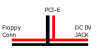
Does anyone know if the floppy power connector on the pe4l can be used as a powersource if you use a DC power adapter? Simplest way would of course to test it by simply hooking up a fan or something to it.. but I don't have the stuff yet (do have it ordered).
If it can be used as a powersource I could add a fan to my enclosure, if not I'll need to forget about that idea.. or use the USB power for power.
@nick359
Are there any USB 3.0 USB->Expresscard converters? Because USB2.0 is too slow for any decent resolution even if it worked. -
cant the fan get power from the psu?
-
http://www.google.com/products/cata...=X&ei=xdY1Tu__FsfSiALYq4ywCA&ved=0CI8BEPMCMAI
I'm not sure if its 2.0 or 3.0, but its the only one ive found -
No that won't work, you need an Expresscard slot built in because you need a direct PCI-e link to the CPU/chipset.
And yes, you can use the floppy power to hook up to another DC-DC converter, although I think it's better if you just hook it straight to the PSU...
EDIT: sorry misread, but I think it should work as long as the 12V coming out of the onboard converter is somehow connected to the floppy port. Just check the schematic on the hwtools website. -
It's usb 2.0....
-
This happened when I unplugged the molex adapter and tried to get one of the 4+4 pin cables on the PSU to work with the 6 pin socket. It was only after the PSU and video card fans stopped spinning that I realized I'd forgotten to switch off the PSU before unplugging/replugging stuff. Dead PSU.
And that is why you always make sure your equipment is off.
/arrested development -
I think the limited bandwidth of the pcie x1 link is the bottleneck here. check out my eGPU benchmark and you'll see how weak is x1 link for some applications such as 3dmark06. For some other applicaion/games it may not be that bad.
I'd suggest you run some benchmark with the application that you intend to do on this eGPU setup to see whether this thing is useful to you or not.
I'm in this thing mainly for the OpenCL/Cuda programming so I can purposely make my application run almost entirely on the eGPU by itself therefore a x1 pcie link is not a very big issue. -
thanks to nando4, i finally have everything up and running. here's a link for my benchmark. NVIDIA GeForce GTX 460 SE video card benchmark results
apparently my scores are pretty low. i will probably be working on that issue next. thanks to all who helped!!
sager np5793
dgpu GeForce 8800m GTX
Intel Core2 Duo Extreme X9000 2.8GHz Processor w/6MB L2 cache - 800MHz FSB
4Gb RAM
Win 7
vidock
corsair cx430 psu
gtx 460 -
@ mental2,
Appreciated if you can do the rest of the benchmarks like 3dMark Vintage, Resident Evil & Devil May Cry (please see first post). If you can post gaming experiences, it will be great too. I found not many game experiences has been posted lately.
Many people who interested with eGPU have asked what kind of performance they can get with eGPU. Of course we can give technical explanation but if we have the real data, it can give better picture what kind of performance can be expected. -
i'd be surprised to see a 8800 gtx be beaten by a 1x pci linked 460.
Does anyone know when the 2.0 expresscard adapter from hw tools is out? I sent them an email but they havnt written back. -
The latest HP DV6T stated in Nando's list doesn't come with expresscard slot, how the egpu solution can be done?
-
I've been a long lurker since in this thread.. now I just realized that I have a mini PCI-e slot with my wireless device is but my question is will it work with a sub notebook HP DM1Z with AMD E-350 fusion platform? I'm a noob and do I need to tweak something in the BIOS?
-
If ExpressCard slot is not available, can use mini-PCIe port.
-
Does noone know when the expresscard 2.0 adapter will be available from hwtools?
-
Should be already, but I haven't found it either on www.HWtools.net...
-
I just looked at the schematic of the pe4l but that only mentions the pinout of the "floppy conn"? I could be wrong though, not a star in reading circuit diagrams (I'm a software man, not a hardware man).
The only discouraging information I found is
Input rather than output, but it's only a versioning note so it could be an oversight.
What I'm hoping for, is that it's hooked up like on the attached image, so basically I hope they were cheapskates and didn't use diodes. Does this even make sense? Frigging decades since I was taught only the basics of this stuff, pretty much forgot all of it
Attached Files:
-
-
For people waiting thunderbolt equipped egpus, villagetronics is working on a version for the fast I/O port:
External Thunderbolt PCI Expansion Chassis and Hub in Development - Mac Rumors -
i'm not actually sure who was the original source who said that it is gonna get released on the 30th? maybe he actually ment 30th of august. ^^
-
Thx for your reply, seem like it's not direct accessible like expresscard for DV6t, remove back cover and do alot of wiring looked like not possible for a newbie like me
Should i get a macbook pro 15 2011 and wait thunderbolt egpu solution? Mac sounds like always overpriced, any comment? -
if you are going the mac way, go for the air or the 13 mbp, if you want 15, you should just forgo your budget and get the higher end model
-
Thanks for your advise, i heard a rumor that thunderbolt for air carries only 50% bandwidth of normal thunderbolt port, does it affects the performance much?
Ya, i am planning to get the higher end model but the weight and temperature always worry me, any news about new laptop with thunderbolt or lightpeak except for the overpriced Sony Vaio Z and Mac? -
according to intel the connector only provides 2 full duplex channels (bi directional 10gbps) so if you get the air or the mbp it wont make a difference.
Although Im torn between accepting this, this would only make sense if the connector or the cable wouldnt support the bandwidth
and the vaio Z dont use thunderbolt, nor lightpeak, its something only they will have, it aint sanctioned by intel (developer of thunderbolt and USB)
The weight is indeed on par with what you get outside apple. However there are no heat issues with it. including the case temps, and the components temps. Although dont try to game on your lap, even on larger machines this aint something one should do. -
the 460 may not beat the 8800 gtx, but in a laptop, the 8800 gtx produces a lot of heat and burns out after a couple of years... (unfortunately!)
-
Unfortunately those scores seem correct for an x1 link without optimus. You have no chance at optimus, but if you could do x2 performance would skyrocket.
-
Here is my 3Dmark Vantage result. That too is pretty low.
i'm not sure i know of any other benchmarks? i'm pretty new to this type of stuff, sorry. -
Hi,
using a Dell U2711@2560x1440 with a Vostro 1500 forces me buying an expensive laptop with displayport or trying DIY ViDock.
I 'd like to choose the cheaper solution.
As far as i read the Vostro 1500(8600mGT) qualifies for up to pcie 4x, but i guess this would be too much trouble. Also it would be quite expensive.
But 2x i would like to try. Can somebody give me a recommendation about the additional GPU? Until now i use WinXP, could i continue using it if i choose a nVidia GPU? The GPU is not really needed for gaming. For gaming i could connect the external screen to the VGA using internal graphics and play with lower resolution.
Is it possible to somehow hotplug the additional GPU? Either in standby or hibernation mode? I would be happy to avoid rebooting. -
hwtools has written back, apparently they do have the express card 2.0 adapter but they only got a few (at least thats how far i understood it).
-
No need to figure out yourself. Everything can be found at first post.
-
That would make sense. You know what I'll just go check right now...yes it looks like it would work. However power bricks tend to have super unreliable power so I'd be careful about using them like this. If it were me I'd stick a fat capacitor on it.
-
Yes you can hotplug PCI-E. All you have to do is sleep, then plug in the card and/or turn its PSU on. On resume the system will detect the card. If you do not sleep, the card will not be detected. XP will work, and does not limit which card you can get. Only Vista imposes any limitations. You can get any card you want as long as it's PCI-E.
In regards to x2 and x4, if you don't plan on gaming there really is no reason to trouble with anything higher than x1. You may not be able to run x2 and x4 while hotplugging, it depends on what your bios does to ports when the system sleeps (mine annoyingly turns port 2 back on causing a lockup). If you do get a PE4H though remember you can get the mini HDMI cables cheap outside of hwtools, making the bulk of the cost the PM3Ns for x4. No one yet has done x4 so it would be interesting to see. -
Hey guys, Happy to report that PE4L+5770 works fine on my DELL 1420.
No further operation needed, just hotplug and play. I have to disable my EVDO adapter to get the USB working.
HOWEVER, there's a performance problem. I can only get 25.7 average fps in RE5 fixed test, DX9. That disappoints me because I can have the same performance using an older 9800GTX+. In terms of gaming, I have 20+ fps in Starcraft 2 with overall settings HIGH, but this drops to 10 fps when having a fight. DIRT 3 is worse, I can only play in Ultra Low....
And overclocking the GPU to 960mhz make exactly NO differece(RE5 still at 27.5fps)..What's the problem?
My settings are Dell 1420
CPU T6900 2.5 Ghz
RAM 2G
eGPU Sapphire 5770 512mb
OS Win7 32bit
HD 500G 5400
Can anybody help? Is my performance bottlenecked on RAM or HD?
I believe x1E is not available for me becuase my expresscard sits in port 6. -
Hi, I just bought a Lenovo T420 and I'm interested in this eGPU thing, however I don't really have a clue to how it works. I have a few questions.
1. What exactly should I be looking at to buy and how much will it cost me?
2. How much will this improve graphics from NVS4200M?
3. Is set-up difficult? -
@ sklsy,
That is because the x1 link bottleneck the HD5770. You'll get better performance with x2 link but you'll need PE4H & if your Inspiron 1420 have enough available PCIe ports (ports 1 & 2 or 3 & 4 or 5 & 6). -
- PE4L or PE4H, PSU & desktop graphic card:-
- You can get PE4L (USD87) or PE4H (USD107) or if you're located in US, you can get it from Harmonic. OR you can wait for ExpressCard 2.0 kit from HWtools.
- PSU choice depend on the graphic card you're going to use. I think you'll need not more than USD60. Before buying check the +12V maximum current. Compare the +12V power against the graphic card power requirement.
- Desktop graphic card (USD???)
- Depend on the what external graphic card you use. x1.Opt setup (with Optimus) is supported by your notebook. Surely, GTX460 with x1.Opt setup will give better performance than NVS 4200M.
- Please read post #4025.
- PE4L or PE4H, PSU & desktop graphic card:-
-
I got a problem here:
I followed the instructions very well until I finished "Select Using startup.bat",the screen showed this and stopped:
-----------------------------------------
[cmd=*setpci -s 0:0.0 54.b=0:2*]
-----------------------------------------
then I proceeded to choose "Chainload w7|orig", a window came out and said:
----------------------------------------------------------------------------------------------------------------------------------------------------------
WARNING: Some unallocated PCI devices exist as don't have pci_valid_alloc=yes. Recommend cancel. perform PCI Compaction to get all devices allocated the proceed to chainload.
----------------------------------------------------------------------------------------------------------------------------------------------------------
I did perform PCI Compaction and came back to "Chainload w7|orig again", still showed the same window.If I ignore this and proceed anyway, the screen changed and show the following messages and stoped once again:
------------------------------------------------------------------
Loaded: DOSKEY, ANSI, SMARTdrive Cache size: 2,097,152 byte.
(TMP=T: ) RDISK 2-MB [cmd=*setpci -s 0:0.0 54.b=0:2*]
------------------------------------------------------------------
I am sure that "[cmd=*setpci -s 0:0.0 54.b=0:2*]" came out is because that I add a string to startup.bat with "call iport dedicated off" to in the All profiles section.
When I ignored this and ctrl+alt+del restarted again, chose "Automated startup via startup.bat", I was not able to enter OS select list and back to 4-choiced-menu. Only I deleted "call iport dedicated off" from startup.bat, I could see OS select list and get into win7.
Waiting for a solution.
ps1: I'm using SONY VAIO S13 series laptop. I got a error "Code 12" in the device manager. And I did update the driver for both drivers of internal and external graphics cards, but the error still here. And the BIOS of my loptop is up to date. And my notebook have 2 piece 4GB memory, so I can not reduce to 2GB.
CPU I5-560M
RAM 8GB
GRAPHICS NVIDIA 310M
ps2: I'm using DIYViDock-Setup-10e8 -
Use the new Setup 1.0f-pre version and do not use 'call dGPU off' since your S13 doesn't have switchable graphics. Note too that your system doesn't have an active Intel HD/HD3000 iGPU so you can't do a x1.Opt (Optimus) link. Consider trading up to a SB notebook that can do Optimus if you want superior performance.
-
Decided on a new laptop that doesn't have an expresscard slot, so I'm selling my PE4L setup. You get the PE4L and the PSU. All you'll need is the graphics card.
Asking price is $70 total (we can work out shipping depending on location). Buying all the components separately would cost you more than this. The PSU supply alone is $40. Includes all the necessary cables (HDMI, etc) -
Thank you very much! So having both nVidia and Ati GPU's in WinXP doesn't make any trouble considering drivers? Can i install both drivers?
Are the mPCIe-cards (PM3N) also able to hotplug while supend to ram? Or only the expresscard connector? I am asking because i like my expresscard-slot for other things...While writing this i realize that the PM3Ns stay in the socket all the time. It is only necesary to connect the mini-HDMI-cable, which should be able to hotplug, right? -
Does optimus also give a performance boost when used with the internal LCD or does it only do that when connected to an external lcd?
-
With Optimus, you'll get performance boost on either internal or external LCD. If we compare performance between internal & external LCD, of course we'll get much better performance with external LCD. With internal LCD, after eGPU processing the graphics, eGPU will need to transfer the frame back through the PCI link, hence the benchmark score a lot lower compared with external LCD. Please see this post as an example.
EDIT: You can read " x1.Opt: NVIDIA Optimus using Fermi desktop eGPUs for performance & Internal LCD mobile use" for better explanation. -
wow wouldnt have thought that there is a difference of 7000 points just from going from internal to external. Oo
I wonder if the difference is that apparent with a 2.0 x1 link...
Is there no way to get a usb 3.0 framegrabber or a usb 3.0 tv card with hdmi input to get around that problem? Something like that: http://www.blackmagic-design.com/products/intensity/? -
Both drivers work, not sure about sleep/connect/wake up detection under XP though. A quote from the opening post:
So perhaps you need to upgrade to Win7 for full ease of use (I know XP at least doesn't remember the Window positions).
I'm in the same boat as you btw, trying to get an Dell U2711 worthy resolution out of my laptop
If you're still pondering with which videocard to go, I personally went for a ASUS ENGT520. It's got DVI for the needed 2560x1440 resolution, it's passively cooled (silent!) and according to wikipedia it's the only external videocard with VP5 (latest generation hardware acceleration for videos). I'm also guessing that the 1GB of VRAM might help elevate the 1x speed of the expresscard slot, the more it can keep locally the less it will need to be used (I could be completely wrong though, it might only need so much VRAM for 3d work)
The GT520 is also very low power so that might save a few bucks on the electricity bill. Fairly cheap as well, but if you want to spend even less take a look at the GT210 instead.. it's dirt-cheap and does the needed resolution.
Excellent! thanks.
Got the pe4l today, it arrived from Taiwan before I even got the videocard itself (going to be another 2 days).
Don't laptop adapters come with a capacitor of their own? I sure do hope so because I don't exactly have the most stable electricity (old house/old wiring). Thanks for the heads-up at least, I'll see if can find a spec sheet of the power brick.. or maybe even pry it open to see what makes it tick.
I do think the power brick itself should at least be able to output a stable current, it can do up to 70watt and the videocard will only need 31watt tops.
[edit]
Looking good so far "- Stabilized output, low ripple & low interference" Stabilized equals capacitor doesn't it?
[edit2]
I might end up using USB as a powersource for the enclosure fan after all. Going through my drawer with computer parts I found an old 5 volt fan from a MSI GX610 notebook. It all depends on tight a fit the videocard is in the enclosure, enclosure itself (a garbage bin of all things!) does have room for a 12CM fan. -
I don't think it will help or working as you intended.
DIY eGPU experiences
Discussion in 'e-GPU (External Graphics) Discussion' started by master blaster, Sep 18, 2009.