 Problems? See this thread at archive.org.
Desktop cards rely a lot on cooling via metalized pads on which these mosfets are placed.
The MXM cards are smaller and rely much more on the heatsink itself.
I also had to mod ordinary maxwell heatsink in the p750dm to fit the zotac 1070 card which has 5 phases on GPU core. So far it seems to have likely normal results, but once i'll have some more time I will compare the temps on VRM and memory zone with some other laptops.
-
-
The new 15W/mK Gelid Ultra pads have higher Hardness (Shore) numbers. Not ideal with the sloppy low pressure heatsink you struggle with in laptops. Softer pads is better. Way better. Don't look you blind on highest possible W/mk numbers. Softer pads is more forgiving with uneven/warped heatsink who is the status in notebooks.
Last edited: Apr 19, 2020FrozenLord and c69k like this. -
I'm going to get more thermal pads soon. What would you recommend?
-
The 12W/mK Gelid GP-Extreme pads. Or the cheaper Arctic pads. Both very soft.
Edit.
Last edited: Apr 19, 2020seanwee likes this. -
hi ,, Papusan
thermal grizzly minus pad 8 ,,is good ?? for me work good ,,but I would like better
-
Grizzly pads is ok. The fits is most important.
-
I'm using minus 8 pads at the moment as well. I don't like that they ooze silicone oil after a while.
-
good ,no need new
silicone oil ?? is keramic or similar ,,no oil ?
for me only minus pad now work on cpu vr ,,long time ,,other work day or one testing
using on vr and ssd ,.all is ok -
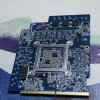
been looking for a VBIOS solution to up the powerlimit of my RTX 2070, but every solution i try either leads to a black screen with backlight or a plain black screen. I then tried to shunt mod the resistors, which pushed it into a Vreg wall, and killed my laptop once power draw was too much (just turned off.) the resistors on the rear of the clevo RTX marked R005 are the shunt resistors, and i shorted them with a bit of wire and solder to check to see if they were the correct ones, which they are. (Literally pushed 2100 boost clock no issue, but draw killed it) I think i would need a 720W adapter to gain enough headroom to prevent the power from tripping.
I circled the shunt resistors in this photo to show the location.
-
Undervolt the gpu. Try a 140/160mhz offset at 2100mhz.
I'm running my 2080 Max-q at 1980mhz with a 230w ac adapter. -
@seanwee Well considering that even the desktop shunt mods don't use wire shorts is for a good reason, it goes into a limb mode on desktop, very much doubt the laptop versions have this protection so you fried your Card at best and system at worse.
Worst of it is, if it's a RTX2070 Max-Q it means it's BGA filth and either some hard work replacing the VRM's hoping you didn't kill the core or VRam or a new mainboard.
Sent from my SNE-LX1 using Tapatalk -
My GS75 is also shunt modded btw. I just bridge the shunts with solder and it works fine.
There doesn't seem to be any shunt modding protection in laptops unlike on desktops.
I'm running into the 230w limit that my ac adapter can supply though. -
Works fine still. After removing the shunt, went back to stock clocks. I used a particular type (26awg) to handle resistance by looping the wire around 5mm before it went back into the other side of the resistors. That gave me ~.004Ω on both, when I should have gone with ~10mm each to make it .008Ω. that's why it didn't go into 300mhz short mode for me. I didn't have the right items on hand so I improvised with the resistance. It appears that the resistance is nominal at 2*.005 so .010 ohms. This gives us a headroom of an extra 150w when we consider that most of the power doesn't actually come from the power cable of the card, but through the slot. The cable is alone max 100w vs 200w through the slot. In spec the slot can provide anywhere from 10a 20v to 10a 7v. Depending on everything, that alone can trip the 330w power supply or the overpower protection.
Card is fine. Within spec I'm sure itd be an absolute monster. Doesn't have any type of issue with 200+w. -
An your GPU holds 1980Mhz at heavy gaming?
-
Yup. Metro exodus runs fine at those clocks with ultra ray tracing.
-
Wow, on what uV? How is your curve in afterburner looks like?
-
He is running hw mod on the shunt resistors, so the card can use more power than it thinks its using.
-
+140 at 1980Mhz +650 memory.
-
But before you lock the Voltage, you slide left or right "core clock slider"?
-
use any tdp mod ?? or need voltage curve + oc ,,max voltage usable ,.before max tdp
only lock is bad ,,curve ,,shift + mouse ,,all above max usable voltage drag down ,, -
So Seanwee has tdp mod and he has more than 150tdp limit on his Max-Q model?
-
or more ,, shunt mod is hw mod ,,not software or custom bios
how long it will be alive ???
-
Hello everyone. I have the Lenovo Y540 notebook with RTX 2060. It´s Locked on 80 W. Is it possible to up this value to 100 or 110W? How can I do that?
-
I just want +10 or +20TDP up to hold 1900Mhz :/
-
More than 90w for sure but not sure if its 150w. By my guess it's probably 130w-140w
Yup, it's a hardware mod. And as long as I keep the temperatures in check it will last as long as an unmodded machine.
Wait for new laptops to come out with 115w rtx 2060s. Then ask owners of those laptops to extract their vbioses and then you can flash it. -
...........seanwee
max q ,, no have difference parts ??,,VR difference and lower quality
I would be afraid of that ,,but I dont know
is hard shunt mod ? i still need mod my gtx1070
sorry translator -
When new SUPER cards will be available?
-
Max-q parts seem to have slightly lower ASIC quality which means they can't overclock as much as regular parts. They are pretty much at the bottom of the speed bin.
As for VRM quality it will vary greatly on how powerful the Vrms are on your specific laptop. My GS75 has 5 50 amp mosfets which is pretty good. For reference the alienware A51m with a 200w 2080 only has 6 of the same mosfets, granted those were burning out but i'm not pushing my 2080 Max-q to those levels of power usage.
And yes, it's a hard shunt mod. With solder.Papusan likes this. -
I've been searching the Web for the 115w 2060 vbios and I came across this.
https://www.level51pc.co/welcome/Productinner/forge15r-rtx-2060-edition
It seems that custom laptop manufacturers already have access to the 115w 2060 vbioses.
Anyone know any custom laptop reps here that might be willing to share the 115w 2060 vbios? -
How Can I shunt mod Clevo 2080? Someone did that before? Whitch resistor i should link?
-
Look for two R005 resistors close to each other. That'll be it.
-
And link both resistors?
-
Look up how to do a shunt mod. If you don't even know what it entails it's best to avoid it altogether.
If you want to risk it, at least understand what you're doing and how it works first so you know how to troubleshoot it in case it doesn't work. -
That's exactly what I asked before. For detailed guide. Maybe my english is too weak
-
I learned most of what I did from YouTube though so I'm not sure if that's a suitable approach for you as it's all in English.
You can have a look and see if you understand.
These two videos show you how it's done but if you don't understand the underlying principles if anything goes wrong/the shunt mod doesn't work, you won't be able to troubleshoot it.
Keep in mind laptop shunts are different from desktop shunts as well so the way you short the shunts might be different. For example, on desktops you can just solder another shunt directly on top of another one but in laptops where the shunt resistor has contacts facing downwards you might need to remove the shunt resistor first before you can solder another shunt there. -
I am using 12W/mK gelid pads in my MSI PS63 8RC, because they are softer. Just wanted to point that there are newer 15W/mK pads
Also think that gelids 12W/mK have very good perf/price ratioPapusan likes this. -
too many unknowns for mobile cards, that's why I'll give it a rest
-
Hi guys! I can not cope with the flashing of my card( all the time I get a trouble . the problem is that after flashing the ID of the video card becomes zeros instead of numbers and letters
notebook gt72 card msi v1.2
I think the problem is that my video card has 4E 56 , and the program Mobile.Pascal.TDP.Tweaker. always saves 55aa
can you help me please?
bios link dump >> https://drive.google.com/open?id=1bPyLyjQE8PFt2RrHAvSqYHUXQF1DVWM0
Hello
only the latest version of your program reads an encore of my video card. others see only zeros. everything would be fine but after flashing i get the black screen on my laptop. what to do?
notebook gt72 card msi 1070 v1.2
can you help please?
bios link dump >> https://drive.google.com/open?id=1bPyLyjQE8PFt2RrHAvSqYHUXQF1DVWM0 -
1BE1 is v1 not 1.2 last bios 3A or A8 no boost
gpu z ?? 1BE1
my
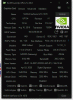
bios 3A
https://www.msi.com/Laptop/support/GT73VR-7RE-TITAN#down-firmwareLast edited: Apr 25, 2020 -
does not work
-
need programmer ,,your gpu z is bad ,,broken card ,,use correct bios ,,card is real 1BA1 / 1BE1 gsync ,,,,1BE1 // 1BA1 is different card ,,V1-E or 1.2-A .,I'm not sure
nvflash not work ,,exist inforom ?
nvflash64 --version
.,but I think you need a programmerLast edited: Apr 25, 2020 -
I could not understand you clearly
why the card is broken if it works fine and stuff....
my programmer works well too...
-
??????????
look to my gpu-z ? oem card gt75 7re -
all bios starting on 55aa will not work my card. I have already noted this twice. you still do not see. Only 4e56 will work. ( because besides GT75 there were GT73 GT72 GT 63 GT62 GT83 and Vortex - with gtx1070mxm)Last edited: Apr 26, 2020
-
You say your vbios starts at 4e56 , all you need to do is enable black screen fix within the application as I am guessing your having a blank screen issue after modding.
Sent from my SNE-LX1 using Tapatalk -
hi ,,psl exist more info about "black screen fix" need this for all card ?? ,,why exist "remove" ???
this is your gpu-Z
vendor xxxx and id 000000 ?? some info / NA
that's ok and the card works? my have all info
,.that's why I thought you had a problem with the card
translator -
4E56 will always display 0000000 at the end as your removing the IFR header which causes the blank screen issue on modded bioses, even my GTX1060 has this issue. There is no point trying to get the ID right as it will code 43 I have tried myself many of times and gave up. If the GPU is working well with 00000000 ID leave it as that.
All it means is you'll need modified drivers all the time like I do.
Sent from my SNE-LX1 using Tapatalk -
can you please give me instructions on what you did to increase the tdp and everything worked? (step by step)
How to avoid a black screen after modifying the BIOS? -
Dump your vbios 3 times with the SPI USB programmer, check the checksums match if they do then take a copy of one of the dumps and open it up in the pascal editor. Make your adjustments and make sure you select black screen fix it will be in one of the tabs. Once done press save and then flash the new file back via the SPI programmer. If your starting with 4E56 just bare in mind that the black screen fix will remove the IFR headers so will return a sub vendor and subsystem Id of 0000 so you will need to installed modded drivers after.
However if your vbios doesn't start with 4E56 do not apply the black screen fix.
Sent from my SNE-LX1 using Tapatalk -
ok ,, when i use tdp tweaker ,, on my oem card ,, i lose the vendor and id ?? and do you need "mod" new drivers all the time?
gsync works ??
Mobile Pascal TDP Tweaker Update and Feedback Thread
Discussion in 'Gaming (Software and Graphics Cards)' started by Coolane, Jun 20, 2017.


