Problems? See this thread at archive.org.
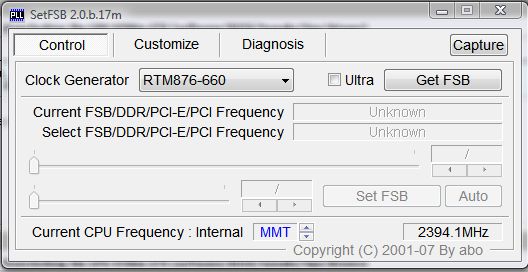
this PLL doesnt show up on the drop down list in clockgen, is there a way to add it?
-
Are you talking about in SetFSB? That's where I'm talking seeing it.
Attached Files:
-
-
I have the Toshiba Qosmio F55 which I *believe* uses the same motherboard, I know they use the same exact video card, and before I sold my Intel Extreme X9000 CPU, had installed it on my laptop, but you are on your own if you try it. The X9000 CPU booted up fine, ran fine, etc. I even ran 3DMark2006 on it. I now have a X9100 on my laptop. You are better off buying and using an X9100 CPU on your X305 laptop. I hope this helps. God Bless
-
Yeah my mistake. I was thinking about the compatibility from the wrong direction. The X9000 will fit in these computers.
-
I'm sorry i forgot to mention I'm up grading to x9100 thank to your advise and thx everyone else for the reply's!
-
The x9000 will absolutely work. Read the previous posts when I dropped the T7500 in this computer. It's from the santa rosa chipset, merom CPU. The montevina/cantiga chipset is backwards compatible.
x9000 will save you money.. and it will work great. but as JDELUNA mentioned, x9100 will maximize your performance.
EDIT: Sorry Kevin
-
Yeah I realized my mistake a few posts back, but I'll go edit the original.
btw, I have a pm that I need to shoot you E-wrecked. -
My bad.. I never made it to the last page before shooting off at the mouth and sending a response to the post. Sorry
PM away. -
i dont think this works for the P7350, laptop locks up after the slightest change in settings with setFSB
-
is it possible to upgrade to dual GPU's on this laptop
thanks in advance
-
looks like they're now being shipped with em..so sure, if ya can find a GPU for sale
-
I wont upgrade processor but i don't know what buy P9500
1. With core stepping C0; Socket 479
or
2. with core stepping E0; Socket 478. -
Hi guys,
I have a x305-706. It's basically dual 9800's with the main 9400 chipset giving me a total of three gpus. I have a big problem. My laptop almost always overheats when I am in game, any game, after about 10 minutes or so the laptop completely shuts off. I checked my temps with nvidia system tools and the 9400 is always 80+ and reaches 90 during gameplay causing the laptop to shut off to protect itself. I was trying to find out where the 9400 would be on this laptop so I can apply the arctic silver. I already have tooken off the case, but wasn't able to spot it. Is it on the bottom of the laptop maybe?(would be impossible to apply it then since the bottom doesn't come off)
If anyone can show me a picture of the 9400 or point out where it would be on the laptop it would be very appreciated.
Here are some pics of the laptop opened from the original poster:
Disassembly guide with Pics http://smg.photobucket.com/albums/v720/christopherquinalty/Qosmio X305-Q701 disassembly/
Hi-Def Component Pics http://smg.photobucket.com/albums/v720/christopherquinalty/full teardown of the board/
I don't know if that helps any since I have a x305-706, but i'm pretty sure all x305's come w/ the 9400 gpu chipset, -
What utility does everbody use to overclock there GPU's on a Q701???
Ive tried everything and nothing works. Im on Windows 7 64.
THanks!
Toshiba Qosmio X305-Q701 Overclocking the GPU 9700m GTS (software/BIOS/tweaks/tips/drivers)
Discussion in 'Gaming (Software and Graphics Cards)' started by E-wrecked, Aug 10, 2008.