 Problems? See this thread at archive.org.
nVIDIA GeForce Drivers v417.35 WHQL Windows 10 - (64-bit)
nVIDIA GeForce Drivers v417.35 WHQL Windows 7, Windows 8.1, Windows 8 (64-bit)
Game Ready Driver Release Notes (v417.35)
Game Ready
Provides the optimal gaming experience for the release of Deep Learning Super Sampling (DLSS) in Final Fantasy XV: Windows Edition.
3D Vision Profiles
Added or updated the following 3D Vision profiles:
@Ultra Male Are yoo ready, bruh?
- Insurgency Sandstorm - Not Recommended
- Atlas - Fair
You're all welcome to the new barbeque party. Let's see how much this driver will destroy for the users
![[IMG]](images/storyImages/nRtkmIB.jpg)
Fixed Issues and Other Changes
As usual... New is always better
- Updated GFE to 3.16.0.140.
- [SLI][TITAN Xp]: SLI is disabled by default after installing the driver. [200471881]
- [TITAN V][NVIDIA Control Panel]: The Workstation->Manage GPU Utilization page appears when it shouldn't. [200470813]
- [Rocket League]: The game launches to a white screen with audio in the background and then crashes. [2451530]
- [Battlefield V: Day0 97][Ansel]: After being moved all the way to the left, the Ansel field-of view (FoV) slider stops following the click-and-drag mouse movement. [2438857]
- [Hitman 2 Silent assassin]: There is flickering texture corruption in the game. [200472315]
- [Notebook][3D games]: Frame rate of 3D games may drop to under 30 fps on notebooks. [2456653]
*Display Driver Uninstaller v18.0.0.5
Official 417.35 Game Ready WHQL Display Driver Feedback Thread (Released 12/12/18)
-
-
First bug, no nVIDIA control panel upon right clicking! What are these clowns a nVIDIA doing?
After installing it, GeForce Experience is telling me that I need to update my driver, to the same freakin' version!
-
Then update
 Your choice install their bloat
Vasudev, Dennismungai and j95 like this.
Your choice install their bloat
Vasudev, Dennismungai and j95 like this. -
have you an nVIDIA control panel with this driver?
-
-
ok I reinstalled the driver but this time I didn't select CUSTOM and de-select the 3D Graphics driver as I usually do and now I have the nVIDIA Control PanelVasudev likes this.
-
If you install the DCH instead of standard Nvidia driver, you have to get the control panel from the Microsoft Store.
-
17763.194
Switching to MSI mode.Papusan, Vasudev and Spartan@HIDevolution like this. -
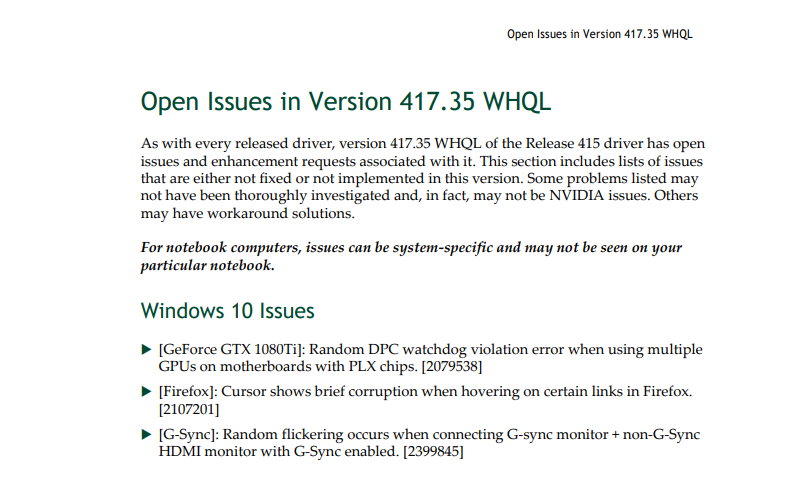
Talking of open issues: Has anyone here encountered an issue where the desktop lags insanely hard after using Firefox to view Youtube clips?
I cannot confirm if this is present in this driver (I killed firefox lol) or perhaps its' an isolated issue on my build?Vasudev likes this. -
I wanna test this "DLSS"
But I dont have the game
-
I'll be the GP Ultra Male
Its a known bug w/o any fixes in this driver crap. I'll test it out and see if there's a remedy.
@j95 I'll test your driver, XtremeG drivers and BS Stock nvidia drivers to give a comparison of performance in 3dmark FS, Witcher 2/3 gameplay,Hitman 2016,Thronebreaker @4k. Hopefully, gaming bench results might be screenshots or it'll be based on how fluid it was from older driver gameplay. I'll post the results in Modded driver thread. It will take 2-3 days. Sorry for the wait because I'm busy with a couple of entrance exams.
EDIT: I'll test custom display OC and OC performance at stock voltage,+25mV and +37.5mV overvolts.6.|THE|1|BOSS|.9 likes this. -
Op updated with new released *Display Driver Uninstaller (DDU) v18.0.0.5
ChangeLog:
-New requirement starting from this version ".NET Framework 4.5 now required."
Reason: Recently with Windows 10, we now see DCH drivers @Ultra Male and theses drivers come with their control panel from the Microsoft store App.
To be removed, some library that were only available for 4.5 is now forcing us to update too.
The downside is the end of support of Windows XP.
-Nvidia,Intel,Realtek DCH driver removal is now supported.
-Additional Realtek audio cleanup.
-Removal of new subkey found in HKLM/Software/nvidia corporation/installer2/ (Drivers)
-Removed "CharSet:=CharSet.Unicode" and "MarshalAs(UnmanagedType.LPWStr)" from "Function CM_Get_Device_ID" that were giving unexpected results for retrieving the DeviceID with .NET 4.5
-(DCH)Removal of the Extension device class and their componentsAshtrix, 0lok, 6.|THE|1|BOSS|.9 and 2 others like this. -
I am also waiting for XG drivers to be released
Edit:-
As always...
XtremeG released it with modded drivers [Performance + Tweaks] as always
For Laptops:-
https://www.reddit.com/r/XtremeG/comments/a5vs78/xg_41735_mobile_win10_x64/
For Desktops:-
https://www.reddit.com/r/XtremeG/comments/a5vsj3/xg_41735_desktop_win10_x64/
Enjoy
Ok here is what they do on every driver I got the list from there dead website
http://tweakforce.com by using
http://web.archive.org/
Any more information you want to know.. ask them..XG drivers are tweaked to improve image quality and stability while performance may increase or decrease slightly depending on your system specs. A few XG registry tweaks include mods to the following:
Paletted Textures In Video Memory
Render Quality Flags
Target Flush Count
Texture Clamp Behavior
Texture LOD Bias
Use Cached PCI Mappings
Texture Memory Space
Downloaded Memory Space
Texture Precache
UMA Fast Frame Buffering
Main 3D rendering
Triple Buffering
Here's what I observed comparing between official ones vs XG...
-Less microstutters
-Higher OC Potential (Gives me additional 50 ~ 90 MHz more OC) with the same overvolt (I use +75mv) going higher voltage gives me black screen
-Higher FPS [Not significant-(YMMV)] (due to less stuttering I guess you feel that you are playing at higher frame rate)
-Less latency per a frame (Means smoothie gameplay)
Last edited: Dec 13, 2018 -
-
They only mod the drivers plus tweaks but they don't make it debloated so... they got all the crap that the nvidia puts it in but with modded drivers + tweaks so.... I debloated it by myself by using http://m.majorgeeks.com/files/details/nvslimmer.html
So that I can enjoy the best of both worlds... enjoying the best performance increase with XG modded drivers and... bloat free
Last edited: Dec 13, 2018 -
Thanks for the link, seems like great utility, I had no idea drivers had so much crap in them. 2 Questions:
1. Win 10 couldn't open that zip file, is my Win messed up, or is this nonstandard zip file and yes 7zip opened it, no problem.
2. Do I need HD Audio and/or virtual audio to play sound over HDMI ? All I need is stereo sound, that's all my TV has, let's say if I play BR and send it over to TV?6.|THE|1|BOSS|.9 likes this. -
I found the cause of the issue I was having with the audio in my shadowplay recordings. Turns out W10 had audio enhancements turned on so I turned it off and made a test recording and the audio is now playing back fine.
6.|THE|1|BOSS|.9 likes this. -
You're welcome
1. I NEVER use Win 10 default zip viewer... I always use Winrar and 7zip too so... that's never been a problem
2. Always test & try.. but... what I always do is that I remove everything and keep Display Driver & Phyx
your case might be different
so... that's why I tell you always test & try
Thanks for sharing your findings I'm sure it will be helpful or useful for other people who ran into the same problem or issue
Vasudev likes this. -
-
XG drivers? No that's why they put the download link of Physx packages but... you only need it to do for the first time and one time only
once it's been installed on your system... you don't need to do it again unless if there's a new version
I have been planning to provide for NBR community a XG drivers and debloated and with Phyx... all in one package but my slow internet connection doesn't allow me to initiate my idea
as I will be dealing with downloading the drivers and uploading
-
That sucks. Why can't they use/create a 7z or zip archive with High or ultra compression. Physx package is only 28MB setup file. Or they can supply modded infs like j95.
I'm on limited bandwidth internet so that's the reason I'm saying. I already downloaded Stock drivers, XG drivers and j95.
Don't use intel DCH drivers, Intel cpl UWP app is broken and there's no options for Graphics panel in context menu/tray. The UWP app is only 10Megs and what's keeping Intel from including the Appx bundle with proper valid certificate with the DCH?
Microshaft driver catalog includes these minimum things so users are downloading full package offline.
For now users of Optimus Prime or AMD Switchable GPU on Windows, use standard/legacy Intel drivers.6.|THE|1|BOSS|.9 likes this. -
DUDE! seriously?!?!?! how ridiculous is this gonna get?
Vasudev, Ashtrix, Mr. Fox and 1 other person like this.
-
Yes its true. But the main highlight is, those control panel or UI are Win32 or legacy which are converted/repacked to be compatible with UWP using project centenial or whatever. I call it UWP desktop bridging.
If you get the same driver from update catalog MSFT includes that UWP app so that you don't need to download it from MS STore.Ashtrix and 6.|THE|1|BOSS|.9 like this. -
That's sad. My internet connection to Mediafire site is really slow (took me 30 minutes to download rather than 3 minutes with max speed) and I was hoping someone could upload those files to better site
Vasudev likes this.
-
But I won't give up easily
I will post it on @Vasudev post http://forum.notebookreview.com/threads/modded-nvidia-drivers-from-xtremeg-and-j95.826322/ and on every new driver thread
Here.. I will only use XG desktop drivers due to my limited time & weak internet connection... maybe in the future things will change when I get a good internet connection
[Debloated & Lite & included Phyx]
https://mega.nz/#!r8FCkCxB!IXmmCfuTRI5rYQgWHlwK_ldVKr1mz-x6rVs462Bie58
Enjoy
-
Maybe start read some of my many quality posts The new
"modern cancer" will be pushed out everywhere... Download the driver from the HW manufacturer, then go (forced) into M$ Moron Store to
get collect the rest.
http://forum.notebookreview.com/thr...ql-findings-fixes.822422/page-2#post-10833290
http://forum.notebookreview.com/thr...xes-index-post-1.779394/page-82#post-10831223Ashtrix, Mr. Fox, 6.|THE|1|BOSS|.9 and 1 other person like this. -
Thanks. I'll test it out. I'm currently testing Stock drivers. Will let you know what XG driver does w/o OC'ing to get best results.jaybee83 and 6.|THE|1|BOSS|.9 like this.
-
@6.|THE|1|BOSS|.9 I didn't find any noticeable difference in XG drivers and j95 drivers. Both were same for me. I did notice XG and j95 driver overclocked to same values as stock and didn't allow to apply higher OC and overvolt. Sleeping dogs and Witcher 3 put my GPU temps at 75-80C a first time for me but those were ultra smooth at 60 FPS. Sleeping dogs was like butter at extreme settings putting 35-50 FPS. At high settings it was 60-70 FPS constantly on both drivers.
jaybee83 and 6.|THE|1|BOSS|.9 like this. -
Well... it maybe different from one configuration to another it all depends on the setup of your laptop
that's why I always mention this....
YMMV or
Test & Try
I have an old laptop with 4th generation CPU 4700MQ and nVidia 840m and yet no difference but with my main laptop (as you can see from my signature) I experience positive performance from FPS to OC to Voltage..
while using XG drivers
-
My ASIC quality is absolute crap at 58%. Honestly, I don't understand how every new game keep up at 60-75FPS on my 980M at high settings at FHD?6.|THE|1|BOSS|.9 likes this.
-
Nothing personal, but how (50% OC on GPU ?)
According to benchmarks from Notebookcheck, GTX 980M on High settings:
The Evil Within 2- 39fps
https://www.notebookcheck.net/The-Evil-Within-2-Laptop-and-Desktop-Benchmarks.260040.0.html
Monster Hunter World- 43fps
https://www.notebookcheck.net/Monster-Hunter-World-Notebook-and-Desktop-Benchmarks.332524.0.html
AC:Odyssey- 44fps
https://www.notebookcheck.net/Assassin-s-Creed-Odyssey-Notebook-and-Desktop-Benchmarks.337682.0.html
Shadow of the Tomb Raider- 45fps
https://www.notebookcheck.net/Shadow-of-the-Tomb-Raider-Laptop-and-Desktop-Benchmarks.333336.0.html
FF XV- 34fps
https://www.notebookcheck.net/Final-Fantasy-XV-Laptop-and-Desktop-Benchmarks.281654.0.html -
No OC at all! All at stock. I'll try Evil within 2. I think I have it. I don't have other games.
-
Shadow of the Tomb Raider demo, with build in benchmark on Steam:
https://store.steampowered.com/app/750920/Shadow_of_the_Tomb_Raider/
Benchmark tool for FF XV:
http://benchmark.finalfantasyxv.com/na/ -
I have at 70's % ASIC... I can't remember really as I'm outside home right now... once I get home I will post a screenshot
Do you use the XG or Stock or j95 driver? With those 60-75 fps?Vasudev likes this. -
SOTR is very big file and I don't have unlimited internet for now.
I do have FF XV benchmark with me. Do you want stock performance or mild OC results?
All the 3 manage just fine. I'll whatsapp @judal57 and see how his gtx 1080ti and 9900K works with modded drivers. His OC values are quite high almost has performance of RTX 2080 on gaming workloads w/o RTX effects.Last edited: Dec 27, 20186.|THE|1|BOSS|.9 likes this. -
well he better, seeing as the 1080 Ti and 2080 non-Ti are basically on par at stock
Sent from my Xiaomi Mi Max 2 (Oxygen) using Tapatalksaturnotaku and Vasudev like this. -
If someone missed it.....
Someone wanted to know the difference between XG & Official ones and one of the XG developer or staff answered.... I will put it here the link just to clear up the confusion
https://www.reddit.com/r/XtremeG/comments/a71tvf/how_does_tweakforce_drivers_differ_from_the/
I am tired from answering the same questions again and again and again through PM's... people need to either read or (search and read) lol...
-
But the detail of what's tweaked is missing and people didn't find any difference in performance at all!
I discovered something, OC limits can be pushed to its limits if and only if, your ASIC quality is higher than 65% be it AMD or Nvidia.6.|THE|1|BOSS|.9 likes this. -
People find no difference on performance?? I have seen people in NBR forums reported positive performance difference
and outside of NBR forums... I have seen alot + including myself reports of having increased OC limit & FPS & less microstutters
Even XG developer said it by himself... [A variety of tweaks are applied, that either, give better stability when overclocking the gpu, give better image quality and more frames per second.]
I don't care about how did he do it.... I care about the result and what he said is what I am experiencing it now... me & others too
ASIC quality have its role for the OC limit... it is obvious and you should have known that long time ago
ASIC quality is rule number 1 to OC better and then everything else XG drivers provides you stability for OC
which is wasn't stable when OC'ing using the official release
see what I mean?
Vasudev likes this. -
When I check nvi inspector profile I found no difference at all!
I can vouch on reduced microstutters on XG and j95. I'm trying out j95 driver. XG and j95 are having similar performance. Dunno which one to select!!!6.|THE|1|BOSS|.9 and c69k like this. -
Well XG Dev. said... [scenarios depend highly on the base nvidia driver and the users' configuration.]
Do you want me to share my configuration through nvi inspector profile? Maybe when we both have the same configuration..
you may get the same experience that I am experiencing
-
But I doubt we can expect similar performance. Its okay I don't use GPU for pushing FPS beyond 100 anyway. Even judal57's 970M OC'ed to boost clocks of 980M beat the crap out of my GPU.
Do you have Adaptive screen refresh turned ON? I have that Fast Sync enabled maybe that's causing me to experience similar kind of performance.6.|THE|1|BOSS|.9 likes this. -
ASIC quality is not as big nowadays as it was back in the day but they did bring binning as more obvious than Pascal. Now if you have a FE or a card that has an OC on it, it will be A chip which is a binned chip which can OC considerably better than non-A. A chips can still overclock but not guaranteed high frequencies
6.|THE|1|BOSS|.9 and Vasudev like this. -
Delete
-
I use V-sync normally (I just put it to "on")
Vasudev likes this.
-
Me too. I like seeing 200+ FPS on older games for giggles.6.|THE|1|BOSS|.9 likes this.
-
As promised but I was a bit late totally forgot about it
Vasudev likes this. -
Here you go... what you're looking for?
![[IMG]](images/storyImages/AsZ8632.jpg)
0lok, 6.|THE|1|BOSS|.9, Vasudev and 1 other person like this. -
Those are really good scores considering the fact it still uses Cancer vBIOS. Did you ask Kingpin whether custom VBIOS which he uses for Liq. N2 or He is available or not! Since you use everything from Kingpin edition for best performance.
@Ifrin Here you go at 1080p on Standard settings:
Stock:
Overclock at +200MHz on core and memory with +50mV overvolt on 417.35 WHQL Prema/XG modded drivers.
The scores are not go good for 980M.Papusan, 6.|THE|1|BOSS|.9 and Mr. Fox like this.
nVIDIA GeForce Drivers v417.35 WHQL Findings & Fixes
Discussion in 'Gaming (Software and Graphics Cards)' started by Papusan, Dec 12, 2018.


