Problems? See this thread at archive.org.
Good call. That's why I love Amazon. Literally the best if you decide you're not keeping it
-
-
Yeah, I did the same! I'd love to go with the 144 Hz Scrfeen for Gaming, but I'll be using it for work mostly, and Maya gets really crammed on1080p. That said, I do have a 144Hz 1440p GSync enabled screen on my desk, so I can game in comfort when at home! I really hope the thermals won't let me down!
-
Hey guys,
I just received my aero 15x 144hz version and I am having difficulties gaming on it. Every game I load runs extremely slow where I can't even make it pass the game screen because it is running slowly. The cursor takes about 6 seconds to respond and it stutters. The graphics at the start screen are very very laggy as well. This is happening on overwatch, destiny 2, assassins creed origins, paladins, and realm royale. The only game i can barely play is fortnite. I have completed a clean install of windows, updated the latest nvidia drivers which were released on the 26th of june, uninstalled and reinstalled each game, and have even changed the gpu priority under the nvidia control panel to the nvidia gpu instead on integrated or auto. I figured I'd reach out to the community before I call gigabyte or xotic pc where I purchased the pc. One last thing i noticed is that my cpu utilization is at 100% while gpu utilization is at 0%. I am certain this is the problem, but do not know how to go about it considering I changed the priority under the nvidia control panel to the dedicated gpu. All feedback is welcomed. And Oh, yes the power plug is plugged in as well. Thank youLast edited: Jul 2, 2018 -
Try download Gigabyte's "Smart Update" and use the 'official' nvidia drivers. I've had a whole host of problems using the latest drivers from nvidia. Mostly to do with weird CPU/GPU usage% and major battery drain. Usually experience decent lag when loading up programs etc. too. Using the official gigabyte nvidia drivers through smart update has resolved pretty much all of the problems though.
-
I'm still using the official Gigabyte NV drivers. I've found when updating mine via geforce experience or direct from nvidia have resulted in major problems. They include battery life being less than 2 hours, weird CPU and GPU usage loads at idle. High temps at idle (over 50 degrees on both dGPU and CPU). Going to Gigabyte drivers immediately solves all of these problems. 6+ hours on battery, 30 dgree temp on CPU and dGPU reporting as 'IDLE' when the laptop is....idle....haha
-
This is exactly the reason that prevents me from immediately buying the Aero. Do you think that other brands have the same issues with drivers?
-
Anyone having this CPU speed throttling issue? Playing overwatch on battery seems to drop it down to 30fps...
CPU drops down to 1.9 ghz on battery no matter what power setting. I think i have to restart with power plugged in, then start the game then disconnect for it to stay at 3.9
UGH, please help guys! I do not want to return this . -
No, smart manager's default setting is to auto switch to the high performance power profile when plugged in, and balanced when on battery. You can change it to high performance for all modes for the high clock speed.
I believe the 30fps is from GeForce Experience's battery boost, either turn off the feature or change the fps limit to 60 from 30.megadip likes this. -
Hrm, i see.
I've already set in smart manager for battery power and AC to be set to performance.
Geforce experience is currently not installed. Im just running Gigabyte standard bloatware install of windows.
I am lost. -
I saw a video on youtube about a week back i believe. The guy did a review and found that when he did a no bloat win 10 install it fixed alot of the issues he had on his aero 15x try that
-
Mine arrived today, typing on it now
 Seems OK so far, not having any keyboard issues as mentioned by others, well aside from getting used to it's slight bias to the left.
Performance seems pretty good when plugged in, debating whether to mess around reinstalling Windows from scratch and only installing the bits of software I want, it doesn't seem too bloated.
With regards to RAM I was looking at adding another stick, but not sure I can get a matching one as mine appears to have V-Color TN416G26D819-SB which is 2666CL19 RAM
Was tempted just to order a set of HyperX HX426S15IB2K2/32 Impact 32 GB (2 x 16 GB) 2666 MHz DDR4 CL15, and the sell the current stick. But does anyone know if it will actually manage to run at 2666CL15 as looking in the BIOS quickly there are exactly zero options for setting timings etc for RAM but CL15 will be much quicker than CL19! -
Ugh, yea thats what i wanted to avoid.
Thanks ! -
I personally would avoid reinstalling...I've seen all sorts of guides specifying an 'order' to install different software to ensure that Smart Manager works correctly. As others have said, there isn't much bloatware. You can uninstall most of the useless things pretty easily I think.
But yeh, not quite sure on your limited FPS issue though. Have you checked windows power settings? I think there might be some settings in there that limits the CPU -
Does anyone know if gigabyte will fix the system stability anytime soon? This device is perfect outside the stability, random keyboard and overall input lag. I feel for a $2700 device, I have the 4k model it should perform better
Last edited: Jul 5, 2018 -
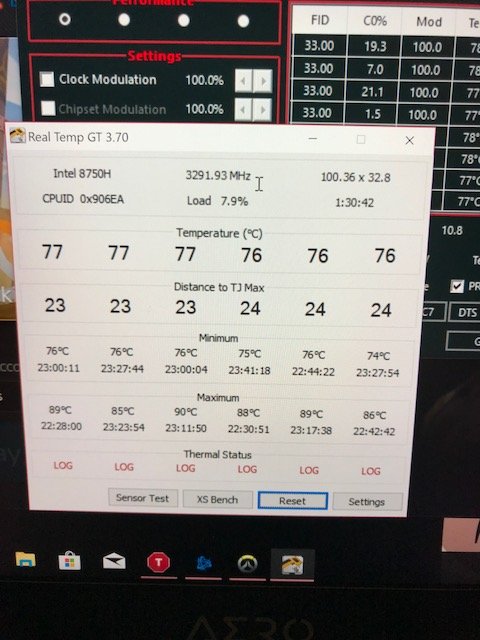
I also wonder this, I have undervolted and now keep cpu temps maxing out in the high 80s.
I leave it plugged in and set off a 10 hour 3ds Max/Corona render overnight to find that the system has randomly restarted, reproducible every night.
This is proving it utterly useless for rendering and I need to overcome this issue or find tools to even start tackling the cause of restarts.. event viewer is garbage.
Windows update restarting permissions have been turned off since day 1.Last edited: Jul 5, 2018 -
The random keyboard and input lag is because of optimus.
Maybe your undervolt isnt stable -
No, it was restarting before and after the undervolt, and it's not a sudden bsod, windows is having time to close apps, and run a 'restarting' sequence and splash screen with the spinning loader
-
What do you mean it’s because of Optimus? It’s because of Gigabyte. I didn’t have this problem on the Alienware 17 or Razer Blade 15. Don’t give false information. Also can't raise the volume in game without it leaving the app everytime. Anyone know whyLast edited: Jul 5, 2018
-
Sorry for misunderstanding you then. I thought you mean this.
-
No worries. That's unfortunately not what I meant. I also can't figure out why it's picking up audio from the computer mic and my gaming headset. Lastly I can't watch videos now. They just won't load and when they do I can hear audio but the screen is completely green. Can anyone answer this as well? Found the green screen fix. Had to go back an update on windows. Seriously. These driver issues are really making me reconsider this purchaseLast edited: Jul 6, 2018
-
Did you use the gigabyte intel and nvidia driver or use the official ones from intel and nvidia website? Some people are having problem with the latest nvidia driver. I had a similar problem, cant play youtube video, when I use the latest nvidia driver a month or two ago. I just use the one from the smart update and it workschildprotectorofthenight likes this.
-
How did you get the GPU under 90c?
XTU can get my CPU to around 80-83c while benchmarking ROTR (Tomb Raider).. But the GPU hits 90c just sitting in the menu.
I've purchased a Topmate laptop cooler (would not recommend), which often keeps the GPU around 85-89c with less demanding games.. -
I really think you need to repaste your GPU if its idle temperature is 90CxDjinn likes this.
-
Undervolt the GPU using MSI Afterburner curve editor.
Use [email protected] and [email protected] as a start, keep a flat line above 0.9V to force the GPU not to use anything over 0.9V, keeping temps down.
He said at the menu of the game, not idling. -
Ah, my bad. I misread.
Still, that's really high for essentially not rendering much. -
I'm using smart update gigabyte software. Also does anyone know what this sound coming from the middle of my keyboard is? Sounds like fans hitting something or maybe coil whine. Turn volume way up. I'm getting into the 90's with -140mv undervolt and all the cores at 3.3ghz. Any other advice for lowering the temps at this point. The razer blade 15 easily stayed in the 80's with a -130mv undervolt and all cores at 3.6.
Attached Files:
Last edited: Jul 7, 2018 -
-
HyperX HX426S15IB2K2/32 is working fine on my Aero 15X, it's automatically picked up the correct timings so now have 32GB dual channel with 15-17-17 timings
-
Have you bought two Rams or have you just inserted one HyperX together with the previously installed one?
-
I bought a 2x16GB kit as I couldn't find a matching one to the V-color it came with.
A colleague at work is also buying an Aero 15X so he is probably going to buy the 16GB stick I took out, otherwise I'll probably eBay it. -
I got aero 15x on monday.
2 Problems.
1) My left shift key and left ctrl key seems broken. They are differ from other keys. When I type those keys, they make clicking sound like they will break in month. Anyone having same issue here? Is this common issue?
2) They changed power adapter without making proper notice. 205w adapter with usb port -> 180w adapter without usb port? I can't take this.
And as I research this issue, I found out something else. It seems they've changed laptop's spec. In the bottom of 15x, there is some text about laptop's INPUT. That was 19.5v*10.5a, about 205w when they were still provide 205w adapter. Now, it is 19.5v*9.23a, about 180w. Is this just because they changed adapter? or they actually spec down input watts for some reason(temperature or somthing) without noticing customer?
Sorry for my broken english. not my mother tongue. -
Bought a mini Thunderbolt 3 dock so I have one cable connection when using it at my desk, but seems the laptop is not capable of driving two monitors at once via the Thunderbolt 3 connection?
This is the one I bought:
https://www.amazon.co.uk/gp/product/B07BJJX47G
The laptop can do one via Thunderbolt 3 and one via the mini displayport though, although I did have weird flickering on and off via mini displayport until I forced it to use Nvidia graphics.
Think I'll look at a cheaper option for the Thunderbolt port if it can only drive a single monitor, annoyingly my Dell monitors can only do 1920x1080 via HDMI instead of their native 2560x1440 so I cannot use the HDMI port, although I might try a HDMI to DVI cable as that might work? -
Having an Kernel-Power, event id: 41 critical event error.
Randomly rebooting my laptop.
Anyone seen this before? Ive had my laptop repasted by HID .
Currently not undervolting, just running stock settings and plugged in the whole time.
Screenshot of the event log:
https://gyazo.com/dff072a128edaec08503d8fe4778e1ac
Also having issues with the left shift. If i am running in game, i constantly have to re-press it to continue running.
Its very sporadic .
Please HELP!Last edited: Jul 16, 2018 -
I own the 4k model and the only issue I have is the oversaturation due to 100% Adobe color space in apps which can't manage the color space. I know from Eizo monitors that you can set the color space to srgb for such apps which can't handle Adobe rgb. But I noticed this is not possible with this monitor because there is not such function in place. Is there any other solution?
-
Hi guys, anyone having CUDA toolkit install on AERO 15x v8? Preferably version 9.0 ++
I had successfully install the toolkit, yet when I want to try running the CUDA samples on VS, it always failed to start (no CUDA-capable device is detected).
Anyone having the same problem? Or do you guys know what should I do to fix it?
(CUDA toolkit 9.0 and driver 388.92) -
Sounds to me like you're running your code on the intel graphics card, and your nvidia card is asleep.
-
I changed the 3D global setting and the VS program setting in NVIDIA control panel to use the NVIDIA card as its preferred graphic processor.
Is there any other way to force the laptop to use nvidia card? -
It should switch to nvidia if you connect a monitor to the mini displayport.
Also you are iterating all devices and not just trying the first one? -
cuz there's only on DDI injected into the TBT port. However it should be no problem to output the QHD through HDMI. Maybe try different cable
-
I think it's a monitor limitation, anyway I bought a mini displayport MST splitter to 2 x displayport, that is working great driving 2 monitors at 2560x1440
https://www.amazon.co.uk/gp/product/B00XXPYOJW/ref=oh_aui_detailpage_o03_s00?ie=UTF8&psc=1 -
good to hear that!
-
Hello guys
I am looking for a new laptop. I have been a macbook pro user for last couple of years and want to move into a new system. Personally, i don't like the new macbook pros, so i am thinking about buying a dell xps 15 or aero 15x. Coming from mac to pc, my main worry is the build quality. Are you guys satisfied about aero 15x? I heard there are light bleed issues and keyboard issues, are they very common? In such cases, is it easy to replace the units? How about the fan noise at idle? I am just curious about the user experience as I am looking for long term performance and reliability in this laptop. -
If you want pure build quality and gaming performance is less important for you, i would strongly recommend the XPS15. Better support, better chassis quality, better screen, better keyboard, better speakers. Just its more of a productivity machine and less of a gaming machine.
-
But it has so many issues. https://www.ultrabookreview.com/19675-im-not-buying-new-xps-15-9570/pcfultra likes this.
-
While true and while I'm a burned customer of the XPS 15, I can still recommend the system for people who are *not* going to game with it. Basically I would simply buy a configuration without the discrete GPU if you're not going to use it. If you *are* going to use it, make sure it won't be for spiky loads like games; it performs better thermally under a consistent load. Game performance is unpredictable because the cooling systems are pretty inefficient and share combined load of CPU and GPU. I had very bad luck and could not get any recent game running on better than low settings at 720 or 900p. So this is very much a YMMV notebook.
-
All those issues and more are present on the Gigabyte as well. Next to just a not so well made chassis. The aero also throttles and cannot keep its boost speeds, has backlight bleed, has keyboard issues, has battery issues etc.
-
Thanks for the info. I looked into dell xps 15, which has better build quality. But honestly, if it wasn't for gaming i would stick with macbook pro which has been reliable so far. They have really poor graphical performance. But since i am traveling a lot i don't want to be stuck with a buggy machine. I heard that dell xps support is better than gigabyte. However, it seems like they have fair bit of issues as well. I understand any machine can have issues, especially, when you are unlucky, but if those can be remedied easily, that is perfect. Aero 15x looks amazing spec-wise just checking whether how reliable the laptop is. Thanks for the info.
-
But the XPS once it throttled, it stay throttled until you restart the machine. Yes you can uninstall the thermal management software and stop windows from installing it. But every major update reinstall it
-
Does anyone know what caused my aero 15x to crash? This was the blue screen error. Here are my log reports. If anyone has any ideas it would be greatly appreciated
Attached Files:
Last edited: Jul 22, 2018 -
-
Think it has to do something with your wifi/lan drivers or chip.
Have you tried running the command
In windows CMD (administrator)?Code:sfc /scannow
Are you running drivers from Smart Update? Otherwise, try installing/updating the internet drivers from Smart Update.childprotectorofthenight likes this.
Aero 15 X w/ 1070 Max-Q
Discussion in 'Gigabyte and Aorus' started by rickybambi, Sep 25, 2017.