 Problems? See this thread at archive.org.
Yup, I've come down to that one and the NETGEAR R6300v2, but I'm gonna have to pay.
-
My machine finally arrived. It weighs 3 pounds 10.2 ounces with a 512GB msata ssd and no hard drive inside. Windows 7 works great. No sound issues, perhaps due to the windows 7 upgrade? Screen looks great. No bad pixels, and clearly better than the screen on my Vaio s13p. Build quality is generally excellent. My keyboard is rock solid. The only (small) quibble is that the trackpad is not quite square and runs up against the frame in one corner. I actually had to tuck a little bit in, but now it is fine. Very satisfied.
-
Can you comment on fan noise?, are the speakers that bad?, does the intel gpu throttle on battery or only cpu?, how much key travel is there on the keyboard?, thanks
-
Fan noise is variable. Depends upon settings under Smart Fan and Ultra Boost, but put them on Turbo and Extreme respectively and, yeah, they sound like a small jet engine.
CPU throttles heavily on battery.
Travel on the chiclet keyboard is nominal, could be deeper IMHO, but I don't have the flex in the center of my keyboard others have noted. May be that I just don't type as hard.
Have had my unit for fifteen days now and all-in-all I'm pleased given some of the issues others have encountered with dead pixels, build and fit, keyboard. -
I haven't looked around, but do you mind explaining how all the fan/GPU/CPU settings work? Like will they automatically set themselves as I run more intensive programs or do I have to set them up for each program? If the CPU hits say 90C, the fans will go on turbo to cool it down, right?
-
Here is a simple way to get two finger tap and three finger tap.
Firstly, NO NEED to use Samsung Touchpad driver, JUST KEEP the original Gigabyte driver.
Secondly, open up regedit.exe and go to key "HKEY_CURRENT_USER\Elantech\SmartPad"
Thirdly,
Two-Finger Tap:
You can get two-finger tap OR two-finger double tap. You can get only one of them.
If you want two-finger tap, change "Tap_TwoFinger_Enable" and "Tap_TwoFinger_ShowItem" to 1.
If you want two-finger double tap, change "TwoFinger_Double_Tap_Enable" and "TwoFinger_Double_Tap_Showitem" to 1.
Three-Finger Tap:
Change "Tap_ThreeFinger_Enable", "Tap_ThreeFinger_ShowItem" to 1.
Then, go to ELAN touchpad software, now you can find more options in One-finger Tapping. Just like the picture below.
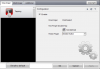
Enjoy cybernick01, tocirahl, bberry110 and 1 other person like this.
 -
Confirmed. Awesome! That's great to hear. I liked the original drivers better anyways. Now is there any chance you can get Smart Motion (continuous dragging when you're past the end of the touchpad) working? I've never figured out how to get it working...
-
Got my p34G from GenTechPC yesterday... self-cleared into Canada, had to pay GST/PST since it's personal item.
I have a slight depression on the clickpad rocker on the left side (does not sit flush), still works fine. No other noticeable issues so far.
Considering Windows 7... however gonna give this frustrating Windows 8 a shot. 8.1 releases free tomorrow/Thursday morning and hopefully that resolves some annoying issues.
Undervolted to -100mV using Intel Extreme Tuning Utility, and tested temps running Unigine Heaven 4.0 DX11 Benchmark Basic.
Ran coinciding Intel stress test and Unigine Benchmark together at 1080p, Ultra quality, Extreme Tesselation, x8 Anti-aliasing.
With undervolt, I got to temperatures of 95 C on CPU and 75 C for GPU within 5-10 min before my machine froze (fans whirring even after freeze).
Forced shut-off, the power button was HOT! The top grill was also hot. Fans are not as loud as W230ST (from recollection).
Probably not gonna try that again... too soon. -
Some people on GB's Facebook page are complaining that their P35K laptops have arrived with bent plastic. Has anyone had problems like this with P34G?
-
Negative, was in working order.
-
There are some QC issues on the mose pad and keyboard (you can check a few posts back), but nothing serious.
-
For those concerned about Windows 8, grab Start8 or other tool that brings back the traditional Windows 7 menu and boot to desktop. 8.1 will boot to the desktop and have a start button, but still uses the win 8 menu. There are some nice things about Windows 8. Actually would have been very nice if they had not try to shove a tablet interface onto a desktop/laptop.
Sent from my SAMSUNG-SGH-I337 using Tapatalkdoremix13 likes this. -
They will set themselves based upon need, i.e. - Optimus will flip between the Intel HD4600 video card one and the NVIDIA one based upon whether you're on power or not, whether the GPU needs to kick in or not. Fans will cycle on and off and to varying degrees based upon temps. The CPU will throttle down significantly on battery and if you still want, need power then you're going to have to deliberately bump settings up, but even then you won't gain much.
-
Only thing frustrating about Win 8 is the Metro U/I if you're not on a touch device. Pulling 8.1 via the Microsoft Store now and upgrading this unit as I've been running Release Preview on two other machines since RP first came out and Win8 does a better job on boot time and file I/O than does 7. As Clintre has said on the next page, start menu and program groups is easily recovered using products like StarDock's Start8.doremix13 likes this.
-
Windows 8.1 Pro upgrade in 45 minutes end-to-end (download from Microsoft Store, two reboots, usual, initial Win8 setup at start). Sat on "Applying PC Settings 85%" for some time. Did have to reboot two more times after that as Start8 from StarDock and Samsung Magician had updates for me as soon as the upgrade was done.
Interestingly enough, lost no space on the 128GB LiteOn mSATA, but the Windows.old directory with 4.5GB is there. Been running RP on a couple of machines for months now, but will leave it for a day or two to make sure everything shakes out okay. -
Oh cool, that seems simple enough. Thanks!
-
Heads up if you upgrade to Win 8.1, Smart Update will have updates for pretty much every driver version on your system.
-
Has anybody decided to upgrade to 16gb RAM? If so is it worth it and what would you recommend? I do a lot of photo and video editing.
-
I have and sold my existing Transcend DIMM to someone here on NB. I would recommend it, but would also advise that current memory prices are almost 2x what they were this time last year. You'll get dual channel with two sticks. Will leave it to others to opine here as to whether the difference is worth it or not. For me it is simply because I need the extra memory to run virtual machines.
-
It's definitely worth it for me. I run a 4GB RAMDisk so the extra 8GB really helps. Also, it allows your RAM to run dual channel, which is always a good thing. So even if you don't need 16GB, having 2x4GB sticks would still be better than a single 8GB DIMM. Furthermore, the general rule for video editing is the more RAM the better lol
Sent from my SGH-M919 using Tapatalk 2 -
Is it recommended then to have a matching pair, would this be correct?
Transcend JetRam 8GB DDR3 204 Pin 1600MHz PC3-12800 SO-DIMM Laptop Memory Module: Amazon.co.uk: Computers & Accessories -
Co-rrect...
-
By the way audio issue seems to be fixed on Windows 8.1 with new beta drivers
Sent from my SGH-M919 using Tapatalk 2 -
I have the same issues with default (not realtek) windows 8 drivers.
Haven't tried the beta. I thought desinstalling would fix it but no... -
8.1, not 8
Sent from my SGH-M919 using Tapatalk 2 -
Been downloading the 8.1 update for hours and hours, still only at 38%........holy slowness, guess everyone and their dog is trying to get 8.1 at the same time.
-
Any ram with the same specs will work, save yourself some money.
-
P34G does not have this issue.
-
New Kensington Universal Portable 120W power supply with AC/DC adapter I bought for traveling with this unit just arrived. For those who will be doing likewise, Kensington, Belkin, whomever, the power tip adapter is an "N3," FYI.
On a side note, power cord for this Kensington adapter is very long (that's good) and the power brick itself is about half as thick as the one that comes with the P34G from Gigabyte. Nice little pouch bag as well. Got this one NIB on eBay for $31, goes for $80 on Amazon. -
I've cracked the case on mine 3x in the past two weeks to upgrade the SSD and WiFi card, mine's been good every time. Double keystrokes on keyboard still an occasional problem though.
-
Thanks for the info, will be looking at these this weekend, wish Gigabyte hadn't sent a huge one
Sent from my SCH-I545 using Tapatalk -
Can we get some comparison pictures Mr.BMidBar
-
Just received my notebook today. Great service from Gentech!
1st impressions: Build quality is good enough, my keyboard as barely no flex but makes a little click noise when pressing a key comparing with my wife's macbook pro and mouse is ok too. Sound is the worst from all the notebooks I had before but I can leave with that. Now the main problem is the Display. The white just looks yellowish and while writing with a white backgound gets a little blurry. Does everybody have the same problem? Please compare this page with other notebook so you see the difference in whites. Is there any fix for this? Until now I haven't heard the fan so I guess is quiet.
Next week I will be running some benchmarks and I will check the temperatures. -
Mine came a little bent and would rock back and forth when lifting left hand. There's a video earlier in the thread. Sent back to newegg yesterday.
-
You can adjust the color via the graphics control panel. Default has a bit more yellowish tint. However it was not hard to correct.
-
I recommend all of you having a hard time adapting to Win8 to try Classic Shell. I assume it works like Start8 (never tried Start8) but it's completely free. Classic Shell - Start menu and other Windows enhancements
On another note, anyone have any thoughts on p34g vs u24f? I assume the u24f will be around the 1.1k price point like the u2442s before it. P34g worth the $300+ more in USD? Dual core i5/i7u CPUs, 750m (might not be GDDR5 version), and 900p screen seem to be the major differences. I assume they'll provide a lot better battery life? Anxiously waiting for the u24f after the p34g came out above my budget, sadly.
Edit: Just searched for the u24f, seems like its 1.3k at Dynamism and Excaliber. That's extremely disappointing. Estimated shipping nov 1st at Dynamism too, backordered at Excaliber. Wonder if I should just go with last gen u2442s. -
Help, will this work on p34? 100W?
Kensington AbsolutePower Laptop, Phone, Tablet Charger (K38080US)
Kensington AbsolutePower Laptop, Phone, Tablet Charger (K38080US):Amazon:Computers & Accessories -
Yeahh... Keys clicking sound is just horrible... What folks at Gigabyte were smoking when they designed this?
-
dup dup dup
-
Just got my p34g from Gentech, and overall pretty happy with it. Already did some rendering in Rhino and it was snappy (though the keyboard noise is definitely annoying).
Is anybody else having problems with the fans constantly ramping up and slowing down? It seems like almost any action makes the fans speed up and get decently noisy. Any suggestions? -
Put Smart Fan on Stealth, turn Ultra Boost off.
-
Whenever i put my laptop in sleep mode, when i wake him up, my wifi doesnt work. I must go in airplane mode, on and off, and then everythings ok. Anyone else has this awkward problem? Any solution?
-
Don't have that problem, but assuming OOTB Windows OS would recommend starting with updating Wireless driver in Smart Update.
-
Does anyone actually use the Smart Switch program, i.e. shut down (fast boot)?
-
Guys, will a 100w power adaptor work on P34G?
-
Finally got a chance to weigh this thing to settle the different weights floating around.
![[IMG]](images/storyImages/6a9ymahy.jpg)
Looks like 3.87 lbs to me (with hdd)
Sent from my SGH-M919 using Tapatalk 2 -
Does anyone know if it would be possible to get a modded bios on this thing to unlock the 760m and other features? Similar to what Prema has for Clevos
Sent from my SGH-M919 using Tapatalk 2 -
Did you happen to also weigh it together with the power brick?
-
Is it just me or does smart update supposedly show new drivers on the right side in bold..... then half the time you click on it, turns out you already had a newer driver installed? I keep doing these long downloads only to find it was a waste of time. Have to stare at all the numbers to read which driver version is what.
-
Nope, you're right. I've been updating some of my drivers directly from Intel and NVIDIA and my versions are newer than what Smart Update says. This will also be true if you get the Win 8.1 beta drivers directly off of Gigabyte's web site. Note that second column on the right says "Official" Driver Version, so if you deviate off that that's your choice.
Right now trying to get my Intel 7260 back to 300 MBps where I was day-before-yesterday. Right now I'm running at 144 MBps.
Gigabyte P34G
Discussion in 'Gigabyte and Aorus' started by spicypixel, Jun 3, 2013.


