Problems? See this thread at archive.org.
So maybe this review reuses some audio from a previous one?
-
Don't forget D2 Ultima said the thermals would be horrible on this machine as well.
-
Seems like the thermals in the video were not too hot at all, but it seems to be maybe slightly under performing for the 1060 in a laptop could get too. This could be expected in this size and weight without bigger fans and heatpipes.(like in laptops like the msi gs43vr)
So i think it is maybe limited in some fashion(not getting to the higher temps). Take this all as pure speculation and my opinion just from what the video shows from GentechPC.
Not that I think that is bad at all. - I still think this laptop is killer. The bigger battery alone is awesome. Also still a huge step up from the 970 / 965 models for graphic performance.
I think i still might try to find a 970 model since i'm really not a big gamer. The price decrease and extra m.2 would be nice to have.Last edited: Dec 2, 2016 -
Con someone post 1060 mobile benchmarks that are actually much higher than what we are seeing in this review? The laptop version of the 1060 might not perform the same as the desktop variant.
But that notebook check website shows they are both relatively the same.hmscott likes this. -
You are wrong kcimpulse, what are you basing it on?the numbers are bang on for the laptop 1060.
-
The laptop version doesn't perform same anyway. The desktop is 10% faster. Check on notebook check and you will see two sets of completely different scores. From what I can see the aero 14 gets the average score of what it's supposed to get.
Sent from my iPhone using Tapatalkhmscott likes this. -
Unless D2 Ultima (or anyone else making statements like that) has the notebook in hand and can credibly run a test to judge the thermals, or has very good sources, it's hearsay.
That kind of speculation does no one any good.
Charleshmscott likes this. -
I'm looking into this a bit more and it appears that most 1060 desktop cards are over clocked vs tho laptop version that is running at stock rates.
hmscott likes this. -
While I should have said it was all Pure Speculation an IMO - But as a comparison to the MSI GS43VR scores is where i was basing the minor minor slip in my mind. Also screen resolutions and other factors totally play into this, and until we have a very in-depth review take it all with a grain of salt. And while there was not a complete stress test on the new aero 14 yet on the max temps it can reach it seems to only be getting to 68C on this high side from what i could tell in the video. And the MSI was getting up to 80C, which usually means its pushing though more performance but you need the cooling to take care of that.
Don't get me wrong I am still loving the New Aero 14, the smaller size and bigger battery are huge selling points. And is it only me that thinks the placement of the heat pipes on the MSI GS43VR over the Wireless Card is kinda nuts.
http://www.notebookcheck.net/fileadmin/_processed_/csm_MG_9304_f32adb1262.jpg
MSI GS43VR
3DMark 11: 12462
Fire Strike: 9814
New Aero 14
3DMark 11: 11629
Fire Strike: 9493
Stats came from these 2 sources.
http://www.notebookcheck.net/MSI-GS43VR-6RE-Phantom-Pro-Notebook-Review.172721.0.html
hmscott likes this. -
Either I'm going blind or they mis-spoke as I don't see any empty M.2 slot on the New Aero.hmscott likes this.
-
I think they were smoking something too. I thought that stuff near the ram was SSD, and that maybe they already installed an upgrade in the M.2 on the right.
But then someone said something about power distribution and that made better sense.Last edited: Dec 2, 2016 -
Ken:
Don't see an empty m.2 slot on the video!!! -
Yes, but I checked up superclocked 1060s versus normal ones. The 100MHz difference should only amount to just under 400 points. Even if I take this into consideration, it should still be around 12,800 points. It's over 1k points less than it should be at.
-
There seems to only be one m.2 slot. It use to be on the left side of the motherboard (looking directly at the bottom panel.
I have the gen.1 of aero 14 and it was located there. This is a big pity -
But aren't all of this just your assumptions? The numbers gathered by notebookcheck on 1060 "mobile" clearly shows average of 11508 out of 15 notebooks they tested. One of them, the razer blade 1060, is at 10890. Surely, you are not going to compare a thin form factor laptop to a "super clockable" system........? I am not sure where you are getting this "normal" gtx 1060 3d mark from either.
Whatever, I think aero 14 v2 would've been great if only they added tb3. Bye.hmscott likes this. -
Did some looking up in the meantime, it seems that they're odd when it comes to firestrike. I'll wait until I see some actual gaming happening over extended playtimes (a cold boot of a game into a 2-3 minute benchmark doesn't mean anything at all for a gamer).
However, with the original Aero 14 to my knowledge not handling the 970M, how this supposedly handles a much hotter card at much lower temperatures makes no logical sense.hmscott likes this. -
TDP crippling maybe? But then why are the scores normal?
Sent from my SM-G935F using Tapatalk -
That's what I'm thinking. Hence why I need to wait and see how it does in games. By the laws of physics, that card isn't behaving properly (holding clockspeeds etc). But of course, no way for me to check, without someone sending me a unit to review.ThePerfectStorm likes this.
-
I can only go by default clocks. I haven't even entertained the idea of seeing oc results so can't compare.
But for me personally the 1060 is very strong to refrain from oc to gain another 6 or so fps when it's achieving around 60fps on ultra settings. I can
Be happy even at 50fps ultra. Coming from a 960m for a year and a half and having a small amount of 970m before then. It would of been good if it was a double of the desktop version. That part is the only disappointment for me because the 1080 and 1070 do match desktop and of course I'm not owning them
Sent from my iPhone using Tapatalk -
Let me explain what I meant.
1506/1708 = desktop card
1608/1804 = superclocked card in question
1404/1670 = laptop card
Desktop card gets over 13k easily
superclocked desktop card only got about 350 points more, give or take
laptop card gets just over 11k
Something's iffy with the laptop cards in firestrike.
1080N is still slower than the desktop version by a bit. 1070N is a 980N on Pascal; it should theoretically BEAT the desktop card doing the math, but in practice it doesn't seem to.
Hence, as I said, I will wait and see what mobile performance is like. I've seen a company complain that notebook 1060s fail VR spec and I've seen notebook 1060s in the vast majority of the notebooks they're in lose to slightly OC'd 980Ms, so saying the majority of notebook 1060s perform at X average means nothing. They should pretty much all be doing better. I don't care about averages, or what 99% of notebooks do. I care about what things are supposed to do. If something doesn't do what it's supposed to do, I'll complain. -
Would scaling impact the test results? The panel isn't native 1080
-
I hear that. I haven't looked into anything beyond the info here and notebook check. I wouldn't be the only one to assume that the laptops are running accordingly as it should even for the mobile level.
That's why I refer to notebook check on averages but it could be that those users are just the ones with lemons but I haven't read any thing for any insight on the overall issues
Sent from my iPhone using TapatalkD2 Ultima likes this. -
No. Internal render resolution is all that matters.
-
Has anyone received one yet?
-
i did but had to RMA it because of damage caused by the courier...

-
Ouch that sucks - Who did you buy though? Was it double boxed?
-
in the uk and yes it was - theres a whole in both boxes where whatever it is fell
np receiving another one tomorrow though so will post here then. bezels are big though (couldnt switch it on) but it feels good in the hand and light -
I was wondering, did you have to pay for the shipping fee for the RMA and are they replacing your laptop for a new one or just fixing the one that was broken.
Curious because I have never bought a laptop online but I am also thinking of one atm. -
I've been trying to keep a look-out for any reviews on the refreshed Aero 14. Here's one that came up, although it is a bit light on details: http://www.nag.co.za/2016/12/01/hardware-review-gigabyte-aero-14/
It does sound like this is a pretty solid laptop though, between that review and the (admittedly apparently somewhat confused) gentech review. I'm trying to call a gigabyte distributor to see if we can get one up here in Canada. It's basically a toss-up between this, the razer blade, and waiting for the XPS 15 refresh.
It's too bad the Aero doesn't come with FHD; QHD seems like a waste at this screen size and I'd prefer better battery life and being able to max out games at native res instead of downscaling to FHD anyway. -
Sorry to hear about your troubles. Interesting comment about the bezels, they really don't look huge in photographs. Is it something very noticable to you? Like the bezels being big on a Razer Blade?
-
That will never happen. Plus unless they was gigabyte who sent it. There's no wAy the shop can fix casing as it's not likely to have the casing parts etc. With gigabyte warranty. It's outsourced. The shop will try to repair it if it's a straight forward thing or reseller of a brand like clevo. Other than that. It's not your problem. You bought it brand new
Sent from my iPhone using Tapatalk -
The screen was one of the reason I went with the P35X in the end. I want sometime and will perfectly scale down to 1080, which is perfect for a 14"-15" while scaling down to a 720 on the Aero 14 will be a waste of real estate. The other is only 1 M.2 slot. I either have to carry an external or buy a 1TB M.2, by that time I'm at the price level of the P35X.
-
redditor with the new aero 14:
https://www.reddit.com/r/gigabytega...t_impressions_gigabytes_aero_14_wv6_gtx_1060/ -
I received my Aero 14 yesterday, still putting it through it's paces. I did tend to get ~ 6 hours of life during productivity use (setting everything up, installing all my programs, using chrome to do my work), and the laptop was still around 20%. Today I will actually be using this during the work day and see how long it'll last off the charger.
-
I just picked mine up today. Feels all metal even though the sides are plastic. The bezels appear large but I think it's because they have all the LCD hardware in the bottom because of the way the hinge is designed. The keyboard feels crisp and not too easy to accidentally press keys which is nice. The track pad is clickable, or tap to click out of the box and didn't give me any issues, but I normally use a mouse so I'm not picky with track pads. It hasn't seemed to get in the way while typing and cause my cursor to jump or anything but I haven't done any extensive writing on it yet.
I'll be testing it with overwatch tonight. I was really surprised by how slim the power adapter is!
Will post back as I use it with more updates or impressions. -
Did you receive it yet? If so how do you like it? I hadn't seriously considered the p35 since it's quite a different form factor to say the aero 14.. but given that it's at least currently available and as you say has FHD and more storage slots available, maybe I'll take a closer look at some reviews.
-
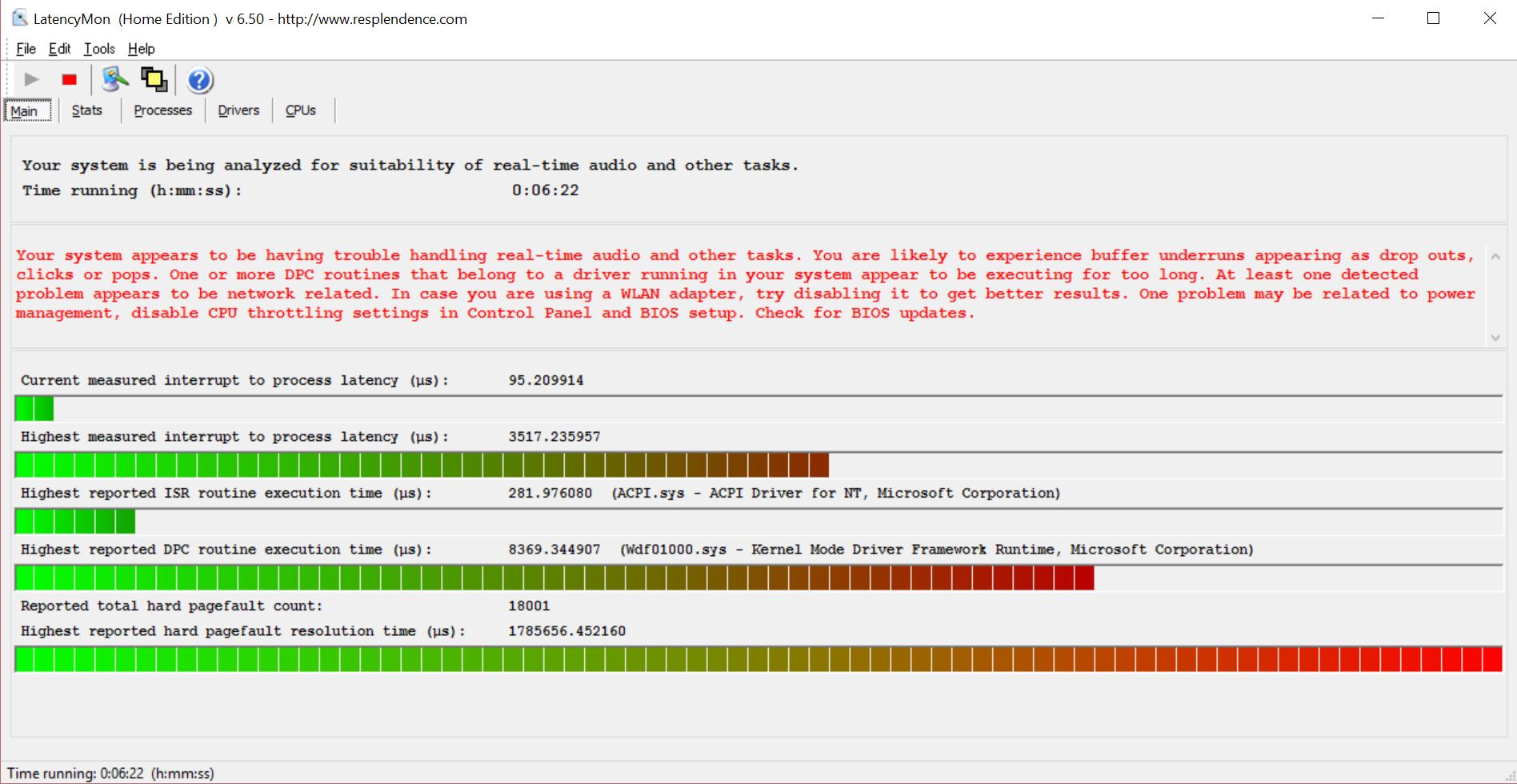
If you have a few minutes, would you run http://www.resplendence.com/latencymon for a couple minutes and let me know if you get any of the bars going into the red and if the summary says 'suitable' or 'not suitable' that'd be great. I just went through 3 msi pascal laptops trying to find one that didn't stutter and I'm wondering if it's some weird issue w/ the CPU or GPU drivers; hoping it doesn't show up elsewhere! Thanks!
-
Update: After a 6 hour workday, the laptop has lasted pretty well, with around 4.5 hours of actual usage (productivity work) and still has 63% battery left (Windows is giving me an estimate of 5 hours and 41 minutes). The settings I am running this on right now is Windows 10's built in Battery Saver, 50% brightness, keyboard backlight off, along with Chrome as my browser of choice.
I will try that now. Will edit this post after a couple minutes.
EDIT: Check attachment.Attached Files:
Last edited: Dec 7, 2016haryhu likes this. -
-
Wow, pretty good battery (especially using Chrome, that's awesome). I can't seem to see your attachment though, are you sure it uploaded properly? Could always use imgur as a fallback too. Thanks!
Edit: Ah there it is. Hm.. that's a pretty high pagefault resolution time. Have you noticed any stuttering?Last edited: Dec 7, 2016 -
No, I did not.
-
No, I did not.
-
I did put up a quick 1st impression on this thread:
http://forum.notebookreview.com/threads/thoughts-on-gigabyte-p35x-v6.797092/page-4
Review here:
http://www.computershopper.com/laptops/reviews/gigabyte-p35x-v6
Video review by XoticPC (a reseller). Beware that while they show a Samsung 950 Pro NVMe as the default 512GB M.2 SSD. The actual unit I got from a different vendor comes with a LiteON CV1 SATA and so did units received by a few other on this forum.
Last edited: Dec 7, 2016DevDude99 likes this. -
I was a little bummed that the Gtx1060 version didn't come with a pouch. The 965m version of the aero 14 came with a padded laptop pouch.
I have yet to do some gaming but just getting all my software set up on this machine has been a really fast process. -
Ok, I kind of understand the DPC Latency thing, and it does seem to be an issue. A lot of my games do stutter, which I find really weird since the framerate is usually constant (except the case of Arkham Knight which seems to be performing worse than it did on a 970m). But it's mostly from nvidia's side. I'm going to try out a bunch of different drivers and see which ones work best.
EDIT: Weird, but the problem is pretty much non existent now! I guess a good old reboot fixed the problem. The reported latency due to the Nvidia kernel is still the same however.Last edited: Dec 8, 2016 -
1 day in and I'm super impressed. Even when gaming the system feels cool to the touch unless you hold your hands near the vents. I'm able to play overwatch on highest settings at native resolution without dropping below 50fps.
-
I'm interested in this, base model is with 512gb nvme. Is it true there is only 1 m2 slot and I guess due to size no standard 2.5"? :/
-
Pow3r- It is not true, the New Aero 14Wv6-BK4 comes with a 512gb Sata 3 M.2 SSD(lite-on). However the single m.2 slot on the computer can support both sata and nvme. So you can upgrade it if you want.
-
That doesn't answer the question completely. Ok sure it takes both types. Is there two slots. Or if there just one that's occupied by the 512gb?
Sent from my iPhone using Tapatalk -
In the UK here both on Scan & Overclockers its advertised as 512GB NVMe. If it isn't it goes back I guess.
But yes as above I want to know how many M2 slots are there in total. By the look of comments on youtube it is only the 1?
http://www.gigabyte.com/products/product-page.aspx?pid=6135#sp
I assume this is right and indeed one. 1TB NVMe is crazy expensive too... -
There's a single M.2 slot. It comes populated with a 512GB SATA SSD not a 512GB NVME SSD
NEW Aero 14 w/ GTX1060
Discussion in 'Gigabyte and Aorus' started by ericheadlo, Oct 31, 2016.