 Problems? See this thread at archive.org.
I haven't been keeping track of this thread. Maybe someone else can fill us in.
-
The fastest tweak you can apply right now with pretty good results is this:
Change on both the "Start" from 3 to 4Code:HKEY_LOCAL_MACHINE\SYSTEM\CurrentControlSet\Services\Processor HKEY_LOCAL_MACHINE\SYSTEM\CurrentControlSet\Services\Intelppm
Only side effect is the increase of temperatures by 2-3 C
The other tweaks are too many for me to trace, maybe JJB, LOUSYGREATWALLGM and others that tried them will make a single post will all the steps -
@Phil
Well I've been waiting on some feedback for my most recent (simplified) list of tweaks before consolidating all the steps in one post. Since I have heard nothing negative so far I guess I will try and put it all together tomorrow.
I am leaning toward posting what I consider the 'conservative' settings that I have been running for 2 days without issues. These settings give me full 4K & 4K/32 speeds all the time, the Seq & 512K R/W numbers are not boosted at idle but with as little as a 1 or 2% CPU load max Seq & 512K speeds are available. I prefer this due to the fact it has little to no impact on idle power draw and little (2-3C) impact on temperatures. I have also confirmend that these settings also work on battery with almost no impact on battery life while doing light browsing, have not tried more demanding tasks on battery though....
I guess I can aslo include notes that explain what settings can get the max performance at idle at the expense of higher temps.... -
LOL you beat me to the response.
I thought your tweak significantly increased the idle wattage and temps on some peoples machines? Hard to keep track here... -
They have to try, results will vary according to the CPU, cooling, etc...
-
The above tweak turned off the Turbo Boost on my laptop. Is this normal? What can I do to turn the TB back on?
-
In my laptop Turbo Boost is on all the time (but that's probably because of the BIOS and my low temperatures)
If that affects your performance restore the two registry settings to the default values -
Agreed. That's what I'm more concerned of especially on medium to heavy load
Anyway, for those who wasn't able to keep track on JJB's settings, here's it is
JJB's latest settings
High performance (power option)
Proc. performance increase threshold = 30%
proc. perf. decrease threshold = 85%
Proc. perf. decrease policy = Ideal
Proc. idle demote threshold = 85%
Proc idle promote threshold = 95%
Proc. performance core parking overutilization Threshold = 95%
Minimum processor state = 0%
Note: Don't forget to record your default temps (idle, min and max) before applying the new settings to see how much heat will this new settings add on your system.
How to activate the hidden options:
WARNING! backup your registry before proceeding this tweak. (in case you messed up your registry)
Start > type "regedit" > HKEY_LOCAL_MACHINE > SYSTEM > CurrentControlSet (NOT the ControlSet00x)
Press CTRL + F (a new window will popup) > copy/paste the respective Key Name > click Find. On the right pane, change the Attributes from 1 to 0. Hit CTRL +F again for the next Key Name
06cadf0e-64ed-448a-8927-ce7bf90eb35d - Processor performance increase threshold
12a0ab44-fe28-4fa9-b3bd-4b64f44960a6 - Processor performance decrease threshold
40fbefc7-2e9d-4d25-a185-0cfd8574bac6 - Processor performance decrease policy
4b92d758-5a24-4851-a470-815d78aee119 - Processor idle demote threshold
7b224883-b3cc-4d79-819f-8374152cbe7c - Processor idle promote threshold
943c8cb6-6f93-4227-ad87-e9a3feec08d1 - Processor performance core parking overutilization threshold
Note: Ensure that you are always under the CurrentControlSet and not the ControlSet001 or ControlSet02
HKEY_LOCAL_MACHINE\SYSTEM\CurrentControlSet\Control\Power\PowerSettings\54533251-82be-4824-96c1-47b60b740d00\xxxxxxx
-
just a side note, instead of tweaking the registry, you could run the following commands to enable the needed settings under power management and minimize the risk of fiddling with the registry.
Run those from an elevated command prompt (or a normal one if you have UAC disabled):
- powercfg -attributes SUB_PROCESSOR 06cadf0e-64ed-448a-8927-ce7bf90eb35d -ATTRIB_HIDE
- powercfg -attributes SUB_PROCESSOR 12a0ab44-fe28-4fa9-b3bd-4b64f44960a6 -ATTRIB_HIDE
- powercfg -attributes SUB_PROCESSOR 40fbefc7-2e9d-4d25-a185-0cfd8574bac6 -ATTRIB_HIDE
- powercfg -attributes SUB_PROCESSOR 4b92d758-5a24-4851-a470-815d78aee119 -ATTRIB_HIDE
- powercfg -attributes SUB_PROCESSOR 7b224883-b3cc-4d79-819f-8374152cbe7c -ATTRIB_HIDE
- powercfg -attributes SUB_PROCESSOR 943c8cb6-6f93-4227-ad87-e9a3feec08d1 -ATTRIB_HIDE
Azazello likes this. -
The only "tweak" you need to do on your specific machine, which is the same as mine, is to go into the BIOS and disable processor C-state. When I did this, 4K performance was very similar to the normal results referenced in the very first post of this thread. I did nothing else to the registry, and my power profile is set to balanced.
Reference -
Crucial C300 on Acer 1830T, no tweaks applied yet.
![[IMG]](images/storyImages/Untitled-7.png)
-
As expected

Phil did you buy the Acer just to examine this problem? -
No I wanted a small laptop for travelling.
-
LOL, ok I though for a moment that you wanted to take a closer look at the problem yourself
-
Since you are doing a lot of net browsing, how do you find the smaller screen?
I'm thinking of getting a smaller laptop (M11x maybe) for traveling but dunno if I will like the smaller screen for net browsing.
Thanks!
Wondering if you too are going to try the PP tweak? -
i can confirm the problem exists on PM965 chipsets as well.
My XPS M1730 presents the same low 4k reads and writes. -
When I disable processor C-states in BIOS, my CPU frequency is locked at 1,73GHz and Turbo Boost feature is not working. When I run an application utilizing only 1 core, the CPU clock remains at 1,73GHz and doesn't change at all.
-
Are you sure? do you get better 4K speeds with the tweak?
-
11.6" is a compromise between portability and usage. 13" would be better for usage but less portable.
Not sure if you know but M11x is the size and weight of a 13".
Yes I will try the tweaks.
This tweak did not work for me. Any idea why? -
Will report back with results in the next couple of hours (my wife's laptop, and she doesn't let me touch it much)
-
Weird, you see no change at all concerning the 4K speeds?
Any increase in the temperatures?
Are you on the high performance power plan?
The BIOS has any power saving features enabled? -
I did not watch temps and yes high performance plan.
Edit: It did work! will update with results later.
Before tweak:
After tweak:
![[IMG]](images/storyImages/tweaked.png)
This great guys. Thanks a lot. -
Good for you
Which tweak did you use? the registry tweak or the C-State tweak?
unfortunatly, on the M17x-R2 bios we do not have an option on the C-state I think... -
I used stamatisx' tweak quoted above.
-
Hey Phil, I think you need to update the title to say all 5X series chipsets (or something better) instead of just 55. Becos, mine is a QM57 chipset and i have the problem. After tweaks they are fine.
-
Good idea. Title updated.
-
Guys, those tweaks are not the final solution,they improve the situation a lot, but the numbers are still low compared to what they should be, trust me
-
Thanks to Stamatisx, erig007, Lousygreatwallgm, mfractal and phil for consolidating all the tweaks so far. (+rep where it will let me).
Important info: I can confirm that with the PM55 and the i5 540M (assume all i5's) that applying my most recent tweaks + Stamatisx's regedit change disables Turbo Boost (at least on my machine).
Below are two shots showing task manager while running Super Pi, look at the CPU activity and you'll see on the first one with just my tweaks that only 3 threads are active (mostly just 1) and the whole super pi run was showing 2.93Ghz with jumps to 3.06Ghz with each 'loop' (reading this with the intel Turbo boost gadget). In the second run with the regedit (3 to 4) changes you can see that all 4 threads are being used and the CPU was locked at 2.8Ghz which is the max speed without Turbo boost. Also to confirm this you can see the slower Super Pi times through 8 runs... Max temps were about the same except on first run only 1 core was high (60C) the other was about 10C lower, the second run both cores were the same (59C), the wattage was also higher (~+4W) on the second run.
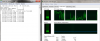 My tweaks only
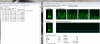 My tweaks plus changing '3' to '4'
I also see no difference with the added change (3 to 4) in the 3 x 50MB CDM runs at idle but the idle wattage seems to jump around more and is ~1 W higher on average.
This could very well be a 'machine specific' situation (for me) so test your own to confirm if you get the same results.... -
I have made a 'custom' power saver power plan with all the same high performance settings and tweaks for 'processor power magament', all the other settings are whatever the default 'power saver' plan has as 'default. Tested this last night on battery and it seems that there is 0 impact on battery life while doing light browsing and simple tasks. I also still get the improved 4K speeds at idle and 'full' performance on Seq & 512K with any minimal CPU load.
I am very happy with the results at these settings
Does anyone have any negative results / issues at all with just my tweaks?
If no one has any known negative issues then I plan to consolidate simplified instructions into a single post that can be posted on some other threads / forums that I promised to keep apprised of this solution.
@stamatisx, erig007, Lousygreatwallgm, mfractal and phil: I plan on copying and pasting from some of the posts you have provided and plan on giving you all credit in my considiated instructions. Please advise if anyone has an issue with me doing this. -
Fixed !! I confirm that this tweak works also with XPS1530 (is PM965 chipset, intel 9.6.0.1014 drivers and Win7 x64) and C300 256GB
Many thanks (+rep)Attached Files:
-
-
We already talked about that but is it possible to export just the selected registry in high performance which have been modified in order to make a patch ?
not the whole registry but just the modified ones
or is it too specific to each laptop? -
it's possible, i think JJB didn't do it yet cause he wanted to make sure ppl are getting good results too and that there are no downsides.
-
Correct. But I am also not comfortable with making a 'patch' to auto load the changes, seems easy enough but I really don't want to be responsible if, for any reason, it doesn't work on all machines. I plan to list the reduced number of tweaks with 'manual' instructions so people will make ther own changes but can also 'undo' the registry changes if needed. i guess i'm imagining a worst case of someone running it and the system crashes for some reason (maybe on a wrong CPU or windows version), at least manually they should see a potential problem if, for example, the registry option is not listed.....
If someone does make a 'patch' to run I would include a link (and credit) to it along with an appropriate warning(s). -
100% confirmed PM965 Chipset (Dell XPS M1730) is also affected.
here are the before and after screenshots. (That's a X25-M 160 Intel)
![[IMG]](images/storyImages/resultsr.png)
-
Which tweak did you apply? stamatisx alone? Where you able to monitor the temps?
Nice scores by the way
-
I applied JBB's latest tweak to the letter. I didn't see CPU rise above 45C
-
So without looking thought the past 54 pages, could somebody tell if any non Intel chipsets are affected.
-
Easiest way to determine if one is affected by this issue is to run CDM 4K test.
-
Important FYI: The settings posted by 'stamatisx' had one setting that I have changed, this change was included in my settings for all recent CDM runs;
Processor performance decrease policy = Ideal (not single)
Could someone please confirm what the default High Performance PP setting is for this ?? Thanks in advance, I don't want to restore defaults (again).
BTW the ideal setting seemed to stabilize the variance in CDM runs and kept the idle wattage from jumpimg around....
@Stamatisx
Could you please edit your post to correct this? just want to avoid confusion. -
Sure, which one?
-
That's a very good question. If Win 7 has the same registry options on other chipsets it would be worth trying it out. That is assuming that there is the same problem of slow 4K speeds to begin with.
If you try it please post your findings
-
THIS post.
Please change; Processor Performance Decraese Policy to "= ideal"
Thanks
PS I guess I just answered my other question, you noted in that post that 'single' was the default setting
-
High Performance: Single
Can you do a few more tests on Single vs Ideal?
I once noticed my CPU core clock was jumping up and down a lot after you suggested me to use Single but after several adjustments, I ended up setting it to Single with more stable CPU core clock (idle).
I'm still unsure which help my CPU core clock to stabilize (means more tests for me)
-
Do you guys suggest only making these changes on the high performance profile?
N
PS - This improved performance on my e6410 on either an Intel G2 or a Vertex 2. -
Yes. Tried it on Balanced and got poorer performance vs High perf (same tweaks applied)
-
That would seem to suggest that some other variable is also effecting this, between balanced and high perf.
Intel needs to fix this in their drivers, this is crazy LOL
N -
That's just the 'starting' point since most of the other adjustments that are part of the 'hidden registry items' are done by default when selecting the high performance power plan. I am going to post revised instructions shortly that will only change the 6 registry items to show in the power plan settings (instead of 20+ new ones). It may or may not make a difference when were done with this but there are just to many options for me to test what happens in the balance or power saver sttings...
EDIT: I have created a custom power plan starting with the high performance as a starting point. On the battery settings I dialed back all I could in the other settings (other than 'processor') and it appears this has no impact (or very little) on battery life while getting full SSD speeds. In other words I get the same battery life with the tweaks... -
I think the link you gave was my post Want me to change it to Ideal?
-
Well that was the idea before you asked me to retest it again.... Give me a few to recheck things...
'Laptops w. Intel Series 5 chipset can not take full advantage of fast SSDs'
Discussion in 'Hardware Components and Aftermarket Upgrades' started by Phil, Aug 27, 2010.


)
