Problems? See this thread at archive.org.
Hmmm, would a secure erase and through hdparm be better then a reformat? I'd be willing to give either a try. Also on the 1720 I didn't see any diff through 64k or 4k
-
-
Yeah secure erase is preferred. About the 64K vs 4K, this is what I found on Windows Internals, Fifth Edition, page 938
"On a larger volume, use of a larger cluster factor can reduce fragmentation and speed allocation, at a small cost in terms of wasted disk space." -
I think I'm going to go forth with the secure erase/reinstall. I think I might go 4k on this install. I'm not sure it would make much differance on an SSD to go with larger cluster size.
-
Anybody looking for a 400Gb SSD?
I received this yesterday which details the OWC release of new SSDs including the 400Gb version.
Photo at: http://eshop.macsales.com/NewsRoom//images/PR_RAIDSSD_500410.jpg
OWC Doubles Capacity Of Award Winning Built In The US
Mercury Extreme Pro Solid State Drive To 400GB
SandForce® processor based SSD line offers up to 285MB/s sustained data rates,
up to 28% Enterprise level over-provisioning, RAID readiness,
and industry leading five year warranty available now from $219.99
May 4, 2010, Woodstock, IL -- Other World Computing (OWC®) Performance Upgrades; FireWire USB SATA Storage; Memory, more at OWC, a leading zero emissions Mac® and PC technology company, announced today it has added a new highest capacity 400GB model to its award-winning OWC Mercury Extreme Pro SSD™ line. Designed and made in the U.S. from imported parts, the new 400GB model doubles the capacity of previously announced OWC Mercury Extreme Pro SSD models while delivering the same best combination of performance, reliability, and warranty coverage available on the market in a 2.5" SATA Solid State Drive (SSD).
Ideal For Mac and PC Power Users and RAID Configurations
The new OWC Mercury Extreme Pro RE SSD 400GB model comes with enterprise level 28% over-provisioning, five year warranty coverage, and is compatible with Mac and PC computers that can utilize single or multiple 2.5" SATA compatible drives including all RAID configurations. Priced at $1599.99 MSRP, the 400GB model is available for pre-ordering with shipping to begin 5/21.
Existing models in the line (previously named the Mercury Extreme Enterprise SSD) are available for immediate ordering and share the same redundancy, reliability, and form factor as offered by the 400GB model which provides easy installation in notebooks as well as in desktop/towers with an adapter:
• 50GB OWC Mercury Extreme Pro RE SSD $219.99
• 100GB OWC Mercury Extreme Pro RE SSD $399.99
• 200GB OWC Mercury Extreme Pro RE SSD $729.99
For more information on the OWC Mercury Extreme Pro RE SSD, including Reseller inquiries, visit: OWC Mercury Extreme Pro SSD Serial ATA 2.5" Solid State Drives using High Performance Sandforce Processor solution
The Fastest, Most Reliable Long Term Performance Available
Ordinary SSDs offer fast read/write performance during first initial uses, but then experience significant write speed degradation over repeated usage. Independent tests ( Macintosh Performance Guide: Special Report? Real World SSD Performance) by leading Mac performance experts confirm the OWC Mercury Extreme Pro RE SSD is able to provide sustained and consistent read and write times of over 260MB/s with 0.1 ms latency and experience virtually no reduction in data transfer rate over heavy usage of the drive.
Up To 100X Greater Data Protection
Utilizing SandForce DuraClass™ technology, the OWC Mercury Extreme Pro RE SSD is able to provide up to 100X higher data protection than provided by ordinary SSDs as well as leading enterprise class hard disk drives. By combining the highest level of Error Correction Code (ECC) and SandForce RAISE™ (Redundant Array of Independent Silicon Elements) technology, the OWC Mercury Extreme Pro RE SSD provides RAID like data protection and reliability without loss of transfer speed due to parity.
Exceptional Power Efficiency
Because the OWC Mercury Extreme Pro RE SSD uses as little as 1/3 the power compared to the most power efficient 2.5" hard drives and up to 1/7 less power than other leading brand SSDs without any performance sacrifice, notebook users can now maximize their “unplugged” mobile use time while desktop/tower users can enjoy the benefits of a more energy efficient system.
“This increase of capacity to 400GB is going to be well received by high end video and photography professionals as well as power users seeking to create the ultimate performance RAID array,” said Larry O’Connor, CEO, Other World Computing. “Doubling the capacity in what TweakTown.com calls ‘class leading…a must have’ makes the Mercury Extreme Pro RE SSD that much more attractive to a wider audience of users.”
About Other World Computing (OWC)
Other World Computing (OWC) has been providing quality hardware products and support to the computer industry since 1988 and features one of the largest online catalogs of computer, iPod, iPhone, and iPad enhancement products through its e-commerce portal Performance Upgrades; FireWire USB SATA Storage; Memory, more at OWC. As a Premiere Level Apple Developer Connection member, OWC also provides extensive US based technical support for Macintosh users around the world as well as Internet access via FasterMac offers Internet Access and e-business services including site design and hosting! and OWC.net, Inc. offers Internet Access and e-business solutions including website design, hosting, and VoIP!
OWC’s industry awards and recognition include: Crain’s Chicago Business 2009 “Fast 50” List of 50 Fastest Growing Companies in the Chicago Area; Inc. 5,000 Top 100 Computers & Electronics Companies 2007 to 2009; Reseller Ratings Elite Member 2009 & 2010; Computerworld Magazine Top Green-IT Companies for 2008; and McHenry County Economic Development Corporation 2008 Business Champion Award.
In March 2010, OWC’s corporate campus was awarded LEED Platinum Certification ( Welcome to OWC's LEED Project site) by the Green Building Certification Institute. Platinum is the highest achievable level of the LEED (Leadership in Energy and Environmental Design) Program, which began in 1998. Out of more than 14,000 LEED projects engaged worldwide since the program's inception, OWC is one of less than three hundred to achieve the Platinum standard. With this recognition, OWC also became the first privately owned light manufacturing/assembly building in Illinois to obtain LEED Platinum status. -
yes, they are. ive got a G1 80gb and its capped. from memory ICH7-M is capped sata1 (whereas i think ICH7 normal is not).
-
hey is 225$ CAD with free shipping a good price for a 80GB G2? I just built a new desktop and was wondering... HD=Fail... I miss SSD.
-
Newegg has some open box 80gb G2's for $189.95 and some 40gb's for $88 but they always sell out very quickly.
Newegg.com - Open Box: Intel X25-M Mainstream SSDSA2M080G2XXX 2.5" 80GB SATA II MLC Internal Solid State Drive (SSD) -
Question for the Masses if I may...
I have a OWC new 100Gb OWC Mercury Extreme Pro RE (RAID Enterprise) SSD for 60 days to fool around with. It does not support TRIM but boasts an equal 'garbage collection' ability for Macs. It was released on the 4th and one chowed up on my door step this morning.
I am wondering how I can check this out to verify this GC ability. Suggestions?
Would it suffice to do a performance test with Crystal, delete say 30Gb of information (more), followed by an immediate performance test again and then another later to see if the GC is working?
Thoughts? I would like to give this drive a run for its money and would be happy to consider any ideas one may have here...
Its got the SandForce, apparently uncapped and with 28% overprovisioning...
I am truly wondering if such a drive can compete against drives with TRIM or if its own built in GC can overcome...
Thoughts? -
Use a program that secure erases HDDs by writting 1s or 0s to the whole disk, this will for sure degrade the performance, then run a few benches to compare the performance before and after the GC
-
Filling and deleting a couple of times - then benchmark...
Wasn't there someone who wore out a C300 or so drive with benchmarking? -
Hmmm... I don't have the intent on bricking it although have the direct contact with OWC if I do which is nice but, Stamatisx, I am interested in any program that you may know of that will do that.
I also am aware there are those here that are much much smarter than I which is why I volunteered to be a guinea pig of sorts with any thoughts.
I am really curious of any tangible benching ideas other than the norms of Crysta Atto and whatnot. -
Well, if you do brick it, it shows that its not a good product - if you stress it that much its good - because a good drive won't be affected, only a bad one will.
Regarding benchmarking - there is really nothing except things like CrystalDiskMark - but do run it in safe mode so that its not influenced by and programmes/processes. -
Yup wondering if i could put some sort of a benchmark package together of common things ie file transfer/boot up etc...
And good point on the bricking thing. -
Here's how I was testing GC. Hope it'll help You.
-
Tx...appreciate this. I am really curious as to what the overprovisioning to 28% will do as well and will be filling and testing to 70/80/90% and seeing if there is any slowing or if the overprovisioning takes care of performance slowing.
-
I think the overprovisioning is the same as space on a HDD to replace bad sectors - its there is a flash chip goes bad.
-
OCZ Vertex 60 GB for 149$ at Newegg.com
-
Download this freespace cleaner and run it with FF checked and then again with it unchecked. Then you can be sure that every fresh block has been written to.
Alex Intelligent Software - Downloads: Windows Programme -
Hmm curious about this and this is why:
We know a ssd slows as it fills.
As discussed in the Anandtech article relating to same, i would have thought that the slowing was a result of the moving of information to accomodate as best possible and that the earlier ssd pausing, to a certain extent, was also a result of this. I also understand that TRIM and the clearing of deleted data ties into this which is why I am unsure..
By overprovisioning I would figure it would allow the ssd to maintain performance as there is more NAND available (as the SSD gets near full) in order to accomodate for the movement of data from block to block to fit it all in (very lament I know)
Curious...because they are also boosting this as a "RAID enterprise SSD" and now I am wondering whether what you are suggesting ties into just that.
So if I filled it to say 90% and there was absolutely no performance degradation we might be on to something here than...hmm. -
OK... I wasn't right - you're on the right track.
HP answer
http://h20000.www2.hp.com/bc/docs/support/SupportManual/c01580706/c01580706.pdf
-
Yup and with this drive its a whopping 28% and.... according to the apparent performance results they portray, is not capped as all are all oher sandforce controllers given exception to the original OCZ Vertex LE I believe... and new Sandforces releases as I recall reading of a deal worked out between them.
Anyway...tx all appreciate having the expertise here to still fall back on when I am unsure. -
Oh, by the way, also try standby/hibernate as well as a BIOS password - just in case the personnel at sandforce don't know how most people use their laptops...
-
hey guys. I'm interested in a 160GB SSD or so. Feels like the sweet spot for my dual booting needs. is Intel still the standard?
Also, are we on the cusp of Gen 3 SSD drives? As in, should I wait for the next wave (if for no other reason than to get a Gen 2 for a little less)? -
Questions for anyone with an idea...
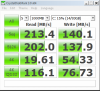
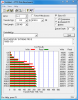
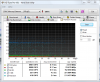
Below are the best numbers I could pull off the new OWC Mercury Extreme RE drive I just received...
They def do not match the 285r/275w sustained as advertised. I might consider my system but I can pull the proper spec numbers out of the Intel so I am wondering if I am missing something.
Got this in a new installation, high power and safe mode with both Intel and MSAHCI drivers.
Kudos for anyone who can solve this eheheh.Attached Files:
-
-
Please don't forget to test the Acc. time with AS SSD
PS: Please run the ATTO with the SSD at 50% (or lower) filled then compare it with the later tests as the SSD gets filled.
Thanks! -
I plan on it but need to figure out why I am not getting anywhere near the orig claims as of yet...
Thanks... -
Just curious if you turned off your System Restore upon reaching desktop?
Was there any optimization before the test? -
yes and no...fresh install, safe mode
-
WOW, that is a bit off. Fresh install, fresh drivers, fresh firmware, Safe mode, what else is there???
-
Okay. Please keep us posted.
-
any takers? pretty please?
-
Intel 160GB G2 is the way to go (faster and reliable) and if you want higher cap SSD you can get the Samsung 256GB SSD (TRIM enabled). Some recommend Vertex 2 but personally I haven't tried one yet.
One thing you need to consider for the G3 is the $/G when released. -
I guess that the only things could be a bad drive or somehow only SATA 1 got set. Well, there are probably others, but not being an engineer, I cannot name them
-
cool. what Sammys are TRIM enabled?
-
Your best move for what you seek is the Intel. It has proven reliability and its performance specific benchmarks are above the other ssds by a landslide in most cases. These are the two key ingredients that would send me directly to that drive.
-
understood. thank you for the insight.
what do you all consider to be a fair price for them these days? I see some on eBay for around $360? good deals? should I look for slightly less elsewhere? -
Get the 2010 release (black plastic casing) Samsung 256GB SSD with the firmware version VBM9LD1Q (TRIM enabled).
FYI: The Samsung 256GB SSD will be slower than Intel 160GB G2. -
Intel is pretty much the best company to go for
4K speeds are great, drives don't die randomly either.
Gen3 can be a while can be out tomorrow... if you want one now, get a G2.
My first thought was chipset - but then the Intel is faster on reads...
My guess would be the drive doesn't perform as advertised... by the way, if its sandforce... compression maybe? It couldn't compress your benchmark well and got low speeds. -
very good. and what would you consider a fair price range?
-
If you get lucky, you can get one OEM Intel 160GB G2 for $350 (New).
Fellow member babyhemi sells retail ones (currently out of stock). Link -
I see a few opportunities around that price. I'll go ahead and confirm one of them and jump on in today.
-
In Europe around November last year they ranged from roughly 360 on the lowest end to about 420...
On a 1:1 comparison I'd say less than 400$ - but that's about as good as it get's... I think they have been at 500$ at the start - you need to ask some local US residents. -
You mah have a point because I get that low run from Crystal and then these from HDTune and ATTO....
Thoughts? Could it be compression is affecting certain benches?Attached Files:
-
-
Post 4840...
Here: http://forum.notebookreview.com/har...thread-benchmarks-brands-news-advice-484.html
Sgilmore chose a specific type of write - on his first bench he mentioned its easily compressible - you should possibly do the same.
One bench with an easily compressible file/write and one with an incompressible one (like video, music) - you might need to ask him how he did it though.
(using CrystalDiskMakr) -
@Les
Did you try to use it on a different controller? and yes I believe compression has something to do with it -
No...I was trying to stay consistent with testing by using the same for both the Intel and the new drive. I may fool around a bit, may completely wipe the drive with HDDErase and then start over and then I just may break open the G73 I have under my desk that I have had sitting there unused for some 5 months now it seems.
Is HDD Erase the best and, also, is there any type of Optimizer that works on ssds in general I wonder...a manual TRIM as optimizer does just for the Intel? I wish I could simply manually Optimize the drive somehow first.
Oh TRIM works on this drive by the way...at least that is the claim and look of CrystalDiskInfo. -
Being this is a laptop forum, make sure to buy 1.8" drives when considering an SSD! Worst case you will need an adapter to put it in a 2.5" laptop, best case your next laptop will REQUIRE 1.8" drives so you'd be out of luck with the 2.5". Also consider a possible case like the Envy 15 which can take 2x 1.8" drives OR 1x 2.5" drive. No disadvantages with the 1.8" really. OCZ/Sandforce/Indilix/whatever need to get off there a$$e$ and make all their drives in 1.8" like Intel does.
-
ehm....
Most laptops use 2,5" drives - only utlraportables and netbooks use 1,8" drives.
There is no need to buy 1,8" drives - 2,5" ones are perfectly fine. -
HDDErase works on any SSD afaik, but you have to run it with a mobo that has IDE and compatability mode options. Most BIOS will "freezelock" HDD's at post necessitating shutting down the computer, unplugging the power cable to the SSD, booting then, "hot plugging" the SSD power cable after post and booted to HDD.exe within the DOS.
The ATA secure erase command that HDDErase sends to the controller wipes all the data off of the controller, not the NAND, if you had something to read the NAND you could theoretically recover the data but that would assume you had the encryption key that matches. -
Are you 100% sure about that?
SSD Thread (Benchmarks, Brands, News, and Advice)
Discussion in 'Hardware Components and Aftermarket Upgrades' started by Greg, Oct 29, 2009.