Problems? See this thread at archive.org.
Only one thought here, the review is for the V128.
Like X25-M G2 160GB and the X25-M G2 80 GB there is a difference in the performance between those two. The same is for the V64 and the V128.
If someone already has this model and tried it in the real world, may be of more assistance than me. I just wanted to point out this detail.
-
I ordered one of these new Vertex 2 SSD's for my X201s laptop. I should have it within a week or so as I am in Asia. I will comment on it once I get it. Am looking forward to receiving mine. I have the regular Vertex 120GB SSD in my Macbook Pro and knock on wood t has been great so far with no problems. I assume that the new one will be even better.
-
Issue:
I have the Samsung 256GB SSD; the drive has TRIM (or so says CrystalDiskInfo) and I'm on the msahci.sys driver set; TRIM is enabled via Windows, too (fsutil check).
However, my sequential writes have plummeted from 170MB/s to 70MB/s. I ran AS Cleaner with FF and now it's at 35MB/s; definitely a mistake there.
I ran AS Cleaner because I emailed Samsung and they said my drive does not have TRIM, but I don't know whether I should trust their shoddy email representatives.
Somewhere I read that the Samsung drives have idle garbage collection: I let it idle for five hours, no improvement.
What next? -
Send it back to Samsung saying it is defective.. -
Its the VBM9LD1Q firmware, right? Secure Erase will do the trick

PS: Don't forget to Back-up your files before performing the Secure Erase as it will delete all the files on your SSD.
EDIT:
VBM9LD1Q = TRIM enabled!
-
Yup, VMB9LD1Q. Right. I have some image backups. Thanks for the tip!
But, is this just an anomaly? Shouldn't TRIM-enabled drives not need Secure Erase? -
Pretty much - Trim should work during normal operations.
I.e. run for the affected cells when a file is deleted. -
OK, whew. All right, was a little afraid.
Thanks, guys!
~Ibrahim~ -
Sorry if I missed this: how full is your drive?
-
I hope I'm posting in the right place...
What SSD would be best for a student using a Lenovo X201T w/ i7-640LM? I plan on running MS Office (Word, OneNote, PPT) and using it for browsing. No games.
I don't need a huge amount of storage (I've got an external drive for that), just want something to make the tablet boot up quickly and run programs fast. I'm willing to pay extra for a good, solid SSD, but don't need the absolute best. I was thinking I could get by with a 64GB, but that's a total guess on my part. -
You're all good. It's about 71GB used out of 238GB.
When I do the Secure Erase, I may "short-stroke" and bring it to 150GB. If I am thinking this out right, it should delay/help with the read-modify-write cycle.
I noticed using AS Cleaner with FF actually filled the entire drive, then went back to 70GB when it finished. -
Toshiba mulls hybrid flash and spinning drive
SSD + HDD = SSHD
Do not want.Last edited by a moderator: May 8, 2015 -
I`m looking at a Samsung 128G SSD with VAM08A1Q firmware.It comes out of 2009 Macbook Pro according to the seller.Can anyone here tell me if this is worth buying,can the firmware be upgraded to the newer trim enabled version?Any advice would be apreciated.
-
Ask him if it has TRIM. If it does, woohoo. If not, watch out. I haven't seen a Samsung with that firmware before. It's not V BM08A1Q, right?
It *may* support background garbage collection. From Anandtech, "Version 1801Q doesn’t support BGC. Version 18C1Q (or later) does." Samsung's firmware updates from 18C(0)1Q to 19C(0)1Q and enables TRIM.
TBH, I would be wary unless it is an absolute steal and you don't mind doing a Secure Erase every once in a while. -
Thanks ikjadoon.It`s not a steal and I don`t trust the seller.
-
No problem.
Mac's don't support TRIM AFAIK, so I don't see Apple purchasing TRIM-enabled drives unless they've saturated the market (which they haven't) or they plan an update relatively soon?
~Ibrahim~ -
Hey guys I need your help. Just got my new Samsung 256gb SSD
P/N MMDPE56G5DXP-0VBD1
mfg.date : 2010.03.07
F/W VBM24D1Q
It's brand new sealed. Now I am going to install it into my Thinkpad X200s, install new Win 7 64bit on it.
Do I need any special driver to install in Win7 for optimal performance ? Nomrally I just install Intel chipset and Matrix driver but I think I read somewhere to download some new Intel drivers or something?
Thanks
CM -
SATA controller driver: default Window's AHCI driver supports TRIM. Intel's new Rapid Storage Technology driver also supports TRIM. On my Samsung 256GB SSD, msachi was marginally, but consistently faster.
EDIT: Do NOT install the Matrix thing. It has a SATA controller driver that DOES NOT have TRIM. -
Didn't the HDD manufacturers already try a hybrid drive and have it fail miserably around the time of Vista's release? Furthermore, I have not heard a peep about how Lenovo's system of 1 continous drive of SSD+HDD for the IdeaPads turned out.
-
Hi all in the SSD thread. I've been looking for a good SSD to bring some speed to the Clevo X8100 that's in the works. It seems the the Intel drives are still king right now, but I was looking for something in the 256gb range.
Anybody have a chance to test out the Mushkin or WD SSD's yet? If WD, I was looking at this 256GB model:
Newegg.com - WD SiliconEdge Blue SSC-D0256SC-2100 2.5" 256GB SATA II MLC Internal Solid State Drive (SSD) - SSD
Mushkin has available an Indilinx model with 256GB capacity:
Newegg.com - Mushkin Enhanced Io MKNSSDIO256GB 2.5" 256GB SATA II MLC Internal Solid State Drive (SSD)
and a Sandforce SF-1200 variety with 240GB capacity:
Newegg.com - Mushkin Enhanced Callisto MKNSSDCL240GB 2.5" 240GB SATA II MLC Internal Solid State Drive (SSD)
Any help is greatly appreciated. Also open to other manufacturers. I've heard good and bad things about every brand/controller at this point, but this will be my first SSD, so I want to take some time to investigate.
Thank you!! -
Thanks for the info! I was under the impresion tha the Rapid Storage Technology driver from Intel would deliver the best performance with SSD.
But now you say that just to leave the default Win7 MS AHCI driver would yield better performance than the Intel Rapid Storage one. That's interesting, so guess I would not install it. -
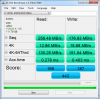
Just looking for confirmation that these are decent numbers for a SuperTalent 128GB SSD. CrystalDiskInfo claims it has TRIM enabled, and as you can see it's 62% full:
-
Basically treat the SSD like a HDD and don't constantly fill it up, i.e. don't benchmark it 24/7 But else - just treat it like a normal HDD.
The only thing you should do is make sure that auto-defrag is off.
Regarding drivers - you can use MS AHCI for Trim, or the Rapid Storage Drivers too - however, if they don't support auto trim you can manually trim suing the Intel toolbox on Intel drives - and say you schedule that to run weekly - you wouldn't even notice it was there. No degradation in performance and the toolbox only needs a few seconds.
Just stick with Intel and learn to carry less data around, only what you need?
Intel is still best with 4K reads and writes - and the other point it, Intels will give you consistent performance not fluctuate like Sandforce does...
And Intels don't tend to randomly die etc. (although one guy here got unlucky) -
All reviews I've read show the Sandforce based drives to be faster than Intel in most situations. And it's more power efficient too.
Where does it fluctuate? -
Compressible vs. Incompressible data.
Les did a little test on that.
Intel's don't compress the data at all - hence consistent performance.
Besides I wouldn't trust Sandforce anyway. -
Hmm I find it hard to ignore these numbers though. These aren't exactly small differences.
![[IMG]](images/storyImages/22529.png)
![[IMG]](images/storyImages/22536.png)
OCZ's Agility 2 Reviewed: The First SF-1200 with MP Firmware - AnandTech :: Your Source for Hardware Analysis and News -
Except that you don't know if the data was easily compressible or not.
If it was - then Sandforce will be faster, if it isn't it looses a lot of its speed. -
Hardware.info reviewed similar drives in a different test system. The differences are even bigger.
I think it's time Intel releases it's G3. Any news on that?
Reads yes, writes no.
![[IMG]](images/storyImages/22531.png)
OCZ's Agility 2 Reviewed: The First SF-1200 with MP Firmware - AnandTech :: Your Source for Hardware Analysis and News -
Here is an IOMeter 4k random write aligned on 4k boundries for 3x100gb RAID 0 Vertex LE's on ICH10R, look at CPU utilization.
![[IMG]](images/storyImages/aligned.png)
Here is a CDM default random (not easily compressible)
![[IMG]](images/storyImages/wcpr.png)
Heres a CDM all 0xFF (easily compressible)
![[IMG]](images/storyImages/cdma.png)
-
I don't think those results can be trusted. The differences are too big.
Like Anand, Legitreviews also came up with smaller differences:
![[IMG]](images/storyImages/pcmark_chart.jpg)
OCZ Vertex 2 100GB SandForce SF-1200 SSD Review - PCMark Vantage - Legit Reviews -
That's still quite a large difference in App Loading, though. In any case, while I would recommend SandForce to those who have money to burn and want the absolute best performance, I'd still recommend the Intel drives to most people because the pricing is much more reasonable.
-
I'd really like some input on this from the gurus... I was going to get an Intel X-25, but there appear to be more than one variant. Just something with decent speed and storage, for a student-friendly price.
-
X-25M is your choice.
X-25V is a budget drive with 40GB
X-25E is a server drive
Make sure you have a G2 in your product ID number.
X-18M is a 1,8" drive, X-25M is a 2,5" drive.
Need to know anything else? the only choice you need to make is 80GB or 160GB - and the G2s are silver.
-
Hi,
Checking on SSDs again. The price hasn't really dropped to levels that I was hoping by now. Oh well. It seems like its a premium product still, and I was hoping it'd be near the price range of HDD's.
When do you think this will happen? -
Never.
Or at least not for a few more good years - especially as HDD development will continue. -
Agreed...you will not see SSDs get even remotely close to the cost per Gb of a HDD for many years to come, if ever. Unlike the HDD, SSDs are primarily reliant on exterior component prices to include that of NAND as well as the controller.
SSDs don't even remotely fall within the same arena as hard drives because they are so much more powerful and open the doors for things as hard drives could never do.
And then there is the consumers mindset.... Lets say in 6 months that all of the Intels drop to the 1-200 range in an effort to push out their new releases. Most consumers would look at these as inferior compared to new technology and would be willing to pay premium for a product that is current and will hold its spot for a few years to come, as the Intel did and is still doing.
Watch out though.... I just finished testing a drive with the Sandforce and it held its speeds even when it was 99% filled and had been filled and deleted 5 times. We know how the Intel and all previous drives fare with filling and age.
Heres a little peak of something sweet. I left 53MB (mb not gb) on the drive for the test. Is that completely full?Attached Files:
-
-
Intel G2s don't care about written to them
When I wrote about 600GB without Trim it didn't slow down at all.
And else - I've got my toolbox.
Those numbers are very nice for a full drive - but - compressible or incompressible data? -
Yes...I will concede I am still a student of how the ssd acts in differing compressions. Up until this, however, I hadn't seen a result anywhere where there was absolutely no slowing whatsoever. We had written about this a number of posts back which is why I had to test it.
I guess we found our proof that the over provisioning does enhance the performance as the drive fills... -
Can't argue there
But I think one should test drives with either random data or incompressible data - its the fairest comparison. -
That's not entirely fair, though, because only some real-world applications involve data with very low compressibility. I would say that you should test both perfectly compressible and entirely random data just to give a point of reference, but the real focus should be on the kind of data you see in the real world.
For example, random data might give you a good indication of how the SSD would perform in, say, copying a video encoded with H.264, but data comes in plenty of other forms in the real world. -
True, but the majority of things we use is compressed.
Video, Music...
And the things that can be compressed easily are mainly small files - often text - some of the program code... but they rely on 4K speeds - if they are low it doesn't matter. -
What do you mean, it doesn't matter?
-
The Intel 160gb G2 is $419.99 @Newegg = $2.62 per GB
Newegg.com - Intel X25-M Mainstream SSDSA2M160G2XXX 2.5" 160GB SATA II MLC Internal Solid State Drive (SSD) - SSD
Mushkin 240gb Callisto $639.99 @Newegg =$2.66 per GB
Newegg.com - Mushkin Enhanced Callisto MKNSSDCL240GB 2.5" 240GB SATA II MLC Internal Solid State Drive (SSD)
I wouldn't say the Intel is much more reasonable. -
These Vantage scores are way higher for the SandForce drives. Doesn't Vantage use "real-world" tests?
-
Here in NL the Vertex LE 50GB (55 GB) is as expensive as the Intel 80GB g2 (74 GB).
So the Intel is a bit cheaper here.
It simulates real world usage, but it is still synthetic because it doesn't use the real application. -
If your 4K speeds are low it won't matter if you compress your tiny files or not...
SSD are supposed to be fast and reliable.
Reliability + Compression... I wouldn't trust it.
And speed - well, 4K speeds are what counts. -
Well, if you want that much SSD space, SandForce seems pretty decent, but $600 is a lot to spend on storage. The 100/120GB SandForce drives are less reasonably priced than the larger ones, however.SandForce drives are by no means slow in 4K random read/write, so I don't get your point.
-
The Vertex LE is $299 after MIR right now too bad you can't flash it to 120gb, then it would be more reasonable.
Doesn't look like a firmware flash is going to be available for existing Sandforce owners to reduce overprovisioning. To change overprovisioning you would have to take the drive apart (voiding your warranty) and place a jumper on the drive to put it in factory mode.
OCZ might let current owners reduce overprovisioning by sending drives in to be flashed -- they offer a service for Indilinx drives that flashes the drives increasing overprovisioning.
http://www.ocztechnologyforum.com/f.....we-can-do-this-thru-FW-if-you-guys-want-it& -
But they are nothing special either - so you might a well take the drive you can trust which is Intel
SSD Thread (Benchmarks, Brands, News, and Advice)
Discussion in 'Hardware Components and Aftermarket Upgrades' started by Greg, Oct 29, 2009.