Problems? See this thread at archive.org.
LOL! Haven't thought of trying that
Okay need to reboot now and try some bench tests. Brb
Thanks!
EDIT: Will the TRIM still work on this 64-bit Intel® RST Driver Files for F6 Install?
-
-
The reason is Crystal and AS SDD both use uncompressable data like you would find in JPG Video or other media files. The Sandforce 2 compression engine does not handle these well. In the case of the Callisto DX and possibly others the compression engine will cripple its speed.
My callisto just hits a wall and you immediately go from 140+ MB/s to 80 MB/s write but I've seen others go even lower. Do a secure erase and reimage and you are back in business. With my drive moderate net browsing and streaming will cripple the drive in 1-2 week with a 120GB DX only 25% used making the need to SE.
Do not just compliantly take the "that doesn't work well with this drive" and walk away. If you have the hardware you will see where this modifies your work flow untill they finally admit there is an issue and FIX IT!!!!!!!!!!!!!! -
I agree. Interestingly enough Anand seems to have missed this when he reviewed the SF-based drives as he claimed that the settled-in performance hit was minimal.
-
My tests don't confirm it either. I ran file duplication benchmarks on 2 Sandforce drives. Both performed fine, even with compressed data. Also in comparison with Crucial C300.
TANware maybe this fixes the performance of your callisto:
Source. -
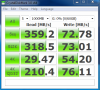
First test with the new system just now.. Can we guess what drive it is eheheh?
Attached Files:
-
-
Nope 9.6.1014 here, it is fine at first, you have to let it settle in, it doesn't happen at first after the SE, it takes a while. Also though I agree it could be the FW the Callisto uses. If it were a gradual decrease I would have chalked it up to the optimization proccess of the drivers.
It is a sudden and immediate loss though, litterally I watched it of 5 runs at 50mb files streaming do 141 MB/s writes on run 1 2 an 3 and then immediately cripple itself to 80 MB/s on run 4 and 5 with CMD. Now this is also seen in 4K too as the IOPS then decrease from the lowered bandwidth.......
Edit; now it took a while befoer it crippled. not just one run but several sets of 5 at 1000 MB the first day I had it. It took a while to get Mushkin to admit the controler slows itself down to perserve the NAND supposedly.
and then...........
The problem then is JPG, Video, Audio, CAB, ZIP, Compresed install EXE's and a host other common files are already compressed so they cause this exact same issue over time............. -
Hi guys,
I'm looking for a SSD Drive with low power consumption to use in my netbook. Which brand and model do you advise me ?
Thanks -
Kingston V 64gb snv425 and WD Edge 64gb are cheap and power efficient.
-
Speaking of power consumption, the Intel Datasheet for the 40GB G2 in my netbook says: active power 150 mW, idle 75 mW, that's 0.15W and 0.075W, which seems remarkably low, seems off by a decimal place at least?
-
The 1.8" version of the Crucial C300 has an ETA of 08/16/2010. Yay!
-
Real power consumption has been measured by Anandtech en Techreport.
-
Just in case haven't seen this post.
@ Phil
"Multitasking" can you tell me how you did this?
I'm thinking of trying this too
-
What exactly do you want to do? measure multi task performance?
see here: http://www.storagereview.com/ultima...tal_scorpio_black_vs_hitachi_travelstar_7k500 -
Yes.
Just curious how much stress can my Vertex 2 take before it starts to loose performance.
On a side note, shouldn't the SSD maintain its high performance until 80% filled?
ie,
12% filled - AS SSD (Acc.time) Read: 1.62ms
69% filled - AS SSD )Acc.time) Read: 2.40ms -
Here's another nice one for multi tasking: "Our first multi task test consisted of scanning a large folder of files with Avast Virus scanner, while at the same time copying a folder and decompressing a zip file with 7zip. "
If you make sure the scanned folder is large enough, you can start manually duplicating and decompressing. All together is CPU and I/O intensive.
The nice thing of Avast is that it will tell how much time it took. -
Sounds good idea. (I'll try that on my next SE)
Anyway, the Acc.time... it really bothers me
1.62ms vs 2.40ms = 0.78!! and its only at 69%
At 2.40ms, I wont have the reason to convince myself to pay $700 for this SSD
Anyone can share their Acc.time between 50-70% filled?
PS: Please specify what brand/capacity/?filled
Thanks!
EDIT: I'm more interested to see X25-M Acc.time. -
Why aren't the Kingston's more popular? They seem fast enough in real world and use much less juice. I'm looking at a V+ 128GB, but the fact that no one talks about them makes me feel like I'm missing something.
-
The V+ is actually a very fast drive.
One of the reasons it's not that popular is the current trend to focus on 4k random read performance, as if that's an accurate way to predict real world performance.
The V+ doesn't score very high in 4k random reads but in real world measurements it beats many of the more popular SSDs like the Intel X25-m.
On top of that, the power consumption is also very good. Techreport has reviewed the V+ quite extensively. -
How about the Acc.time? No help on predicting real world perf?
On a side note, do you happen to know if Intel X25-M (Acc.time) gets slower while the drive gets filled (below 80%)? -
It's all important, access times, throughput, I/O etc. It's hard to predict real world performance. I was just benchmarking a couple of drives. Let's call them A and B for now. A was much faster in PC Mark Vantage, but when I measured real world performance B won hands down.
I don't know. -
Interesting.
Update: I'm still convinced Vertex 2 is faster and stable than my Samsung
Hope some Intel X25-M user than share some light here before I end up opening my Intel SSD (would like to have it sealed to have higher resell value
)
-
How about 1:09 mins duplicated 4.28GB of files?
Have you tried this too? Anyone? -
Sounds good, but we can't really compare it unless we have the exact same folder. Copying small files takes longer than copying large files for example.
And even if we had the same folder, many other variables would play a role like CPU, memory etc.
That's the downside of real world benchmarks, it doesn't make for easy comparison. -
This week I got an HP ProBook 4720s, I'm not keen on the stock Hitachi drive, perhaps because I'm used to using Samsung 5400rpm units. Sure the Hitachis are perfect for most people but I find it rather chattery and a bit noisy.
Anyway, the new 7200rpm Samsungs don't yet seem to be available at retail and I'm a little loathed to take a performance drop to 5400rpm. Therefore I'm considering an SSD.
128Gb would be fine for me spacewise, it doesn't have to be the fastest unit but I do like consistency. I do some audio stuff and would use the SSD as a working drive rather than a storage.
From a brief search around the web I've read some horror stories but I presume the overall fail/trouble rate is no worse than a mechanical drive?
I'm in the UK, so which brands should I be considering? Or should I just compromise, get a 5400rpm Samsung and hold off for now?
Thanks. -
@ IdontexistM8, what's your budget, roughly?
how heavy do you multi task? -
I'd like to keep it under £200, however for the right unit I'd go a touch higher, especially if I can get some cashback.
Not majorly, although I would like to do more. -
Kingston V is decent performer. Faster, quieter and more power efficient than any HDD. Costs £ 166.
Kingston SSDNow V-Series G2 128GB, 2.5", SATA II (SNV425-S2/128GB) | Skinflint Price Comparison UK -
Thanks, I found that a little earlier, looked a decent deal. I'd use it in the 4720s immediately, then down the line it would probably end up in my NC10 netbook.
Is the comparative performance difference between the V Series and the V+ (and other makes) nothing to be concerned about? -
Well the V+ series is faster but you pay for the extra performance. It's something you could notice during heavy multi tasking.
If you're going to spend that much it might be worth it looking at a Corair Force 120. -
Ok, I do encode video and audio but not at the same time. I like to edit down large chunks of audio but I rarely multitrack more than a handful of channels. I tend to store most things externally. So I guess it would suffice.
How are the Kingstons holding up reliability wise? Any better or worse than the competition? -
Well you're coming from a HDD so this will be a big step forward.
Reliability wise I think they're very good. I've never read any complaint about them. -
Picking up from reviews, my only mild concern is stuttering. That appears to have been, by and large, ironed out with the latest version of the V, but obviously if I'm recording audio or doing something else on the fly a stutter is far from ideal.
The soon to go nc6320 has a habit of freezing and for the last year I've been using my netbook to record and the HP to edit. -
The stuttering only happened with the first generation. The second generation (SNV425) has no stuttering problems as far as I know.
-
Ok thanks for that.
I'll ponder over the weekend. It's a £55 jump from the V to the V+ which might or might not be worth it in performance terms should I wish to crank up what I do. -
Well if you want to go over the 200 mark, there's the Corsair Nova V128 too. They're quite close in performance.
Techreport.com has benchmarked both extensively. Unfortunately not on a laptop but on a desktop. -
I was having a look at what I've got on my outgoing machine and it totals to around 45GB. At the moment and because I've got a truck load (i.e. Terabytes worth) of external storage I can't see myself putting much more than that on the new machine.
After some playing around I've decided to go for a clean install and will be able to get rid of HP's recovery partition (they are sending me disks in addition to the included Win 7 Pro DVD). Therefore I'm wondering if I could get away with dipping my toe into the SSD water with a 64GB. . . Save a few quid and see how I like it. -
There are a few tweaks that you can apply to save a lot of space. Like disabling page file, hibernation and system restore.
I'm currently using 13GB of my 64GB Crucial C300. I don't use a lot of programs. -
I take it that many of those savings are because you don't need the things designed in Windows for mechanical drives?
Last Qs for now regarding firmware. . . How easy is it to update firmware within a notebook setup and how necessary/risky is it? -
Not really, the savings have to do with sacrificing some options for more storage space, better performance and less write actions to the SSD.
If you mean updating the firmware of the SSD, it depends on the manufacturer.
Updating the BIOS on an HP laptop is very simple. The tool is on HP's website. -
I think I'm either going to go for the Kingston V+ or your Crucial C300 in the 64GB flavour.
-
I'd go with the C300. The real world speed difference will be small, but the C300 will keep it's value better because it's SATA III.
And in the future when you get a SATA III laptop or desktop, you'll get even better performance. -
Ok, my only concern with the C300 was the write speed.
-
I've been benchmarking the C300 against the Vertex LE that gets 250MB/sec write speed. The differences during filecopy and installing were tiny. The C300 even won on occasions. This is because random write performance is more important than sequential write performance.
It could be different when your applications require high sequential write speeds. -
Fair enough, thinking about it with those specs a 1.5GB audio file would still only take 20-30 secs to write and usually I'd be saving it back to an external drive anyway.
-
Only looking at the label on my X25-M 160, it says 5V and 1A, which is, if my math is still good:
5V * 1A = 5Watts
So, yeah, I would assume that this guy drains 5Watts, but that might be only theorical, still, 5W and 0.15W are somewhat way too far for both to hold true...
I would too assume that there a decimal wrongly placed; since they're not the exact same drive, I'd opt for 1.5W for the 40GB G2...
Just a thought though...
-
Ive got the C300 64Gb in my system now and had posted its CDM a few posts back... I have it booting fairly quick as well...nice drive as it is upward compatible. The writes are a bit low on these drives but one needs to consider when they will be using them to their fullest extent. Large sequential file transfers are pretty much a rarity.
![[IMG]](images/storyImages/53921d1281043037-ssd-thread-benchmarks-brands-news-advice-c300-normal-test.png)
-
I was having a quick look at the stock Hitachi drive a SSD would replace. Its CrystalDiskMark for sequential writes was about 15MB/s higher.
I shift large chunks of data every now and again, whether this is sufficient to need to look at different SSD I'm not sure.
The one other I've picked up on in my browsings is the OCZ Vertex 2 60GB which appears to be supremely rapid in all departments. From Dabs it works out about £17 more than the C300 and £11 more than the Kingston V+.
If the C300 64GB had the 128GB's write speed it would be a no brainer. Sure I'd be pretty happy with any of them but still a tough call. -
Ok here's an example. Duplicate 7GB in large mkv files.
C300 64GB: 2:09 minutes
Vertex LE 50GB: 2:18 minutes
So even though the Vertex has much higher sequential writes, the C300 beats it.
What would be the source to supply the large chunks of data? -
Antec MX-1 enclosure(s) via USB or eSATA, then kept on the internal for a bit with a bunch of re-writes then back onto the Antec.
I may well have been blinded by numbers, perhaps there's too much info out there!
-
hey guys, i'm totally new to SSD's and would really appreciate some insight.
i am in the process of upgrading notebooks and would like to go all out with my next laptop. i haven't kept up with SSD's so i am totally lost as to whats good and whats not. a couple of guys recommended me the intel x-25m and the 160GB model i was lookin at could be had for around $400. right now, the intel x-25m seems to be my top choice cuz of it's performance and 160GB seems like a nice amount of storage. a 256GB, for me, would be kind of a waste cuz i don't really store much on my laptop. i have a 500GB external for movies/music/junk. 120GB might be a bit too little.
could u guys give me some recommendations, and suggestions, on which SSD to purchase. i am lookin for something with about 160GB of space and has comparable performance to the intel x-25m's. thanks in advance!
p.s. - this will be going into a Sager NP8850.
SSD Thread (Benchmarks, Brands, News, and Advice)
Discussion in 'Hardware Components and Aftermarket Upgrades' started by Greg, Oct 29, 2009.