Problems? See this thread at archive.org.
Crucial RealSSD C400 gets 25nm technology in Q1 2011 - www.nordichardware.com
Crucial C400 and C400v (value).
-
-
That's a serious improvement from the existing piece of crap OEM Samsung in my Envy 14.
-
Hello,
Just curious here...
How can you possibly know that ?
What area is improved from your OEM one and how do you know ?
Again, just curious here...
Thx !
eYe

-
Current price for C300 256 GB is 650 $, so I guess that C400 could cost 500 $ and C400v 400 $ for 256 GB.
-
Don't do it!!! Seriously. The Force series drives are plagued with a big problem at the moment, where the drive is randomly not seen in BIOS. Corsair are trying to fix it with a firmware update, but they haven't managed to figure out what's going wrong yet. The Corsair staff themselves have taken to "recommending" that people get the Performance series and not the Force series for use in laptops. Here's the main thread on the issue at the support forums, and there are loads more threads by people with this issue. Don't make the same mistake I did!
-
Mainly 4k read and writes. Based on specs alone this new one has claimed 31000 IOPS 4k read, 21000 IOPS 4k write. My HP Samsung has 4000 IOPS 4k read, and 1500 IOPS 4k write. Even if actual performance is half, it's still worlds faster.
I made the big mistake when buying the Envy 14 to get a large SSD. Granted it was a decent deal with the 30% bing cashback, but now I realize it wasn't really, because its performance isn't much better than a fast 7200RPM drive like a 7K500 or Caviar Black. I should have just bought the minimum hard drive and bought my own SSD. I definitely won't be buying another Samsung. -
Is there any way to get automatic trim to work in xp , i know there is an manual util, but is there anyway to get trim to work as efficiently in xp as in windows 7.
I can only afford an 60-64gb sdd, and i though xp takes up an lot less space than windows 7. -
Ok, gotcha.
I am not too familiar with IOPS though; any idea how could that translate in MB/s by any chance, if any such translation is ever possible...
thx again
-
@ eYe-I-aïe...:
For 4000 IOPS 4k read
4000 * 4kB = 16000 kB/s = 15.625 MB/s
(1 MB = 1024 kB) -
Thanks Dude !
So, that would mean those drives would do the following:
121MB/s 4K READS
and
82MB/s 4K WRITES,
right ?
if so, I'd say it's pretty impressive, although, still need to figure out real world benefit... -
I don't think u can do so... u're better off installing windows 7..
-
Yep, that'd be right.
-
Am I wrong or it's fastest costumer SSD with MLC out there?
-
Surely for the 4K Reads;
Most likely for 4K Writes;
As far as I'm aware, first manufacturer that sells his SSD based on 4K's numbers rather than sequential ones... -
According to this review it isn't fastest costumer SSD with MLC.
But it's good enough if it stays reliable as Samsung was before. -
What would you consider is the best all around 60GB or 64GB SSD for under $125? I'm looking at the Kingston SSDNOW V Series 64GB? It's $100 after mail-in rebate at newegg:
Newegg.com - Kingston SSDNow V Series SNV425-S2/64GB 2.5" 64GB SATA II Internal Solid State Drive (SSD)
or the OCZ Vertex (not Vertex 2) for $109 after rebate:
Newegg.com - OCZ Vertex Series OCZSSD2-1VTX60G 2.5" 60GB SATA II MLC Internal Solid State Drive (SSD)
I bought the 40GB OWC Mercury Extreme Pro for $99, but I realized 40GB probably isn't going to be enough even just as a system drive with basic apps for my notebook. I will have a hard drive for storage in the notebook in addition to the SSD. -
It seems to be a new thing. Especially Sandforce drives have been advertising with 4K IOPS:
Newegg.com - Computer Hardware,Hard Drives,SSD,mushkin
http://www.newegg.com/Product/Product.aspx?Item=N82E16820227536 -
I have the kingston 64gb v+ and im happy with it. I paid $112. It came with a nice little external case for your old hard drive so now I can still use my old drive for storage. My brother had a vertex 1 and it died twice on him so I got the kingston.
-
Vertex 1 is way better than the Kingston V series (SNV425).
The Kingston V+ performs similar to Vertex 1.
Crucial C300 64GB is $136
http://www.google.com/products/cata...sult&resnum=2&sqi=2&ved=0CB0Q8wIwAQ#scoring=p -
Thanks guys. I'm trying to figure out the difference between Agility and Vertex. Vertex seems to have faster performance in general but the Agility seems to cost the same?
And regarding C300, I thought it was not good with a SATA II controller, and its 4k write times sucked comparatively? It's all so confusing.
For a SATA II ICH9 controller, If I stepped up the price, which would be best between:
Corsair Force F60 60GB $145
Crucial C300 64GB $139
OCZ Vertex 2 60GB $158 / $138 after rebate
OCZ Agility 2 60GB $158 / $138 after rebate -
Vertex 2 beats C300 on SATA II.
C300 beats Vertex 1 on SATA II.
Vertex beats Agility.
Only reason to buy Agility would be if it was cheaper. -
Thank you, so what about Force? Should I go with Force since even you seem to tout its performance on SATA II?
-
Force performs very similar too Vertex 2. It's basically the same thing with different firmware.
But, one member says the Force has problems. If that's true (I haven't inestigated it) it might be better to go with Vertex 2. -
Sweep posted the link here
The system shuts down after idling for long hours then BIOS cant detect the drive until power-cycle is done but the problem remains. Some members there are currently testing the new firmware. -
With respect to the Crucial in SATA 2 vs 3, I did some CDM testing awhile back and below are the charts if they help at all...
As well...you might be interested in the final Vantage scoring:
I know they are with the OWC's rather than the vertex 2 but as many say, a SandForce is a SandForce right? Im not so convinced of that but sticking to the SATA 2 scores of the Crucial, I thought you might appreciate the differences between SATA 2 and 3. -
yup, this would just explain that...
-
Thanks, so OWC is probably about the same as well? Thanks for all your info so far +1
Thanks for that, seems they're still working out the bugs. Looks like I'm vying for the Vertex 2 then +1
Thanks a bunch! That's good info +1 (hope I can give out this much rep, lol). Looks like I'm vying for the Vertex 2. However I'm debating whether to just exchange my 40GB OWC for a 60GB, but that's $67 more (bought 40GB at $99) or use it in my Shuttle PC. Wonder if OWC will price match to a Vertex 2 at all? -
Thanks.
AFAIK, they don't. I've tried it several times but no dice
-
-----------------------------------------------------------------------
CrystalDiskMark 3.0 x64 (C) 2007-2010 hiyohiyo
Crystal Dew World : Crystal Dew World
-----------------------------------------------------------------------
* MB/s = 1,000,000 byte/s [SATA/300 = 300,000,000 byte/s]
Sequential Read : 227.951 MB/s
Sequential Write : 182.966 MB/s
Random Read 512KB : 207.656 MB/s
Random Write 512KB : 69.523 MB/s
Random Read 4KB (QD=1) : 18.413 MB/s [ 4495.4 IOPS]
Random Write 4KB (QD=1) : 13.510 MB/s [ 3298.4 IOPS]
Random Read 4KB (QD=32) : 19.822 MB/s [ 4839.4 IOPS]
Random Write 4KB (QD=32) : 15.038 MB/s [ 3671.4 IOPS]
Test : 1000 MB [C: 30.8% (18.4/59.5 GB)] (x5)
Date : 2010/09/05 21:33:43
OS : Windows 7 [6.1 Build 7600] (x64)
Just figured I'd post my results thus far. This is a kingston V+ 64gb.... nothing amazing but it was cheap so I got it. Its in a hp dv2550se with an 1.5ghz core 2 duo processor so $112 was as much money as I was gonna spend. This computer is now faster than it ever was so I am happy. -
do we have a general consensus on the Agility 2 vs Vertex 2 in terms of performance per extra dollar spent on either?
-
Well considering they seem to be about the same price, the Vertex 2 appears to have better 4k performance, so it's a no brainer IMHO. Agility 2 claims 4k Write of 10,000 IOPS, Vertex 2 is 50,000 IOPS. I've got my mind set on the 60GB OCZ Vertex 2 for $138 after rebate right now.
-
Both Anandtech and Techreport have said that one will not notice the differences between Agility 2 and Vertex 2 in real life. I agree.
No one is going to notice the difference between a OWC MEP and Vertex 2 either, in my opinion. -
About SandForce based drives, don't forget that it can get 50000 IOPS 4kB write only when writing all zeros or one, which probably will never happen in real life.
-
Agreed to Phil and Tomy B's above posts.
One good example coming from someone (me) who is very keen on responsiveness and boot time, I got my Sammy 256GB last week and installed in on my M15x to see how would it feel against my Vertex 2 240GB and to my surprise it was next to nothing from my real world usage. The only difference I found was the boot time (power button to desktop) which was slower by 500 to 600 milliseconds (launching other common apps felt the same).
Agility 2 or Vertex 2 = Vertex 2
Cheers! -
I had Intel X25-V 40GB and I didn't feel any difference compared to my SSD and the reason why I choose Samsung based SSD is reliability.
-
In reality most people side by side will see little difference real world between the Intel G2, C300 and any Vertex 2. Synthetics may show it but they are so fast to begin with there is little difference. It isn't like big differences in comparing a 7,200 and 5,400 RPM HDD or an XT compared to a standard 7,200 RPM.
For casual home use these are all super fast drives. There could be some specific work flow that may show some minor differences between the drives. These however are specialized and few and far between.
Personally I went Vertex 2 but IMHO I would have been as well off with an Intel G2 or C300 but with no experience in SSD's at the time I did not realize this. Early SSD's I am sure had significant differences but as the state of the art gets faster and faster the real world differences are seemingly fading away. -
Thanks for the responses, was looking at the 40GB Agility 2 for $100 vs 40GB Vertex 2 for $120.
Also, is there a significant difference between a 50GB SSD vs 60GB Extended SSD? They're the same price -
Absolutely correct. The reality of it is that 99.9% of people are moving up from HDD systems and will be thrilled with any ssd. I have 3 distinctively different ssds here right now (Intel/OWC/Crucial) and I would challenge anyone to tell the difference between any in every day use.
Its us techies and geeks that like to crunch things such as total number and start times at the end of the day. -
Except for the OEM Samsung SSD's. They suck.
-
they're not exactly the best but they offer a lot of SSD space cheaply.. u can't have everything..
-
Well actually before the Intel I was Samsung 256Gb and Samsung 64Gb before that which I reviewed. Their is still a jump from the good ole hard drive and its much the same with all ssds and thats access time .
-
I guess since we're talking subjective, I noticed no improvement, as a matter of fact frequent pauses when loading programs and just intermittent pauses as the drive was accessed. And my benchmarks are also no better than a good 7200RPM HDD. I actually checked the actual drive to make sure it wasn't an HDD by accident (ordered it OEM from HP as part of CTO in Envy 14), even though device manager showed it as a Samsung SSD.
-
Are you kidding? Do you have PM800 256GB Samsung with new FW (TRIM support)? Because I had 500GB 7200RPM Seagate before and man the samsung ssd is way faster (really much faster)...
-
I also have Samsung based SSD (PM800/RBB controller) and it was really noticeable difference going from HDD and not any difference compared to Intel X25-V.
-
I too noticed these issues on a client's Dell a year ago - was also told I was crazy to think the SSD as inferior - but it definitely was. A few hundred (well, not quite...) updates later (not firmware updates; driver updates) and the M6400 finally performs like a semi-respectable computer with a Samsung 128GB SSD.
(But, that also performs much, much worse than how my Seagate XT in a much lower spec'd VAIO does). -
That's the problem. It was a $565 upcharge to get it configured in the notebook, not cheap. Granted I got the laptop with 30% BCB which is the main reason I ordered it CTO with the laptop (ended up being ~ $400 if you take into account 30% BCB).
Before I ordered HP said they were either Western Digital or Crucial. When it came it was Samsung, and without TRIM as well. They are supposed to send me a new replacement SSD with updated firmware that supports TRIM, but it keeps getting delayed and going on over a month now. But they keep extending the period I can return the laptop. I was going to give it a chance to see how well it improved, but this is getting ridiculous.
Look at this and tell me there's nothing wrong (Samsung 256GB SSD on left, Seagate Momentus 500GB HDD on right):


Crystal Disk Info:
![[IMG]](images/storyImages/cdisamsung256gb.jpg)
I've ensured the drive is aligned, enbled and disabled write caching, tried different drivers, same result. You can't update the firmware either. HP Has to offer the utility and updated firmware. You can't do the Samsung update, I've tried. Samsungs supposedly have idle GC, so I did some testing here:
http://forum.notebookreview.com/hp-envy-hdx/505396-all-samsung-256gb-ssd-owners-firmware-trim.html
It took a 24 hour idle with no sleeping the PC in order for it to recover. Well, after using the PC for a while (like several days), I ran the test again and above are the results that I have gotten the last two times I've run it. -
Wow thats really really bad...
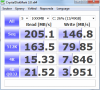
Here is mine in it's probably worst shape (no matter what I do with laptop I never get worse numbers than this):Attached Files:
-
-
@htwingnut
Since your SSD doesn't support TRIM the only solution to fix your SSD poor performance is Secure Erase. -
I've only had the laptop for a month or so, haven't used it much. I'm not going to do a secure erase every month, or every couple months, that's ridiculous. This day and age storage drives should be maintenance free more or less. Sorry, but I'm not paying $565 for an SSD with no TRIM. HP can have the stupid laptop back if they don't deliver a drive with TRIM.
SSD Thread (Benchmarks, Brands, News, and Advice)
Discussion in 'Hardware Components and Aftermarket Upgrades' started by Greg, Oct 29, 2009.


)