Problems? See this thread at archive.org.
The 120GB gives you the option of lower OP. You can turn it back into the 100GB version by leaving 20GB as unallocated space.
Beside, I think the 100GB is usually selling at a premium over the 120GB(Both have the same 128GB RAW NAND space), now that is marketing
-
-
Looking for some advice on SSD's, IM looking for reliable units, that are fast, im looking for 2 80 gig drives for my home computer, and 2 250ish units for my 2 notebooks...
any recommendations? -
In terms of reliability, the tried and true x25m is my first choice for the simple reason that it has been out for such a long time(in SSD time scale) and only has one firmware update.
-
Yeah really. Not a lot different that CPU makers binning much faster CPU's as slower ones to meet demand.
-
Heres a question for you guys, I'm about to set up two intel X25-M 160GB SSDs in RAID 0, I"m basically looking to max my SSD Speed, as well as RAID so that I can have everything I need loaded on my system. I'm pulling out my blu-ray burner, and putting it in an external enclosure so that I can install a 1TB storage HDD in it's place. So in total, the system will be housing 3 drives. Two in RAID 0, one for storage. This will be in the M17x listed below.
My question is, are there better options? IF so I'd be tempted to sell the Intels for something else. I was looking at these as they offer more space.
OCZ Vertex
SSDs are not my strong suit, and I don't know much about the OCZ drives other than hearing good things about them
-
Samsung and Intel would be my top picks.
Samsung PM800 can be had very cheap from Ebay. -
I am using 2 Intel X25-M in RAID0 myself, and was using 2 Sammys PM800 in RAID0 as well previously.
Both rigs were super fast, the 2 Intel are just ish faster at decompressing files; else, it's almost the same speed (± 15 ~ 25 seconds to boot, programs loading almost instantly, and so on).
I cannot comment on other setups or other drives, but I can tell you that raiding two SSDs almost double the I/O; so, very
However, in any case, if you plan to RAID two SSDs, you would be well advised to NOT fill them more than say 70% of their total capacity if you want to remain an Happy-SSD-Buddy, because you won't benefit from the TRIM command; see the second link in my sig for more infos.
Cheers !
eYe -
How bad is Kingston V100 128Gb(Toshiba controller). I can buy b'new one for nearly 40% off standard web price.
-
I am presently doing RAID testing and have completed Crucial 256x2, Samsung 256x2 and am moving on to Crucial 64x2 before Sansforce x2 and 256x4 if it helps at all. Will have all put together and public by Weds for sure.
-
I'm currently running 2 Samsung PM800 128GB in RAID0 and I'm very happy with the performance. It's not double compared against a single PM800 in AHCI, but it's significantly faster.
-
Here are the two Crucial and then the two Sammies
Attached Files:
-
-
could you pls run the AS SSD Copy Benchmark with both and post the results?
-
I am not a fan and dont have that program but I am right now setting up a 4x array with all. Maybe I will download it and then use it for the 64GBx2 as well.
I just learned that the new RST 10 1.0.0.1046 driver has a great improvement in speeds alll around including Vantage. -
Ok guys I decide to settle with Mushkin Callisto deluxe 120GB
Brought it for £150.XX
That's the cheapest 120GB SF-12XX drive available in UK -
Les, the latest IRST driver is 10.1.0.1008 WHQL.
See:
intel drivers pour Raid/Sata/Ata/Ahci
-
I think he's talking about new unofficial version available here.
-
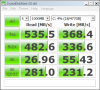
Tested with 1008 and it brought my speeds down compared to 10046. Crucial Reads are 535 with 46 and down to 499 with 008.
Look at these reads with my secret unauthorized version though... Did I do good? You may have to count the amount of numbers in those read speeds to believe it.Attached Files:
-
-
You do know we're linking to the same page, right?
That is not what I've experienced - but then I'm not running RAID!
Yeah! You did great! -
Ya I kept track... I am on my last RAID scenario but today I created 10 RAID arrays of which 8 were 2SSD and 2 were 4SSD. I also completed 70 separate tests to include Crystal/PCMark Vantage and the HDTune Tests. I am on my last Array right now but was able to test the different RST versions (3) as well as unintentionally testing write cache buffer flushing enabled and disabled.
-
Is that the V+ or V? The V+ is very good (see Anandtech).
-
I'm still Nr.1 in here I see. I'm getting my 10th ssd by now, dudes. Just wanted to walk by and say hello.
-
Thanks for reply Phill. I brought Mushkin Callisto deluxe 120GB (SF-12XX)
-
Hey Dave, where ya been? I am still on my second, well actually third but I do not count my first STUTTER drive. Had the really bad controller, have blocked out the name.
What are you thinking about the upcoming THIRD round for Intel, Crucial and even Indilinx? -
Well, I've been gone after too much crap in here (3, 2, 1 till they start hating me again
)
well, i wanted to wait for the third round of intel. but the first and second gen serves me well since long now, and i needed a new one. so i'm getting a 120gb intel in.. i guess one day.
never touched indilinx and others yet. and i guess i never will. my systems are by now 100% intel (i5, core2duo, you name it). it just fits to have intel ssds
and due the law of diminishing results, i don't think i would experience a big wow effect by having something else.
so by now it's 3 sammies, 3 mtrons, and soon the 4th intel..
and at this very moment, i'm actually defragmenting my home server system drive yeah, that one isn't ssd yet. sadly. have to find 5tb of cheap ssd storage
-
Okay so I've been wondering for awhile;
The 40 GB Intel SSD has 170 read 35 write
The 80 GB Intel SSD has 250 read 80 write
The 120 GB has 250 read and 100 write
The 160 GB has 250 read and 100 write
Is it the small SSD you have the slower read/write speeds you have or does Intel just use different flash NAND chips per different size? But all the SandForce based SSDs have the same read/write speeds, but Indilinx controllers also follow Intel's pattern to an extent.
-
as the ssd is essentially a raid of flash-chips, the less, the less performance you get.
but it depends on the controller, and on how many flashchips it can talk to in parallel. the intel one can talk to up to 10 afaik, and on the 50gb one only has 5 => half the performance. the 80 one has 10, but still is at the limit (as it has no "free chip for writing" when all 10 are loaded, hence the write limit).
sandforce doesn't produce ssds with too less chips to saturate the controller, it seems.
it looks like reads could be much higher on sata3, if intel would support it. 340 at max or something. -
Sorry Dave...I might be in the lead eheheh. and Bigspin...cant read that.
I would like to throw something out to the group here if I may. I am attending CES in Jan and meetimg with most companies personally which was the main purpose of the trip. Right now we r booked with Intel, Samsung, Corsair,Kingston,Zalman, SuperTalent, and SandForce.
These meetings are usually a half hour sit down to talk about the company, where they have come from, present and future and are private in nature.
We will be meeting with many more in the 4 days... Are there any questions you guys have for the companies? If so, pm me the message and I will include it in the conversation.
If there are any ideas at all, send them to me.
I thought I would bring this here because it was brought to my attention in making one of these appts a few days back that at over 1.2 million hits, this is the oldest and largest SSD related conversation on the web which is still thriving very well. -
This offer is very kind of yourself, thanks a bunch for that.
I would have millions of questions I would like you to ask, but I'll discipline myself and will ask you to ask them only one...
When will they finally make ATAPI-8 compliant SSDs, so we'll finally be able to TRIM-in-RAID ???
Please and thanks !
eYe -
User Name Posts
davepermen 680
tilleroftheearth 613
Phil 540
sgilmore62 457
DetlevCM 424
Les 280
you're not even in the same leage! but you definitely are first, and the one who made us what we are.
ENJOY!
nice, have to remember this if something pops up.
and one had the most posts in here..
-
So, since I'm total new to SSD and I found no infos in the first post of this thread, let me ask:
I'm using a crucial c300 - 128 gb ssd, I've updated it to the last firmware and I've disallowed "windows restore" option in order to gain some space/general performance...
What tool do everyone use to check performaces? I saw HD Tune but I don't find it reliable, what else is around?
What's else should I know about my ssd? thanks to anyone who's willing to help -
try crystaldiskmark and enjoy your disk
-
Intel 120GB $204.99 - $35 cash card = $169.99 - $25 newegg gift card = $155 - 3.5% ebates rebate = $148!!!
At newegg, $25 gift card today only. I just bought one.
See Cin's post for details:
http://forum.notebookreview.com/not...5-200-50-300-100-500-today-12-13-10-only.html -
That's after a crap ton of rebates Might as well for Intel G3 SSDs
-
Dave P welcome back. All who leave here do eventually come back. Right Les???
))))
And you, Dave P are one of the few who remember and even have Mtron! What ever happened to that shooting star??? They were king of SLC for sure!
So Les, that is my question. WHY did they all kill SLC??? Is it because they do not respect our data enough to provide at least the OPTION of SLC? I mean, there has to be some truth in the saying t6hat AT THE END OF THE DAY, SLC is faster and more reliable.
That is my question Les, and you can ask all or any of them you would like this same question.
Thanks, Dave -
it's because slc does not provide enough benefit worth the cost.
no matter what solution you use, you NEED a backup if you want reliable storage. so mlc are much better in cost. remember i bought my 64gb for 800$ back then.. and replaced it on all my main systems with mlc intel for added performance. reliability so far is there on both, and doesn't matter. i have backup
-
If you're going to keep Windows Restore disabled, I hope you've got a solid backup/imaging plan to an external drive. System restore can be configured to use less space (ie: 1-2% of total drive space) rather than fully disabled.
-
I also have backup. Which is of course necessary no matter what drive one has. Still, I do not like the way SLC disappeared. And with yourself as the exception
, these MLC drives have not been available long enough for any REAL data to be attained as far as longevity.
Bring back my Mtrons please! Of course, I write this on an MLC
PS I have no idea what my next drive will be but I am very excited about it nevertheless!
G3??????? -
mlc exists as long as slc. it's exactly known how long they live, how they die, and how to measure it.
it all doesn't matter as long as it all is within the defined boundaries. mlc 2x, mlc 3x, slc, they all deliver 100% reliable flash till their write-count is over. even then, they're controllable to verify if they still work. (don't think of fabrication errors right now, that can happen to slc too).
it's NO problem. especially as storage sizes grow. i would not buy 16gb mlc to install my os on it. but on a 80gb one it simply doesn't matter.
all that matter is, i can plug it in, it works, and the manufacturer knows what he's doing. unimportant with wich components. and that's why i was on mtron first, and now on intel mainly: they know what they do. -
But at $204.99 it's still a bargain. I just got $50 from Kingston, $20 cash card from OCZ, and then $35 from Intel and $25 from Newegg. That's $130 I can use to buy something fun. You can get cash from your cashcard at pretty much any bank for no fee too.
-
Im embarassed...thought you were talking about number of SSDs owned eheh...was an early morning.
-
how many ssds did you had / actually used by now? (means not just for testing)
and no problem, i hate early mornings myself, too. i fail till around 13:00 then start to get a bit productive
-
Here ya go:
If a drive supports TRIM, then when a TRIM command is sent to the drive it will properly TRIM the data and make that space immediately available to be erase during a garbage collection cycle on that block (rather than MOVE the unknown unneeded data).
RAID uses drivers that are in-line with the data being sent to the drive. It is up to the RAID stack and drivers to interpret the TRIM information from the host and respond appropriately by passing that command to the drive. Note that depending upon the RAID mode used, it may be a complex lookup to determine where those particular blocks are located across the array.
Is that quick? -
A freaking men to that!
-
Yes, Mtron was an exciting company, for sure. G3, where are you?
-
Hihi, I'm kinda new here..
Im looking for an SSD upgrade for my m1730 which I have had for good 3 years and was always thinking to upgrade my original 2x 250 gb samsungs 5400 in raid 0 to something similar in capacity and raid configuration (so 2x XXXGB SSD) and since I have no idea which ones are good and which ones not so good or even bad sdds would be very greatful for some help to choose a good, decent sdd drive.. optimaly 120-256GB x2 in size with good performance and ofcourse price not higher than 500-1000 pounds (for both of them)
any hints or links to some good sdds or links for reviews/shops that sell them etc would be very appreciated -
Hmm.... I have 4 systems all running SSDs...one still being pushed along by the Intel. My son has a system and my wife as well...both with SSDs. Ive tried like heck to get failures guys... Believe me if they can't do it nobody can.
I happened to be at the computer store (local) down the street a few days back asking about RAID and asked if he had ever used an SSD. His response was " Not with the money we are making here no". I brought one in for him to fool around with and now he and his brother (Co-owners) are fighting over it.
It was like I walked in with gold in my hands. They couldn't believe it... Nice to help I guess.
Shameless plug for these guys...
Computer Repair | Laptop Repair | Sales | Niagara | Onsite -
Hello everyone,
I've exhausted options on the Sony thread, so thought I'd come over to this thread for help with all the SSD expertise here.
I recently upgraded from an ASAX SSD (it's pretty bad) to a Renice SSD. It's got good review for a 1.8" ZIF-interface SSD. In fact, I shove it to my desktop and achieve quite an amazing benchmark for a 1.8"
Anyway, so installation was fine, install Windows 7, latest Intel chipset drivers, Sony library all the essentials. The buttons and everything works! I was first struggling with both READ and WRITE problems, but after this guide of how to fix TZ SSD speed, I've gotten the write to go up (same with the other TZ owner), but read speed remain to be under UDMA2.
I had luck, for ONE time lolz, 83MB write, 56MB read, but after one reboot, it just went poof, back to this. It was quite short lived.
![[IMG]](images/storyImages/renice_reads.jpg)
I rebooted, and rebooted like a crazy man thinking magic would come back but it never happened. That's when I start toying around with configurations, but with no luck.
I tried the registry trick, uninstalling the controller and let it re-detect trick no dice. My bios is so simple it doesn't allow me to select DMA mode at all, and my Windows Device Manager tells me it's UDMA2, which is basically what HDTune is detecting.
My computer is a Sony VAIO TZ91NS
U7600 @ 1.20GHz, 2GB ram, Windows 7 32bit
SSD in Question: Renice K3VLAR 64GB 1.8" ZIF
My configuration replaced the DVD-ROM with an extra HDD, making 2 HDD in my laptop. My other HDD is a WD Blue 500GB and is able to run at UDMA5 and its performance is on par.
As you see, I used hdparm to force UDMA5 with the -X command, yet still no dice what so ever. Well I mean I had it once, then it just disappeared.
Anybody have any ideas what might went wrong? I've ruled out drive fault when I plugged it into my computer. Ruled out cable fault because I also replaced my old SSD and it was reading a good 77MB/sec according to CDM.
If anything got any clue, that'd be amazing Thanks ahead of time! I'd buy coffees if everyone's around lolz! *goes broke*
-
Looks like a great store!
-
Hey Cape.... Ya... bad night though....
Having USB3 probs so I bought a 1000watt Coolermaster...hooked her up...took 40 minutes to get everything just right...flicked the switch and poof...pop... short and it blew..not impressed.
Ah well... new Gigabyte UD7 on the way with promise of the Sandyforce within a month... Whats Sandyforce and hows it relate to mobo? eheh
Anyone looking for a like new Rampage III Gene eheh. Not enough card slots.
SSD Thread (Benchmarks, Brands, News, and Advice)
Discussion in 'Hardware Components and Aftermarket Upgrades' started by Greg, Oct 29, 2009.