Problems? See this thread at archive.org.
thanks. I just don't wonna waste my expensive MB's...lol
BTW will it affect disk alignment ?
-
When Windows 7 creates the 100MB partition, that is how it ensures it's aligned. Let it do it's job.
There is no good reason to create a second partition on an SSD. Use folders instead. -
The one good reason I can see for two partitions is if you install your OS on one, and data files on another. That way you can safely reinstall you OS without losing data. Yes you can and should backup but it just saves that extra step when reinstalling the OS.
-
hi guys!! I'm new in this SSD stuff and I've read a lot about it and see plenty of videos and I've decided I want to install a OCZ Vertex2 in my AWM15x. The only issue: $. Do you people think its mark value will drop in the following weeks or months? I mean: the price would be significantly slow with the current storage capacities or it would be more or less the same and the capacities will be increased instead?
Hope someone could answer me and thanks in advance
-
Nice tool, but I'm gonna stick with Intel SSD Toolbox.
Anyway, CDI is pulling the SMART info and accurately reads my SSD at 99% still. I don't know why yours is new and at 92%, but I hear that SSD health is hard to guage with different programs.
I dunno if you should be worried or not. :| -
I saw somewhere saying that 100mb partition is for bitlocker.
That's exactly what i'm thinking. I have a backup system, but having two partitions help me to reinstall OS without worrying about other stuff.
Otherwise I also think there's no point partitioning SSD since it's not going to fragmented. -
Yes, Microsoft took a page from linux. the 100MB kind of store the bootstrap of the OS. As the boot loader(i.e. the code in boot sector) cannot load things that is protected.
-
OK, but since Home premium not support bitlocker this is just waste of space.(From the SSD space/price point of view)
-
in a sense yes. Though 100M out of a typical 100G(my min size of modern W7 installation) is not that much.
-
.001% = almost not worth the bother.
-
htwingnut,
On a HDD, I agree 100% with you. On an SSD though, if I'm re-installing an O/S, I'm probably going to SE it though anyways.
With an SSD; backup is not optional.
bigspin,
On the contrary, the most fragmented files will be on an SSD.
-
Yes, I know, but it'll not affect the performance like HDD. so what's the point?
-
Backup is never optional. I'm just saying instead of having to go through the extra step of restoring all your files after a fresh windows install, your stuff is still intact.
But good point about SE. I have done that already with my Intel a couple times.
So far personally, I haven't partitioned the SSD. On my desktop PC's that have 60GB SSD's, it's the main OS drive and that's it anyhow. On my M11x my Intel 120GB is a single partition. -
On a typical Windows installation, it is still very difficult to have one's stuff intact after a fresh installation. C:\Users have kept too many things which is difficult to split out.
-
That is not what you originally said, nor what I responded to either.
I do think that it affects the performance though - not the fragmentation of files per se, but the fragmentation of free space (which Windows works diligently to find contiguous portions of).
After I ran PerfectDisk's 'Consolidate Free Space' option on my Inferno, the 'snap' the system has is noticeable - but the overall speed is the same, I'll admit (but then again, that's all an SSD does anyways - gives more 'snap'). -
While SSD shield some what the effect of fragmentation (making slow things faster), reading multiple fragments of a file is still slower than one big contineous chunk so defrag still make sense for SSD, may be just less frequent. I recently try a defrag of my 80G and it records about 2G host write so I would say a price I would pay for say a 3 month interval.
-
I saw article syaing somewhere(I think Anandtech) that ssd'd get fragmented somewhat, but it's affect on the performance is next to nothing. Even by doing that we kill the drive
-
kill the drive ? other than some more write, what harm does it have ? I have done it and it cost me about 2GB write(on my 80G that was installed in 9/2010). I don't care about that if it is done say once a month.
As for saying the effect of the performance is next to nothing, I would suggest people to look at the sequential vs random read/write benchmark of SSD. -
Dont want to get in trouble but don't want all to be left out...
-
Hey Les,
What SSD would you recommend for a HP ENVY 14 & for a HP DV6T SE?
What is the minimum size you would recommend for running Windows 7 + CS5 Suite? Does it make sense to run my OS + programs from the SSD and have everything else on the secondary HDD?
Any advice on how to replace the optical drive with a SSD in these machines?
Thanks! -
The optical thread is on this site and get a coffee because it is huge. I am sure someone would jump in though.
All of your other questions become dependent on your price range. Any SSD is good for that laptop, you should understand the difference in the controllers, however, because some are a bit more aggressive in garbage collection than others. As well, I recently did an article which is getting ALOT of attention on the new f/w quietly released by Sandforce.
As far as the data being stored on a secondary disk, I have a 1.5Tb hdd so does that answer your question? Why would I want to put all the movies, music and photos on the main disk if I never use them? -
If you don't mind the low sequential write speeds with uncompressable data, Sandforce drives can be good value for money.
-
oh..phil i just wanna ask that from u. how bad is it? hope writing speed is still better than intel
-
Not sure if it was mentioned before but Intel released new RST
Intel Rapid Storage Technology 10.1.0.1008
http://downloadmirror.intel.com/19607/a08/iata_cd.exe
incompressible data seq. write is slower than Intel G2 160GB. About 80MB/sec on a used drive.
Not many situations you'll notice it though. -
ok. I think cheap Kingston V100(JM618) is better solution me as second drive, since they have better sequential write speed. I'm going to use that drive to store all the ZIP/Movie Files which I have to deal with my work life.
-
Hi there,
I am going to buy OCZ Vertex 2 120GB 2.5".
I heard that some laptop chipsets have considerable problems taking maximum out of SSDs. I own HP ProBook 6450b with chipset Intel 5 Series/3400 Series. Is it one of those problematic? If so, is there any solution to this problem? I heard about several tweaks, but I don't know which one is the best.
I would like to copy my entire HDD on that SDD, so that I dont have to reinstall whole system. Which program do you suggest?
I recall one thread about how to lengthen SSD life, but I can't find it anymore. The only thing I remember is that I should turn off prefetch. Could you post link to it?
Thanks
Manthess -
Well, first just let me say as nice as it would be to just copy your system over... DON'T DO IT!
You will surely be disappointed by the SSD performance then as I don't know of any program that will transfer from an HDD to an SSD successfully without being out of alignment not to mention tuned appropriately for an SSD. If you're using Windows 7 it will set it up appropriately with a fresh install. -
OK, so I i will do a fresh install. What should I do afterwards? What steps should I take to lenghten SDD life? Which tweak to use? I am a little bit lost in this.
-
USE SSD optimization guide by Les
& little bit of googling help you alot..
-
i tested an ssd on one of our work systems. it has bitlocker enabled, and is an i5 with sata2, so it should deliver the nice 250mb/s readspeed on an intel ssd. thanks to bitlocker (i guess) i get around 160mb/s only. and it does feel quite a bit more sluggish than my other systems (which are slower, but don't have bitlocker).
the wow effect just isn't there anymore on such a setup. well, it was an interesting test. -
paragon free download with license Paragon Migrate OS To SSD Free Download With License Serial Code My Digital Life
-
Thanks!
Does this actually migrate the whole OS or just files? The information isn't quite clear. It mentions nothing about alignment either, which is obviously crucial to an SSD's performance. -
@htwingnut
About splitting OS/user files. It's do-able. I did it on my desktop, 50GB OS partition, 100GB Programs, and 490GB Media Files.
There are ways to migrate C:\Users to a different drive; it just takes a few clicks because Windows can remap Documents, Music, etc. folders anywhere, even on drives separate from the OS. And it will automatically rearrange the Registry entries and what-not, so all "Document" folders will redirect to D:/Documents instead of C:/Documents (which you would delete, anyways).
The only problem (if you split OS and programs) is that a few archaic installers won't let you choose the installation directory and assume C:\, but those are few and far between.
@whoever was asking about the 92% PM800
My PM800 shipped at "92%" and has remained at "92%" for over a year now with CDI 3.3.0.
~Ibrahim~ -
Did you actually read the blurb? Posted below for reference, high lighted the answers (I believe) to your 2 questions.
Highlights of Paragon Migrate OS to SSD:
Migrate Windows to larger or smaller storage devices in a single operation
Automatically align partitions on the destination disk if necessary
Automatically detect and copy MSR for successful migrations of Windows 7
Allows the user to exclude data during the process in order to fit the destination disk
Processes locked (in-use) disks with MS VSS to migrate with no Windows reboot
Guarantees safety for the system and data
Paragons time-proven move/resize functionality is includedLast edited by a moderator: May 8, 2015 -
Migrate doesn't necessarily mean transfer, and I was reading the Paragon site not the article. I guess I was looking for it from Paragon's mouth.
-
Windows 7 has built-in tools to backup and restore system image with the existing partition table information preserved (so if your existing one is properly aligned, the restored one would be too).
The only catch is it can only move from smaller to larger or equal size drive. Otherwise, you have to do some shrinking and preparation.
It is easy, do not need to boot into a seperate OS(other then the restoration that use the Windows install DVD or just the recovery DVD that can also be created in Windows 7). -
I think most people would be moving from a large primary drive to a smaller SSD; I know that I am considering to purchase the ENVY with the 2 x 500GB, 7200RPM option and then saving the primary drive as a backup while installing a 256 SSD.
Perhaps you missed the key word in the OP post = paragon
free
Last edited by a moderator: May 8, 2015 -
I moved from a 120G to 80G without any problem after proper shrinking. I know there are free options(clonzilla, linux dd etc.), it is just that I found working inside Windows 7's builtin stuff is easier.
My colleague strongly recommended Acronis which turned out to be a nightmare(target misaligned and I need to redo the whole thing), I was just trying to let people know that there is already a known working option.Last edited by a moderator: May 8, 2015 -
Yeah I tried Acronis and it fubar'd my ssd to ssd alignment.
-
Merry Xmas all and hope all got in on this...
Recent Xmas updates... New UD7 in the mail USB3 doesnt work, new Runcore ProV and I just got..... a Revodrive. Gotta admit, these are nice cards. -
I used Acronis True Image 2011 and it didn't mess up my alignments.
-
They may have changed that, I was using their enterprise version or something like that, forgot the version number.
Though according to this
Partition Alignment on True Image Home | Knowledge Base
it still happens.
I believe it is a matter of how you do it, which is the scary part. Window 7's version however is more straight forward and even it doesn't work(yes, the first time it didn't due to the size), it would not trash your SSD as it refuse to continue unless it knows it is ok. -
Do you think my SSD is failing?
I bought this from Scan in early 2009 and it is under a 2 year warranty. My drive is a 2.5 Corsair P128 and i'm using it in a Sony SZ7. I'm just using the Sony standard drivers as i cannot install any other drivers without doing a hack and i don't wish to do it. When i default back to original settings i would lose my settings anyway and that's partly why i haven't installed newer drivers.
A few weeks ago my computer just crashed and i thought it could be my W7 installation or my SSD but i discounted that in the end and thought it was my W7 installation.
I've done a clean install and my drive is basically empty and i've never used it much at all since i bought it. It's always stayed around 100GB of space left.
This drive hasn't got TRIM. I could upgrade it but i haven't done so.
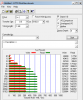
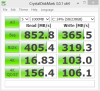
Now, today i ran these tests and for my write it seems way too low now. The first test i ran i got 25MB where i have got 30MB in this test. I could return the drive or do you think everything is fine? I paid £275 for this drive.Attached Files:
-
-
Its the P128 so things have come along quite a bit since then. Here is the question Rach my old friend.... Do you think there is a problem with it? I would bet you see no difference in day to day use no?
-
Hi Les, merry Christmas to you. It still feels the same to me Les but what with my computer crashing a while little back and it took me a long time to reinstall etc and of course don't want it to happen again. This could be degradation even if i haven't hardly used the drive much which i haven't. I've used my TT much more since the past year also.
I've gone back to Vista as i thought there could be an instability with W7 and the Sony drivers as there quite picky. I didn't bench it prior to when it crashed. Still, those figures seem too low to me for the write but may be with a non TRIM hardly used drive now 18 months on this is only to be expected? -
They seem low because of the scores we see iin drives now. Back to Vista? Yeesh... You must have an evil laptop eheh.
-
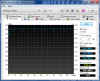
Thanks Les, i guess i won't RMA it. I have run the test in 100MB and that seems ok but when taxed a little the performance really just drops of to less than expected.
Attached Files:
-
-
USB 3.0 doesn't work? You install the NEC driver? Works fine on my UD5.
Revodrive any good? Benchmarks? -
Merry Christmas to all! May everyone get the SSD they want for Christmas
-
Tried everything and they have another on the way...and as for the RevoDrive Yes!!!!! Lets see what I can dig up off of first tests and not tuned yet...fresh install...
Attached Files:
-
SSD Thread (Benchmarks, Brands, News, and Advice)
Discussion in 'Hardware Components and Aftermarket Upgrades' started by Greg, Oct 29, 2009.