 Problems? See this thread at archive.org.
Thanks Tomy! I thought I did that, must have dreamed it. It is done NOW!
-
-
guess you have a small screen then. here it's laaaarger than life.
other than that, it's 2.5", again. how boring
well, i'm curious how much difference there'll be noticeable. it'll replace my 80gb intel gen2 from my desktop, and that one will move into my girlfriends netbooknotebookthingywhateveritis (something with amd, so it's an inbetween).
would have been more fun with the 310.. how the **** do i plug that in`?!!!?
and there, a question raises: is there a way to plug it in in a PC? not notebook. are there adapters for that, or would i have to rewire it myself to the sata port?
edit: and the answer: well, looks like this would've helped
![[IMG]](images/storyImages/MINIPCIE-ADPT.jpg)
in other news, lets go trough them by head:
intel gen1 160gb 1.8"
intel gen2 80gb 2.5"
intel gen2 80gb 2.5"
intel gen2 40gb 2.5"
intel gen2 120gb 2.5"
intel gen3 120gb 2.5"
samsung 100MB/s 128gb 1.8"
samsung 200MB/s 64gb 1.8"
mtron mobi 64gb 3.5"
mtron mobi 64gb 3.5"
mtron mobi 32gb 1.8"
some pre-ssd-cult samsung ssd that died immediately and was dog slow (20MB/s or something) 64gb 1.8"
c300 128gb 2.5"
those are my ssds, i'm on nr. 13 now? well, wish me luck with that one, then!
-
Are there any penalties to using NTFS compression on SSD's (Intel)?
And does anyone with 120-150GB of data uncompressed have any idea what kind of space savings I might see on average? I know there is a lg variability, just some basis of estimation please. -
depends on the data. if its mostly movies and music, then nearly nothing. if it's mostly uncompressed data (even docx etc don't count, they're zipped), then it might have impact.
but for DATA, it can't do that much, as most is in some compressed form anyways.
it increases cpu load, as it has to compress and decompress everything. that might harm batterylife, or not. for the ssd, it's not much difference. it might kinda like it, as it might "flatten" writes a bit (reduce the random writes to more sequencial ones) -
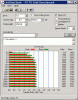
My system (Dell Latitude E-series) has been halting to a crawl, so I ran an ATTO benchmark. The speeds were fine when I installed the SSD in January.
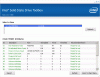
What do you make of these benchmarks? Clearly, something is broke. I also included output of SMART attributes from the Intel toolbox.Attached Files:
-
-
A Secure Erase might be worth a try.
PS. I would post on the OCZ forums with these problems. There are some OCZ specialists on the forum.
Edit: please do not double post as it is against the forum rules. -
Thanks. I tried to follow your suggestion and post this on an OCZ forum, but that is against rules.
A secure erase would be mighty painful.... -
@ hooterbif: It looks like it's working in PIO 0 mode. Maybe it's something with drivers for ACHI controller or with ACHI controller.
BTW: What is against rules? -
Posting the same message twice on this forum is against the forum rules.
No one will object if you post this problem on the OCZ forums.
But who knows, you might get the appropriate help here too. -
Tomy,
Thanks for the response.
Do you suspect PIO 0 from some bit of information in my attachments, or do you suspect that simply because it looks like performance is getting limited to ~3 MB/s?
Is PIO mode a selectable quantity through some setting in Windows? Is there a way to directly check PIO mode (in BIOS or Windows)?
In regards to rules, I thought that I would post this problem in an OCZ forum, but that is double posting (see post #9558).
HB -
That rule is only for NBR forums/sub-forums.
Feel free to post all you like at other sites.
-
I suspect PIO 0 because I had same problem with one older motherboard and HDD, something was wrong with ICH5.
I don't know how to select PIO/UDMA modes and I can check modes only for IDE device (optical drive) in Device Manager --> IDE ATA/ATAPI controllers --> ATA Channel 0 --> double click -->> tab Advanced Settings.
For SATA ACHI Controller I don't have tab Advanced Settings.
If You have another SSD/HDD maybe You can try put it instead of SSD just to determinate where is the problem. Or try to connect Your SSD to another computer and run ATTO. -
Hi Tomy,
Thanks for the advice.
I fixed it by removing the IDE device in Device Manager. On recognizing the device, Windows set the IO to Ultra DMA Mode 5.
HB -
Aren't You using AHCI?
-
I guess not. I'll set that in BIOS. I think that you've written guides about this, so I'll try to find those.
-
I don't remember writing any guides (except one in my signature) about AHCI, but Googling "IDE to AHCI windows (one You are using)" should help.
-
The procedure also depends on the type of chipset used, so it might be wise to add that to that google search
-
Thanks. I did that, and it worked great. Benchies improved.
-
I was having problems with my OCZ Vertex 3. Alot of freezing and hang ups. Removing Intel RST and using the Standard AHCI SATA Controller has fixed all issues.
![[IMG]](images/storyImages/5706447878_9157013e7d_m.jpg)
-
Very nice scores !
-
Great sir
Just for my curiosity, what chipset do you have ? -
-----------------------------------------------------------------------
CrystalDiskMark 3.0.1 x64 (C) 2007-2010 hiyohiyo
Crystal Dew World : Crystal Dew World
-----------------------------------------------------------------------
Sequential Read: 349.692 MB/s
Sequential Write: 207.536 MB/s
Random Read 512KB: 300.642 MB/s
Random Write 512KB: 203.895 MB/s
Random Read 4KB (QD=1): 16.765 MB/s [ 4093.0 IOPS]
Random Write 4KB (QD=1): 41.771 MB/s [ 10198.0 IOPS]
Random Read 4KB (QD=32): 85.998 MB/s [ 20995.5 IOPS]
Random Write 4KB (QD=32): 66.177 MB/s [ 16156.4 IOPS]
Test : 100 MB [C: 48.4% (54.1/111.6 GB)] (x5)
Date : 2011/05/18 19:42:49
OS : Windows 7 Home Premium Edition SP1 [6.1 Build 7601] (x64)
Are these normal speeds for an Intel 510 SSD (120 GB)?
Did some optimization as per the The SSD Review's guide. -
Hey guys, can you help me make a decision about which SSD I should buy for my Sony laptop VGN-350P(it uses a toshiba MK6006GAH 60 gb hard drive PATA but it is dead.
My two choices are the
1. Mach Xtreme Technology 60GB MX-NANO 50 Series 1.8" PATA SSD - 50pin Female IDE Connector | My Digital Discount Review link---> ( OverClocked inside - Redaktion ocinside.de PC hardware page) <--- Review link or the
Mach Xtreme Technology 120GB MX-NANO 50 Series 1.8" PATA SSD - 50pin Female IDE Connector | My Digital Discount and the
2. RunCore 64GB Pro IV 1.8" PATA - Female IDE Solid State Drive SSD | My Digital Discount
Thanks
-
Intel 320 seems be slower:
AnandTech - The Intel SSD 320 Review: 25nm G3 is Finally Here
Btw, 4k QD32 is very important as just 4k too? (whats difference?)
One last question...I tried Process monitor SW and I saw many thousands of lines with Read, Creat and Write operations....but I didnt work on PC with anything.....does these operations dramaticaly reduce longlife of SSD?....because it seems be big number for me
Process Monitor
Thank you! -
I personally use task manager and see the I/O writes tab and sort according to that.
The biggest issue would be the Chrome/Firefox/IE user profile writes. I've got a cheap 4GB SD card and sym-linked those profile folders onto that card.
Now I pretty much have no large amount of writes to the SSD. -
Good idea!
But I dont see I/O writes in task manager:
http://windows7journal.com/wp-content/uploads/2009/08/Windows7TaskManagerProcesses.jpg
And any other tips for keeping M4 fit? Turn Off indexing in Windows or some software for keeping SSD fit? ....What happen if I run OS (TRIM not supported) on VirtualBox, does it reduce longlife of SSD?
Thanks! -
You have to click on Set columns in the "View" tab I think.
I would turn off paging file, and probably indexing. -
And I heard about some SW for keeping SSD fit....some SSD toolbox or something, do you have experience with it?
-
If you really want to prevent writes to your SSD (which is actually not necessary but oh well) set a memory cache in Firefox.
I personally don't recommend preventing writes unless you're an extreme user. Neither do I recommend turning off indexing or page file.
![[IMG]](images/storyImages/kingston-SSD-storage,L-F-237939-13.jpg)
A Question Of Endurance : Q&A: Tom's Hardware And Kingston On SSD Technology -
Well, I study IT few years but practicaly I have no experience with SSD.
I use Chrome and I found this.
////
Simply close Chrome, right-click your Chrome shortcut, click Properties, and then in the field labeled "Target:", make it look something like this:
"...chrome.exe" --disk-cache-dir="CACHE_DIR" --disk-cache-size=N
////
So I change cash directory to SD card? I see many Chrome.exe in task manager and the biggest has 843 000 writes and every second growing +10 about, thats the problem, right?
-
Better to use Firefox with a cache in RAM in my opinion. An SD card would be quite slow I expect.
But really, why are you so worried about writing to your SSD? If you buy something you're going to use it right?
It is only extreme users that need to worry about their writes. No normal user will write 44GB per day on average.
The whole idea of preventing writes comes from the days when SSD were new and immature technology. Nowadays there's no need for preventing writes anymore. -
Well, I was reading forums yesterday and last days many customers have problem with dead Vertex 2....bad health status... But OCZ said it may take minimaly 5 years
..5 years became into 5 months? And I think they were avarage users. So I dont know if I can trust to any brand about longlife of SSD
-
Vertex 2 uses an unreliable controller, that's the reason they have failures. It wasn't because the NAND was worn out. If the NAND was worn out the SSD would still be readable.
-
This is solution for caching of webbroswers right?
How to move the Firefox or Chrome cache to a RAM disk and speed up surfing by 20% or more -
Firefox: Speed Up Firefox by Moving Your Cache to RAM, No RAM Disk Required - Lifehacker
I'm not sure how to do it for Chrome. Anyone? -
the tweak to move chrome temp files in another place as a ram disk,
is to copy this tag in the end of chrome link in your desktop icon, this will unlink the folder in C:\users\... (the one in windows SSD)
--user-data-dir="F:\where-you-want\
where F is the ram disk or the normal hard disk, but you will see the difference if you put them on it
at the moment there isn't a same way as firefox to set cache in ram and if you move the data, you will have to copy favourites again in new folder -
Thanks but I don't want to use a RAM disk.
I want the temp files to be stored in RAM. -
I got a question which was probably answered already, but this search "button" is just isn't being "straight" with me.
I bought used Crucial C300 256GB SSD. Do I need to do anything with it prior to fresh installation of Win 7 64 bit? Or due to TRIM stuff it'll all take care of itself? I'm new to SSD scene. -
View attachment 65435
This is my bench with my new Vertex 2 80gb (25nm) I heard the 25 nm drives ran slower but this is way below the 285/275 rating they say. I have done a number of tweaks and installed RST drivers but this is that fastest i get -
The 285/275 rating is measured with ATTO (fully compressible data).
Try running ATTO disk benchmark. -
You shouldn't have to do anything. Just make sure that the drive is aligned and that your hard drive controller is set to AHCI.
-
one is parallel writing 32 different datapieces at once, one is writing all the datapieces one by one.
don't. just don't. ssds don't die because of those writes. they last years with a default windows installation and default usage. up to 80 years.
don't care about caching. don't care about tweaking windows (disabling indexing for example is a no-op on windows 7. disabling windows search does not increase any performance or reduce writes in any longevity impacting way, and just slows down your system on search).
just don't bother with all that crap "optimisation stuff". people try to sell you snake oil. install the os, use it. done. -
Sorry if this has been asked before (the thread is so long now): Is it possible to combine mSata with SSD for RAID 0?
-
yeah, i got a 5 year warranty for free!
nice find. -
Oh so sweet! Precisely why I bought Intel!
-
indeed. and solves finally the "omg i have to make sure my ssd doesn't get too much writes and such".
now you get it replaced if it dies within 5 years. if that's not enough 100% guaranteed lifetime for your typical pc device, then i don't know. (still, if it lives for 80 years, and thus survives me most likely, then i'm still glad) -
Is this the avg speed of the vertex 2 25nm?
-
Hi guys, can you take a quick look at my benchmarks to see if my ssd is properly optimized by my system?
the details are:
lenovo thinkpad t410i
ocz vertex 2 - 120gb
-- fw: 1.29
-- die size: 32Gb
I cloned my windows 7 64bit to this ssd from a hdd.
I changed all the settings on win7 as recommended by various websites for optimizing an ssd.
I definitely felt an decrease in boot time; but that is basically it- it felt the same when opening my usual office apps. (I have 4gb ddr3 and do not game)
benchmarks:
![[IMG]](images/storyImages/th.414191f55c.png)
-
Looks pretty decent, enjoy !
SSD Thread (Benchmarks, Brands, News, and Advice)
Discussion in 'Hardware Components and Aftermarket Upgrades' started by Greg, Oct 29, 2009.




![[IMG]](http://www.freeimagehosting.net/image.php?414191f55c.png)