Problems? See this thread at archive.org.
10 second that's insane
i get to boot in just over 20 sec with the v+100
i'm wondering something for the batterie life result is it possible that you had the Garbage collection going on? cause the first day i got the drive it didnot give result as good as did after a little settle in time
-
Could very well be GC. I've seen some unusual spikes in power consumption.
Unfortunately I don't have time to test long term results.
PS. the 10 second boot time measured with Boottimer is without BIOS post time. -
10 seconds is very fast. My HP 8530w with a Samsung 470 128 GB needs ~ 19 sec.
-
My Asus M60J with Intel G2 160GB SSD used exactly 28 seconds on a boot. I turned it off. And I started taking the time the moment I pressed the power button.
That said it is not very useful to compare different systems, because each system have its own programs it need to go through before it is ready. -
boottimes below 20 seconds are massively driver dependent. any system with ssd could easily boot in 10 seconds (-bios), but often, some drivers slow it down while booting.
and then there are the bios' that take 7 seconds themselves till actual os start.
i want finally to have instant bios', that are not at all visible except if you hold escape WHILE PRESSING POWER. it's ridiculous to spend so much time staring at a manufacturer logo, where booting the os is now faster. -
I'll leave the Kingston in my machine for a while to idle and then do another battery life test and see if GC is a factor. I do know they say it has aggressive GC, which is good I guess, once the system is "up to snuff".
The ULV notebook I'm using isn't the most efficient. I was considering running it in my M11x because I get insane battery life with my 120GB Intel in there, close to 8 hours. I don't understand it though. The M11x without the nVidia GPU is essentially the same machine as my ULV notebook, SU7300, 4500MHD, 4GB DDR3, yet my "Hannsbook" consumes more power. Granted the screen is overall brighter than my M11x and 12.1" vs. 11.6" but still.
In the end I'm satisfied with the performance. Similar to the Intel, except for the QD32 bench, which just means it isn't the best of multitaskers, but for what I'm using it for not even remotely an issue.I wanted a little more capacity -
Does anyone know how room temperature influences battery life? It's hot here now and my fan is constantly on. I wonder how much of an impact that has.
I believe it's dedicated graphics that makes booting a bit slower.
Mine has integrated Intel graphics.
The best performers in this thread tend to have integrated graphics.
http://forum.notebookreview.com/win...-your-windows-7-boot-time-tweaks-allowed.html -
If anything, it should give even more run-time for your system (talking strickly about the battery and not taking into account the fact that the fan is working harder).
I would say that unless the fan is spinning at 4K RPM or more, then the two will balance themselves out and you should not have to worry about it either way (it would still be nice to report the ambient temps though).
Over the long term though, it will shorten the battery's lifetime, if it is significantly and constantly at a higher temperature than around 25 Celsius. -
Sandforce and sneaky marketing claims...
Corsair goes for "Max random 4K write" spec on SSDs -
it all depend on the actual temperature of your system ont he m17 we had a part over heating due to a crappy termal pad and in some case it was enough to cause issue with the power system cause of the augmented resistance of the part when it heat up
(note not every one had this issue cause by it the system in it self was built right on it's power limit)
Edit boot timer give me a boot time of 29.094 -
More ways to lose your data:
See:
AnandTech - Computex 2011: SuperTalent Introduces SandForce Powered USB3 Stick -
it's a usb stick. it's only purpose IS to lose data.

-
hahaha that made me laugh tiller
-
But now, you can lose it at SandForce speeds. And... still have the key to lose more data later on.
Me too, me too...
-
USB drives are still not as bad as Floppies...
-
i never actually lose data on usb keys, ever. i DO lose the keys, though.. but so far, most showed up after a while again (some after years)
-
The Patriot 64GB Rage Pro's are - total data corruption on multiple keys.
-
Lol what are you talking about? I've never lost info on a USB stick.
Mr. Mysterious -
When I pop in ssd, do I have to change any bios information before starting fresh win7 install ?
I remember something about AHCI or something like it, but not sure what it meanss. -
Go into BIOS and change to AHCI mode, that's it.
-
Then pick up one or two Patriot Rage Pro's 64GB keys and stop missing out on all the fun of losing ~120GB of data in the time it takes to copy them to the keys (... and corrupt the data you're copying).
Bad, bad Patriot!!!
-
............I have a 1GB USB 2.0 Stick. That's it.
Mr. Mysterious -
That would be bad for everyone if an entire class of SSDs are junk. Well maybe Intel, Samsung, Micron, and Toshiba would like it...
-
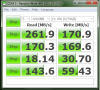
Anyone here with Intel 320 120GB?
Read looks a bit low
![[IMG]](images/storyImages/Untitled-14.jpg)
-
i'll install mine in about a week max. we can compare then.
but yes, it should be a tad higher i thought. we'll see. -
![[IMG]](images/storyImages/QxQFu.png)
(alright so its not a laptop) -
well i have this one from intel 320 160gb
Attached Files:
-
-
I guess that's all there is. My sequential read went up to 255 MB/sec so that's ok.
Some people get 22 MB/sec random read. That was a desktop though. -
No clue what any of those numbers mean but I thought in would post it anyway
Crucial c300
![[IMG]](images/storyImages/ssd.jpg)
-
So when are 500GB SDD's going to cost $250 or less?
-
Lol you'd better wait for 2 more years then, bub.
Mr. Mysterious -
Current gen are on high capacities are rounding between $1.50 to $1.75, i expect the next gen probably between $1.00 to $1.50, maybe in another gen $0.75 to $1, in gen or two more, maybe $0.50 - $0.75. So probably around 4 years is my personal guess.
-
500GB will take a while since they aren't normally even used in consumer applications. 256GB is pretty much the largest at the moment, which you might see come down to ~ $1/GB in two years. 60-100GB drives can be found now with MIR and sales for ~ $1/GB now.
-
I saw a Vertex 2 240GB for 290$ a couple weeks ago...
-
yuio, too bad it is only worth about $29 though.
-
I would not touch it even it is given me free.
-
It is worth $29 in materials.
But even if I was paid $290 to use it, I wouldn't either.
Learned my lesson on SF drives with my 'much less than stellar' Patriot Inferno.
-
i guess i would touch it for free..
touch it, not use it
-
So much love for OCZ in this forum
-
i got one of my greatest satisfactions when i persuaded all my friends to avoid OCZ SSD and their false advertisement.
anyways, i bought a c300 64 gb for my brother, i suggested a intel but we were curious to test this model, so we choose this. Arrived this morning
and after windows 7 installation, this is the first and last bench to see if it's all ok, and it seems
Attached Files:
-
-
yes looks fine. there's new firmware for it, you might want to try it.
-
i checked that it was a revison 7 model, the last one if i'm right.
i just plugged in and installed, and controlled that trim was enable.
Any others tips for this kind of drive? -
You might want to check what firmware it's running. CrystalDiskInfo can tell you.
Edit: oops I thought you had the M4. my mistake. -
Did You ever tried any Samsung?
-
Tomy, yes I have.
I also actually owned one for about 4 minutes - sold it to the first person who offered me the gas money to bring it over.
The version I had my hands on was 'new' in 2009 or so... the person I sold it to thinks it is the greatest upgrade ever (strictly for work/office related scenarios) - but I thought that the (still working, at the time...) Hybrid XT was just as fast, if not faster (except for rebooting/shutting down).
I'll give one thing to Samsung SSD's: they last and last (even if they 'feel' like a mechanical HDD to me). -
That's true, Samsung isn't fastest SSD, but fast enough for me.
-
I guess you're not referring to Samsung 470 which is one of the fastest SATA II SSDs available. It also has the lowest failure rate on Newegg for what it's worth.
If someone would trade his Samsung 470 128GB for my Intel 320 120GB I'd do it in a heart beat. -
I'm talking about PM800/PB22-J from 2009 and yes, Samsung is well known about it's reliability.
Not sure how many here know it, but Samsung 470/PM810 is 5th generation controller from Samsung. -
Even the PM800 is a very nice SSD, beating the real world performance of Intel G2 and Vertex 2 here.
If Tilleroftheearth actually owned one I would love to see proof of that, like a forum post or receipt for example.
SSD Thread (Benchmarks, Brands, News, and Advice)
Discussion in 'Hardware Components and Aftermarket Upgrades' started by Greg, Oct 29, 2009.