 Problems? See this thread at archive.org.
)
Hi.
I found this list of tweaks here , I have done all of them, but the forefox one is new to me, as i use firefox a lot i will be doing this tweak.
John.
-
-
Well friends let me share few relevant information with you and see yourself who is the best. I hope you like it.
![[IMG]](images/storyImages/HHQSi.png)
![[IMG]](images/storyImages/66kZx.png)
![[IMG]](images/storyImages/9lFoG.png)
![[IMG]](images/storyImages/BPAHQ.png)
-
Nightmare, what does this show? What conclusions are YOU drawing from this wall of data?
For myself, just because the SSD capacities are below my personal minimum of the 240/256GB (depending on the controller used) NEEDED for having the highest performaning storage subsystem today, your data with 40/64GB SSD's seem irrelevant for me (and I'm assuming most others who use/need SSD's in notebooks, not desktop based systems) no matter what your conclusions may indicate.
Sorry for seeming so harsh (I'm not, really!...), it's just that you've posted this to two threads (at least) without replying to a question and without giving any reason for offering this data.
Along with no background of why this data was collected and why and how this data has any relevancy to anyone other than yourself (a conclusion would have helped a lot in this regard), this is just a wall of text with many posts following simply stating 'what is this???'.
Sure, I get that you're testing (somehow...) write endurance, but everything else is very, vague and nightmarish-like.
(Please, give us more information)! -
Samsung seems to have very low MWI when compared to other brands, 85 for the 830 and 60 for the 470 , when the other brand have an much higher MWI
MWI = Media_Wearout_Indicator
John. -
Tinderbox, we don't know how they're reporting MWI though (are they comparable between SSD manufacturers, let alone SSD models?)...
-
It looks like Nightmare`s data may come from here.
SSD Write Endurance 25nm Vs 34nm
John. -
I would suggest you to go for Samsung 830.
-
I guess you guys didnt get it what the tests are all about.
1- This test shows the endurance of different SSDs (About how the company claims about their product and how they perform in real life) with different controllers. First of all there is difference between nm fabrication and impact on a life of SSD, but it also depend how a particular controller writes a data to a particular SSD.
2- These are some random data which I captured from different testers who actually testing these drives in real world conditions. If you have noticed one of the 64GB Intel drive is SLC, not MLC like other. Different capacity may make some difference but these are a drive that passes manufacture claimed life expectation and still performing (till the drive gets dead on its own). As you see all the drives are getting slower by the time we write more and more data on to it. But Samsung still manages to retain its speed even after writing so much data without too much wear and tear in compare to other drives, not because of its capacity only but because of many other factors like mode it uses (Toggle mode). -
I've been debating on which SSD to get for my Zenbook - is there any real difference between the Crucial m4/Samsung 830 and Intel 520? Seems the differences are mostly minor with slight variations in price, and with the Samsung being somewhat faster than the others but also using more power.
-
I had got a bsod every time i came out of sleep mode with the Crucial M4 128GB latest firmware, even after a clean install, I bought an Samsung 830 256GB and i must have done 100+ sleep resumes with no bsod`s at all, also the samsung has a higher write speed than the M4, never had a Intel so apart from the extra cost i dont have an oppinion.
John. -
I have a Dell Studio XPS 16(core i7, 4GB RAM, 500GB SATA HDD) notebook. I want to add one SSD for my OS and the HDD will be used for other media files. Is it possible to upgrade this notebook with 1 internal SSD and 1 internal HDD( does it have slot for these two?). Please guide me
-
Doesn't seem like you can do that for the XPS 16...
See:
Second internal hard drive for Studio XPS 16 and similar? - Laptop General Hardware Forum - Laptop - Dell Community -
thanks for the info
-
Intel SSD Toolbox has been updated to include new SSD's:
See:
http://downloadcenter.intel.com/Detail_Desc.aspx?agr=Y&DwnldID=18455
Installing it now... -
Just replaced the Samsung 830 in my Samsung Series 7 with a Plextor M5 Pro and I can't believe the speeds I'm getting with a laptop. I wish I still had my SFF system for testing.
![[IMG]](images/storyImages/img20120926192905.jpg)
M5 Pro
![[IMG]](images/storyImages/m5p95.jpg)
M3 (Sata II)
![[IMG]](images/storyImages/m395.jpg)
-
Jocelyn84, I would be interested to hear more on your Plextor M5 Pro upgrade (the specifics: clean install/clone/???).
I've always thought that Samsung SSD's 'felt' slow - no matter how good the 'scores' were. -
Does anyone know if the SAMSUNG 840 Pro Series MZ-7PD512BW 2.5" 512GB SATA III MLC Internal Solid State Drive (SSD) will work with the Lenovo x220t?
I'd like to get a very fast 512GB 7mm ssd drive for my x220t.
I'm looking for advice on the fastest ssd that will work with it without having to modify the drive.
Thanks much,
-michael -
You shouldn't be crossposting... against forum rules.
Anyway, there are no drives that you can modify... I would recommend the Crucial M4 512GB myself.
See:
512GB, 2.5-inch Solid State Drive, upgrades for Dell Latitude E6220 Laptop/Notebook, CT2556146 from Crucial.com -
sorry which place is better?
-
How about this drive?
Plextor M5P Series PX-512M5P 2.5" 512GB SATA III Internal Solid State Drive (SSD)
It needs to be 7mm.
This drive is very fast. It's available, and it's a good be cheaper than the samsung.
Any reason this would not work in the x220t?
Thanks all,
-michael -
No reason except it's new, unproven and unknown.
If you're okay with that; go for it (just make sure you're doing daily backups of your important data). -
I grabbed one
Should be able to install it this weekend. Ill let u know how it goes. I love my acronis true image. Lets me good around and get back to normal very quickly. -
Good Luck!
I for one will be very interested in your results.
(I would advise though to do a clean install on your new SSD - one less isssue to have to troubleshoot - if any arise). -
I'm currently using an ssd that came with it but its much too small.
Since its already in an ssd ill try moving an image.
It takes hardly any time to try.
Thanks for advice and info
Ill keep you informed. -
The drive works flawlessly. It's very easy to setup. Love the x220t.
I backup with acronis true image. I use a usb3 external drive. Acronis true image aligns ssd drives nicely. I backed up. Replaced the drive (very easy). Booted to Acronis true image dvd. Created larger partitions for win7 and win8. Then restored. Had to turn on trim. Other than that it was very nicely setup. Alignment was fine. Benchmarks very fast. Not full rated speed but maybe in a powerful desktop it would. Read gets 505MB Write gets ~430MB. Nice to have space. I think I will purchase a 256GB msata drive next. I could use that for win 8 and have the full 512gb for win7.
Thanks all.
-michael -
Upgraded my Y470 with a MydigitalSSD 128GB Smart Series mSATA. and I must say it's very very nice.
Incompressible data run
![[IMG]](images/storyImages/128GBmSATA_zpseed8594b.jpg)
Compressed data run
![[IMG]](images/storyImages/128compressed_zpsf197b142.jpg)
The difference is astonishing and this is comparing it to a MydigitalSSD 64GB Bullet Proof -
hello, this is my benchmarks with y580. (firmware 01mg)
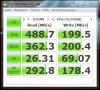
-
If money weren't an issue, what is the current *IT* drive to get? I heard the Crucial M4's were having some questionable results long-term - anything behind that other than a few bad apples? I see Intel's still in the running and still higher priced than most. Who's leading the marks with random reads/writes?
-
Lol, it's not a questionable long term result. It's a firmware bug that's been fixed since around January or February of this year.
As for the "it" drive, Samsung 840 Pro. -
Gotcha'. Thanks for the update.
And what software do you recommend to wipe the drive clean for a clean installation/factory install? -
I have Intel and Samsung SSDs so I just use Intel SSDToolbox or Samsung Magician to secure erase.
-
Does that make it so the performance is back to factory-ready or just for if you wanted to sell the drive to someone, you'd be confident they couldn't retrieve the data?
-
How much should leave in 256 GB and should free need to be unallocated or free 20 GB space.
-
Both actually. It erases the data and restores the SSD speed to factory/new.
-
Depends on who you ask. Samsung Magician recommends an additional 10% over provisioned or 23.8GiB in the case of a 256GB (238GiB) SSD. tilleroftheearth recommends 50-60% OP. Personally, I just have mine formatted to a nice, round 200GiB which translates to around 15% OP, I believe.
Mind you, OP isn't really necessary nowadays but it does help. -
Jedd, thank you so much for the quick responses.
I just found some "cons" for the 256GB 840 Pro in the comments of newegg, and I wanted to get your input, and see if there's any fruition behind them:
( source)
Is there some review somewhere that Samsung drives deteriorate faster than other brands? I've read this a few times. Perhaps a review somewhere I missed touch on this subject? -
I think you also asked to owner who recently purchase 512 GB doc0075579
http://forum.notebookreview.com/sol...-samsung-announces-840-ssd-8.html#post8954732 -
Thanks I also read somewhere to leave 20% free in any SSD.
-
Yeah, that's the usually recommended amount. I believe Intel recommends 20% OP, too. I was thinking of doing 20% but since SSDs already come with at least 7% OP out of the box, I just went with 16%. Granted, part of the reason is because I'm a bit OC and 200GiB looks nicer than 191GiB.
-
I didn't install the SSD yet let see what Samsung Magician will recommend.
-
For those interested, here is a crystaldiskmark of my 512GB 840 Pro.
-----------------------------------------------------------------------
CrystalDiskMark 3.0.2 x64 (C) 2007-2012 hiyohiyo
Crystal Dew World : Crystal Dew World
-----------------------------------------------------------------------
* MB/s = 1,000,000 byte/s [SATA/300 = 300,000,000 byte/s]
Sequential Read : 498.847 MB/s
Sequential Write : 481.072 MB/s
Random Read 512KB : 427.101 MB/s
Random Write 512KB : 445.980 MB/s
Random Read 4KB (QD=1) : 23.008 MB/s [ 5617.3 IOPS]
Random Write 4KB (QD=1) : 49.589 MB/s [ 12106.7 IOPS]
Random Read 4KB (QD=32) : 400.202 MB/s [ 97705.6 IOPS]
Random Write 4KB (QD=32) : 333.511 MB/s [ 81423.6 IOPS]
Test : 1000 MB [C: 32.0% (152.4/476.8 GB)] (x5)
Date : 2012/11/24 11:08:51
OS : Windows 7 Ultimate Edition SP1 [6.1 Build 7601] (x64) -
hello everyone, i wish somebody could help me because i dont really understand how this ssd works and reading online just confuse me more
i am going to get my new gaming rig which is alienware m17x r4 with 128Gb mSATA ssd boot drive + 500gb hdd and i am going to put on another ssd 240gb intel 520 into the 2nd empty cuddy in my m17x.
the 128 mSATA is for windows and some application, 500gb hdd will be for storage and i am planning to use the 240gb intel 520 ssd which i will install it myself when my alienware arrive as a game drive (i will install all my game there)
my question is will there be any problem with the configuration i plan to make or is there any better way to use the resources that i have?
my main purpose getting this laptop is for gaming of course
thanks for the help
-
Your plan is sound.
Only question I have: are you sure you'll have the necessary caddy/wiring/connectors for the second drive bay when your system arrives?
(Many manufacturers only fit what is sold - if you ordered it empty and didn't specify you wanted the necessary parts; you could be in for a bit of a surprise and a not so happy search hunting down all the right parts). -
I just bought a 10 lot of old school SLC drives! $850:
Lot of 10 Intel X25-E Extreme 64GB 2.5" 3Gb/s SATA SLC SSD SSDSA2SH064G1GC | eBay
I figure them being Intel they're as reliable as SSD goes, and if they're tested in a server environment, I know I won't have any lemons. I have a pair of 32GB Intels but I paid like $350 for each one a few years back.
Great investment? Or the GREATEST investment? -
^ not really. Couple of years ago it would have been a great investment but not today. 85 bux buys new 128GB Samsung 830 ssd which is just as reliable (if not even better) than those drives. Also those dont support TRIM, and people want more than 64GB.
they work decent though, with average writes going at about 80MB/s over time. -
I can't help thinking the same as miro_gt - $850 is a lot of cash to blow on old skool stuff especially when no one really wants it. Unless you are gonna use 'em all personally, I think it's a bit of a waste......given Today's SSD's are probably much better.
-
i'll make sure i got everything for the 2nd drive bay, thanks for the answer
-
So I just got a message from ebay that that 10 lot of X25-E's that I bought are qualifying for a ' warranty'. How do those warranties work that aren't by Intel? How much do they cost, and if one of the drives die, do they reimburse me for what I paid for them? Or some other figure or reference point for the price? There's Square Trade, Geek Squad, and Smart Care, but their descriptions on the site don't mention a price and I want to know if they're actually going to follow through if one of these 5 year old, used, SSD's die.
-
You got the message and you're asking us? Lol...
I would say this 'warranty' is useless - eBay isn't about protecting you and your investment in the X25-E's. It's about them making even more money.
NO HDD/SSD I've ever bought and used has ever been returned for warranty - the data is not guaranteed - the 'bare' drive is useless to me - and I won't give my or my clients data to a third party for 'diagnosis' either.
No matter what this warranty costs - save the money and put it to replacing the X25-E's as you need to. Or better yet: buy the better tech as it becomes available (S3700 possibly).
At the best; the warranty will give you a refurbished SSD with you paying shipping both ways and insurance and still have the system down until all this shipping/diagnosing/approval has happened at the pace of the third party's warranty you've purchased... why would you pay for this?
You'll still be without your data. You'll still need to take the time to integrate the SSD back into your system and worse; you'll still be with a refurbished SSD (possibly in worse condition than yours was) and you will more than likely not have a right for a further claim on this 'replacement' SSD.
Best option: ignore message from eBay.
Good luck. -
Just walking by... saying hi.
SSD Thread (Benchmarks, Brands, News, and Advice)
Discussion in 'Hardware Components and Aftermarket Upgrades' started by Greg, Oct 29, 2009.


