Problems? See this thread at archive.org.
ok just a question... i know that u get these drives in Asus G73, which i'm planning to buy in about 4 months... the thing is that RAID isn't supported but can software RAID be done with these 2 drives in it?
-
Guys,I have the Seagate ST9500420AS (500Gb) ,and maybe I have the option to trade it for the 7k500 at no cost,would it be worth?
I have no issues with this drive,I only think it vibrates a little..and makes noise like a fan..no usual HDD noise... -
Yes, the 7K500 is faster, slightly quieter and more power efficient.
Tom's Hardware Comparison 7K500 vs. 7200.4 -
Hello,
I have the same problem with the Seagate momentus 7200rpm 500Gb with acc. sensor , my ST9500420ASG is always spinning.
I think it is something related to the hard drive itself because it has the same behavior of always turn with Ubuntu Lucid 10.04 and with Winddows XP.
In my Dell precision m4400 there is no settings in the Bios to determine the hard disk behavior (quiet, performace, normal on some Bios)
The previous hard disk , a Seagate Momentus 7200rpm 250Gb WITHOUT free fall sensor was acting normally, spinning down when idle.
Do the always spinning behavior might be related to the Free Fall Sensor ?
Could it be disable by software as ask in this post ? : http://forum.notebookreview.com/4586577-post820.html
-
Probably not.
There's usually a setting somewhere in Windows to determine when the hdd spins down. -
Hi,
you are right, I have contact Seagate support by chat, they told me that Free fall sensor is not responsible for hd always spinning.
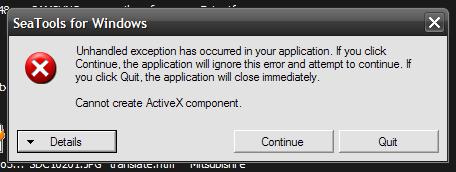
They suggest me to test the drive, installing Seagate test software, SeaToolsforWindows, unfortunately I receive an error when running on XP (see attached picture) so I cannot test the drive.
I do not think that the problem is Windows settings since also Ubunto Lucid do the same, I mean the hard disk is always turning, and with the other version of Seagate Momentus 7200rpm 250Gb the hard disk stop to turn when idle.Attached Files:
-
-
Hi,
I bought a HP ProBook with a Seagate Momentus 7200.4 ST9500420AS a few month ago and everything works fine but by now the drive isn't recognized by the bios anymore. It hasn't made any strange sounds, so I think it might be the controller which went to hell.
I opened the ProBook and removed the drive in order to plug it to a working desktop-pc (2 month old pc with an actual bios firmware) but the drive isn't recognized there too.
After that I tried an external adapter which allows to plug HDDs to USB but the drive doesn't work.
So, to rescue the data I search for a new or used drive with a compatible controller to the one on my drive. These are the values on the drive:
SN: 5VJ287QE
ST9500420AS
PN: 9HV144-022
FW: 0006HPM1
WWN:500C5001E47EDED
CT: 2BAZD0183YA8WS
NBPC: 515660-003
and these the values on the controller-side:
720107HHH
54360
100537087
K M019N2QY
Maybe someone knows which are the relevant values?
Or has someone an other hint to get the drive to work or to rescue the data? -
Hello I have the same problem that your. Also I have a HP Probook with the same hard disk.
Have you obtained some solution? I need help
Thank you -
guys, I've this HDD in my second bay of the g73jh, its firmware is 0003sdm1, how can I check that the HDD is running fine?
I am asking this because I lately suffered from some crash, and they happened while I either using itunes (which files are on the HDD) or moving files from the HDD to the SSD (like installing stuff), so I would like to check out if it could be an SSD/HDD fault...
Yet I can play for hours with game that are installed on the SSD, so I would think it's either software or HDD fault...
Thoughts? Firmware updates suggested? -
My drive is 500gb ST9500420ASG, OS Win 7 x64, Gateway P-7811FX.
Intel Rapid Storage Technology and HDTunePro shows that Logical sector size is: 512 Bytes
I fought its should be 4k? Isn't this drive use 4k Advanced Format?
thanks -
Thats a 512 bytes per sector drive...
http://www.seagate.com/docs/pdf/datasheet/disc/ds_momentus_fam.pdf -
Is it possible to format this HDD with a NTFS cluster size that is 4096 bytes (4K) using fresh Windows 7 install(there is an option before Win7 install)?
-
4K should be the default cluster size.
-
do you know why I have 512 Bytes? at the windows instal it was on default option.
-
See the spec's here:
See:
ST9500420ASG Momentus 7200.4 SATA 3Gb/s 500-GB Hard Drive | Seagate
This is not an advanced format drive.
Your sector size is 512KB.
Your cluster size is 4096KB with a default Windows 7 (clean) install.
You can check this by making a text file with a single character (eg. 'A') as the whole content. If you save this .txt file (doesn't matter what you name it) and right click on the file, choose properties and check the file size it should be 4KB (4096 Bytes).
Hope this helped. -
Thanks I got it now, my mistake. I have sector size 512kb, new drives have now 4kb sector.
-
Probably much too late to reply as you will have discovered that this is either a fault with the hard disk electronics or the interface to the hard disk itself. I had the same problem with an HP Pavillion DV7 with the same drive, and managed to get mine going again by removing and cleaning the contacts on the pcb - the disk drive then worked for long enough to create the system image needed in case it goes again and I have to replace the hard drive completely. It looks to me as if the cooling is insufficient, as the pcb is tarnished with age, and is only 18 months old.
-
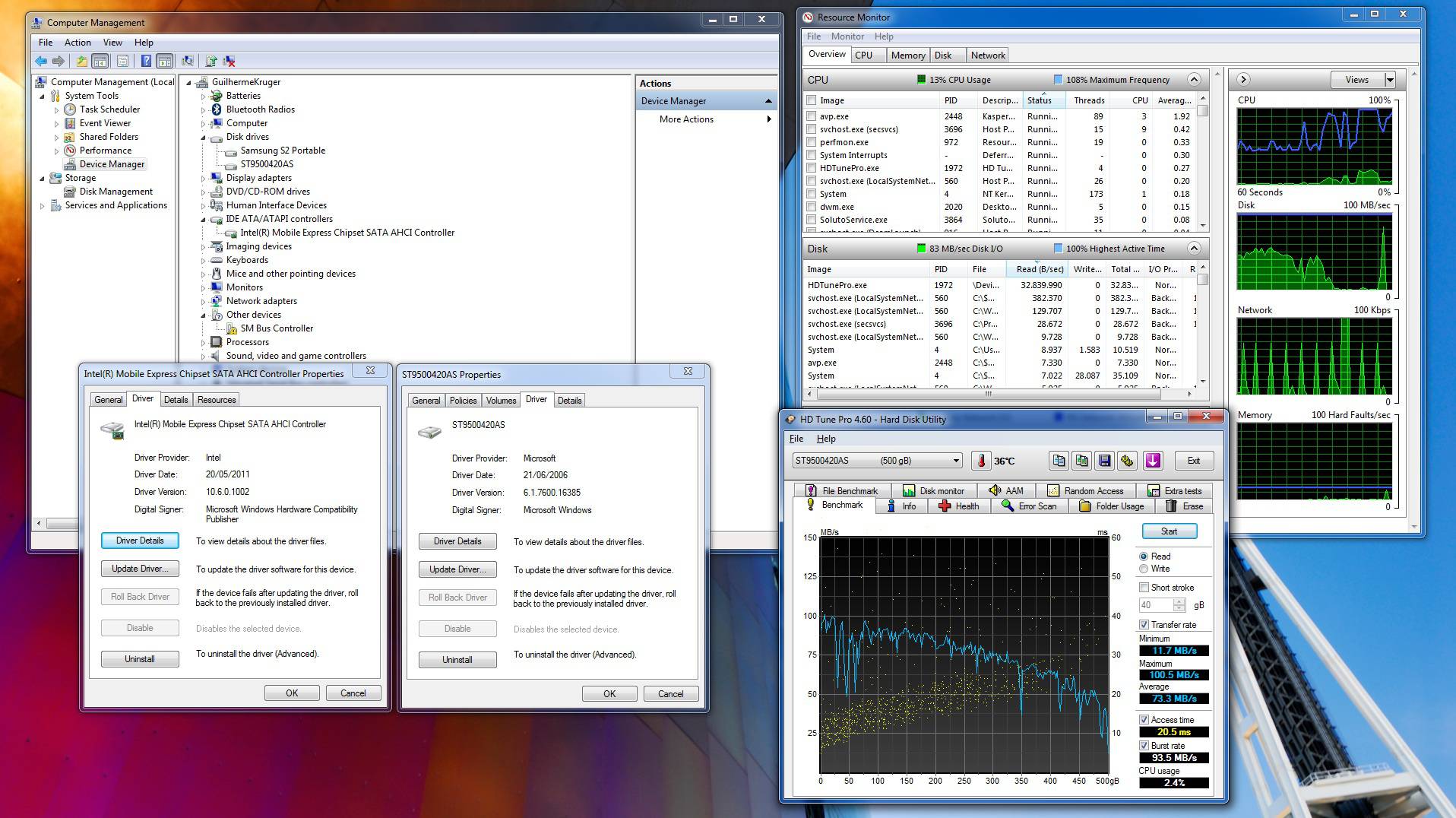
Guys, i'm managing to get ~40mb/s in average in HD Tune Pro on my ST9500420AS, any ideas where i can find the bottleneck?
Rest of specs:
Asus N53SV-SX1
12gb ram 1333mhz
i7 2630qm
GT540m
1xSeagate momentus, that came with the notebook -
check Health/Smart of your HD first
using HD tune pro
and Hard Disk Sentinel (for bad sectors) programs -
Health is green, what can i make out of the SMART? (See attach)
Attached Files:
-
-
hd looks fine to me.
did you bench this drive before?
what I would do now:
1)uninstall this drive from "device manager"
reboot
2)install intel rapid storage
and check again -
Can someone pinpoint me to the Samsung Spinpoint M8 thread? I've tried searching everywhere for it and yet it seems to have completely vanished....and I really want to look at it one more time.
-
-
Thanks man....
-
Thanks, I did got some increase, I'm gonna order a new one for RAID 0 now, and I got a question:
Asus don't say anywhere and I didn't find in BIOS if my notebook (N53SV-SX1) supports hardware raid, will it be aceptable with software raid? I dont know any software or have done any raid yet, still reading about it...
Thanks for the help, I will make sure to also spread the knowledge ;DAttached Files:
-
-
Well, it seems I'll be reviving this thread.
I have a HP OEM 7200.4 500GB (ST9500420AS, original firmware 0006HPM1) with an annoying clicking noise problem. Updated it with Dell's 0005SDM1 and clicking noise is gone but smart values have gone haywire - especially the temperature (~240*C).
Then re-updated with 0004SDM1 and temps are lower (~140*C). Any suggestion as to what I should do?
Any other firmware I might try? -
Hello.
I have got ST9500420AS in my laptop. My friend is selling his ST9500420ASG. Is it worth to set up RAID 0 with ST9500420AS and ST9500420ASG or should I buy another, the same drive which is ST9500420AS ?
Can I disable Free Fall Protection in ST9500420ASG and make it ST9500420AS ? -
This used to be the data drive on my previous laptop, it died suddenly, did anyone experience the same problem? mine is a ST9500420AS firmware 0002SDM1. I still keep the drive hoping i'll be able to retrieve the data.
Seagate Momentus 7200.4 thread
Discussion in 'Hardware Components and Aftermarket Upgrades' started by Apollo13, Jul 10, 2008.