Problems? See this thread at archive.org.
The only way you learn is by doing so don't be afraid to try a few things on your own. ThrottleStop isn't too complicated so give it a try and see what you can figure out. The download also includes an html help file so try reading that and try using the program for a day or two and then if you have any questions, post them. You can't expect crayonyes to help you with everything. He's already provided you with a lot of help.
-
-
yeah, you don't have to worry about losing performance.
And Throttlestop is easy to setup too
but you'll be fine with the current rmclock setup
Nice to know we have so many choices right hehe
-
On ThrottleStop is there anyway to change voltages without locking the multiplier?
-
ThrottleStop is a simplified version of RM Clock. It doesn't have the fine control that RM Clock does so you only get to set your maximum voltage and maximum multiplier. You can then use the Power Saver option if you want these to decrease at idle.
I found on the 45nm Core 2 CPUs that they spend most of their idle time in the C3/C6 sleep state where VID settings have virtually no affect. There isn't a lot of power savings to be had on these once you've reduced the maximum voltage. If you need the finer control that RM Clock offers then you will have to use that but if you need something simple then ThrottleStop is a good choice and will accomplish pretty much the same thing while using less resources and CPU cycles to do it. ThrottleStop also supports the half multipliers without needing to modify anything in the registry.
Some users have discovered that it no longer makes sense to run a CPU at multipliers half way between the minimum and the maximum. You're better off running a CPU at the maximum multiplier so it can get the task done quickly and then go back to the C3/C6 sleep state. Running a CPU in C3/C6 saves more power than slowly running a CPU with a mid level multiplier. -
After switching my book off for a while, I've come back to it and took a record of temps.
My CPU now runs @ 30deg C
And my GPU runs @ 59deg C
The book is stable and I ran the stress test for 3hrs.
This is absolutely amazing! Again, many thanks to the OP
Here's some more Rep Power
-
So the power save option lowers the used multiplier as processing need goes down(like the chip does normally?)
-
The powersave option will switch your cpu between the lowest and the highest multiplier (like the chip does normally yep). You can only adjust the max multiplier voltage with throttlestop, and that's all you need
-
Kris @ JKA: Now that you've discovered the wonders of under volting, you might want to try the Dual IDA trick that most Dell laptops support.
http://forum.notebookreview.com/win...c-acceleration-ida-both-cores-core-2-duo.html
The increase in CPU temperature will be minimal, especially at idle compared to your present setting and you will get a boost in performance. Run a wPrime benchmark in Dual IDA mode and you will see a noticeable difference.
Edit: Here's what micro managing the VID and FID on a 45nm CPU accomplishes at idle. The difference in power consumption whether you go high or go low is hard to measure so you might as well go high. The 45nm CPUs go into a low power C3/C6 state at idle where FID/VID settings have little to no affect.
![[IMG]](images/storyImages/lowfidvid.th.png)
![[IMG]](images/storyImages/highfidvid.th.png)
-
Thanks unclewebb I'll have a look at that now
-
Hi, it was kinda unbelievable for me to see this temperature after undervolting all credit goes to crayonyes, flipfire, tigtex.....
But now also i am having a doubt , after restarting my computer, the seetings revert back to the previous factory VID's and i have to set the VID's again, so is their any way to have this saved.I have tried what flipfire has told to, but it's not working.
Thanks.Attached Files:
-
-
Are you using throttlestop? if you are did you clicked the "save" button?
Are you using rmclock? did you choose "performance on demand" as the startup management mode?
And... Did you add the application to the startup of your computer? (with throttlestop, just make a shortcut to the throttlestop.exe inside the start menu -> startup folder)
Don't forget to make sure that your undervolting is stable. Run orthos cpu (read 1st page) or prime95 or any other cpu testing tool for a couple of hours. -
I am using rmclock, coming to stability test, i have ran orthos for about 1&1/2 hrs which should be pretty fine, but then to when i will get time i will run it for 3 hrs.
-
Is it worth buying CPU Genie? Does it work with i5?
-
Cpugenie has some cpu usage problems with windows 7... you may use the trial and check that.
Core i's family cpu's aren't capable of doing any undervolting. Only works with core 2 and older cpu's. -
Aww, that's bad.. Wanted to lower cores temps so badly :/ .
-
You can always apply a new good thermal compound like arctic mx-3. Helps a lot here
And clean the fans regulary.
-
Yeh, but i can't remove the warranty stickier
.
-
hi everyone, when i start up rmclock and i go to change the voltage values, it shows a voltage of .8 something and im wondering is it already undervolted because it was like that after i first ran the program.
Thanks -
Run HWiNFO32. It can show you the VID voltage for your CPU at the different speeds.
HWiNFO & HWiNFO32 - Hardware Information and Analysis Tools
0.8 something might be your low speed voltage but it won't be your highest speed voltage. RMClock lets you change all of your voltages for each different multiplier to whatever you like. If your computer is setup correctly, even without RMClock running it will be using the lowest VID voltage at idle. -
Okayy thanks i will give that a look..im just really curious why my fans r running at almost high even at idle. I was hoping that if i undervolted id be able to slow the fans down but i feel im doing it wrong..does rmclock only reduce voltage making it cooler or should it reduce voltage make cooler and slow fan down? thanks for the replies
-
Use HWMONITOR
and tell us the temperatures that you are getting. Having the fan at full speed means high temperatures, the solution isn't undervolting. -
Why can't the core i5's be undervolted? I was hoping to do that on my new laptop I'll be buying.. :/
-
I turned my pc on and the temps were 30-32c but as i watched it for a minute it kept rising up to 40-43c. Then the fans kick in and they just stay on even when im not doing anything.
Hwinfo shows my VID with .8750v, 1v, 1.1375v, 1.25v with a 6, 6, 9.5, 10x multiplier respectively. Should i check those after running orthos or playing a game and see if they change? -
peteyfresh12: If your fans stay on all the time, that's a bios issue. Some manufacturers think that they are doing you a favor. They think leaving the fans running all the time is a good idea but I hate that too. There's no reason to do this if the heatsink is properly designed.
HWiNFO32 shows you the default VID voltage settings for your CPU that were set at the factory. Every CPU can be a little different.
SLFM 0.8750
LFM 1.0000
HFM 1.1375
IDA 1.250
The Super Low Frequency Mode voltage is as low as your CPU can go. When set up correctly, it should use that voltage at idle whether you are running RM Clock or not. When SLFM is being used, the bus speed gets cut in half and the voltage goes as low as possible to minimize power consumption. RM Clock can't improve upon this.
The important ones that you should change are the two highest ones. That's where your biggest power and heat savings will be. You should be able to drop the 1.1375 VID down to about 1.050. The highest IDA multiplier can probably be reduced to under 1.100 volts. By doing this, when running at full speed, your laptop will not get as hot. Go to the first post in this thread so you can learn all about RM Clock.
RM Clock does not directly support the newer Core 2 CPUs because they can use half (0.5) multipliers. There is a registry hack available that should let you get beyond this limitation. If you are using RM Clock and don't do the registry mod, when running Orthos on both cores, the maximum multiplier will be limited to 9.0 even though your CPU supports 9.5 on both cores when fully loaded.
As for the Core i CPUs, Intel changed their design and under volting is no longer possible. You'll have to ask Intel why they did this. They've taken away a great method for enthusiasts to control power consumption and heat. -
New to the world of undervolting and this is one heck of a thread to read through.
For starters, I have an XPS 13 w/ the Intel Core 2 Duo P8700 2.53 GHz, L2 cache 3 MB.
I used the guide in the first post, but found that I could continue lowering my VID and never caused a BSOD. Additionally, when I looked at my CPU Info screen, the "current" VID would not reflect the one I had applied. It was almost as if I was only allowed go so low.
Two questions as a follow-up:
1. Is there a way to force it to go lower?
2. I thought I read that my P8700 required a slightly different method for undervolting. Is that the case? Have I actually accomplished nothing using the guide from Post No. 1?
Thanks- -
What operating system are you using? It's a good idea to set your Control Panel -> Power options -> Minimum processor state to 100% when using Windows 7 so the OS and RM Clock are not fighting against each other for control of the VID and multiplier. Post some HWiNFO32 screen shots when testing at full load.
-
Running Windows 7.
Minimum processor state is set to 100%:
![[IMG]](images/storyImages/5wyv61.jpg)
Even if I apply VID settings below 1.0:
![[IMG]](images/storyImages/11vp7xx.jpg)
I see a maximum of 1.0000. Assuming it's the 9.5x vs. the 9.0x?:
![[IMG]](images/storyImages/spydfs.jpg)
-
If i were you... i would use throttlestop with that CPU
Rmclock is too old and obsolete. You will loose performance with it. Throttlestop is really easy to use and very eficient. give it a try. Read page 506, there is a link there
In my opinion.. the 1st page needs an update. rmclock is dead. -
Did you go into this screen and make sure that P-State transitions are enabled?
![[IMG]](images/storyImages/rmc.png)
-
Yup. All is checked as it should be.
-
One last thing to have a look at.
![[IMG]](images/storyImages/dffs.png)
To get access to the SLFM VID, Enable Dynamic FSB Frequency Switching needs to be checked. If it is not checked, the lowest VID you will be able to use is the LFM VID which for your CPU is 1.0000 volts.
RM Clock can still be used on the newer 45nm CPUs and it can still be used in Windows 7 x64 so I wouldn't say it's dead but you do have to do some modifications to get it to work correctly with W7 and the new 45nm CPUs.
I came up with a registry modification a few pages ago to update RM Clock but here's a better idea. This user created a small utility program to update RM Clock so you can use the half multipliers.
http://forum.rightmark.org/topic.cgi?id=6:1896
Edit: I just tried this program and besides being huge, it doesn't work correctly.
The manual method works for both the IDA and the HFM multiplier.
Here's my method for manually adjusting RMClock by editing the registry for 45nm and half multiplier support.
http://forum.notebookreview.com/6130270-post4855.html -
Is setting up ThrottleStop in task scheduler still the best way to have it run on start up?
-
If you have UAC on, yes. If not you can just make a shortcut to the exe in the "startup" folder inside start menu
I don't like and don't recomend rmclock because it doesn't handle the cpu well when doing multimedia tasks like watching videos and play games, it uses 5% cpu here, which makes the "free undervolting idea" a 5% performance hit in my old xp setup. With seven it's even worse. Just take a look at Cpu times in task manager when you have rmclock running in background.
I consider rmclock development dead because there are no updates and there are urgent performance bug to be solved.
Cpugenie it's even worse. It uses 100% of one cpu core with windows 7, bug not solved at the moment.
No one wants to loose performance right? So the only software that I know to be very good with undervolting is throttlestop.
Just test every software and see which one fits your needs. -
When using RMClock in Windows 7, I find that as long as you set the Minimum processor state to 100%, RMC won't have to waste CPU cycles fighting against Windows and if you keep it minimized in the system tray, it's not too bad in terms of CPU Usage and efficiency at idle. I haven't tried your multimedia / gaming tests with RMC though.
There are still lots of happy RMClock users so I gave up trying to convert them all to ThrottleStop.
If they want to use RMClock, I try to help them get it set up correctly.
As for CPU Genie, I'd rather have someone poke me in the eye than install that on my computer. I couldn't believe the performance hit I experienced when testing that. It prevented my CPU from getting up to full speed in some situations which killed performance. For commercial software, I was very disappointed. -
I am dumb and do not know how to delete posts
-
I would love to try ThrottleStop on my MSI U230, but it doesn't support AMD processors.
-
Hmm, throttlestop is probably more reliable if you look at facts and figures but I'm yet to see RMclock crap out on me, besides I really like the amount of control it gives you. I tried throttlestop a few times and didn't much like how much it's dumbed down in comparison to RMclock.
Secondly, I think we should edit the first pot in this thread to get rid of all the "can I undervolt my ixxxx processor?" questions given that the answer is always no. -
ThrottleStop was dumbed down on purpose. It was designed to give beginning to intermediate users some control over their Intel CPU without having to do too much research or without having to think too much. With a couple of mouse clicks, you can have ThrottleStop set up very quickly.
It also has some more advanced features like Dual IDA mode as well as the ability to unlock the multiplier on Core 2 Extreme CPUs. RMC can not do either of these tricks.
RMClock gives you more control over your CPU but I found when testing on the 45nm Core 2 CPUs, all that extra control isn't needed. I tested with both a Kill-a-Watt meter and with the Windows Performance Monitor utility and found that in many situations, there is no significant difference in terms of power consumption, battery life or heat output.
The disadvantage of RMClock is that it does not support the half (0.5) multipliers on the 45nm CPUs without editing the registry. A very small percentage of enthusiasts know about this and understand what needs to be changed to correct this problem so most leave RMClock as is and lose performance because of it. ThrottleStop fully supports the 45nm CPUs and doesn't need any modifications like this.
Both programs have advantages and disadvantages. -
Thanks for this guide. I was able to undervolt the t6500 in my Studio 15 to 0.925 volts on every multiplier, and loading the processor with Orthos and monitoring with CPU-Z confirms the voltage. Also its max temp went down 15 degrees Celsius and the fan kicks in less. However, under RM Clock's monitoring page, I still see occasional voltage spikes on multipliers that should be set to 0.925, sometimes to the highest voltage. Any idea what these are caused by?
-
Voltage spikes are usually caused by not setting the Control Panel -> Power Options -> Minimum processor state to 100% in Vista and Windows 7.
If you don't do this then there will be times where the operating system and RM Clock will fight over the multiplier and VID voltage. -
Won't that increase power consumption?
EDIT: Nevermind, I did as you said and it eliminated the spikes. Thanks! -
A lot of users have had troubles with RM Clock when trying to run it on Windows 7 because of this. After that mod, RM Clock works great, just like the good old days.
The only problem is that the 0.5 multiplier that the T6500 uses is not supported by RM Clock without a registry mod.
Since your CPU runs with a low VID, you should try the Dual IDA mod using ThrottleStop instead of RM Clock.
http://forum.notebookreview.com/win...c-acceleration-ida-both-cores-core-2-duo.html
If you can enable Dual IDA then run a wPrime benchmark and you will see a noticeable increase in performance compared to what RM Clock can offer you. Just set the SLFM option and drop the VID to the same value that you are using now before trying to enter Dual IDA. -
How do I unlock half multipliers on RMclock? My main goal with this was to eliminate fan noise when unnecessary (which worked, with a few other power option changes) so I'm not that interested in dual IDA.
Thanks for your help thus far. -
Asside from the max multiplier (if yours happens to be a half multiplier), there's not much you can do unless you feel like doing some hardcore modding.
-
Ok, so how do I do that? My top multiplier should be 10.5 (200 FSB / 2100 max clock) and RM clock only reads the top as 10.
EDIT: NVM, got it. -
tipoo: Did you do the RM Clock registry mod I posted earlier? That works great so you get your 0.5 half multipliers back.
I'm not 100% sure but I think the T6500 also supports Intel Dynamic Acceleration mode which means it can use an 11 multiplier when a single core is in the active state and the second core is in the C3/C6 sleep state. If you run ThrottleStop by itself and the adjuster goes up to 11.0 then your CPU definitely supports this multiplier. If that is available, RM Clock should let you access it but it's not accurate at reporting when IDA mode is active in its graphs. -
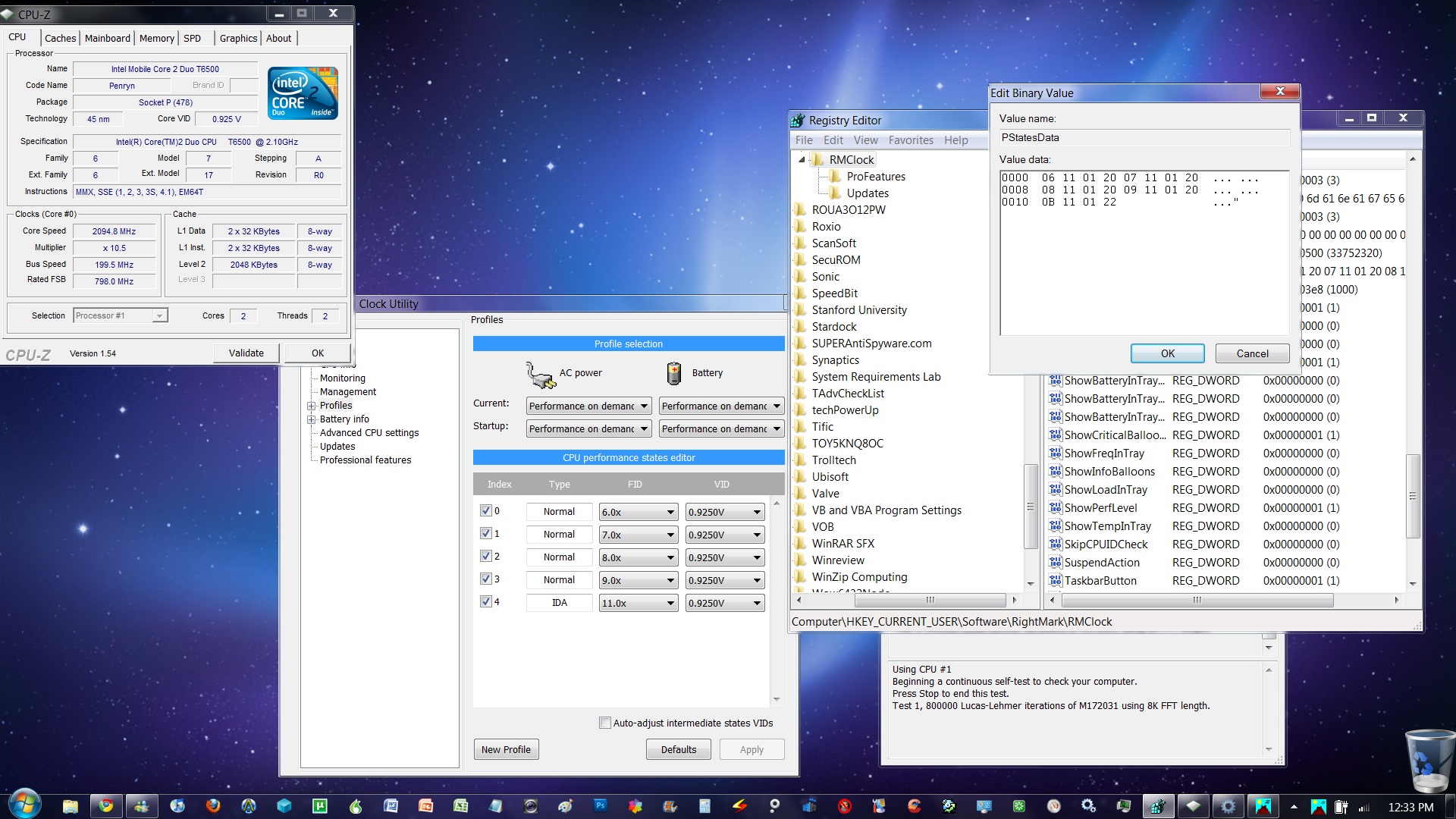
Yeah, I changed the registry value from 0A (10) to 0B (11), so now it uses the highest multiplier of 10.5.
I also set that multiplier's last value to 22, which designates it as the IDA multiplier.
Anything else I should know? I tried setting the 6X multiplier to 31 to designate it as SLFM, but it keeps setting itself back to the default 20. Does my processor support SLFM? Why can't I enable it then?
Thanks again. -
The correct registry entry for the 10.5 multiplier is 4A. The A stands for 10 and the 4 stands for the half multiplier.
I'm not sure what you're doing here. Do you have a link to the guide you are following? Post a screen shot of RM Clock and what the registry looks like that you are editing. One value is the multiplier and the other is the VID. CPU's have a minimum and maximum VID so you can't set values outside this range or it won't work.
Have you tried ThrottleStop yet to see if your T6500 has an IDA multiplier of 11 available?
I think you need Dynamic FSB Frequency Switching in the RM Clock Advanced CPU Settings turned on to access the SLFM voltage. -
Image uploaded...It seems to work fine for me.
I got ThrottleStop, and after putting various loads on the CPU I have not seen the multiplier go higher than 10.5.
Its strange, ThrottleStop has the checkbox for SLFM available, but RMclock does not seem to allow it to be enabled.
This is what I followed, its originally in Chineese but the numbers are all I needed so it worked fine. See where it says (multiplier type code: 20 = Normal \ Standard \ Rounding Left, 31 = SLMF, 22 = IDA), thats where I got the 31 and 22 from.
Google TranslateAttached Files:
-
-
RMClock does not seem to be reading your CPU correctly. It should show both the SLFM multiplier and the IDA multiplier. The way it it set up now it looks like it is going to be limited to the 9.0 multiplier when running two threads in Orthos or Prime95.
If you are running a single thread of Prime95 and you run ThrottleStop in monitoring mode, if IDA is working correctly, you should see an average multiplier bouncing around between 10.5 and 11.0. That's how IDA works. RMC usually draws a straight line at 10.5 and does not show this correctly even when it is working.
In the RMClock folder is a registry file called RMClock_WipeOut. You might want to try stopping RMClock and then running this so it wipes out all previous settings so you can start again. After all the RMClock registry entries have been wiped then when RMC starts up again, it should be able to find some more values for the performance states editor.
SkipCPUIDCheck should also be set to 1 in the RMClock Registry so once you get things setup, it might stay like that without getting reset.
The "Undervolting" Guide
Discussion in 'Hardware Components and Aftermarket Upgrades' started by flipfire, Apr 1, 2008.


![[IMG]](http://img718.imageshack.us/i/lowfidvid.png/)
![[IMG]](http://img822.imageshack.us/i/highfidvid.png/)