Problems? See this thread at archive.org.
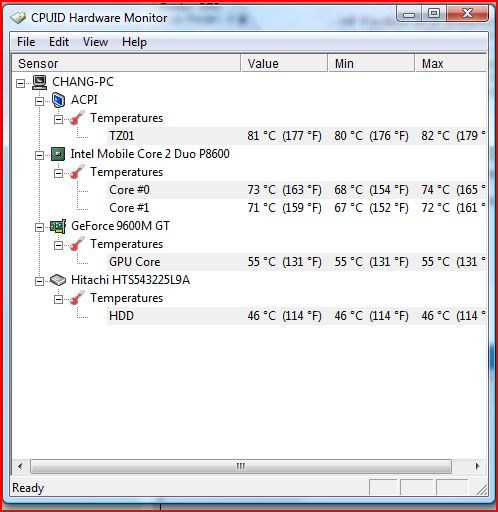
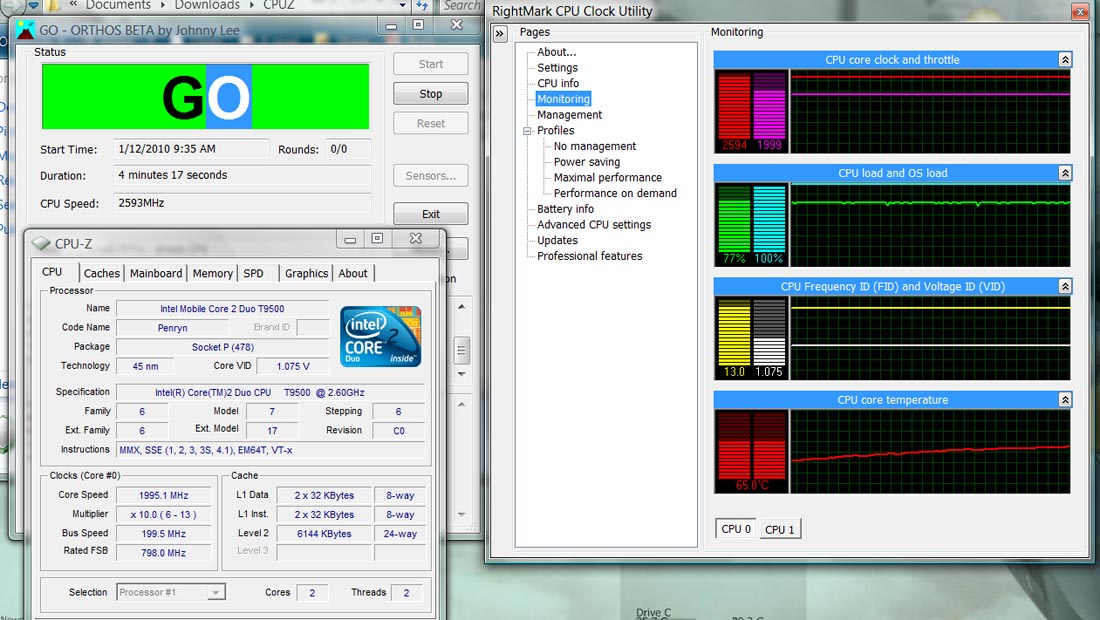
A significant decrease in temps will be noticed when the cores are under load/stressed.
-
actually it rose by 1C on core # 0
edit: 2 C now..Attached Files:
-
-
hey guys
i have a p-7811fx and managed to get all multipliers down to 0.900 v
stable for over an hour but the thing is my cores have different max temps one 52 the other one 55. to begin with i had 60....
rmclock reports 51.6
the thing is 0.900 is the lowest in the tabs..there is nothing more?
multipliers are 6 7 8...
can i get lower?
is this all ? (lol)
cpu is p8400 just as reminder
whats your experience with p7811 fx? -
I am surpirsed at the differnce in temperature. I usually do video encoding, and now during the process the temp doesn't go pass 66C. I was thinking if such a thing was possible with the TL66. Most probably I can't use the highest multiplier because of heat, but just maybe I could use it as lets say a TL 64 or 62. It is just gathering dust outside the notebook.
I am currently undervolting for each P state. Thanks for the info. lets see.
Question: Does anyone know the default AMD P State voltages? So that I know a default stable point to lower the voltage from.
what is that? -
Quit while you're ahead. 40C is ridiclously low for a runnng CPU. Undervolting wasn't made for superconducting IC's. You need to apply at CERN !
-
after about 6 hrs i got bored of orthos...its stable nothing happens.. temps are 53 core 0 and 55 core 1 from 60....voltage still 0.9000v on all 3 multipliers?
so? any advice on what next? have i hit the nirvana of undervolting with my cpu?
i can't go lower than 0,9000 as i said in my previous post...cuz there are no more numbers in the tab -
i'd quit while i'm ahead. your experiencing lower temperatures and lower battery drain, im sure you are satisfied with the results. who knows, if you go any lower, you might just BSOD
-
Relax, have a beer, enjoy nirvana and gloat over the poor slobs who can't achieve your results. Then, do some computing for change ha ha.
-
I think theres something called a pinmod, but I would risk it if I were you. You better buy a notebook cooler if you still have heating issues
-
i don't have heating issues..never had to begin with...60 degrees were ok for me..i just did it for the battery..
i noticed i only get 8000 3dmark 06 points now? i thought there shouldn't be any performance drop....except for some mhz off the cpu .. -
I think that you can only go as low as that CPU is allowed to do. My Pentium M Dothan can go as low as .7xxxV.
The T5550 in my P6860-FX has a lower limit of .9500V. Like you, I can run the lowest limit through the full multiplier range. Which makes me think this would be a great chip to overclock. Unfortunately the pll isn't listed in clockgen...
It doesn't matter because I plan on upgrading the cpu anyway. -
"some mhz off the cpu" IS a performance drop. Done correctly, undervolting means running the CPU at the same original speed (GHz) only at a lower voltage and lower current consumption because the processors will let you do it. If something is slowing down, then something was done incorrectly. Did you apply throttling by mistake?
-
is there any compatibility issues with undervolting and itunes ? i can't get a minidump file because the machine just freezes solid at random when i use itunes to listen to music/video....
i already made sure i'm running the latest itunes and removed excess modules in light of the recent BSOD reports & all that....
just curious. -
If you get issues it mean you undervolted too much
-
haven't gotten a BSOD yet, even when running orthos for 4 hrs straight....so it's still possible to get other issues like unexpected freezing, etc. ?
edit:ok...i've been running a video in itunes for about 20 mins and all seems ok. before this, i had my voltages all set to .95 (from 6x all the way to 12x). i changed the 12x to .9875 and i don't see an issue [yet].... -
Recent iTunes has been crashing Vista. I hate iTunes and don't use it but have seen it mentioned.
**For what it's worth** -
i am thinking that it might not be the undervolt because nothing else has been giving me an issue. it only happens when playing videos either in full screen or a window.
do not understand it. i know itunes is written crappy, but if it's an issue others have had, why haven't they addressed it yet, they are usually good about that...
it's going to be a tough call migrating an entire library to another platform, believe me, i'd like to, but finding an alternative is not easy... -
I hear ya. I haven't followed it closely but there have been some new iTuneUpdate/VistaCrash comments cropping up. Maybe it is the new update??? Or the new update fixes it??? Don't know.
-
@ 8.0 release, itunes caused vista users BSOD due to untested drivers & the like. upon ppl's outrage, they updated to 8.0.0.35, which supposedly fixed the issue.
however my problem has been in existence at least 3 releases prior and including this new release. it might have something to do with SLI i am thinking....and apple's push for quicktime, because i get a few glitches during playback of videos....sometimes the videos and audio do not match up. weird. -
Is there anyway for RM Clock to run automatically at start up? I always have to allow the action.
-
k so i've just done some undervolting on my P9500 and was able to lower the voltage significantly. My 9x multiplier is at 2.58GHz and I can run it with 0.975 V which gives me ~43C in RMClock. Every other multiplier I was able to set to 0.925 V which was the lowest option I could get. So I'm thinking that if there were more options possible I'd be able to undervolt it more? I know that RMClock isn't being developed anymore and that it doesn't really fully support the P9500 so is there any other alternatives to RMClock which would give full support?
-
Go into settings and there should be an option that says ''run for windows startup'' just check the box.
-
I do have it checked and it runs at start up, but every time I am prompted by the UAC to let it run.
-
Oh
in that case I do not know. Sounds like a Vista problem to me?
-
It's because UAC needs confirmation, is there a way to allow it as a trusted program?
-
I am not 100% sure myself as I am still not a Vista user. :-/
-
disable UAC its useless anyway..good spyware and viruses evoid it anyway..
go to control panel...user accounts and UAC u disable it there -
If you disable UAC msconfig grabs it until you allow it. I gave up for now. Must be a way. My experience anyway. I start it manually for now. Tired of chasing down Vista quirks.
-
Here is the way I got around it. Works Great.
http://blogs.techrepublic.com.com/window-on-windows/?p=616 -
Yep I saw that but had not gotten around to tyring it yet. Seems a lot of fooling around but if it's the only way, then we are stuck with it.
Thanks for posting it. -
eh doesn't work
-
Then, I bet your not doing something right, As it does work.
Make sure in RM clock you don't have the ''Run at start up'' checked. And make sure its not in the start up folder. -
Its fairly simple, Once you have done it once. You can do it in less then a minute. Just check a few boxes and your good to go.
-
P8400 has a 8.5x multiplier . RMclock cannot recognize half multipliers so it will only read it as 8x
266mhz FSB x 8 multiplier = 2.1ghz
If you had a P8600 which has a 9x multiplier, it wont downclock. -
1st up, thanks for the great guide Flipfire. I've successfully undervolted my laptop using your guide and managed to get my temps down.
I've been trying to get get my girlfriend's laptop (running Vista Home 32bit) undervolted as well as shes been having massive overheating problems. The problem is, when running a stress test using Orthos, RMClock displays a CPU load of only about 45%. It only hits 100% for the first few minutes. After that goes back down to 45%. Multiplier displays shows 10x which is max.
Any idea how to get it to 100% load?Attached Files:
-
-
Thanks.
Your cpu is overheating causing it to throttle down. Thats why it cant go 100%
You might wanna check your fans or reseat the CPU.. sounds like major hardware problem -
Wow! That was a quick reply!
Anyway, shes dropped her laptop a couple of times before so hopefully her fans are still working. I'll mess with it to see if I can get it to work properly. I'll post an update if successful. -
I am thinking about undervolting the CPU in my new laptop (Samsung Q310-A(S)S-1UK 2.40Ghz C2D), however, when I run Rightmark CPU Utility it says my cpu type is unknown, does this cause a problem?
I am on Vista Home Premium SP1.
If you need anymore info let me know!
![[IMG]](images/storyImages/CPUInfo.jpg)
Thanks
Stu -
may i ask what you mean by it wont downclock? i have a p8600 and have undervolting working, unless thats not what youre referring to?
-
it seems like what was causing the freezing in itunes is RMClock, because when i unloaded it, i was able to continuously play videos & sync my 5G without freezing. temps went up a bit, but oh well....
-
Im guessing you have a T8300 penryn. RMclock just cant recognise the latest revision/stepping of this chip. It happened to all the Dell users in the past
Its perfectly fine to go ahead and undervolt.
Yes iTunes is known to stutter or crash while using RMclock. Try disabling SuperLFM if you have it enabled.
Also try raising the priority of the iTunes process.
I was actually refering to another used on the previous page
Okay a P8400 has a 8.5x multiplier. Due to RMclock unable to read half multipliers, it will read it as a 8x multiplier
266mhz FSB x 8.5 = 2.2ghz
266mhz FSB x 8 = 2.1ghz
Thus a 100mhz~ downclock due to RMclock not
You have a P8600 that has a 9x multiplier which means its fine. -
not using superLFM
is there a way to change the process priority permanently ? tried using 'above normal', that didn't change playback stuttering. not sure if high or real time will suffice or alleviate the issues...
i'm almost at the lowest settings (.95v @ 6x and .975v @ 12x)...my cpu won't go below .95v -
What Vista profile are you using?
Try using the RMclock Advanced Power Management profile. Its under Additional Plans
Vista and RMclock can sometimes have adverse effects on the cpu management. -
don't have this feature, probably because i only have the free version
what would it do ? -
I would like to thank flipfire for this guide and everyone that helped me earlier, when i did a test run undervolting my t5750
While i was home this time i got my x9000 installed into the gateway 6860-fx and i was undervolt it to pretty much 1.0 volts (the lowest it would allow) the only 2 modifiers i couldnt get that low were the lowest to multipliers. And they were stable at 1.1volts.
This shaved ALOT off my temps. I now idle between 37 and 40 degrees and i havent seen over 56degrees even after 4+ hours of running orthros!
Thank you all -
Free version has it too, its abit hidden in the Vista Power profile screen. You ahve to click Show Additional Plans and it will show up
No problem, Enjoy -
nope, still don't see it...anyway
thanks for helping anyway....i uninstalled it before, installed it again and so far it's been playing videos without crashing most times.... -
Just looked at the spec for my computer and it is an Intel® Centrino® 2 Processor Technology P8600 (2.4Hz) 1066MHz FSB with 3MB Cache with Chipset
Intel® PM45 + ICH9M.
I assume this is still ok?
Is there any special steps / precautions I need to take using Vista?
Thanks -
Is undervolting ok? Yes. Undervolting is ok with any processor. Just follow the guide and you will be fine. The only precautions are BSOD's/freezes due to low voltage. You just have to bump the voltage back up.
-
Is there any point in doing all this when I ran Orthos for 10 min and the cpu only reached 56 Celsius and the Gpu only 58?
Cpu started at 55 and Gpu started on 57...
The "Undervolting" Guide
Discussion in 'Hardware Components and Aftermarket Upgrades' started by flipfire, Apr 1, 2008.