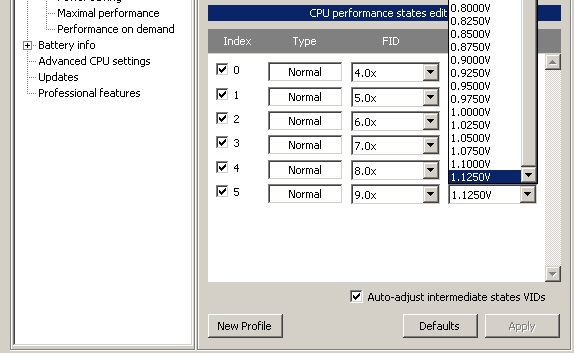
Problems? See this thread at archive.org.
Your math is is horrible and your numbers are not real. Let me explain using factual data.
1. If you read a few posts here you'll notice that most all users end up with a <10% difference between their highest and lowest voltages not your hypothetical 40%. From a physics point of view, your voltages just aren't real-world. My range is 7%, 0.950 to 1.025
2. Your "10W for the rest of the hardware" is totally out to lunch. Just the display and HDD eat 2/3 of the total wattage of a laptop when they're running. It's documented.
3. Just what part of Ohms Law are you using to calculate that doubling the speed of a microprocessor at the same load takes 4 times the watts (10 vs. 39.2) ? The unit of energy, the joule, is defined as 1 watt-second. The total amount of energy required for a fixed computing job is constant. Twice the watts for half the time is the same number of joules. You're multiplying twice.
The laws of physics don't allow you to cook up numbers just to suit your fancy.
-
-
1. I didn't think they were that far off but they weren't supposed to be exact, just for a simplistic example.
AFAIK the standard Pentium M 1.6GHz p-states are 1.036V @ 800MHz and 1.484V @ 1600MHz, a ~43% increase in voltage for doubling the frequency.
2. My notebook idles at ~13-14W off battery but but lets use 50W instead.
Using 10W cpu power at half speed the notebook consumes 10W + 50W = 60Wh. With a 45Wh battery this will last 45Wh / 60Wh = 45 minutes.
Using 39.2W cpu power at full speed the notebook consumes 39.2W + 50W = 89.2Wh. With a 45Wh battery this will last 45Wh / 89.2Wh = 30 minutes.
3. Ohms Law from Intel P=CV<sup>2</sup>F
We see an increase of 3.92 x the power so roughly 3.92 x 10W = 39.2WCode:/ 1.4 \2 / 12 \ |-----| x |----| = 3.92 \ 1.0 / \ 6 /
It's not perfect but gives us an approximation.
There are a lot of ifs and buts and no one solution to answer all of them
-
1. If you're tweaking everything then sure, there may not be a big difference in the actual voltage. However, 99% of users don't mess with speedstep, so the effect on power savings would be even more pronounced than in your situation.
2. When the CPU is idle, sure, the cpu is consuming a minority of the power. As soon as you begin using it, it becomes the biggest hog of power. For example, even my 2.2Ghz 45nm single core celeron doubles the system's power consumption when it is at full load.
3. He is going off the fact that power consumption increases by the square of the voltage. A fixed value of energy for work done is completely false here. Let's say that my processor is at 1.175V at 2.2Ghz and at 1.1Ghz I can get it down to .850. That means that at full load the 2.2Ghz processor consumes over 3.8 times the power that the 1.1Ghz processor does, or 1.9 times the power for the same amount of work done. This isn't entirely accurate though because as the temperature of a processor increases, its internal resistance increases as well, so the higher clocked processor running at a higher voltage will consume more than the previous calculations show. Depending on the configuration, this effect may be minor or quite noticeable.
Also if your cpu is not at 100% load, there is no reason for it to be clocked so high. It is wasting more energy than it has to. Even if only a little bit is being saved, it all adds up.
The argument that speedstep is to keep processors from overheating is a joke these days with 45nm dual and single cores. It gets even more ridiculous when you realize that it allows the CPU to run at 100% load indefinitely at its highest frequency. -
1. You're pulling your numbers out of a hat. No CPU requires 40% more voltage to run at it's rated top speed vs. half speed. Try some real working numbers like 1.025 vs.0.95 or some the hundreds of real values people publish here.
2. Your battery calculations are smoke and mirrors. "My notebook idles at ~13-14W off battery but but lets use 50W instead" Why not 1000W instead? Why don't you get an ammeter and run your battery through it to your laptop so you'll have real measurable data instead of making it all up.
3. I don't think you understand how electrical engineers use "C" or capacitative reactance in computing real impedence values for power calculations. You either overlooked it or forgot about it. If you plug REAL numbers, like 0.95 and 1.025 into P=V*V/R you get a value of 2.3 or a 15% power premium for the privilege of getting your job done in half the time so you can shut off your 10-20W display and your 10-20W HDD.
4. You need to get your money back from whomever taught you physics. -
What's ridiculous is that you don't know the difference between undervolting and speed stepping. It's undervolting that allows full speed, full load operation without heat damage. I'm not even going to comment on your junk calculations. Call me after you get a passing grade in a year of college physics.
-
First off, thanks for the guide, I have been able to drop a decent amount of temp off my cpu through undervolting.
But I do have a quick question,
My CPU is a T5800, options for VID go from 1.050v-1.250v in the drop down list. After testing with ORTHOS for 50 minutes (Small FFTs -stress CPU) I had no problems running my highest FID (10.0x) at 1.050v.
My question is, should I leave it at that or should I go up a step or two?
Just curious because since I cant find a limit low enough to give me an error/warning in ORTHOS or give me the BSOD I don't know what the limit actually is before it would do that. I just know that I am limited by how low I can go in RMClock.
Any help would be much appreciated. -
Leave it and be happy that you got your final answer so quickly. 1.05 lower limit is locked by your CPU or BIOS, not RMClock.
-
I'd like to add my thanks for this guide. I have an HP 8510p T7300. When I first tested I was idling in the mid-50s and after having Orthos put the cpu through its paces I was getting a temp of 84.
After completing the undervolting procedure, I'm now idling in the mid to upper 40s and Orthos tests are showing low to mid 60s under load. I am completely blown away by this! After opening up the notebook for cleaning I also noticed HP's lousy job of glopping on thermal medium. So I have a tube of Arctic Silver 5 on the way and I expect that may lower temps a bit more yet. All in all, I'm a happy camper. Wish I had done this sooner.
These are my current settings for performance on demand:
0 SuperLFM 6.0x 0.8500v
1 Normal 6.0x 0.8625v
2 Normal 7.0x 0.8750v
3 Normal 8.0x 0.8875v
4 Normal 9.0x 0.9375v
5 Normal 10.0x 0.9625v (originally 1.2500v)
6 IDA not used
I tested for about 2.5 hours and everything seems stable. Do these numbers look okay?
Thanks again! This guide is a treasure.
-
1. Intel's speed stepping changes the frequency and voltage, so I don't know what you are talking about there. Also, no 45nm dual core cpu is going to fry continuously running at full speed and voltage. Speed stepping is to lower power consumption and heat production when processing power is not needed. It saves some battery time and keeps the fan from turning on as much.
2. Shut up with the "complete a task in half the time" crap. Even at 1.2Ghz, my T4200 is more than enough to do 95% of the stuff I use that laptop for in real time without lagging. I'm sure most users aren't having their laptops run SETI or F@H all the time.
3. The calculations are correct. You just don't like them, so of course you can't comment on them.
4. You obviously don't have a clue, so don't talk down to me. You probably dropped out of high school and sell phones at a kiosk in the mall; no wonder you're so grumpy. -
If that is the case how come I can get my top x7.5 multiplier to run at 0.925V with CrystalCPUID even though it has an (X) next to the voltage?
The lowest I can select in RMClock is 1.0V. -
The "X" means that you're probably locked out of that voltage. Have you verified that you're actually running at the CPUID promised voltage with another utility like Everest or CPU-Z ?
-
Guys what if my PC keeps shutting down while stressing the CPU ? ( MAX temp was @ 107 C) And yes i have a prob. with overheating. How do i underwolt(hopping this will fix it) if i cant do the test ?
P.S.AMD Turion(TM) 64 X2 Mobile Technology TL-60, a troublesome cpu....
So any help ? -
Just for fun, I'll give it one more whack
1. The Intel speed stepping capability is built into their CPU chips. The chips don't change FIDs or VIDs by themselves though. A power plan in the OS, or a separate utility like RMClock, Genie, or CPUID does that. They modify the ACPI tables which the processor reads to figure out what to do. If you don't like the canned plans in XP, Vista, or W7, you can build your own. But, changing voltages and changing frequenies are completely independent of each other as long as there's no conflicts. Voltage stepping is not speed (frequency) stepping. Also, undervolting reduces power consumption and heat all the time, fast, slow, idle, full load.
2. I really don't care what you do with your machine. I just want to finish what I'm working on quickly so I can turn the HDD and display off and really save battery.
3. You seem to have gotten your knowledge of speed stepping and voltages from the 2004 Intel White Paper which uses a 1.6 GHz Pentium M. The power equation you use is a curve fit from the voltage table in that paper. It only applies to the exponential high end of a processor's design limit. You cannot apply that equation to all processors and all voltages. Power does NOT always go up as the square of the voltage times frequency. At least the engineers used real measurements to plot their curve instead of pulling them out of thin air. See my thumbnail of a "flat" voltage curve for a T8100 that's running right now.
4. Actually, I did finish high school, and college, and graduate school but I've never sold phones. Sorry to have come up short
ftp://download.intel.com/design/network/papers/30117401.pdf -
Yes that's exactly what the X means but I've verified the voltage in both Everest and CPU-Z and it is definitely running at 0.925V. I just wish CrystalCPUID always worked as sometimes I have to go into the multiplier adjustment screen and click apply to kick it back into action again.
-
That number is kind of high nowadays. My Hitachi 7k320 7200RPM hard drive draws 1.6W peak power and has an idle power of 0.86W to 1.0W. An minimal brightness LED screen can draw a little under 10W.
-
I just HAD to look it up. You're absolutely correct. Even a 5W startup draw from zero to 120 revolutions per second. Those platters must be made from razor blades. I want one.
-
I think you should visit NBR Cooling Central Link, You should start by cleaning out your vents and checking if the heatsink is seated properly.
-
Is it advisable to enable SUPER LMF? And by default (without using RMClock), is it enabled by Intel on my P9500?
-
Thanks tpmportal it helped
NOw after running the test i got a max of 73 C.
Now when i launch RmClock i get these settings:
http://img35.imageshack.us/i/61703445.jpg/ These dont look like the ones on the starting page, any help on what must i check ? -
On a battery that lasts normally 2 hours , 30 minutes is 25 %
On a battery that lasts normally 6 hours , 30 minutes is only 7 %
So , how much % on a battery ? -
Those are rough numbers. Basically, it depends on your laptop, on your CPU, on how you have undervolted by.
-
I'm wondering if RMClock is to be preferred above notebookhardwarecontrol for any reason, is it? I mean that NHC takes a lot of time to start when I boot into windows, and I guess that it's quite bloated, but I could be wrong.
Can anyone with experience with both programs answer my question?
Thank you! -
I have completed an undervolting procedure on my HP 8510p and it's been running stable for a few days now. The machine is running 20 degrees cooler under load!
I have a couple of questions ancillary to this. My current setup for voltage is:
These are my current settings for performance on demand:
0 SuperLFM 6.0x 0.8500v
1 Normal 6.0x 0.8625v
2 Normal 7.0x 0.8750v
3 Normal 8.0x 0.8875v
4 Normal 9.0x 0.9375v
5 Normal 10.0x 0.9625v (originally 1.2500v)
6 IDA not used
I'm unclear on whether or not I should disable speedstepping, and I'm also unclear on whether or not I should leave the machine on the Performance on demand setting of RMClock when using battery-only. Should I let Windows XP control the power settings or should I create another profile for battery use using RMClock?
Thanks for any clarification. -
Rmclock supports newer computers better. For example, I used NHC on my previous WinXP laptop, but when I upgraded to a C2D machine with Vista, NHC didn't work right on it. Rmclock does. On the other hand NHC is a bit easier to setup than Rmclock. Some people might also prefer the UI of one program over the other.
-
don't dissable speedstep (no point), rmclock will take over controll anyway.
do leave it on "Performence on demand" while using battery-only, that's what I do. It will give the exact same battery life as the "power saving" mode.
If you want to know why just read back a few posts. -
Thank you. I'm using NHC on a 4 year old Dell laptop with a Pentium M, so NHC works just fine. I truly like the way I can set the multiplier time-out values, which multipliers should be used during the speedstepping and at which voltage the cpu should work at each seperate multiplier. I have an average undervolt of ~0.1V on my Pentium M, with the biggest undervolt done at the lowest multiplier. It helps keeping the temperatures low and it enhances batterytime by a small margin.
-
Hi,
I have an Amilo PA-1538 and I tried to undervolt it using the guide, after seeing that my CPU temperatures under stress tend to reach 81-82 °C, with GPU reaching also 92 °C.
However, the system behave oddly when I try that. If I try to move the voltages only one step up (so, from 1.1250 to 1.1000) and apply it, after a couple of seconds the mouse locks and the system freezes.
Probably this happens because this notebook doesn't allow any modification at all (the bios, for example, has all features locked, apart from boot order and similar stuff).
Is there any way to make it work? I can't believe that my notebook can't be undervolted at all, particularly if it reaches temperatures that high.
Thanks for any help.Attached Files:
-
-
Thanks very much! Just what I needed. I evidently missed the post to which you refer. I'll take a look back.
-
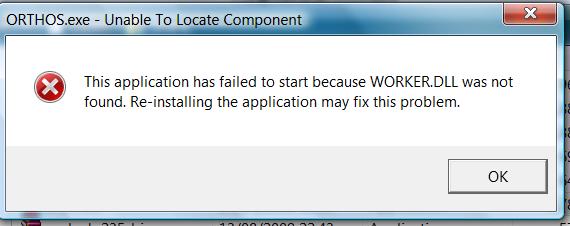
HELP !!
When I try to run orthos.exe I get the message in the attachementAttached Files:
-
-
20C (36F) is great. Makes you wonder what the laptop design engineers are spending all day on, doesn't it. It's obviously not on the easiest way to achieve less heat and better battery life.
The whole reason for P.O.D. (so the slackers say ) is to USE speedstepping together with your new lower voltages to achieve more battery life. However, if you really watch the RMC Monitoring window while you work, you'll see that 90+% of the time is spent at your FID 6 with only brief bursts up to your top selected speed, FID 10. You might as well unselect 7, 8, and 9 because they're always skipped. The threshold level you set in the P.O.D. profile (I used to use 15% load as the trigger point) determines when your CPU goes to afterburner and then back down.
-
Does it makes much sense to do undervolting with an SU9300 (Samsung X360) with SSD
Looks like I don't have Speedstepping
http://i30.tinypic.com/21l298n.jpg
The 6.0x is already at it's lowest 0.9875
Only the IDA 7.0x can be lowered to 0.9875 in steps of 0.0125 V
What now ? -
Did you perhaps move the orthos executable away from the directory where worker.dll is stored? It needs to be able to see that file, which is included with its package. If you moved orthos.exe to your desktop or someting like that, try using a shortcut to it instead so that wherever it is it sees worker.dll.
-
Thanks for the insight. Although I know this works, as my temps prove, and have a basic understanding of why, I'm still trying to wrap my brain around the finer points.
May I ask why you chose the 15% figure? Is that in reference to the "Target CPU usage level" setting? Mine is at 50% It defaulted to that so I left it.
In fact there are several items that are ticked in my settings that just sorta "came" that way" so I've left them. I have no idea as to whether they're
good settings or not and am still trying to understand "the fine manual." Things like "Enable Enh. Stop Grant" "Enable Enh. Deeper Sleep" etc. -
Sorry to have been long winded. I have to air out any hidden slackers before I can dig right in.
1. After I watched my RMC graphs for a few hours, I noticed that the speed stepping only stepped up at a sustained 50% load or higher. The ONLY things that would kick up my CPU were Orthos, movie editing or Folding@home. So, all day, I was running my laptop at half speed. I could have bought a 1 GHz rig for a lot less. Then, I noticed that the stepping threshold could be lowered to 15%. Better, but still, I was running at half speed 90% of the time. CPU Genie has bar charts to prove it but I found the program to be unstable. Anyway, that's why I don't use stepping anymore but I DO use undervolting via RMC.
2. To me, SLFM and throttling are both braking mechanisms. I don't need 'em, I don't use 'em. If I'm going to be idle a few minutes, I use standby. The display and HDD are "off" and the CPU is in a coma. See my thumbnails. -
can you uncheck "auto-adjust intermidiate states VIDs" and try it again.
Also can you try to *increase* one of the VIDs (this will show if the problem is just the CPU not being tollerable to lower VIDs). -
What does auto-adjust intermediate states VIDs do?
And is it recommended to enable SuperLMF? -
Hi, and thanks for the reply and help.
I did it first of all unchecking "auto adjust", and the problem was the same.
I cannot increase VIDs, 1.1250 is the highest on the table. -
Now this is funny,
when I start up my laptop, my memory usage in task manager is around 1 gig , then I run orthos for about 2 minutes and after that memory usage is around 800 Mb
Looks like this orthos program "cleans up" my memory... -
Some expert has an idea ?
-
Can anyone point me to an explanation of what the thermal protection and enhanced low power state settings do and how to determine the optimal settings for my notebook (Dell 14z P8600). I've undervolted without a hitch and am running on average 10 degrees C cooler, but I've seen various screenshots showing different people using different settings. FWIW, here's a SS of my settings, which I guess were the default settings since I never changed them.
-
can you uncheck the boxes next to 0, 1, 2, 4 and 5 so that only 7x is enabled. then try to increase the voltage for 7x.
-
What does auto-adjust intermediate states VIDs do?
And is it recommended to enable SuperLMF? -
Windows pages stuff out to your virtual memory (HDD) to make breathing room for chainsaw apps.
-
read the first post.
auto adjust means that all you have to do is set the voltage for the highest mutiplier, the voltage for the lower multipliers will be automatically changed.
yes enable superLMF. -
Ok. Is the throttling of RMClock better than the throttling (Speedstep technology) of Intel?
-
I have no idea, I would say it probably is equal (with repsect to battery life).
Although you may get a few more mins on bettery with RMclock if you undervolt. -
Let's take for example this post for a T7300 http://forum.notebookreview.com/showpost.php?p=5188732&postcount=3458
I assume these voltages are minimum stable voltages so let's take 6x @ 0.8625V and 9x @ 0.9375v.
The frequency change is 9x/6x = 1.5 or 50% increase in speed
The voltage change is 0.9375/0.8625 = 1.087 or an 8.7% increase in voltage.
Using the magic equation P=CV<sup>2</sup>F (0.9375/0.8625)<sup>2</sup> * (9/6) = 1.77 or a ~77% increase in power for a 50% increase in frequency and as stated before there are other factors which will effect the results but we're trying to keep things simple. According to your work done in half the time theory, a 50% increase in frequency should only consume 50% more power but as can be seen this is not the case.
I see you did a little plot of your T8100, so taking the take-off point from 1.6GHz @ 0.95V to 2.0GHz @ 1.025V we get a 45% increase in power for a 25% increase in frequency !
For the flat part of the voltage from 0.6GHz to 1.6GHz @ 0.95V as I understand it is where you would be better off not using the multipliers below 1.6GHz (8x) as the cpu would be able to enter halt states more often running at 1.6GHz than 600MHz and that would save more power than any p-state. but I'm not 100% sure if that is exactly how it works.
As for capacitance I am very familiar with it and as for the battery power levels I use the current and voltage levels from the battery itself, no need to hook up wire and meters. Here is a an example of real time software from a previous post although at the time I was running on AC so no wattage shown but FYI my LCD consumed ~2.6W at the lowest brightness. Not sure what hard drive your using that consumes 10W-20W but it seems an awful lot of power for a notebook drive.
![[IMG]](images/storyImages/or1.png)
Here is a quote from Intel a Core 2 Duo E800/E700 series and Pentium Dual-Core E500 series dated Jan 2009AFAIK the equation is applicable to all semiconductors but may not be so obvious because of other factors such as operating all frequencies at the highest or higher than required voltage or where the quiescent power of the device is high enough effect the result by a large amount.
Although the equation can be used to approximate power savings and temperature reduction it is probably even more useful for overclockers where power increase and temperature<sup>*</sup> increase can be approximated beforehand.
* When internal local ambient temperature near the cpu is known.
Somehow though Scot I think you just wont accept this and it makes me feel kinda dumb spending time to try and help you but that's your prerogative. -
When trying to run RMClock with the 64-bit driver I receive this error. "Cannot install or load RTCore64 driver. Make sure you're loading this application from not a read-only medium and/or a network drive, and that you're logged on with Administrator rights." I don't understand why this isn't working because the RTCore64.sys is in the same folder and I am the only admin on this computer.
-
I always like a good technical argument, especially where the wrong conclusions are derived from perfectly valid data. Sure beats the hell out of playing Pogo
1.) I omitted your "real time software" graphics in this reply to save space and mostly because there's not a scrap of power usage data in them. Voltages without amps doesn't say anything about watts. If you have real data from running on battery, post them. I can't comment on your ~2.6 watts for your display at lowest brightness since you don't supply any numbers and its not relevent to my main point here.
2.) Xhepera's data is fine (6.0x 0.8625v and 9.0x 0.9375v) and perfectly representative for undervolted T7300 processors. Here's the problem: The "Magic Equation" you refer to is NOT a law of physics like Ohms law. It's an observation; an equation derived from a plotted graph for a 1.6 GHz Pentium M using Intel stock voltages. The equation comes from their own experimental data. The equation doesn't correctly predict voltages for any other processor model including Intel's own T7300. You took accurate data and then applied second-hand math to get the wrong answer. And, BTW, (0.9375/0.8625)<sup>2</sup> is an 18% power increase in exchange for 50% more CPU clock speed. I'll take it, any day.
3.) Fire up your Excel and start plotting actual frequencies and voltages that members report here and you'll find your "Magic Equation" falls flat, literally. The real Ohm's law says watts = volts X amps, or with a little math, watts = (volts X volts) / resistance. I have no problem with wattage increasing as the square of the voltage, but don't be throwing in an extra Frequency factor just because it fits a power profile from another time, another place, and another chip. Jeez, derive your OWN equations from your OWN data. Try using Least Squares or Polynomial curve fitting math. They're built into Excel. Or you can buy MathCad or StatGraphics.
4.) Thank you for feeling sorry for me. Well, gotta run, it's time for Pogo
-
I'm trying to undervolt my sister's laptop right now. When I open up RMclock, there is no "Advanced CPU settings" page on the left side of the window. What am I doing wrong?
The laptop is an HP G60-120US.
Specs:
AMD Turion X2 RM-70 2GHz
4GB DDR2
Nvidia 8200m G
etc.
The "Undervolting" Guide
Discussion in 'Hardware Components and Aftermarket Upgrades' started by flipfire, Apr 1, 2008.