Problems? See this thread at archive.org.
I couldn't noticed much different on cpuz but messing with lower voltages produces a BSOD so I'm guessing that voltage really was changed.
![[IMG]](images/storyImages/2n067pj.jpg)
is what I get after the first 10 minute ORTHOS run then the same if not a little worse when running ORTHOS for 45 minutes to check stability.
-
For anyone that has an AMD processor I think undervolting will produce great results. It did for me at least
Stock Voltages
Orthos Stress Test (both cores locked at 2.3GHz) 2 hours
w/o cooler: Max 96C
w/ cooler turned on high: 85C
Cores locked at 1150MHz through K10stat for 3 hours, web browsing, typing a document
w/o cooler: Max 61C
w/ cooler turned on high: Max 57C
Cores locked at 575MHz through K10stat for 3 hours, web browsing, typing a document
w/o cooler: Max 53C
w/ cooler: Max 49C
P-State 0: 1.0500, P-State 1: .8875, P-State 2: .7625
Orthos Stress Test (both cores locked at 2.3GHz) 2 hours
w/o cooler: Max 79C
w/ cooler turned on high: 76C
Cores locked at 1150MHz through K10stat for 3 hours, web browsing, typing a document
w/o cooler: Max 52C
w/ cooler turned on high: 50C
Cores locked at 575MHz through K10stat for 3 hours, web browsing, typing a document
w/o cooler: Max 48C
w/ cooler: Max 46C, Min 35C -
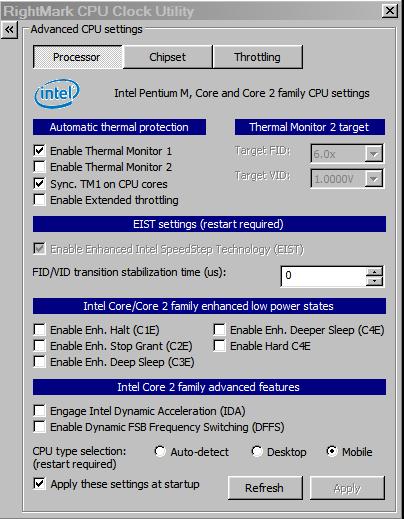
You don't have the thermal monitoring turned on properly. Go into RMClock and turn on "Thermal Monitor 1" and "Thermal Monitor 2". Your temps should jump up - then get vmodding.
-
I actually meant, should I undervolt on the cooler, or remove the cooler and do it on the desk, then apply the cooler after its complete. I dont want it shutting off or something bc it got too cold or hot or something.
-
It's more simple than you think. Undervolting is turning down the voltage of your CPU to the lowest level that runs reliably. That's it. You're done. Coolers have no effect on undervolting at all.
-
Ah ok, thanks Scott. Just assumed that since we had to check the temp then it would have an effect. Cheers.
-
Ok, I turned on "Thermal Monitor 1" and "Thermal Monitor 2" and using cpu-z the voltage change is definitely being made but it's still not working.
Here are my settings. It is slightly disconcerting that people with the same machine and components have got it to work and have much lower temperatures than mine. Any ideas?
![[IMG]](images/storyImages/2wehtzm.jpg)
-
Most anyone would be happy with idle temp in the low 50s and a full load max in the low 70s. It's your fan setpoints running the show now. Under your conditions your CPU might last 300,000 hours, but you can always try for more.
-
My full loads max temps are in the low 90's not the low 70's though
-
Your 30 min. stress temps say 73 and 71 for Cores 0, 1.
Am I reading your CPUID wrong ? -
oh, that was after I'd stopped the stress test, you need to look at the max temps of 95/96 which it reached during the stress test
-
I believe CPUID saves a log file of the highest and lowest readings you've ever recorded. That means it will recall data from before undervolting. The min/max values are not important. What are your core temps during testing?
-
All temp values were reset before the stress test. So the min of 42/44 is at the start of the test and during the test the core temps just get higher and higher. They reached 96/95 at which point I stopped testing
-
Just for fun, show us the RMC temp graphs during Orthos.
-
k, just ran Orthos, after 5 minutes it was 85 degress, this is how it looks after only 8 minutes. I don't want to run it too long anymore as this could be doing more damage than it's worth.
![[IMG]](images/storyImages/14xhqpx.jpg)
-
Pretty clear that the problem is your fan or heatsink.
-
The thing is, the laptop is only a few months old and it doesn't *feel* hot when being used, not compared to my old laptop. And if it were purely a problem with the fan or heatsink that wouldn't explain why undervolting has no effect.
-
Depending on the environment(s) that the laptop operates in, a couple of months can plug up a heatsink and coat the blades of the fan with a thick layer of dust. If your heatsink/fan are really dirty, undervolting will have no effect, as the cooling system can not dissipate more heat than is generated at idle.
If it was me, I would take it apart and clean it, then undervolt. -
k, tomorrow morning I'll take it apart and have a look. Thanks for the help thus far guys
-
Best that you mind Mklym or he'll arrange to have Newfoundland returned to you Brits C.O.D.

Actually, computer parts seen to always fail straight off or else never, right?
If your heat transfer mechanism is broken, the components get hot but the case remains cold, right?
Lowering the voltage on a CPU simply makes it heat up a little slower but if not conducted away still continues to build up.
You'll find it. -
Hey guys!
I'm trying to undervolt right now but i have a few questions.
Rmclock and Cpu-z shows different voltages, which one is correct?
And coretemp and rmclock shows different temps, would I be right assuming coretemp is correct since it's TJ Max is 105 instead of rmclocks 100 on a Intel p8700?
http://img27.imageshack.us/img27/7454/rmclock.jpg -
select "mobile" in the advanced CPU settings.
Download the latest version of CPUz.
now they should both show the same voltage. -
Thanks, that did it!
-
I thought I was onto something when I opened it up and saw my thermal cooling assembly looked like this (sorry for poor picture quality, I used my phone)
![[IMG]](images/storyImages/f9l091.jpg)
But then I searched online and found another guy whose cooling assembly looks exactly the same, despite the fact that the service manual shows copper all the way around the assembly so basically I don't know.
-
"Ticking the "Auto-adjust Intermediate States" box will fill in all the multipliers in between your Idle (6x) to your highest multiplier accordingly"
That doesn't seem to work for me, the VID doesn't change in between?
The highest one is 0.9750V on x9 and the lowest one is SuperLFM on 0.8750V at x6, doesn't matter if I untick SuperFLM and just use the lowest "normal" those in between still doesn't change? -
Can you power up your notebook with the fan/sink exposed. It should spin up and go faster at higher CPU temps. Check for blockage as per Mklym. If the fan spins OK, put on some new thermal compound. It has to be the fan or the flat contact plates on the heatsink.
-
Hi,
I have dv6500z laptop with Turion 64x2 TL-60 and GeForce 8400M GS. After running the test for 5 minutes, CPU temps went to 90c. If any one tried undevolting the similar CPU, can you give me your volts for reference. -
This guide is amazing, it did wonders to my CPU. THANK YOU
-
When i undervolted, my 10.0x mulitplier was set to 1.0625V, while my IDA at 1.325. I did turn off my IDA, but the maximal voltage on CPU info shows that my maximal voltage is set to 1.175. I thought that this was because of my IDA voltage was set fairly high so i clicked IDA on and dropped it down to 1.125V and turned it back off. (did not turn on IDA by going into performance on demand profile as it probably will cause a BSOD)
The maximal voltage is still at 1.175 so i am wondering what i can do to drop this. -
What, exactly, are you trying to do. A voltage setting won't "stick" unless it's selected. If you're not going to use a certain FID, then who cares what it's set to
-
i have 10x multiplier as 1.0625V, but the maximum showing on cpu info is 1.175V. I am trying to lower this voltage. (CPU-Z indicates the voltage goes to 1.0625V, but sometime suddenly goes to 1.175V)
The 1.175V is originally the voltage between my 10x multiplier and the 11x multiplier(IDA). Even though IDA was off, it seemed like the voltage still goes very high due to the where the voltage for the IDA was set as(1.25V, made mistake in post above).
I understand the voltage doesnt "stick" unless i make it so. It doesnt mean i can drop the voltage for the IDA easily as its very unstable. What i did above was reduce the voltage for the IDA without completely applying it to the specific profile, thinking the max voltage may drop if I drop the IDA. As i know it didnt work and probably wont, i am looking for help.
@scott, i did specify what i am trying to do in the very last line of my post. First line states what the problem is, and the second line is a confusing line of what i tried to do. -
Is it possible to undervolt and overclock (CPU and GPU) at the same time? If so, which route should I go between these two scenarios:
1. Undervolt --> Overclock CPU --> Overclock GPU
2. Overclock CPU --> Overclock GPU --> Undervolt
Or any other suggestions please .
-
Hundreds (thousands?) of people have experienced your dilemma, me included. First, you have to understand that Intel Dynamic Acceleration is basically uncontrollable. It's a canned routine. And, you're employing RMC because you want to be in the drivers seat for voltages and clock speeds. When IDA kicks in, it ups the voltage to handle its increased clock speed automatically. You don't get to choose how it handles things. You only get to choose whether or not it's allowed to engage. OK?
My suggestion, which I've posted a lot of times, is to squeeze your top FID, 10.5X, out of RMC without resorting to IDA.
First, in Profiles, select only your 11X IDA box. Try 1.065 for starters in the 11X VID. Next, in Adv. CPU, UNselect SLFM and IDA. All this does is to fake RMC into using 10.5X without being able to display it. The monitor graphs will prove you're getting what you want. Why only one FID? Because, after undervolting all your heat problems are solved and, contrary to the Urban Myths, speed switching does not save battery power at all. See posts by mklym, chumley and myself. -
This one is for the Hazard Man, hisself
-
Lots of people overclock and undervolt.
You definatly want to do all the overclocking first, then try to undervolt.
So I vote for option 2.
Also RMclock is good for overvolting (but only CPU, I wouldn't overvolt a mobile GPU, but it's your GPU so feel free to do what you want).
If your temps are good then you might want option 3:
overvolt CPU-->overclock CPU *a lot*-->overclock GPU-->undervolt GPU. -
Lol, explanation please
-
It's pretty tricky to undervolt a GPU, though, right? BIOS, etc.?
~Ibrahim~ -
I usually refer these types of questions to a strange, ancient order of marsupials called the Overclockers who mainly reside on the remote island-continent called Australia. These mad monks can pull amazing CPU speeds out of ordinary chips often resorting to cryogenic cooling with liquid nitrogen in the process.
Apparently, after weeks of excessive beer guzzling, followed by all night reptile poaching, the clan retreats to their workbenches to pull these clock speed miracles right out of their pouches. They have a weird Mantra preached by monk Moral Hazard:
Clock or clock not. There is no try.Attached Files:
-
-
EDIT: Since i turned off SLFM, does that mean i have to re enter all voltage? Since voltage on actual lowest mulitplier shows 1.000V although i set it as 0.925.
-
I don't have the complete history of what you've already done but I do know that simply unchecking the SLFM box does not reset the other voltages. Since I don't know the model of your CPU, I'll take a wild guess and suggest that your CPU is locked in at 1.000 volts at the lower limit. RMC cannot override that. Why don't try my suggestion and post a thumbnail of the RMC monitor graphs. We can proceed from there.
-
Hey
I seem to be unable to engage IDA on my computer, the box is greyed out. I've got an Intel P8400 processor and running Windows Vista 64 bit.
Any suggestions?
Martin -
I do believe you are correct in terms of the CPU being locked. I have a Intel P9700 which intel ranges the voltage 1.012V-1.175V.
Also, i know i am doing something wrong, so just tell me from where i am wrong.
I went to profile and unchecked everything but the IDA 11x box. I turned down the voltage for 1.0750 as i dont have a 1.065 V. As soon as i clicked apply, i got a blue screen. -
Sorry, there's no standard recipe book for every CPU, especially your newer P9700.
Check your Adv. CPU settings against my thumbnail.
Raise the 11X voltage up 0.025 volts at a time until you don't BSOD anymore.
Then, you're all done.Attached Files:
-
-
Thanks for the Guide info
Heres my results for a P7450 2.13GHz
Voltage appears to be locked below 0.925V..CPUgenie will take it lower but no lower voltage registers with CPU-Z and temp no longer lowers as well.
My highest voltage was 1.138V and is now set at 0.962V
All rest below that 1 are now 0.925V
Has lowered my loaded CPU temps 6-7 DegC(from 71/72 to 64)
There is a september release of CPUgenie out (V1.3) Its not without the odd hiccup but i think its got some good potential especially if some guys here got behind it.
Worth a look as an option for Intel users anyway.
My TJMAX settings for this P7450 needed to be adjusted to 90 to read correct temps.
Original
![[IMG]](images/storyImages/CPUgenieOFF.jpeg)
![[IMG]](images/storyImages/3dMark06CPUgenieOFF.jpeg)
Undervolted
![[IMG]](images/storyImages/CPUgenieSET.jpeg)
![[IMG]](images/storyImages/3dMark06CPUgenieSET.jpeg)
-
Just an (important!) note. You're not all done once you no longer get BSODs. You need to thoroughly test stability.
Moreover something I have noticed. Running stable in Orthos is NO guarantee that the CPU is stable at that voltage. I have also tested by solving very large systems of linear equations in Matlab (that stresses the CPU a lot by calling some low-level routines from the LAPACK package, written in Fortran) and it has errored out on voltages that were stable in Orthos.
So it is ALWAYS important to increase the voltage one step from the lowest one that seems stable (or in any other application for that matter; error conditions that did not appear in Matlab can appear elsewhere). -
Yes. I tried it. It's better but it still has a problem (with my T8100 anyway) holding on to the FID and VID settings over time. It's been that way since the beginning. If it just had the "Iron Grip" like RMC, I'd switch in a New York minute
-
EBE:
Totally true. Even hours on Orthos is not stable for me at some voltages! It's so weird.
~Ibrahim~ -
I had the same problem with my P7450 and CPUGenie v1.3 until yesterday. I posted a message on the support forum at www.clockmod.com and within hours the Admin there had posted a new version (1.3.1) that keeps the VID settings after a sleep/hibernate resume, which was the problem I had.
All seems good now, only time will tell if it's truly stable, but the 3 cylces of sleep I put it through last night all recovered fine, whereas with v1.3 my VID would have been back to 1.113 (or something close to that, I am not on the laptop at present and can't recall the exact stock volts).
My P7450 seems stable at 0.9625V at 8x clock, so hopefully it will prove to be good at that long term. -
I've been trying this guide for a 10th time at least and always I can't get past "apply settings at start up". Rmclock window disappears after the reboot warning, but the monitors are still down at the task bar and no reboot follows. I need to kill the prosses myself in order to start it again, but I can't save any settings. Any ideas?
HP HDX 18-1103EA, Q9000, Vista x64 -
Are you using the special 64 bit driver offered somewhere on this thread ?
The "Undervolting" Guide
Discussion in 'Hardware Components and Aftermarket Upgrades' started by flipfire, Apr 1, 2008.