 Problems? See this thread at archive.org.
Disable IDA and don't worry about it.
-
Attached Files:
-
-
Absolutely perfect program for undervolters who want to run at a single speed. Program is TINY and doesn't chew up CPU time. Thanks.
-
So, are you saying "So easy, a Caveman can do it"?

-
i made everything like in your pic, but IDA is still the one checking itself up well i disabled it in the profile and now i'm using registry edit. According to CPU-Z everything works fine on 10.5x multiplier
One more question, what to use on idle mode? SFLM 6x FID on 0.95v or normal 8x FID on 0.95v?
-
Close.
I meant to say "So easy, a Newfie can do it" LOL ! -
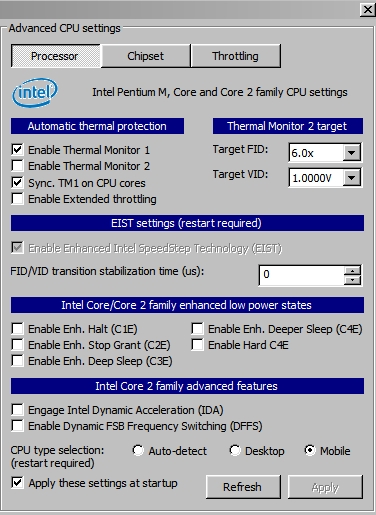
1. IDA needs to be disabled in both Profiles and Adv. CPU.
2. Use the highest FID that works at 0.95 volts for idle. -
I just find out that if RightMark CPU Clock utility want to be used in Windows 7 than this need to be done:
in RMC in Management enable Enable OS power management integration (restart required)
in RMC in Profiles in OS settings choose for example Balanced
in W7 in Power plan Balanced in Minimum processor state set 100%
OR easiest way:
in RMC in Management disable Enable OS power management integration (restart required)
in W7/Vista in Power plan in Minimum processor state set 100% !!!
and now RMC is taking control of processor and Windows 7 of the rest
This is the same way how CPUgenie works
Thanks to scott.ager and others -
A quick question about k10stat: I have succesfully undervolted my laptop, and everthing was done while I am on the balanced (hp recommended) power plan.
p0 - 1.063
p1 - 0.8875
p2 - 0.75
Now everytime I switch plans (power saver, specifically), when my notebook is idling, it runs at 1.063v, at 1.15ghz (half of my processor speed). It is supposed to run just at 0.8875 at 1.15ghz. When I run the HP recommended plan, everything gets fixed again, so I am stuck with that power plan. The thing is, I have some settings on the power saver mode that I use when I go to class to save battery (like brightness set down to lowest) and it can get inconvenient to set the brightness everytime to the lowest when I go to class if I will be stuck with the HP recommended plan. Any thoughts on this? Is there anyway such that my undervolting settings would be applied to all power plans?
I hope I was able to explain my issue right.
This forum has been very helpful and I feel that I helped my laptop live longer, thanks to this introduction to undervolting. ^^ -
How to to unlock 10.5 multiplier in RMclock?
I heard it is possible with manual edit of registry.
My friends notebook has T4300 2.1GHz but RMC only see 10x multiplier .
Thanks for help -
This is another way to fool RMC into giving the top half multipler. If you're only going to run at full speed you can select only the IDA index in Profiles and then uncheck the IDA box in Adv. CPU.
RMC can do half multipliers. It just doesn't have an easy way to select for it. -
I'm having trouble following that guide. Every time I change something in the PStatesData, I get a BSOD. I think I'm changing the wrong numbers and screwing up my system
0000 09 11 01 31 06 11 01 20 ...1...
0008 07 12 01 20 08 14 01 20 ... ...
0010 09 15 01 20 0A 15 00 22 ... ..."
0018
I have a P8700 on Windows 7 x64. -
It is realy hard to do it, until u will find out the proper way !
Firt time I added one row and it added 36x multipier
then I did delete it and it change the way that it had delete the 10x and added 11x (now I have 6,7,8,9,and 11x) , thats what i need, so I was lucky
Do not forget to check if it is really working (CPU-Z)
anyway this is most important:
As example : 06 1B 00 31
1 pair - number of multplier ( 06).
2 & 3 pair are voltage - you can change them inside RMlock ( 1B 00).
4 pair is a TYPE of multiplier (31).
where TYPE of multiplier:
20 = Normal\Standard\Rounding Left
31 = SLMF
22 = IDA
and some another usefull tips:
fix the maximum Thermal Design Power (TDP) value for processor (for me it is 105°C)
Windows Registry Editor Version 5.00
[HKEY_CURRENT_USER\Software\RightMark\RMClock]
"CpuTempOffset"=hex:05
Unlock hidden VIDs:
Windows Registry Editor Version 5.00
[HKEY_CURRENT_USER\Software\RightMark\RMClock]
"UnlockVid"=dword:00000001
Unlock hidden FIDs (dont have to work for u):
Windows Registry Editor Version 5.00
[HKEY_CURRENT_USER\Software\RightMark\RMClock]
"UnlockFid"=dword:00000001
and some usefull information about CPU C-States Power Saving Modes:
http://www.hardwaresecrets.com/article/611/1 -
You need to change 09 for 0A and 0A for 0B, so it should look like this:
0000 09 11 01 31 06 11 01 20 ...1...
0008 07 12 01 20 08 14 01 20 ... ...
0010 0A 15 01 20 0B 15 00 22 ... ..."
0018
In the RMClock it will show you 10x and 11x for the IDA, but if you check it in CPU-Z it is really 9,5 -
It is from left to right in to two columns
SLFM -> 1.
2. -> 3.
4. -> 5.
![[IMG]](images/storyImages/17698425.th.png)
-
Thanks for the help. But it only sort of works...
Changing those values turned the multipliers in RMclock into 10x and 11x, as it should be. However, when I do this, I can't open up any programs. Firefox as well as every other program gets the "not responding" error message. Could this be affected by some other RMclock setting or is it something else? -
My P8700 is apparently locked so I can't go below 1.000V and I'm wondering if that should be the case.
I installed RMClock, even though the settings say 0.925 or 0.950 for maybe 6X or 7X, the voltage will stick at 1.000v. However, anything beyond 1.000V does get undervolted. CPUGenie does get the same results. Anyone know why?
Thanks! -
Wow, I jumped in on this thread 2 years ago and it's still goin strong, since I don't have time to catch 400 pages up excuse my ignorance if this has already been anwered, is there any way to undervolt arrandale? thanks dudes!
edit: rmClock won't work but it looks like cpugenie might, anyone tested this? -
Manufacturers lock the minimum voltage so people won't mistake a UV BSOD and return their laptop as defective under warranty.
-
I've got P8700 as well but my minimal voltage is 0,875V, that is a big difference.
I have some concerns about RMclock. For example I allow only one multiplier but the processor still switches frequency, multipliers and voltage. That is not correct, is it?
The monitoring function can not be trusted in my system, the cpu load is completely off, I once had even 101% load.
I use CPU-Z as well, but that shows me weird multiplier numbers like 3x. I dont know which utility I should trust anymore...
-
#4659 (two pages ago!!!):
in RMClock in Management disable Enable OS power management integration (restart required)
in W7/Vista in Power plans in Minimum processor state set 100% !!!!!!!!!!!!!!!!!!!!!!!!!!!!!!!!
It is the SLFM which is half-because is showed for one core!
Both utilities are OK ;some havent been updated for some time so arent fully compatible with newer OS - u just need to understand to them
my RMC settings:
![[IMG]](images/storyImages/Nastavenie.jpg)
-
cpuz can't report SLFM fsb, which is half of the normal fsb,
so it's reporting 3x 266MHz,
it lowers the multiplier to get the exact speed of SLFM, when it should be: 6x 133MHz (cut the fsb speed to half) -
Thanks guys for the help! I set it as Blazom posted and now it works as I wanted.
It makes sense about the CPU-Z, strange thing is that I unchecked the superLFM, so it should not set it at all but I can live with that. -
I just setup RMclock on my DV2 with the Athlon Neo processor. Huge temperature difference. I got a 7 degree drop on the processor (or at least what I think is the processor. The video card dropped by a degree, but I think it's a shared heatsink for both.
Before:
![[IMG]](images/storyImages/th_before.jpg)
After:
![[IMG]](images/storyImages/th_after.png)
The voltage before undervolting was 1.050v.
I don't know the exact temperature drop becuase HWmonitor doesn't seem to see a sensor on-die. I can tell there is a drop though, even without looking at HWmonitor. -
I have tried the following with 64x win 7. However, i cant get it to stick. Every time i do a restart and open up RMC, it always shows no management. What else needs to be done so that it starts up automatically when windows starts? Also on a different note, i was able to undervolt to 0.875 on all multipliers with no BSOD after a 45 min load test. Core temps are down about 7 degrees from before. Idle temp dropped about the same. Its a XPS 1340 with a P8700 chip. Is this normal to undervolt that low and still be stable?
-
follow the red squares (do not have to all of them !!! Use your head ):
I have T9500 which has Thermal Design Power 35 Watts and it is on 0.9500 V
and yours is P8700 which has Thermal Design Power 25 Watts so why it cant be on 0.875 V ??? -
Hi,
I tried sifting through the pages for a clear-cut answer, anyway hope someone can help with this.
I'm running W7.
W7 Power Management set to Balanced
- Min. Processor: 10%
- Max. Processor: 100%
- Unchecked "Enable OS power management integration"
EDIT:
Should I proceed as follows?
FID 8 stable at 0.8500V
FID 7 stable at 0.8250V
FID 6 stable at 0.8000V
FID 5 unstable at 0.7750V, so since I have to leave it at 0.8000V, I unchecked this one. (Please verify if this is okay!)
FID 4 currently testing at 0.7750V, seems stable.
Rinse and repeat for FID 1-4?
Yeah?Attached Files:
-
-
Remember that RMC or another tool like CPUgenie will not work if your Minimum Processor state will be on : 10% - it have to be on 100%
Minimum Processor state on 100% means here that the Performance on demand will be all the time , not that processor is running for 100% all the time !
If u have it on 10% and than running orthos - your processot is running on 100% and therefore RMC showing that it is working (performance on demand)
but if u turn off Orthos and u will be observing CPU in RMC Monitoring u will see that voltages are going their own way (by the BIOS settings)
And u dont have to have all multiplier checked.
Install CPUgenie trial and take a look in the ACPI P-state Viewer and u will see that even your vendor (DELL) dont use them all ( ACPI P-state are multipliers set in BIOS).
Than u can use the same like in your BIOS , just undervolted or:
Some users have 2 multipliers : lowest and highest
Some users have 3 multipliers : lowest , middle and highest
Some users have 3 and more multipliers (likewise in BIOS)
And if your FID 5 is unstable at 0.7750V, than test it on 0.8000V, and if it is stable on 0.8000V than u done.
And remember that lowest multiplier = less voltage
so if your FID 5 is stable on 0.8000V than u now that 1-4 FIDs have to be 0.8000V or lower (they need less power) !!!
So if 4 FID stable at 0.7750V than 1-3 FIDs are as well and don t need to be tested for 0.7750V (wastage of time) -
Regarding frequency, is there any physical harm to locking at max freq at all times (like what does it actually do to the CPU)? What are the reasons for variable frequency, is it just mainly to allow safer voltage range for operation? If my t5470 can handle 0.9v at max multi alright, it should be fine letting it run at max freq at all times, is that correct?
-
I run my laptops at max FID with no problems.
-
Just a few yeras ago, all cpu's ran at top speed because they only had one speed. With the rapid increase in transistor numbers and heat per chip together with lighter. less bulky cooling stystems, something had to give. In stepped speedswitching to slow everything down to avoid heat stress.
Luckily, undervolting reduces heat so well, that downshifting or speedstepping has lost it's job in many applications, like laptops. -
Hey guys, I have another question for you.
Yesterday I tried CPUGenie to undervolt my cpu. I was able to undervolt it to 0,975V at multiplier 9,5x (perfectly stable), while in RMClock my lowest stable voltage is 1,0125. When I set 0,975V in RMClock, computer reboots instantly. How is this possible? Shouldn't it be always the same voltage regardless the tool I use?
I use CPU-Z and Coretemp to measure the voltage, so I think that both tools are working fine, also the temperature drop was noticable... -
Here are the RMClock settings I'm using for the dm3z L625 1.6ghz, w/ 4330. Stable so far. All the VID's are upscaled 1 step (0.0250V) because I'm paranoid. It's been stable so far, but with 45 minutes ORTHOS stress testing.
W7 Balanced
Min processor: 100% on processor, 100% on battery
Max processor: 100% on processor, 100% on battery
Unchecked Enable OS integration
Here's the thing:
More often than not my throttle only hits 4x and 8x. Sometimes it hits 6x. Is there any benefit to only keeping FIDs 0, 4, and 8?
Does anyone know the BIOS P-states for the L625?
Big thanks to Blazom for his post the page before. -
This should work with the Asus UL30VT as well right? Not sure how its gonna work with the 30% overclocking you get from some power modes though?
-
I used this on an MSI-1651 Laptop with a p9400 running the built in 20% overclock to run at 3.03ghz and I dropped the voltage from 1.3v to 1.15v with zero errors. Reduced temps from a staggering 82 to a chilly 65. Thank a lot for this guide, it helped cool my laptop immensely and prolonged its life!
-
i followed this guide, i understood the instructions well, followed it step by step, undervolted my idle from 8x to 6x, undervolted my 13x to to notches below, my 12x to 1 notch below and was amazed that my battery life had increased from 4 hours to 4 hours and 30 mins! amazing!
will try to undervolt the other multipliers after a week of observing and testing what i had undervolted...thank you for this very wonderful guide!
question:
can use the power saving mode with only the superLFM ticked when im on the go just for typing or web browsing? will it be okay? -
Thanks for the guide! Funny how I've always increased voltages to get higher clockspeeds on a desktop but now am undervolting to stay cool and get longer battery life on a laptop!
Here's something I noticed while getting my max temps. I figured I would monitor temps using the worst case scenario:
-Closed lid, display on external monitor only. Max T = 57*C
On a whim I wanted to see how much lower my temps would be with the laptop lid open. I was surprised to see a higher temp?!
-Open lid, display both on laptop and external monitor: Max T = 58*C
Well, I continued to follow the guide and dropped the VID on my highest multi of 8x to 1.0375 (original was 1.1375). Here are the results:
-Closed laptop, display on external monitor only. Max T = 53*C
-Open lid, display both on laptop and external monitor: Max T = 54*C
-Open lid, display on external monitor only. Max T = 52*C
I'm going to drop the VID lower to find min VID, but I'm curious as to why temps are lower withthe lid closed? I always assumed that an open lid allows more air to circulate and to let heat escape more easily rather than to be constrained by the lid. -
Yes, the open lid allows hot air to escape, but on the test with the lid open and both the LCD and external monitor are being driven by the video card, hence the higher temps. Note the coolest is with lid open and only the external monitor being driven.
Congratulations on your successes so far. -
Right, that makes perfect sense! The vid card is working harder to drive both displays
Back to my undervolting. My cpu only has 3 multis: 6x, 7x, and 8x, and a min VID of 1.000 for each. I was able to run orthos for 45min at the min VID of 1.000 with no problems so far! With the lid closed and external monitor the MaxT=48*C!
Before I undervolted the laptop, I remember my temps under full load would sit at around 61-62*C! That's a pretty significant drop, I'm happy
BTW, Rmclock seems to be reporting the wrong core temp, is there a way to change the TJmax?
Also, while looking for a file to change TJmax I clicked and enable Rmclock_Tweaks in the program folder, what does this do? Is there a way to undo it?
Edit: Ok, I opened Rmclocks_Tweaks in notepad and I think this is what I'm supposed to change in order to display the correct coreTemp:
I believe Rmclock is reporting values 5*C lower than it should. Can someone help me fix this?Code:// CPU cores temperature readout user-defined offsets. // // NOTE: this is a REG_BINARY value containing per-CPU core temperature offsets. // There may be as many BYTE offset values as the number of system CPUs present // (but no more than 32), separated with a comma // (e.g., "CpuTempOffset"=hex:02,ff,01,00 for a quad-core CPU) // // If there are less offset values specified than the number of system CPUs, the last // offset value will be used for all subsequent system CPUs. Therefore, a single value // provided by default will specify the same temperature readout offsets for all CPUs. // // Default: 0 degrees; Minimal: -128 (80h) degrees; Maximal: +127 (7Fh) degrees // "CpuTempOffset"=hex:00
-
Hi, I had the same 5°C difference. You just need to change the "CpuTempOffset"=hex:00 to "CpuTempOffset"=hex: 05 , it will apply for both cores. Than add the RMClock_Tweaks.reg to registry.
-
Thanks Blemcak! I am hex illiterate so this totally helps.
Edit: Worked perfectly! Although I did have to workaround the fact that WIndows wouldn't let me save the edited reg file in the rmclock folder, even though I admin. -
ok im rly a noob so am i suppose to keep the settings set to "performance on demand" in rmclock with all of the boxes checked after im done? i have a p8700 with the max mutliplier set to 1.0V
-
guys
Filpfire said in the OP that only cpu-z 1.4 shows correct voltages
Does anyone know if version 1.53 (latest) also shows them correctly?
Thanks -
I've nevver seen the RMC Monitoring page (graphs) give an incorrect voltage.
-
I meant if the program called CPU-Z gives correct voltages in the newest version
Not rightmark itself -
Strange results:
Background:
I undervolted the T7300 in my Toshiba Tecra A9 to 1.05V (while it was overclocked to 2.3ghz).
Today:
I put that same T7300 in my MSI GT627, same overclock to 2.3ghz.
Now it undervolts to 0.9250V.
That is a huge difference.
The tecra A9 had a GM965 express chipset (max 800mhz FSB). The G627 has a PM45 express chipset (max FSB 1066mhz).
My guess is that it has something to do with the chipset. The PM45 express chipset allows for a better undervolt (also overclock since you need less voltage to be stable)? -
wow thats nice..
I always had rule of thumb 2GHz -> around 1.000V ..
so surprised to see 2.3GHz @0.9250V -
I was surprised also, but intelburntest and ORTHOS both say it's stable.
I run it at 0.9375 to be safe. -
Again, does the newest version of CPU-Z give correct voltages, as flipfire says only v 1.4 used to give correct voltages?
-
The newest version does give correct voltages. The guide hasn't been updated in a while.
The "Undervolting" Guide
Discussion in 'Hardware Components and Aftermarket Upgrades' started by flipfire, Apr 1, 2008.


![[IMG]](http://img18.imageshack.us/i/17698425.png/)


![[IMG]](http://s113.photobucket.com/albums/n227/brian10161/screenshots/before.jpg)
![[IMG]](http://s113.photobucket.com/albums/n227/brian10161/screenshots/after.png)


