Problems? See this thread at archive.org.
It illustrates compounded reads/writes and queue depth. Start multi-tasking and your drive begins to get hit with a lot of overhead, which slows down the little things that were fast before. Yes, they're still fast, but they're slower, whereas on the SSD it maintains instant access.
-
-
you never do two things at once? Install a game and download something while you wait? or copy some files to/from your ipod and play a game at the same time? "video edit" and do something else?
-
i do. sometimes..

no, but more than one: very often. -
I have four hands and three mice, each with their own mouse pointer, so I open multiple programs at the same time all the time. Oh, that includes three brains so I can do many things at once (as long as my brains aren't arguing with each other). But even with three hands and three mouse pointers, I don't open 17 programs at once.
I just got my Intel drive yesterday and updated the firmware. I bought it from Newegg for $315 shipped. It was made/packed in Dec 2008 so I was a little surprised it was so "old". Firmware upgrade went much smoother than the same for my Samsung drives. I just hope this thing is worth the premium. It is definitely a nice drive from what I've seen so far. Hopefully 80 GB will be enough to have Vista x64 and Win7 x64 comfortably on my notebook (with all the apps I need). -
That depends on whether you have to pay tax for newegg purchases, doesn't it?
OCZ Vertex 120 GB:
Price on eBay: $399 + $6.50 shipping (from NY). cashback: $32. Rebate: $40. Net cost: $333.50
From newegg: $377.45 + tax = $412.36. After rebate: $372.36. -
If you are shipping to the US, the price is a little less. I see the Kingston 160GB bundle selling for $579 shipped on eBay, and you get a 8% cashback from Microsoft. Net is $533. The bundle contains some useful accessories like a USB enclosure, etc.
-
Running Win7 on my Dell XPS1530 with Intel 80GB SSD -
Processor: 6.1
RAM: 6.1
Graphics: 5.7
Gaming graphics: 5.1
Primary hard disk: 7.6
Last edited by a moderator: May 8, 2015 -
New Intel 80GB is selling on ebay for $300 with free shipping. With 8% cash back, that is a sweet deal. My VISA is heating up!
-
Nice to see SuperTalent keeping up with their firmware. I decided to flash mine as it's just too hard to resist getting a performance update. There is also a wiper utility called UltraDrive_PRT like the OCZ Trim/Wiper utility. I tried it too, but the before/after results were about same. Here's a direct link to the press release on their site:
http://www.supertalent.com/press_vi...9237b6ec&lid=c4ca4238a0b923820dcc509a6f75849b
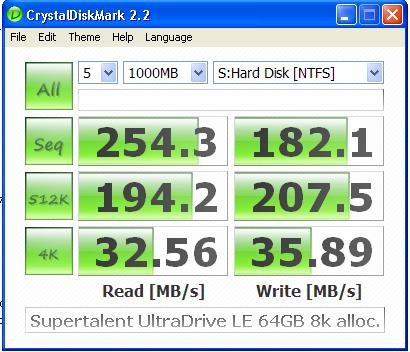
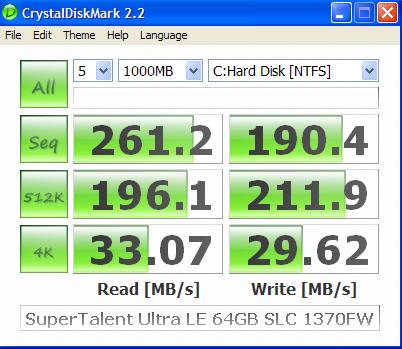
New firmware has improved speeds a bit. Here's the before and after scores on CDM:Attached Files:
-
-
I do but not 18 programs at once, and when I am doing 2 things at once the 2nd thing is using my 2nd disk.
-
just look at it that way: with the ssd, finally, you won't have to care as you will be the bottleneck always
i don't open 18 programs at once myself, but i don't want to care if i process some data in the background, i still want a snappy system (that's what the 4 cores on my pc f.e. are all about, not?). thanks to the ssd, the bottleneck of simulateus work shifts back to me. finally, the computer is not the slower piece anymore. and that without thinking of working on different hdd's and such.
sort of like "the sky is the limit, but you can't jump more than half a meter or so anyways.."
-
Here are mine videos (with 4x64GB SLC Sammys on EP45/ICH10R raid0) :
http://www.youtube.com/watch?v=67_qhZr9Itw
Programs that run :
1. ConvertX to DVD 3.5.1
2. Cryptload
3. MS Excel 2007
4. Internet Explorer 8.0
5. Firefox 3.0.8
6. Freecell (windows game)
7. GIMP
8. HD Tune Pro 3.5
9. Hearts (windows game)
10. Intel Matrix Storage Manager 8.7
11. Windows Media Player 11
12. Nero 8.3.13 lite
13. MS Paint
14. MS Powerpoint 2007
15. Adobe Reader 9
16. Resource Monitor
17. Safari 4.0
18. Solitaire
19. Spider Solitaire
20. System Information
21. WinRAR 3.71
22. MS Word 2007
23. MS Wordpad
24. Subtitle Workshop 2.51
25. Paint .Net 3.36
26. Flashget 1.9.6.1073
27. Notepad++ 5.3
28. Windows DVD Maker
and : http://www.youtube.com/watch?v=I5sZcOIKctE
Vistax64 Ultimate boot in 10s under VMWare with 4x64GB Samsung SSD SLC in raid0
System: Q9400 @ 3600, 8GB Ram (4x2GB, 450Mhz, 1:1, 5-5-5-15), 8800GTS512, Windows Seven build 7000
Edit: System specs updated with controller and raid setup -
you !!
lovely movie
-
chsin7,
Nice videos... what RAID card (if any) do you have running those 4 SSDs? -
I am using onboard ICH10R of my Gigabyte P45 motherboard. The 4 Samsungs SLCs are set at Raid0.
-
is there any TRIM software can be used for Samsung and intel SSD?
-
Patriot came out with their own SSD with indilinx controller.
http://www.patriotmem.com/products/detailp.jsp?prodline=8&catid=21&prodgroupid=114&id=805&type=17 -
good, more products = more choices & more competition and that could mean lower prices.
-
-
The best way to delete SSD is do a full format, not a quick format.
That is also known as "zero fill" which writes zeros in all the sector. The way SSD is made, only 1 full format is enough to erase everything.
Don't bother with the crazy DoD 5220 22-M or Gutmann methods which writes "zeros" many many many many times to ensure all the data is 100% erase. It is made for normal hard drive mostly use my government and big corporation to erase sensitive data. Those methods will use up many write cycles. You wouldn't want to do that... well... at least the buyer wouldn't you to do that. -
My understanding is that a full format doesn't equal "zero fill". I also read somewhere that with SSD's containing NAND chips, one shouldn't do a "zero fill," but a "one fill" (though such a function doesn't exist in Linux IIRC).
No, to delete everything on an SSD before selling it, one should perform a secure erase on the drive. You'll have to Google it. While I have a link ( http://cmrr.ucsd.edu/people/Hughes/SecureErase.shtml) it points to version 4.0, and apparantly this is not the version to use with SSD's. You'll need an older version (3.3?).
01 -
Is it possible to force flash the 8820 firmware into the Intel X25-M again?
I tried flashing my 8610-based drive for the first time through an eSATA dock, and the utility returned me some error which said bad instruction or something, I couldn't remember exactly.
When I installed the X25-M into my laptop and tried to flash it again, the utility said that the firmware has already been updated to 8820 and it wouldn't allow me to re-flash it. Thought of re-flashing it just to be sure since the first time didn't go quite right...

-
Why would you take that kind of chance on such an expensive drive? A bad flash can potentially brick an SSD, right?
;_;
Coincidentally, I just got my X-25M 160gb yesterday, and I followed their instructions to a T when flashing it. I was nervous as heck. -
It's OK to use "Scan for and attempt recovery of bad sectors" on an SSD, right? I think so but want to make sure. Also, does it have any benefit?
-
Gskill Falcon for 299. This is the OCZ vertex basically.
http://www.techbargains.com/news_displayItem.cfm/164293 -
Nice, making it more and more tempting to buy one, but I will keep waiting!
-
I was just wondering Cape Consultant, are you sure that E4300 in your signature is a 14.1" screen?
-
Finally got around to reading the falcon review. Id say for the money its a good product, I wish they had included a few more tests. It appears it has great raw continual read/write but has bad random write, a place where intel & the vertex sacrificed some of the pure write speed in favor of speeding those things up.
So I hope they make it more "vertex like" with a firmware update as I think it will do it more good than harm. This is a good sign on how pricing & competition may bring SSD into budget minded consumers hands sooner than we anticipated though, I am almost willing to shell out $300 for a SSD but just not quite. I am really looking forward to $200 or maybe $300 for a larger capacity.
Im still going to get the 300gb Velociraptor for my desktop for sure I need the capacity and the speed boost will work where I need it, the SSD is for the laptop. -
Darn BOBCATMVP1, you are RIGHT! It is a 13.3. I had a Lenovo that was 14.1 before that! I use a monitor plugged into it all the time so I never gave it much thought. Sig being corrected now, thanks! Dave
-
still waiting for the summit or the sandisk g3s to be released. i wonder what kind of performance to cost would these 2 be.
-
is there any software works like a TRIM? coz I want to rewipe my samsung SSD.
-
They use the same firmware. This is a bench from a newegg user.
Random
Uncached Write 121.26 12.84 MB/sec [4K blocks]
Uncached Read 1829.36 12.96 MB/sec [4K blocks]
Thats basically like the OCZ vertex and about 12 times as fast as the raptor.
In 6 months, when the 32nm chips roll out, I'm sure you'll be able to get 200-256gb drives for 300 easy. -
I'm sure it takes a lot longer than 6 months!
In 6 months you may see the 128GB at the $200-$220 level. The 256GB drives will be at the $400 level. -
Samsung has got 3bit per cell 32nm chips in the work. 3 bits per cell means 50% more space. Thats why I'm so optimistic
-
TRIM function has to be supported by SSD firmware. AFAIK only OCZ ssd’s has this function implemented in their firmware. (not sure about samsung)
And TRIM function is default enabled in Win7 RC, so you don’t need extra software if you are using win7 -
So I can use TRIM with my W7 RC1 x64 and X25-M right now? How?
-
first: you never care about TRIM manually normally. you shouldn't have to.
second: no, only ocz has it implemented so your x25-m doesn't have it, yet. -
You don't need to "use" TRIM. W7 automatically sends TRIM command to the disk when you delete the file.
But intel X25-M doesn’t support TRIM command, yet.
from http://communities.intel.com/thread/3827?tstart=0 -
Also correct me if I am wrong but the intel is the only SSD that is so efficient in maintaining its full speed that it basically doesnt even need trim.
-
Originally, the main (only?) gripe about the Intel was that it was inefficient in maintaining it's full speed in certain circumstances. A recent firmware update appeared to have fixed that.
I'm not sure how much that issue had to do with trim but I would think Intel SSD wouldn't be any different with regards to needing trim. Of course, slower SSDs have less room for error. -
I've been out of loop for a while. So what is the advantage of these MLC drives over SLC drives? I thought SLC drives are always faster, but these MLC drives seem to have very high read/write too. So what gives? How is the random read/write?
-
Whether or not it needs it is a matter of opinion. It is unquestionable that it is beneficial. This is no different with Indilinx based drives.
-
SLC drives are faster and more reliable (longer lifespan). However MLC are cheaper and bigger (relatively speaking).
-
Yeah and given that I say MLC is the way to go as they are supposed to last about 5 years as is, and by that time you will probably upgrade to a new better one, so better not to shoot yourself in the foot and overspend for a SLC now IMO.
-
By faster you mean just the sequential, or does that include random too?
-
SLC is theoretically faster, yes, but an MLC with a good controller is faster than an SLC with a worse controller. And this is across the board - random, sequential, etc.
-
So is the OCZ Vertex the fastest MLC type around?
-
Intel X-25M is the fastest MLC, followed by the Vertex. G.Skill's Falcon and SuperTalent's UltraDrive ME (Or LE? I can't remember which) follow very closely behind as they use the same controller as the Vertex.
-
I thought the X-25E was the best
Though honestly you cant say one is faster than the other, as if you took say the Falcon and the Intel and put them head to head, they both are faster than the other in different things. So it depends what you want to do with the SSD really. -
X-25E is SLC, he's looking for fastest MLC.
Every Indilinx drive is faster than the X-25M at sequential writes and even 512K random writes, but the X-25M is head and shoulders faster at small writes which is what gives it the perceptual performance boost over the other Indilinx drives.
The new SSD Thread (Benchmarks, Brands, News and Advice)
Discussion in 'Hardware Components and Aftermarket Upgrades' started by Les, Jan 14, 2008.