Problems? See this thread at archive.org.
Thats cool. Strange, but cool. I was hoping to see better results on the writes. But it's still very good for how cheap it is (half price) of other SSD drives
-
-
To me, the graphs are very confusing. Why the WAY up and then WAY down on the graphs? I do not expect a straight line like the reads, but that seems to fluctuate WAY too much to assure anything like smooth and fast writes.
Is anyone else confused? Dave -
The up and downs come from any type of interference when testing drives. Things such as disk caching, behind the scenes disk activity, fan, programs and so on will cause this.
The best way to test is to try and get as pure of a reading as possible with nothing running whatsoever in the background.
I used to ensure my system had just started and wasn't hot as of yet so the fan wouldn't kick in during the testing. -
Would be a good idea to not have it as the system disk then.
-
NO its fine and should be the system disk. I wouldnt have it any other way. If you dont have it as the system disk, you are losing all the benefit of the ssd which is encompassed in its incredible access times (quick startup, application starting, shut down and so on).
I have only had my ssds as system disks. -
Thanks for the explanation Les! I am so close to getting one of these! I can easily put my entire MAIN computer on a 64GB by offloading stuff thta should be archived anyways. And I would have 5 or 10 GB's free. I generate lots of little stuff, not much big stuff. I am very happy with the way the prices have fallen. And the big Gorilla has not even gotten in the game yet! (Intel)
Dave -
That's what I would think too. But this other guy posted very similar HD Tune write results with all the spikes. I think it has to do with the OCZ.
![[IMG]](images/storyImages/oczwrite.gif)
-
hm.. 128GB /1.024^3 == 119.20928955078125 Real Gigabytes.
That's why the SuperTalents are 30, 60, 120 gb.. because they don't want to fool people like all harddisk and ssd vendors else do. -
Given that the memory is manufactured strictly in powers of two, you need to look for a different explanation.
We don't know the partitioning scheme in use, and there could easily be a ~10GB recovery partition which would account for the "missing" bytes.
Cheers, -
this is the official statement from supertalent. but i'd guess les could tell better, wether ssd's have in them what they have written on their package, as he has tested a lot of them.
and just because they are power-of-two-chips doesn't mean all of it gets reserved for storage. there could be a bit of backup for the wear-leveling, so it can even wear-level while the disk is full, or what ever
-
That seems like a large reservation, ~7%.
More likely for bad block reallocation rather than for wear leveling. When the disc is full, there is nothing to wear level as there's no place to write. It's the write process that is destructive long term. Reads are basically "free". -
.. i correct my self ..
while it's close to full. at a close to full disk, wear leveling should have issues, as then a certain fragmentation of the cell-to-data mapping happens, which could create issues. at least my algorithms would have that problem but i don't know enough about inner workings of wear-leveling.
anyways, i'd guess they are spare-parts of some sort, or, they are for better yields.
there may be quite a lot of mlc chips that don't have full storage capacity. reducing the capacity allows to still sell them. and as the disks are quite cheap, it could be they accept a certain amount of non-working bits in the mlc chips? -
Your formula is correct, but OCZ is a differnt case. The ssd was unformatted, no any hidden partition.
As you can see, HDTune shows the disc (physical) capacity and the OS capacity:
![[IMG]](images/storyImages/hdtuneinfooczcoressd1ax8.png)
Here the HDTune info for Samsung with proper disc capacity:
![[IMG]](images/storyImages/hdtuneoczssdrsqh5.jpg)
-
So whats the verdict? What is the fastest of Samsung vs OCZ?
-
Visoneer, any chance you could run PC mark Vantage on your OCZ? It's free to run it once. It would give some nice comparision results with all the SSDs on Anadtech.
-
OCZ has two different models. The SATA II, both samsung and OCZ are the SAME EXACT DRIVE(SLC). Just different names etched on the sides.
The new OCZ CORE series (half the price of the older ones) is a different kind of ssd (MLC). So they have difference...but nothing Huge.
You see, your question is kind of vague, because OCZ has two different models of SSD's. One Is a CARBON COPY of the samsung. And the other is a cheaper model with different tech, so it has different pro's and con's. -
Sure, I will do it.
-
It's the other way around. The "older" Sammy/OCZ units are SLC (more expensive to produce @ 1bit/cell). The new OCZ Core series are MLC (less expensive to produce @ 2bits/cell).
As an FYI, the OCZ core series is about 1/4 the cost per unit storage, not half.
The 64GB OCZ/Samsung is ~$1000.
The 128GB OCZ Core is ~$500
1000/64 ~ $15.63 / GB
500/128 ~ $3.87/GB
Cheers, -
Yea, I was unsure at the moment, and edited last minute. Its all good now though. -
Holy ****. I just finished reading this article, where they tested different HDD with different SSDs. The new OCZ SATA-II CRUSHED them all. Both the SSDs and all the HDDs. In all categories! They didnt test Samsung SSD though.
http://www.tomshardware.com/reviews/ssd-hard-drive,1968.html
Will defnitily be buying a OCZ SSD. 128 GB...YAY
-
Very cool. I'm assuming your run Vista. If you run XP it would be PCMark05.
-
Love that article.....a few thoughts if I may...
First and foremost, whether it is an ssd or hard drive, the actual available space is always less than that stated. It is simply a calculation from the most basic level to understand it and has been done many times before).
There are no hidden partitions...except, I noticed on one drive the test highlighted the OS and available space. In this case, there are hidden files and partitions because your drive has been formatted and has its hidden files to include the pagefile which can be 4Gb in itself.
As for the OCZ 64Gb and Samsung SATA II, these are identical drives which were rebranded by both Samsung and OCZ after manufacture from the common source company. These are both slc drives and need to be understood as such or we will get confused in the end. These two drives should reach 90-100MB/s read and write. It will show in my Samsung review below.
The new core series is a mlc ssd and it is possible to pull higher benchmarks depending on the controller used by the company.. Remember, the original Samsung was doubled by the new Samsung SATA II yet the only change was in controller technology. The slc chips inside were exactly the same.
So...in my opinion, yes its possible to pull the socks up on mlc but its lasting benchmarks will be determined in time.
I would suggest that mlc is very much a new technology because, on introduction of the ssds to consumers, they were already commonplace in enterprise and industry and slc was the sole ssd in use.
MLC popularity is only growing now as industry is trying to reach the consumer and, conversely, understanding there will be a huge business interest as well.
Last but not least to Cloudfire...remember that, in Toms apology and benchmarks, they have been very particular with the tested ssds used.
You might want to take a look at the MtronPro or Memoright results at the beginning of this article, remembering of course that there is a massive price difference between. -
More testing on the new OCZ Core here.
http://blog.laptopmag.com/ocz-core-series-affordable-ssd-hands-on -
Very interesting. In these benchmarks it's not even that much faster than a Scoprio 5400rpm. I wonder how the Scorpio 7200rpm would do against the Core.
-
PCMark Vantage
![[IMG]](images/storyImages/pcvanhddscoredm1.jpg)
![[IMG]](images/storyImages/pcvanhddqf7.jpg)
-
Well done Visioneer. I'll give you some rep as soon as i am allowed to give again.
Here are some comparison materials:
![[IMG]](images/storyImages/resultschart.png)
Did it also give a HDD overall score? (maybe just fallen of the screenshot)
More Vantage scores for OCZ II and Samsung SSD:
http://www.anandtech.com/storage/showdoc.aspx?i=3311&p=6
Vantage scores for WD Black Scorpio 320GBGB 7200rpm:
http://www.extremetech.com/article2/0,2845,2321520,00.asp -
cool. Looks like the Core series nips the heels of the Original OCZ/Samsungs...for most of the tests anyhow. Very exciting
-
Yeah I agree with your conclusion. And when measured in MB/sec these differences seem quite relevant, but when measured in real seconds the difference are not that big. Like the Laptop mag test showed.
-
Does anyone have an idea of how the OCZ Core compares to OCZ's regular SSD (and to other SSDs/HDDs) in terms of power consumption? Thanks!
-
I've just installed Vista 64 Ultimate on the new OCZ Core 128GB. The HDTune numbers are:
Transfer: 41.5MB/sec min, 77.6MB/sec average, 85.2MB/sec max
Access: 0.5ms
Burst: 34.8 MB/sec
CPU usage: 7.7%
There may or may be some difference as I don't have the absolute latest drivers for everything. The machine is in AHCI mode.
It took a couple attempts to get Vista Ultimate 64 to install properly. I'm not sure why, they were clean installs. The machine got screwed up last night when Vista installed about 60 updates - I don't know which one was lethal.
But Vista tends to be like that.
Just to put another wrinkle in it, Vista has now just installed 61 updates and it survived, so I will probably never figure out what screwed up the previous updates. -
very cool. Keep em comming guys. :-D
-
I know this may have been mentioned in this thread before...but I am just seeing/hearing of this Samsung model w/ 250GB of space...so I thought i'd share for who haven't seen this as yet.
http://www.samsung.com/us/aboutsams...news_seq=8580&search_keyword=&from_dt=&to_dt=
Check out the read/write speeds...it's this kind of sh*t that makes wanna *** in my pants!
-
Hollly rusted metal batman! 200mb/s read? Dang....
On another note, here's another comparison of the core vs. velocirapter
http://www.hothardware.com/News/OCZ_Core_Series_SSD_Vs_VelociRaptor_Sneak_Peek/ -
Alot is being examined on straight benchmarks. I hope all are remembering the most visible element of the ssd is your access times. These tests above arent as much a result of read/write speeds as they are that of the phenomenal access time of the ssd.
We can carry on to consider the ssds complete silence, less heat, longer battery life, almost nil possibility of disk crashes and so on.. -
When the SSDs really do live longer they should live a lot longer than hard drives, but the technology is a bit young. The shortest lived drive I've ever had was an SSD.
The power consumption and heat also is at the moment possibly in favor of the hard drive, and I'm not sure how this scales going forward.
The thing that makes the SSD attractive to me is the killer access time and the very good transfer rates. -
The longer battery life is only valid for some of the SSDs, while many shorten battery life.
OCZ Core 64GB for $239 -
I have used and tested ssds extensively. My first review here pit a hard drive beside a ssd and the real diff was substantial... I am not going to dig that up because someone will always find reasons to not agree. I have used ssds solely since day one with this laptop last year. Mtron Mobi, Mtron Pro, Memoright, Memoright GT, Samsung SATA, Samsung SATA II, Sandisk, as well as a few I cannot discuss all went through their paces here. I have yet to encounter a single one that I can justify believing a shorter life span.
We simply have to look at power consumption at consistent and full power to understand, not to include the fact that this causes a hd to almost burn a hole in yr laptop and an extreme in fan use.
I get 5 plus hours out of my Dell 9 cell and this was never possible with a hd. I am able to watch a dvd movie and still have battery life left. Maybe this is also because I don't use disk caching and the ssd is not always being accessed for pagefile as is the hd when it is active...hmmm -
Don't know if this has already posted here, but here is a sneak peek, 64GB OCZ Core mobs the floor with Velociraptor: http://www.hothardware.com/News/OCZ_Core_Series_SSD_Vs_VelociRaptor_Sneak_Peek/
-
Well get one of the recent Super Talents and you probably won't be missing on the fun any more.
-
In my opinion the second article of Tom's Hardware about SSD power consumption gives pretty clear answers:
http://www.tomshardware.com/reviews/ssd-hard-drive,1968-12.html -
IS THIS SITE REAL?
http://www.eworldsale.com/ocz-oczssd2-1c32g-32gb-25-inch-sata2-solid-state-disk_5698_25847.html
They seem to be offering the Core series at MSRP...with the addition of a $40 rebate.
32G = $155.74 - $40MIR = $115.74
64G = $215.17 - $40MIR = $175.17
128G= $564.38 - $40MIR = $524.38 (way high for some reason) -
Seems to be real yeah, here are the reviews: http://reviews.pricegrabber.com/e-world-sale/u/1647344/
-
wow, there's alot of P.O.'d people on there. Also a few satisfied...though those responses seemed to be Droning...as if they were fake, lol.
-
Maybe I'm one of the lucky ones because I've had my Supertalent 120GB drive for a little over 2 months now and I've had no problems with it.
-
You can get an idea of what the overall response is by checking the reviews here.
I assume as Super Talent fixes whatever they screwed up the number of people reporting dead SSDs will go down. But at the moment it's about 30% complaints, which is just awful; even if it means that 70% of the drives were OK.
Newegg was RMA'ing the Super Talents even if they were a little past the 30 day limit but they have stopped. I expect that this is because there were too many of them for Newegg to take the hit.
It's really clear tha the Super Talent drives were lemons. This doesn't mean that that whole technology of SSDs is questionable. It just means that you have to get it right to get the advantages. Until Moore's law catches up a little bit it will still require a pretty good solid state drive to beat a decent hard drive. In the future? It seems like short of another storage revolution like perpendicular, hard drives will not keep up with SSDs. But right now? It's definitely not a slam dunk. -
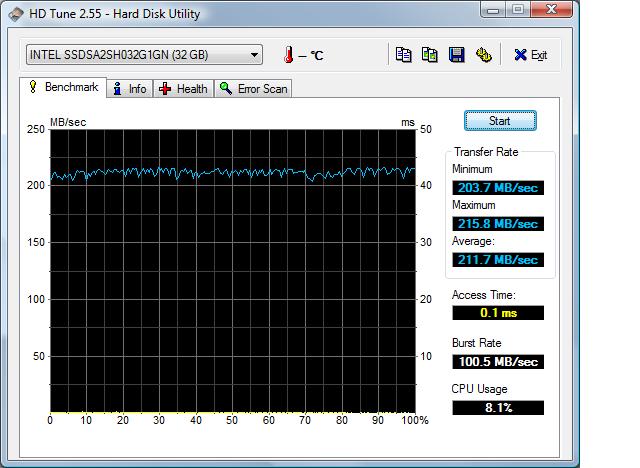
Here are my HD Tune results for the OCZ 128 GB SSD.
-
As a complement to the synthetic benchmarks I'd be much interested in a more subjective "real use" experience from a OCZ Core series user. Things like installing windows and applications, boot time, starting applications, searching disk for file (and contents in file), compiling/running in visual studio development, matlab etcetera. Whatever you got going on your computer.
The most interesting would of course be if anyone had the opportunity to compare things like this on the same computer with different HDDs.
It's really exciting times if the SSDs will finally become somewhat mainstream. Looking forward to the fastest and quietest laptop ever.
Thanks,
J -
These review answers many of your questions:
http://www.bluefi.co.uk/
http://blog.laptopmag.com/ocz-core-series-affordable-ssd-hands-on -
Here are mine. Any idea what I need to do to speed it up?
EDIT: I have checked that all my drivers are up to date and that the 82801 AHCI controller is there. Turbo Memory is installed and running OK which implies AHCI mode. I can't actually see that the OCZ is associated with the AHCI controller, but I would assume so. There is also an Ultra ATA controller which is for other drives, and I suppose if somehow the OCZ is using that controller it could slow things down. But it looks like I'm getting about a 25% slowdown compared to your results.Attached Files:
-
The new SSD Thread (Benchmarks, Brands, News and Advice)
Discussion in 'Hardware Components and Aftermarket Upgrades' started by Les, Jan 14, 2008.