Problems? See this thread at archive.org.
Tomy B., I would humbly suggest you are wrong in this case.
Intel announced their prices and have not announced any new pricing publicly.
The distributors and/or resellers can charge any price they want.
(Remember, Intel's prices are not suggested list prices - they are prices for 1,000 lot quantities).
Distributors would be the first to point their fingers to Intel, if they substantially raised the prices to _them_.
Since they (the distributors) are being so quiet (because obviously people are too impulsive and buy these particular drives at any price), Intel is (to me) not guilty of any 'dirty games'.
As to New Egg et al, all I can say is that as much as I am salivating to get two or more of these drives, so far I am able to keep a level head and can look ahead past today, this week or even this month - if need be.
I am not loathe to spend a Lot of money to get the latest technology (when I'm actually in a shopping mood), but I am loathe to spend money at the wrong time, simply because of an imaginary shortage coupled with greed.
Greed on the part of the resellers and the buyers (it takes two to tango).
Greed is not always bad though - it shows what people and/or companies are really made of.
Those who buy based on needs are not greedy, but those who buy for bragging rights are simply pushing the prices up unnecessarily for the rest of us - in the short term.
Fortunately, this situation is simply unsustainable (how many geeky, greedy, stinking rich SOB's can there be!) and the prices will fall to reasonable levels soon.
Patience, grasshopper!
-
-
Just don't get sick when you are in the US.
-
Where have you been eating? The food for the most part is great! Don't know about the other things you mentioned though
-
As I said before, probably I'm wrong, but still my opinion is that Intel could do something about this if they care.
But do they care? Hm...
as tilleroftheearth said: it's to much rick out there
NHF for anyone, just a little jealous
Actually it's good idea, very good!
Then I'll be one rich !!!
First I need to earn 225 000 $ but it's hard with 800 $ monthly earnings. -
I know the situation isn't ideal, but please refrain from bypassing the language filter anymore.
I don't want to have this great thread derailed by this sort of thing. -
Greed is the fundamental principle of capitalism. While it has some downsides, like supply shortages driving up demand, and thus prices, that's only a downside for the buyer. It's great for the seller.
Capitalism is why when indilinx-based SSDs jumped in the market, it forced Intel to lower their prices. Competition is also a fundamental principle of capitalism.
Don't be mad at resellers for reading the market, be glad that you're not in a monopoly situation like a year ago where Intel had the only half-decent MLC SSD. -
My bad! Will not happen again!
Anyone saw this!
@ Kamin Majere: I know situation isn't ideal, but in Croatia (where I came from) 10 000 $ yearly isn't that bad.
@ Koshinn: I'm not mad at resellers, they are only doing their job, but still my opinion is that Intel could do something about it.
BTW: only reseller where I can by IT related stuff for decent price is eBay because I live in Croatia where price for Vertex 250 GB is around 1250 $, and for Intel they don't list price
@ everyone: I was just a little carried away, didn't what to be impolite. -
Not everyone in the USA likes it.
http://www.capitalismalovestory.com/ -
Yeah, I like in the US and I can tell you that capitalism is not all good. When companies get too big and powerful, like private health insurance companies and big banks that are "too big to fail", it's not good for the little guys.
-
Amazon.com has the Intel 80GB G2 for $269, and you can order it... but not in stock.
-
The real problem is that there is no perfect solution for society. Greed is in inherent in humans, in one form or another.
The good news is that we can just wait an extra month or two for the price to come down. -
Hi guys, I'm a newbie with this SSD thing, trying to find a 1.8 inches to replace the HDD on my samsung x360 but unfortunate all recommended SSDs in this thread seems to be all 2.5 inches. Can someone kindly help me out with a good choice (60-80GB) or should I wait a little longer ? Thanks.
-
The intel is a really good 1.8in SSD. You can get it in either 80gb or 160gb and it will be a very solid performer
-
If you can wait, the G2 X18-M will be out (hopefully) shortly. The 80GB version should be around $225 USD. It is one of the (if not the) best 1.8" drive you can get.
-
yeah, and, as it will be a new gen, the old gen will get phased out, and this sure for rather cheap, too.. so best wait for gen2 on 1.8", and then check out both gen1 and gen2
-
Pretty excited... Got RAID0 agilities due here on the 10th, and just ordered and external hardrive enclosure and acronis 2009 so I will have no problem cloning the wife's system (which is still the factory install, hp bloat and all, that she insists is exactly how she wants it) onto her soon to be hand me down Sammy SLC which she'll probably claim isn't any faster than her 250gb 5400rpm spinner, just to spite me... Haha
-
Here are some results for Intel 160GB G2, with write cache enabled (first case) and write cache disabled (second case). It looks like it is better to turn write cache on.
![[IMG]](images/storyImages/CrystalDiskMark2.2.gif)
![[IMG]](images/storyImages/CrystalDiskMark2.2_no write cache.gif)
![[IMG]](images/storyImages/HDTune_no%20write%20cache.png)
-
Thank you for your advice, sound reasonable.
-
So, thanks to hooterbif, I tried this on my current system with my Scorpio Blue 500GB 5400RPM drive running Windows 7 Ultimate x64 with 4GB RAM:
Crystal Disk Mark 2.2 (64bit) 100MB size 5 Runs:
Write Cache Off:
.........Read........Write (MB/s)
Seq:.. 69.14....... 39.00
512:.. 31.23....... 24.66
4K:.... 0.464........ 0.410
Write Cache On,
Write Cache Buffer Flushing Disabled (Checked):
.........Read........Write (MB/s)
Seq:.. 72.05....... 73.32
512:.. 32.83....... 46.89
4K:..... 0.476....... 1.373
Write Cache On,
Write Cache Buffer Flushing Enabled (Unchecked):
.........Read........Write (MB/s)
Seq:.. 71.51....... 71.84
512:.. 31.68....... 46.44
4K:..... 0.483....... 1.526
To verify that these numbers mean anything in the real world, I put 13 programs in my startup folder and rebooted and timed each until there was (almost) no disk activity (except for random blips, of course).
Off; is the time it took for the computer to turn off.
Win7; is the time it took for the computer to show the Win7 start animation.
Desktop; is the time it took to show the desktop.
NoDiskAct; is the time it took for the computer to 'settle down' and be ready to do work.
(Seconds) NoCache WriteCache+NoFlush WriteCacheOnly
Off........... 37.....................32.....................13
Win7..........8......................15.....................18
DeskTop.....50.....................34.....................20
NoDiskAct...245...................179...................187
Totals........340 secs............260 secs............238 secs
The results are interesting:
We notice the Decrease of the random writes from 1.526 to 1.372 (the middle column) 260-238=22 seconds or 9% slower vs. the theoretical 11% Random Write advantage,
(Write cache on for both, but testing for the Write Cache Buffer Flushing enabled (right column)/disabled (middle column) state);
We do Not see the effects of the Sequential R/W's affect the outcome as much as the numbers would suggest 39 MB/s to 73 MB/s or about 87% slower;
We see that disabling the write cache flushing (checking the box) is detrimental to overall performance;
What is most interesting is that NoCache vs. CacheOnly, the random write speeds are almost 4 times slower (actually 3.72), yet, we 'only' achieve about 43% increase in overall performance (340 vs. 238 seconds).
What does all the above tell me?
Well, if SSD's behave anywhere close to the above, then Intel is correct to push for very high random write speeds - even to the detriment of sequential write speeds (although I want both, of course), but it also hints that the OCZ Vertex line will 'feel', very close to the Intel in real use (with the added benefit of the higher sequential writes).
But it will still be slower overall, unless all you do is copy (very) large files back and forth.
I think I am looking at these variables properly, if not, please point out where my thinking is going off track.
-
My 5400k HDD with cache ON :
![[IMG]](images/storyImages/sanstitre1cx.th.jpg)
Now you can laugh
My system is pulled down by this crap. -
Good post. Fast sequential read throughput and latency with phenomenal random write small file speeds is the recipe for speed on the X25.
-
@ hooterbiff
did you get that backwards? Enabling write cache should increase your write perfomance nnot make it SIGNIFICANTLY worse... If the first case is truly write cache off, I would deffinitely have it turned off... -
Kallogan, what hard drive is that?
I have experience with quite a few Acer notebooks and they mostly had Seagates in them (which I promptly replaced with my 7K200).
Just curious!
I can imagine the speed boost you and I will feel when we get the Intel G2's installed.
-
I have a Western digital apparently.
In fact, i just bought a 64GB crucial M225. Was so so cheap i couldn't resist. I'm sick of intel G2 adventures. Plus it's priced 239 euros in France (when it's in stock) while i got the M225 for 135 euros. -
My new SSD works pretty good!
Attached Files:
-
-
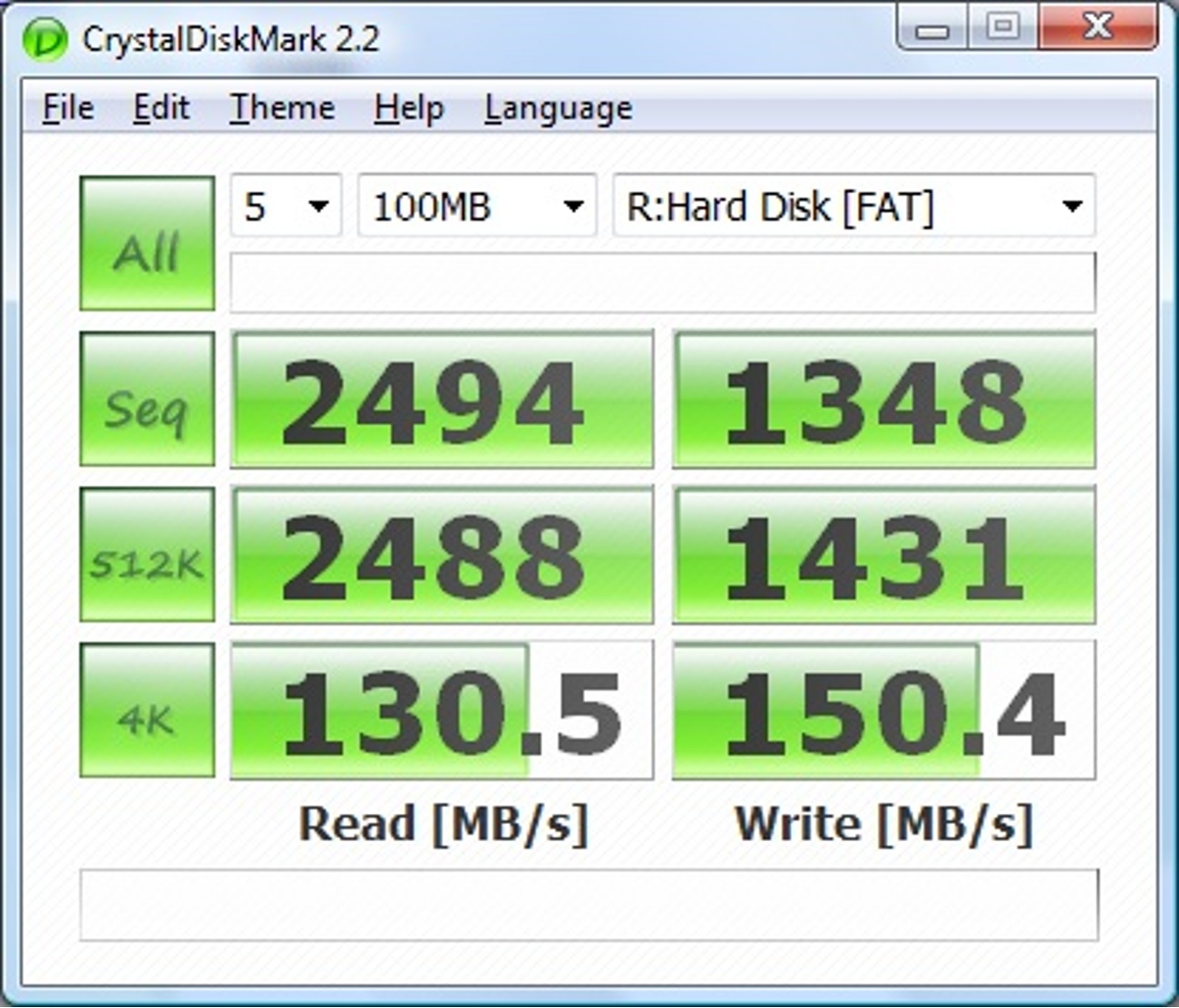
So you set up a ram disk?
-
Awww... You spoiled my fun!
I guess the drive letter and the fact that it was "FAT" might have been a giveaway...
Shows you how far SSD's still have to go, though! -
Sorry
But yeah RAM disks are very nice, but quite limited in their usability. It would be nice if we could use that interface and get speeds like that, but right now we're limited to SATA2 and the nice fact that the information stays on the SSD after the power goes off
But yeah those kind of speeds would be amazing
-
That's the amount I'm looking to spend. Where did you buy it?
-
Crystal Mark vs ATTO
I have wildly different write speeds from Crystal Mark and from ATTO. Below are the snapshots. This is a brand new Vertex 60GB, running Windows 7 x64 RTM on a Latitude E6400. I have tried both the Intel and the MS ATA drivers, no difference. I used Acronis to recover a backup of my previous HDD, and I did not do any partition sizing.
The ATTO numbers look reasonable, but the Crystal Mark writes are poor. I have disabled indexing, searches, defrag, etc. Overall the system feels fine. I posted this question on the OCZ forum also, but perhaps I might get a quicker answer here. BTW, I have also run the OCZ wiper tool.Attached Files:
-
-
Thanks!
Just an update (with much less numbers);
I did the same test with the same 13 programs on my desktop and have been very surprised by the results.
First, the laptop is on Win 7 x64, the desktop is still Vista Ultimate 64bit with 8GB RAM (double the laptop) and boot/program drive is a 300GB VRaptor.
The desktop HD is also short - stroked to 65GB and formatted with a cluster size of 64K.
The VRaptor 4K R/W speeds (CrystalDiskMark) with Write Cache On are:
1.185 Read MB/s and 2.773 Write MB/s (roughly double the 5400rpm scorpio blue 500GB).
Now, originally I just wanted to compare between the two computers if Write Cache On is faster than Write Cache On and checking the disk properties box to enable 'Advanced' performance (in Vista); (which should be comparable to disabling the Disk Cache Flushing (in Win 7) by Checking the tick box).
I found that they tracked very closely; for maximum overall performance just check the Write Cache box and leave the other unchecked (for both Win7 and Vista).
What was more surprising though is that on my laptop, Win 7 was offering performance (at least with these 'tests' that I did) that was only 7% slower than a Quad core desktop, with double the ram and running a VRaptor (vs. a 2.5" scorpio blue), but Vista instead of Win7!
Now I know that when I need to get work out the door as fast as possible I simply ignore the laptop (the desktop is much, much faster with multiple programs open)... but doesn't this make you stop and think?
I'll have to do more 'real-world' tests to really say that Win 7 is that much better - but I re-ran these results twice on both computers and all I'm gaining in these tests by using the desktop is about 30 seconds.
To state it another way; the laptop with Win7 and Write Cache On is faster than the desktop with Vista and Write Cache off.
I conclude that Win 7, an SSD (or two) and 8GB+ of ram will soon make desktops obsolete.
Couple a laptop with a docking station, two (or more) external displays (24"+) and the ability to take your work with you without copying to an external drive or USB key will soon make the traditional desktop seem Less powerful than ever.
Does anyone else see these kind of performance differences between Win7 and Vista? -
No, I think the picture order is correct. That is, the upper CrystalDisk and HDTune results were taken with write-cache on, and those numbers are higher than the those in the lower pictures - right?
-
Yes, that is how I read it too.
-
Smart move!
That is just a couple of euros higher than what Crucial suggests (MSRP).
I too am being worn down with the G2 price adventures, but so far am holding out.
I guess this will be the last upgrade for your current rig, right?
Enjoy!
-
I had a question about RAM disks that I thought I'd throw out while everyone is waiting for the next chapter in the Intel G2 reality show.
Are they a good idea? I'm thinking about creating one for temp files such as browser temp files.
It would seem that a RAM disk would reduce wear on an SSD, and a little speed boost wouldn't hurt either. Anyone have a link to instructions about
The best way to set them up? Software, etc.
What temp files to direct to the RAM disk? Clearly browser temp files, plus I'm thinking there must be a ton of Windows temp stuff that could go in there. -
you forgot to test vista on the ssd, and will notice, the os does make 0 difference on an ssd based system. and this will not change the fact that a desktop delivers more power for the same money as well. for the money of a high-end 8gb ram laptop with an ssd, i can get a dual quadcore with 2+ ssd in raid0 and 8gb ram, and so on..
so, same stays the same: vista == win7 on an ssd, a system with an ssd kicks any other systems ***, and a desktop will always have more power per $. -
Just to check in here, is the X25-M G2 the latest greatest thing at least until next year?
Is it a wise purchase now, or should I wait until Q1/Q2 2010? -
well, the others won't sleep, espencially for christmas time, so expect some new stuff from non-intel and maybe even intel-ssds..
but it's late'n'great, so go get it if you want one. waiting can be done afterwards
-
davepermen,
I don't have an SSD yet and have not tested one either.
The (unfair) comparison was between a 500GB 5400RPM Scorpio Blue with Win7 and a 300GB 10,000RPM VRaptor running Vista.
I do agree with you that a desktop will have more power than a laptop for the same $$$, but will an SSD really wipe out any OS differences in performance?
The reason I'm curious is that I've been thinking of getting a netbook with a G2 inside, but I would love to be running Win7 on it (to standardize all my computers to a single OS). I know it won't be my desktop, but will it run at least as fast as Windows XP (which is what most netbooks seem to be delivered with)? -
I am in the same boat. Trying to decide between buying a 160GB G2 now vs. waiting for the 320GB Intel X-25. Grrrr.....
-
oh, i thought it was win7 on ssd against vista on raptor..
no clue what you messed up your vista with, as it should have beaten win7 easily (and does in similar situations here, with or without ssd, unimportant).
but yes, with an ssd, all this vanishes anyways for the most part.
but one thing's sure, i have write cache on on all my machines and configurations. any os with write cache off performs much worse.
but what i see with ssd's is, much more other components starting to show up slowing down a system. boot times are from 20 to 40 seconds with the SAME disk and the SAME clean installation, and this independent on which os. what happens to matter is the actual hw that gets initialized, and the drivers.
on my 2730p, boot time is longer than the predecessor, 2710p, even while the newer one has an intel ssd in, and the older one an older mtron with 80MB/s max read.
reason? different hw that starts up. on the 2730p, 5-7seconds get spend while the drive is idling. so something else blocks the boot (again, independent both on vista/win7).
else, the intel would perform best all around, but as the bootprocess hangs somewhere else which i haven't determined yet, where, i can't gain anything anymore..
but overall, yes, ssd wipe out anything..
-
I don't know, I'm looking at it on my iPhone and the the top results in crystal mark show far better write results than the bottom one and only slightly slower reads... I would take the slight hut in reads for the significant gain in rights if my iPhone is viewing it right
-
At first, I thought the 80GB G2 would be enough, but reading everything I could on how SSD's work (and specifically the Intel's, of course) I decided that the 160GB G2 will be the one that I will actually purchase.
I think the 320GB Intel's will be at least a version G2.5 if not a fully G3 drive and who knows? I may upgrade to that as soon as they are available (assuming the performance increase is substantial); then I'll simply put the 160GB G2 in another computer (or maybe a nice netbook).
All the research I've done points to the fact that the G2 is definitely a huge performance boost for relatively little money - if you're making money by using the performance of your computer, then I would suggest that you may be losing money by waiting until the 320GB Intel arrives.
For me, buying around $500 G2 will give me more performance increase in my system than when I went to Quad Core 8GB RAM for 5 times the money.
I don't think it's something I'll regret doing, even if something (much) better comes along in 3 or 4 months (I'll have already made my money back, and then some). -
I have a 60gb Vertex in my Dell Latitude E4300, and those crystal and atto marks look almost identical to when my drive was new. My 4k reads were a little higher in CDM, but it could be just an artifact.
If these scores are lower than what other people get with 60gb Vertex's (which will always be slower than 120's/250's), then maybe there's something with Dell motherboards that's holding us back. -
On my desktop and M17x, I get different numbers as well with my 60GB Vertex.
My results are always better with ATTO than crystal. -
Look in device manager under IDE ATA/ATAPI controllers and post a screen shot.
like this:
![[IMG]](images/storyImages/capturecc.png)
-
Transfer rates aren't going to be affected by disabling indexing/searches/defrag. Maybe you are using an old firmware?? It could also be the laptop. Try it on different hardware, but same software.
BTW, CrystalDiskMark benchmark is a totally different benchmark from ATTO. It might have different behaviors.
(on a side note, ATTO's figures are all sequential. So when it says 4KB write on ATTO it means SEQUENTIAL 4KB writes) -
Is there any word on when Indilinx's next controller, "Jet Stream," will be available? I see a few places out there that say Q3 2009, but nothing approaching certainty. If they do come out around Q3, though, that would make 2010 a great year to buy a laptop. Windows 7, USB 3.0, SATA 3.0 SSDs, and Nehalem/Westmere all coming out within 6 months of one another. That's a perfect storm right there.
-
I am using the M$ AHCI driver (same as your screenshot).
I was told it was better than the nvidia AHCI driver. -
I have tried both the Intel and the M$ SATA drivers. When I am using the M$ drivers, it looks like yours except there are only 4 ATA channels.
The new SSD Thread (Benchmarks, Brands, News and Advice)
Discussion in 'Hardware Components and Aftermarket Upgrades' started by Les, Jan 14, 2008.


![[IMG]](http://img268.imageshack.us/i/sanstitre1cx.jpg/)